Votiful
## A High-Performance Vote Listener for NuVotifier
This plugin is a lightweight, high-performance addon for NuVotifier, designed specifically to handle a massive number of concurrent votes without impacting your server’s performance.
## Why Choose This Plugin?
Does your server lag when many players vote at once? This plugin was built to solve that exact problem. After struggling with performance issues on our own server, we developed a robust system capable of processing votes with extreme efficiency. It’s battle-tested and stable under pressure, ensuring your server remains responsive even during peak voting hours. If you run a demanding server and need a reliable vote-processing solution, this is the plugin for you.
## Features
This plugin expands NuVotifier by adding two core, performance-focused features:
* **Vote Statistics:** Track essential voting data with provided placeholders. Easily display total votes, top voters, and more on scoreboards, in GUIs, or anywhere else PlaceholderAPI is supported.
* **Vote Event:** A dedicated system allows admins to easily and reliably hook into the voting process to create custom rewards, trigger server commands, or integrate with other systems.
## Video
VoteBan Players
# VoteBan
This plugin supports ANY ban or mute system since it uses custom commands.
Commands:
– /votemute [reason] – Start a vote mute for a player online.
– /voteban [reason] – Start a vote ban for a player online.
– /votekick [reason] – Start a vote kick for a player online.
– /addvote – Vote for a current ban/kick in progress.
Permissions:
– VOTEBAN.* – Access to all commands.
– VOTEBAN.VOTE – Use the /addvote command.
– VOTEBAN.STARTKICK – Use the /votekick command.
– VOTEBAN.STARTBAN – Use the /voteban command.
– VOTEBAN.STARTMUTE – Use the /votemute command.
– VOTEBAN.BYPASS – Not allow votes on players with this permission.
Images



VoidItemControl
# 📦 VoidItemControl | Advanced Item Management System
**VoidItemControl** is a professional, high-performance item interaction management system designed for modern Minecraft servers. It allows administrators to have full control over which items can be placed or dropped, supporting unique quest items, currencies, and special server artifacts.
### 🛠️ Key Features
* **Action Restriction System** – Precisely block **PLACEMENT** or **DROP** actions for specific items based on their material type.
* **Metadata Sensitivity** – The system recognizes items not just by material, but also by their **Display Name** and **Lore**, allowing for unique restricted items.
* **Universal Compatibility** – Designed to run smoothly on **Spigot**, **Paper**, **Bukkit**, and **Folia** engines from versions **1.8** to **1.21.x**.
* **Void Give System** – Integrated `/vic give` command allows administrators to instantly grant players items defined in the config with all metadata preserved.
* **Bypass Permissions** – A flexible permission system allowing staff or specific player groups to ignore item restrictions.
—–
### 💻 Installation & Setup
1. Download the `.jar` file.
2. Drop the file into your server’s `/plugins` folder.
3. Restart your server to generate the configuration files.
4. Customize your restricted items list and system messages in `config.yml`.
—–
### 📜〢 Configuration Example
“`yaml
############################################################
# #
# VOIDITEMCONTROL – CREATED BY KUBA_121 #
# A professional item interaction management system #
# #
############################################################
############################################################
# #
# PERMISSIONS: #
# – voiditemcontrol.admin: Access to /vic reload/give #
# – voiditemcontrol.bypass: Immune to item restrictions #
# #
############################################################
# Should the plugin notify you about new updates?
update-check: true
# Define your restricted items here
restricted-items:
# Unique identifier for the restriction (used in /vic give)
bedrock_rule:
# Material name (Bukkit name)
material: “BEDROCK”
# Optional: Block only if the item has this specific name
display-name: “&b&lVOID BEDROCK”
# Optional: Block only if the item has this lore
lore:
– “&7This item is controlled”
– “&bby the void system.”
# Actions to block
prevent-placement: true
prevent-drop: true
# Should the player be notified when an action is blocked?
notify-player: true
magic_block:
material: “COMMAND_BLOCK”
display-name: “&d&lMAGICAL COMMAND BLOCK”
lore:
– “&7This is a block”
prevent-placement: true
prevent-drop: false
notify-player: true
messages:
# The global prefix for all system messages
prefix: “&b&lVoidControl &r&8»&7”
# Sent when a player tries to place a restricted block
placement-blocked: “%prefix% &7The &bvoid &7prevents you from placing this object.”
# Sent when a player tries to drop a restricted item
drop-blocked: “%prefix% &7This item is &bbound to your soul &7and cannot be dropped.”
# Standard system notifications
no-permission: “%prefix% You lack the &bvoid power &7to do this.”
reload-success: “%prefix% Configuration reloaded &bsuccessfully&7.”
# Structure for the /voiditemcontrol help command
help-menu:
– “&8&m——–&r &b&lVoidControl Help &8&m——–”
– “&7/vic help &8- &fDisplays this menu”
– “&7/vic give [amount] &8- &fGive item”
– “&7/vic reload &8- &fReloads the configuration”
– “&8&m—————————————-”
usage-command: “%prefix% Usage: &b/vic &8<&7help&8|&7reload&8|&7give&8>”
“`
—–
### 🛡️ Support & Community
Join our **Code Hub** for technical support, bug reports, and updates.
* **Discord:** [[Join Support Server]](https://discord.gg/jdWeSJbcKx)
* **Source:** [[GitHub]](https://github.com/kuba-121/VoidItemControl)
VoidDeath
# 🌀 VoidDeath | Hardcore Dead-Ban System
**VoidDeath** is a professional, high-performance solution for Hardcore Minecraft servers. It provides a seamless way to manage player deaths by implementing a customizable “Dead-Ban” system, ensuring your server maintains its high-stakes environment without unnecessary overhead.
### 🛠️ Key Features
* **Customizable Ban Duration** – Set exactly how long a player should be banned after death (e.g., 24h, 7 days, or permanent).
* **Performance Optimized** – Built with a “Void-First” mindset. Minimal impact on TPS, even with high player counts.
* **Clean Death Messages** – Professional, customizable death announcements to inform the community.
* **Admin Bypass** – Operators can be exempted from the dead-ban system for testing and management.
—
### 💻 Installation & Setup
1. Download `.jar` file.
2. Drop the file into your server’s `/plugins` folder.
3. Restart your server to generate the configuration files.
4. Customize your settings in `config.yml`.
—
### 📜〢 Configuration Example
“`yaml
############################################################
# #
# VOIDDEATH – CREATED BY KUBA_121 #
# A professional death-ban event system #
# #
############################################################
############################################################
# #
# PERMISSIONS: #
# – voiddeath.admin: Access to /voiddeath reload, #
# /deadlist, /cleardeadlist #
# – voiddeath.revive: Access to /revive #
# – voiddeath.bypass: Immune to death-ban #
# #
############################################################
# Ban duration after death (e.g., 30s, 10m, 2h, 1d, perm)
ban-duration: “perm”
# Should administrators (voiddeath.bypass) be exempt from the ban?
admin-bypass: true
messages:
# The global prefix for all system messages
prefix: “&4&lVoidDeath &r&8»&7”
# Message sent to all players when someone dies
elimination-broadcast: “%prefix% &f%player% &7was consumed by the darkness.”
# The screen shown to players when they try to join while banned
# Placeholders: %time% (remaining duration), %prefix%
kick-message:
– “&4&l● ELIMINATED ●”
– “”
– “&8Your soul has left this world.”
– “&7Status: &4Death Ban”
– “”
– “&8Return will be possible in: &f%time%”
– “”
– “&8&oCheck our Discord for more information.”
# Structure for the /voiddeath help command
help-menu:
– “&8&m——–&r &4&lVoidDeath Help &8&m——–”
– “&7/voiddeath help &8- &fDisplays this menu”
– “&7/voiddeath reload &8- &fReloads the plugin”
– “&7/revive &8- &fRevive an eliminated player”
– “&7/deadlist &8- &fShow all eliminated players”
– “&7/cleardeadlist &8- &fClear the entire database”
– “&8&m——————————–”
# Correct command usage messages
usage-voiddeath: “%prefix% Usage: &4/voiddeath &8<&7help&8/&7reload&8>”
usage-revive: “%prefix% Usage: &4/revive &8<&7player&8>”
# Standard system notifications
no-permission: “%prefix% You lack the &4void power &7to do this.”
revive-success: “%prefix% &f%player% &7has been &4brought back &7to life.”
revive-not-found: “%prefix% &4%player% &7is not currently dead.”
list-empty: “%prefix% The void is currently empty.”
reload-success: “%prefix% Configuration and data &4reloaded &7successfully.”
# Styling for the /deadlist command
list-header: “&4&lELIMINATED PLAYERS LIST”
list-item: “&8• &f%player% &8(&4%time%&8)”
# Database and time formatting
clear-success: “%prefix% The elimination database has been &4purged&7.”
time-perm: “&4&lFOREVER”
“`
—
### 🛡️ Support & Community
Join our **Code Hub** for technical support, bug reports, and updates.
* **Discord:** [[Join Support Server]](https://discord.gg/jdWeSJbcKx)
* **Source:** [[GitHub]](https://github.com/kuba-121/VoidDeath)
—
VoidChat+
# 💬 VoidChat+ | Advanced Communication
**VoidChat+** is a professional, high-performance communication solution for modern Minecraft servers. It provides a complete chat management system by splitting communication into local and global channels, while maintaining top-tier security with integrated Anti-Swear and Anti-Bot mining requirements.
### 🛠️ Key Features
* **Dual-Channel System** – Seamless transition between local (proximity-based) and global communication (using the `!` prefix).
* **Infinite Local Mode** – Configure local chat range to `-1` to cover the entire world or dimension, perfect for specialized survival modes.
* **Anti-Bot Security** – Unique system requiring new players to mine a specific amount of blocks before they are granted the ability to chat.
* **HEX & PAPI Support** – Full support for modern HEX colors and PlaceholderAPI integration for dynamic, beautiful chat formats.
* **Admin Chat Spy** – Allows staff members to monitor local conversations to ensure community guidelines are followed.
—–
### 💻 Installation & Setup
1. Download the `.jar` file.
2. Drop the file into your server’s `/plugins` folder.
3. Restart your server to generate the configuration files.
4. Customize your settings and word filters in `config.yml`.
—–
### 📜〢 Configuration Example
“`yaml
############################################################
# #
# VOIDCHAT – CREATED BY KUBA_121 #
# Professional local & global chat system #
# #
############################################################
############################################################
# #
# PERMISSIONS: #
# – voidchat.use: Access to basic commands #
# – voidchat.reload: Access to /voidchat reload #
# – voidchat.admin: Access to Admin/Spy/Clear/Toggle #
# – voidchat.color: Ability to use & and HEX colors #
# – voidchat.bypass: Bypass block break requirement #
# – voidchat.globalbypass: Bypass global cooldown #
# #
############################################################
# — GENERAL SETTINGS —
# Time in seconds for global message (!) cooldown.
# Bypass this with voidchat.globalbypass permission.
global-message-cooldown: 30
# Distance in blocks for the local chat.
# Set to -1 for infinite range (everyone in the world hears you).
local-chat-range: 100.0
# Number of blocks a player must break before they can use the chat.
blocks-required: 10
# Should the block requirement be active?
chat-requirement-enabled: true
# — ANTI SWEAR —
anti-swear:
# List of words that will be replaced with ****
banned-words:
– “badword1”
– “badword2”
– “badword3”
# — CHAT FORMATTING —
# You can use Placeholders from PAPI (if installed) using %placeholder%
# {player} and {message} are internal placeholders.
# Format for global chat (triggered by ! at the start)
global-format: “&a&lGLOBAL &r&8»&7 {player}: {message}”
# Format for local chat (based on range)
local-format: “&e&lLOCAL &r&8»&7 {player}: {message}”
# — SYSTEM MESSAGES —
messages:
# The global prefix for all system messages
prefix: “&b&lVoidChat &r&8»&7”
# Error when player lacks required permissions
no-permission: “%prefix% You lack the &bvoid power &7to do this.”
# Notification for successful config reload
reload-success: “%prefix% Configuration &bpurged &7and &breloaded &7successfully.”
# Message when no one is in range for local chat
no-one-in-range: “%prefix% &7The void is silent. No one is close enough to hear you.”
# Requirement message. Use {blocks_required} for remaining count.
requirement-not-met: “%prefix% &7Your voice is weak. Break &b{blocks_required} &7more blocks to speak.”
# Global chat cooldown notification
global-cooldown: “%prefix% &7The void needs &b{time_remaining}s &7to resonate again.”
# Admin Spy mode toggles
admin-enabled: “%prefix% &bAdmin Spy &7is now &aactive&7. All whispers are yours.”
admin-disabled: “%prefix% &bAdmin Spy &7has been &cdisactivated&7.”
# Global mute notifications (self-toggle)
global-muted: “%prefix% &7You have &cclosed &7your ears to the global void.”
global-unmuted: “%prefix% &7You can now &ahear &7the global resonance again.”
global-muted-error: “%prefix% &cYou cannot speak while your global ears are closed.”
# Chat Management (Clear & Toggle)
chat-cleared: “%prefix% &7The chat has been &bpurified &7by &b{player}&7.”
chat-toggled-on: “%prefix% &aGlobal resonance has been restored. Chat is now enabled.”
chat-toggled-off: “%prefix% &cThe void has been silenced. Chat is now disabled.”
chat-disabled-error: “%prefix% &cThe chat is currently suppressed by an administrator.”
# Command usage and help
usage-voidchat: “%prefix% Usage: &b/voidchat &8<&7help/reload/admin/clear/toggle&8>”
only-players: “%prefix% &cOnly those with a physical form can use this command.”
# Help menu structure
help-menu:
– “&8&m——–&r &b&lVoidChat Help &8&m——–”
– “&7/voidchat help &8- &fDisplays this menu”
– “&7/voidchat reload &8- &fReloads the configuration”
– “&7/voidchat admin &8- &fToggle Admin Spy mode”
– “&7/voidchat clear &8- &fClear the chat history”
– “&7/voidchat toggle &8- &fEnable or disable the chat”
– “&7/global &8- &fSend a global message”
– “&bTip: &7Use &b!message &7or &b/g &7for global!”
– “&8&m——————————–”
“`
—–
### 🛡️ Support & Community
Join our **Code Hub** for technical support, bug reports, and updates.
* **Discord:** [[Join Support Server]](https://discord.gg/jdWeSJbcKx)
* **Source:** [[GitHub]](https://www.google.com/search?q=https://github.com/kuba-121/VoidChat)
Voicechat WorldGuard
[Modrinth](modrinth.com/project/voicechat-worldguard)
|
[Discord](https://discord.gg/yCdhVDgn4K)
|
[Wiki](https://docs.yleoft.me/voicechat-worldguard)
# Voicechat WorldGuard
Add custom WorldGuard flags for [Simple Voice Chat](https://modrinth.com/plugin/simple-voice-chat).
This small plugin provides WorldGuard region flags to control Simple Voice Chat behaviour per-region. It is intended for server software based on Bukkit APIs: Bukkit, Spigot, Paper and Folia. It does NOT support mod loaders (Fabric, Forge, etc.).
## Features
– Per-region control of voice chat behaviour for players inside WorldGuard regions.
– Simple, focused set of flags:
– voicechat-enabled — enable/disable voice in the region (boolean)
– voicechat-distance — set voice range in blocks (integer) (Voicechat 2.6.0+ required)
– voicechat-muted — mute voice in the region (boolean)
(Flags and names may be extended or changed in future versions — check the plugin’s documentation or changelog.)
## Requirements
– Java 17 or above
– WorldGuard (installed and working)
– Simple Voice Chat plugin 2.1.12 or above
– Server platforms supported: Bukkit, Spigot, Paper, Folia
## Usage
Set flags on a WorldGuard region with the standard WorldGuard commands. Examples:
– Disable voice chat in a region:
– /region flag voicechat-enabled deny
– or: /rg flag voicechat-enabled false
– Set a custom voice distance for a region:
– /region flag voicechat-distance 30
– Mute voice inside a region:
– /region flag voicechat-muted allow
– or: /rg flag voicechat-muted true
Note: WorldGuard accepts values in slightly different formats depending on version. If “allow/deny” does not work, try “true/false” for boolean flags.
## Permissions
– voicechatworldguard.bypass.* — Allows players to bypass all region voice chat restrictions.
– voicechatworldguard.bypass. — Allows players to bypass a specific flag restriction (e.g., voicechatworldguard.bypass.voicechat-enabled).
## Reporting Issues
If you find a bug or have a feature request, please open an issue on this repository: https://github.com/yL3oft/VoicechatWorlguard/issues
When reporting, include:
– Server platform & version (Spigot/Paper/Folia/etc.)
– Versions of WorldGuard and Simple Voice Chat
– Plugin version and server logs if available
Version Numbering Converter
# VNC (Version Numbering Converter)
Version Numbering Converter (VNC) is a Java library for working with Minecraft versions across both numbering families:
– Classic Java-style versions such as `1.20.6` and `1.21.11`
– Year-based drop versions such as `24.1`, `25.4`, and `26.1.1`
It covers two use cases:
– Pure version modeling and conversion through `MinecraftVersion`, `VersionScheme`, and `MappingTable`
– Bukkit/Paper runtime detection through `VNC`, including server constants, player version resolution, protocol lookup, and version comparisons
## Highlights
– Exact historic mappings from `1.0.0` through `1.21.11`
– Drop support for current lines such as `25.4`, `26.1`, and `26.1.1`
– Protocol lookup for exact releases and published snapshots
– A runtime bridge for Bukkit/Paper with legacy-compatible constants like `SERVER_VERSION`
– String-based comparisons that correctly handle patch-sensitive boundaries like `1.20.5`
## Core API
### 1. Parse and inspect versions
“`java
MinecraftVersion classic = MinecraftVersion.parse(“1.21.11”);
MinecraftVersion drop = MinecraftVersion.parse(“26.1”);
classic.isClassic(); // true
classic.getVersion(); // “1.21.11”
classic.getProtocol(); // 774
classic.supportsHex(); // true
drop.isClassic(); // false
drop.getVersion(); // “26.1”
drop.getProtocol(); // 775
“`
### 2. Convert between numbering schemes
“`java
String dropName = VersionScheme.MOJANG.toDrop(“1.20.3”); // “23.2”
String classicName = VersionScheme.MOJANG.toClassic(“25.2.2”); // “1.21.8”
String customClassic = VersionScheme.CROA_CUSTOM.toClassic(“25.4”); // “1.22”
String customDrop = VersionScheme.CROA_CUSTOM.toDrop(“1.22.1”); // “25.4.1”
“`
### 3. Create your own mapping scheme
“`java
MappingTable table = new MappingTable()
.registerLine(30, 1, “1.50”, “1.50.1”)
.registerMapping(“1.51”, “30.2”);
VersionScheme scheme = VersionScheme.mapped(table);
scheme.toDrop(“1.50.1”); // “30.1.1”
scheme.toClassic(“30.2”); // “1.51”
“`
### 4. Resolve protocols
“`java
Integer protocol = MinecraftVersion.protocolForIdentifier(“1.20.6”); // 766
Integer snapshot = MinecraftVersion.protocolForIdentifier(“26.2-snapshot-3”);
MinecraftVersion newest = MinecraftVersion.fromProtocol(754); // 1.16.5
List all = MinecraftVersion.versionsForProtocol(767); // 1.21, 1.21.1
“`
## Bukkit / Paper runtime API
`VNC` exposes a runtime snapshot of the current server:
“`java
MinecraftVersion server = VNC.SERVER_MINECRAFT_VERSION;
String classic = VNC.SERVER_CLASSIC_VERSION;
String drop = VNC.SERVER_DROP_VERSION;
int protocol = VNC.SERVER_PROTOCOL;
double legacy = VNC.SERVER_VERSION;
boolean modernRegistry = VNC.isAtLeast(“1.20.5”);
boolean legacyCommands = VNC.isBefore(“1.13”);
boolean inRange = VNC.isBetween(“1.19”, “1.21.11”);
“`
Player version resolution uses ViaVersion when present and falls back to the server version otherwise:
“`java
MinecraftVersion playerVersion = VNC.player(player);
if (playerVersion.supportsHex()) {
// Safe to send RGB formatting to this player
}
“`
## Why use the string helpers?
`SERVER_VERSION` is still available for compatibility with older plugins, but patch-sensitive checks should prefer:
“`java
VNC.isAtLeast(“1.20.5”);
VNC.isBefore(“1.21.9”);
VNC.compare(VNC.SERVER_MINECRAFT_VERSION, “26.1”);
“`
That avoids the common limitations of comparing versions only as `double`.
## Requirements
– Java 8+
– For the Bukkit runtime helpers: a Bukkit/Paper-compatible runtime on the classpath
– Optional: ViaVersion, if you want `VNC.player(…)` to resolve the effective client version instead of the server version
vMessage
# vMessage
    
> 🆕 Hey, I’m SzymON/OFF! If you found **vMessage** useful please don’t hesitate to also try [vHubs](https://modrinth.com/plugin/vhubs)! It allows you to create multiple hub servers accesible with player commands (e.g. `/hub`, `/lobby`, `/survival`).
**vMessage** is the best Velocity plugin for synchronizing chat and player events across your entire proxy network! It is designed for server administrators who want seamless, reliable, and configurable message syncing without unnecessary complexity.
## Features
– **Global Chat Sync:** Instantly syncs chat messages across all servers connected to your Velocity proxy.
– **Join/Leave/Change-Server Broadcasts:** Notifies all players network-wide when someone joins, leaves, or switches servers.
– **Silent Permissions:** Players with a special silent permission can prevent their join, leave, and server change messages from being announced.
– **Powerful Configuration:** Comes with a robust, easy-to-use config file so you can tailor the plugin to your network’s needs.
– **Lightweight & Fast:** No unnecessary features or bloat—just efficient, reliable message syncing.
## Installing
1. Place `vMessage.jar` into your Velocity `plugins` folder.
2. Install the appropriate versions of [SignedVelocity](https://modrinth.com/plugin/signedvelocity) on your proxy AND backends.
3. Start or restart your Velocity proxy.
4. Edit the generated configuration file (`plugins/vMessage/config.yml`) to suit your preferences.
Once installed and configured, vMessage will automatically:
– Sync chat messages across all servers
– Broadcast join, leave, and server switch events to all players (unless the player has the silent permission)
No commands or permissions are required for basic functionality.
## Updating
To update vMessage, replace the existing `vMessage.jar` in your `plugins` folder with the latest version and restart your Velocity proxy.
If new configuration options are introduced, your config.yml will be migrated automatically.
## Commands
vMessage provides several administrative commands for advanced usage and configuration:
– `/vmessage say `
Sends a message as the specified player across the network.
**Permission:** `vmessage.command.say`
– `/vmessage fake [player] [old-server]`
Sends a fake join, leave, or server change message as if the specified player performed that action.
**Permission:** `vmessage.command.fake`, `vmessage.command.fake.join`, `[…].leave`, `[…].change`
– `/vmessage reload`
Reloads the plugin configuration without restarting the proxy.
**Permission:** `vmessage.command.reload`
– `/vmessage help`
Displays the help message with available commands.
**Permission:** `vmessage.command.help`
– `/broadcast `
Broadcasts a custom message on the network.
**Permission:** `vmessage.command.broadcast`
**Aliases:** `/bc`, `/bcast`, `/shout`
– `/message `
Sends a private message to a specific player across the network.
**Permission:** `vmessage.command.message`
**Aliases:** `/msg`, `/tell`, `/whisper`, `/w`
– `/reply `
Replies to the last player who sent you a private message.
**Permission:** `vmessage.command.reply`
**Aliases:** `/r`
You can also use `/vmsg` or `/vm` as an alias for `/vmessage` for convenience.
Make sure to assign the appropriate permissions to your staff or admin roles in your Velocity configuration.
For `/broadcast`, `/message`, and `/reply`, you can set `allow-by-default` to `true` in the config file to let all players use these commands without needing explicit permissions.
## Configuration
vMessage provides a powerful and easy-to-use configuration file. You can customize message formats, toggle features, and more. Look at the wiki for detailed configuration options: [vMessage Wiki](https://github.com/szymon-off/vMessage/wiki/Configuration-(config.yml))
## Why vMessage?
– **Purpose-built for Velocity:** Designed specifically for Velocity, making it the most reliable and feature-rich solution for network-wide messaging.
– **Simple Setup:** Drop it in, configure, and go. No complicated dependencies or setup steps.
– **Actively Maintained:** Built with modern best practices and open to community feedback.
## Contributing
Contributions are welcome! Please open issues or submit pull requests for improvements or bug fixes.
## Building from Source
If you want to build vMessage yourself:
– Prerequisites: Java 17 or higher
– Clone the repository and build:
“`bash
git clone https://github.com/szymon-off/vMessage.git
cd vMessage
./gradlew build
“`
– The built jar file will be in the `build/libs/vMessage-0.0.0-UNKNOWN.jar`.
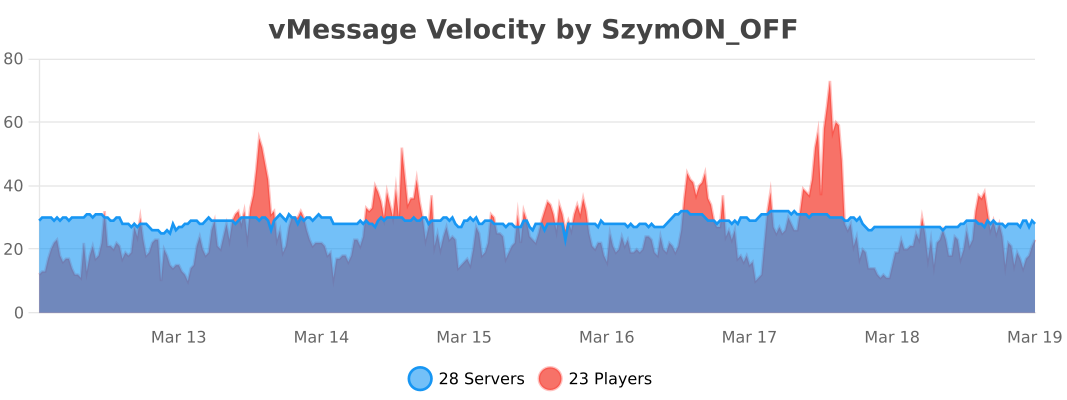
## Usage Statistics
## License
– Versions **≤ 1.6.1** are licensed under the **MIT License**.
– Versions **≥ 1.7.0** are licensed under the **GNU General Public License v3.0** (GPL-3.0).
You can find the full text of each license in the corresponding release archive, or in the repository under the `LICENSE` file for that version.
VulkanMod Just for Chinese
# Hello! This translation pack for VulkanMod just for Chinese!
It is for people just need Chinese translation,it can’t support you any other problem.
It are not VulkanMod,if you need,Please go to [there](https://modrinth.com/mod/vulkanmod) for VulkanMod!
# 欢迎使用VulkanMod专属中文翻译包!✨
## 有何不同🤔
只支持中文翻译,简便实用!⚡
## 安装🔨
这是一个 资源包 文件,请放置在resourcepacks文件夹中。这通常会在游戏目录下方(开启版本隔离),也可以在游戏中的“资源包…”界面选择右下角“打开包文件夹”打开。
## 可以将其内置于整合包中吗🤨
当然,您可以将其内置于资源包中。
顺带一提,您也可以修改包文件,只是请不要将作者私自标注为您!
## 翻译不准/遇到问题🛠️
请反馈至评论区或QQ 3564937130。
vLobbyConnect
# vLobbyConnect – The Ultimate Lobby Manager for Velocity Proxy
vLobbyConnect is a **powerful and lightweight Velocity plugin** designed to seamlessly manage lobby connections for **players using different Minecraft protocol versions**. Whether your server supports multiple Minecraft versions or needs efficient load balancing, vLobbyConnect ensures players are sent to the **correct lobby** every time.
## 🚀 Why Use vLobbyConnect?
– **Version-Specific Lobby Assignment** – Automatically sends players to the appropriate lobby based on their Minecraft version.
– **Seamless Load Balancing** – Distributes players evenly across multiple lobbies, preventing overcrowding and lag.
– **Failsafe Mechanisms** – If a lobby is misconfigured or full, players are redirected to an available fallback lobby.
– **Easy Setup & Configuration** – Just drop the plugin into Velocity, configure the lobbies, and you’re good to go!
## Setup
1. Place the plugin jar in your Velocity plugins folder.
2. Configure your lobbies in two places:
### Plugin Config (config.yml)
This file is located in `src/main/resources/config.yml` (it will be copied to `plugins/vLobbyConnect/config.yml` on first run):
“`yaml
lobbies:
1.20lobby1: “name1”
1.20lobby2: “name2”
1.8lobby1: “name3”
1.8lobby2: “name4”
# To add more lobbies, follow the pattern “VERSIONlobbyX”
# Example:
# 1.13lobby8: “name5”
“`
### Velocity Server Configuration (velocity.toml)
In your `velocity.toml`, configure the servers with the required modifications. For example:
“`toml
[servers]
name1 = “ip”
name2 = “ip”
name3 = “ip”
name4 = “ip”
try = [] # keep fallback empty
“`
## ⚡ Commands
– **/lobby**
– **/hub**
These 2 Instantly teleports the player to the appropriate lobby.
message @kmaba on discord for quick assistance
## 🛡️ Future Enhancements (Planned Features)
– **Customizable Messages** – Modify join/fallback messages in `config.yml`.
– **Priority Lobbies** – Assign preferred lobbies based on player rank or permissions.
## 🎮 Conclusion
vLobbyConnect is the **ultimate lobby management solution** for Velocity servers, ensuring a smooth, version-compatible experience for all players. Download it today and **enhance your network’s performance and player experience!** 🚀
Test this plugin out on play.craftium.ro!