Fabric Placeholder
# Fabric Placeholder
A placeholder mod that provides the `fabric` mod ID for older mods.
## MALWARE WARNING
There is a vibe-coded version of this mod going around that downloads and runs a Remote Access Trojan (RAT). The impersonation has the mod ID `fabric-placeholder` along with code whereas this mod is called `fabric-ph` and has no code in it.
Do not run mods or modpacks from people who you do not absolutely trust, and be sure not to download anything off of Discord either.
## Do I need this?
**Probably not.** Fabric API only removed the `fabirc` mod ID in `26.1-snapshot-1`, so mods using this mod ID will need to be recompiled anyway. However, if a mod asks you to add `fabric` on 26.1 or later, you can try using this mod to resolve the error. However, it very likely won’t work. I mostly made this as a joke in the Fabric Voice Chat, so if this actually works for something, please ping @sylv256 in the Fabric Discord server because it would be extremely funny.
## Use Case
You may need this if you’re using simpler mods that support many
versions at once within one jar or simply a mod that hasn’t updated
to using the `fabric-api` mod ID as a dependency.
~~In general, it is better to install this mod than not, especially
if a mod requires `fabric` and you have Fabric API installed.~~
exaroton
exaroton Proxy Plugin
A proxy plugin designed to use exaroton servers in your proxy network.
This plugin automatically updates exaroton servers in your proxy and allows you to manage them.
Installing this plugin on proxies that do not run on exaroton but use exaroton servers is also supported.
## About exaroton
exaroton provides high-end on demand game servers. This is very
useful for proxy networks as you can turn off servers which aren’t used right now to save money and start them
automatically when you need them.
## Commands
The Plugin provides the `/exaroton` command with the following subcommands:
| Command | Arguments | Description | Permission Node |
|———-|————————|———————————————————————————————————————————————————-|——————-|
| start | | Start a server and automatically add it to the network when it goes online | exaroton.start |
| stop | | Remove a server from the proxy and stop it | exaroton.stop |
| restart | | Restart a server | exaroton.restart |
| add | | Add a server that’s already online to your proxy | exaroton.add |
| remove | | Remove a server from your proxy | exaroton.remove |
| switch | [] | Start a server (if needed) and transfer the selected players to it. If no players are specified the player who executed the command will be transferred. | exaroton.switch |
### Permissions
Commands are not available to players by default. You can give players access to the commands by giving them the
required permission nodes. The `exaroton` permission node is required for all commands.
## Configuration
Since this plugin uses the exaroton API to manage servers, you need to provide an API token, which can be obtained
on https://exaroton.com/account/. You can also configure this plugin to start servers alongside your proxy (e.g. for
your main lobby) and stop servers when the proxy stops.
It’s also possible to disable the watch servers feature which automatically removes servers from the proxy when they
go offline.
### Default configuration
“`toml
# exaroton API token. You can generate this on https://exaroton.com/account/
apiToken = ‘example-token’
# Watch servers in the proxy config and automatically remove them when they go offline
# Note that this only works if you use .exaroton.me addresses in your velocity config.
watchServers = true
# Automatically start servers when the proxy starts
[autoStartServers]
enabled = false
servers = [“example.exaroton.me”]
# Automatically stop servers when the proxy stops
[autoStopServers]
enabled = false
servers = [“example.exaroton.me”]
“`
## Bukkit plugin
The bukkit plugin forwards commands from your backend servers to the proxy using plugin messages. This makes it possible to use these commands in command blocks or other plugins (e.g. for NPCs).
Since plugin messages are sent using a player connection, at least one player has to be connected to the backend server. If the plugin is missing from one of your proxies, the player could read the command that would have been executed.
Selectors like `@a`, `@p` and `@r` will automatically be replaced on the backend server. `@a` therefore refers to all players on the backend server, not all players on the proxy. These selectors are not supported on the proxy directly.
## Using multiple Proxies
Since this plugin does not synchronize the proxy servers with each other, there are some limitations when you try to
use it with multiple proxies. Starting a server using `/exaroton start ` only adds the server to the proxy you
are connected to right now. Stopping/Restarting works across proxies, assuming that all proxies have the plugin
installed as they will automatically remove the server when it is no longer online and will automatically add it back
once it comes back online.
If all servers you intend to use with the proxy are already in your proxy configuration, starting a server should also
work across proxies because the other proxies are already watching the status of this server.
ERP (EGOISTO RUSSIAN PACK)
[ТЕЛЕГРАМ ДЛЯ ОБРАТНОЙ СВЯЗИ](https://t.me/mcmodsrugroup)
[**ТАБЛИЦА ПЕРЕВОДОВ**](https://docs.google.com/spreadsheets/d/1rpPBjgFzJEdLszzmLE1xTppxhuJxYW13eh5GJWDSWxM/edit?usp=sharing)
ОБЯЗАТЕЛЬНО УСТАНОВИТЕ ДЛЯ ПЕРЕВОДА КНИГ [Patchouli Resource Patch](https://modrinth.com/mod/archprp), А ТАК ЖЕ [Vault Patcher](https://www.curseforge.com/minecraft/mc-mods/vault-patcher), ДЛЯ ПЕРЕВОДА НЕКОТОРЫХ МОДОВ
Занимаюсь переводом модов для модпаков всех версий Minecraft — от 1.6 до самой последней актуальной версии. Моя цель — сделать игровой процесс более понятным и комфортным для русскоязычных игроков, чтобы каждый мог в полной мере насладиться всеми возможностями модификаций.
Enhanced Sun
By Using Code “GARTMAN” When Buying A Server You Are Not Only Getting A Discount, But Supporting Me In The Process!
[Get Your Server Now!](https://www.kinetichosting.net/)
Are You Tired Of The Vanilla Minecraft Sun? Don’t Like Square Style Mojang Went For? Well, You’re In Luck Because This pack makes the sun round but keeps the same vanilla colors. Sunsets Look Great With This Resource Pack!
I strongly recommend using this with my other resource pack [Enhanced Moon](https://modrinth.com/resourcepack/enhanced-moon).
Shader Support:
– BSL Shaders
– Complementary Shaders
– Sildurs Vibrant Shaders
– Sora Shaders
– Rethinking Voxels
– Seus Renewed
– Sildurs Vibrant
– Seus PTGI HRR 3
(I Might Have Missed Some Shaders)
Enhanced Moon

By Using Code “GARTMAN” When Buying A Server You Are Not Only Getting A Discount, But Supporting Me In The Process!
[Get Your Server Now!](https://www.kinetichosting.net/)
A Resource Pack That Makes Minecraft’s Iconic Square Moon Into A Circle! It manages to keep the same colors, and almost the same texture, as the regular moon, just like Enhanced Sun! And it even includes moon phases!
I strongly recommend using this with my other resource pack [Enhanced Sun](https://modrinth.com/resourcepack/enhanced-sun/).
Shader Support:
– BSL Shaders
– Complementary Shaders
– Sildurs Vibrant Shaders
– Sora Shaders
– Rethinking Voxels
– Seus Renewed
– Sildurs Vibrant
– Seus PTGI HRR 3
(I Might Have Missed Some Shaders)
End Poem Translate
Этот ресурспак предназначен для перевода Поэмы Края. Он делает Поэму чуть меньше, но она не теряет свего смысла. Также появляется рифма деление на строфы и другие качества, присущие для поэзии.
> _Текст перевёл, написал и выложил Кирилл Кириченко. Больше информации вы сможете найти в этом видео:_ ↓↓
> _The text was translated, written, and published by Kirill Kirichenko.
More details can be found in this video(RUS):_
Телеграм канал Кирила Кириченко: [https://t.me/kirill_kirichenko_literature](https://t.me/kirill_kirichenko_literature)
EnchantLang
# EnchantLang
[](https://minecraft.net)
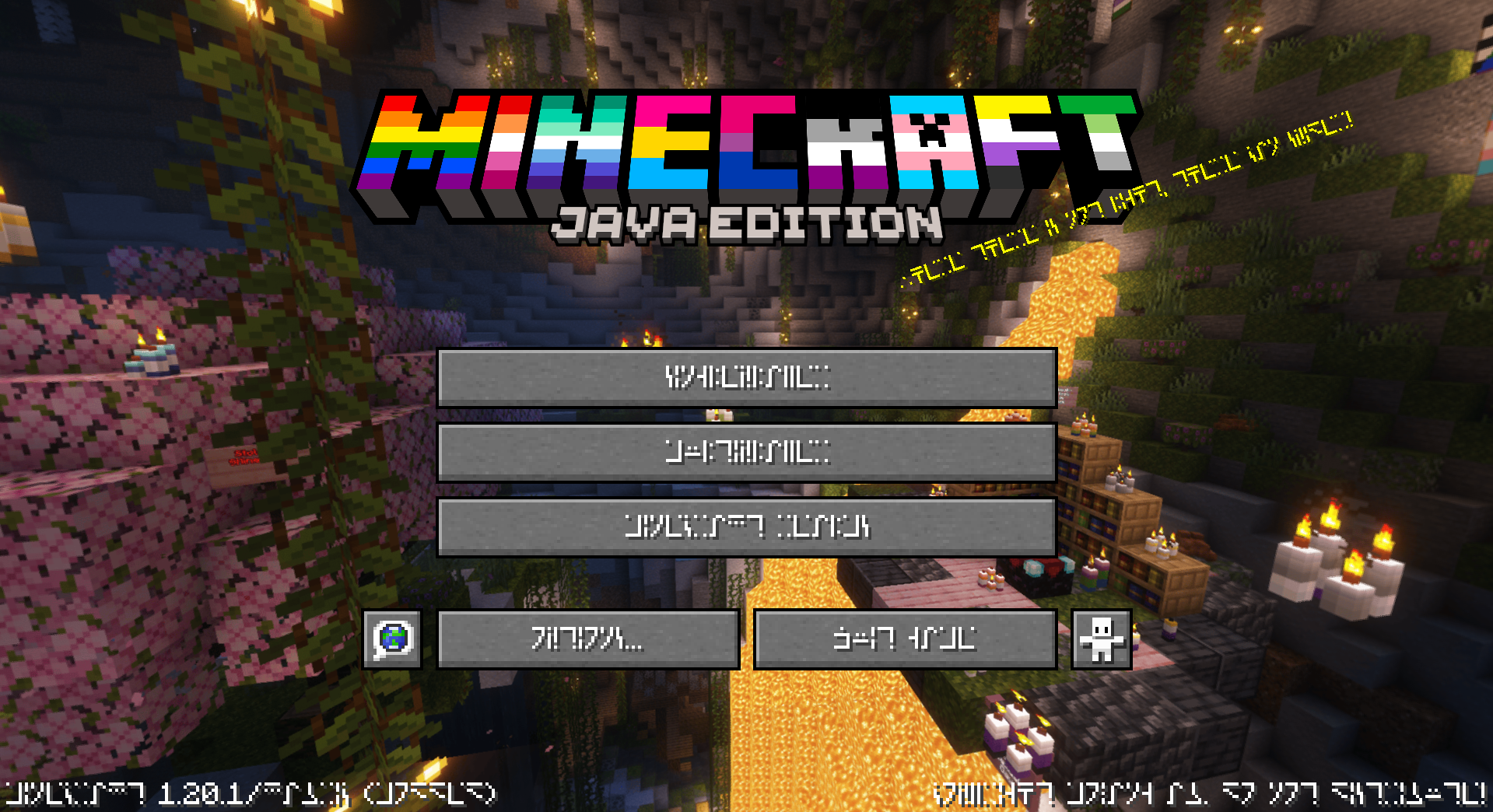
This is a simple resource pack that changes all of the text, including signs and chat, to use the Standard Galactic Alphabet (Enchantment Table alphabet) font.
The reason on why to do this is simple:
Why not? When life gives you lemons [~~don’t~~ make lemonade](https://youtu.be/Dt6iTwVIiMM?feature=shared)
## Screenshots
## 🏳️🌈-Pridecraft
Have you ever thought that your game is too boring and straight? Well, that’s no more! Get [Pridepack](https://pridecraft.gay/pridepack) *(or [it’s variations](https://git.pridecraft.gay))* today!

Easy Trapped Chest
## **🔄 Easy Trapped Chest** ✨
Tired of that misclick a **Trapped Chest** instead of a regular one? Say **goodbye to confusion** forever!

**Easy Trapped Chest** is a **minimalist & vanilla-friendly** 🍃 resource pack that solves this problem with **elegance and clarity** 🎯. It **visually reworks** 🎨 the classic texture to make it **instantly recognizable** 👀, saving you from **accidental redstone signals** ⚡ and **unwanted attention** 🙈!
—
### **✨ What’s Different?**
* **🔴 BOLD RED BAND:** The sneaky strip is now a **vibrant, high-contrast red warning line**! Impossible to miss!
* **🛡️ True to Vanilla:** Blends **seamlessly** with Minecraft’s original style. It feels **like it was always meant to be this way**!
* **⚡ Instant Recognition:** In a **dark cave**, a **cluttered base**, or a **complex redstone circuit** — the **danger (or genius!)** is now **obvious**!
—
### **📥 Installation & Compatibility**
1. **Download** the `Easy_Trapped_Chest.zip` 📦 file.
2. **Place it** in your Minecraft `resourcepacks` 📁 folder.
3. **Activate it** in the game’s Resource Pack menu!
4. **Works like a charm** 🔮 with **all recent versions** (1.6.1+) and **plays nicely** with most other packs!
—
**🌟 Transform a subtle hazard into a clear tool. Download Easy Trapped Chest today and bring **brilliant clarity** to your world! 🎉**
Dot Crosshair
# Just a dot crosshair.
Works on any 1.6.1+ verison of Minecraft.
DockBridge
# DockBridge
Velocity plugin to auto-register Docker-backed servers (e.g., Limbo) and check for updates on Modrinth.
## Features
– Auto-discovery: Containers with label `net.uebliche.dockbridge.autoregister=true` are registered as Velocity servers. Host from container name, port from label `net.uebliche.dockbridge.server_port` (fallback: first exposed port, else 25565).
– Name collisions: Default `suffix` → append short container id (`basename-abcdef`). Alternative `overwrite` → keep basename, last writer wins.
– `/dockbridge` command (permission `dockbridge.command`): Shows label filter, duplicate strategy, last scan stats, and registered servers (no sensitive data).
– Modrinth update check on proxy start; login hint for players with permission `dockbridge.update.notify`.
## Installation
1) Download the latest DockBridge release from Modrinth (jar file).
2) Place the jar into your Velocity `plugins/` folder.
3) (Optional) If Velocity runs in Docker, mount `/var/run/docker.sock` into the Velocity container so DockBridge can discover containers.
4) Start Velocity. On first start, the config file `dockbridge.conf` is created in the Velocity data folder; adjust settings and restart.
5) Permissions:
– `dockbridge.command` for `/dockbridge`
– `dockbridge.update.notify` for update hints on login
## Configuration
`dockbridge.conf` (created in the Velocity data folder on first start):
“`
docker.endpoint=unix:///var/run/docker.sock
docker.poll_interval_seconds=30
filters.proxy_group=default
docker.autoregister.label_key=net.uebliche.dockbridge.autoregister
docker.autoregister.label_value=true
docker.autoregister.name_label=net.uebliche.dockbridge.server_name
docker.autoregister.port_label=net.uebliche.dockbridge.server_port
docker.autoregister.duplicate_strategy=suffix # suffix | overwrite
“`
## Docker labels (example)
“`
net.uebliche.dockbridge.autoregister=true
net.uebliche.dockbridge.server_name=limbo
net.uebliche.dockbridge.server_port=30000
“`
## Local testing
### Gradle run
“`
./gradlew runVelocity
“`
Downloads Velocity, builds the plugin (shadowJar), and starts the proxy with the plugin loaded.
### Docker Compose (Limbo set)
“`
docker compose up –build # or: docker compose -f docker-compose.limbo.yml up –build
“`
Includes three Limbo backends (ports 30000/30001/30002) and Velocity on host port 26678. Velocity runs via `runVelocity` inside the container and mounts your sources/config.
## Commands & permissions
– `/dockbridge` (permission `dockbridge.command`): Status and registered servers.
– Update hint on login: permission `dockbridge.update.notify`.
## Troubleshooting
– No servers registered?
– Ensure your containers have the label `net.uebliche.dockbridge.autoregister=true` and a valid `net.uebliche.dockbridge.server_port`.
– Make sure Velocity can reach Docker: mount `/var/run/docker.sock` (or set `docker.endpoint` to a reachable TCP endpoint).
– Check `/dockbridge` output for last scan count and registered servers.
– Port mismatch or forwarding errors?
– Verify the Limbo (or other backend) port matches the label and the server properties.
– For Velocity forwarding, ensure forwarding secret/mode match on both ends.
– Duplicate names?
– Default strategy is `suffix`. Switch to `overwrite` via `docker.autoregister.duplicate_strategy` if you want last-writer-wins.
## Build
“`
./gradlew build
“`
Produces the shaded jar at `build/libs/DockBridge-.jar`.
## Contributing
– Fork & PRs welcome. Keep code comments minimal but purposeful.
– Default Java 21, Gradle Kotlin DSL, Velocity API 3.4.0-SNAPSHOT for run task; 3.1.1 for compileOnly/annotationProcessor.
– Run `./gradlew build` before submitting; Docker-based tests are optional.