SimpleLimbo
# SimpleLimbo
A lightweight virtual limbo server plugin for Velocity proxy using LimboAPI.
## Features
– **Multiple Limbo Servers** – Create unlimited virtual limbo instances with different configurations
– **Auth Plugin Support** – Compatible with JPremium and other authentication plugins
– **Fallback System** – Automatically catch players when backend servers go down
– **AFK Detection** – Move idle players to a dedicated limbo server
– **Custom Worlds** – Load schematic files for limbo environments
– **Rich Display** – Titles, action bars, boss bars, and chat messages
– **Auto Reconnect** – Automatically attempt to reconnect players to backend servers
– **Velocity Bridge** – Register virtual servers that redirect to limbos
## Requirements
– Velocity 3.3.0+
– LimboAPI 1.1.27+
– Java 17+
## Installation
1. Download LimboAPI and place it in your Velocity plugins folder
2. Download SimpleLimbo and place it in your Velocity plugins folder
3. Restart Velocity
4. Configure `plugins/simplelimbo/config.yml`
## Configuration
### Basic Limbo Setup
“`yaml
limbos:
auth:
enabled: true
dimension: “OVERWORLD”
gamemode: “ADVENTURE”
world-time: 6000
spawn:
x: 0.0
y: 100.0
z: 0.0
yaw: 0.0
pitch: 0.0
settings:
read-timeout: 30000
should-rejoin: true
should-respawn: false
disable-falling: true
disable-falling-delay-ms: 5000
commands:
– “login”
– “register”
display:
on-join:
chat: “&eUse /login or /register”
title:
enabled: true
title: “&eAuthentication”
subtitle: “&7Please authenticate”
“`
### Velocity Bridge (Auth Plugin Compatibility)
For plugins like JPremium that expect players to be on a named server:
“`yaml
velocity-bridge:
enabled: true
register-aliases: true
aliases:
auth: “auth” # Maps server name “auth” to limbo “auth”
“`
Then in your auth plugin config, set the limbo server to `auth`.
### Anti-Fall Tuning
– `disable-falling` keeps players from dropping after join (Y lock mode).
– `disable-falling-delay-ms` controls when anti-fall starts.
– If players get slow join or “Loading Terrain” delay, increase `disable-falling-delay-ms` (for example: `1200`, `1500`, `2000`).
### Settings Notes
– `should-rejoin: true` keeps LimboAPI rejoin flow enabled (recommended for stability).
– `should-respawn: false` avoids extra respawn packet during join.
### Fallback System
Automatically catch players when backend servers crash:
“`yaml
auto-triggers:
fallback:
enabled: true
limbo: “fallback”
kick-patterns:
– “.*server.*closed.*”
– “.*timed out.*”
message: “&cServer offline. Moved to fallback.”
“`
### AFK System
Move idle players to a dedicated limbo:
“`yaml
auto-triggers:
afk:
enabled: true
limbo: “afk”
idle-time: 300
check-interval: 30
exempt-permission: “simplelimbo.afk.exempt”
“`
### Custom World Files
Load schematic files for limbo environments:
“`yaml
limbos:
lobby:
world-file:
enabled: true
type: “SCHEMATIC”
path: “plugins/simplelimbo/worlds/lobby.schem”
offset:
x: 0
y: 64
z: 0
light-level: 15
“`
## Commands
| Command | Permission | Description |
| ———————————— | ——————- | ———————— |
| `/simplelimbo send ` | `simplelimbo.admin` | Send a player to a limbo |
| `/simplelimbo list` | `simplelimbo.admin` | List all limbo servers |
| `/simplelimbo reload` | `simplelimbo.admin` | Reload configuration |
## Permissions
| Permission | Description |
| ———————— | ———————— |
| `simplelimbo.admin` | Access to admin commands |
| `simplelimbo.afk.exempt` | Exempt from AFK trigger |
## Auth Plugin Compatibility
SimpleLimbo includes compatibility features for authentication plugins that call `player.getCurrentServer()`:
1. Set `fake-server-name` in your limbo config to a valid Velocity server name
2. Enable the velocity-bridge with matching alias
3. Configure your auth plugin to use this server name as the limbo server
Example for JPremium:
“`yaml
# SimpleLimbo config.yml
velocity-bridge:
aliases:
auth: “auth”
limbos:
auth:
fake-server-name: “auth”
# … other settings
“`
“`yaml
# JPremium configuration.yml
limboServerNames: [auth]
mainServerNames: [lobby]
“`
## Building from Source
“`bash
git clone https://github.com/ItsAzni/SimpleLimbo.git
cd SimpleLimbo
./gradlew shadowJar
“`
The compiled JAR will be in `build/libs/`.
## License
MIT License
## Credits
– LimboAPI by Elytrium
– Velocity by PaperMC
Simple Auto Restart
# SimpleAutoRestart

GitHub | Modrinth | Spigot | CurseForge | Wiki





A Simple plugin to automatically restart your server at scheduled times with customizable warnings.
## Features
– Schedule automatic restarts at a specific times and days. (eg. `Wednesday;00:00`, `Sunday;3:00`)
– Customizable warning messages and titles (supports MiniMessage and legacy formatting).
– Configurable restart command(s) to fit your setup.
– Real-time based (not tick-based) scheduling for better accuracy.
– Supports all versions of from 1.8.7+
– Open Source!
## Installation
1. Configure your server restart script in `spigot.yml` (See PaperMC Docs)
2. Download the latest `SimpleAutoRestart-.jar`.
3. Place the JAR file into your server’s `plugins/` folder.
4. Start or restart the server.
5. Configure `plugins/SimpleAutoRestart/config.yml` (See the wiki for more information)
## User Interface
### Default Warning Messages

### Admin Commands

## Troubleshooting
### It counts down, but doesn’t restart
Make sure you have configured restart-script in your `spigot.yml`.
## Support
If you have any issues, bugs or questions. Feel free to create an issue ticket or message me on discord.
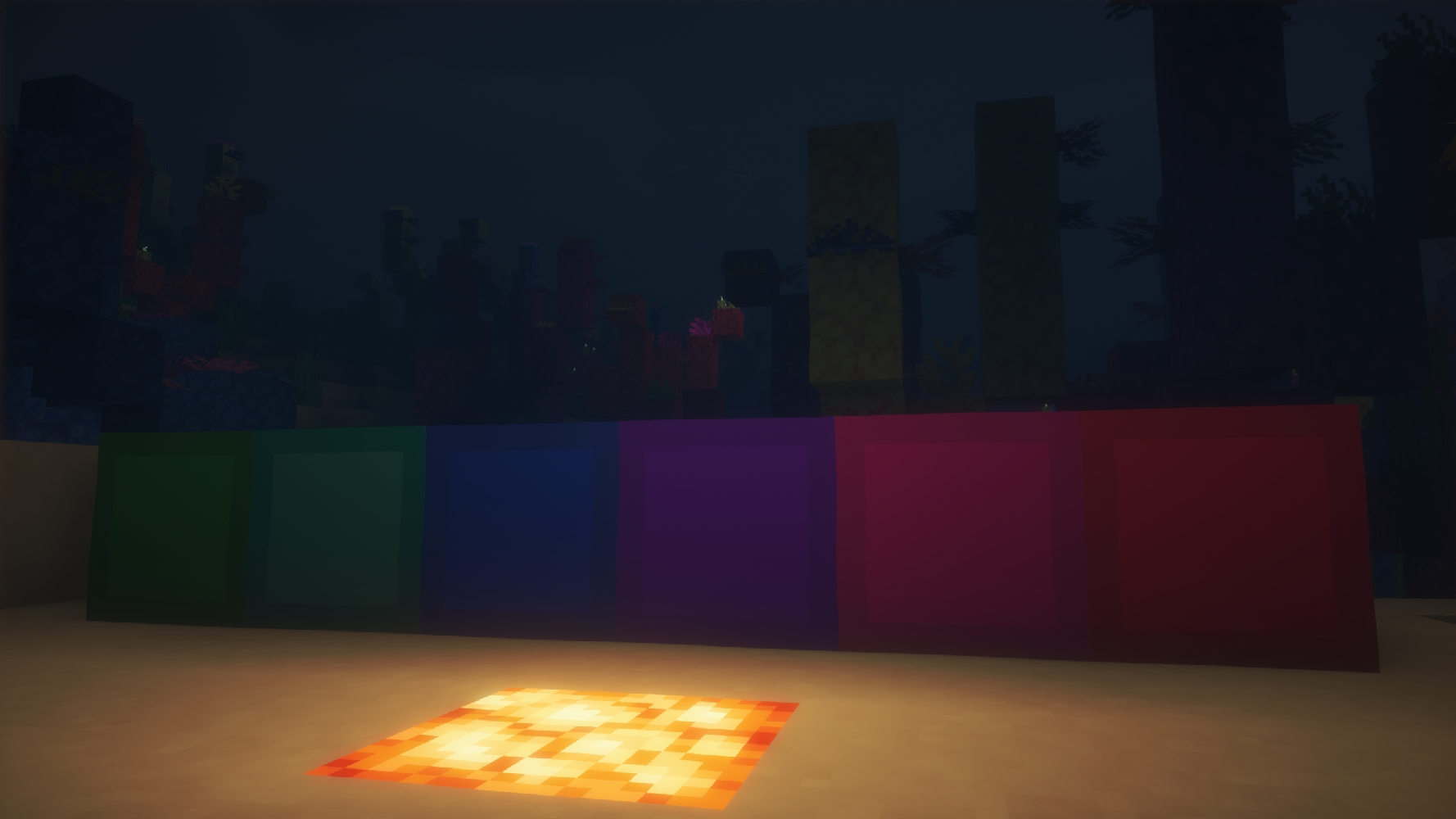
Astra’s Simple Wool Textures
—
Note: This pack’s textures were created with the help of AI (ChatGPT) to ensure clean and even borders on every block.
✅ Supports all 16 Vanilla.
✅ Works on Wool and Carpets.
✅ Performance-friendly (16x resolution).
✅ No mods (like OptiFine) required.
# 📸 SCREENSHOT

—
Wool Simple
## Simpler and better looking wool for bedwars and Minecraft.
### My other projects
Simple Tpa


– /tpa [player] – Sends a teleportation request.
– /tpahere [player] – Sends a teleportation request to teleport the player to you.
– /tpaignore [player] – Ignores a player from teleport requests.
– /tpauto – Auto accepts /tpa requests from other people
– /tpahereall – Sends a teleportation request to teleport everyone to you.
– /tpaccept – Accepts the request.
– /tpatoggle – Disables/Enables the teleportation to you.
– /tpatoggle [player] – Disables/Enables the teleportation to a specific player.
– /tpdeny – Denies the teleportation request.
– /back – Teleports you to your last location.
– /back [player] – Returns a player to its last position.
– /tpcancel [player] – Cancels a teleportation request to a specific player.
– /simpletpa – Opens the main menu
– /simpletpa debug – Shows information about the plugin and server
– /simpletpa reload – Reloads the plugin

– simpletpa.simpletpa
– simpletpa.tpahereall
– simpletpa.tpatoggle.others
– simpletpa.tpaccept
– simpletpa.tpdeny
– simpletpa.tpahere
– simpletpa.back
– simpletpa.back.others
– simpletpa.reload
– simpletpa.tpatoggle
– simpletpa.tpa
– simpletpa.tpaignore
– simpletpa.tpauto
– simpletpa.bypasscooldown
**PLACEHOLDERS**
**%simpletpa_tpa_status%**- it will output On or Off. This value is based on the /tpatoggle command.
**%simpletpa_tpauto_status%** – returns on or off.

German – NEW
German – OLD
Russian

1. Download the plugin.
2. Place it into the “plugins” folder
3. Restart the server.
! Discord server: https://discord.gg/pKfwbukNRj
If there are problems, paste them in the discussion section or in my discord server!
THANK YOU ALL!
**It will be awesome if you leave a 5 star review 🙂
It really helps me a lot!**
## License & Terms of Use
This resource is proprietary and protected by copyright.
All rights are reserved by the author.
By downloading or using this resource, you agree to the following terms:
– You may use this resource for its intended purpose.
– You may not claim this resource as your own.
– You may not decompile, reverse engineer, or modify the resource.
– You may not share, redistribute, or publish any part of the code.
– The author reserves the right to modify these terms at any time.
– Violation of these terms may result in license revocation.
Simple TexturePack-BuildCraft
This is a SimpleTexturePack-_BuildCraft_ Mod Extension
It brings vibrant textures to your BuildCraft Pipeline system factory,Has a wide range of version support,Some blocks and items have been optimized。
How To Use:
Start Minecraft,Press ESC, Options>Resource Packs>Open Pack Folder and copies the “.zip”flie to here,click the pack in “Available”Area and click Done,after a Loading interface,then you finished it
Notice:
1.The version before 1.12 will **NOT** supported,so the newly texture only update on the“1.12MainVersion”
2.!To use the texture pack,you **must** install the mod “_BuildCraft_” and the Main pack first!!
To install the Main pack,please visit:CLICK HERE!
To install Mod:BuildCraft,please visit:CLICK HERE!
Simple TexturePack
This is a SimpleTexturePack
It brings vibrant textures to your Minecraft world,Has a wide range of version support,Some blocks and items have been optimized。
How To Use:
Start Minecraft,Press ESC, Options>Resource Packs>Open Pack Folder and copies the “.zip”flie to here,click the pack in “Available”Area and click Done,after a Loading interface,then you finished it
How To Update:
Delete old pack,copied newly pack in the “Pack Folder”than start Minecraft,Press ESC, Options>Resource Packs,click the pack in “Available”Area and click Done,after a Loading interface,then you finished it
Notice:
1.The version before 1.13 will **NOT** supported,so the newly texture only update on the“1.13-1.20MainVersion”
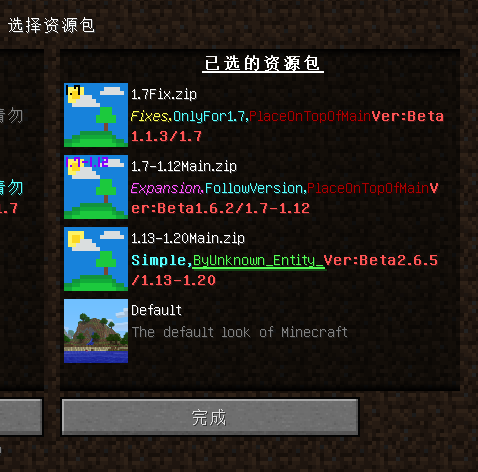
2.The Fix must on the top of Main
Example:
3.This texture pack also supports a number of other mods,need download other texture pack
Now support:
Create 1.14-1.20 DOWNLOAD HERE!
Applied Energy2 1.15-1.20
Mekanism 1.9-1.20
Build Craft 1.7-1.12
Industry Craft2 1.18-1.19
Simple Swords [Stopped]

English
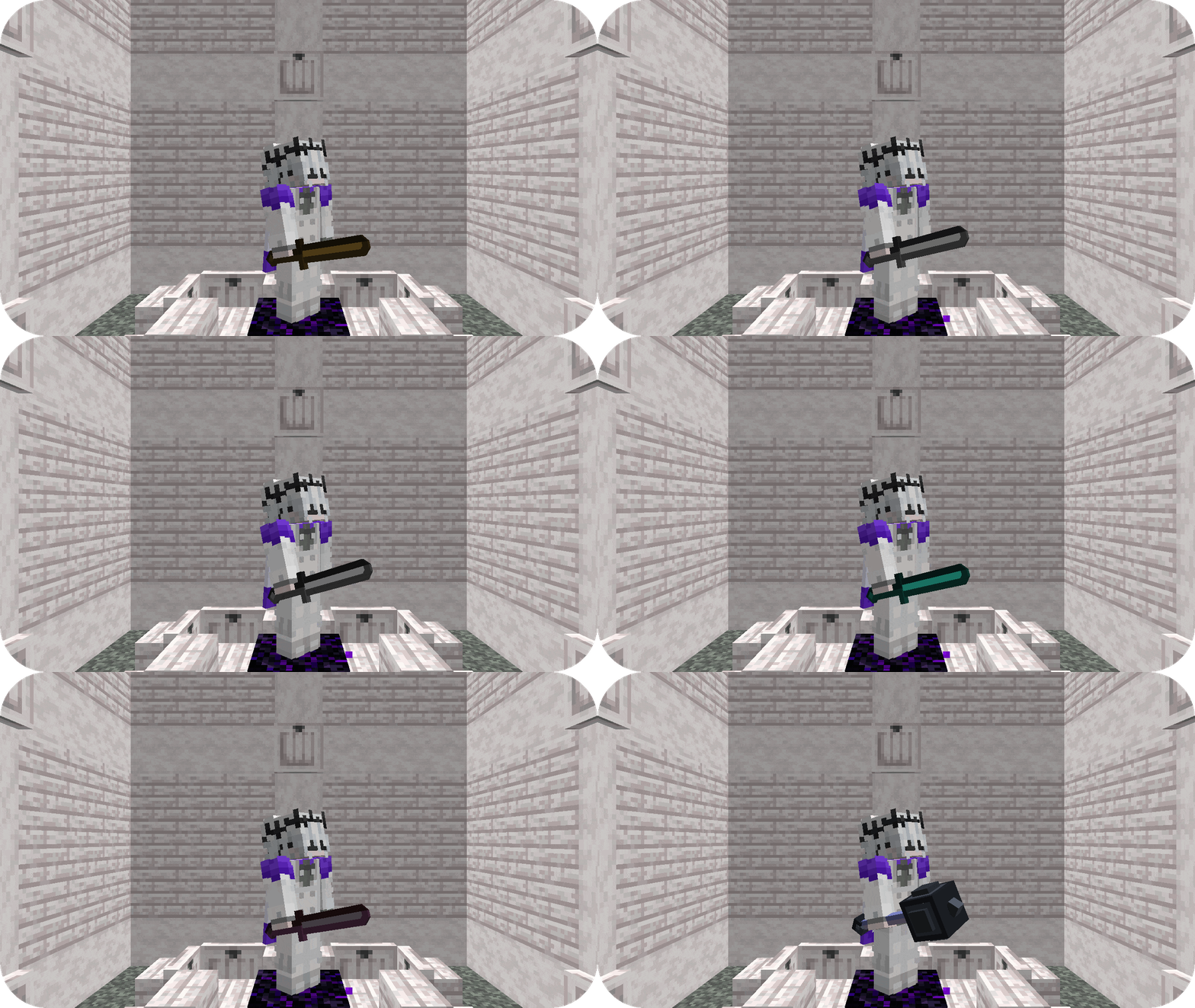
This resource pack adds 3D weapons to your game!

Now in the resource pack there is:
Netherite sword,
Diamond sword,
Golden sword,
Iron sword,
Stone sword,
Wooden sword
and Mace!
Руссикй
Данный ресурс-пак добавляет в вашу игру 3D оружие!

Сейчас в ресурс-паке есть:
Незеритовый мечь,
Алмазный мечь,
Золотой мечь,
Железный мечь,
Каменный мечь,
Деревянный мечь
и Булава!
Український
Цей ресурс-пак додає у вашу гру 3D зброю!

Зараз у ресурс-паку є:
Незеритовый мечь,
Алмазный мечь,
Золотой мечь,
Железный мечь,
Каменный мечь,
Деревянный мечь
и Булава!
Simple Reconnect
A plugin for Velocity that reconnects players to the last server they were playing on
## Features
– **Automatic reconnection to the last server on player login**
– Configurable messages for reconnect success and server unavailable
– Multiple storage backends: YAML, SQLite, MySQL, MariaDB, PostgreSQL, LuckPerms
– Optional per-server permission (velocity.reconnect.)
– Server blacklist to prevent reconnection to specific servers
– Optional LiteBans integration to prevent reconnecting banned players
– Optional fallback prevention (block redirect to fallback server when kicked)
– _reload_ command to reload configuration without restarting the proxy
## Commands
– **/vreconnect reload** Reloads the plugin configuration
## Permissions
– **reload:** requires permission velocity.reconnect.reload (default: op)
## Configuration
“`
# For debugging purposes, recommended to disable
debug: false
# Should we check for the latest version?
checkUpdates: true
# Send players a message when they are reconnected
messageOnReconnect: true
reconnectMessage:
– “You were reconnected to %server%.”
# Send a message when their previous server isn’t available
notAvailable: true
notAvailableMessage:
– “Unable to reconnect you to your last server.”
# Require velocity.reconnect. permission per server
perServerPermission: false
# Servers that players cannot reconnect to
blacklist: []
# Prevent connection to fallback servers when kicked
preventFallback: false
preventFallbackMessage: []
# LiteBans hook – prevents banned players from reconnecting to banned servers
liteBansHook: false
storage:
method: “yaml”
data:
address: “localhost:3306”
database: “reconnect.db”
username: “root”
password: “1234”
“`
– **debug:** Enable debug logging
– **checkUpdates:** Check for new versions on startup; admins with velocity.reconnect.admin get update notifications
– **messageOnReconnect / reconnectMessage:** Message shown when player is reconnected. Placeholders: %server%, %player%
– **notAvailable / notAvailableMessage:** Message when the last server is offline or unreachable
– **perServerPermission:** If true, player needs velocity.reconnect. to reconnect to each server
– **blacklist:** List of server names where reconnection is never allowed
– **preventFallback / preventFallbackMessage:** When kicked, prevent redirect to fallback server (if not on blacklist)
– **liteBansHook:** Integrate with LiteBans to block reconnection to servers where the player is banned
– **storage.method:** Storage backend. Options: yaml, sqlite, mysql, mariadb, postgresql, luckperms
– **storage.data:** Connection settings for database backends. For SQLite/YAML, database is the file path
## Storage
In the **config.yml**, there are different storage options. If you don’t need your own plugins to interact with this one, we recommend you keep the **method** set as the default option **(yaml)**
“`
storage:
method: “yaml”
# The below is only needed if you are using MySQL
data:
address: localhost
database: reconnect
username: root
password: ”
“`
To change the method, alter the **method** key. Current options are:
– **yaml:** Local .yml file
– **sqlite:** Local SQL database
– **mysql:** Local or remote SQL database
The **data** section is for if you are using the **mysql** option for **method**
– **address:** The address of the SQL database
– **database:** The name of the database
– **username:** Username for the SQL database
– **password:** Password for the SQL database
###Requirements
– Java 21 (LTS)
– Velocity Proxy on the latest supported version
### Internal behaviour
– When using a forced host, the plugin does not override the initial server choice
– Storage location for YAML: **plugins/reconnect/data.yml**
– For LuckPerms storage, the last server is stored as user metadata
Simple PvP Edit
# Simple PvP Edit
## Discontinued the project has been abandoned and will no longer receive updates!
**This Minecraft Resource Pack enhances the aesthetics of PvP, making it look more attractive, simple, and even potentially useful due to some of its features.**
## Features
– `Makes swords and axes smaller.`
– `Reduces the size of fire and shields.`
– `Shrinks utility items like potions, golden apples, totems, and more.`
– `Compatible with versions 1.6.1-1.21.1`
– `Compatible with Sodium and Optifine.`
– `You can check the gallery for more information.`
– `It focuses more on cpvp (crystal pvp).`
##
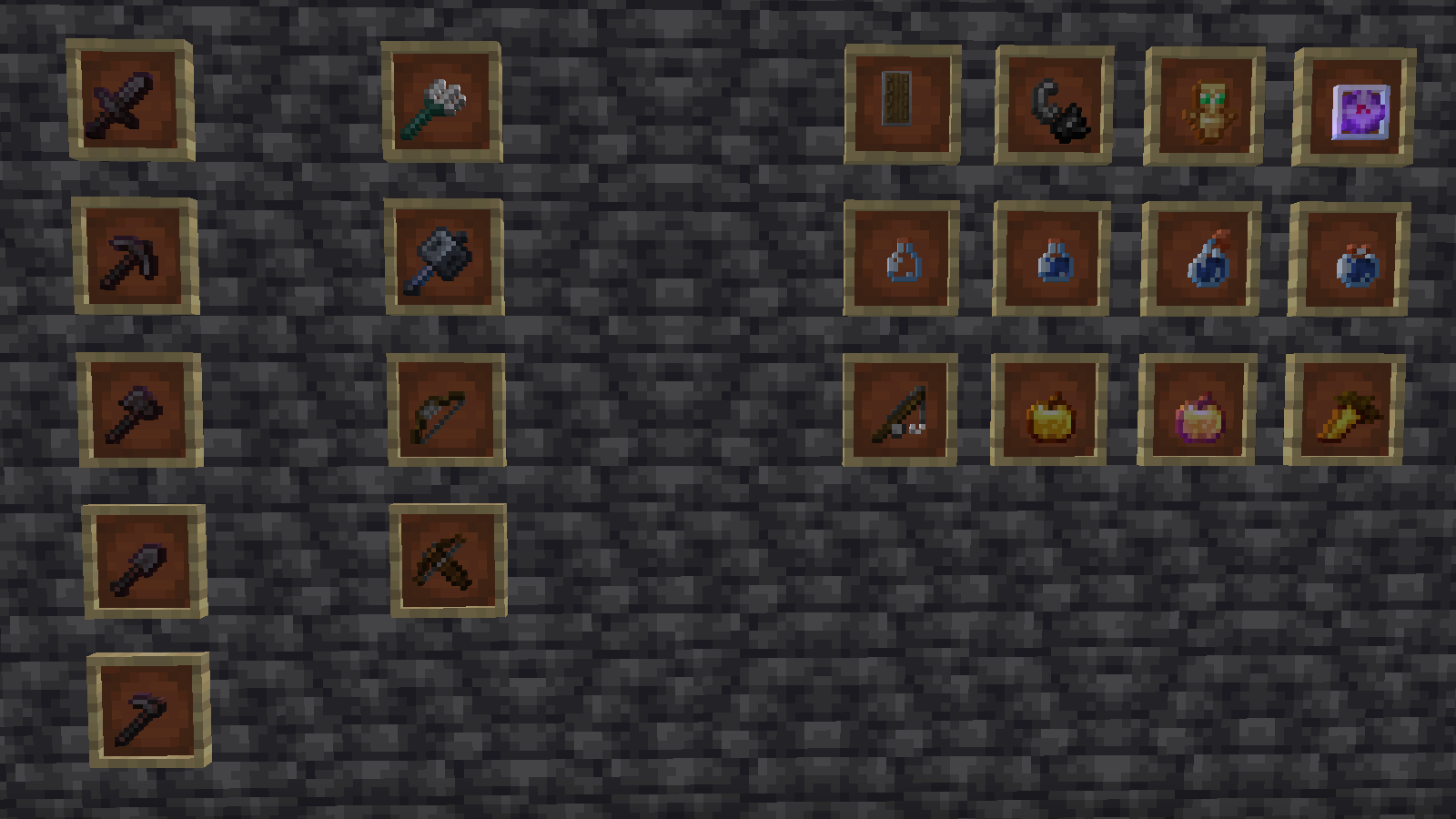
– `Check the gallery for more information.`
Español
># Simple PvP Edit
## Descontinuado ¡El proyecto ha sido abandonado y ya no recibirá actualizaciones!
**Este resource pack de Minecraft mejora la estética del PvP, haciéndolo atractivo, simple e incluso potencialmente útil debido a algunas de sus características.**
## Características
– `Hace que las espadas y las hachas sean más pequeñas.`
– `Reduce el tamaño del fuego y los escudos.`
– `Encoge objetos de utilidad como pociones, manzanas doradas, tótems y más.`
– `Compatible con las versiones 1.6.1-1.21.1`
– `Compatible con Sodium y Optifine.`
– `Puedes consultar la galería para obtener más información’.`
– `Se centra más en cpvp (crystal pvp).`
##

– `Consulta la galería para obtener más información.`


