VelocityChat
# VelocityChat
– [中文](https://github.com/MapleDust/VelocityChat/blob/v1.8/README.md)
– English
A Cross-server chat plugin for Velocity proxy
## Features
– Cross-server chat
– (configurable, default true) Enable color code
. check [Minecraft Wiki](https://minecraft.wiki/w/Formatting_codes) for
more information
, use `&` instead of `§` in game.
– `/vchat local` Send local message (to current server), alias (configurable) `/lc`.
– `/vchat broadcast` Send global message, alias (configurable) `/br`.
– Message of player joined, left and switch server.
– (configurable, default false) Send sample players when client refreshing multiplayer games.
– (configurable, default false) Show all proxy players on tab list.
– (configurable, default true) enable command `glist`.
– (configurable, default true) enable default global chat.
– (configurable) Send local message if chat message is starts with matched string.
– (configurable) translations
## Files
Locate in `plugins/VelocityChat`
### Configuration `config.toml`
– See in the file
### Langs
#### Default `langs/default/*.properties`
– The default language file is now forced to refresh
#### Custom `langs/custom/*.properties`
– You can replace any default translation here.
Some of the translations:
– Fallback chat format:`qu_an.chat.message.chat.default=`
– Server exclusive chat format:`qu_an.chat.message.chat.server.=`
– Examples:
– `qu_an.chat.message.chat.server.lobby=§8[§r{0}§8|§r{1}]§r<{2}§r> {3}`
– `qu_an.chat.message.chat.server.survival=§8[§r{0}§8]§r<{2}§r> {3}`
– Use fallback chat format if missing.
– Server name:`qu_an.chat.server.name.=`
– Examples:
– `qu_an.chat.server.name.lobby=Lobby`
– `qu_an.chat.server.name.survival=§aSurvival Server`
– Use server id if missing.
VelocityBlockVersion
VelocityBlockVersion






A simple Velocity plugin to whitelist/blacklist versions from connecting to your network. This let’s you block or allow certain versions.
## Features
* Whitelist/blacklist versions from connecting.
* Custom disconnect message.
## Documentation
Visit the [wiki](https://docs.hyper.lol/plugins/velocityblockversion/about/) for help.
## License
This plugin is released under GNU General Public License v3. See [LICENSE](https://github.com/hyperdefined/VelocityBlockVersion/blob/master/LICENSE).
velocity-hub-command
The velocity-hub plugin adds the /hub command to the velocity network for easy return if a hub server or similar is present.Simply add it to the velocity server and the /hub command will run on all connected servers!
The `/hub`command is added across the entire Velocity network. There is no need to add the plugin to Paper servers or other server connected to Velocity.
The game version is for all versions supported by Velocity 3.4.0-SNAPSHOT as it is added to the proxy server only. The game version must be specified and is specified, but see the [PaperMC website](https://docs.papermc.io/velocity/server-compatibility/) for details.
# Installation
1. Download the latest release of the plugin
2. Put velocity-hub-x.x-SNAPSHOT.jar in /plugins directory of velocity
This completes the process!
# Config reference
– hubServerName
Specify the destination server. This is the server name listed in servers in velocity.toml. (Usually, the hubServerName is the same as the server name listed in the try=[] brackets.)
### Message custom
We support Japanese, Russian, and other languages. If there are any languages that we do not support, please let us know via GitHub issue!
MiniMessage is supported. If you write like `hub`
, it will be displayed in red. See [here](https://docs.papermc.io/misc/tools/minimessage-web-editor) for details.
You can test the display at the following sites.
[https://webui.advntr.dev/](https://webui.advntr.dev/)
[https://minecraft.menu/minecraft-rgb-generator](https://minecraft.menu/minecraft-rgb-generator)
– transferMessage
Sets the message to be sent to the player who used the command during the transfer.
– alreadyConnectedMessage
Sets the message if the player using the command is on the server designated as the forwarding destination.
– serverNotAvailableMessage
Sets the message when the specified server is unavailable.
# Issue and question
If the plugin does not work properly, try deleting config.json.
Problems and questions feature request [here](https://github.com/stellarcielo/velocity-hub/issues).
Velocity-CommandLimiter
# What Is This
Powerful Plugin that manipulates all commands under proxy or proxies to control display and execution!
limit and disable command!
# How To Use
### Before Installation
Basically, it is recommended to use with permission management plug-ins such as LuckPerms.
## How To Setup
Put the downloaded plugin into the Velocity plugin folder and run it once.
Then the default config will be generated.
### Config
The settings described in `[[permissions]]` in config will be applied to players who have the permissions described in `[[permissions]]`.
If a player has multiple permissions due to group inheritance in LuckPerms, etc., all settings will be activated, so the settings with the most restrictions will be given priority.
For example, if `default` is set to `commands = [“help”, “list”]` and `guest` inherits the default permissions, then even if `guest` is set to `commands = [“list”]`, `help `is not available!
“`toml
# Permission to view and execute all commands `commandlimiter.admin` for the following
allAllowed = “admin”
# Restrict the display and execution of all commands by players who do not have any privileges, or
limitNoPermissionsPlayer = true
# Configuration of commands available for each permission node
[[permissions]]
# Value of permission node `commandlimiter.default` for the following
nodeName = “default”
# Enable whitelist or not?
# If false, it will be in blacklist format
whiteList = true
# For whitelist, only the commands described below can be displayed and executed
# If blacklisted, only the commands described below will be restricted
# Commands containing subcommands can be filtered by wildcards or regular expressions
commands = [“help”, “list”, “me*”, “msg*”, “teammsg*”, “tell*”, “tm*”, “trigger*”, “w*”, “random*”]
“`
### Permission Node
The root of the permission node for this plugin is `commandlimiter`.
If you want to set it up with LuckPerms etc., you need to set it up as follows
> Example of LuckPerms settings saved in yaml
“`yaml
name: default
permissions:
– commandlimiter.default:
value: true
“`
## Command
The following commands are available
| Command |Alias | Description | Required Permission Nodes |
|—————————|————-|————————————————-|———————–|
| `/commandlimiter-reload` | `/cl-reload` | Reload the plugin config to reflect the settings | `commandlimiter.admin`|
> ⚠️Attention⚠️
Even if you reload the configuration with the command, the client will display the commands as they were before they were configured** until you reconnect to the server.
This is due to the fact that the client gets the commands that are available when connecting to the server.
# Support SNS
SNSList: [https://kuwa.dev/](https://kuwa.dev/)
Twitter(x): [https://x.com/kuwamain](https://x.com/kuwamain)
Discord Support Server: [https://kuwa.app/discord/support](https://kuwa.app/discord/support)
> Japanese
# What Is This
プロキシやプロキシ下にある全てのコマンドを操作して表示と実行を制御する強力なPlugin
# How To Use
### 導入前に
基本的にはLuckPerms等の権限管理プラグインと利用することをお勧めいたします
## 設定方法
ダウンロードしたプラグイン本体を、Velocityのプラグインフォルダに入れ、一度起動します
そうすることでデフォルトのconfigが生成されます
### Configの説明
config内の`[[permissions]]`に記述した権限を持つプレイヤーに記述した設定が反映されるようになります
LuckPermsのグループ継承等で複数の権限を持つプレイヤーの場合、すべての設定が有効化されるため、制限が多い設定が優先されます
例を言うと、`default`に`commands = [“help”, “list”]`が設定されていて、`guest`がデフォルトの権限を継承するようになっている場合、たとえ`guest`が`commands = [“list”]`のように設定されていても`help`を利用することはできません
“`toml
# 全てのコマンドの表示と実行を許可する権限 以下の場合`commandlimiter.admin`
allAllowed = “admin”
# 権限を何も持っていないプレイヤーのすべてのコマンドの表示と実行を制限するか
limitNoPermissionsPlayer = true
# 各 permission node で利用できるコマンドの設定
[[permissions]]
# permission node の値 以下の場合`commandlimiter.default`
nodeName = “default”
# ホワイトリストを有効にするか
# falseの場合はブラックリスト形式になる
whiteList = true
# ホワイトリストの場合は、以下に記述したコマンドのみ表示と実行が可能になる
# ブラックリストの場合は記述したコマンドのみ制限される~~~~
# サブコマンドを含むコマンドの場合、ワイルドカードや正規表現でフィルタ可能
commands = [“help”, “list”, “me*”, “msg*”, “teammsg*”, “tell*”, “tm*”, “trigger*”, “w*”, “random*”]
“`
### Permission Node
このプラグインの permission node の root は `commandlimiter` になっています
LuckPerms等で設定する場合は以下のように設定する必要があります
> LuckPermsの設定をyamlで保存するようにしている場合の例
“`yaml
name: default
permissions:
– commandlimiter.default:
value: true
“`
## Command
以下のコマンドが利用可能なコマンドです
| コマンド |エイリアス | 説明 | 必要なPermissionノード |
|—————————|————-|————————————————-|———————–|
| `/commandlimiter-reload` | `/cl-reload` | プラグインのconfigを再読み込みして設定を反映します | `commandlimiter.admin`|
> ⚠️注意⚠️
コマンドで設定を再読み込みしたとしても、コマンドの表示に関しては**サーバーに再接続するまでクライアントでは設定前の表示**になります
これはクライアントがサーバー接続時に利用できるコマンドを取得する仕様のためです
Velocity Carbon Discord
# Velocity Carbon Discord
Bridging [Carbon](https://modrinth.com/plugin/carbon) chat channels to Discord.
Carbon must be installed on the proxy to use this plugin. If you use Carbon on your backend servers, please use their DiscordSRV compatibility.
## Features
– Highly configurable
– Webhooks or bot messages for chat
– Display player count in bot status
– Ping discord users from in-game
– Reply to in-game messages from Discord
– Handle separate chat channel mappings (E.g. one channel for global chat, one channel for staff chat)
– Customisable Minecraft Avatar display
– Link discord attachments in-game
– Status messages on server start and shutdown, as well as player join, leave or change server
– Formats Xaero’s Minimap shared waypoints in Discord
## Installation
1. Create a discord bot application [here](https://discordapp.com/developers/applications/)
– Click `Add application` and then go to the `Bot` tab
2. Enable the `SERVER MEMBERS INTENT` and `MESSAGE CONTENT INTENT` under `Privileged Gateway Intents`
3. Go to the `OAuth2` tab and copy the `CLIENT ID`
4. Create an invite link for your new bot [here](https://discordapi.com/permissions.html)
– Enable permissions: `View Channels`, `Send Messages` and `Read Message History`
– Paste the copied `CLIENT ID` into the field on the page
– Click the generated link to invite your bot to your discord server
3. Go to the `Bot` tab and copy the bot token, you may need to click `Reset Token` first
4. Install the plugin on your server, start the server once to generate the config and stop the server again.
5. Open the plugin config files at `plugins/velocitycarbondiscord/config.yaml`
6. Replace where it says `TOKEN` with the bot token you copied previously
7. Edit the channel mapping to include the carbon channels and discord channels IDs you want to link
8. Set any additional config options you want
9. Start the server
## Support
Support for Carbon and Velocity Carbon Discord can be obtained in the [Carbon discord server](https://discord.gg/S8s75Yf). For Velocity Carbon Discord issues, please ping `@Jarva`
## Configuration
Default config generated on startup:
“`yaml
discord:
token: ‘TOKEN’
# Available placeholders:
messages:
# Additional placeholders:
chat_message: ‘: ‘
# Additional placeholders:
join_message: ‘** joined **’
leave_message: ‘** left **’
# Additional placeholders: N/A
disconnect_message: ‘** was disconnected**’
# Additional placeholders:
disconnect_server_message: ‘** was disconnected from **’
# Additional placeholders:
server_switch_message: ‘** moved from to **’
# Available placeholders: N/A
shutdown_message: ‘**Proxy shutting down**’
start_message: ‘**Ready for connections**’
# Additional placeholders: <description><br />
advancement_default_message: “**<username>** has just earned the achievement [<title>]** _(<description>)_”<br />
advancement_challenge_message: “**<username>** has completed the challenge [<title>]** _(<description>)_”<br />
advancement_goal_message: “**<username>** has reached the goal [<title>]** _(<description>)_”<br />
advancement_task_message: “**<username>** has made the advancement [<title>]** _(<description>)_”<br />
# Additional placeholders: <displayname> <message><br />
death_message: “**<message>**”<br />
webhook:<br />
# Available placeholders: <displayname> <username> <uuid><br />
avatar_url: ‘https://crafatar.com/renders/head/<uuid>?overlay’<br />
username: ‘<username>‘<br />
# Available placeholders: <message><br />
message: ‘<message>‘<br />
show_bot_messages: false<br />
show_attachments_ingame: true<br />
show_activity: true<br />
# Available placeholders: <amount><br />
activity_text: ‘with <amount> players online’<br />
enable_mentions: true<br />
enable_everyone_and_here: false<br />
prefer_webhook: true<br />
# Available placeholders: <message> <nickname> <role_color> <username><br />
minecraft:<br />
# Additional placeholders: <attachments> <discord_format> <reply_format> <username_format><br />
format: ‘<discord_format> <reply_format><username_format> <dark_gray>» <reset><message><attachments>‘<br />
discord_format: ‘<dark_gray>(<color:#7289da>discord<dark_gray>)<reset>‘<br />
username_format: ‘<color:<role_color>><hover:show_text:<username>><nickname></hover><reset>‘<br />
mention_format: ‘<color:<role_color>><underlined>@<nickname></underlined></color>‘<br />
# Additional placeholders: <reply_message> <reply_nickname> <reply_role_color> <reply_url> <reply_username><br />
reply_format: ‘<dark_gray><click:open_url:<reply_url>>[<color:#4abdff>←<color:<reply_role_color>><hover:show_text:<reply_username>><reply_nickname></hover><dark_gray>]</click><reset> ‘<br />
# Additional placeholders: <attachment_url><br />
attachment_format: ‘<dark_gray><click:open_url:<attachment_url>>[<color:#4abdff>Attachment<dark_gray>]</click><reset>‘<br />
channels:<br />
– name: ‘carbon:global’<br />
enabled: true<br />
broadcast_events: true<br />
discord:<br />
webhook:<br />
url: ‘WEBHOOK_URL’<br />
channel_id: ‘CHANNEL_ID’<br />
– name: ‘carbon:staff’<br />
enabled: true<br />
minecraft:<br />
format: ‘<discord_format> <gray>✦</gray> <username_format> <dark_gray>» <aqua><message><attachments>‘<br />
discord:<br />
webhook:<br />
url: ‘WEBHOOK_URL’<br />
channel_id: ‘CHANNEL_ID’<br />
“`</p>
<p>## Credits<br />
– fooooooooooooooo: Creation of [Velocity Discord](https://modrinth.com/plugin/velocitydiscord/) which heavily inspired the features, and this README<br />
– Draycia: Creator of [Carbon](https://modrinth.com/plugin/carbon), as well as provided lots of help figuring out implementation details</p>
</article>
<article>
<h1>Velocity – Auto Reconnect</h1>
<p>VelocityReconnect keeps players online while a backend server restarts and reconnects them automatically when it comes back.</p>
<p>Instead of kicking players out during a restart, VelocityReconnect keeps retrying in the background and can hold players inside the proxy while they wait. This makes restarts, crashes, and maintenance feel much smoother for players.</p>
<p>By default, VelocityReconnect uses its built-in no-limbo mode, so no extra backend or limbo server is required. If you prefer, it can also work with a real holding server.</p>
<p>Features:</p>
<p>Native Velocity reconnect handling<br />
No limbo server required<br />
Built-in no-limbo mode enabled by default<br />
Optional support for a real holding server<br />
Automatic reconnect attempts while the backend is offline<br />
Custom reconnect titles, subtitles, and actionbar messages<br />
Animation support in reconnect messages<br />
Configurable reconnect timing and retry behavior<br />
Fallback server support<br />
Per-server permission support<br />
Simple Voice Chat compatibility for built-in holding mode<br />
Setup:</p>
<p>1. Drop the plugin into your proxy’s plugins folder.<br />
2. Restart your Velocity proxy.<br />
3. Open the config and set the reconnect timing to match how long your server usually takes to start.<br />
4. Check that the shutdown text or regex matches the message your backend sends when it restarts.<br />
5. If needed, edit the config and reload the plugin.<br />
Test it and enjoy.</p>
<p>Credits:<br />
VelocityReconnect is based on and ported from tau’s BungeeReconnect, with additional Velocity-specific changes and built-in proxy holding support for single-backend setups.</p>
<p>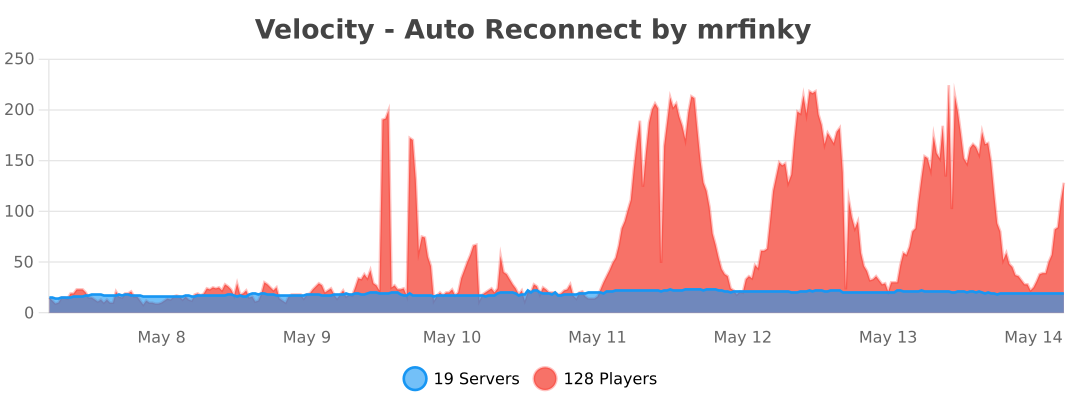</p>
</article>
<article>
<h1>Velocity Alert</h1>
<p><br />
<br />
# Velocity Alert Plugin<br />
## Overview<br />
A simple Velocity plugin that alerts/announces players in your entire server network. You can use this feature to warn players about an upcoming server/proxy restart, or announce any other important message you want to mention.</p>
<p>## Features<br />
* `/alert (message)`<br />
* Permission node is `alert.command.permission` (recommended for staff only; you can setup the permissions in your permission plugin)<br />
* Colored messages with HEX color support<br />
* Config file where you can customise the alert message prefixes and colors.</p>
<p>### Supported Formats<br />
A list of supported formats with links on how to use them.<br />
– [Legacy](https://www.digminecraft.com/lists/color_list_pc.php)<br />
– [JSON](https://minecraft.wiki/w/Raw_JSON_text_format)<br />
– [XML (MiniMessages)](https://docs.advntr.dev/minimessage/format.html#minimessage-format)</p>
<p>### Format Examples<br />
Here are some basic examples of those 3 different formats: (<span style="color:red">[ALERT] Warning!</span>)<br />
– Legacy: `/alertlegacy &cWarning!`<br />
– JSON: `/alertjson {“text”:”Warning!”,”color”:”red”}`<br />
– XML (MiniMessage): `/alertxml <red>Warning!`</p>
<p>Or you can use `/alert` by changing the format in the config file. The defaults format is lagacy.</p>
<p>## Installation and Setup<br />
1. Download the latest Alert plugin [here](https://modrinth.com/plugin/velocity-alert/version/1.8).<br />
2. Place the plugin in the plugins folder of your proxy server.<br />
3. Restart your proxy and that’s it! The plugin should be loaded.</p>
<hr>
<p>If you have any questions or have found a problem, please report it to [https://github.com/Anwenden001/Velocity-Alert-Plugin/issues](https://github.com/Anwenden001/Velocity-Alert-Plugin/issues)</p>
</article>
<article>
<h1>velocit</h1>
<p># velocit<br />
A [playit.gg](https://playit.gg) plugin for [Velocity](https://github.com/PaperMC/Velocity) servers</p>
<p># Getting Started</p>
<p>1. [Setup a Velocity Server](https://docs.papermc.io/velocity/getting-started)<br />
2. Install the plugin’s [latest release](https://github.com/200Tigersbloxed/velocit/releases/latest)<br />
3. Click the link in the console window to link your playit account to the server<br />
4. Done!</p>
<p># What’s supported?</p>
<p>Pretty much anything that’s TCP will work right now.</p>
<p>Feature | Description | Supported<br />
— | — | —<br />
Minecraft TCP | The TCP port for Velocity | ✔️<br />
UDP Ports | UDP Ports (for things like Geyser) | ❌<br />
Extra TCP Ports | Any extra TCP ports to expose | ✔️<br />
IP Forwarding | The actual IP address of the client | ❌</p>
<p>*any feature listed is planned*</p>
<p># How to Build?</p>
<p>1. Pull the repo<br />
2. Open with your favorite Java IDE<br />
3. Refresh maven packages<br />
4. `mvn install`</p>
</article>
<article>
<h1>VCustomBrand</h1>
<p># VCustomBrand</p>
<p>[](https://discord.gg/5NMMzK5mAn)</p>
<p>Customize the brand to display to players on your Velocity network with [MiniPlaceholders](https://modrinth.com/plugin/miniplaceholders) support</p>
<p>[](https://www.bisecthosting.com/4drian3d?r=ModVCustomBrand)</p>
<p>## Installation<br />
– Download VCustomBrand from [Modrinth](https://modrinth.com/plugin/vcustombrand)<br />
– Drag and drop on your Velocity plugins folder<br />
– Optionally install MiniPlaceholders together with any expansion<br />
– Start the server</p>
<p>## Command<br />
### `/vcustombrand reload`<br />
Permission: `vcustombrand.command`</p>
<p>## Demonstration</p>
<p>This video makes use of the [Expressions](https://modrinth.com/plugin/expressions-expansion) and [Player](https://modrinth.com/plugin/player-expansion) expansions of [MiniPlaceholders](https://modrinth.com/plugin/miniplaceholders)</p>
<p><iframe width="560" height="315" src="https://www.youtube-nocookie.com/embed/2Wm7sHLmpsc" title="YouTube video player" frameborder="0" allow="accelerometer; autoplay; clipboard-write; encrypted-media; gyroscope; picture-in-picture; web-share" allowfullscreen></iframe></p>
<p>## Limitations</p>
<p>The brand field in the client only supports plain text, not components, so no HEX colors or gradients can be used</p>
</article>
<article>
<h1>VConsoleLinker</h1>
<p># VConsoleLinker</p>
<p>[](https://discord.gg/5NMMzK5mAn)<br />
[](https://t.me/Adrian3dSupport)<br />
[](https://t.me/Adrian3dUpdates)</p>
<p>Link your Velocity console to a Discord channel via WebHooks</p>
<p>[](https://www.bisecthosting.com/4drian3d?r=ModVConsoleLinker)</p>
<p>## Installation<br />
– Download VConsoleLinker from Modrinth<br />
– Drag and drop on your plugins folder<br />
– Start the server<br />
– Configure the Channel ID and the WebHook token in the settings</p>
<p>*Library used for Discord webhooks* [JDWebHooks](https://github.com/4drian3d/JDWebHooks)</p>
<p>## Discord WebHook Configuration</p>
<p></p>
<p>1. Copy the URL of the WebHook.<br />
2. Extract the ID and Token from the URL as shown in the image.<br />
3. Put those fields in the specific configuration options.<br />
4. Restart your proxy</p>
</article>
</main>
<script type="speculationrules">
{"prefetch":[{"source":"document","where":{"and":[{"href_matches":"/*"},{"not":{"href_matches":["/wp-*.php","/wp-admin/*","/wp-content/uploads/*","/wp-content/*","/wp-content/plugins/*","/wp-content/themes/minecraft/*","/*\\?(.+)"]}},{"not":{"selector_matches":"a[rel~=\"nofollow\"]"}},{"not":{"selector_matches":".no-prefetch, .no-prefetch a"}}]},"eagerness":"conservative"}]}
</script>
<div class="gtranslate_wrapper" id="gt-wrapper-52301630"></div><script id="gt_widget_script_52301630-js-before">
window.gtranslateSettings = /* document.write */ window.gtranslateSettings || {};window.gtranslateSettings['52301630'] = {"default_language":"en","languages":["ar","az","bn","bg","hr","cs","da","nl","en","fi","fr","de","el","hu","id","it","ja","kk","ko","fa","pl","pt","ro","ru","sl","es","sv","th","uk","uz","vi"],"url_structure":"sub_directory","flag_style":"2d","wrapper_selector":"#gt-wrapper-52301630","alt_flags":[],"custom_domains":{"ru":"minecraft.vpesports.games"},"float_switcher_open_direction":"top","switcher_horizontal_position":"left","switcher_vertical_position":"bottom","flags_location":"\/wp-content\/plugins\/gtranslate\/flags\/"};
//# sourceURL=gt_widget_script_52301630-js-before
</script><script src="https://minecraft.vpesports.com/wp-content/plugins/gtranslate/js/float.js?ver=3.1.1" data-no-optimize="1" data-no-minify="1" data-gt-orig-url="/minecraft-version/1-7-3/page/9/" data-gt-orig-domain="minecraft.vpesports.com" data-gt-widget-id="52301630" defer></script><script id="wp-emoji-settings" type="application/json">
{"baseUrl":"https://s.w.org/images/core/emoji/17.0.2/72x72/","ext":".png","svgUrl":"https://s.w.org/images/core/emoji/17.0.2/svg/","svgExt":".svg","source":{"concatemoji":"https://minecraft.vpesports.com/wp-includes/js/wp-emoji-release.min.js?ver=7.0"}}
</script>
<script type="module">
/*! This file is auto-generated */
const a=JSON.parse(document.getElementById("wp-emoji-settings").textContent),o=(window._wpemojiSettings=a,"wpEmojiSettingsSupports"),s=["flag","emoji"];function i(e){try{var t={supportTests:e,timestamp:(new Date).valueOf()};sessionStorage.setItem(o,JSON.stringify(t))}catch(e){}}function c(e,t,n){e.clearRect(0,0,e.canvas.width,e.canvas.height),e.fillText(t,0,0);t=new Uint32Array(e.getImageData(0,0,e.canvas.width,e.canvas.height).data);e.clearRect(0,0,e.canvas.width,e.canvas.height),e.fillText(n,0,0);const a=new Uint32Array(e.getImageData(0,0,e.canvas.width,e.canvas.height).data);return t.every((e,t)=>e===a[t])}function p(e,t){e.clearRect(0,0,e.canvas.width,e.canvas.height),e.fillText(t,0,0);var n=e.getImageData(16,16,1,1);for(let e=0;e<n.data.length;e++)if(0!==n.data[e])return!1;return!0}function u(e,t,n,a){switch(t){case"flag":return n(e,"\ud83c\udff3\ufe0f\u200d\u26a7\ufe0f","\ud83c\udff3\ufe0f\u200b\u26a7\ufe0f")?!1:!n(e,"\ud83c\udde8\ud83c\uddf6","\ud83c\udde8\u200b\ud83c\uddf6")&&!n(e,"\ud83c\udff4\udb40\udc67\udb40\udc62\udb40\udc65\udb40\udc6e\udb40\udc67\udb40\udc7f","\ud83c\udff4\u200b\udb40\udc67\u200b\udb40\udc62\u200b\udb40\udc65\u200b\udb40\udc6e\u200b\udb40\udc67\u200b\udb40\udc7f");case"emoji":return!a(e,"\ud83e\u1fac8")}return!1}function f(e,t,n,a){let r;const o=(r="undefined"!=typeof WorkerGlobalScope&&self instanceof WorkerGlobalScope?new OffscreenCanvas(300,150):document.createElement("canvas")).getContext("2d",{willReadFrequently:!0}),s=(o.textBaseline="top",o.font="600 32px Arial",{});return e.forEach(e=>{s[e]=t(o,e,n,a)}),s}function r(e){var t=document.createElement("script");t.src=e,t.defer=!0,document.head.appendChild(t)}a.supports={everything:!0,everythingExceptFlag:!0},new Promise(t=>{let n=function(){try{var e=JSON.parse(sessionStorage.getItem(o));if("object"==typeof e&&"number"==typeof e.timestamp&&(new Date).valueOf()<e.timestamp+604800&&"object"==typeof e.supportTests)return e.supportTests}catch(e){}return null}();if(!n){if("undefined"!=typeof Worker&&"undefined"!=typeof OffscreenCanvas&&"undefined"!=typeof URL&&URL.createObjectURL&&"undefined"!=typeof Blob)try{var e="postMessage("+f.toString()+"("+[JSON.stringify(s),u.toString(),c.toString(),p.toString()].join(",")+"));",a=new Blob([e],{type:"text/javascript"});const r=new Worker(URL.createObjectURL(a),{name:"wpTestEmojiSupports"});return void(r.onmessage=e=>{i(n=e.data),r.terminate(),t(n)})}catch(e){}i(n=f(s,u,c,p))}t(n)}).then(e=>{for(const n in e)a.supports[n]=e[n],a.supports.everything=a.supports.everything&&a.supports[n],"flag"!==n&&(a.supports.everythingExceptFlag=a.supports.everythingExceptFlag&&a.supports[n]);var t;a.supports.everythingExceptFlag=a.supports.everythingExceptFlag&&!a.supports.flag,a.supports.everything||((t=a.source||{}).concatemoji?r(t.concatemoji):t.wpemoji&&t.twemoji&&(r(t.twemoji),r(t.wpemoji)))});
//# sourceURL=https://minecraft.vpesports.com/wp-includes/js/wp-emoji-loader.min.js
</script>
</body>
</html>