Sleek DR
This fontpack adds a Sleek Digital Retro font.
To install it, make sure to select it in the resource packs screen and put it on top of other font packs.
# MY OTHER FONTS
– Paramita Font by SourAlien
– Marga Font by SourAlien
– PP Font
– Anicca Font by SourAlien
– Warm Mojangles
– Tiny Bold Font
– SAS SMALL CAPS FONT
– sas all lowercase font
– Samsara Mono by SourAlien
– Epsilon Font by SourAlien.
– Ostrakon Font by SourAlien
– Alice Font
– Synesthete’s Dream
– HD B&W Font
Skyblue Nether Portal
# **Sky Blue Nether Portal**
***Sky Blue Nether Portal*** is a **lightweight resource pack** that reworks the *Minecraft* Nether portal by replacing the **classic purple texture** with a **clean sky blue portal** inspired by the *Minecraft Movie portal*. The new design keeps the **vanilla style** intact while making the portal **less visually loud** and more refined.
*Perfect for players who want a fresh Nether portal without changing how Minecraft feels.*

### **Features**
– **Sky blue Nether portal texture**
– *Vanilla friendly visuals*
– **Frame adapts to any portal size**
– *No performance impact*
– **No mods required**

This resource pack fully reworks the Nether portal texture. The portal no longer uses a purple nether texture on each block. Instead, it features a **skyblue** with increased transparency and no size limitation, allowing it to adapt naturally to any portal shape.
Other texture packs used in these pictures: **Saturated Mc** and **Smooth Low fire**
—
### **Compatibility**
– **Minecraft Java Edition**
– *Fully compatible with most resource packs*
– **Uses vanilla style textures and models**
—
If you enjoy ***Sky Blue Nether Portal*** and want to support **future updates**, consider supporting me on **PayPal**.
SKN’s Loopy Ores
Summary
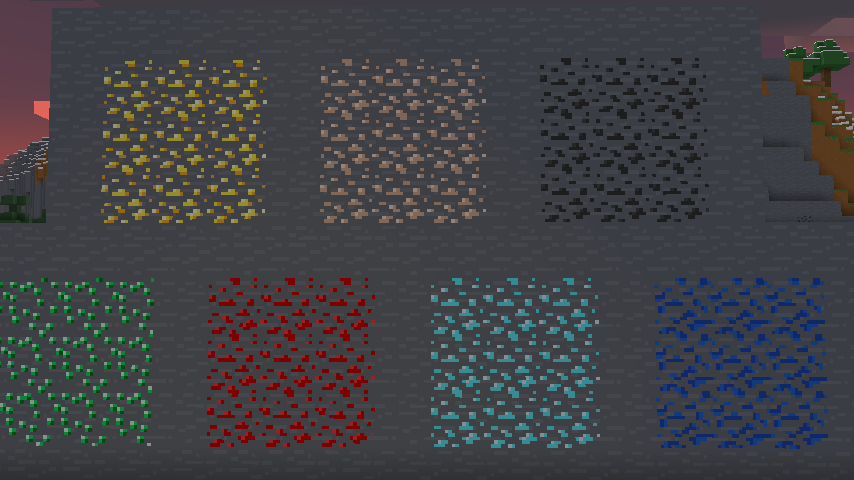
Vanilla ore textures have always seemed very “contained” in their blocks. You could draw a grid using the blocks themselves. This texture pack connects all those lonely ores together, albeit in a pretty rugged way.
This also functions as a more awesome version of all the “ore outline” resource packs.
I didn’t touch gilded blackstone or ancient debris because they’ve all been pretty cool textures already, and I wouldn’t be changing much. I included them in screenshots in the gallery, but I did not change them.
Images
All Ores Affected
1.19-Latest

1.6-1.8.9

Ingame Screenshots



Shader Preview
Solas

Complementary Reimagined

None

All shaders used are linked in the gallery with their corresponding images.
If you have any questions, comments, or ideas, please check out the wiki link and post them there.
SKN’s Loopy Ores: Bare Bones
Summary
My Loopy Ores resource pack has been making its rounds, and as I’ve been enjoying playing with the Bare Bones resource pack, I figured I’d make a version of this that’s compatible. nearly every ore-type block is changed. (gilded blackstone and netherite are similar but unaffected, as there is nothing I can significantly do to make them like the ores.)
Images
All Ores Affected

1.8.9 Version
If you have any questions, comments, or ideas, please check out the wiki link and post them there.
Synkai IP Limiter
# Advanced Synkai IP Limiter
A powerful Velocity proxy plugin that prevents multiple accounts from joining your server using the same IP address. Includes account binding, alt-account detection, and Discord webhook notifications.
—
## Features
– 🔒 **IP-Based Player Limiting** – Restrict concurrent connections per IP address
– 🔐 **Account Binding** – Bind player accounts to their IP address
– 🚫 **Alt-Account Detection** – Automatically detect and prevent alt accounts
– 🔑 **Permission-Based Bypass** – Allow ops and VIPs to bypass restrictions
– 📢 **Customizable Messages** – Color code support (&c, &4, etc.)
– 🔔 **Discord Webhook Support** – Get real-time notifications of violations
– ⚪ **IP Whitelist** – Configure trusted IPs with custom limits
– ⏰ **Binding Expiration** – Set binding duration (never, 1 week, 1 month)
– 🐛 **Debug Mode** – Enhanced logging for troubleshooting
—
## Installation
1. Download the latest compiled JAR file from the build directory
2. Place it in your Velocity proxy’s `plugins/` directory
3. Restart your Velocity proxy server
4. Configuration file will be auto-generated at `plugins/IPLimit/config.yml`
—
## Configuration
Edit `plugins/IPLimit/config.yml` to customize the plugin:
“`yaml
# IP Limit Configuration
# Max players allowed per IP (This limits concurrent sessions for the valid account)
max-players-per-ip: 1
# Permission to bypass checks (Ops usually have this)
bypass-permission: “iplimit.bypass”
# Message shown when kicked due to IP limit/Binding (Supports Color Codes like &c, &4)
kick-message: “&cYou are not allowed to join with this IP! 1 Account per IP limit.”
# Message shown when kicked for using an Alt account
alt-kick-message: “&cAlt accounts are not allowed! This IP is bound to another account.”
# Binding expiration policy (never, 1w, 1m)
binding-expiration: “never”
# Discord webhook settings (optional)
discord-webhook-enabled: false
discord-webhook-url: “webhookurl here”
discord-webhook-username: “Advanced Synkai IP limiter”
discord-webhook-embed-color: 16711680
# Whitelisted IPs (These IPs bypass all checks)
whitelisted-ips:
– “192.168.1.1”
– “10.0.0.1”
# Optional limits for whitelisted IPs (overrides normal max)
whitelisted-ip-limits:
“127.0.0.1”: 3
# Debug mode (prints more info to console)
debug: false
“`
### Configuration Options
| Option | Type | Description | Default |
|——–|——|————-|———|
| `max-players-per-ip` | Integer | Maximum players allowed per IP | 1 |
| `bypass-permission` | String | Permission node to bypass checks | `iplimit.bypass` |
| `kick-message` | String | Message when player hit IP limit | Customizable |
| `alt-kick-message` | String | Message for alt accounts | Customizable |
| `binding-expiration` | String | Binding duration: `never`, `1w`, `1m` | `never` |
| `discord-webhook-enabled` | Boolean | Enable Discord notifications | `false` |
| `discord-webhook-url` | String | Discord webhook URL | `webhookurl here` |
| `discord-webhook-username` | String | Bot username for webhooks | Advanced Synkai IP limiter |
| `discord-webhook-embed-color` | Integer | Embed color (RGB decimal) | 16711680 |
| `whitelisted-ips` | List | IPs that bypass all checks | – |
| `whitelisted-ip-limits` | Map | Custom limits for specific IPs | – |
| `debug` | Boolean | Enable debug console output | `false` |
—
## Permissions
| Permission | Description | Default |
|———–|————-|———|
| `iplimit.bypass` | Bypass IP limit and binding checks | Ops |
| `iplimit.admin` | Access admin commands | Ops |
—
## Commands
“`bash
/iplimit [subcommand]
“`
### Subcommands
– `info` – Show player IP binding information
– `reload` – Reload configuration from disk
– `unbind ` – Remove IP binding for a player
– `whitelist ` – Add IP to whitelist
– `debug [on|off]` – Toggle debug mode
—
## Discord Webhook Setup
To get real-time notifications of IP violations:
1. Create a Discord webhook in your server settings
2. Copy the webhook URL
3. Edit `config.yml`:
“`yaml
discord-webhook-enabled: true
discord-webhook-url: “https://discord.com/api/webhooks/YOUR_WEBHOOK_ID/YOUR_WEBHOOK_TOKEN”
“`
4. Customize the webhook username and embed color as desired
5. Reload the plugin with `/iplimit reload`
—
## How It Works
1. **First Connection** – Player joins with their IP, account is bound to that IP
2. **Same IP, Same Account** – ✅ Allowed (logged in again)
3. **Same IP, Different Account** – ❌ Kicked (alt account detected)
4. **Different IP, Same Account** – ⚠️ Allowed (new IP, rebinding)
5. **Whitelisted IP** – ✅ Always allowed
6. **Bypass Permission** – ✅ Ops and VIPs bypass all checks
—
## Features in Detail
### Account Binding
Once a player joins, their account is bound to their IP address. This prevents other accounts from using the same IP.
### Binding Expiration
Configure how long bindings remain active:
– `never` – Bindings are permanent
– `1w` – Bindings expire after 1 week
– `1m` – Bindings expire after 1 month
### IP Whitelist
Add trusted IPs (proxy, testing, corporate networks) to bypass all checks:
“`yaml
whitelisted-ips:
– “192.168.1.1”
– “10.0.0.1”
“`
Set custom limits for whitelisted IPs:
“`yaml
whitelisted-ip-limits:
“127.0.0.1”: 5 # Allow 5 players from localhost
“`
### Debug Mode
Enable debug logging to troubleshoot issues:
“`yaml
debug: true
“`
Check console for detailed information about:
– Player connections
– IP bindings
– Permission checks
– Webhook requests
—
## Troubleshooting
### Players Getting Kicked Unexpectedly
1. Check the player’s IP: `/iplimit info `
2. Verify whitelisted IPs if needed
3. Check if player has `iplimit.bypass` permission
4. Enable debug mode for more info
### Discord Webhook Not Working
1. Verify the webhook URL is correct
2. Check `discord-webhook-enabled: true`
3. Ensure the webhook hasn’t been deleted from Discord
4. Check console for error messages with debug enabled
### Config Not Updating
1. Use `/iplimit reload` to reload configuration
2. Ensure YAML formatting is valid
3. Check file permissions on config.yml
SimpleLimbo
# SimpleLimbo
A lightweight virtual limbo server plugin for Velocity proxy using LimboAPI.
## Features
– **Multiple Limbo Servers** – Create unlimited virtual limbo instances with different configurations
– **Auth Plugin Support** – Compatible with JPremium and other authentication plugins
– **Fallback System** – Automatically catch players when backend servers go down
– **AFK Detection** – Move idle players to a dedicated limbo server
– **Custom Worlds** – Load schematic files for limbo environments
– **Rich Display** – Titles, action bars, boss bars, and chat messages
– **Auto Reconnect** – Automatically attempt to reconnect players to backend servers
– **Velocity Bridge** – Register virtual servers that redirect to limbos
## Requirements
– Velocity 3.3.0+
– LimboAPI 1.1.27+
– Java 17+
## Installation
1. Download LimboAPI and place it in your Velocity plugins folder
2. Download SimpleLimbo and place it in your Velocity plugins folder
3. Restart Velocity
4. Configure `plugins/simplelimbo/config.yml`
## Configuration
### Basic Limbo Setup
“`yaml
limbos:
auth:
enabled: true
dimension: “OVERWORLD”
gamemode: “ADVENTURE”
world-time: 6000
spawn:
x: 0.0
y: 100.0
z: 0.0
yaw: 0.0
pitch: 0.0
settings:
read-timeout: 30000
should-rejoin: true
should-respawn: false
disable-falling: true
disable-falling-delay-ms: 5000
commands:
– “login”
– “register”
display:
on-join:
chat: “&eUse /login or /register”
title:
enabled: true
title: “&eAuthentication”
subtitle: “&7Please authenticate”
“`
### Velocity Bridge (Auth Plugin Compatibility)
For plugins like JPremium that expect players to be on a named server:
“`yaml
velocity-bridge:
enabled: true
register-aliases: true
aliases:
auth: “auth” # Maps server name “auth” to limbo “auth”
“`
Then in your auth plugin config, set the limbo server to `auth`.
### Anti-Fall Tuning
– `disable-falling` keeps players from dropping after join (Y lock mode).
– `disable-falling-delay-ms` controls when anti-fall starts.
– If players get slow join or “Loading Terrain” delay, increase `disable-falling-delay-ms` (for example: `1200`, `1500`, `2000`).
### Settings Notes
– `should-rejoin: true` keeps LimboAPI rejoin flow enabled (recommended for stability).
– `should-respawn: false` avoids extra respawn packet during join.
### Fallback System
Automatically catch players when backend servers crash:
“`yaml
auto-triggers:
fallback:
enabled: true
limbo: “fallback”
kick-patterns:
– “.*server.*closed.*”
– “.*timed out.*”
message: “&cServer offline. Moved to fallback.”
“`
### AFK System
Move idle players to a dedicated limbo:
“`yaml
auto-triggers:
afk:
enabled: true
limbo: “afk”
idle-time: 300
check-interval: 30
exempt-permission: “simplelimbo.afk.exempt”
“`
### Custom World Files
Load schematic files for limbo environments:
“`yaml
limbos:
lobby:
world-file:
enabled: true
type: “SCHEMATIC”
path: “plugins/simplelimbo/worlds/lobby.schem”
offset:
x: 0
y: 64
z: 0
light-level: 15
“`
## Commands
| Command | Permission | Description |
| ———————————— | ——————- | ———————— |
| `/simplelimbo send ` | `simplelimbo.admin` | Send a player to a limbo |
| `/simplelimbo list` | `simplelimbo.admin` | List all limbo servers |
| `/simplelimbo reload` | `simplelimbo.admin` | Reload configuration |
## Permissions
| Permission | Description |
| ———————— | ———————— |
| `simplelimbo.admin` | Access to admin commands |
| `simplelimbo.afk.exempt` | Exempt from AFK trigger |
## Auth Plugin Compatibility
SimpleLimbo includes compatibility features for authentication plugins that call `player.getCurrentServer()`:
1. Set `fake-server-name` in your limbo config to a valid Velocity server name
2. Enable the velocity-bridge with matching alias
3. Configure your auth plugin to use this server name as the limbo server
Example for JPremium:
“`yaml
# SimpleLimbo config.yml
velocity-bridge:
aliases:
auth: “auth”
limbos:
auth:
fake-server-name: “auth”
# … other settings
“`
“`yaml
# JPremium configuration.yml
limboServerNames: [auth]
mainServerNames: [lobby]
“`
## Building from Source
“`bash
git clone https://github.com/ItsAzni/SimpleLimbo.git
cd SimpleLimbo
./gradlew shadowJar
“`
The compiled JAR will be in `build/libs/`.
## License
MIT License
## Credits
– LimboAPI by Elytrium
– Velocity by PaperMC
Simple Auto Restart
# SimpleAutoRestart

GitHub | Modrinth | Spigot | CurseForge | Wiki





A Simple plugin to automatically restart your server at scheduled times with customizable warnings.
## Features
– Schedule automatic restarts at a specific times and days. (eg. `Wednesday;00:00`, `Sunday;3:00`)
– Customizable warning messages and titles (supports MiniMessage and legacy formatting).
– Configurable restart command(s) to fit your setup.
– Real-time based (not tick-based) scheduling for better accuracy.
– Supports all versions of from 1.8.7+
– Open Source!
## Installation
1. Configure your server restart script in `spigot.yml` (See PaperMC Docs)
2. Download the latest `SimpleAutoRestart-.jar`.
3. Place the JAR file into your server’s `plugins/` folder.
4. Start or restart the server.
5. Configure `plugins/SimpleAutoRestart/config.yml` (See the wiki for more information)
## User Interface
### Default Warning Messages

### Admin Commands

## Troubleshooting
### It counts down, but doesn’t restart
Make sure you have configured restart-script in your `spigot.yml`.
## Support
If you have any issues, bugs or questions. Feel free to create an issue ticket or message me on discord.
Astra’s Simple Wool Textures
—
Note: This pack’s textures were created with the help of AI (ChatGPT) to ensure clean and even borders on every block.
✅ Supports all 16 Vanilla.
✅ Works on Wool and Carpets.
✅ Performance-friendly (16x resolution).
✅ No mods (like OptiFine) required.
# 📸 SCREENSHOT

—
Wool Simple
## Simpler and better looking wool for bedwars and Minecraft.

### My other projects
Simple Tpa


– /tpa [player] – Sends a teleportation request.
– /tpahere [player] – Sends a teleportation request to teleport the player to you.
– /tpaignore [player] – Ignores a player from teleport requests.
– /tpauto – Auto accepts /tpa requests from other people
– /tpahereall – Sends a teleportation request to teleport everyone to you.
– /tpaccept – Accepts the request.
– /tpatoggle – Disables/Enables the teleportation to you.
– /tpatoggle [player] – Disables/Enables the teleportation to a specific player.
– /tpdeny – Denies the teleportation request.
– /back – Teleports you to your last location.
– /back [player] – Returns a player to its last position.
– /tpcancel [player] – Cancels a teleportation request to a specific player.
– /simpletpa – Opens the main menu
– /simpletpa debug – Shows information about the plugin and server
– /simpletpa reload – Reloads the plugin

– simpletpa.simpletpa
– simpletpa.tpahereall
– simpletpa.tpatoggle.others
– simpletpa.tpaccept
– simpletpa.tpdeny
– simpletpa.tpahere
– simpletpa.back
– simpletpa.back.others
– simpletpa.reload
– simpletpa.tpatoggle
– simpletpa.tpa
– simpletpa.tpaignore
– simpletpa.tpauto
– simpletpa.bypasscooldown
**PLACEHOLDERS**
**%simpletpa_tpa_status%**- it will output On or Off. This value is based on the /tpatoggle command.
**%simpletpa_tpauto_status%** – returns on or off.

German – NEW
German – OLD
Russian

1. Download the plugin.
2. Place it into the “plugins” folder
3. Restart the server.
! Discord server: https://discord.gg/pKfwbukNRj
If there are problems, paste them in the discussion section or in my discord server!
THANK YOU ALL!
**It will be awesome if you leave a 5 star review 🙂
It really helps me a lot!**
## License & Terms of Use
This resource is proprietary and protected by copyright.
All rights are reserved by the author.
By downloading or using this resource, you agree to the following terms:
– You may use this resource for its intended purpose.
– You may not claim this resource as your own.
– You may not decompile, reverse engineer, or modify the resource.
– You may not share, redistribute, or publish any part of the code.
– The author reserves the right to modify these terms at any time.
– Violation of these terms may result in license revocation.