SnowReports
# SnowReports
Lightweight, customizable player reporting plugin.


## Features
– **Report Reason Presets** with auto-completion
– **Multiple Storage Methods** MySQL, SQLite, MariaDB, PostgreSQL, H2
– **Intuitive GUI** for viewing and managing reports
– **Discord Integration** via webhooks
– **Automatic Update Checking**
– **Highly Customizable** settings and messages
– **Cross-server support** while using a remote storage method with the velocity plugin
– **Chat History** stored for each report
## Usage
### Commands
| Command | Description | Permission |
|——————————————–|———————————————|——————————————–|
| `/snowreports` | Main command | `snowreports.command.snowreports` |
| `/deleteallreports [confirm]` | Delete all reports | `snowreports.command.deleteallreports` |
| `/deleteallreportsfrom [confirm]` | Delete all reports made by a player | `snowreports.command.deleteallreportsfrom` |
| `/deletereport [confirm]` | Delete a specific report | `snowreports.command.deletereport` |
| `/myreports [page]` | View reports you’ve made | `snowreports.command.myreports` |
| `/report [reason]` | Report a player | `snowreports.command.report` |
| `/reports [player/page]` | View all reports or player-specific reports | `snowreports.command.reports` |
| `/setstatus [confirm]` | Set the status of a report | `snowreports.command.setstatus` |
### Permissions
| Permission | Description |
|———————————————-|—————————————————–|
| `snowreports.command.` | Give permission to a certain command |
| `snowreports.command..` | Give permission to a certain subcommand |
| `snowreports.alerts` | Receive an alert when a player is reported |
| `snowreports.bypass.cooldown` | Bypass the report cooldown |
| `snowreports.bypass.report` | Makes a player immune to reports |
| `snowreports.update` | Get notified if an update is available when joining |
### Placeholders
Requires PlaceholderAPI
| Placeholder | Description |
|————————————|————————————-|
| `%snowreports_reports_total%` | Total number of reports |
| `%snowreports_reports_open%` | Total number of open reports |
| `%snowreports_reports_inprogress%` | Total number of in progress reports |
| `%snowreports_reports_resolved%` | Total number of resolved reports |
## License
SnowReports is licensed under the [GPL-3.0 license](LICENSE).
Snitch 32x
This time I present you “Snitch 32x” PvP pack. its is a PvP texture pack its change texture of every item and GUI based on dark and neon colours. this pack make your PvP fight better and by adding new textures you can enjoy the minecraft new way.
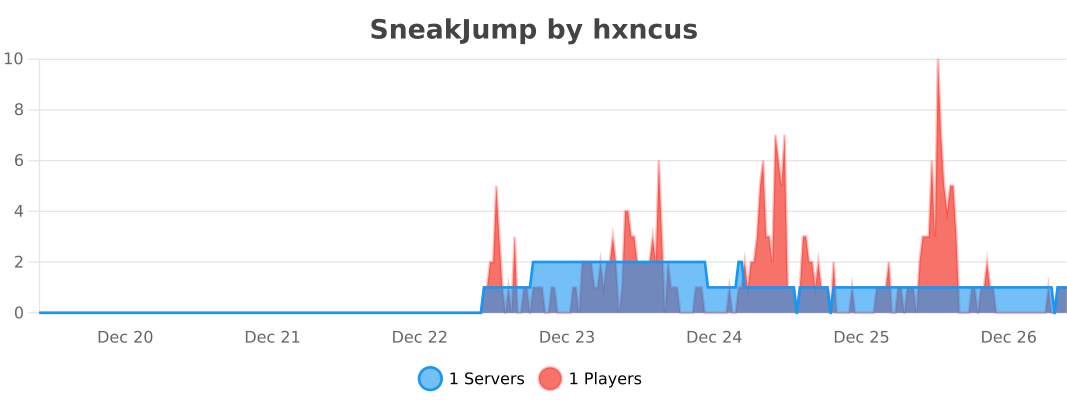
SneakJump | Super Jump, Charged Leaps & Parkour
# Overview
SneakJump adds enhanced jumping mechanics triggered by holding the SHIFT key.
The plugin calculates vertical velocity using an accurate simulation of Minecraft’s gravity and tick-based motion, ensuring consistent and predictable jump heights.
The jump height can be fully customized in the config, up to the maximum reliable limit of 61 blocks.
# Features
– Configurable jump height
– Accurate physics-based calculation with gravity and velocity decay
– Ability to enable or disable the plugin via config
– Customizable messages and permissions
– Works seamlessly on any server type, including RPG, PvP, and minigame setups
– Provides controlled and predictable jump boosts for gameplay mechanics
Config
“`yaml
# Enable or disable SneakJump functionality
# Default: true
enabled: true
# Permission required to use sneak + jump
# Default: empty string, which means no permission required
permission: “”
# Minecraft gravity approximation used in jump calculation
# Default: 0.0882
gravity: 0.0882
# How many blocks high the player should jump when sneaking
# Default: 2, Maximum: 61 blocks (Minecraft limit, maybe I will fix it in the future…)
jump-height: 2
# Multiplier applied to vertical velocity each tick
# Default: 0.997
multiplier: 0.997
# Cooldown between jumps in milliseconds
# Default: 3000 milliseconds (3 seconds)
cooldown: 3000
# List of worlds where SneakJump is active
# Only players in these worlds will be able to sneak + jump
# Default: [“world”, “world_nether”, “world_the_end”]
allowed-worlds:
– world
– world_nether
– world_the_end
# Cooldown message settings (ACTIONBAR, CHAT, SYSTEM, or nothing)
# Default: ACTIONBAR
cooldown-message-type: “ACTIONBAR”
cooldown-message: “§8[§aSneakJump§8] §fWait {cooldown} milliseconds before jumping again.”
# Shows useful commands
# {0} replaces with a command label
# /sneakjump help
help-messages:
– “§7=== §aSneakJump Commands §7===”
– “§e/{0} help §8- §fShows this help message.”
– “§e/{0} reload §8- §fReloads the config.”
# Reloads the config
# /sneakjump reload
reload-message: “§8[§aSneakJump§8] §fSuccessfully reloaded the config.”
# Config version (do not modify)
version: 1
“`
# Permissions
sneakjump.jump – Allows the player to use the enhanced jump. Players without this permission will jump normally.
# Commands
– /sneakjump help – Displays all available commands.
– /sneakjump reload – Reloads the plugin configuration.
## bStats
You can also take a look to my other plugins


[SMOOTHER] Outlined Wool
This pack adds a subtle and smooth outline to wool, similarly to Outlined Wool
**❓ What’s the difference between this pack and Outlined Wool ?**
_The outlines of this pack have a solid color, while Outlined Wool have multi-colour outlines._
✏️ Made with **Live Texture Editor** by Zee
⬆️ **UPDATES**: supports 26.1 and above, ignore the “_outdated resource pack_” toast when loading
Smoother Green Widgets
Removes the ugly and noisy pixels from widget buttons and makes highlited widgets green like Bedrock or Barebones.
⚠️ This pack only affects widget buttons and slider buttons
✏️ Created with Live Texture Editor by Zee
💯 Dark Mode coming at 100 downloads
Smooth XP Bars


GUI, Smooth, Dark Mode
Der’s Smooth Shaded Font (Faithful 32x)


This resourcepack simply modifies Faithful 32x’s font by adding targeted colored shading to the lower parts of its characters, giving the game a more refreshing/visually appealing look! Supports **11,000+** characters, various languages, many symbols and is available for a wide range of game versions!
_**Note:** This pack has various (former) shading styles, check them out in the gallery! Only the latest release style is showcased here._

**All of Faithful 32x’s font is currently supported and shaded, consisting of:**
– **ascii.png**: Most-used characters and some other symbols
– **ascii_sga.png**: Standard Galactic Alphabet used for enchanting
– **asciillager.png**: Secret characters only illagers may understand (pre v16)
– **accented.png**: Versions of letters with accents, diacritics, ligatures and circled numbers/letters
– **nonlatin_european.png**: Accented characters, miscellaneous symbols, some non-european characters, latin script characters
**Beyond that, the latest releases also added:**
– **8,500+** shaded glyphs across 37 unicode pages
– **Extensive** language & symbol support
– **Vanilla fixes** for incorrect glyph widths like for “▚”
– Support for popular servers like **Hypixel** (symbols) and **Wynncraft** (tooltips)

**Q1**: May I use this for my modpack?
**A1**: Feel free to include it in your modpacks on Curseforge and Modrinth! If you are using it as a content creator, giving credit by linking to this project’s page in your content’s description is highly appreciated!
***
**Q2**: What are editions?
**A2**: Editions were used to group game versions, indicated by a letter at the end of the pack’s name, ex.: (C) for Copper Edition, supporting MC 1.18+, including the files shown in the table of editions (gallery). **v10+ no longer uses editions** as there is only one file for MC 1.16+ now.
***
**Q3**: What are shading styles?
**A3**: Shading styles used to provide variety in the font’s appearance. v9.2 needs the Respackopts mod to access all styles (pair with Sinytra Connector if on forge). Standalone versions for each style, ex.: “Rose” (pink tint) are also available, not needing any mods. **v10+ no longer has multiple shading styles** nor needs any mods.
***
**Q4:** How do I tell **Der’s Shaded Font** apart from other shaded fonts?
**A4:** Last time I checked, this one was the only vanilla shaded font that supported anything other than just ascii.png characters (see features section for details). Symbols, accented characters and otherwise special characters with shading are most likely from here as well as any of the exclusive colored shading styles.
***
**Q5**: Why do a few special characters/symbols look double-struck when bold?
**A5**: Those (usually thin) characters appear as double-struck/outline due to Minecraft applying the same bolding method (duplicating and shifting by two pixels) across the board. Resourcepacks are limited in this regard as they cannot adjust said method. It is best to avoid using such characters in “**bold**” for now. Only a handful are affected.
***
Click here for a 16x version! / Submit feedback
Smooth Low Fire
## SMOOTH LOW FIRE 32x
> Smooth Low Fire 32x is a resource pack that makes your View of the game Less obstructive when caught on fire! BUT you may still see the effect of Burning! This has always been an issue for the majority base of minecraft members. So a pack has been made for it in order to fix this!
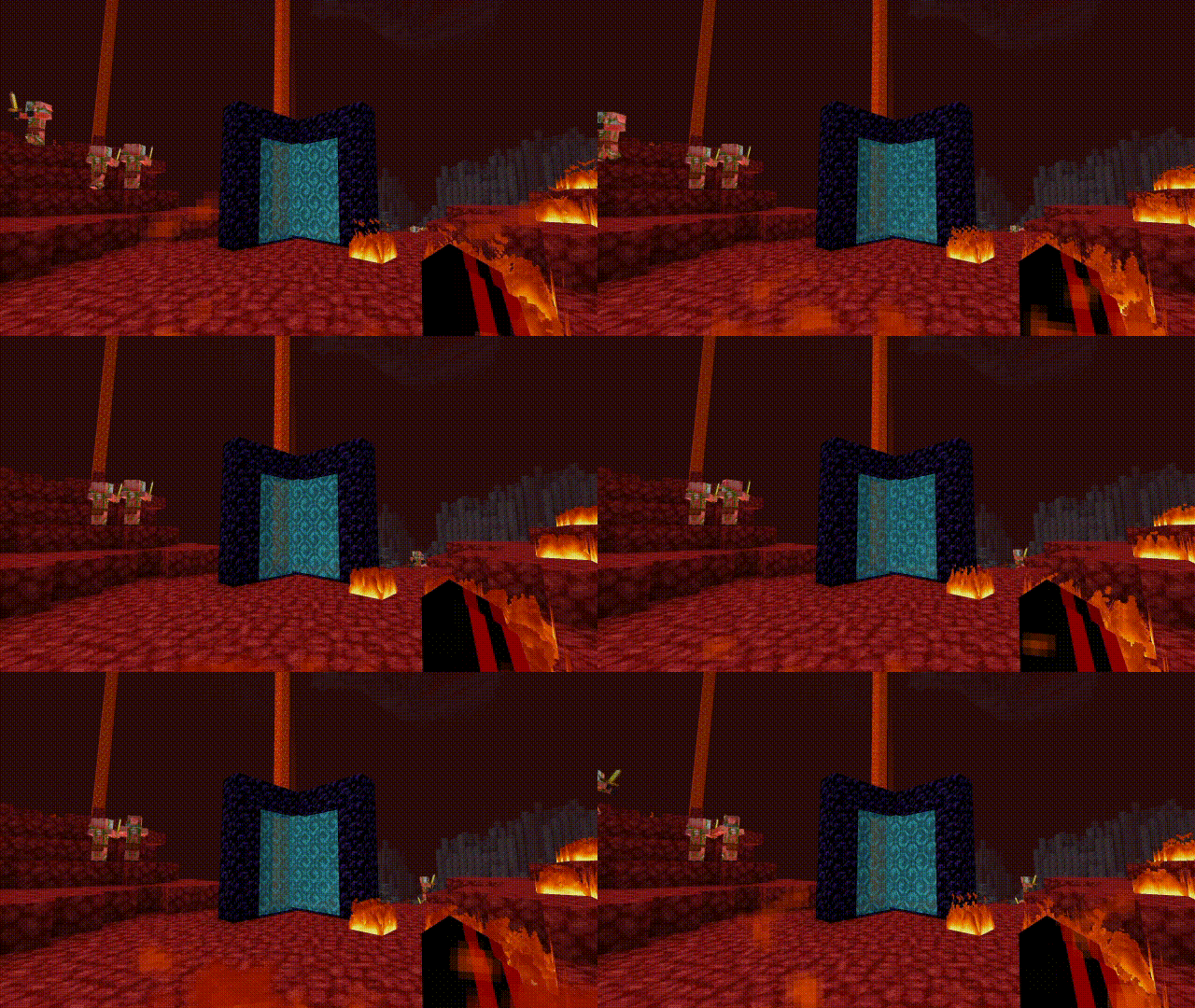
Heavily inspired by Better low fire
Other texture packs used in these pictures:
Saturated MC , Skyblue Nether Portal
> please support me on paypal
Smooth font(X32)
> I have drawn the basics, and for now, it’s only in English (unfinished). 
> > I will complete it later.!!
> > Looks really nice, doesn’t it? :)
> > This is the font under nametag, I think it looks really nice.<❤️> :p
Smooth Entity Shadows
Makes the Shadows under Entities Smooth. The closest you can get without shaders and optifine!

VS Vanilla: