TigerReports

# TigerReports by MrTigreroux
**1.7+ Spigot** plugin
**MySQL** & **BungeeCord** support
**Vault** chat prefixes and suffixes support
**Discord** support by installing [TigerReportsSupports](https://modrinth.com/plugin/tigerreportssupports) plugin

## Description
TigerReports is a highly configurable and detailed plugin to manage player reports. It works with a simple command `/report` which registers many data that is displayed in a staff GUI (a chest).

## Operation
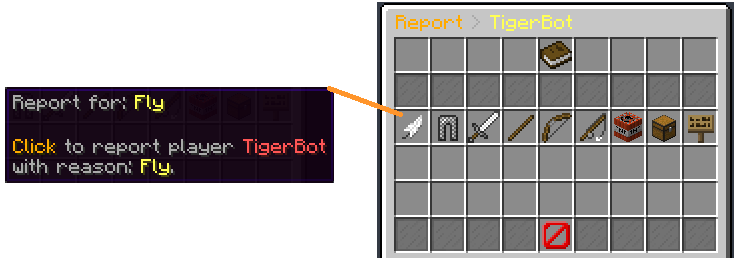
Players can report online and offline players (it depends on the config) with a cooldown and a minimum amount of characters. If they don’t specify any reason, a GUI (chest) is opened to select one of the defaults (configurable) reasons.
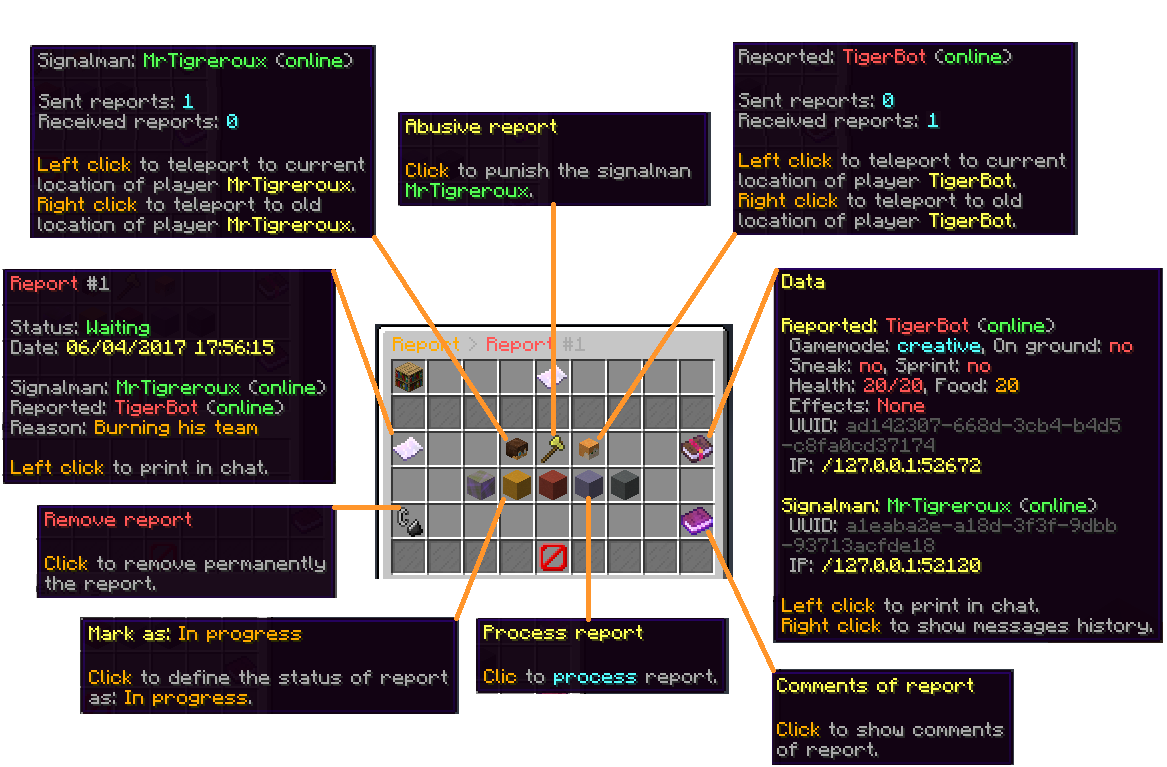
When a report is sent, online staff is alerted by a clickable message that opens a menu.
This menu allows to:
– **Teleport** to current and older (during the report) location of the reporter and the reported players.
– **Punish** if it’s an abusive report with a cooldown of configured time (the report is marked as false when this punishment is used).
– See **advanced data** like gamemode, health, effects, and more of the reported player.
– Mark the **report status** as: Waiting, In progress, Important or Done.
– **Archive** the report (removed from the main menu but kept in the database).
– **Delete** the report definitively.
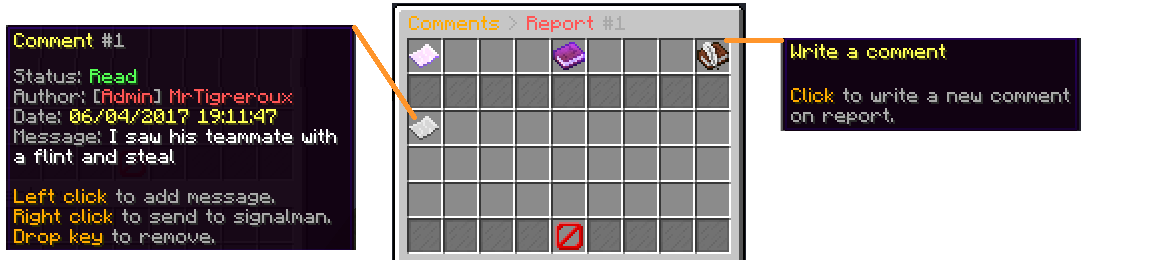
– Write and see **comments** from the staff on the report.
– See **messages history of participants** of the report posted before the report.

When a staff marks a report as Done, he can leave an appreciation between: true, uncertain and false.
The report is displayed in the main menu until an advanced staff archives or deletes it.

## Pictures

**Reason menu:**
![Reason menu](https://cdn.modrinth.com/data/cached_images/99fe9271900bf1b6996be5a10fc813d1a8bd82eb.png)

**Report menu:**
![Report menu](https://cdn.modrinth.com/data/cached_images/69dcdb0eebcad031b49ac8031cf51265188a06c4.png)

**Comments menu:**
![Comments menu](https://cdn.modrinth.com/data/cached_images/2e3fde45c37954fe5ceab1500dd6112609cffbf6.png)

## Config
The plugin can be configured in config.yml file.
You can see a list of all parameters that can be modified and a description of what they do [here](https://github.com/MrTigreroux/TigerReports/wiki/Config).
The default config.yml settings are [here](https://raw.githubusercontent.com/MrTigreroux/TigerReports/master/src/main/resources/config.yml).

## Messages
Messages are by **default in French** but all can be modified in messages.yml file.

**Why?** Because I’m French I don’t want the default messages of the plugin to have bad english but I nevertheless wrote a base of english below if you don’t have the time/motivation to translate them by yourself.
They are updated after all new versions.

If you run a 1.16+ Spigot server, you can set hex colors in messages.yml file with `&#FFFFFF` or `&x&F&F&F&F&F&F` format for #FFFFFF hex color with `&` set for [Config: ColorCharacter](https://github.com/MrTigreroux/TigerReports/blob/f2a7d0c3ba5ea85a3e2da2d3bdd06e8ab80b1855/src/main/resources/config.yml#L6) in config.yml file.

**Important:** If you use Minecraft **1.8 or less**, you must encode messages.yml file with **ANSI**, else you must encode it with **UTF-8**.
If messages are not changed, it means that you encoded with wrong format.

**Also**, you can’t put a comment (`#Message`) at first line of the file. If you do it messages will simply not be implemented.

### Update your messages
If you recently updated TigerReports to the latest version, you can update your messages (in messages.yml file) with this online tool:
[![Update your messages button](https://cdn.modrinth.com/data/cached_images/841f99b50382f8f139d4de95dc3612b5d229aed3.png)](https://mrtigreroux.github.io/plugins/tigerreports)

### Default messages
Click on your language below, then press `CTRL` and `A` keys to select all the messages and then copy/paste them (`CTRL` and `C` then `CTRL` and `V`).
*(thanks to people who shared these translations, their pseudo is at the top of the file)*

[English](https://raw.githubusercontent.com/MrTigreroux/TigerReports/master/default-messages/english.yml)

[Français](https://raw.githubusercontent.com/MrTigreroux/TigerReports/master/default-messages/french.yml)

[Español](https://raw.githubusercontent.com/MrTigreroux/TigerReports/master/default-messages/spanish.yml)

[中文](https://raw.githubusercontent.com/MrTigreroux/TigerReports/master/default-messages/chinese.yml)

[Русский](https://raw.githubusercontent.com/MrTigreroux/TigerReports/master/default-messages/russian.yml)

[Tiếng Việt](https://raw.githubusercontent.com/MrTigreroux/TigerReports/master/default-messages/vietnamese.yml)

[Nederlands](https://raw.githubusercontent.com/MrTigreroux/TigerReports/master/default-messages/dutch.yml)

[Polskie](https://raw.githubusercontent.com/MrTigreroux/TigerReports/master/default-messages/polish.yml)

[Deutsch](https://raw.githubusercontent.com/MrTigreroux/TigerReports/master/default-messages/german.yml)

[Italiano](https://raw.githubusercontent.com/MrTigreroux/TigerReports/master/default-messages/italian.yml)

## Commands
You can see all available commands [here](https://github.com/MrTigreroux/TigerReports/wiki/Commands).

## Permissions
You can see all available permissions [here](https://github.com/MrTigreroux/TigerReports/wiki/Permissions).

## Installation
TigerReports is a plugin which doesn’t depend on the Minecraft version. It is meant to work on all versions of Spigot **higher or equal to 1.7**.

Installation of TigerReports is standard:
– Stop your Spigot server.
– Download and put TigerReports.jar file in plugins folder of your server.
– Launch your server.

That’s it, you can now edit all that you want in `./plugins/TigerReports` folder, save your changes and apply them on the server by reloading with `/reports reload` command. Some features/messages need a restart of the server to be updated.

If you have a **BungeeCord network**:

You have to configure a **MySQL database** in config.yml file (at the bottom of the file) of **each of your Spigot servers** and leave the BungeeCord option enabled.
_(**You don’t have** to put TigerReports.jar in the plugins folder of the BungeeCord network server)_

I recommend you to:
– Edit messages.yml and config.yml files to your needs.
– Check that all is good on one server.
– Select TigerReports folder (in plugins folder of your server), then hold `CTRL` key and select TigerReports.jar.
– You can now copy both files and paste them on each of your Spigot servers.

If you want the **Discord** support:

Install the [TigerReportsSupports](https://modrinth.com/plugin/tigerreportssupports) plugin following instructions in the presentation page of that plugin (in *Installation* section).

### Common issues

The BungeeCord (only) commands cannot be executed by a Spigot plugin for a player, therefore **you can’t configure** a BungeeCord command in [PunishCommands](https://github.com/MrTigreroux/TigerReports/blob/f1e2aa57566264690e28071fa892fbfed3397f88/TigerReports/src/config.yml#L78) in config.yml file. **However**, a player can still execute them, therefore you can send a tellraw to the staff member, explaining him that he has to click on the message to execute the BungeeCord command.
You can use an online tellraw generator like [this one](https://minecraft.tools/fr/tellraw.php).
Example of a command put for [PunishCommands](https://github.com/MrTigreroux/TigerReports/blob/f1e2aa57566264690e28071fa892fbfed3397f88/TigerReports/src/config.yml#L78) in config.yml file:
“`
‘-CONSOLE tellraw _Staff_ {“text”:”[Apply the punish command]”,”clickEvent”:{“action”:”run_command”,”value”:”/bungeebancommand _Reported_ 5d Fly”}}’
“`

*(Note: you must put `’` at the beginning and at the end of the command because the tellraw command contains `”`)*

If you experience some lags/want to minimize the impact of the plugin on the server performance:
You can consider:
– setting a high value for `Config: MenuUpdatesInterval`
– disabling `Config: CollectSkulls`
– setting a small value for `Config: MessagesHistory`
– setting a small value for `Config: MaxReports`
– enabling `Config: StackReports` if you frequently have several reports for a same player
– disabling `Config: ChatReport` feature
– setting a small or empty list for `Config: CommandsHistory`
– enabling `Config: ReportOnline`

## Terms of Service

Please respect my work respecting these directions:
– Do not claim this plugin as yours.
– Do not distribute or sell this plugin on this site or another, just redirect to this page.
– Do not copy part or all of source code without quoting me and notifying me (MrTigreroux).

And that’s all, thank you for reading this page.
If you want to look at sources, the plugin is on [GitHub](https://github.com/MrTigreroux/TigerReports).

> If you encounter any bug or have suggestions, let me know them here:
> – [GitHub](https://github.com/MrTigreroux/TigerReports/issues)
>
> I will answer as soon as possible.

Please keep in mind that I made this plugin for free to help people who don’t know how to create their own plugin, a like or feedback is highly appreciated. 🙂

Thorough Keybindings

For as many Minecraft versions as possible, this mod makes the keybindings of usually fixed mappings rebindable. This is a client side mod.

For example, this lets you remap Escape and F3 in-game, even in versions before F3 was made rebindable. Also adds rebinding options for Shift, Control, Alt as well as the digits to navigate the profiling pie chart. Furthermore, backports mappings to earlier game versions, like rebinding F5 or hotbar slot keys.

For versions 1.14 to 1.21, this mod uses [Fabric](https://fabricmc.net/) and requires the [Fabric API](https://modrinth.com/mod/fabric-api) to run.
For versions beta 1.0 to release 1.13, this mod uses [Ornithe](https://ornithemc.net/) with Fabric and requires the [Ornithe Standard Libraries](https://modrinth.com/mod/osl) to run.

Thijzert’s Exploration Panorama

Changes the panorama in the main menu to be a custom one made with Thijzert’s Exploration Pack.

The Master Sword

A resource pack which replaces either the Netherite Sword or the Diamond Sword with a vanilla-styled Master Sword from The Legend of Zelda!

![Master Sword Texture](https://cdn.modrinth.com/data/cached_images/5a68e5c5ffba4a87eb1621009e7de5454da3b6ab.png)

The Food Eating Animation

**The Food Eating Animation**

A texture pack that adds sprite animations for edible and drinkable items.

This pack animates every single item you can eat or drink in vanilla Minecraft without mods

![The Food Eating Animation](https://cdn.modrinth.com/data/cached_images/9ae18ddf1f4064a40df2efb1a05dac5fe6e7e376.gif)

The Best Hud

This is a simple resourse pack that makes your HUD Colerful and fun Please Enjoy!
And also check out my [Youtube Chennel](https://www.youtube.com/@CollinsController)

TF2 Scout Zombies

The default – and admittedly boring – zombies are replaced with Scout zombies from Team Fortress 2. Comes with custom zombie textures and custom sounds. This was inspired by a L4D2 mod that changes all common infected to zombie mercenaries. Subtitles are also replaced appropriately. **_With Optifine/ETF, spawns will be 50% Red and 50% Blu._**

TF2 hit sound

A meme resourcepack that replaces the hitting sound with the tf2 hit sound

Even if it says that the pack is outdated, it should work on all versions

You can submit bugs or suggestions [here](https://docs.google.com/forms/d/e/1FAIpQLSeELpo_gqlwn4ftgP_tkB6I-rq6c6nyvs4BM07e89AKy3DI2g/viewform?usp=sf_link)

![heave is dead!](https://cdn.modrinth.com/data/W3WVh3NI/images/793e3e4f3e7a5bab5c82abe02f8dfe741573e080.jpeg)

ColorCraft

![ColorCraft](https://github.com/JustArthur/colorcraft-texturepack/blob/main/images/banner.webp?raw=true)

# 🎨 ColorCraft — Bring Color to Your Interface

**ColorCraft** redefines how you see Minecraft’s UI — literally.
It enhances text visibility and adds rich formatting to menus, messages, and UI elements across multiple languages and mods.
Better contrast, better clarity, better *vibes*. 🌈

## ✨ What It Does

Tired of dull, unreadable menus or chat text blending into the background?
ColorCraft injects vibrant colors and styles into Minecraft’s interface — making it more intuitive and eye-catching without altering the game’s vanilla spirit.

✅ Improved contrast on menus and buttons
✅ Styled text for game modes, tooltips, effects, and more
✅ Support for mods & multiple languages
✅ Seamless integration with existing UI packs

## 🖼️ Sneak Peek

| Feature | Preview |
|———-|———-|
| Main Menu | ![Quit Game is now red](https://github.com/JustArthur/colorcraft-texturepack/blob/main/images/main_menu.png?raw=true) |
| Create World Menu | ![Create world screen](https://github.com/JustArthur/colorcraft-texturepack/blob/main/images/new_world.png?raw=true) |
| Settings & UI | ![Settings screen](https://github.com/JustArthur/colorcraft-texturepack/blob/main/images/options.png?raw=true) |
| Sodium Compatibility | ![Sodium settings](https://github.com/JustArthur/colorcraft-texturepack/blob/main/images/sodium.png?raw=true) |
| Keybinds | ![Keybinds screen](https://github.com/JustArthur/colorcraft-texturepack/blob/main/images/keybinds.png?raw=true) |
| Enchantments | ![Enchantments](https://github.com/JustArthur/colorcraft-texturepack/blob/main/images/enchanted_book.png?raw=true) |
| Dye Colors | ![Dye colors](https://github.com/JustArthur/colorcraft-texturepack/blob/main/images/dye.png?raw=true) |
| Effects | ![Effects](https://github.com/JustArthur/colorcraft-texturepack/blob/main/images/potion_effect.png?raw=true) |
| Pause Menu | ![Pause menu](https://github.com/JustArthur/colorcraft-texturepack/blob/main/images/pause_menu.png?raw=true) |
| Death Screen | ![Death screen](https://github.com/JustArthur/colorcraft-texturepack/blob/main/images/dead_screen.png?raw=true) |
| Chat Messages | ![Chat messages](https://github.com/JustArthur/colorcraft-texturepack/blob/main/images/gamemode_chat.png?raw=true) |

## 🌍 Supported Languages

Almost all major Minecraft Vanilla languages are supported ! (some mods may not be fully supported yet for all languages)

`ru_ru` Thanks to [YarTom](https://modrinth.com/user/YarTom) for some of the translations.

## 🧩 Mod Compatibility

ColorCraft supports a wide variety of mods to ensure every text in your world stays clean and colorful.

✅ Supported mods:
– [Alex’s Caves](https://modrinth.com/mod/alexs-caves)
– [Alex’s Mobs](https://modrinth.com/mod/alexs-mobs)
– [Alexs Caves: Stuff & Torpedoes](https://modrinth.com/mod/alexscaves-torpedoes)
– [Better Statistics Screen](https://www.curseforge.com/minecraft/mc-mods/betterstats)
– [Bobby](https://modrinth.com/mod/bobby)
– [Cave Dust](https://modrinth.com/mod/cave-dust)
– [Cloth Config](https://modrinth.com/mod/cloth-config)
– [Create](https://modrinth.com/mod/create)
– [Detail Armor Bar Reconstructed](https://modrinth.com/mod/detail-armor-bar-reconstructed)
– [Durability Tooltip](https://modrinth.com/mod/durability-tooltip)
– [Dynamic FPS](https://modrinth.com/mod/dynamic-fps)
– [Dynamic Crosshair](https://modrinth.com/mod/dynamiccrosshair)
– [Embeddium](https://modrinth.com/mod/embeddium)
– [Enderite Mod](https://modrinth.com/mod/enderite-mod)
– [Enhanced Block Entities](https://modrinth.com/mod/ebe)
– [Extended Enchanting](https://modrinth.com/mod/extended-enchanting)
– [Fancy Block Particles – Renewed](https://modrinth.com/mod/fbp-renewed)
– [Farmer’s Delight](https://modrinth.com/mod/farmers-delight)
– [Immersive Hotbar](https://modrinth.com/mod/immersive-hotbar)
– [Inventory Particles](https://modrinth.com/mod/inventory-particles)
– [Inventory Management](https://modrinth.com/mod/inventory-management)
– [InvMove](https://modrinth.com/mod/invmove)
– [Malilib](https://modrinth.com/mod/malilib)
– [Mod Menu](https://modrinth.com/mod/modmenu)
– [Naturally Trimmed](https://modrinth.com/mod/naturally-trimmed)
– [Nvidium](https://modrinth.com/mod/nvidium)
– [oωo](https://modrinth.com/mod/owo-lib)
– [Physics Mod](https://modrinth.com/mod/physicsmod)
– [Presence Footsteps](https://modrinth.com/mod/presence-footsteps)
– [Shulker Box Tooltip](https://modrinth.com/mod/shulkerboxtooltip)
– [Sodium](https://modrinth.com/mod/sodium)
– [Sodium Extra](https://modrinth.com/mod/sodium-extra)
– [Sounds](https://modrinth.com/mod/sound)
– [Stellar View](https://modrinth.com/mod/stellarview)
– [Supplementaries](https://modrinth.com/mod/supplementaries)
– [TCDCommons API](https://www.curseforge.com/minecraft/mc-mods/tcdcommons)
– [Terralith](https://modrinth.com/datapack/terralith)
– [VanillaTweaks](https://modrinth.com/mod/vanillatweaks)
– [Vein Mining](https://modrinth.com/mod/vein-mining)
– [Veinminer Enchantments](https://modrinth.com/mod/veinminer-enchantments)
– [Wakes](https://modrinth.com/mod/wakes)
– [Waystones](https://modrinth.com/mod/waystones)
– [Xaero’s Minimap](https://modrinth.com/mod/xaeros-minimap)
– [Xaero’s World Map](https://modrinth.com/mod/xaeros-world-map)
– [Yet Another Config Lib (YACL)](https://modrinth.com/mod/yacl)

> 🧱 *Want your mod supported?*
Drop your mod link in the issues tab — compatibility updates are frequent.

## 🧠 Compatibility Notes

– Works with (maybe) any Minecraft version
– Compatible with all major mod loaders (Fabric, Forge, etc.)
– Can be used alongside other **UI enhancement** or **dark mode** packs
– Designed for **vanilla readability** — no texture changes outside of text
– Some of the UI Texture Pack features may conflict with other UI packs, so make sure to place ColorCraft above them in the resource pack list for best results.

## ⚙️ Installation

1. Download the latest release from [Modrinth](https://modrinth.com/resourcepack/colorcraft) or your launcher.
2. Drop it into your `resourcepacks` folder.
3. Enable it in-game and place it **above** any UI pack (for priority).
4. Enjoy your clean, colorful Minecraft interface. ✨

## ❤️ Contribute

Want to translate, tweak, or suggest a new color scheme?
Open a [Pull Request](https://github.com/JustArthur/ColorCraft/pulls) or start a [Discussion](https://github.com/JustArthur/ColorCraft/discussions).

> Every contribution keeps ColorCraft vibrant — thank you for helping make Minecraft more readable for everyone!

**🧡 Stay colorful. Stay creative.**

Text Effects

![Text Effects](https://cdn.modrinth.com/data/TXwLqayf/images/9b8b300df301da3bddb6952f2b540a216cc8c7d4.webp)


This library adds text effects which can be used by servers and mods to add unique effects to component-based text.

Integrated effects:
– Wobble
– Shake
– Marquee

… and more

### Usage

#### Add Dependency

build.gradle.kts:
“`kotlin
repositories {
// …
maven(“https://maven.axolotlclient.com/releases”)
}

dependencies {
// …

// use modImplementation for versions <26.1 if on fabric implementation("io.github.moehreag:text-effects:“)
}
“`

#### Apply Effects

“`java
// A few other pre-made effects are available in the `TextEffects` class.
// Usage may differ slightly depending on game version.
var text = Component.literal(“This is a text with effect!”).withStyle(Style.EMPTY.text_effects$withEffect(TextEffects.WOBBLE));
“`

#### Create your own effects

A few factory methods for common operations are provided in the `TextEffect` class.
Some pre-made effects are provided in the `TextEffects` class, with a few additional helper methods as well as registration handling. If you’d like to build on top of another effect you can use `TextEffect#combine`.

“`java
public static TextEffect CUSTOM_EFFECT = TextEffects.register(Identifier.fromNamespaceAndPath(“modid”, “custom_effect”), TextEffect.constantYOffset(-2));
“`

Effects are automatically able to be de/serialized in components using their id provided at registration.

“`
{
text: “text with a nice effect”,
text-effects: “text-effects:wobble”
}
“`
*This component works for 26.1, it may not for earlier minecraft versions.*

This format can also be used in commands, for example `/tellraw`.