UK English Cookie Fix
In the UK, cookies and biscuits are different things. Biscuits are a generic term, and a cookie is a type of biscuit. It’s technically not incorrect, but it sounds a bit strange. It’d be like if “beef” was called “meat” ingame. This resource pack corrects it in UK English and makes it sound more natural and normal.
That’s it.
(this texture pack was made for 1.20.2 but will 99.999999999% work for everything after)
TZP Extra Compat (Tissou’s Zombie Style)
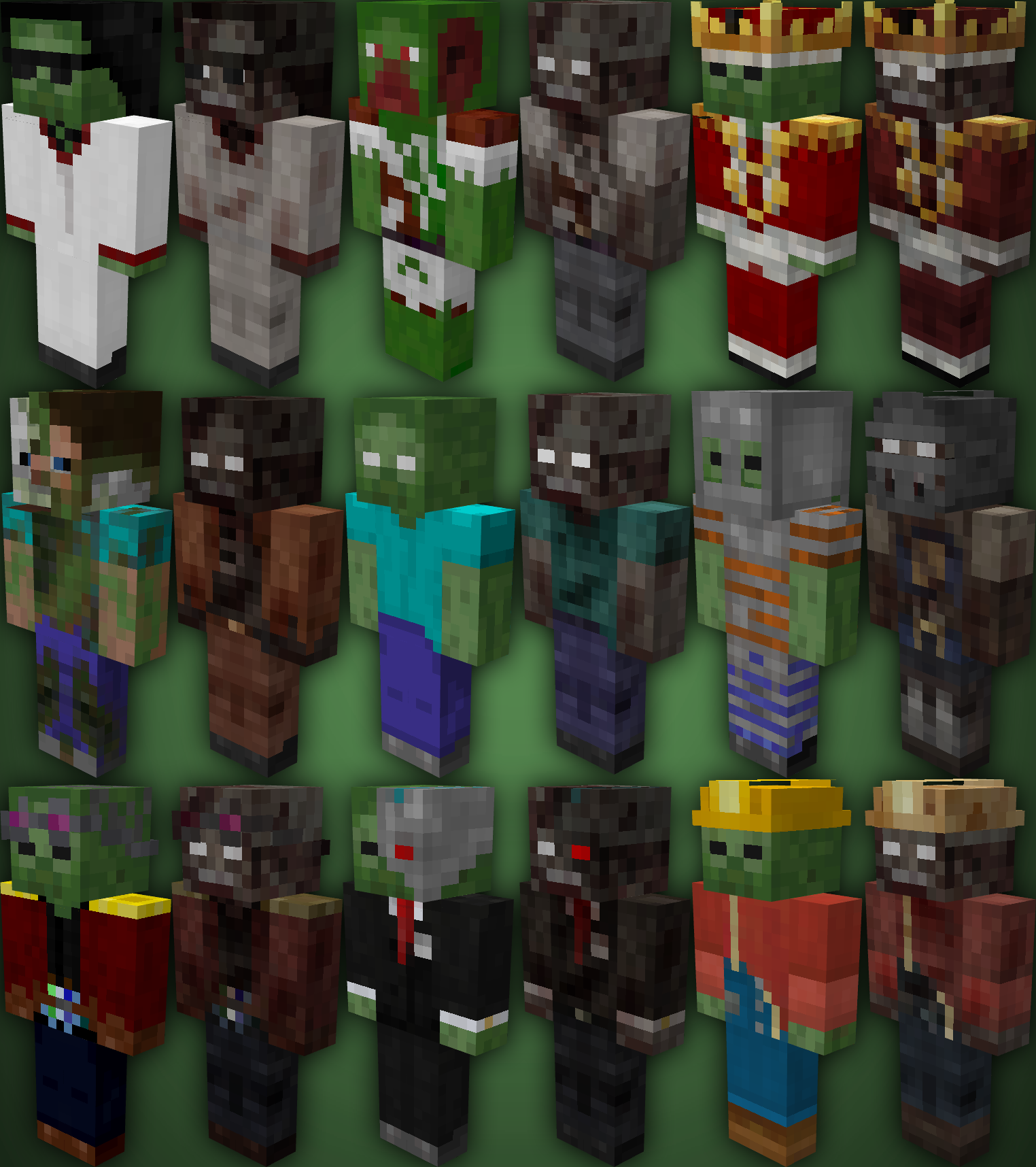
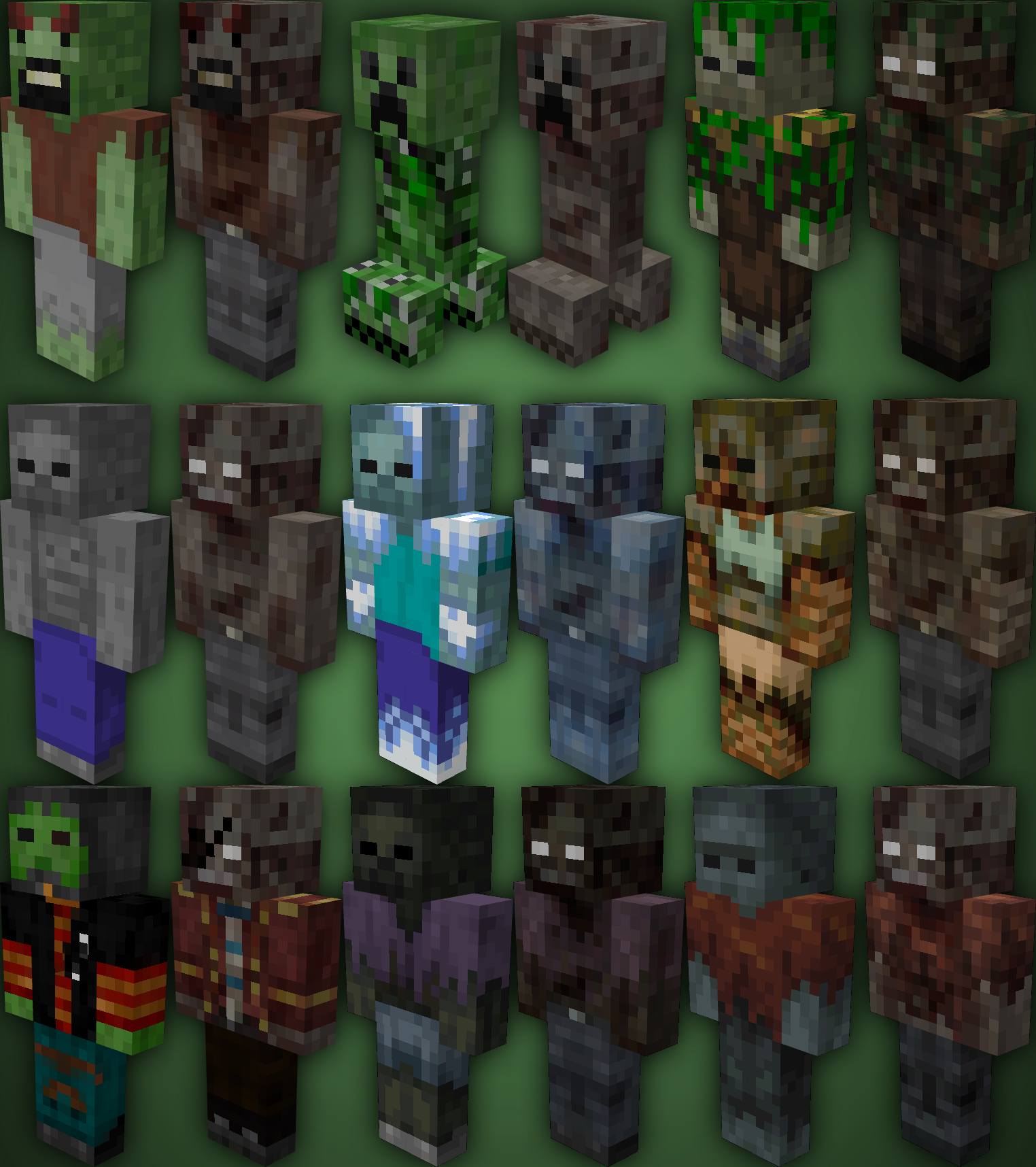
TZP Extra Mod Compat, Add new textures to mobs (zombies) so you feel more according to [Tissou’s Zombie Pack](https://www.curseforge.com/minecraft/texture-packs/tissous-zombie-pack-optifine-1-7x-1-20) Style.
### Mod Compatibility:
– [Sully’s Mod](https://modrinth.com/mod/sullysmod)
– [Mo’ Zombies Wave](https://modrinth.com/mod/mo-zombies-wave)
– [Mob Variants](https://modrinth.com/mod/fryc-mob-variants)
– [Majrusz’s Progressive Difficulty](https://modrinth.com/mod/majruszs-progressive-difficulty)
### Before (left), after (right)
TVP
Dark minimalist 16× PvP resource pack. Improved blocks, models and item positions keep visuals clean and readable. Materials stay clear, nothing distracts or hurts the eyes.

Books the Other Way Around
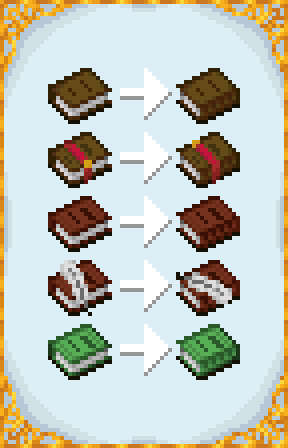
Resource pack that turns the books around, perhaps making more sense for languages written from right to left. Doesn’t change the writable/written books GUI nor the enchanting table book model.
For suggestions or bug reports message me on discord, my discord tag: bombmee
TumiTranslator
# TumiTranslator
Add rich translations to you Minecraft Server or Proxy
## Installation
– Install [MiniPlaceholders](https://modrinth.com/plugin/miniplaceholders)
– Drag and drop on your plugins folder
– Start the server
## Features
– Add the translations you want, and use them anywhere on your server.
– Support for MiniPlaceholders placeholders. (Full support anywhere for global placeholders;
for player placeholders, requires plugins compatible with MiniMessage using the latest version)
## Placeholders
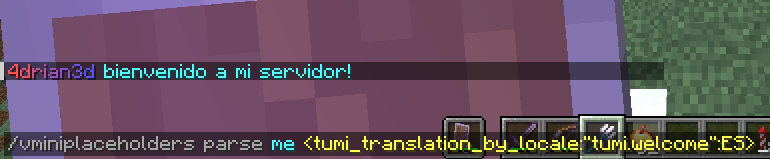
In addition to providing translations that can be used anywhere on your server,
TumiTranslator also provides placeholders for using your translations.
This is the recommended way to use translations, usable in plugins compatible with MiniPlaceholders.
– ``
Returns a translation in the language of the target/executor.
If the translation does not exist in the specified language,
it will attempt to use the translation in the configured default language.

– ``
Returns a translation in the specified language.
If the translation does not exist in the specified language,
it will attempt to use the translation in the default language configured.
## Usage in General Translations
The recommended use of TumiTranslator is through its MiniPlaceholders placeholders.
But if you want to use them anywhere else, it is possible. Here are some examples.
Please note that player placeholders are not yet supported in this way of displaying placeholders.
[This feature will be applied to MiniMessage in future versions.](https://github.com/KyoriPowered/adventure/pull/1300)
### Lang Tag
– ``

## Videos
#### TumiTranslator with Velocitab
[](https://youtu.be/YSyx6R2_hK0)
#### TumiTranslator with VCustomBrand
[](https://youtu.be/1Me2Cw_1hHI)
## Support
Support is exclusively for those who have purchased the plugin from BuiltByBit or Polymart. You will be given a role on my Discord server with access to an exclusive channel.
Tulip
## What is Tulip?
Tulip is a lightweight and easy-to-use config library for Minecraft that simplifies the process of saving and loading data to and from config files. With its simple API, Tulip allows you to easily manage your mod’s config settings. Whether you’re a beginner or an experienced modder, Tulip’s intuitive design means that it is easy to handle things like saving and loading data all while the mod handles errors for you.
You can use this mod to add configurations to your mods. To clarify, this mod isn’t for making config screens (where other config libraries do so), this library is for handling saving and loading. You will have to create your own config screen class to handle actually dealing with your mod’s data.
## Well, where do I find a source to learn how to use this library?
I’ve made a GitHub wiki page that explains every step in the process of using Tulip, as well as setting up a simple config screen along with it. You can find it [here](https://github.com/TimeCubed/tulip-config-manager/wiki).
## IMPORTANT
Please note that most likely older versions of Tulip are broken and should be considered broken even if they aren’t. If you’re a mod creator and would like to use Tulip, please be sure to download the latest version of Tulip.
## Potential Future Additions
– Quick config screen creation
– JSON config files
– Automatic class serialization and deserialization
TU7 Tutorial World Panorama
Panorama of the Legacy Console TU7 Tutorial World
Credits to this site for providing the map: https://www.theminecraftarchitect.com/
TU69 Tutorial World Panorama
Panorama of the Legacy Console TU69 Tutorial World
Credits to this site for providing the map: https://www.theminecraftarchitect.com/
TU5 Tutorial World Panorama
Panorama of the Legacy Console TU5 Tutorial World
Credits to this site for providing the map: https://www.theminecraftarchitect.com/
TU46 Tutorial World Panorama.
Panorama of the Legacy Console TU46 Tutorial World
Credits to this site for providing the map: https://www.theminecraftarchitect.com/