Simple Recycling
Simple Recycling is a tiny mod that allows you to smelt undamaged metal tools and armour back into ingots. If you have IC2 installed, you can also macerate them. Macerating works for all tools with a dust form, not just metal tools; same for pulverizing.
And that is literally all this mod does.
Compatibility notes, for modpack authors:
To detect tools, this mod takes each known tool material, and tries crafting it in certain shapes. Specifically: a pickaxe shape, a shovel shape, a hoe shape, a sword shape, an axe shape, a shears shape, a RP2-like sickle shape, a chestplate shape, a leggings shape, a boots shape, and a helmet shape.
Tools whose only crafting recipe does not follow one of these patterns will not be detected.
Tools that are not detected can be added manually to the config file.
To detect tool materials, the mod tries the first item from every ore dictionary name, as well as any items specified in the config. Materials starting with “ingot” in the ore dictionary, or added to the “ingots” config option, will be smeltable. Materials not starting with “ingot”, or added to the “gems” config option, will require macerating.
(Original mod by immibis. Original description from the FTB Forum)
## Archival notice
**This mod is abandoned and has been uploaded for archival purposes. It was originally created by immibis. It has been uploaded to Modrinth under the ModrinthArchives account with permission from the original author.**
Simple Reconnect
A plugin for Velocity that reconnects players to the last server they were playing on
## Features
– **Automatic reconnection to the last server on player login**
– Configurable messages for reconnect success and server unavailable
– Multiple storage backends: YAML, SQLite, MySQL, MariaDB, PostgreSQL, LuckPerms
– Optional per-server permission (velocity.reconnect.)
– Server blacklist to prevent reconnection to specific servers
– Optional LiteBans integration to prevent reconnecting banned players
– Optional fallback prevention (block redirect to fallback server when kicked)
– _reload_ command to reload configuration without restarting the proxy
## Commands
– **/vreconnect reload** Reloads the plugin configuration
## Permissions
– **reload:** requires permission velocity.reconnect.reload (default: op)
## Configuration
“`
# For debugging purposes, recommended to disable
debug: false
# Should we check for the latest version?
checkUpdates: true
# Send players a message when they are reconnected
messageOnReconnect: true
reconnectMessage:
– “You were reconnected to %server%.”
# Send a message when their previous server isn’t available
notAvailable: true
notAvailableMessage:
– “Unable to reconnect you to your last server.”
# Require velocity.reconnect. permission per server
perServerPermission: false
# Servers that players cannot reconnect to
blacklist: []
# Prevent connection to fallback servers when kicked
preventFallback: false
preventFallbackMessage: []
# LiteBans hook – prevents banned players from reconnecting to banned servers
liteBansHook: false
storage:
method: “yaml”
data:
address: “localhost:3306”
database: “reconnect.db”
username: “root”
password: “1234”
“`
– **debug:** Enable debug logging
– **checkUpdates:** Check for new versions on startup; admins with velocity.reconnect.admin get update notifications
– **messageOnReconnect / reconnectMessage:** Message shown when player is reconnected. Placeholders: %server%, %player%
– **notAvailable / notAvailableMessage:** Message when the last server is offline or unreachable
– **perServerPermission:** If true, player needs velocity.reconnect. to reconnect to each server
– **blacklist:** List of server names where reconnection is never allowed
– **preventFallback / preventFallbackMessage:** When kicked, prevent redirect to fallback server (if not on blacklist)
– **liteBansHook:** Integrate with LiteBans to block reconnection to servers where the player is banned
– **storage.method:** Storage backend. Options: yaml, sqlite, mysql, mariadb, postgresql, luckperms
– **storage.data:** Connection settings for database backends. For SQLite/YAML, database is the file path
## Storage
In the **config.yml**, there are different storage options. If you don’t need your own plugins to interact with this one, we recommend you keep the **method** set as the default option **(yaml)**
“`
storage:
method: “yaml”
# The below is only needed if you are using MySQL
data:
address: localhost
database: reconnect
username: root
password: ”
“`
To change the method, alter the **method** key. Current options are:
– **yaml:** Local .yml file
– **sqlite:** Local SQL database
– **mysql:** Local or remote SQL database
The **data** section is for if you are using the **mysql** option for **method**
– **address:** The address of the SQL database
– **database:** The name of the database
– **username:** Username for the SQL database
– **password:** Password for the SQL database
###Requirements
– Java 21 (LTS)
– Velocity Proxy on the latest supported version
### Internal behaviour
– When using a forced host, the plugin does not override the initial server choice
– Storage location for YAML: **plugins/reconnect/data.yml**
– For LuckPerms storage, the last server is stored as user metadata
Simple PvP Edit
# Simple PvP Edit
## Discontinued the project has been abandoned and will no longer receive updates!
**This Minecraft Resource Pack enhances the aesthetics of PvP, making it look more attractive, simple, and even potentially useful due to some of its features.**
## Features
– `Makes swords and axes smaller.`
– `Reduces the size of fire and shields.`
– `Shrinks utility items like potions, golden apples, totems, and more.`
– `Compatible with versions 1.6.1-1.21.1`
– `Compatible with Sodium and Optifine.`
– `You can check the gallery for more information.`
– `It focuses more on cpvp (crystal pvp).`
##
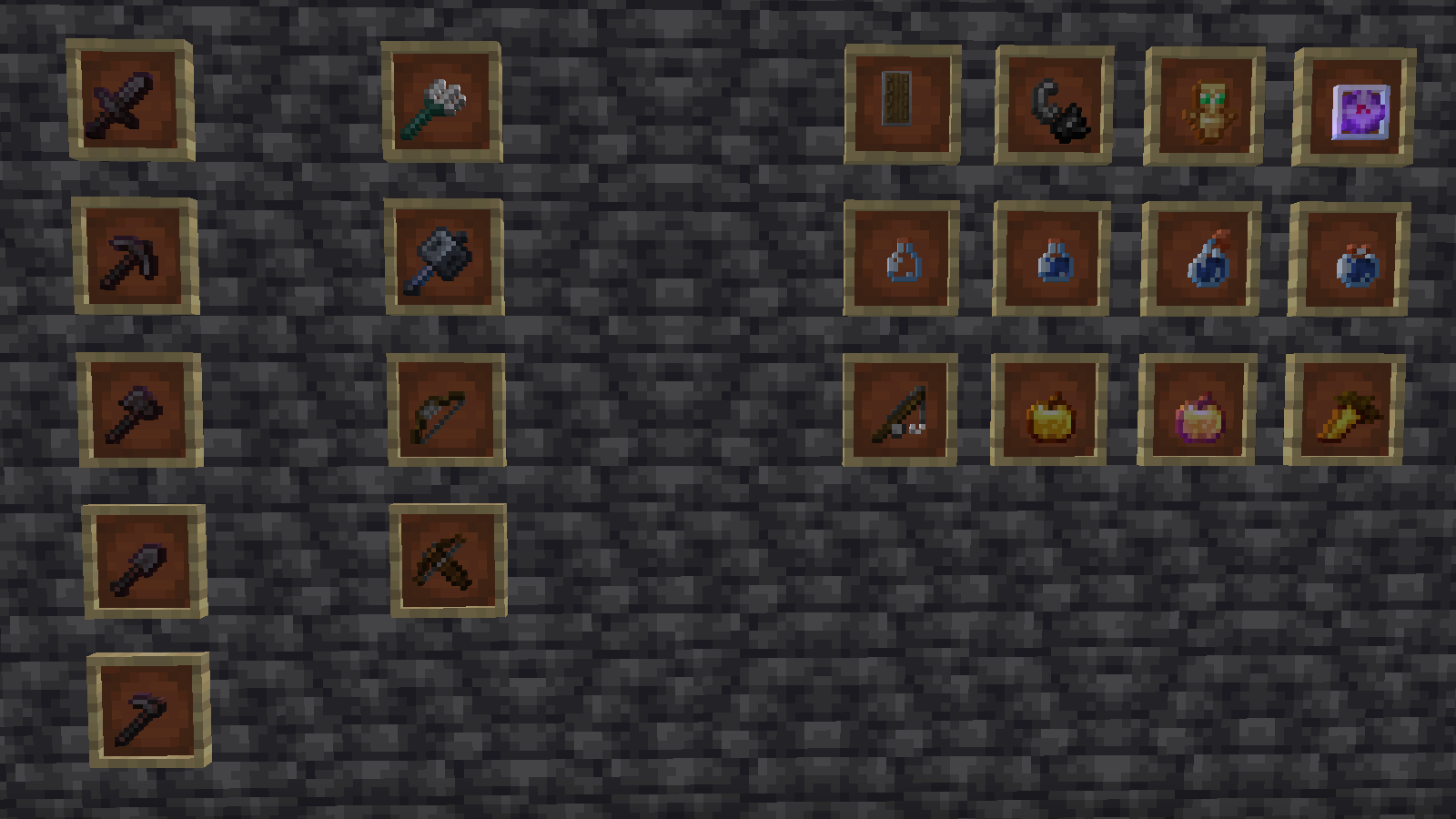
– `Check the gallery for more information.`
Español
># Simple PvP Edit
## Descontinuado ¡El proyecto ha sido abandonado y ya no recibirá actualizaciones!
**Este resource pack de Minecraft mejora la estética del PvP, haciéndolo atractivo, simple e incluso potencialmente útil debido a algunas de sus características.**
## Características
– `Hace que las espadas y las hachas sean más pequeñas.`
– `Reduce el tamaño del fuego y los escudos.`
– `Encoge objetos de utilidad como pociones, manzanas doradas, tótems y más.`
– `Compatible con las versiones 1.6.1-1.21.1`
– `Compatible con Sodium y Optifine.`
– `Puedes consultar la galería para obtener más información’.`
– `Se centra más en cpvp (crystal pvp).`
##

– `Consulta la galería para obtener más información.`
Simple Pack
## **The Simple Pack**

The simple pack is a new way experience Minecraft! We have re-textured the whole game to produce a simple and more artistic look that maintains its Minecraft feel. Enjoy new mob, block, item and game menu graphics! Install this simplifying pack into your Minecraft world and experience a more diminished outlook on your average blocks. The lack of extra pixels produces a more unique and almost satisfying form of gameplay, almost a whole new experience! I hope you enjoy it!
Pixels by IcyDice : )
—
Simple hit sound
This resource pack enhances PvP hit sounds to make combat feel more responsive and satisfying ⚔️🔥 The sounds are clearer and less distracting, helping you stay focused and track your hits better 🎯 Perfect for players looking for a smoother, more engaging PvP experience 🚀
Simple Grass Blocks
# About
This resource pack just makes the grass block texture simpler. It makes the texture of them only grass, so the dirt will not be visible. There are already a lot of resource packs that do the same thing.
# Issues
If you have any issue, please tell me here.
Simple Click
**WARNING**: Compatible with all version from 1.7 and higher! Ignore the information in the game and just use!
Tired of a loud, sharp, unpleasant clicking sound with any action in the game menu? Simply replace the old click with a quiet and modern. Don’t let anything annoy you while you concentrate on the game.
Silent Portals
# Silent Portals
**A Minecraft resource pack to remove the portal sounds from 1.6.1+**
•Will update as new versions are released to avoid in-game warning•
Removed Sounds
-Nether Portal Random Sounds
-Nether Portal Travel Sounds
How It Works
The resource pack replaces the .ogg sound files with versions containing no audio but the game still sees as a valid audio file.
This resource pack includes both “sound” and “sounds” folders to insure the maximum compatibility. No other files are changed to keep the size as small as possible.

**Enjoy the silence** of no annoying portal sounds!
Silent Piglin
# Silent Piglin
**A Minecraft resource pack to remove the Piglin (all types) sounds from 1.6.1+**
•Will update as new versions are released to avoid in-game warning•
Removed Sounds
-Piglin
-Piglin Brute
-Zombified Piglin
-ZombiePig (Older Game Versions)
How It Works
The resource pack replaces the .ogg sound files with versions containing no audio but the game still sees as a valid audio file.
This resource pack includes both “sound” and “sounds” folders to insure the maximum compatibility. No other files are changed to keep the size as small as possible.

**Enjoy the silence** of no annoying Piglin sounds!
Silent eating sounds
After someone asked me on my bug/suggestion form, i decided to actually make a separate recourcepack that makes eating completely silent.