Technoblade-Totem 3D 1.6.1-26.1.2
Changes the Totem Texture to a 3D Technoblade skin.
Makes the Totem Look like Technoblade.
—
-Credit: SkinMC /totem
Made Using (U can also make ur own): **https://skinmc.net/totem**
**This is not an ad, I’m just giving credit**
Lisence
This Project Has No Licence
Perfect to get an easy download of this from launchers and stuff.
This pack has all versions from 1.6.1 – 26.1.2(latest version)
“`
Thanks so much for 80+ Downloads.
“`
TeamChat
# TeamChat
A plugin that provides a separate chat for the server team.
## Features
– /teamchat command
– [MiniMessage](https://docs.advntr.dev/minimessage/format.html)
– [MiniPlaceholders](https://modrinth.com/plugin/miniplaceholders) support for Paper and Velocity
– [PlaceholderAPI](https://www.spigotmc.org/resources/6245/) support for Bukkit and Paper (e. g. ““)
## Requirements
– Java 21+
## Default configuration
“`
# TeamChat plugin v2.3 by BauHD
# Modrinth: https://modrinth.com/project/teamchat
# Discord: https://discord.gg/Gmxwzz2rA9
prefix: “[TeamChat] ”
permission: “teamchat.use”
aliases:
– “tc”
announce-in-console: false
format: “ » ”
no-permission: “You do not have the permission to use this command!”
usage: “Usage: /teamchat ”
team-message: “ – ”
“`
TCommandBlockerLite


# TCommandBlocker (v1.1)
Check the updated page [here](https://www.spigotmc.org/resources/tcommandblocker.111927/)
Simple command blocker plugin
# Features
– Unlimited commands
– Block any command
– 100% translatable
# Commands
– /tcommandblocker reload
– /tcommandblocker version
# Permissions
– tcommandblocker.reload
– tcommandblocker.version
# Dependencies
– None
Hermit Soundboard
# Hermit Soundboard
This resource pack contains a mix of sounds from Hermitcraft.
This includes:
– Slimes shouting in the (pitch-shifted) voice of
[EthosLab](https://www.youtube.com/channel/UCFKDEp9si4RmHFWJW1vYsMA) that the player is
[“the greatest redstone master in the world”]((https://www.youtube.com/watch?v=oAvPZwbM1Mc&t=586s))
– Goats occasionally [laughing maniacally](https://www.youtube.com/watch?v=kiVH4CjiHhI&t=1400s) or saying
[“Anyways, what?”](https://www.youtube.com/watch?v=j4ph_6Uu91s&t=1520s)
– Turtles taking damage will tell you in XisumaVoid’s voice that “This is illegal!”
– Once in a while you may hear a Zedaph [moo](https://www.youtube.com/watch?v=DaUZcfY0IVg&t=1097s)
in amongst the cows
– Mixed into the wolf sounds are various audio clips of [XisumaVoid,](https://www.youtube.com/watch?v=fSh8q0b4m4g&t=802s),
[Zedaph, JoeHills and ZombieCleo](https://www.youtube.com/watch?v=eaIXFYf_v8U), aka,
“The Woolves of Wool Street”
– You might one day hear an Enderman ask if you’ve
[“got any pickles?”](https://www.youtube.com/watch?v=56y1nRZlu9Q&t=438s)
– Hurt ghasts will occasionally sound like [Grian](https://www.youtube.com/watch?v=qmJHVf_UaXo&t=230s)
## Credits
The author of this resource pack claims no rights to any of the underlying assets. All voices
are of the members of the Hermitcraft server, as taken from their videos.
The combining of these elements into this resource pack was done under the principle of fair use.
## License
This pack and its contents has been marked as dedicated to the public domain. Details can be found in
the accompanying LICENSE.txt file.
Taco’s Rainbow XP Bar
A simple Minecraft resource pack to make your XP bar rainbow.
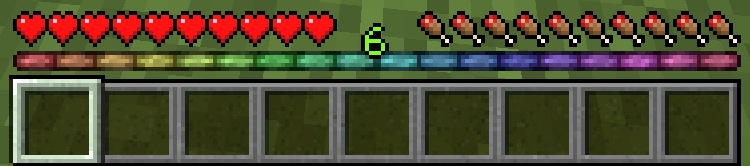
This pack is directly inspired by the somewhat popular [Rainbow XP bar and ping](https://www.curseforge.com/minecraft/texture-packs/rainbow-xp-bar-and-ping), so I used the same licensing and everything.
My pack icon’s “color bar” is also directly inspired by it, too.
…Alright, so why does this exist, then?
Well, I tried using “Rainbow XP bar and ping”, but thought it was too bright and garish. I personally just don’t think it looks that good.
I really liked the concept of the colored XP bar though, so I decided to make my own version using a color replacement tool and set intervals of hue value changes.
(I used Pixlr for this, but you can use any software that has a color replacement tool.)
Unlike “Rainbow XP bar and ping”, this pack does NOT contain connection bar color changes.
I didn’t really care about that, so I didn’t change it.
Project initially created July 6th, 2022.
Finally decided to upload it December 2022 so other people could use it if they felt the same way I did.
## Important Version/Download Information
Don’t worry about the incompatibility warning. As long as you’re downloading the correct file, it should work fine.
## Licensing
This work is licensed under the Creative Commons Attribution-NonCommercial 3.0 Unported License.
To view a copy of this license, visit https://creativecommons.org/licenses/by-nc/3.0/ or send a
letter to Creative Commons, PO Box 1866, Mountain View, CA 94042, USA.
TAB

TAB is an all-in-one plugin for displaying information in various places, which aims to outperform all similar plugins in terms of features, compatibility and performance.
The compact configuration allows you to get the plugin to work the way you want regardless of how simple or complex you want it to be or how experienced you are.
The default configuration already contains useful values and examples to give you a better understanding and get you started quickly with instant results.
The extensive [wiki](https://github.com/NEZNAMY/TAB/wiki) answers any of your questions.


[](https://github.com/NEZNAMY/TAB)
[](https://github.com/NEZNAMY/TAB/issues)
[](https://github.com/NEZNAMY/TAB/wiki)
# Discord?
Official support by me is no longer provided to free users due to limited time and extreme inefficiency (see [provided services]([https://github.com/NEZNAMY/TAB?tab=readme-ov-file#provided-services](https://github.com/NEZNAMY/TAB?tab=readme-ov-file#provided-services)) for more info).
However, you can join this [fresh new community discord]([https://discord.gg/YPqXt63YQj](https://discord.gg/YPqXt63YQj)) made by a nice person who promises to help everyone with all plugins, including TAB.
Before you consider requiring assistance, check out the [wiki](https://github.com/NEZNAMY/TAB/wiki) first. It will answer any questions you may have and is also constantly getting improved.


TAB-Bridge
**This is an addon for my [TAB](https://modrinth.com/plugin/tab-was-taken) plugin which extends its features when installed on BungeeCord / Velocity.**
# Installation
Install this jar on all backend servers where you want the additional features.
**This is not a BungeeCord / Velocity plugin!**
# Compatibility
## Bukkit
The plugin supports all known minecraft versions and is very likely to support any future versions due to how simple it is and most of the functionality consists of hooking into other plugins.
The supported version(s) information in each version refers to Fabric (see below).
## Fabric
Due to large usage of internals, the risk of breaking on new MC versions is high. As such, the mod strictly defines supported version(s) and will therefore require an update, at least to the supported version list, every time there is a minecraft update.
To find the latest bridge version for your server version, see supported version(s) in each update or simply use the download filter.
# Features
* Forwarding PlaceholderAPI support to the proxy
* Allow detection if player is invisible to make nametag invisible (compensation for 1.8.x client sided bug)
* Allow detection if player is disguised to disable collision to prevent endless push
* Forwarding permission groups of players if no permission plugin is installed on proxy
* Forward vanish status for compatibility with global playerlist / layout features
* Forward player’s world for %world% and per-world settings
* Allow TAB’s placeholderapi expansion with TAB on proxy
* Forward player’s gamemode for spectator fix feature to work
Synthwave City Sky Overlay
**Pack Overview:**
This resource pack replaces the sky with an image of a synthwave city that’s mostly neon pink, neon blue, purple, and magenta colored!
For this resource pack to perform properly, you must use Optifine or any other mods that allow custom skies.
**Minecraft Settings:**
Custom skies: On
Sky: Off
**_If skybox doesn’t work, relaunch Minecraft_**
Sword UI+
 
This texture pack is modified based on the Faithful Resource Pack
https://faithfulpack.net/
license:https://www.faithfulpack.net/license
# Sword UI+ | 中文
**The ultimate UI overhaul, designed for the classic 1.6.2–1.8.x PvP experience.**
**专为经典1.6.2–1.8.x PVP体验而生的终极UI升级。**
This texture pack is the culmination of feedback from countless 1.6.2–1.8.x players, aiming to perfect the most critical elements of combat. Sword UI+ streamlines your interface, sharpens your focus, and removes every distraction, giving you the clarity you need to dominate in the arena.
这款材质包融合了无数1.6.2–1.8.x玩家的反馈,旨在完善战斗中最关键的元素。Sword UI+精简了你的界面,让你更专注于目标,并移除所有干扰,为你提供在竞技场中称霸所需的清晰视野。
If you enjoy this pack and want to support its continued refinement, consider buying me a coffee!
如果你喜爱这款材质包并希望支持其持续更新,不妨请我喝杯咖啡!
—
## ✨ Key Features | 核心特性
– **Refined Sword Design**: A cleaner, more visible sword texture that helps you time your clicks perfectly.
**精简剑刃设计**:更清晰、更醒目的剑纹理,助你完美把握点击时机。
– **Minimalist UI**: A re-imagined health bar, hunger bar, and hotbar that reduce on-screen clutter.
**极简UI**:重新设计的生命值、饥饿值和物品栏,减少屏幕杂乱。
– **Enhanced Focus**: Subtle tweaks to item icons and environmental textures to keep your eyes on the opponent.
**专注增强**:对物品图标和环境纹理进行微调,让你的目光始终锁定对手。
– **Seamless Compatibility**: Works perfectly with OptiFine and other essential 1.6.2–1.8.x mods.
**无缝兼容**:与OptiFine及其他1.6.2–1.8.x核心模组完美协作。
—
## 📥 Installation Guide | 安装指南
1. **Download**: Get the latest Sword UI+ version for Minecraft 1.6.2–1.8.x.
**下载**:获取适用于Minecraft 1.6.2–1.8.x的最新版Sword UI+。
2. **Install**: Place the downloaded `.zip` file into your `resourcepacks` folder.
**安装**:将下载的`.zip`文件放入你的`resourcepacks`文件夹。
3. **Activate**: In Minecraft, go to `Options` > `Resource Packs`, select Sword UI+, and click “Done”.
**激活**:在Minecraft中,进入`选项` > `资源包`,选择Sword UI+并点击“完成”。
Not sure if it’s working correctly? Jump into a world and check your sword and hotbar—you should see an immediate, cleaner difference.
不确定是否正确安装?进入一个世界,检查你的剑和物品栏——你应该能立刻看到更清爽的变化。
—
## ⚙️ Compatibility & Performance | 兼容性与性能
Sword UI+ is built from the ground up for **Minecraft 1.6.2–1.8.x**. While it may work on other versions, we only guarantee full functionality and optimization on 1.6.2–1.8.x.
Sword UI+是**专门为Minecraft 1.6.2–1.8.x**从头打造的。虽然它可能在其他版本上也能运行,但我们只保证在1.6.2–1.8.x上拥有完整的功能和最佳优化。
– **Recommended**: Use with OptiFine for the best PvP experience and additional customization.
**推荐**:配合OptiFine使用,以获得最佳的PVP体验和额外的自定义选项。
– **Troubleshooting**: If you encounter visual glitches, ensure that Sword UI+ is placed above other conflicting packs in your Resource Packs menu.
**故障排除**:如果你遇到视觉错误,请确保在资源包菜单中,Sword UI+位于其他可能冲突的材质包之上。
Swapixel: How Did We Get Here?
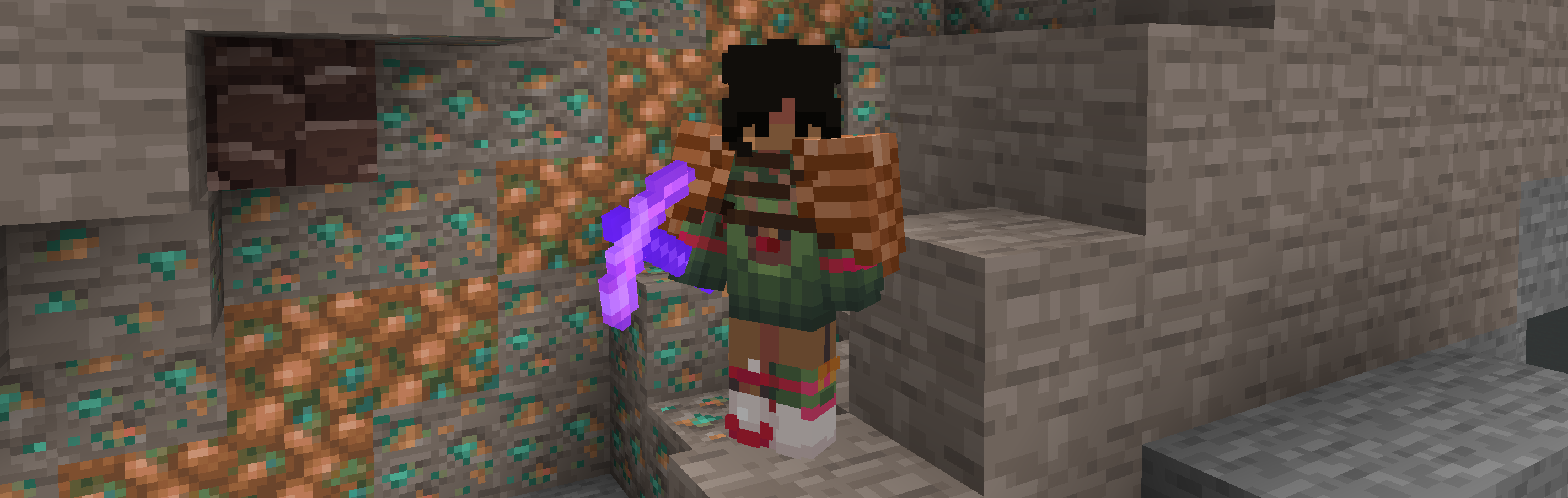
A Hypixel Skyblock resource pack that intends to bring a unique experience by swapping collections, materials and minerals, including changing their crafting trees!
FAQ:
– Do I need any mods to use this?
> – Yes! You have to use [Optifine](https://optifine.net/downloads) and [NotEnoughUpdates](https://github.com/Moulberry/NotEnoughUpdates/releases).
> – *Additionally, it’s **heavily** recommended to use [Skyhanni](https://github.com/hannibal002/SkyHanni/releases) for the full, intended experience as the pack allows you to change the colour values and names of items. I wish there was a case where you could use a resource pack to change the name of the items, but unfortunately there isn’t. Please do join our [discord server](https://discord.gg/2s4y8mZvR2) to be able to get the commands or the visual_words.json file for the renamed items, and it shouldn’t take long to set everything up!*
– Does this pack support 1.20+?
> – Not yet! The plan is to first update this pack on 1.8.9 before porting it forwards.
– What does this pack change?
> – Currently, it only swaps Dwarven Mines related content, but i’m planning on expanding on the concept and going onto different islands!
– NotEnoughUpdates doesn’t re-texture certain mineable and non-mineable blocks, how do I fix this?
> – Sadly, this is a bug with NotEnoughUpdates itself and i’ve been waiting for a fix for over a year now. As of right now, there are no fixes and we’re just waiting an update to the mod itself that fixes these inconsistencies!
– How do you get the ideas for the item swaps?
> – It depends, I may make an idea on my own or ask the community for feedback or suggestions. Overall, i’d like to make this resource pack as best as it can be, and as unique as it can be too with the help & effort of the community.
– Am I allowed to make my own iteration of a Hypixel Skyblock Swap resource pack?
> – Of course! This isn’t a trademarked idea lol. I want this pack to be a key to like a gateway of weird stuff, so people can know that it’s okay to make more than just a resource pack that adds-in textures for items. Why not have some fun with it?
– Am I allowed to make an [X] Resource Pack-like versions of this pack, to act as addons for other packs?
> – Definitely, please do credit the pack and/or me in the description though!
> Here’s a small funfact; this resource pack was originally going to be a fan-made addon for Furfsky, using the same swap concept in the pack’s art style. In the end, I ended up going the standalone route.
– Can I use the textures from this pack in my own texture packs?
> – Only if it’s a personal pack! Please don’t upload and claim ownership of the sprites. If anything, you may message me on discord so we could discuss it!