Pack Goals:
– Make any Items, blocks, Mobs, or Other Textured Objects Adhere to the style created in earlier versions.
– Fix Any Bugs With The Vanilla Programmer Art (Improper Horse models, Zombie Pigman, Villagers, etc).
– Fix Any Inconsistencies That Started to Crop Up Around Release 1.5 and especially Release 1.12 and 1.13.
– Fill in gaps where Notch/Mojang forgot to make a texture (Farmland Sides, A Bottom Texture for the Crafting Table, etc).
——————————————
Whats changed:
– Whats included in the pictures.
– Various Splahes.
– Every Doubleslab texture.
– Removes 1.16 and up biome-dependant music.
– Potions have a glint and thick/mundane/awkard potions have unique textures (www.planetminecraft.com/texture-pack/time-s-potions/)
– Vlem Replaces Pigstep (www.planetminecraft.com/texture-pack/pigstep-to-calm4-ogg/)
– Dog Replaces Otherside (https://www.planetminecraft.com/texture-pack/time-s-discs-otherside-to-dog/)
– Eleven Replaces Creator Music Box (https://www.youtube.com/watch?v=l9nULbHnzfk)
– 0x10c Replaces Precipice (https://www.youtube.com/watch?v=ImwvjsD1row)
– Ricochet Replaces Creator (https://www.youtube.com/watch?v=itE92Fm9xA8)
– Horse Models (https://www.planetminecraft.com/texture-pack/time-s-old-horses-optifine/)
– Some Misc GUIs (loom, Crafting Book, etc).
– Improved grass/leaf colormaps.
– Tools show durability
– Programmer Art Optifine CTM
– Misc other Stuff
——————————————
What might/will change in the future (In no particular order):
– Happy Ghast Equiment Models/Items
– Sniffer
– Sculk
– Panda
– Optifine Compatibility Expanded To Newer Mods
——————————————
Requirements & Such:
– Requires Programmer Art (Under It In Pack Selection Menu).
– Requires Optifine for correct Pigman head shapes and Horse models.
– Requires The Appropriate Minecraft Version.
——————————————
### Thanks for Downloading!
——————————————
If you want a specific version not shown here (such as for a modded world) just ask on the wiki/planet minecraft link. I have old backups stored elsewhere.

Images (Gifs)

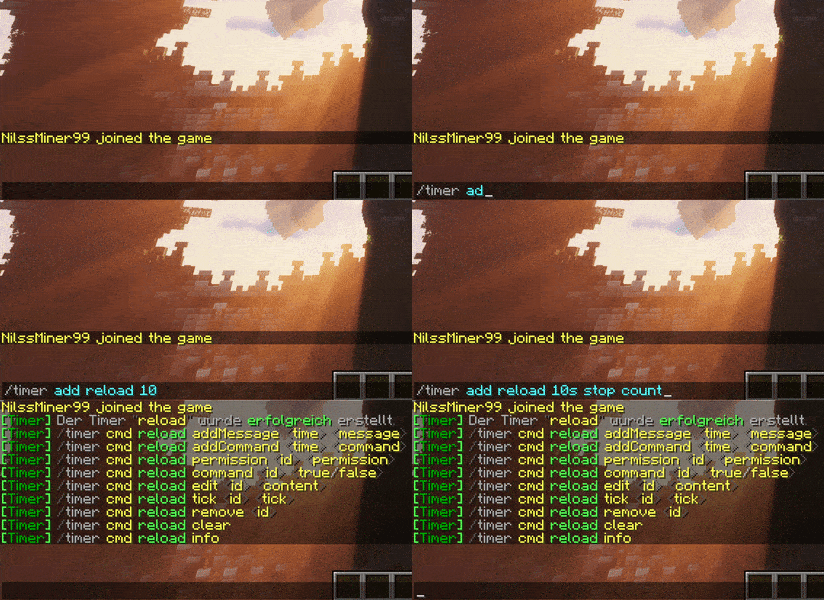
You are able to use the **time argument** in commands with more than one parameter.
Example: **2h10min** or **10min2h30s**

“`
/timer add
/timer set enable
/timer set disable
/timer set stop
/timer set save
/timer set ticks
/timer set name
/timer cmd [arguments]
/timer types
/timer remove
/timer info
/timer list
/timer reload
/timer save
/timer load
“`
“/timer cmd reload addMessage 30s &aReload in &c30&7Seconds&8.“
“/timer cmd reload addMessage 15s &aReload in &c15&7Seconds&8.“
“/timer cmd reload addMessage 10s &aReload in &c10&7Seconds&8.“
“/timer cmd reload addMessage 5s &aReload in &c5&7Seconds&8.“
“/timer cmd reload addMessage 4s &aReload in &c4&7Seconds&8.“
“/timer cmd reload addMessage 3s &aReload in &c3&7Seconds&8.“
“/timer cmd reload addMessage 2s &aReload in &c2&7Seconds&8.“
“/timer cmd reload addMessage 1s &aReload in &c1&7Second&8.“
“/timer cmd reload addMessage 0 &cReloading&8.“
**3.**
Now we add the reload command on the last tick
“/timer cmd reload addCommand 0 reload“
**4.**
Finish
Now we can enable and check if it works with
“/timer set reload enable“
or
“/timer list“ **(click on enable)**
Create a broadcast messages
**1.**
Create a timer with action message
“/timer add broadcast 1min reset msg“
**2.**
Now we need to add some messages
“/timer cmd broadcast addMessage &aTest &81“
“/timer cmd broadcast addMessage &aTest &82“
“/timer cmd broadcast addMessage &aTest &83“
“/timer cmd broadcast addMessage &aTest &84“
“/timer cmd broadcast addMessage &aTest &85“
**3. (Optinal)**
Change the sort type of wich message get as next
“/timer cmd broadcast sort roundrobin“
**4.**
Finish
Now we can enable and check if it works with
“/timer set broadcast enable“
or
“/timer list“ **(click on enable)**
Language
[English](https://gist.github.com/NgLoader/4962691cd7a283a3ecc32284e3437286)
“thanks to minecraftreagan“
TigerReports
# TigerReports by MrTigreroux
**1.7+ Spigot** plugin
**MySQL** & **BungeeCord** support
**Vault** chat prefixes and suffixes support
**Discord** support by installing [TigerReportsSupports](https://modrinth.com/plugin/tigerreportssupports) plugin
## Description
TigerReports is a highly configurable and detailed plugin to manage player reports. It works with a simple command `/report` which registers many data that is displayed in a staff GUI (a chest).
## Operation
Players can report online and offline players (it depends on the config) with a cooldown and a minimum amount of characters. If they don’t specify any reason, a GUI (chest) is opened to select one of the defaults (configurable) reasons.
When a report is sent, online staff is alerted by a clickable message that opens a menu.
This menu allows to:
– **Teleport** to current and older (during the report) location of the reporter and the reported players.
– **Punish** if it’s an abusive report with a cooldown of configured time (the report is marked as false when this punishment is used).
– See **advanced data** like gamemode, health, effects, and more of the reported player.
– Mark the **report status** as: Waiting, In progress, Important or Done.
– **Archive** the report (removed from the main menu but kept in the database).
– **Delete** the report definitively.
– Write and see **comments** from the staff on the report.
– See **messages history of participants** of the report posted before the report.
When a staff marks a report as Done, he can leave an appreciation between: true, uncertain and false.
The report is displayed in the main menu until an advanced staff archives or deletes it.
## Config
The plugin can be configured in config.yml file.
You can see a list of all parameters that can be modified and a description of what they do [here](https://github.com/MrTigreroux/TigerReports/wiki/Config).
The default config.yml settings are [here](https://raw.githubusercontent.com/MrTigreroux/TigerReports/master/src/main/resources/config.yml).
## Messages
Messages are by **default in French** but all can be modified in messages.yml file.
**Why?** Because I’m French I don’t want the default messages of the plugin to have bad english but I nevertheless wrote a base of english below if you don’t have the time/motivation to translate them by yourself.
They are updated after all new versions.
If you run a 1.16+ Spigot server, you can set hex colors in messages.yml file with `&#FFFFFF` or `&x&F&F&F&F&F&F` format for #FFFFFF hex color with `&` set for [Config: ColorCharacter](https://github.com/MrTigreroux/TigerReports/blob/f2a7d0c3ba5ea85a3e2da2d3bdd06e8ab80b1855/src/main/resources/config.yml#L6) in config.yml file.
**Important:** If you use Minecraft **1.8 or less**, you must encode messages.yml file with **ANSI**, else you must encode it with **UTF-8**.
If messages are not changed, it means that you encoded with wrong format.
**Also**, you can’t put a comment (`#Message`) at first line of the file. If you do it messages will simply not be implemented.
### Update your messages
If you recently updated TigerReports to the latest version, you can update your messages (in messages.yml file) with this online tool:
[](https://mrtigreroux.github.io/plugins/tigerreports)
### Default messages
Click on your language below, then press `CTRL` and `A` keys to select all the messages and then copy/paste them (`CTRL` and `C` then `CTRL` and `V`).
*(thanks to people who shared these translations, their pseudo is at the top of the file)*
## Commands
You can see all available commands [here](https://github.com/MrTigreroux/TigerReports/wiki/Commands).
## Permissions
You can see all available permissions [here](https://github.com/MrTigreroux/TigerReports/wiki/Permissions).
## Installation
TigerReports is a plugin which doesn’t depend on the Minecraft version. It is meant to work on all versions of Spigot **higher or equal to 1.7**.
Installation of TigerReports is standard:
– Stop your Spigot server.
– Download and put TigerReports.jar file in plugins folder of your server.
– Launch your server.
That’s it, you can now edit all that you want in `./plugins/TigerReports` folder, save your changes and apply them on the server by reloading with `/reports reload` command. Some features/messages need a restart of the server to be updated.
If you have a **BungeeCord network**:
You have to configure a **MySQL database** in config.yml file (at the bottom of the file) of **each of your Spigot servers** and leave the BungeeCord option enabled.
_(**You don’t have** to put TigerReports.jar in the plugins folder of the BungeeCord network server)_
I recommend you to:
– Edit messages.yml and config.yml files to your needs.
– Check that all is good on one server.
– Select TigerReports folder (in plugins folder of your server), then hold `CTRL` key and select TigerReports.jar.
– You can now copy both files and paste them on each of your Spigot servers.
If you want the **Discord** support:
Install the [TigerReportsSupports](https://modrinth.com/plugin/tigerreportssupports) plugin following instructions in the presentation page of that plugin (in *Installation* section).
### Common issues
The BungeeCord (only) commands cannot be executed by a Spigot plugin for a player, therefore **you can’t configure** a BungeeCord command in [PunishCommands](https://github.com/MrTigreroux/TigerReports/blob/f1e2aa57566264690e28071fa892fbfed3397f88/TigerReports/src/config.yml#L78) in config.yml file. **However**, a player can still execute them, therefore you can send a tellraw to the staff member, explaining him that he has to click on the message to execute the BungeeCord command.
You can use an online tellraw generator like [this one](https://minecraft.tools/fr/tellraw.php).
Example of a command put for [PunishCommands](https://github.com/MrTigreroux/TigerReports/blob/f1e2aa57566264690e28071fa892fbfed3397f88/TigerReports/src/config.yml#L78) in config.yml file:
“`
‘-CONSOLE tellraw _Staff_ {“text”:”[Apply the punish command]”,”clickEvent”:{“action”:”run_command”,”value”:”/bungeebancommand _Reported_ 5d Fly”}}’
“`
*(Note: you must put `’` at the beginning and at the end of the command because the tellraw command contains `”`)*
If you experience some lags/want to minimize the impact of the plugin on the server performance:
You can consider:
– setting a high value for `Config: MenuUpdatesInterval`
– disabling `Config: CollectSkulls`
– setting a small value for `Config: MessagesHistory`
– setting a small value for `Config: MaxReports`
– enabling `Config: StackReports` if you frequently have several reports for a same player
– disabling `Config: ChatReport` feature
– setting a small or empty list for `Config: CommandsHistory`
– enabling `Config: ReportOnline`
## Terms of Service
Please respect my work respecting these directions:
– Do not claim this plugin as yours.
– Do not distribute or sell this plugin on this site or another, just redirect to this page.
– Do not copy part or all of source code without quoting me and notifying me (MrTigreroux).
And that’s all, thank you for reading this page.
If you want to look at sources, the plugin is on [GitHub](https://github.com/MrTigreroux/TigerReports).
> If you encounter any bug or have suggestions, let me know them here:
> – [GitHub](https://github.com/MrTigreroux/TigerReports/issues)
>
> I will answer as soon as possible.
Please keep in mind that I made this plugin for free to help people who don’t know how to create their own plugin, a like or feedback is highly appreciated. 🙂
Thorough Keybindings
For as many Minecraft versions as possible, this mod makes the keybindings of usually fixed mappings rebindable. This is a client side mod.
For example, this lets you remap Escape and F3 in-game, even in versions before F3 was made rebindable. Also adds rebinding options for Shift, Control, Alt as well as the digits to navigate the profiling pie chart. Furthermore, backports mappings to earlier game versions, like rebinding F5 or hotbar slot keys.
For versions 1.14 to 1.21, this mod uses [Fabric](https://fabricmc.net/) and requires the [Fabric API](https://modrinth.com/mod/fabric-api) to run.
For versions beta 1.0 to release 1.13, this mod uses [Ornithe](https://ornithemc.net/) with Fabric and requires the [Ornithe Standard Libraries](https://modrinth.com/mod/osl) to run.
Thijzert’s Exploration Panorama
Changes the panorama in the main menu to be a custom one made with Thijzert’s Exploration Pack.
The Master Sword
A resource pack which replaces either the Netherite Sword or the Diamond Sword with a vanilla-styled Master Sword from The Legend of Zelda!
The Last Sword You Will Ever Need Mod adds as it says the last sword you will ever need. It is a sword that can one hit KO the Ender Dragon.
The sword is crafted using four diamond blocks surrouding the dragon egg. You’ll need to defeat the dragon and get the egg as an item to be able to craft this unstoppable sword!
Enjoy!
The Food Eating Animation
**The Food Eating Animation**
A texture pack that adds sprite animations for edible and drinkable items.
This pack animates every single item you can eat or drink in vanilla Minecraft without mods
This is a simple resourse pack that makes your HUD Colerful and fun Please Enjoy!
And also check out my [Youtube Chennel](https://www.youtube.com/@CollinsController)