TitleAnnouncer
# TitleAnnouncer
[](https://github.com/4drian3d/TitleAnnouncer/actions)

[](https://discord.gg/5NMMzK5mAn)


A lightweight plugin to send Titles, Actionbars, Bossbars and Chat Announces to Paper servers and Velocity networks.
## Features
– Ability to send announcements by using titles, actionbars, bossbars, and chat messages.
– Send announcements to users in the same world or server you are in.
– Send announcements to a specific user.
– Use of the [MiniMessage format](https://docs.adventure.kyori.net/minimessage.html#format) throughout the plugin, allowing the maximum possible customization.
– [MiniPlaceholders](https://modrinth.com/plugin/miniplaceholders) support
[](https://www.bisecthosting.com/4drian3d?r=ModTitleAnnouncer)
## Commands
To use the commands in Velocity, just add a “v” at the beginning of the command, for example: “/vannounce” or “/vtitleannouncer”.
### Announce Command
| Command | Arguments | Permission |
|————————-|————————————————————————————————|————————|
| /announce or /vannounce | [(Format type)](#format-argument) [(Target Argument)](#target-argument) (Format Arguments) | titleannouncer.command |
## Arguments
### Target Argument
When sending an announcement, you can define who to send it to using the target argument.
This argument allows you to select either an online player or the executor themselves, a server, or a world to send the announcement to.
The available targets are:
#### Self Target
This target allows you to send the respective announcement to the same executor of the command.
Keep in mind that if the server console uses this target, it will not be able to receive bossbars, actionbars, titles, or sounds;
it will only be able to receive chat announcements
**Example Usage**
`/(v)announce chat self Some announcement`
#### Player Target
This target allows you to send an announcement to a specific player.
Use the format `“player:PlayerName”`.
As it is an argument that uses a colon character and due to limitations of the Minecraft Vanilla command system,
it must be enclosed in quotation marks.
If executed in-game, online player names will be suggested.
**Example Usage**
`/(v)announce title “player:4drian3d” “TitleAnnouncer” “by 4drian3d”`
#### All Target
This target allows you to send an announcement to all players on the server or proxy.
If you run the command from TitleAnnouncer in Velocity, the announcement will be sent to all players on your network.
If you run it from TitleAnnouncer installed in Paper, the announcement will be sent to players connected to the server where it is run.
**Example Usage**
`/(v)announce actionbar all TitleAnnouncer | `
#### Server Target
> This target is exclusive to Velocity
This target allows you to send an announcement to the specific server where the player executing it is connected, or to a specific server.
For the executor to send the announcement to the server where it is connected, you only need to place `server` as an argument.
But if the executor wants it to be executed on another server, it must be specified with the format `“server:ServerName”`.
Like the player argument, when requiring `:`, it must be enclosed in quotation marks.
**Example Usage**
`/vannounce bossbar server 30 blue notched_12 A big announcement!!!`
`/vannounce bossbar “server:lobby” 30 blue notched_12 A big announcement!!!`
#### World Target
> This target is exclusive to Paper
This target allows you to send an announcement to the world where the player executing the command is located or to a specified world.
If you want to send the announcement to the world where the player is located, you must use the `world` argument.
But if you want to specify another world, you must use the `“world:WorldName”` argument.
Like the player argument, when requiring `:`, it must be enclosed in quotation marks.
**Example Usage**
`/announce bossbar world 30 blue notched_12 A big announcement!!!`
`/announce bossbar “world:lobby” 30 blue notched_12 A big announcement!!!`
### Format Argument
#### Chat Format
| Arguments | Permission |
|————-|—————————–|
| [Message] | titleannouncer.command.chat |

#### Actionbar Format
| Arguments | Permission |
|————-|———————————-|
| [Message] | titleannouncer.command.actionbar |

#### Title Format
| Arguments | Permission |
|—————————————————————–|——————————|
| [Title] [SubTitle] (FadeIn Time) (Stay Time) (FadeOut Time) | titleannouncer.command.title |

#### BossBar Format
| Arguments | Permission |
|—————————————————|——————————–|
| [Display Time] [Color] [Overlay] [Content] | titleannouncer.command.bossbar |

#### Sound Format
> If running on Velocity, this format will only be able to send sounds to players with versions higher than 1.19.3.
| Arguments | Permission |
|———————————————-|——————————|
| [Sound Key] (Source Type) (Volume) (Pitch) | titleannouncer.command.sound |
Tip4serv Donation Webstore
[Tip4serv.com](https://tip4serv.com/?ads=modrinth) provides gaming communities with a platform to effortlessly set up their virtual store and facilitate the sale of digital goods, including donations.
Managing a community and creating content can be demanding tasks. We aim to streamline the process, enabling managers to efficiently handle donations and automatically reward players.
Our mission is to deliver a user-friendly platform that simplifies the experience for both creators and buyers.
Here are examples of stores that you can customize: [https://murga.tip4serv.com](https://murga.tip4serv.com), [https://neon.tip4serv.com](https://neon.tip4serv.com) and [https://steelcraft.tip4serv.com](https://steelcraft.tip4serv.com)
## Features for starter plan (only 5% fee)
– Unlimited game servers & commands
– Create subscriptions plan
– Commands status tracking
– Stock management
– Deliver roles & messages on Discord
– Create discount coupon
– Add managers for your store
– Purchase email and invoice
– Sales statistics
– Private flow for subscribers
– Custom sub-domain
– Resend commands
– No ads
## Features for PRO members (subscription required)
– Dynamic Dark/Light theme
– Account linking with avatars
– Product page with gallery & video
– GUI colors editor & additional CSS
– Top customers & related products
## Store available in 15 languages
English, Danish, Dutch, English, French, German, Hungarian, Italian, Norwegian, Polish, Portuguese, Romanian, Russian, Spanish, Swedish and Turkish.
## Payment method
Here are the payment methods you can offer your players: Visa, Paypal, Cash App, Google Pay, Apple Pay, Ideal, GiroPay, BanContact, Sofort, Sepa, EPS, BACS, Amazon Pay, Revolut Pay, Mobile Pay, MultiBanco, BECS, Przelewy24, Boleto, Oxxo, Afterpay, Link.
## How does this work?
Tip4Serv checks if a player has made a donation on your Tip4Serv store and delivers the order in a minute (e.g., group, money, etc.) by executing commands in the server console.
Create your store and connect your Minecraft server in **5 minutes** on [Tip4Serv](https://tip4serv.com) in 4 simple steps:
1. **Store Settings:**
Enter your store name and set the desired URL.
2. **Payment Methods:**
Select your preferred payment options.
3. **Connect Server:**
Link your Minecraft server to Tip4Serv using your API key.
4. **Add Products:**
Create and configure products with executable commands on your server.
## Commands
**tip4serv connect** – Link your server to Tip4Serv (Ensure the API key is correctly set in tip4serv/tip4serv.key).
**tip4serv reload** – Deliver pending orders if there are any.
**/storelink** – Show a link to the store in the server chat.
## Proxy commands (Velocity & Bungeecord)
**tip4proxy connect** – Link your server to Tip4Serv.
**tip4proxy reload** – Deliver pending orders if there are any.
## Need help?
– [Documentation](https://docs.tip4serv.com/games/minecraft)
– [Contact us](https://tip4serv.com/contact)
Tiny Tools+
Are the default tools taking up too much screen space? “Tiny Tools+” offers a clean and subtle redesign of all essential items — Sword, Pickaxe, Axe, Shovel, and Hoe — now in smaller, sleeker versions!
This pack retains the vanilla Minecraft feel while making your tools more compact — perfect for PvP or simply a cleaner visual experience.
tiny tools
a resource pack that tools smaller but preserve the vanilla look.
showcase video:
if you want to download every tool individualy
tiny spears:https://modrinth.com/resourcepack/tiny-spear
tiny shears:https://modrinth.com/resourcepack/tiny-shears
tiny mace:https://modrinth.com/resourcepack/tiny-mace
tiny pickaxe:https://modrinth.com/resourcepack/tiny-pickaxe
tiny axe:https://modrinth.com/resourcepack/tiny-axe
tiny swords:https://modrinth.com/resourcepack/tiny-sword
tiny trident:https://modrinth.com/resourcepack/tiny-trident
Tiny bow:https://modrinth.com/resourcepack/tiny-bow
tiny sield:https://modrinth.com/resourcepack/tiny-shield
Tiny crossbow:https://modrinth.com/resourcepack/tiny-crossbow
Tiny shovels:https://modrinth.com/resourcepack/tiny-shovels
Tiny hoes:https://modrinth.com/resourcepack/tiny-hoe
tiny fishing rod:https://modrinth.com/resourcepack/tiny-fishing-rod
tiny buckets:https://modrinth.com/resourcepack/tiny-buckets
all my packs:https://modrinth.com/user/erez43
tiny sword
a resource pack that that make the sword texture smaller but still preserve the vanilla look.
This resource pack is part of my ”tiny tools” series. packs in the series:
tiny spears:https://modrinth.com/resourcepack/tiny-spear
tiny shears:https://modrinth.com/resourcepack/tiny-shears
tiny mace:https://modrinth.com/resourcepack/tiny-mace
tiny pickaxe:https://modrinth.com/resourcepack/tiny-pickaxe
tiny axe:https://modrinth.com/resourcepack/tiny-axe
tiny swords:https://modrinth.com/resourcepack/tiny-sword
tiny trident:https://modrinth.com/resourcepack/tiny-trident
Tiny bow:https://modrinth.com/resourcepack/tiny-bow
tiny sield:https://modrinth.com/resourcepack/tiny-shield
Tiny crossbow:https://modrinth.com/resourcepack/tiny-crossbow
Tiny shovels:https://modrinth.com/resourcepack/tiny-shovels
Tiny hoes:https://modrinth.com/resourcepack/tiny-hoe
tiny fishing rod:https://modrinth.com/resourcepack/tiny-fishing-rod
tiny buckets:https://modrinth.com/resourcepack/tiny-buckets
all my packs:https://modrinth.com/user/erez43
tiny shears
resource pack that make shears smaller but still preserve the vanilla look
This resource pack is part of my ”tiny tools” series. packs in the series:
tiny spears:https://modrinth.com/resourcepack/tiny-spear
tiny shears:https://modrinth.com/resourcepack/tiny-shears
tiny mace:https://modrinth.com/resourcepack/tiny-mace
tiny pickaxe:https://modrinth.com/resourcepack/tiny-pickaxe
tiny axe:https://modrinth.com/resourcepack/tiny-axe
tiny swords:https://modrinth.com/resourcepack/tiny-sword
tiny trident:https://modrinth.com/resourcepack/tiny-trident
Tiny bow:https://modrinth.com/resourcepack/tiny-bow
tiny sield:https://modrinth.com/resourcepack/tiny-shield
Tiny crossbow:https://modrinth.com/resourcepack/tiny-crossbow
Tiny shovels:https://modrinth.com/resourcepack/tiny-shovels
Tiny hoes:https://modrinth.com/resourcepack/tiny-hoe
tiny fishing rod:https://modrinth.com/resourcepack/tiny-fishing-rod
tiny buckets:https://modrinth.com/resourcepack/tiny-buckets
all my packs:https://modrinth.com/user/erez43
tiny pickaxe
resource pack that make the pickaxe smaller but still preserve the vanilla look.
This resource pack is part of my ”tiny tools” series. packs in the series:
tiny spears:https://modrinth.com/resourcepack/tiny-spear
tiny shears:https://modrinth.com/resourcepack/tiny-shears
tiny mace:https://modrinth.com/resourcepack/tiny-mace
tiny pickaxe:https://modrinth.com/resourcepack/tiny-pickaxe
tiny axe:https://modrinth.com/resourcepack/tiny-axe
tiny swords:https://modrinth.com/resourcepack/tiny-sword
tiny trident:https://modrinth.com/resourcepack/tiny-trident
Tiny bow:https://modrinth.com/resourcepack/tiny-bow
tiny sield:https://modrinth.com/resourcepack/tiny-shield
Tiny crossbow:https://modrinth.com/resourcepack/tiny-crossbow
Tiny shovels:https://modrinth.com/resourcepack/tiny-shovels
Tiny hoes:https://modrinth.com/resourcepack/tiny-hoe
tiny fishing rod:https://modrinth.com/resourcepack/tiny-fishing-rod
tiny buckets:https://modrinth.com/resourcepack/tiny-buckets
all my packs:https://modrinth.com/user/erez43
Tiny Items
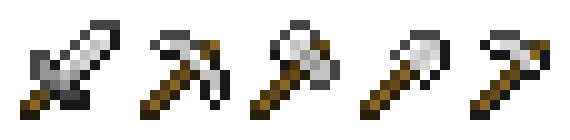
Simple resourcepack that makes items (weapons & tools) smaller in GUI and your hands, but also tries to save the vanilla look and 16×16 resolution.
This resourcepack does not need optifine/CIT, it can work perfectly in vanilla Minecraft.
tiny bow
resource pack that make the bow smaller but still preserve the vanilla look.
This resource pack is part of my ”tiny tools” series. packs in the series:
tiny spears:https://modrinth.com/resourcepack/tiny-spear
tiny shears:https://modrinth.com/resourcepack/tiny-shears
tiny mace:https://modrinth.com/resourcepack/tiny-mace
tiny pickaxe:https://modrinth.com/resourcepack/tiny-pickaxe
tiny axe:https://modrinth.com/resourcepack/tiny-axe
tiny swords:https://modrinth.com/resourcepack/tiny-sword
tiny trident:https://modrinth.com/resourcepack/tiny-trident
Tiny bow:https://modrinth.com/resourcepack/tiny-bow
tiny sield:https://modrinth.com/resourcepack/tiny-shield
Tiny crossbow:https://modrinth.com/resourcepack/tiny-crossbow
Tiny shovels:https://modrinth.com/resourcepack/tiny-shovels
Tiny hoes:https://modrinth.com/resourcepack/tiny-hoe
tiny fishing rod:https://modrinth.com/resourcepack/tiny-fishing-rod
tiny buckets:https://modrinth.com/resourcepack/tiny-buckets
Tiny Bold Font (TBF)
This fontpack adds a tiny and bold font.
To install it, make sure to select it in the resource packs screen and put it on top of other font packs.
_This font uses caps as lowercase._
# MY OTHER FONTS
– [Paramita Font by SourAlien](https://modrinth.com/resourcepack/paramita-font-by-souralien)
– [Marga Font by SourAlien](https://modrinth.com/resourcepack/marga-font-by-souralien)
– [PP Font](https://modrinth.com/project/pp-font)
– [Anicca Font by SourAlien](https://modrinth.com/resourcepack/anicca-font-by-souralien)
– [Warm Mojangles](https://modrinth.com/resourcepack/warm-mojangles)
– [SAS SMALL CAPS FONT](https://modrinth.com/resourcepack/sas-small-caps-font)
– [sas all lowercase font](https://modrinth.com/resourcepack/sas-all-lowercase-font)
– [Samsara Mono by SourAlien](https://modrinth.com/resourcepack/samsara-mono-font-by-souralien)
– [Ostrakon Font by SourAlien](https://modrinth.com/resourcepack/ostrakon-font-by-souralien)
– [Epsilon Font by SourAlien](https://modrinth.com/resourcepack/epsilon-font-by-souralien)
– [Alice Font](https://modrinth.com/resourcepack/alice-font)
– [Sleek DR](https://modrinth.com/resourcepack/sleek-dr)
– [Synesthete’s Dream](https://modrinth.com/resourcepack/synesthetes-dream)
– [HD B&W Font](https://modrinth.com/resourcepack/hd-bw-font)