Mute Pistons
Mutes the sounds produced by Pistons and Sticky Pistons, without affecting other sounds.
Version **1.9 and above** supports changing sounds using json files, decreasing file sizes and increasing performance.
Versions **below 1.9** use the only way to do this, a 0 seconds mute sound replacement and might require a game restart.

Click here or on the image above for the Quieter version
**You might also want to use:**
|[](https://modrinth.com/resourcepack/quieter-dispensers-and-droppers)|[](https://modrinth.com/resourcepack/mute-dispensers-and-droppers)|[](https://modrinth.com/resourcepack/old-water)|[](https://modrinth.com/resourcepack/old-bedrock)|[](https://modrinth.com/resourcepack/new-bedrock)|[](https://modrinth.com/resourcepack/vanilla-hearts)|[](https://modrinth.com/resourcepack/vanilla-hunger)
|:-:|:-:|:-:|:-:|:-:|:-:|:-:|
|[Quieter Dispensers and Droppers](https://modrinth.com/resourcepack/quieter-dispensers-and-droppers)|[Mute Dispensers and Droppers](https://modrinth.com/resourcepack/mute-dispensers-and-droppers)|[Old Water](https://modrinth.com/resourcepack/old-water)|[Old Bedrock](https://modrinth.com/resourcepack/old-bedrock)|[New Bedrock](https://modrinth.com/resourcepack/new-bedrock)|[Vanilla Hearts HUD](https://modrinth.com/resourcepack/vanilla-hearts)|[Vanilla Hunger HUD](https://modrinth.com/resourcepack/vanilla-hunger)
legacy-lwjgl3
# legacy-lwjgl3
A mod for [Ornithe](https://ornithemc.net) to run old versions of Minecraft with [lwjgl3](https://github.com/lwjgl/lwjgl3).
### Usage
#### Configuration
The mod offers optional configuration options via system properties or
environment variables.
A list of currently available options is provided below.
| Property Name | Environment variable name | Description |
|———————————————–|———————————————–|——————————————————|
| `legacy_lwjgl3.use_sdl` | `LEGACY_LWJGL3_USE_SDL` | Use SDL3 instead of GLFW for window & input handling |
### Unstable versions (CI)
Bleeding-Edge versions can be found in the Actions tab of the repository: https://github.com/moehreag/legacy-lwjgl3/actions.
### Building
This mod can be built using `./gradlew build`, jars can then be found at `build/libs/`.
### Dev
This mod is published to AxolotlClient’s maven, located at https://maven.axolotlclient.com.
“`kotlin
repositories {
maven(“https://maven.axolotlclient.com/releases”)
//maven(“https://maven.axolotlclient.com/snapshots”) // for unstable versions, optional
}
dependencies {
modImplementation(“io.github.moehreag:legacy-lwjgl3:“)
}
“`
### IME support for other mods
This mod provides IME preedit overlay functionality. If other mods provide independent text field implementations
they will not integrate with IME by default. legacy-lwjgl3 publishes a small API package which allows other mods
to integrate with IME input.
“`kotlin
repositories {
maven(“https://maven.axolotlclient.com/releases”)
//maven(“https://maven.axolotlclient.com/snapshots”) // for unstable versions, optional
}
dependencies {
modImplementation(“io.github.moehreag.legacy-lwjgl3:api:“)
}
“`
### Contributing
Contributions are welcome! Due to the project structure and its goal to support as many Minecraft versions
as possible working with the codebase is not trivial. If you are interested in contributing and need
assistance please join our [Discord server](https://discord.gg/BfmYmPw3Ts)
### Credits
This mod is forked from the version for legacyfabric authored by Zarzelcow: https://github.com/Zarzelcow/legacy-lwjgl3.
It is based on [lwjgl2](https://github.com/lwjgl/lwjgl) and a forge mod by gudenau: https://github.com/gudenau/MC-LWJGL3.
Additional Credits to:
– The OrnitheMC Project: https://ornithemc.net
– Contributors to this mod, especially: [Floweynt](https://github.com/Floweynt)
Mod Remapping API
# Mod Remapping API
Remaps non-Fabric mods made for a different environment (by default obfuscated) to the current runtime mappings.
Provides hooks to expand the remapping process from other mods.
This mod doesn’t depend on a specific Minecraft version and should work on any version that Fabric Loader can launch.
### Mods depending on this API:
– [Fabricated Legacy Forge](https://modrinth.com/mod/fabricated-forge)
– [Apron](https://modrinth.com/mod/Apron)
– [Fabricated-Rift](https://modrinth.com/mod/fabricated-rift)
## Credits
### Most of the original code of the mod remapper
– paulevsGitch’s mod BetaLoader
Mod Loading Screen
# Mod Loading Screen
An advanced loading screen with the loading progress of mods. It works on all Minecraft versions, as it doesn’t even require Minecraft. Its only requirement is Fabric Loader 0.12.0 or later or Quilt Loader (specific versions of Quilt support are unknown). Do note that if you run this mod on a game other than Minecraft, the loading screen may not close itself.
## Agent
Mod Loading Screen provides a Java agent, which allows opening the loading screen before even the mod loader itself loads. This feature is primarily targeted at modpack developers who want to make a seamless loading experience. The agent can be used by passing `-javaagent:mod-loading-screen-1.0.4.jar` as a JVM argument. If the agent is used, the loading screen should *not* be installed as a mod.
## API
To depend on the API, use the Modrinth Maven. The API should be JiJed, and doing so will not include Mod Loading Screen inside your mod (it will only include the API, which is only a few kilobytes). The API is designed to have both forwards and backwards binary compatibility with future Mod Loading Screen versions. An API is provided for checking which API calls will return stubs and which ones are real.
“`gradle
repositories {
exclusiveContent {
forRepository {
maven {
name = “Modrinth”
url = “https://api.modrinth.com/maven”
}
}
filter {
includeGroup(“maven.modrinth”)
}
}
}
dependencies {
// implementation, not modImplementation!
include(implementation(“maven.modrinth:mod-loading-screen:1.0.4:api”))
}
“`
The API has two top-level classes: `LoadingScreenApi` and `AvailableFeatures`. Full javadocs are available for both classes.
MiraiMC
MiraiMC
[](https://github.com/DreamVoid/MiraiMC/releases/latest)
[](https://www.codefactor.io/repository/github/dreamvoid/miraimc)
[](https://github.com/DreamVoid/MiraiMC/actions/workflows/maven.yml?query=is%3Asuccess)

—
MiraiMC is a [mirai](https://github.com/mamoe/mirai) bot for Minecraft servers
> Mirai is a high-performance multi-platform library, as well as a framework, providing protocol support for Tencent QQ.
> Mirai is designed to handle all sorts of messaging works that can be automatically done by bots in a perfect way.
> Tencent QQ: A modern messaging software used by all Chinese netizens.
## Features
* Support Bukkit/Sponge servers.
* Support BungeeCord/Velocity proxies.
* Optimized for GUI-less OS such as Linux
* Dynamically load dependent libraries to minimize file size.
## Getting Started (Server)
1. Download MiraiMC from “Featured versions” part. Then install it like installing other plugins.
2. Configure any plugins’ that depend on MiraiMC (if any) and login to your bot account
A more detailed tutorial can be found here: https://docs.miraimc.dreamvoid.me/
## Getting Started (Plugin Developer)
* It is simple to develop a new MiriMC-based plugin by using template:
– [Maven](https://github.com/MiraiMC/MiraiMC-Template)
– [Gradle KotlinDSL](https://github.com/MiraiMC/MiraiMC-Template-Gradle-KotlinDSL)
* MiraiMC javadoc here: https://jd.miraimc.dreamvoid.me
* Detailed development tutorial here: https://docs.miraimc.dreamvoid.me/
### Dependency
#### Maven
“`
io.github.dreamvoid
MiraiMC-Integration
1.9
provided
“`
#### Gradle
“`
implementation ‘io.github.dreamvoid:MiraiMC-Integration:1.9’
“`
## Commands and permissions
### Commands
| Command | Description | Permissions |
| —- | — | —- |
| /mirai | MiraiMC Robot Command | miraimc.command.mirai |
| /mirai login [protocol] | Log in to a robot (you can execute this command multiple times to log in to multiple robots) | miraimc.command.mirai.login |
| /mirai logout | Log out and close a bot | miraimc.command.mirai.logout |
| /mirai list | List currently online bots | miraimc.command.mirai.list |
| /mirai sendfriendmessage | Send a message to a specified friend | miraimc.command.mirai.sendfriendmessage |
| /mirai sendfriendnudge | Send a stamp to a specified friend | miraimc.command.mirai.sendfriendnudge |
| /mirai sendgroupmessage | Send a message to the specified group | miraimc.command.mirai.sendgroupmessage |
| /mirai checkonline | Check if the specified robot is online | miraimc.command.mirai.checkonline |
| /mirai autologin add [protocol] | Add an autologin robot account | miraimc.command.mirai.autologin |
| /mirai autologin remove | Remove an autologin bot account | miraimc.command.mirai.autologin |
| /mirai autologin list | View autologin robot account list | miraimc.command.mirai.autologin |
| /miraimc | MiraiMC Plugin Command | miraimc.command.miraimc |
| /miraimc bind add | Add binding for player and QQ number | miraimc.command.miraimc.bind |
| /miraimc bind getplayer | Get the QQ number bound to the specified player name | miraimc.command.miraimc.bind |
| /miraimc bind getqq | Get the player name bound to the specified QQ number | miraimc.command.miraimc.bind |
| /miraimc bind removeplayer | Removes a player’s bind | miraimc.command.miraimc.bind |
| /miraimc bind removeqq | Delete the binding of a QQ number | miraimc.command.miraimc.bind |
| /miraimc reload | Reload configuration file | miraimc.command.miraimc.reload |
### Permissions
| Permission Node | Description | Default |
| ——- | —- | —- |
| miraimc.command.mirai | Allow use of `/mirai` | OP |
| miraimc.command.mirai.* | Allow all subcommands of `/mirai` | OP |
| miraimc.command.mirai.login | Allow `/mirai login` | OP |
| miraimc.command.mirai.logout | Allow `/mirai logout` | OP |
| miraimc.command.mirai.list | Allow `/mirai list` | OP |
| miraimc.command.mirai.sendfriendmessage | Allow `/mirai sendfriendmessage` | OP |
| miraimc.command.mirai.sendfriendnudge | Allow `/mirai sendfriendnudge` | OP |
| miraimc.command.mirai.sendgroupmessage | Allow `/mirai sendgroupmessage` | OP |
| miraimc.command.mirai.checkonline | Allow `/mirai checkonline` | OP |
| miraimc.command.mirai.autologin | Allow `/mirai autologin` | OP |
| miraimc.command.miraimc | Allow use of `/miraimc` | OP |
| miraimc.command.miraimc.* | Allow all subcommands of `/miraimc` | OP |
| miraimc.command.miraimc.bind | Allow `/miraimc bind` and subcommands | OP |
| miraimc.command.miraimc.reload | Allow `/miraimc reload` | OP |
## LICENSE
[GNU Affero General Public License v3.0](https://github.com/DreamVoid/MiraiMC/blob/main/LICENSE)
## Acknowledgments
Thanks to the following people/teams/projects for their contributions to MiraiMC!
* [mamoe/mirai](https://github.com/mamoe/mirai): Powerful QQ robot support library, the core and foundation of MiraiMC.
* [lucko/helper](https://github.com/lucko/helper): Provide MiraiMC with a solution to dynamically load the mirai core.
* [brettwooldridge/HikariCP](https://github.com/brettwooldridge/HikariCP): An efficient SQL connection pool, providing database connection solutions for MiraiMC.
* [LT_Name](https://github.com/lt-name): Optimized a lot of Nukkit code for MiraiMC, also provided a lot of help for MiraiMC.
* You.
[DreamVoid](https://github.com/DreamVoid) and [MiraiMC](https://github.com/MiraiMC), made with ❤.
This file is a translated version of the [original file](https://github.com/DreamVoid/MiraiMC/blob/main/README.md), and some semantics may differ from the original file.
MineGIT
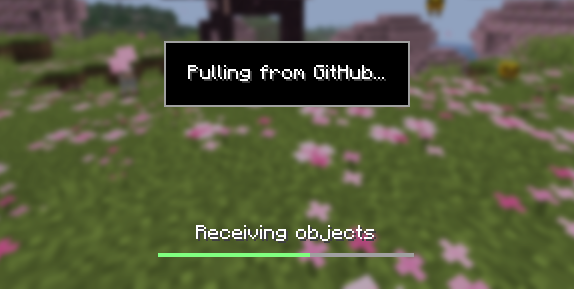
### Cloud sync for Minecraft worlds!
Sync and back up your worlds between multiple devices! Fully integrated into the Minecraft client for a seamless experience when loading, saving, and downloading worlds from the cloud.
## How does it work?
Worlds that you select are uploaded to your GitHub account as repositories. Every time you quit to the title screen, a commit of the current state of your world is created and pushed to the repository on GitHub. Whenever the world is loaded, the mod will check if any new versions of the world are available in the cloud, and if so, they will be downloaded to your device.
Since this mod uses Git internally, it also means that only the files in your world save folder that you modify will be uploaded and downloaded each time, saving storage space and internet bandwidth.
## How do I set it up?
There are several steps to setting up this mod, which include creating a personal access token for GitHub, as well as choosing the worlds you would like to enable MineGIT for.
### Video guide:
### Creating a GitHub personal access token
In order to do the first-time setup, you will need to generate a GitHub personal access token through the following steps:
1. Create an account on GitHub if you do not have one already (https://github.com)
2. Navigate to the [page to create a personal access token](https://github.com/settings/personal-access-tokens)
3. Click `Generate new token`
4. Enter any name (such as MineGIT) under `Token name`
5. Scroll to `Expiration` and set it to `No expiration` (so that you do not have to repeat this process when the token expires)
6. Under `Repository access` choose `All repositories`
7. Under `Permissions`, click `Add permissions` and select `Administration` and `Contents`
8. Set `Access` on the `Administration` and `Contents` lines to `Read and write`
9. Press `Generate token` and copy the generated token to be pasted into Minecraft later (the generated token should start with `github_pat_` and be followed by a long string of letters and numbers)
### Setting up in-game
Once the mod is installed and you are in-game, do the following steps to link your GitHub account with the mod:
1. Click on the cloud button on the bottom left corner of the world creation or world selection screen (If the button does not appear, you have already previously linked your account; see the section below entitled ‘Reconfiguring account linking’)
2. Enter your GitHub username and personal access token (PAT) that you created in the previous step on the new page that appears
3. Press the button labeled `Test credentials` to make sure you’ve entered the information properly
4. You may now exit the screen and proceed to either enable sync for a world or clone an existing one
#### Reconfiguring account linking
If you have already previously set up account linking and would like to change settings afterwards, you have a couple of options to get back to the configuration screen:
– **Configure through ModMenu:** If you have [ModMenu](https://modrinth.com/mod/mod-menu) installed, simply find the mod in the mods list and open the configuration from there
– **From the world clone screen:** There is a button in the top right corner of the world cloning screen that will open the configuration screen
– **From the world selection screen:** By holding alt and clicking on the world sync button on the bottom left of the world selection screen, you will be brought back into the configuration screen
### Enabling sync for a world
World syncing needs to be enabled individually for each world you would like to sync to your GitHub account. To enable sync for a world, do the following:
1. Select a world on the world selection screen
2. Press the cloud button in the bottom left of the screen labeled `Enable world sync`
3. Confirm your decision on the next screen
This process will create a new repository named `minegit_[world folder name]` on your GitHub account, initialize a Git repository in your world save folder, and push its current state to GitHub. From this point forward, loading the world will pull the world’s latest changes from GitHub, and exiting the world will push changes to GitHub.
You can now download this world on another device to effectively sync changes between them through the next step: cloning.
### Downloading a world on a different device (Cloning)
Cloning a world will download the exact state of the world as it was last saved to GitHub. Use the following steps to clone a world:
1. Navigate to [github.com](https://github.com) in a web browser
2. Click on your profile picture in the top right corner and then `Repositories`
3. Find the repository corresponding to the world you would like to clone and copy its name
4. Back in Minecraft, click on the button with an arrow pointing downwards labelled in the bottom left corner of either the world selection screen or world creation screen
5. Paste the name of the repository you copied earlier and press `Clone`
6. You are now able to load the world like normal and have changes be synced across your devices!
### Tips & Tricks
– If you want to exit a world without pushing it to GitHub (for example, if you wanted to restart Minecraft and load the same world without having to wait for changes to be pushed), you can hold `Alt` while clicking `Save and Quit to Title`. This will skip the ‘pushing to GitHub’ step.
– Git keeps a list of all of the worlds changes every time you exit the world. This is useful, since if you have a little knowledge of how to use the Git command line interface you can rollback your world to a previous version!
– If you want to save some storage space taken up by the size of the Git repository on your computer, or make the world quicker to clone on other devices, use the `Prune World Commits` button in the edit world menu. This will delete all of the old versions of your world, leaving only the most recent one.
## Report an issue
If you run into bugs, crashes, or simply have a suggestion on how to improve the mod, please feel free to open an issue on the mod’s [issue tracker](https://github.com/ModMonster/MineGIT/issues)!
Please include the current Minecraft version, Fabric version, mod version, and any relevant game logs when submitting an issue.
MenuFPSUnlocker
# Japanse
メインメニューのフレームレートを30fps(1.7.x~1.12.2)または60fps(1.15.x~1.20.x)から120fpsに上げることで、メニュー画面の遅延を修正するMODです。
# English
This mod fixes the delay in the menu screen by increasing the frame rate of the main menu from 30fps(1.7.x~1.12.2) or 60fps(1.15.x~1.20.x) to 120 fps.
### ModLoader
[LegacyFabric](https://legacyfabric.net/) or
[Forge](https://files.minecraftforge.net/net/minecraftforge/forge/)
### Required mods
[UniMixins 1.7.10 (Forge) ](https://modrinth.com/mod/unimixins)
[MixinBooter 1.8.x~1.11.x (Forge) ](https://modrinth.com/mod/mixinbooter/)
Invisible Item Frames

**A simple resource pack that makes item frames invisible**.
—
## Need a Minecraft Server? (Sponsor)
[](https://billing.sparkedhost.com/aff.php?aff=3138)
Get **25% off your first month** with Sparked Host.
—
## Quick info
– **Versions:** 1.4+ (full invisibility from 1.8+)
– **Works with almost all mods (Sodium/Iris and OptiFine too)**
– **No mods or commands required**
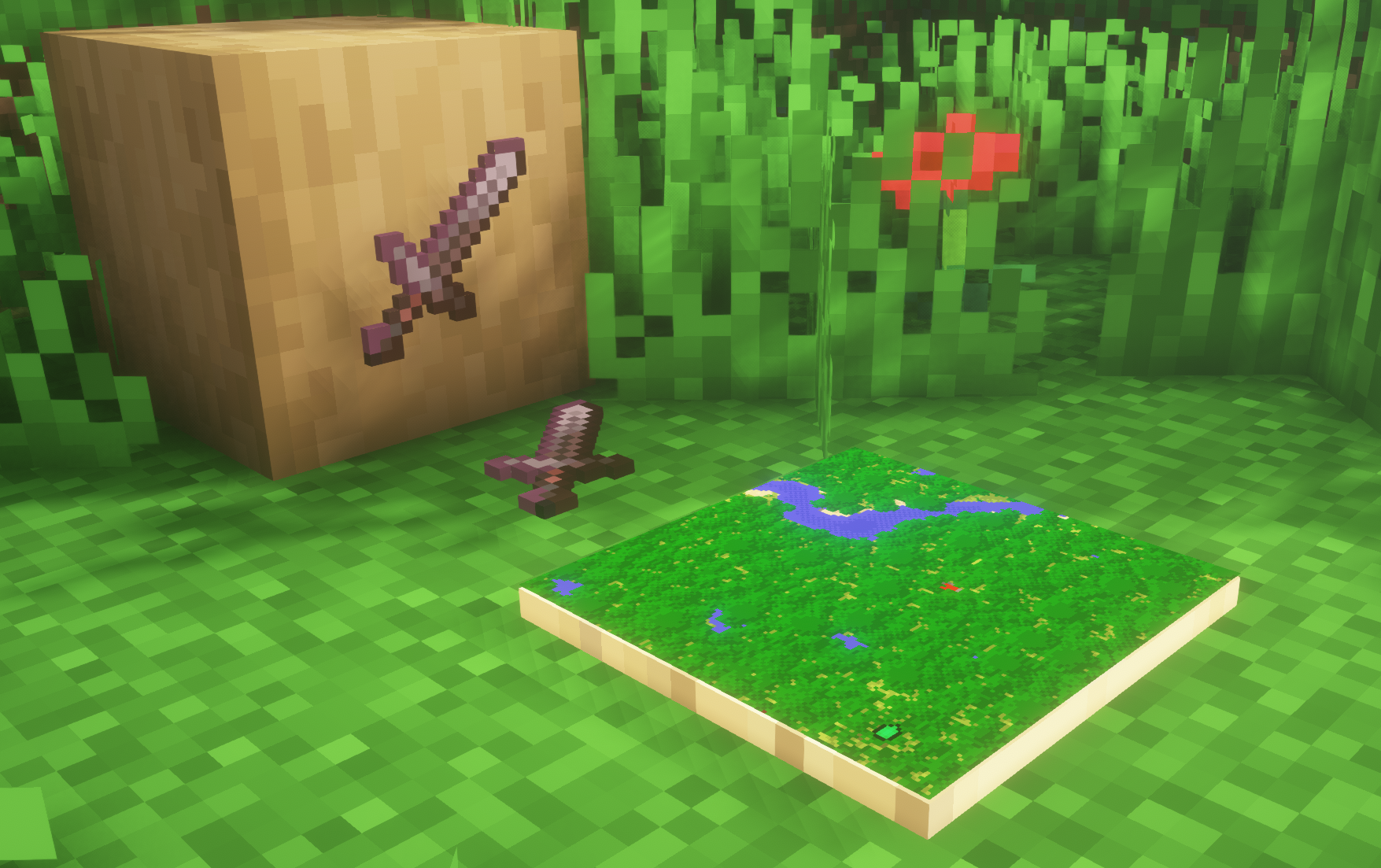
– **Additional files for invisible glow item frames and invisible map frames**
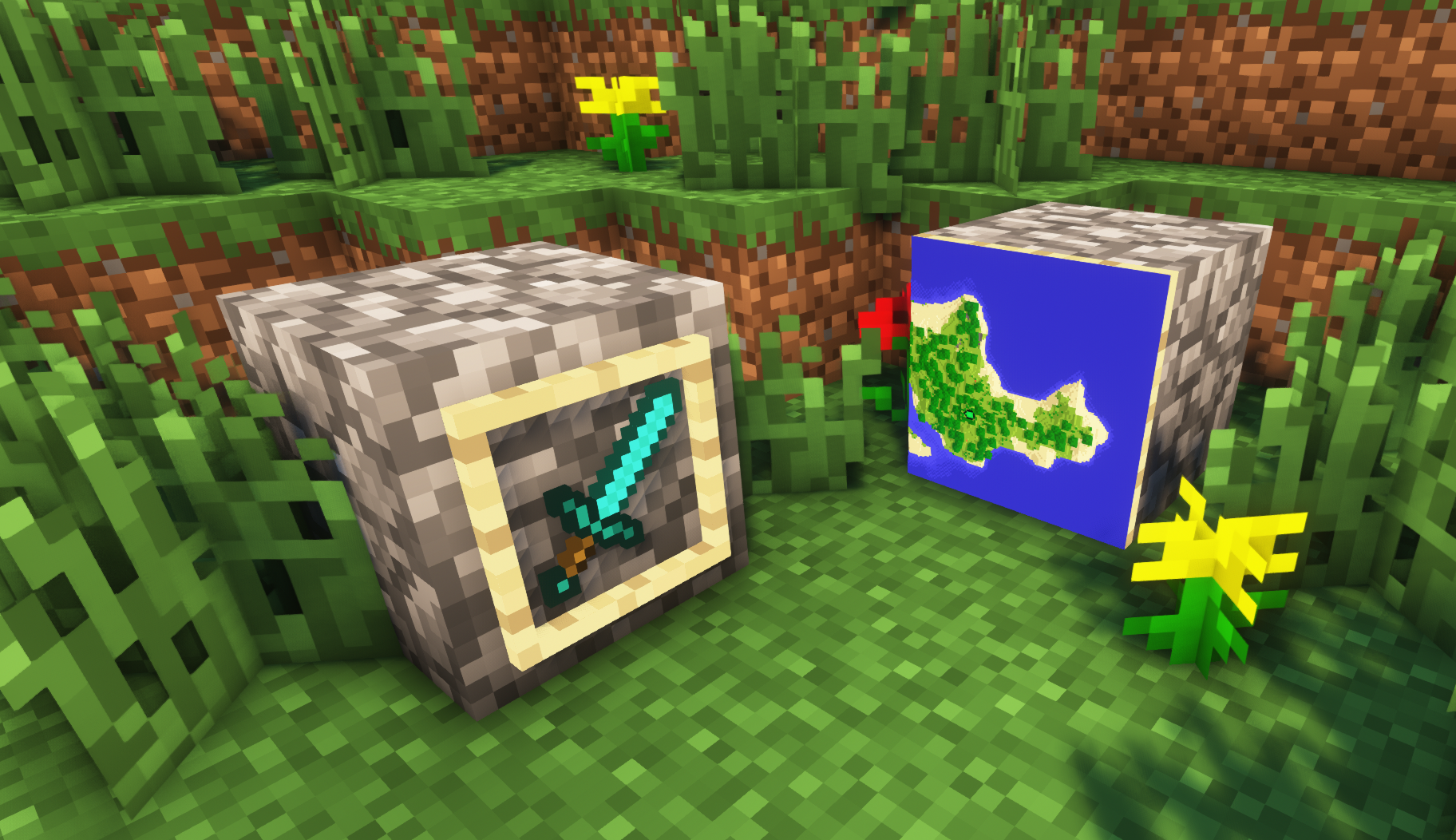
– **Versions below 1.8 will only have the center of the frame invisible (view images below for more info)**
—
## Showcase
**1.8+**
1.4-1.7.10
—
FAQ
**Can I use this with other packs?**
> Yes, but place this pack in a **higher priority (above other packs)**.
**How do I remove item frames?**
> Enable debug hitboxes using **F3 + B** and break the frame.
**Can I use this pack in my modpack or server?**
> Yes you are free to use it, as long as you don’t claim this pack as your own.
**Why is my map/glow item frame not invisible?**
> You have to install those separately. They are available under **additional files** or the buttons near the top of this page.
**Does this make the game slower?**
> This pack actually slightly **improves the client-side framerate** in scenes with lots of item frames.
—
## Additional Files
– [Download Invisible Glow Item Frames](https://cdn.modrinth.com/data/gfr4403r/versions/SVxFWAm4/Invisible-Glow-Item-Frames-V4.zip)
– [Download Invisible Map Item Frames](https://cdn.modrinth.com/data/gfr4403r/versions/SVxFWAm4/Invisible-Map-Item-Frames-V1.zip)
—
## Need a Minecraft Server? (Sponsor)
[](https://billing.sparkedhost.com/aff.php?aff=3138)
Use code **MattyWalker** for 25% off your first month.
Infinity Water Bucket

# Infinity Water Bucket Overview:
Infinity Water Bucket is a small mod that allows the Infinity enchantment for Water Buckets, using an anvil, providing an infinite portable water source. It also allows you to use the Infinity enchantment on empty Buckets, providing an infinite liquid void.
## Infinity Water Bucket Community:
Myself, along with other players of Infinity Water Bucket, can found at our Discord. There is also [a Guilded server](https://www.guilded.gg/i/Wkn138B2) for those who prefer to join it instead of Discord.
## Infinity Water Bucket Requirements:
Infinity Water Bucket can be played using either [Forge](https://files.minecraftforge.net/net/minecraftforge/forge/) or [Fabric](https://fabricmc.net/use/installer/) and even [Legacy Fabric](https://github.com/Legacy-Fabric/fabric-installer). On Fabric (including Legacy Fabric) the Fabric API is optional.
### Main Features:
– Uses Mixin to allow the Infinity enchantment to be applied to empty and water buckets.
– Works with Dispensers to place infinite water or pickup infinite liquids
– Prevents Enchanted empty buckets from milking cows
– Prevents Enchanted from picking up fish & axolotls
– Allows you to fill/consume cauldrons with an infinite supply
– Server-side, but without it on the client causes visual glitches
– Built-in Update Checker
– Mod Support
– [Caves and Cliffs Backport](https:/www.curseforge.com/minecraft/mc-mods/caves-and-cliffs-backport) – Prevents Axolotls pickups & Fill/Empty Cauldrons
– [Milk All The Mobs (Forge](https://www.curseforge.com/minecraft/mc-mods/milk-all-the-mobs/) & [Fabric](https://www.curseforge.com/minecraft/mc-mods/milk-all-the-mobs-fabric/)) – Prevents Enchanted empty buckets from milking supported entities
– [Get In The Bucket Mod](https://www.curseforge.com/minecraft/mc-mods/get-in-the-bucket-mod/) – Prevents Enchanted from picking up mobs
– Note that this mod is incompatible with [Infinity & Mending Unnerf](https://www.curseforge.com/minecraft/mc-mods/infinity-mending-unnerf)

## Minecraft Version:
Please do not ask for Infinity Water Bucket to be ported to an older version of Minecraft. coolsim intends to maintain all current Minecraft versions (1.4.7+) and is willing to backport the Forge Version further when the associated RetroGradle updates are out. coolsim will begin to update Infinity Water Bucket to 1.19 as the corresponding Forge & Fabric Full Release version is released, so please don’t ask.
## License and Modpacks:
Please feel free to use Infinity Water Bucket in any modpack whilst making sure to give credit to coolsim. Do not redistribute Infinity Water Bucket in any form.
Icon Bubbles
**This resource pack changes your hearts and hunger bar icons to be circles.**
### Features:
– Round hearts
– Round hunger bar
– Changes all types of hearts (poison, freezing, hardcore…)
– Compatible with the [AppleSkin mod](https://modrinth.com/mod/appleskin)
**♡ Make sure to follow!**