Critical PVP – Survival Friendly
## ⚔ PvP Texture Pack
A clean and competitive PvP texture pack designed for maximum clarity and performance.
Features include:
– **Bow Charger** – See immediately when you can shoot.
– **Low Fire** – Flames no longer block your vision.
– **Low Side Shield** – Shield moved to the side for better visibility.
– **Short Swords** – Compact sword models for smoother gameplay.
– **Small Totems** – Clear view with Totems in Off-Hand and on Totempop.
– **No Pumpkin Blur** – Clear view even with a pumpkin equipped.
Perfect for duels, UHC, Bedwars, or casual PvP – fight with confidence, speed, and style!
CraftDen1al
# Plugin Synopsis
This is a lightweight plugin run on server-side, which allows you to refuse certain crafting operations from client-side.
# How to Use This Plugin
Loading world with this plugin loading, this plugin will not actively modify anything. You need to create and edit a file named `craftden1al.json` (case sensitive on Linux) in the root directory of the world (i.e. in the same directory as `level.dat`).
Example of `craftden1al.json`: (“//” comments for ease of understanding, actual JSON files do not allow comments)
“`json
{
“deny_mode”: false, // defaults ‘true’; ‘true’ for deny mode and ‘false’ for allow mode; accepts: ‘true’ | ‘false’
“patterns”: [
[
{
“type”: “rege_s_simple_datapack:all”, // a string represents a condiion type, registered in rege.rege.minecraftmod.craftden1al.util.ConditionRegistry
“data”: [] // any element, depends on the type’s requirement
}, // an object represents a conditional match, or ‘null’ represents an unconditional match; accepts: an object | ‘null’
[
“minecraft:string”, // a string(available on MC 1.7+) represents the resource location of the item, or a number represents the raw ID of the item, or an object(see below) represents a more detailed item, or ‘null’ represents an empty slot
“minecraft:string”, // the same as the previous line
“minecraft:string”, // the same as the previous line
“minecraft:string” // the same as the previous line
], // an array represents a shaped or shapeless recipe’s ingredients, or ‘null’ represents that the ingredients are unimportant
{
“id”: “minecraft:wool”, // a string(available on MC 1.7+) represents the resource location of the item, or a number represents the raw ID of the item
“dv”: 0, // a number represents the DV(Damage Value) of the item
“count”: 1 // a number represents the count of the result item; won’t be useful in ingredients’ definitions
}, // a string(available on MC 1.7+) represents the resource location of the result item, or a number represents the raw ID of the result item, or an object represents a more detailed result item, or ‘null’ represents that the result item is unimportant
2, // an integer represents the width of the shaped recipe, or null represents that the width of the shaped recipe is unimportant; if both this and next element is absent, it represents that whether the recipe to match is shaped or not is unimportant
2 // an integer represents the height of the shaped recipe, or null represents that the height of the shaped recipe is unimportant; if this element is absent and the previous element is present, it represents that the recipe to match is shapeless
]
] // defaults ‘[]’; an array represents all recipe patterns to match
}
“`
So, after editing the file and restarting the server / re-entering the world, the client player will find they are only able to craft 1 [White Wool](https://minecraft.wiki/w/White_Wool) with 4 [String](https://minecraft.wiki/w/String)s, and when trying to craft other recipes, even though the result item is displayed on the right side of the crafting screen, when trying to take out the item, it will “bounce back”, thus refusing to craft certain recipes.
# Notice
Please refer to the Minecraft Wiki’s history for recipe lists, and the width and height of the shaped crafting patterns are strictly “source-code-based”.
For example, the width and height of [Diamond Axe](https://minecraft.wiki/w/Diamond_Axe)’s are 2 and 3, not 3 and 3; and must be `[“minecraft:diamond”, “minecraft:diamond”, “minecraft:diamond”, “minecraft:stick”, null, “minecraft:stick”]`, not its horizontal-mirrored form (i.e. `[“minecraft:diamond”, “minecraft:diamond”, “minecraft:stick”, “minecraft:diamond”, “minecraft:stick”, null]`).
If you are not able to view the source code, the best way is to write both to the pattern.
# FAQ
Q: Is it useful to run this mod on the client-side?
A: Client-side loading of this mod is useful for entering singleplayer worlds. It takes no effect for entering multiplayer games. Whether it takes effect depends on whether this mod is loaded on the server side.
Q:Seems that the pattern defined in `craftden1al.json` did not being loaded?
A:Please check whether the content of `craftden1al.json` conforms to the syntax of JSON (pay special attention to the presence or absence of commas, whether the symbols are halfwidth, and no comments allowed). If there is a syntax error, the game log will show `Incorrect JSON syntax of craftden1al.json, giving up loading: reason`. As well as confirming that the key names are spelled correctly (e.g. `patterns` is written as `pattern` causing no patterns to load), and that the recipe list is incorrect.
Q: In Creative Mode, I can press a number key to move an item from the result item slot out without bouncing it back?
A: This is a feature of Creative Mode, this won’t happen in Survival/Adventure Mode.
Q: Will `craftden1al.json` be overwritten because it contains invalid item IDs, etc.?
A: No. This plugin will only read the file, not write to it.
CME is Bad
# Abstract
Players and modpack developers sometimes find the game crashed with `ConcurrentModificationExceptions` (CME) and `IndexOutOfBoundsExceptions` (IOOBE), which only give stacktrace of current thread and are hard to trace which mod causes them. Here’s one of the crashes which is caused by SimpleReloadInstance in 1.20.1 Forge:
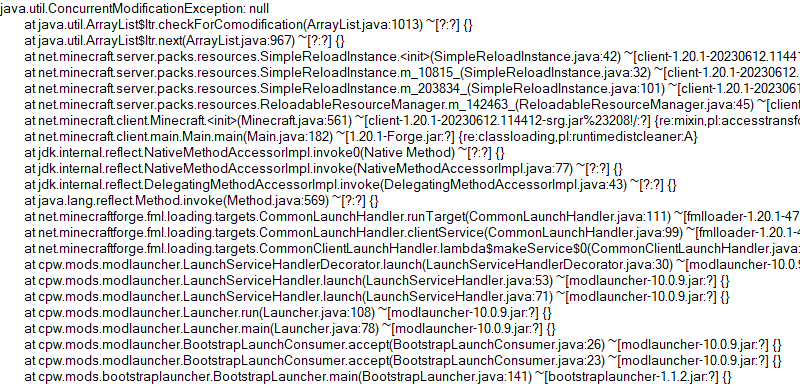
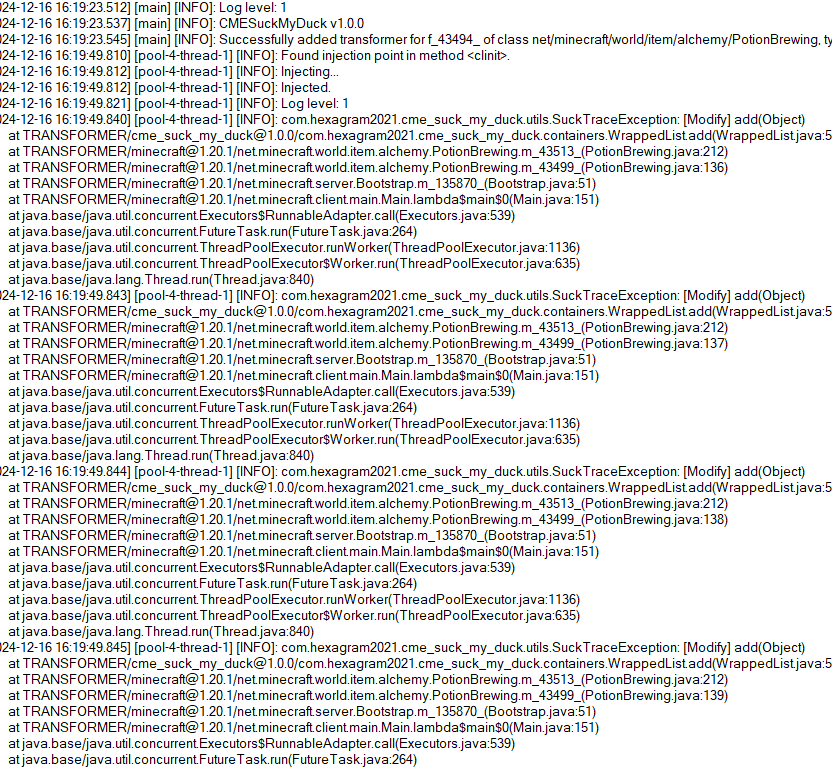
So this is what the mod is developed for. Players who install this mod and add javaagent to JVM Argument correctly will receive a full log for modification history of a certain collection:
# Usage
First, add this jar to mods folder.
Second, edit your Java Virtual Machine Argument in your launcher. Add `-javaagent:mods/CMESuckMyDuck-.jar=;;;`.
Finally, run the game, play and wait until the crash happens.
# Usage for Other Java Projects
This mod can not only be used for Minecraft debugging, but also be utilized to debug other java projects. Similar to Minecraft. The only different step is that you should add gson and asm jar to classpath (`-cp`) before javaagent, and add our `CMESuckMyDuck-.jar` to classpath after javaagent.
# Arguments
##
A full name of the class, which has a container that you would like to monitor. Use “ instead of `.` (a.k.a. the internal name of class).
##
A field name of the container in target class, which you would like to monitor. For Forge, use SRG name. For Fabric, use intermediary name. For NeoForge, use official name.
##
Currently, we only support three containers: `List`, `Set`, `Map`. This argument indicates the type of monitored container.
##
`static` or `nonstatic`. This argument indicates the container is a static field or non-static field.
# How to get and
Let’s start with an example.
First, take a look at the stacktrace of CME/IOOBE:
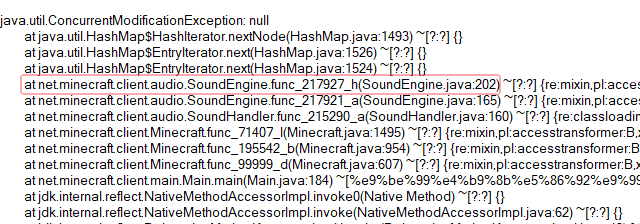
Second, read the source code of SoundEngine and confirm which container is facing this issue:
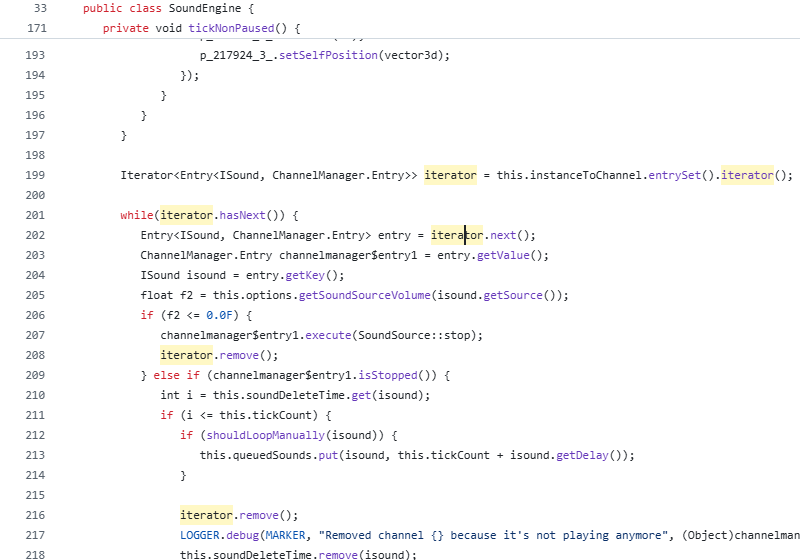
Now we know we should monitor map `field_217942_m` (`instanceToChannel` in `SoundEngine`). Keep going.
Third, install this mod, and add “`-javaagent:mods/CMESuckMyDuck-1.0.0.jar=net/minecraft/client/audio/SoundEngine;field_217942_m;Map;nonstatic`” to Java Virtual Machine Argument. Relaunch the game and wait for the next crash.
Finally, open `CMESuckMyDuck.log` file and you will see which thread and which mod has concurrently modified the container.
# Examples (JVM Arguments)
## ConcurrentModificationException from SoundEngine in Forge 1.16.5 Environment
`-javaagent:mods/CMESuckMyDuck-1.0.0.jar=net/minecraft/client/audio/SoundEngine;field_217942_m;Map;nonstatic`
## ConcurrentModificationException from PotionBrewing in Forge 1.20.1 Environment
`-javaagent:mods/CMESuckMyDuck-1.0.0.jar=net/minecraft/world/item/alchemy/PotionBrewing;f_43494_;List;static`
## ArrayIndexOutOfBoundsException from Zeta mod
`-javaagent:CMESuckMyDuck-1.0.0.jar=org/violetmoon/zetaimplforge/event/ForgeZetaEventBus;convertedHandlers;Map;nonstatic`
# Other options
## Log Level
Use system property `-Dcme_suck_my_duck.log_level=` to set custom log level.
Default 1, which means no debug message will be logged.
Users can set it to 0 to output debug message, which is not recommended – query functions like Map#get, Set#containsAll will also be logged when set to 0, and make the file very very long.
## ASM API Version (v1.0.2+)
In order to maintain compatibility with the latest version of Minecraft, this mod is compiled with asm version 9.7. For older versions of Minecraft (such as 1.12.2), API level operations such as ASM_9 cannot be applied, so players need to use `-Dcme_suck_my_duck.asm_api_version=` to modify the ASM API version compatibility. For example, game version 1.12.2: `-Dcme_suck_my_duck.asm_api_version=5`.
## File Max Entries (v1.0.3+)
Since we notice that when crash happens, the last few operations in the log are much more important than the previous ones. So our mod adopts a paging strategy after v1.0.3, and only the last two pages are retained at the end. The number of logs output on each page (that is, the number of operation call stacks) is fixed, and the default value is 500. Players can use `-Dcme_suck_my_duck.file_max_entries=` to modify the maximum number of elements on the page.
## Whitelist of Constructor (v1.0.3+)
Sometimes a container in a certain class is used in many places (eg. CompoundTag#tags). Directly using this mod will cause the log to be too long or the valid content to be replaced by subsequent operations. Therefore, players can specify an additional constructor whitelist to monitor the corresponding container in the corresponding class of a specific module. The default is empty, that is, there is no whitelist. Players can use `-Dcme_suck_my_duck.whitelist_constructor_stacktrace=` to specify it. If any line in the stack trace where the container is constructed includes the content of the whitelist string, the container will be monitored – otherwise, the container will not be monitored, which greatly simplifies the log output information.
## Transform to Thread Safe (v1.0.4+)
Use system property `-Dcme_suck_my_duck.transform_to_thread_safe=true` to transform the field into a thread-safe container.
This is NOT recommended unless you like slowness and don’t want to fix the problem.
## Inject method (v1.0.4+)
Use system property `-Dcme_suck_my_duck.inject_method=true` to switch to inject mode.
If set, you should use `-javaagent:CMESuckMyDuck-.jar=;` and whenever this method is called, you will receive a stack trace in log files.
## Ignore threads (v1.0.5+)
Use system property `-Dcme_suck_my_duck.ignore_threads=;;;…` to ignore some thread that is expected to modify the given container (or call the given method). For example, `-Dcme_suck_my_duck.ignore_threads=”Server thread”`.
## Stop logging early (v1.0.7+)
Use system property `-Dcme_suck_my_duck.stop_logging_if_exception_created=false` to stop logging if critical error occurs.
## Trace ID Updater (v1.0.8+)
Use system property `-Dcme_suck_my_duck.trace_id_updater=;` to update trace ID when calling the given method. This might be useful in inject mode.
## Monitoring Local Variables (v1.1.0+)
Use system property `-Dcme_suck_my_duck.local_var_index=` to monitor local variable at given index in the given method.
If set, you should use `-javaagent:CMESuckMyDuck-.jar=;;`. By the way, the index can be reused by different local variables. So you might have to use `-Dcme_suck_my_duck.match_local_index=` to specify the ordinal of ASTORE operation to indicate which local variable to monitor.
# Conclusion
I like eating peking duck. It’s so delicious!

Circular Logs
# Improve the look of your default Logs with… ↴

## Adds Vanilla-like circulated Logs Top | No Optifine or other Mods needed!
### It’s supports every Version of the game! (even including Legacy ones)
### And day-by-day will have more and more mods supported!
Supported Mods
• [Abundance](https://modrinth.com/mod/abundance) – by exoplanetary
• [Architect’s Palette](https://modrinth.com/mod/architects-palette) – by Jsburg
• [Biomes O’ Plenty](https://modrinth.com/mod/biomes-o-plenty) – by Forstride & Adubbz
• [The Aether](https://modrinth.com/mod/aether) – by Oz-Payn
• Vanilla Minecraft – by Mojang
• [Wilder Wild](https://modrinth.com/mod/wilder-wild) – by FrozenBlock
Cave Tweaks
CAVE TWEAKS!
❤️ Made by Wilozyx and DraconicAxolotl! ❤️
Cave tweaks is a vanilla-esque tweaks 16x pack for most minecraft versions. The goal of the pack is to include most versions from infdev (yep), alpha, beta and release!
This pack is 100% public domain, we totally allow and encourage people who enjoy the pack to use, edit and improve upon our textures for their own works if you wish to do so!
Wish to support us?
Subscribe to our channels on youtube!
[Wilozyx’s Channel](https://www.youtube.com/@wilozyx) |
[DraconicAxolotl’s Channel](https://www.youtube.com/@Draconic_Axolotl)
—
What versions is the pack available for, currently?
| Sign | State |
|———————|:———————:|
| ✔️ | Fully done & uploaded |
| ❌ | Not done but planned |
| 🔨 | Currently being worked on |
| ⏳ | Done and awaiting to be posted |
| Version | Status |
|———————|:———————:|
| Beta 1.0 | 🔨 |
| Beta 1.1 | 🔨 |
| Beta 1.2 | 🔨 |
| Beta 1.3 | ⏳ |
| Beta 1.4 | ⏳ |
| Beta 1.5 | ✔️ |
| Beta 1.6 | ✔️ |
| Beta 1.7 | ✔️ |
| Beta 1.8 | ✔️ |
| Release 1.0 | ✔️ |
| Release 1.1 | ✔️ |
| Release 1.2| ✔️ |
| Release 1.3| ✔️ |
| Release 1.4| ✔️ |
| Release 1.5| ✔️ |
| Release 1.6| ✔️ |
| Release 1.7| ✔️ |
| Release 1.8| ✔️ |
| Release 1.9| ✔️ |
| Release 1.10| ✔️ |
| Release 1.11| 🔨 |
| Release 1.12+| ❌ |
Blinding Pumpkin Overlay
You ever wanted to completely blind your foes with a curse of binding pumpkin? Then this is the resource pack for you!
Should work for every version.
It just makes the pumpkin overlay completely black, thats it.
[Alternative Download [PlanetMinecraft]](https://www.planetminecraft.com/texture-pack/blinding-pumpkin-overlay)
Black Hole Moon
# 
Thanks for checking out Black Hole Moon! This Resource Pack will change the boring moon to a Black Hole. Great to prank your friends, or just to change the moon to something else.
## FAQ
### Does this require any external mods?
Nope. This Resource Pack does not need any external mods for it to function properly.
### Can you put this pack on CurseForge?
I do not plan to put this pack on CurseForge, and probably never will.
### On some versions of Minecraft it either says “The pack is too new” or “The pack is too old”
On these versions “supported_formats” in pack.mcmeta was not introduced yet, because of that it looks at “pack_format” and says on the lines of “Pack format 5? (pack format for 1.15.2) That is old. This pack must not work on me anymore” even though the pack supports that version. Best you can do is just ignore it and enable the pack anyway, do the same if it says “pack is too new”.
### Did you make the Pixel Art yourself?
Yes! and you are free to use it on whatever project your working on. Credit would be appreciated, but its not mandatory, just dont copy the Resource Pack outright and publish it claiming its your own.
Better Zombie X Herobrine
Transform your Minecraft experience with Better Zombie X Herobrine A terrifying and unique texture pack that completely reimagines the classic zombies.
Every zombie you encounter is replaced with a haunting Herobrine version
featuring glowing white eyes that pierce through the darkness creating an unsettling atmosphere for your worlds.
Perfect for adventure maps, horror-themed servers
or just adding a creepy twist to vanilla gameplay. This pack focuses on entity and model textures
Altering the visual appearance of zombies while keeping Minecraft’s vanilla feel intact. With a resolution of 16x–32x, it balances clarity and performance
Ensuring smooth gameplay on most systems. Whether you’re exploring dungeons, fighting mobs, or building eerie landscapes Better Zombie X Herobrine adds a chilling and memorable visual
If the menu looks strange or is missing textures, that’s normal, but it won’t affect your gameplay.
Element that will keep players on edge. Experience the horror… if you dare.
Better Mc Textures
# Better Mc Textures
## Why Better Mc Textures?
I know, there isnt any textures thats good and is in all versions of minecraft, so thats what i created. This has **boxed ores**, **shorted tools**, **lower fire** and **shield**, shows how much **bow pulls** and much more! **Download** it now for **better textures**. **Have fun**! 🙂
## Features
This texture pack have:
1. **Shorter Tools**!
2. **Boxed Ores**!
3. **Lower Fire** and **Shield**!
4. **Smaller Foods** and **Particles**!
5. Shows **Bow** and **Crossbow Stages of fire**!
6. **Transparent Pumking** and **Crystal**!
## Extra Info
**Have fun**!
**Support** me by **downloading** it!
If you got questions or problems **[join my discord server](https://discord.com/invite/ETTr37p38R)**!
## License
This pack is available under the [Creative Commons Attribution-ShareAlike 4.0 International](https://creativecommons.org/licenses/by-sa/4.0/). You are free to use it in accordance with the terms listed there.
Better Birch Leaves
# Better Birch Leaves
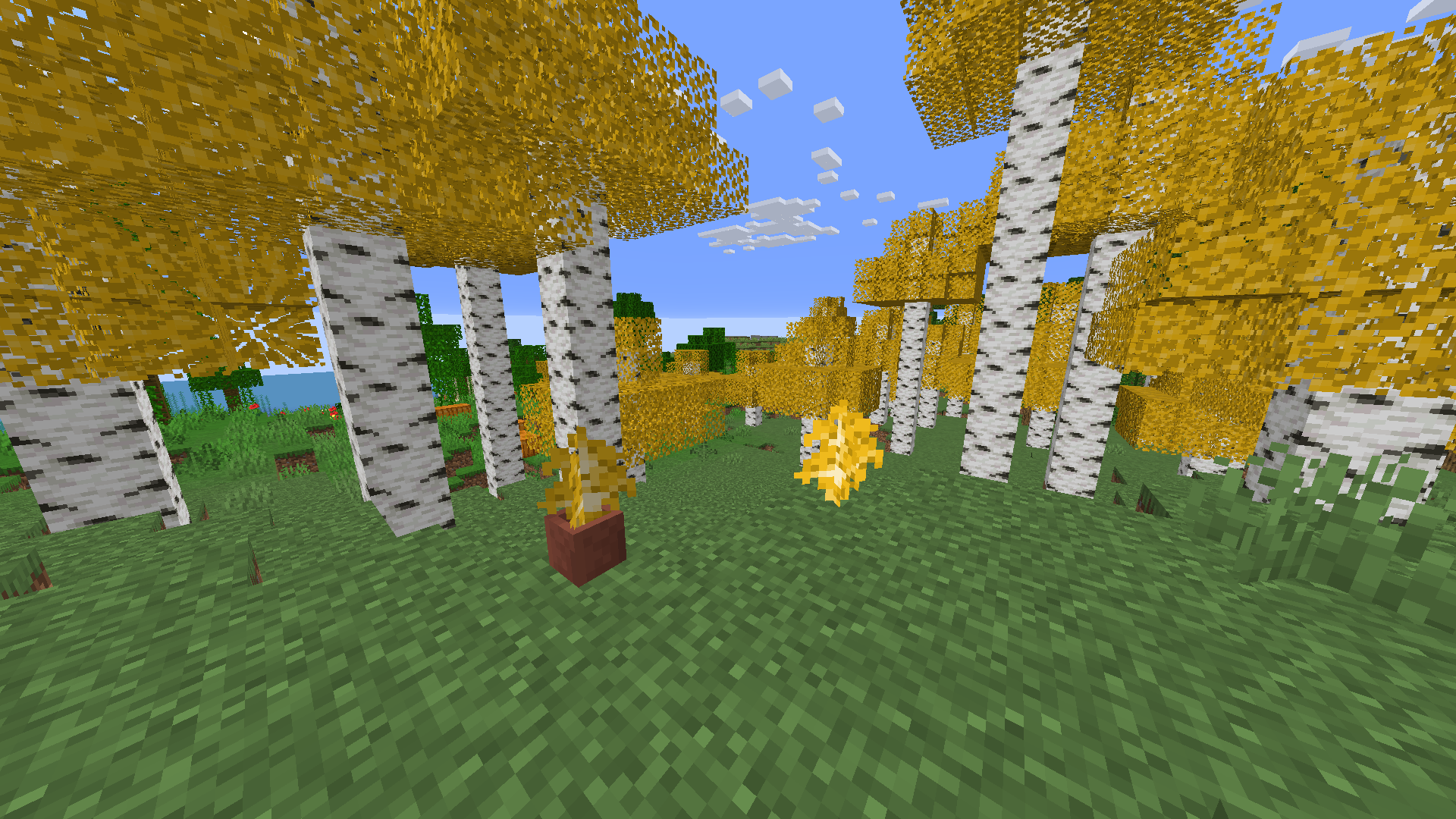
Birch leaves, but beautiful. This resource pack gives **birch leaves and saplings** a **golden-yellow makeover**, making forests feel warmer and more natural — like autumn year-round.
## Features:
– Birch **leaves and saplings** now appear **yellow/golden**, not bright green
– Inspired by the new leaf color style from modern versions
– Works with all biomes — no code, just cleaner visuals!
## Older Versions Supported:
– In Minecraft **1.6.1 – 1.12.2**, birch leaves and saplings use the **older-style textures**, blending into classic visuals

## Compatibility:
– **Resource Pack**: Minecraft **1.6.1 – 1.21.11**
– No dependencies needed