ReSplash! – Splash text restored & curated

# Wait, what?
**ReSplash** is a resource pack all about Minecraft-ifying Minecraft’s splash text. Making it more Minecraft-y than Minecraft. You follow? No? That’s fine.
Rather than copying an existing splashes.txt file, I transcribed every single splash off the wiki, one by one, an effort taking a few hours. I even accidentally duplicated “***Check it out!***” like Mojang did and then caught it.
# What’s it change?
Below are all the splashes added and curated by ReSplash.
In total, ReSplash has 400 splashes, compared to base Minecraft’s 446.
Here’s how to read the sections:
***Added splash!***
*Mojang splash!* -> ***ReSplash splash!***
## §1 – Reintroduced Splashes
Former splashes restored by ReSplash
### Indev era
***Better than Prey!***
*Moderately attractive!* -> ***Sexy!***
***Minors welcome!***
***Made by Notch!***
*It’s finished!* -> ***When it’s finished!*** (as the game is continuously updated)
### Alpha era
*Not as cool as Spock!* -> Now accompanied by the original ***Cooler than Spock!***
***Rude with two dudes with food!***
***Lewd with two dudes with food!*** (¿Por qué no los dos?)
*Supercalifragilisticexpialidocious!* -> ***Superfragilisticexpialidocious!***
***Woo, /v/!***
***Switches and ores!***
### Beta era
*”Autological” is!* -> ***”Noun” is an autonym!***
### Adventure era
***110813!***
***Totally forgot about Dre!***
***Hobo humping slobo babe!***
***Popping tags!***
## §2 – Revitalized Splashes
Former splashes restored and rewritten by ReSplash
### Indev era
*Pre-beta!* -> ***Out of beta!***
*Kind of dragon free!* -> ***Absolutely dragon free?*** (question mark is intentional)
*More than [n] sold!* -> All four (4000, 5000, 25000, 500) + a new one: ***More than 300000000 sold!***
*Now on OpenGL 3.3 core profile!* -> ***OpenGL 3.3!***
### Alpha era
*1% sugar!* -> now accompanied by ***0% sugar?*** (see “dragon free” splash)
*The Work of Notch!* -> ***The Work of Notch (and friends)!***
## §3 – Remixed Splashes
Extant splashes replaced or rewritten by ReSplash
### Beta era
*Twittered about!* -> now accompanied by ***Tweeted about!*** (F to pay respects)
### Adventure era
*Made by Jeb!* -> ***Made by Jeb, too!***
*Pumpakungen!* -> ***Pumpa kungen!***
*Colormatic* -> ***Colormatic!*** (added standard-yellow §e exclamation point)
*Java 16 + 1 + 4 = 21!* -> ***Now Java 21!*** // Updated to “Now Java 25!”
*HURNERJSGER?* -> ***HURNERJSGER!***
*Now contains 32 random daily cats!* -> ***Now with cats!*** (nuked social media in-joke)
*Now with Multiplayer!* -> now accompanied by ***Multiplayer!*** (matching *Singleplayer!* splash)
### Microsoft era
*More Digital!* -> ***Digital!***
*Thank you for the fish!* & *Thanks for the fish!* -> ***Thanks for all the fish!***
*All rumors are true!* -> ***All the rumors are true!***
*It came from space.* -> ***Made of star stuff!***
377-390 (Pandemic splashes) replaced ->
– ***Scrub, scrub, scrub ’til the water’s brown!***
– ***Down with the Sickness!***
*Edit is a name!* -> ***”Edit” is a name!***
*Fabulous graphics!* -> ***Fabulous!***
408-415 (Social justice splashes) replaced ->
– ***Strives for more liberty!***
– ***Won’t do what they told us!***
– ***Rufus Truthfist!***
– ***Do you not see the signs?!***
– ***Don’t be racist, I am a building!***
– ***Did you know that you have rights?***
– ***No more oppression!***
– ***I’ve got an idea…World Peace!***
* Lines 435-439 condensed down to *I’m glad you’re here!* & *Contains infinite genders!*
*Sniff sniff…* -> ***Really smells like dog buns!*** (Adventure Time, to go with the Bravest Warriors splash)
## §4 – Redacted Splashes
Extant splashes removed by ReSplash
### Adventure era
*Finally complete!*
All *Hello, [country]!* splashes, except for *日本ハロー!*
(referencing the JP credits song of the Minecraft documentary)
*Don’t feed avocados to parrots!*
*Plz reply to my tweet!*
*I have a suggestion.*
*Woah.*
*Ryan also has amazing hair!*
*pls rt*
*One day, somewhere in the future, my work will be quoted!* (No it won’t)
*Now with additional stuff!*
*Extra things!*
*Yay, puppies for everyone!*
*Tougher than diamonds, rich like cream!*
*/give @a hugs 64*
*This is good for Realms.*
*Any computer is a laptop if you’re brave enough!*
### Microsoft era
*doot doot*
*There’s no stopping the Trollmaso*
*Throw yourself at the ground and miss*
*Rule #1: it’s never my fault*
*Replaced molten cheese with blood?*
*Absolutely fixed relatively broken coordinates*
*Javalicious edition*
*You’re going too fast!*
*Don’t feed chocolate to parrots!*
*The true meaning of covfefe*
*Something funny!*
*Rainbow turtle?*
*I need more context.*
*Water bottle!*
*What’s the question?*
*What do you expect?*
*Look mum, I’m in a splash!*
*Awesome game design right there!*
*Ph1lza had a good run!*
*10 years of Mining and Crafting!*
*Ping the human!*
*In case it isn’t obvious, foxes aren’t players.*
*Buzzy Bees!*
*Minecraft Java Edition presents: Disgusting Bugs*
*This parrot is no more! It has ceased to be!* (This…is an EX-SPLASH!)
*Honey, I grew the bees!*
*Find your claw!*
*Everybody do the Leif!*
*<3 Max & 99 & Ducky!*
*#minecraftfarms*
*Envision! Create! Share!*
*Also try Minecraft Dungeons!*
*Vanilla!*
*Zoglin!?*
*[this splash text is now available]*
*Home-made!*
*There's <
## §5 – Bedrock Splashes
Splashes imported from Bedrock Edition
***Glowing creepy eyes!***
***& Knuckles!***
***Mostly harmless!***
***Artisinal!***
## §6 – New Splashes?
I put these extra splashes into the pack, too!
***Agender!***
***Hello there!***
***Unparalleled!***
***Successor of the Chambered!***
***Order of the Stone!***
***Rana!***
***Miners welcome!***
***Ask your doctor!***
***Kind of Lootbox free!***
***VENGEAAAANCE!***
***Digging a hole!***
***Godspeed chicken!***
***Deserves ice cream!***
***Also try Infiniminer!***
***Also try Factorio!***
***Also try Rocket Arena 3!***
***Also try Cookie Clicker!***
***Justice for XaPhobia!***
***Justice for C418!***
***Fancy!***
RelishAuth
# RelishAuth
**Advanced Authentication System for Velocity Proxy Servers 🔐**

*Secure your Velocity network with advanced authentication, Discord integration, and premium account support*
## 🌟 Features
### 🔐 **Multi-Method Authentication**
– **Password Authentication**: Traditional secure password system with Argon2 hashing
– **Discord Integration**: Link Discord accounts for seamless authentication
– **Premium Auto-Login**: Automatic authentication for premium Minecraft accounts
– **Hybrid Mode**: Combine password + Discord for maximum security
### 🛡️ **Advanced Security**
– **Session Management**: Configurable session durations (0-1 hour)
– **IP Validation**: Optional IP-based session validation
– **Rate Limiting**: Protection against brute force attacks
– **Premium Verification**: Real-time Mojang API validation
– **Bedrock Support**: Compatible with Floodgate for cross-platform play
### 🤖 **Discord Bot Integration**
– **Real-time Verification**: Instant Discord DM verification
– **Join Notifications**: Security alerts when someone joins with your account
– **Account Management**: Change passwords, manage sessions via Discord
– **Admin Commands**: Full server management through Discord slash commands
– **Rich Embeds**: Beautiful, informative Discord messages
### 🌐 **Multi-Language Support**
– **English** and **Arabic** language packs included
– **Customizable Messages**: Full message customization support
### 💾 **Flexible Database Support**
– **SQLite**: Zero-configuration local database (default)
– **MySQL/MariaDB**: Network database support for multi-server setups
– **PostgreSQL**: Enterprise-grade database with advanced features
– **Connection Pooling**: High-performance HikariCP integration
—
## 📸 Screenshots
### Discord Integration

*Seamless Discord verification with interactive buttons*
### Admin Dashboard

*Powerful admin tools accessible through Discord slash commands*
### Security Notifications

*Real-time security notifications keep your account safe*
### Optimized Limbo world

—
## 🚀 Installation
### Prerequisites
– **Velocity Proxy** 3.4.0 or higher
– **Java** 21 or higher
– **LimboAPI** plugin (required dependency)
– **Discord Bot** (optional, for Discord features)
### Step 1: Download and Install
1. Download plugin JAR file
2. Place the JAR file in your Velocity `plugins/` folder
3. Install LimboAPI Place it in the same folder
4. Restart your Velocity proxy
### Step 2: Initial Configuration
1. Navigate to `plugins/relishauth/`
2. Edit `config.yml` to configure your authentication method
3. Set up your database connection
4. Configure Discord bot (optional but recommended)
### Step 3: Discord Bot Setup (Optional)
1. Create a Discord application at Discord Developer Portal
2. Create a bot and copy the token
3. Add the token to your `config.yml`
4. Invite the bot to your Discord server with appropriate permissions
—
## ⚙️ Configuration
### Basic Configuration
“`yaml
# Choose your authentication method
authentication:
method: “password” # Options: password, discord
premium-auto-login: true
allow-bedrock-players: true
# Session management
session:
duration: “5m” # Options: 0, 1m, 5m, 15m, 30m, 1h
allow-different-locations: true
# Database setup
database:
type: “sqlite” # Options: sqlite, mysql, mariadb, postgresql
sqlite:
path: “data.db”
“`
### Authentication Methods
#### 🔑 Password Authentication
Perfect for traditional servers wanting secure password-based auth:
“`yaml
authentication:
method: “password”
password:
min-length: 6
max-length: 32
hashing: “argon2” # Secure password hashing
“`
**How it works:**
1. New players create a password when first joining
2. Returning players enter their password to authenticate
3. Sessions are saved based on configured duration
4. Optional Discord linking for additional features

#### 💬 Discord Authentication
Ideal for Discord-centric communities:
“`yaml
authentication:
method: “discord”
discord:
bot-token: “YOUR_BOT_TOKEN”
server-id: “YOUR_DISCORD_SERVER_ID”
“`
**How it works:**
1. Players enter their Discord username in-game
2. Bot sends verification DM with interactive buttons
3. Players click “Verify” to authenticate
4. Account is permanently linked to Discord


#### 🏆 Premium Auto-Login
Streamlined experience for premium players:
“`yaml
authentication:
premium-auto-login: true
allow-premium-username-impersonation: false # Security: prevent impersonation
“`
**How it works:**
1. Premium accounts are automatically verified via Mojang API
2. No password or Discord verification required
3. Instant server access for legitimate premium players
4. Cracked clients cannot impersonate premium accounts

### Security Configuration
“`yaml
security:
authentication-timeout: 300 # 5 minutes to authenticate
password-attempts:
max-attempts: 3
lock-duration: 15 # Minutes
premium:
verification-timeout: 5
api-url: “https://api.mojang.com/users/profiles/minecraft/”
“`
### Limbo World Customization
“`yaml
customization:
limbo:
dimension: “THE_END” # OVERWORLD, NETHER, THE_END
gamemode: “SPECTATOR”
spawn:
x: 0
y: 64
z: 0
block-movement: true
“`
## 🎮 Commands
### Player Commands
| Command | Description | Usage |
|———|————-|——-|
| `/ra password ` | Set/change password | `/ra password mypass123 mypass123` |
| `/ra discord ` | Link Discord account | `/ra discord john_doe` |
| `/ra logout` | Clear all sessions | `/ra logout` |
| `/ra session [duration]` | Set session duration | `/ra session 30m` |
| `/ra notify ` | Toggle join notifications | `/ra notify on` |
| `/ra unlink` | Unlink Discord account | `/ra unlink` |
| `/ra info` | View account information | `/ra info` |
### Admin Commands
| Command | Description | Usage |
|———|————-|——-|
| `/ra reload` | Reload configuration | `/ra reload` |
| `/ra info ` | View player information | `/ra info PlayerName` |
| `/ra unlink ` | Unlink player’s Discord | `/ra unlink PlayerName` |
| `/ra block ` | Block username from IP | `/ra block Griefer 192.168.1.1` |
| `/ra unblock ` | Unblock username from IP | `/ra unblock Griefer 192.168.1.1` |
| `/ra clearblocks ` | Clear all stored blocks for username | `/ra clearblocks Griefer` |
| `/ra setpassword ` | Admin set a player’s password | `/ra setpassword PlayerName NewPass NewPass` |
| `/ra resetpassword [length]` | Admin reset password (temp password) | `/ra resetpassword PlayerName 16` |
—
## 🤖 Discord Bot Integration
### Setup Process
1. **Create Discord Application**
– Go to Discord Developer Portal
– Click “New Application” and give it a name
– Navigate to “Bot” section and create a bot
2. **Configure Bot Permissions**
Required permissions:
– Send Messages
– Use Slash Commands
– Manage Roles (for linked role)
– Read Message History
3. **Invite Bot to Server**
“`
https://discord.com/api/oauth2/authorize?client_id=YOUR_BOT_ID&permissions=268435456&scope=bot%20applications.commands
“`
4. **Configure in RelishAuth**
“`yaml
discord:
bot-token: “YOUR_BOT_TOKEN”
server-id: “YOUR_DISCORD_SERVER_ID”
linked-role-id: “ROLE_ID_FOR_LINKED_USERS”
“`
### Discord Slash Commands
| Command | Description | Permission |
|———|————-|————|
| `/link` | Instructions for linking account | Everyone |
| `/session [duration]` | Set session duration | Linked users |
| `/notifications [toggle]` | Toggle join notifications | Linked users |
| `/info [player]` | View account information | Admin |
| `/kick ` | Kick player from server | Admin |
| `/unlink ` | Unlink player’s account | Admin |
| `/block ` | Block username from IP | Admin |
| `/unblock ` | Unblock username from IP | Admin |
| `/clearblocks ` | Clear all stored blocks for username | Admin |
| `/setpassword ` | Admin set a player’s password | Admin |
| `/resetpassword [length]` | Admin reset password (temp password) | Admin |
| `/reload` | Reload plugin configuration | Admin |
—
## 📞 **Support & Links**


—
Reimagined GUI (Dark)
# Reimagined GUI – Dark


Replaces every container in the game, changes hotbar, hearts and armor icons.
> If you’re looking for the Light version you can find it here Reimagined GUI – Light
## You can support me and my projects here


## Mod support
– Backslot
– Capes
– Curios
– EMI
– Inventorio
– MidnightControls
– ModMenu
– No Chat Reports
– Vanilla Notebook
– Shulker Box Tooltip
– Metal Barrels
Terms of use
Copyright © Reimagined GUI – Dark
Author AmongstReality
Links to pages of the author on different platforms:
– Patreon
– BuyMeACoffee
– CurseForge
– Modrinth
– Planet Minecraft
When you can use my assets:
– In public Modpacks on Modrinth/CurseForge.
– If you want to add mod support as an addon for the resource pack. If you do that, you have to add clear credit that
includes links to the original resource pack.
– Any private modifications of the original resource pack.
When you can **NOT** use my assets:
– Distribution on the Bedrock Marketplace.
– Locking behind a paywall (e.g. Patreon).
– Distribution of original/modified assets on any platforms.
Links to the resource pack’s pages on different platforms:
– CurseForge
– Modrinth
redule d’où cobax
redule d’ou cobax is a red recolor of a texture pack made by Akooa and myself made for 1.8.9 pvp.
It is based arround the vanilla game textures while still adding some fresh details to it making it more pleasant to play with 🙂
It is mainly made for gamemodes like bedwars and skywars but can be used all arround 1.8.9.
The main goal of this pack is to make the overall pvp experience fill more smooth by shortening swords as well as adding a custom sky as well as a sound pack.
/! The Sky and the soundpack ONLY WORKS WITH Optifine, while you can use the pack without optifine, the sky as well as the soundpack wont work without it /!
Here are some in game screenshots to showcase more of the pack :
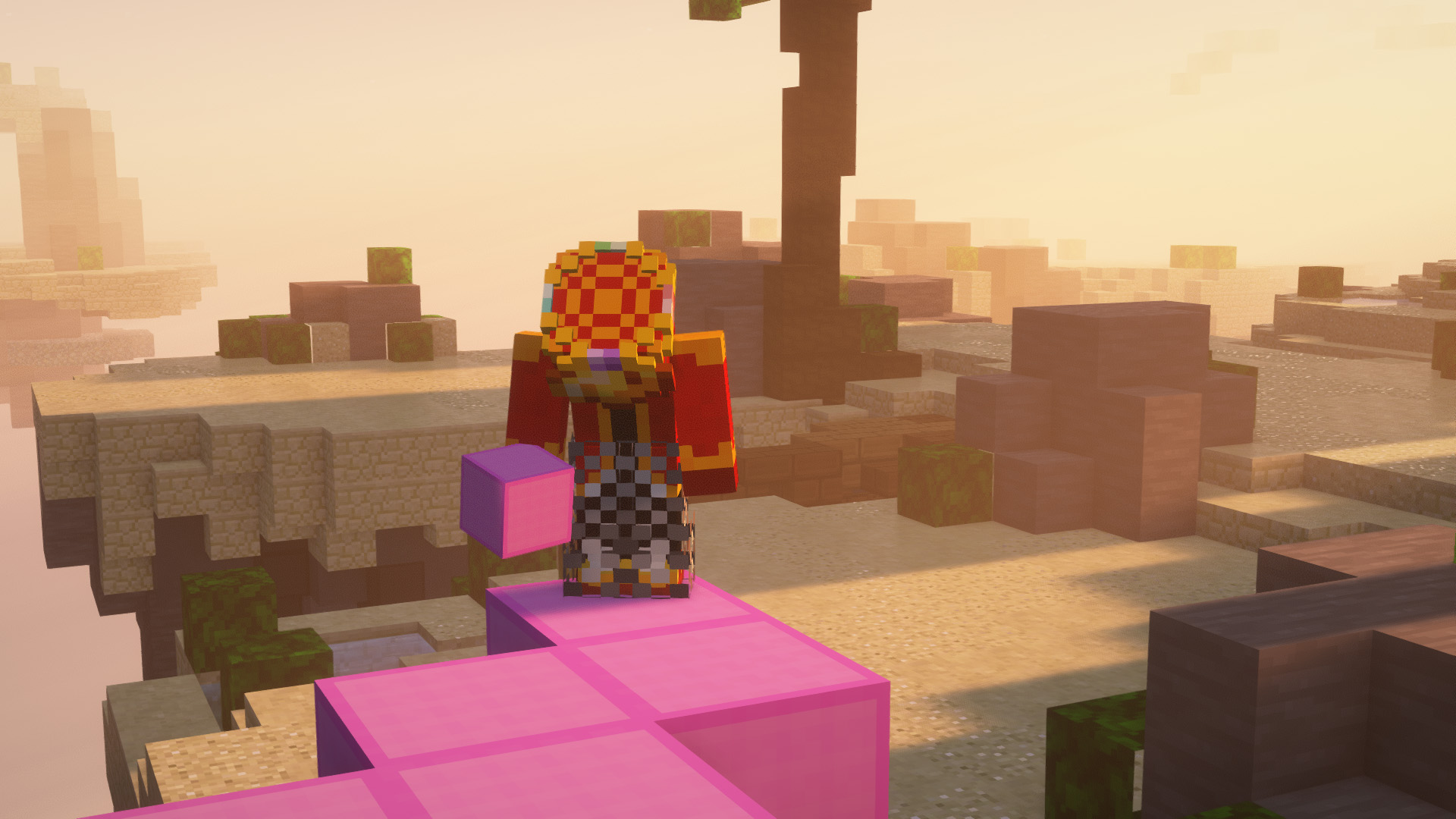
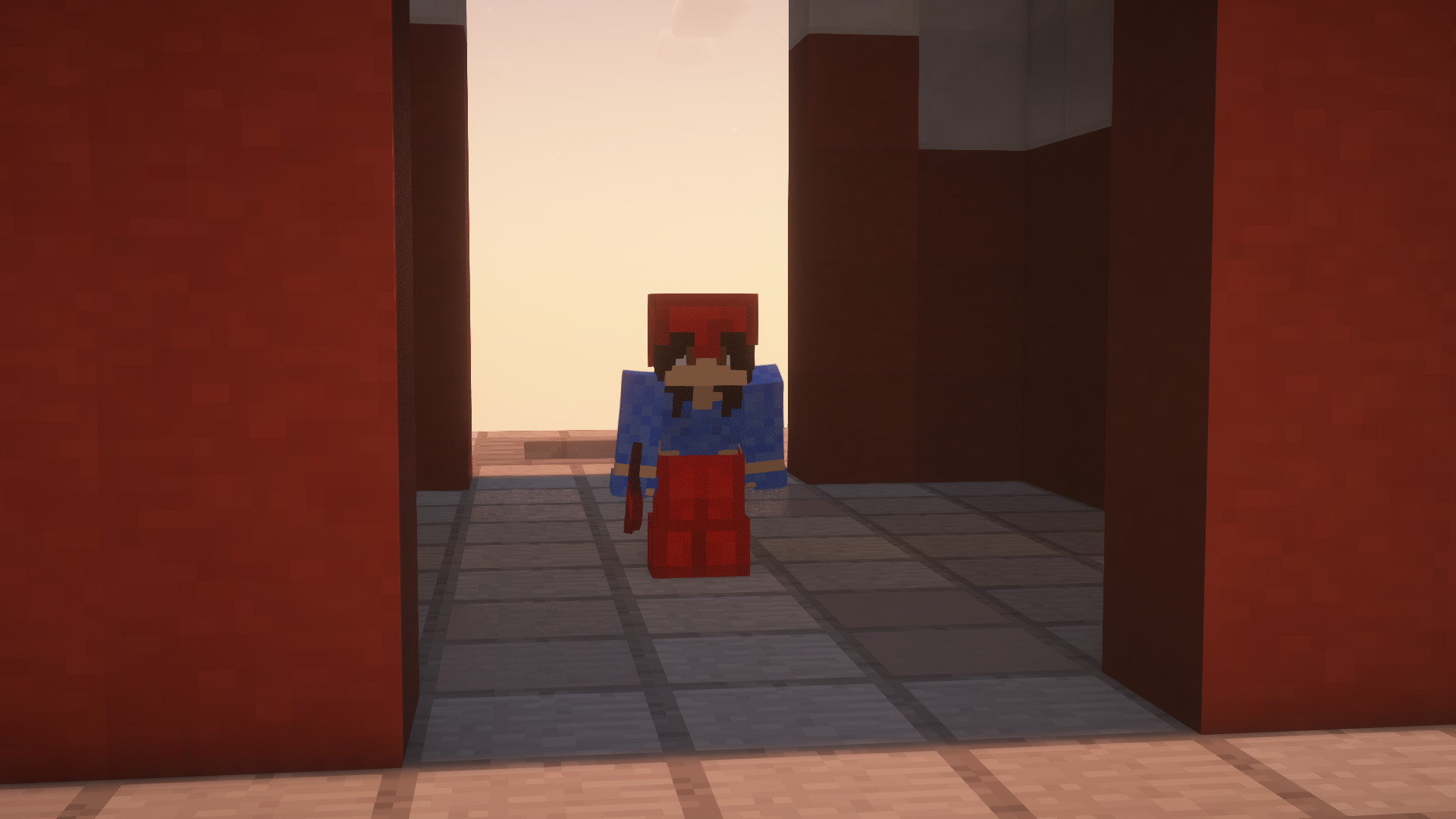
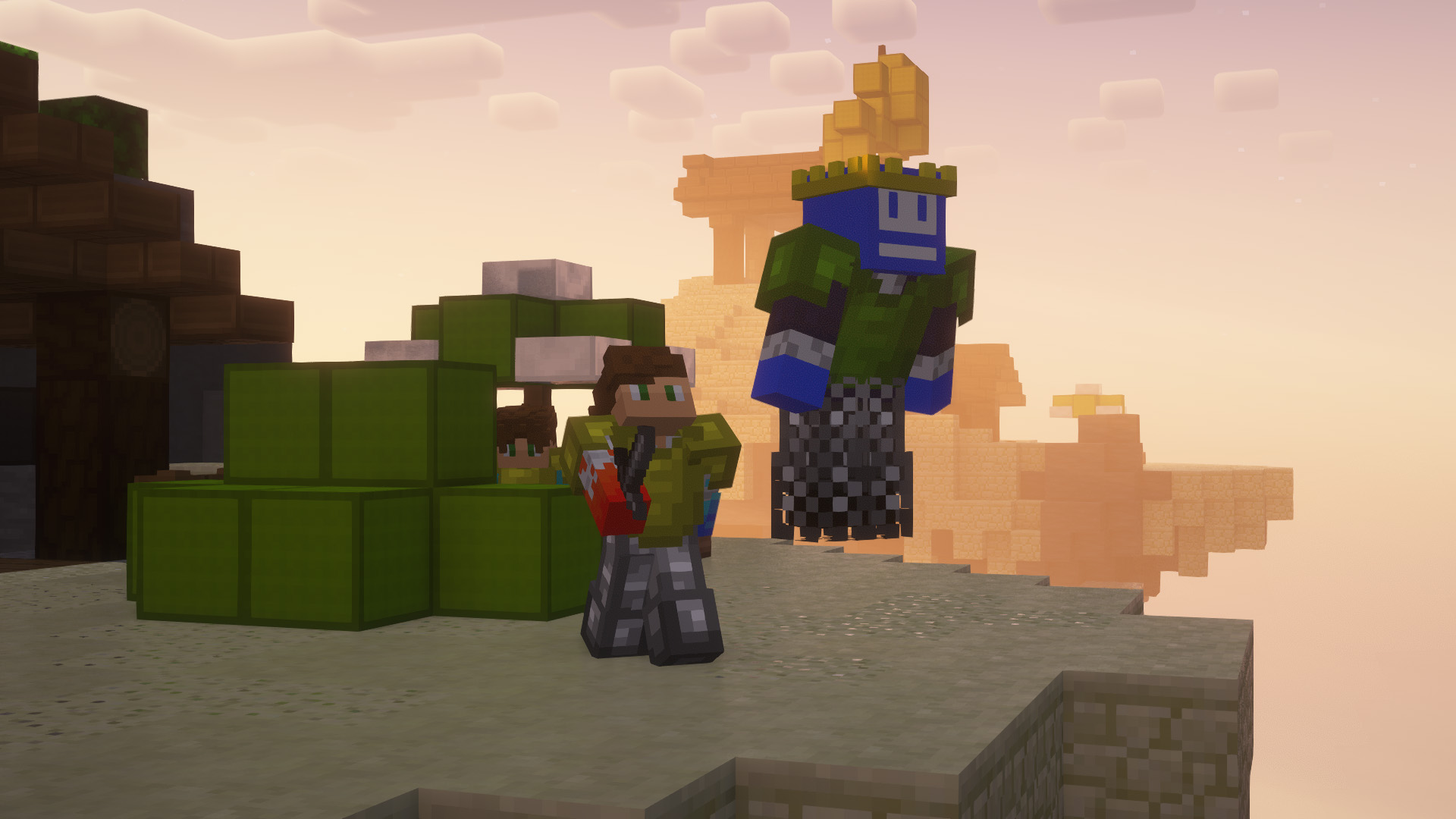
Sidenote : Feel free to join the discord if there is any issues with the Texture pack (Rendering Issues, Crashes, Textures not working properly, Sky glitches and/or not rendering…) It helps us greatly improve the work we do and provide the best for you all !
Redstone Multimeter Fabric
# Redstone Multimeter
Redstone Multimeter is a LiteMod for 1.12 by NarcolepticFrog. It is an easy to use, intuitive redstone debugging tool. Since LiteLoader never updated past 1.12.2, the mod is stuck in that version. Redstone Multimeter Fabric is a Fabric port of the original mod, which makes it compatible with the newest versions of Minecraft!
# Features
Redstone Multimeter allows you to track a myriad of redstone related events by placing virtual “meters” in the world. This makes it incredibly easy to see when blocks are e.g. powered or moved, and the order in which they do so. An overview of logged events is displayed in a HUD in the top left corner of the screen. This HUD has three components:
– The meter list: Each meter gets its own row and simply displays its name here.
– The primary event viewer: This is a graph showing logs of a 60 gt period. It usually shows logs of the past 60 gt, meaning you will see them scroll by in real-time. You can use the hotkeys to pause the HUD and scroll through the logs at your own pace.
– The secondary event viewer: This graph is usually hidden, but when the HUD is paused, it will appear next to the primary event viewer. It shows the order of events within the selected tick.
Meters are organized into meter groups. A meter group is a collection of meters and a unique name. You can have multiple meter groups, but the HUD will only display the logs of a single meter group. To subscribe to a meter group, use the `/meter group ` command. You can get a list of all meter groups by using the `/meter listGroups` command.
## Commands
* `/metergroup list`: query a list of all available meter groups.
* `/metergroup subscribe`: subscribe to your default meter group (which you can configure in the Options Menu).
* `/metergroup subscribe `: subscribe to the meter group with the given name, or create it if it does not already exist.
* `/metergroup unsubscribe`: unsubscribe from this metergroup.
* `/metergroup private`*: query whether this meter group is private or public.
* `/metergroup private [true|false]`*: set this meter group to private or public.
* `/metergroup members list`*: query a list of all members of this meter group.
* `/metergroup members add `*: add a player as a member of this meter group.
* `/metergroup members remove `*: remove a player as a member of this meter group.
* `/metergroup members clear`*: remove all members from this meter group.
* `/metergroup clear`: remove all meters from this metergroup.
* these subcommands are only available to you if you are the owner of this meter group
## Keybindings
– `Toggle Meter` (default `M`): Adds or removes a meter at the block you are looking at. Holding `ctrl` makes the meter immovable.
– `Reset Meter` (default `B`): Resets the properties of the meter you are looking at.
– `Pause Meters` (default `N`): Pauses HUD.
– `Step Forward` (default `.` ): If paused, moves the display 1 tick ahead in time. Holding `ctrl` moves 10 ticks.
– `Step Backward` (default `,`): If paused, moves the display 1 tick back in time. Holding `ctrl` moves 10 ticks.
– `Toggle HUD` (default `H`): toggles the HUD.
– `Scroll HUD` (default `alt`): scrolling while holding this key steps forward or backward through the HUD.
– `Open Multimeter Screen` (default `G`): opens the Multimeter screen.
– `Open Meter Controls` (default `I`): opens the meter controls of the meter you are looking at.
– `Open Options Menu` (default `O`): opens the Options Menu.
– `View Tick Phase Tree` (default `U`): opens the Tick Phase Tree screen.
– `Print Logs To File` (default `P`): toggles the printer.