White Enchantment Glint
# White Enchantment Glint
Makes the enchantment glint **white**!
# White Enchantment Glint
Makes the enchantment glint **white**!

### Consider joining the Discord server for updates!
**”What Language Is That?”** fixes one of Minecraft’s most confusing features by **converting the Standard Galactic Alphabet into readable English**.
The mysterious symbols used in enchanting tables are fully translated, so you can finally understand what you’re looking at instead of guessing like a wizard who skipped class.
This pack works directly on the Enchanting Table interface, making enchantment text clear and easy to read while keeping the original vanilla style intact.
No gameplay changes, no mods required — just a simple, clean upgrade that makes Minecraft make sense.
✔ Works with Enchanting Tables
✔ Translates Standard Galactic Alphabet
✔ Keeps vanilla style
✔ No mods required
*Note: if you do not use Linux, this mod is not for you*
“[Wayland](https://wayland.freedesktop.org/) is a replacement for the X11 window system protocol and architecture with the aim to be easier to develop, extend, and maintain.”
With the increasing popularity of Wayland compositors on Linux, including several desktop environments switching to Wayland by default, application support for Wayland makes the Linux desktop experience all the better.
While Minecraft does run under XWayland, features like per-monitor HiDPI scaling do not function. If you experience problems related to XWayland, this mod is for you.
# Requirements
A Wayland-supported system GLFW installation and the following JVM flag is required:
“`
-Dorg.lwjgl.glfw.libname=/usr/lib/libglfw.so
“`
To install the proper GLFW on Arch Linux, run:
“`sh
sudo pacman -S glfw-wayland
“`
# Motivation
I wrote this mod after using [Sway WM](https://swaywm.org/) with a HiDPI display. All XWayland applications look blurry, so it is not an option. The community solution was to [patch the system glfw](https://github.com/Admicos/minecraft-wayland), but I’d rather not do that.
# Bug Reports
If you continue to experience problems with Minecraft on Wayland after installing this mod, file a bug report [on the issue tracker](https://github.com/StackDoubleFlow/MCWaylandFix/issues) if it hasn’t already been reported.
# WasteLand Emeralds
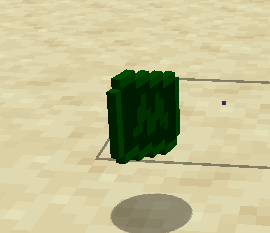
### This resource pack changes the texture of an emerald so that it looks like money
This fontpack changes the color of the default font in Minecraft to be more pleasing to the eye.
To install it, make sure to select it in the resource packs screen and put it on top of other font packs.
# MY OTHER FONTS
– [Marga Font by SourAlien](https://modrinth.com/resourcepack/marga-font-by-souralien)
– [Paramita Font by SourAlien](https://modrinth.com/resourcepack/paramita-font-by-souralien)
– [PP Font](https://modrinth.com/project/pp-font)
– [Anicca Font by SourAlien](https://modrinth.com/resourcepack/anicca-font-by-souralien)
– [Tiny Bold Font](https://modrinth.com/resourcepack/tiny-bold-font)
– [SAS SMALL CAPS FONT](https://modrinth.com/resourcepack/sas-small-caps-font)
– [sas all lowercase font](https://modrinth.com/resourcepack/sas-all-lowercase-font)
– [Samsara Mono by SourAlien](https://modrinth.com/resourcepack/samsara-mono-font-by-souralien)
– [Ostrakon Font by SourAlien](https://modrinth.com/resourcepack/ostrakon-font-by-souralien)
– [Epsilon Font by SourAlien](https://modrinth.com/resourcepack/epsilon-font-by-souralien)
– [Alice Font](https://modrinth.com/resourcepack/alice-font)
– [Sleek DR](https://modrinth.com/resourcepack/sleek-dr)
– [Synesthete’s Dream](https://modrinth.com/resourcepack/synesthetes-dream)
– [HD B&W Font](https://modrinth.com/resourcepack/hd-bw-font)
# **Wander 16x** ⛰️
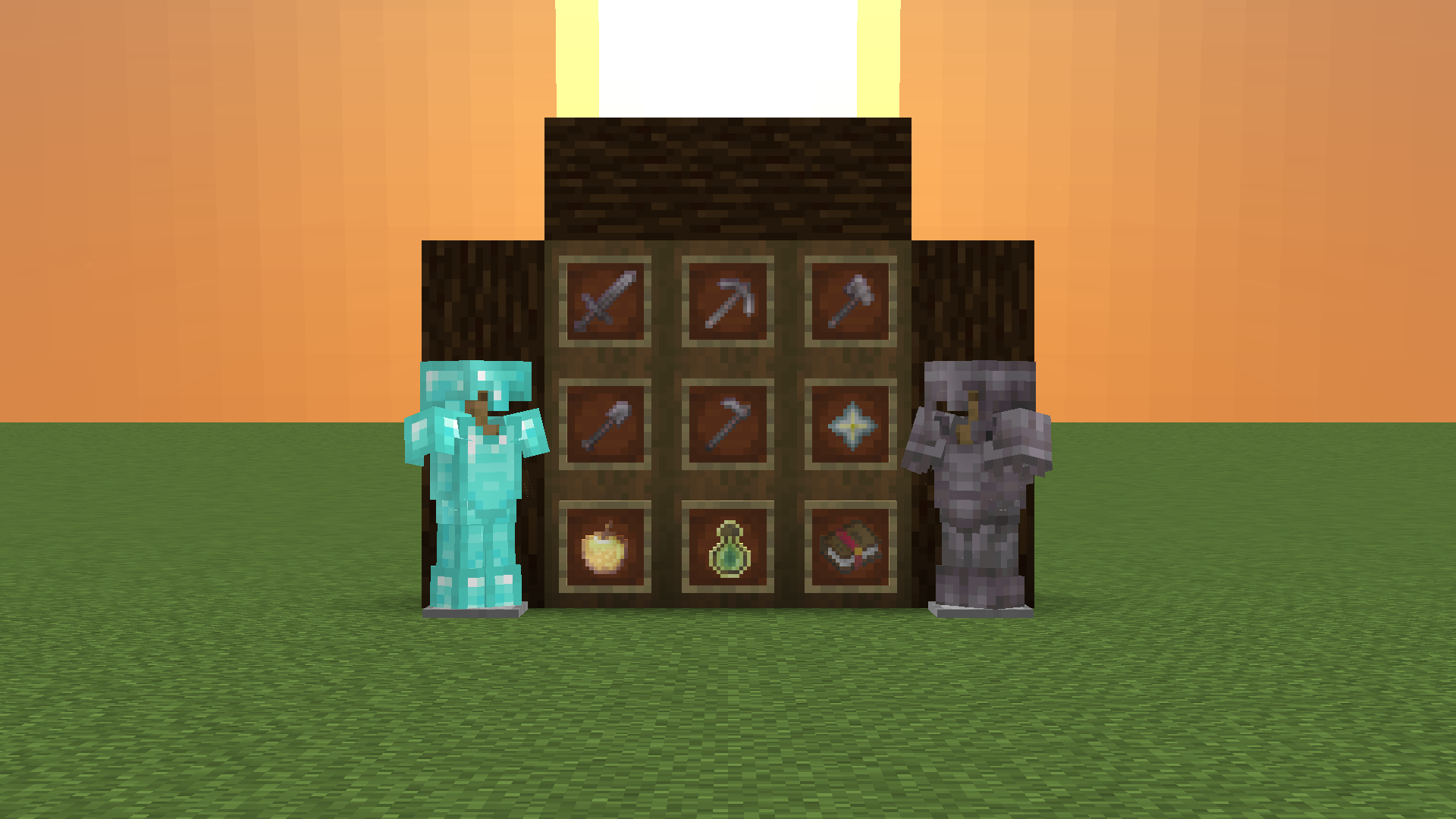
Wander into the unknown with this beautiful retexturing of Minecraft!
## What is it? 🗺️
A blue default styled texture pack made for PVP minigames such as bedwars and skywars!
## What does it contain? 🧭
Retextures the weapons, tools, skybox, health items, armor, GUI, and many blocks. Intended to be used on versions 1.8-1.8.9 and 26.1 with the latest version of the pack!
### Performs best with Optifine 🍃
This pack was made with use of optfine in mind on 1.8, however it is not required.

**Changes the Minecraft logo on the title screen (and the menu background) to a stupid shitpost I’ve had in my mind for a while.**
Two versions are available, one for 1.20 and up, and another for 1.19 and under. Make sure you download the correct version.
[](https://ko-fi.com/nanobuntv)
Special thanks to [Ewan Howell](https://ewanhowell.com) for making the [Blockbench plugin](https://www.blockbench.net/plugins/minecraft_title_generator) that made this possible.
This work is licensed under [CC BY-NC-SA 4.0](https://creativecommons.org/licenses/by-nc-sa/4.0)

This 1.16.5 PVP texture pack is built for combat efficiency and performance. 🚀 It boosts FPS while optimizing your visuals for a competitive edge. ⚔️
Key Features:
Short Swords & Axes: Compact models that clear up your screen for better visibility. 🗡️🪓
Dark Mode UI: Sleek dark-gray menus to help you stay focused. 🌑
Glowing Ores: Easier to spot in dark caves. ✨💎
BedWars Ready: Custom textures for beds, resources (Iron, Gold, Diamond, Emerald), and golden apples. 🛏️🍎
Perfect for players who want a clean, high-performance look without the clutter! 🏆
Vulkan 16x is an awesome PvP pack with volcano-inspired colours. Every texture was designed to look good without becoming distracting during fights, making it perfect for fights. Despite the very colourful colour palette, the textures remain easy on the eyes and work well for long sessions. If you want a pack that combines strong visuals with PvP performance, Vulkan 16x delivers a stylish experience that feels great to use in every fight.
# VNC (Version Numbering Converter)
Version Numbering Converter (VNC) is a Java library for working with Minecraft versions across both numbering families:
– Classic Java-style versions such as `1.20.6` and `1.21.11`
– Year-based drop versions such as `24.1`, `25.4`, and `26.1.1`
It covers two use cases:
– Pure version modeling and conversion through `MinecraftVersion`, `VersionScheme`, and `MappingTable`
– Bukkit/Paper runtime detection through `VNC`, including server constants, player version resolution, protocol lookup, and version comparisons
## Highlights
– Exact historic mappings from `1.0.0` through `1.21.11`
– Drop support for current lines such as `25.4`, `26.1`, and `26.1.1`
– Protocol lookup for exact releases and published snapshots
– A runtime bridge for Bukkit/Paper with legacy-compatible constants like `SERVER_VERSION`
– String-based comparisons that correctly handle patch-sensitive boundaries like `1.20.5`
## Core API
### 1. Parse and inspect versions
“`java
MinecraftVersion classic = MinecraftVersion.parse(“1.21.11”);
MinecraftVersion drop = MinecraftVersion.parse(“26.1”);
classic.isClassic(); // true
classic.getVersion(); // “1.21.11”
classic.getProtocol(); // 774
classic.supportsHex(); // true
drop.isClassic(); // false
drop.getVersion(); // “26.1”
drop.getProtocol(); // 775
“`
### 2. Convert between numbering schemes
“`java
String dropName = VersionScheme.MOJANG.toDrop(“1.20.3”); // “23.2”
String classicName = VersionScheme.MOJANG.toClassic(“25.2.2”); // “1.21.8”
String customClassic = VersionScheme.CROA_CUSTOM.toClassic(“25.4”); // “1.22”
String customDrop = VersionScheme.CROA_CUSTOM.toDrop(“1.22.1”); // “25.4.1”
“`
### 3. Create your own mapping scheme
“`java
MappingTable table = new MappingTable()
.registerLine(30, 1, “1.50”, “1.50.1”)
.registerMapping(“1.51”, “30.2”);
VersionScheme scheme = VersionScheme.mapped(table);
scheme.toDrop(“1.50.1”); // “30.1.1”
scheme.toClassic(“30.2”); // “1.51”
“`
### 4. Resolve protocols
“`java
Integer protocol = MinecraftVersion.protocolForIdentifier(“1.20.6”); // 766
Integer snapshot = MinecraftVersion.protocolForIdentifier(“26.2-snapshot-3”);
MinecraftVersion newest = MinecraftVersion.fromProtocol(754); // 1.16.5
List
“`
## Bukkit / Paper runtime API
`VNC` exposes a runtime snapshot of the current server:
“`java
MinecraftVersion server = VNC.SERVER_MINECRAFT_VERSION;
String classic = VNC.SERVER_CLASSIC_VERSION;
String drop = VNC.SERVER_DROP_VERSION;
int protocol = VNC.SERVER_PROTOCOL;
double legacy = VNC.SERVER_VERSION;
boolean modernRegistry = VNC.isAtLeast(“1.20.5”);
boolean legacyCommands = VNC.isBefore(“1.13”);
boolean inRange = VNC.isBetween(“1.19”, “1.21.11”);
“`
Player version resolution uses ViaVersion when present and falls back to the server version otherwise:
“`java
MinecraftVersion playerVersion = VNC.player(player);
if (playerVersion.supportsHex()) {
// Safe to send RGB formatting to this player
}
“`
## Why use the string helpers?
`SERVER_VERSION` is still available for compatibility with older plugins, but patch-sensitive checks should prefer:
“`java
VNC.isAtLeast(“1.20.5”);
VNC.isBefore(“1.21.9”);
VNC.compare(VNC.SERVER_MINECRAFT_VERSION, “26.1”);
“`
That avoids the common limitations of comparing versions only as `double`.
## Requirements
– Java 8+
– For the Bukkit runtime helpers: a Bukkit/Paper-compatible runtime on the classpath
– Optional: ViaVersion, if you want `VNC.player(…)` to resolve the effective client version instead of the server version