Shadow 16x
🌑 Shadow 16x – Resource Pack Description
Shadow 16x is a clean PvP-focused pack built for clarity and performance, while keeping a smooth 16× style.
✨ Key Features:
16x resolution – lightweight and sharp visuals.
Short swords – more screen space during PvP.
Custom skies – immersive day & night views. (REQUIRES OPTIFINE MOD)
Optimized wool textures – designed for godbridging & bridging practice.
Special crosshair – precise alignment for bridging and combat.
_**Note: I do not have explicit permission for some textures used. I am fine with removing said textures if it is an obligation to the creators. Contact me via Discord @void2d, Instagram @void46_ , and e-mail : [email protected]
**_
Der’s Shaded Font Plus (Default 16x)


This resourcepack simply modifies Minecraft’s font by adding targeted colored shading to the lower parts of its characters, giving the game a more refreshing/visually appealing look! Supports **11,000+** characters, various languages, many symbols and is available for a wide range of game versions!
_**Note:** This pack has various (former) shading styles, check them out in the gallery! Only the latest release style is showcased here._

**All of Minecraft’s font is currently supported and shaded, consisting of:**
– **ascii.png**: Most-used characters and some other symbols
– **ascii_sga.png**: Standard Galactic Alphabet used for enchanting
– **asciillager.png**: Secret characters only illagers may understand (pre v16)
– **accented.png**: Versions of letters with accents, diacritics, ligatures and circled numbers/letters
– **nonlatin_european.png**: Accented characters, miscellaneous symbols, some non-european characters, latin script characters
**Beyond that, the latest releases also added:**
– **8,500+** shaded glyphs across 37 unicode pages
– **Extensive** language & symbol support
– **Vanilla fixes** for incorrect glyph widths like for “▚”
– Support for popular servers like **Hypixel** (symbols) and **Wynncraft** (tooltips)

**Q1**: May I use this for my modpack?
**A1**: Feel free to include it in your modpacks on Curseforge and Modrinth! If you are using it as a content creator, giving credit by linking to this project’s page in your content’s description is highly appreciated!
***
**Q2**: What are editions?
**A2**: Editions were used to group game versions, indicated by a letter at the end of the pack’s name, ex.: (C) for Copper Edition, supporting MC 1.18+, including the files shown in the table of editions (gallery). **v10+ no longer uses editions** as there is only one file for MC 1.16+ now.
***
**Q3**: What are shading styles?
**A3**: Shading styles used to provide variety in the font’s appearance. v9.2 needs the Respackopts mod to access all styles (pair with Sinytra Connector if on forge). Standalone versions for each style, ex.: “Rose” (pink tint) are also available, not needing any mods. **v10+ no longer has multiple shading styles** nor needs any mods.
***
**Q4:** How do I tell **Der’s Shaded Font** apart from other shaded fonts?
**A4:** Last time I checked, this one was the only vanilla shaded font that supported anything other than just ascii.png characters (see features section for details). Symbols, accented characters and otherwise special characters with shading are most likely from here as well as any of the exclusive colored shading styles.
***
**Q5**: Why do a few special characters/symbols look double-struck when bold?
**A5**: Those (usually thin) characters appear as double-struck/outline due to Minecraft applying the same bolding method (duplicating and shifting by two pixels) across the board. Resourcepacks are limited in this regard as they cannot adjust said method. It is best to avoid using such characters in “**bold**” for now. Only a handful are affected.
***
Click here for a 32x version! / Submit feedback
Shaded Caps
This resource pack capitalizes the minecraft font & adds a shading effect
to make your font look amazingly tasty.

This resource pack was made with inspiration from the 2 following resource packs
so if you want either of them without the other then click the links below.

philliamm’s Shaded Font This adds a shaded effect to the base minecraft font.
qrafty’s Capitalized Font This turns all the lowercase letters into smaller capitals.

### CREDITS
**philliamm** – For the font shading idea
**qrafty** – For the capital font idea
ServerJoinPerms
# ServerJoinPerms
A Velocity proxy plugin that enforces server-specific join permissions for Minecraft servers.
## Features
– Restricts players from joining servers they don’t have permission for
– Prevents server switching to unauthorized servers
– Simple permission-based access control
– Native Velocity integration
## Requirements
– Velocity 3.0.0 or higher
– Java 11 or higher
## Installation
1. Download the latest `ServerJoinPerms.jar` from the releases page
2. Place the JAR file in your Velocity server’s `plugins` directory
3. Restart your Velocity proxy
## Usage
### Permissions
The plugin uses a simple permission structure:
– `server.` – Grants permission to join the specified server
### Examples
– To allow access to a server named `survival`: `server.survival`
– To allow access to a server named `creative`: `server.creative`
### Behavior
– Players without the required permission will be disconnected with an error message
– Permission checks occur on both initial join and server transfers
– The error message clearly indicates the reason for disconnection
## Configuration
No configuration file is needed. The plugin works out of the box with Velocity’s permission system.
## Building from Source
1. Clone the repository
2. Run `mvn clean package`
3. Find the compiled JAR in the `target` directory
## Support
For support, please open an issue on the GitHub repository.
## License
This project is licensed under the MIT License.
## Author
– **LOLYAY** – Initial development
SerializationIsBad
A few weeks ago, a very critical vulnerability allowing arbitrary remote code execution on clients and servers (and therefor even all connected clients on a server) was discovered in many Minecraft mods.
More details on the whole topic as well as a list of all currently known affected mods is available here
Senjata Melayu

# Senjata Melayu | Malay Weaponry | سنجات ملايو
**What does this project add? / Apa yang ditambahkan dalam projek ini?**
– Swords has now been replaced by the keris!
Pedang kini digantikan dengan keris!
– Axes has now been replaced by machetes!
Kapak kini digantikan dengan parang!
– And mores to come in the future!
Dan lebih banyak lagi yang akan datang!
—
**Available Versions / Versi Tersedia**
| Minecraft Versions | Available? |
| :—————— | :————: |
| 1.21 (Tricky Trials Update)
1.20 (Trails & Tales Update)
1.19 (Wild Update)
1.18 (Cave & Cliffs Update – Part II)
1.17 (Caves & Cliffs Update – Part I)
1.16 (Nether Update)
1.15 (Buzzy Bees Update)
1.14 (Village & Pillage Update)
1.13 (Update Aquatic) | ✔️ |
| 1.12 (World of Color Update)
1.11 (Exploration Update) | ✔️ |
| 1.10 (Frostburn Update)
1.9 (Combat Update)
1.8 (Bountiful Update)
1.7 (Update That Changed The World) | ✔️ |
| Beta 1.7.3 | Soon!™ |
| Bedrock Edition | Here |
—

 <-- **Bedrock Version**
Check out other MCEM packs! / Jom tengok pek MCEM lainnya!







—


Want to pair this resource pack with other MCEM pack(s)?
Make sure it’s in this exact order!

-> Senjata Melayu*
-> Busana Melayu*
-> BetterMalay Language Pack**
-> JawiCraft Language Pack**
-> Any pack you want to use, or, in this case, the default texture pack
* = Can be freely swapped
** = May only be swapped if you want to use the Jawi language option, since the splash text will not render correctly if not using it, especially on older versions
—
**Credits / Penghargaan**
| Credits / Penghargaan | Contributor / Penyumbang |
| :— | :— |
| Creator, Designer, Compiler
Pencipta, Pereka Bentuk, Penyusun | Muhammad Nuruddin (NuruddinPlays) |
| Keris Base Texture Designer
Pereka Bentuk Tekstur Asas Keris | flurrry |
| Idea for Keris
Idea Keris | Muhammad Rayyan (Lit_Boiss) |
|Idea for Machete
Idea Parang| Muhammad Izhar Khan (CP_131) |
| Design Assistance
Bantuan Reka Bentuk | Ahmad Ali Karim (EmpAhmadK) |
—
**Sebuah Projek Koleksi Pek Sumber Minecraft Bertemakan Melayu
A Malay-themed Minecraft Resource Pack Collection Project
سبواه ڤروجيک کوليکسي ڤيک سومبر ماءينکرفت برتيماکن ملايو**





See Through Inv
Clear Inventory only works for newer Minecraft Versions, because it has the new Textures, that don’t work well in old Minecraft… so I did a Texture Pack/Resource Pack that make a “Clear Inventory” for older Versions of Minecraft. 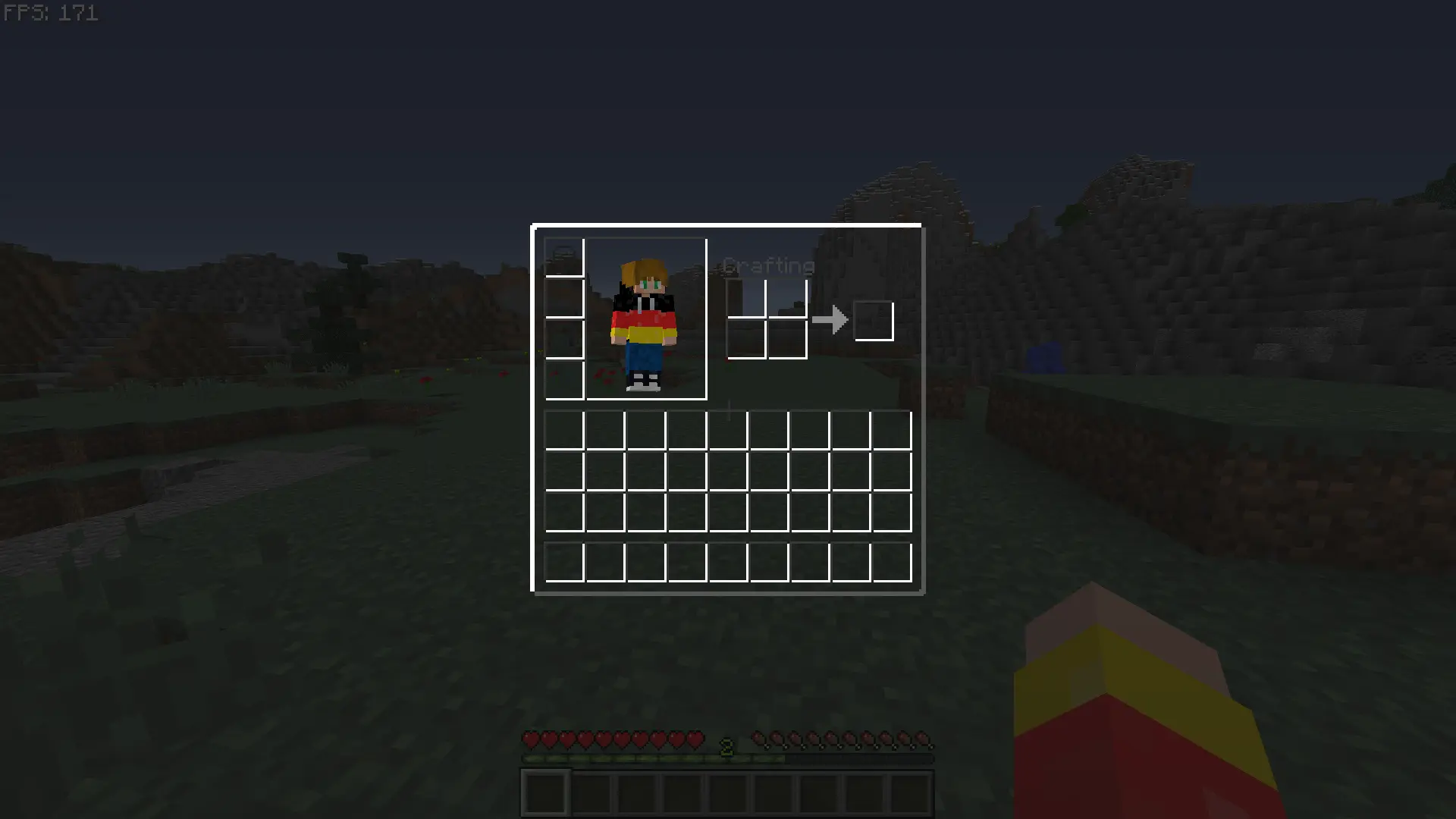(Made for 1.8.9, but could work in more Versions)
Saturated Ceramics

This resource pack fixes one of the main problems with vanilla ceramics – their excessive “pale” appearance. If you’ve always felt that the colors of ceramics look dirty or gray, this pack is for you.
all lowercase
This fontpack turns all font to lowercase.
To install it, make sure to select it in the resource packs screen and put it on top of other font packs.
# MY OTHER FONTS
– Paramita Font by SourAlien
– Marga Font by SourAlien
– PP Font
– Anicca Font by SourAlien
– Warm Mojangles
– Tiny Bold Font
– SAS SMALL CAPS FONT
– Samsara Mono by SourAlien
– Ostrakon Font by SourAlien
– Epsilon Font by SourAlien
– Alice Font
– Sleek DR
– Synesthete’s Dream
– HD B&W Font
Sans Totem
This texture pack adds sans from the rpg game what is named undertale.Have fun with it.
WARNING:THIS TEXTURE PACK İS NOT ORIGINAL BUT IT DIDNT COPYIED FROM SOMEWHERE IT MADE BY ME FROM PHOTOS ITS A COSTUM TEXTURE PACK