SignEdit for Bukkit
# SignEdit for Bukkit
[![[Release@GitHub]](https://img.shields.io/github/v/release/Deltik/SignEdit?style=for-the-badge)](https://github.com/Deltik/SignEdit/releases) [![[Downloads@Total]](https://img.shields.io/github/downloads/Deltik/SignEdit/total?style=for-the-badge)](https://github.com/Deltik/SignEdit/releases) [![[Downloads@Latest]](https://img.shields.io/github/downloads/Deltik/SignEdit/latest/total?style=for-the-badge)](https://github.com/Deltik/SignEdit/releases) [![[Ratings@Spigot]](https://img.shields.io/spiget/rating/47604?style=for-the-badge)](https://www.spigotmc.org/resources/signedit-for-bukkit.47604/rate)
SignEdit for Bukkit is a [Bukkit plugin](https://www.spigotmc.org/resources/categories/bukkit.4/) that allows players to edit sign objects by looking at them or clicking on them and typing in a SignEdit command.
![[SignEdit for Bukkit v1.14.0 – /sign help]](https://i.imgur.com/VBCjDIr.png)
## Installation
1. Download the latest .jar file from [the Releases page](https://github.com/Deltik/SignEdit/releases) and upload it to your Bukkit server (Spigot, PaperMC, etc.) plugins/ folder.
2. Restart your Bukkit server.
**Usage, Permissions, Configuration, and Features**
Full documentation of this plugin can be found in [the GitHub project README.md](https://git.io/SignEdit-README).
## Compatibility
This plugin is a fork of [Omel’s SignEdit](https://web.archive.org/web/20190905124503/https://www.spigotmc.org/resources/signedit.25485/) v1.3. Omel’s SignEdit v1.3 and older are not compatible with Bukkit 1.12 and newer because a deprecated API method was removed ([see related issue in MyPet](https://github.com/xXKeyleXx/MyPet/issues/1033)).
More compatibility information can be found in [the GitHub project README.md](https://git.io/SignEdit-README#compatibility).
Sick [16x] texture pack 1.8.9
this is a red pvp texture pack for minecraft 1.8.9. it was made by Klox1nPixles (on YouTube) PugPacks (on YouTube) and me/_crxwned. the pack took a year make, and was for the YouTuber Sicc. This pack heavily improves the look and feel of the game. hope you injoy:) (ps I have a video on youtube)
Shuttle
> This project is still in development!
## Description
Shuttle is a lightweight open-source addon library for adding extension support to your mods. It allows for dynamic registration of objects which can be pulled and used within your mod easily, as well as allowing provision of instances which might be required for the construction of certain objects.
## Should I use it?
You can and / or should use this library if:
– You are creating a public addon api for your mod
– You want to easily extend your own mod (with more mods :p)
– You want to, for some othe reason, provide the ability to register new stuff in or internally tweak with your mod(s)
## Why?
After rewriting the addon system for [Cactus Mod](https://modrinth.com/mod/cactus) I decided to publish it as an open-source library for other modders to use.
For now, there isn’t really documentation on it – I’m maintaining this in my free time and will create some docs when I have time for it.
## Docs
> Coming Soon™
Shorty Swords
Shortened Sword are Just Built Different! Aren’t they look hot?
Texture-pack makes swords a bit shorter. Supports almost **EVERY** ever existed Minecraft Version.
Shorter Swords
[
](https://modrinth.com/resourcepack/shorter-swords-pack)

[
](https://discord.gg/FVH3GaMHJz)
[](https://modrinth.com/shader/shorter-swords-pack)
[](https://ko-fi.com/titan1um)

**This resource pack makes swords shorter to give you a better view of the battlefield!**
ℹ️*All images* below *and in the* Gallery *were taken in* vanilla Minecraft **1.21.1**
# 📥Installation:
This resource pack makes swords shorter to give you a better view of the battlefield! The pack is *made for* **all versions between 1.6.1 and 26.1.1**.
⚠️The short copper sword is *only available* for **versions above 1.21.9** (The Copper Age Update)!

# ✨Features:
Swords are now shorter to give you a better view of the battlefield!


# 🛠️Versioning:
This ressource pack uses the following versioning system:
– **Base pack:** standard versioning + copper sword or no copper sword (CS/NCS) Minecraft version
– -> *e.g.* **1.0ncs-1.20.1, 2.4cs-v1.21.9,…**

# 💘 Support me!
To help me and make me develop more fascinating projects, share and recommend this resourcepack . Thank you so much!!!
You can also try my other projects [here](https://modrinth.com/user/Titan1um) or the projects me and Polr made [here](https://modrinth.com/organization/titan1um-x-polr)! 😀
Short PvP Swords 1.6+
**remember even it shows warnings like For Newer or Older version it will still works fine**
# 🗡️ Clean PvP Swords
**Short sword textures for clear screen PvP. Perfect for Sword PvP, UHC, and Bedwars.**
—
## 📦 About this Pack
This pack replaces all sword textures with minimal, short versions – ideal for PvP players who want a clean screen and better visibility during fights.
**✅ Includes:**
– Wooden, Stone, Iron, Gold, Diamond & Netherite short swords
– Consistent pixel art style
– No extra GUI changes
– Lightweight – great for low-end PCs
—
## ⚔️ Recommended For
– Crystal PvP
– UHC / KitPvP
– FPS gameplay
– Clean screen texture setups
—
## ⚠️ Compatibility Note
– Tested on **Vanilla Minecraft Only**
– Not Tested with Mods
—
## 🏷️ Tags
`#pvp` `#fps` `#short-swords` `#clean-ui` `#1.21` `#resource-pack` `#low-fire` `#minecraft-texture`
Short Swords
This texture pack makes swords short for your convenience!
This texture pack supports 1.8.9, 1.21.11, 26.1
PvP Swords
# PvP Swords
Shorter/smaller textured swords for easier PvP.
insert copper sword from imagination below… or go to the gallery tab i guess
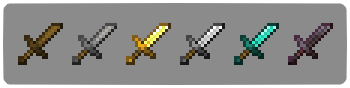
The resource pack file is shorterswords.zip
shea’s simple Totem x bare bones
# shea’s simple Totem x bare bones
## what does this pack does
### it takes Totems and cleans it up
This pack does not include any bare bones textures
**Bare Bones is required for the intended look**
disclaimer if you use this pack make sure to place this pack above bare Bones in your resource pack list for it to use its own instead of bare bones
i recomend using other shader and resource packs like [bliss](https://github.com/X0nk/Bliss-Shader) to improve looks but that is optional
**you can showcase this if you want just dont redistrabute it**
Shady’s Dark Okami GUI
The default Minecraft interface is too bright for me, and other dark mode packs I’ve downloaded in the past are just a step away from perfect. So, I made my own.
Features a dark mode interface that’s not too dark and not too light, double resolution font, and a custom-made Okami inspired HUD for hearts, air, armor, and hunger. To go a bit farther, the sun and moon are also replaced with custom Okami textures.
**_Check the gallery for more examples of how this pack looks when applied._**
