Truly Small Items
### Features
– Smallified equipment and miscellaneous items.
– Fixes multiple texture issues, such as the end crystal offset.
– Blends in well with vanilla textures.
– Fully compatible with other smallifying resource packs!
– Fully functional in any version from 1.5!
### Questions?
Be sure to make suggestions and report bugs or inconsistencies to the [Jotform](https://form.jotform.com/260524716060046)!
### What Version?
If you are using the Modrinth loader, it should automatically select the resource pack for your version!
In case you are not using the Modrinth loader, the letter determines which pack to install:
* P: 1.5 – 18w43a
* T: 18w43a – Latest
Small fire – Remastered
# 🔥 Small Fire – Remastered
## A smaller fire texture for better visibility
**Tired of fire blocking your screen during combat? Small Fire – Remastered reduces the fire texture size, making it perfect for:**
– **PvP – No more flames covering your view.**
– **Survival – Less intrusive fire while exploring.**
– **Vanilla-friendly – Stays true to the original style.**
## Features
– **No OptiFine required. – Works in vanilla minecraft and others!**
– **Smaller fire block. – Unlike other packs, makes the fire block smaller!**
## Example
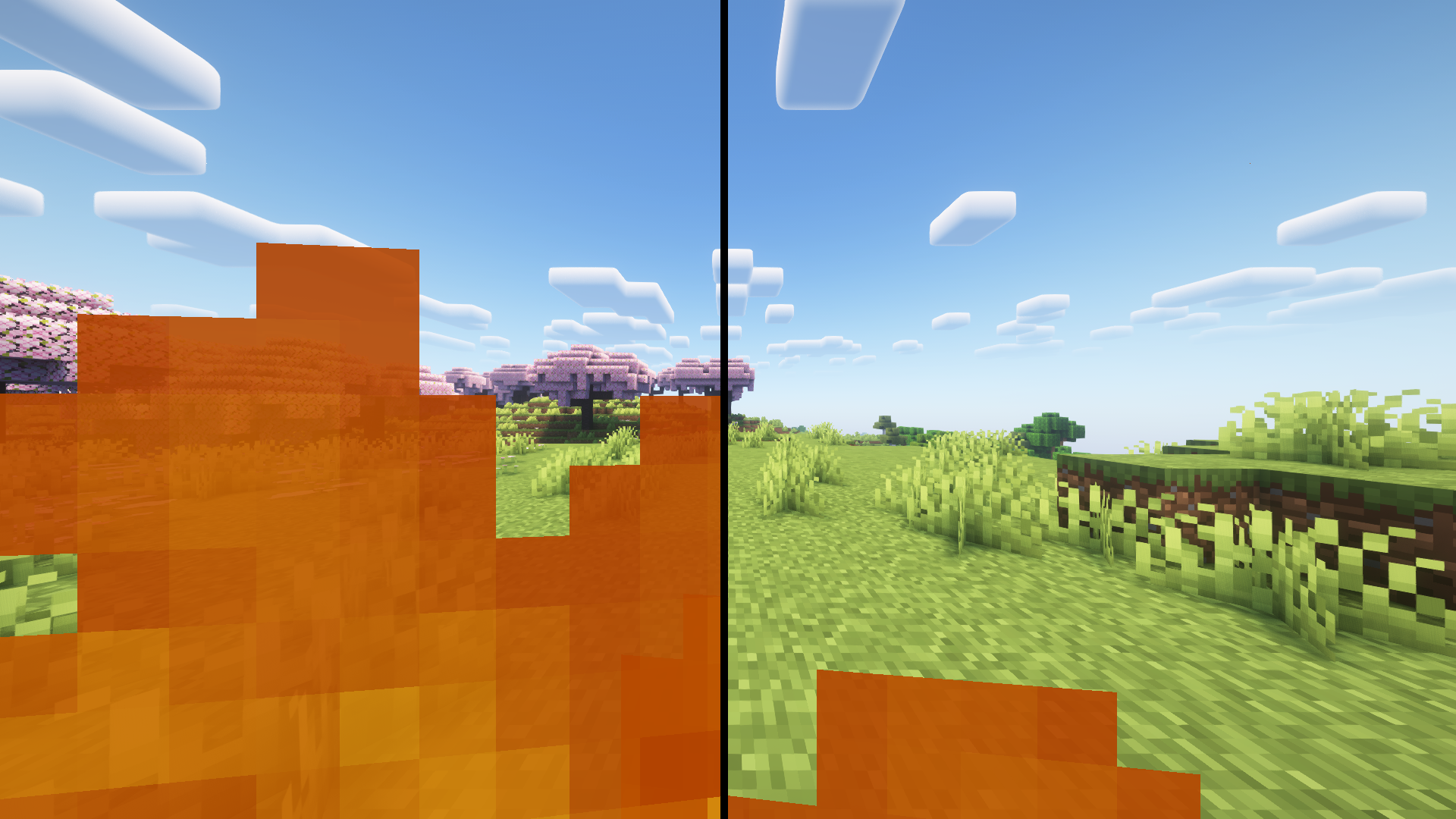
## Compatibility
– **Full modern minecraft support!**
– **Versions: `1.21.x – 1.6.1` (always updating!)**
**Installation: Place it in your resourcepacks folder and enable it in-game.**
### Original project
**[project](https://modrinth.com/resourcepack/small-fire)**
—
🇪🇸 Descripción en español
## 🔥 Small Fire – Remastered
### Una textura de fuego más pequeña para mejor visibilidad
**¿Cansado de que el fuego bloquee tu pantalla durante el combate? Small Fire – Remastered reduce el tamaño de la textura del fuego, haciéndolo perfecto para:**
– **PvP – No más llamas cubriendo tu vista.**
– **Supervivencia – Fuego menos intrusivo mientras exploras.**
– **Compatible con vanilla – Mantiene el estilo original.**
### Características
– **No requiere OptiFine. – ¡Funciona en Minecraft vanilla y otros!**
– **Bloque pequeño. – A diferencia de otros paquetes, este reduce el tamaño del bloque de fuego.**
### Compatibilidad
– **Compatible con las todas versiones modernas de Minecraft.**
– **Versiones: `1.21.x – 1.6.1` (siempre actualizando!).**
**Instalación: Coloca el paquete en tu carpeta de `resourcepacks` y actívalo en el juego.**
Small Caps Font

Small Caps Font
This resource pack changes the Minecraft font to a small caps one. I’ve made some improvements from the similar already in vanilla, such as changing the numbers and modifying the symbols and characters. You can check it out for yourself below or in the gallery!

Small Axes
# 🪓 Small Axes
Big axes getting in your way? Small Axes is a minimalist texture pack that reduces the size of all axe models, giving you a clearer view while chopping trees, fighting mobs, or building. Stay efficient and stylish with a cleaner, less intrusive HUD.
✅ Features:
✔️ Smaller axe models for every tier (wood, stone, iron, gold, diamond, netherite)
✔️ Faithful to the vanilla Minecraft art style
✔️ Ideal for PvP, survival, or aesthetic gameplay
✔️ Compatible with other resource packs
📦 Compatibility:
Minecraft Java Edition
No mods required
**Part of the small tools series**
Sleek DR
This fontpack adds a Sleek Digital Retro font.
To install it, make sure to select it in the resource packs screen and put it on top of other font packs.
# MY OTHER FONTS
– [Paramita Font by SourAlien](https://modrinth.com/resourcepack/paramita-font-by-souralien)
– [Marga Font by SourAlien](https://modrinth.com/resourcepack/marga-font-by-souralien)
– [PP Font](https://modrinth.com/project/pp-font)
– [Anicca Font by SourAlien](https://modrinth.com/resourcepack/anicca-font-by-souralien)
– [Warm Mojangles](https://modrinth.com/resourcepack/warm-mojangles)
– [Tiny Bold Font](https://modrinth.com/resourcepack/tiny-bold-font)
– [SAS SMALL CAPS FONT](https://modrinth.com/resourcepack/sas-small-caps-font)
– [sas all lowercase font](https://modrinth.com/resourcepack/sas-all-lowercase-font)
– [Samsara Mono by SourAlien](https://modrinth.com/resourcepack/samsara-mono-font-by-souralien)
– [Epsilon Font by SourAlien](https://modrinth.com/resourcepack/epsilon-font-by-souralien).
– [Ostrakon Font by SourAlien](https://modrinth.com/resourcepack/ostrakon-font-by-souralien)
– [Alice Font](https://modrinth.com/resourcepack/alice-font)
– [Synesthete’s Dream](https://modrinth.com/resourcepack/synesthetes-dream)
– [HD B&W Font](https://modrinth.com/resourcepack/hd-bw-font)
Skyblue Nether Portal
# **Sky Blue Nether Portal**
***Sky Blue Nether Portal*** is a **lightweight resource pack** that reworks the *Minecraft* Nether portal by replacing the **classic purple texture** with a **clean sky blue portal** inspired by the *Minecraft Movie portal*. The new design keeps the **vanilla style** intact while making the portal **less visually loud** and more refined.
*Perfect for players who want a fresh Nether portal without changing how Minecraft feels.*

### **Features**
– **Sky blue Nether portal texture**
– *Vanilla friendly visuals*
– **Frame adapts to any portal size**
– *No performance impact*
– **No mods required**
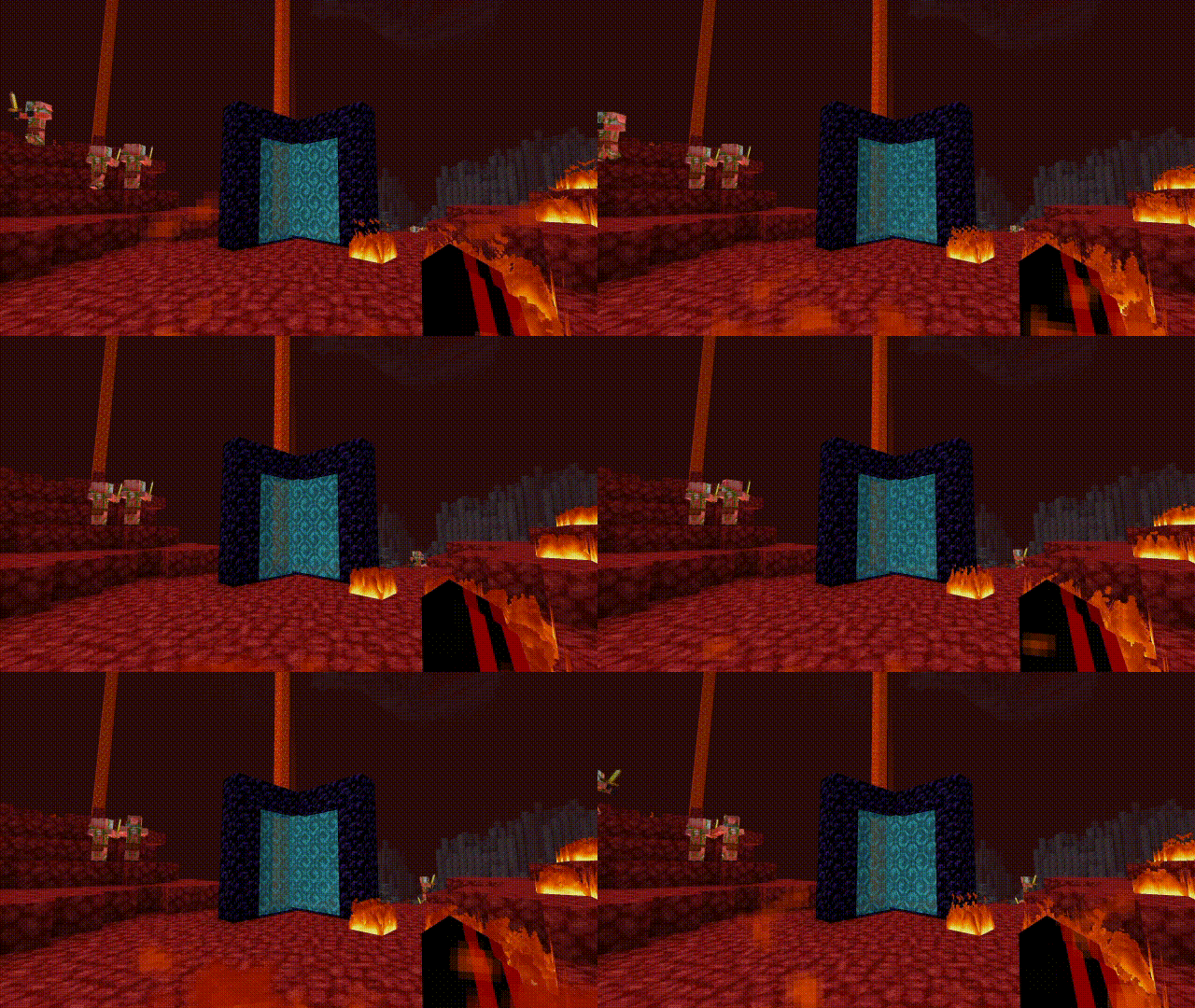
This resource pack fully reworks the Nether portal texture. The portal no longer uses a purple nether texture on each block. Instead, it features a **skyblue** with increased transparency and no size limitation, allowing it to adapt naturally to any portal shape.
Other texture packs used in these pictures: **[Saturated Mc](https://modrinth.com/resourcepack/saturated-mc)** and **[Smooth Low fire](https://modrinth.com/resourcepack/smooth-low-fire)**
—
### **Compatibility**
– **Minecraft Java Edition**
– *Fully compatible with most resource packs*
– **Uses vanilla style textures and models**
—
If you enjoy ***Sky Blue Nether Portal*** and want to support **future updates**, consider supporting me on **PayPal**.
SKN’s Loopy Ores
Summary
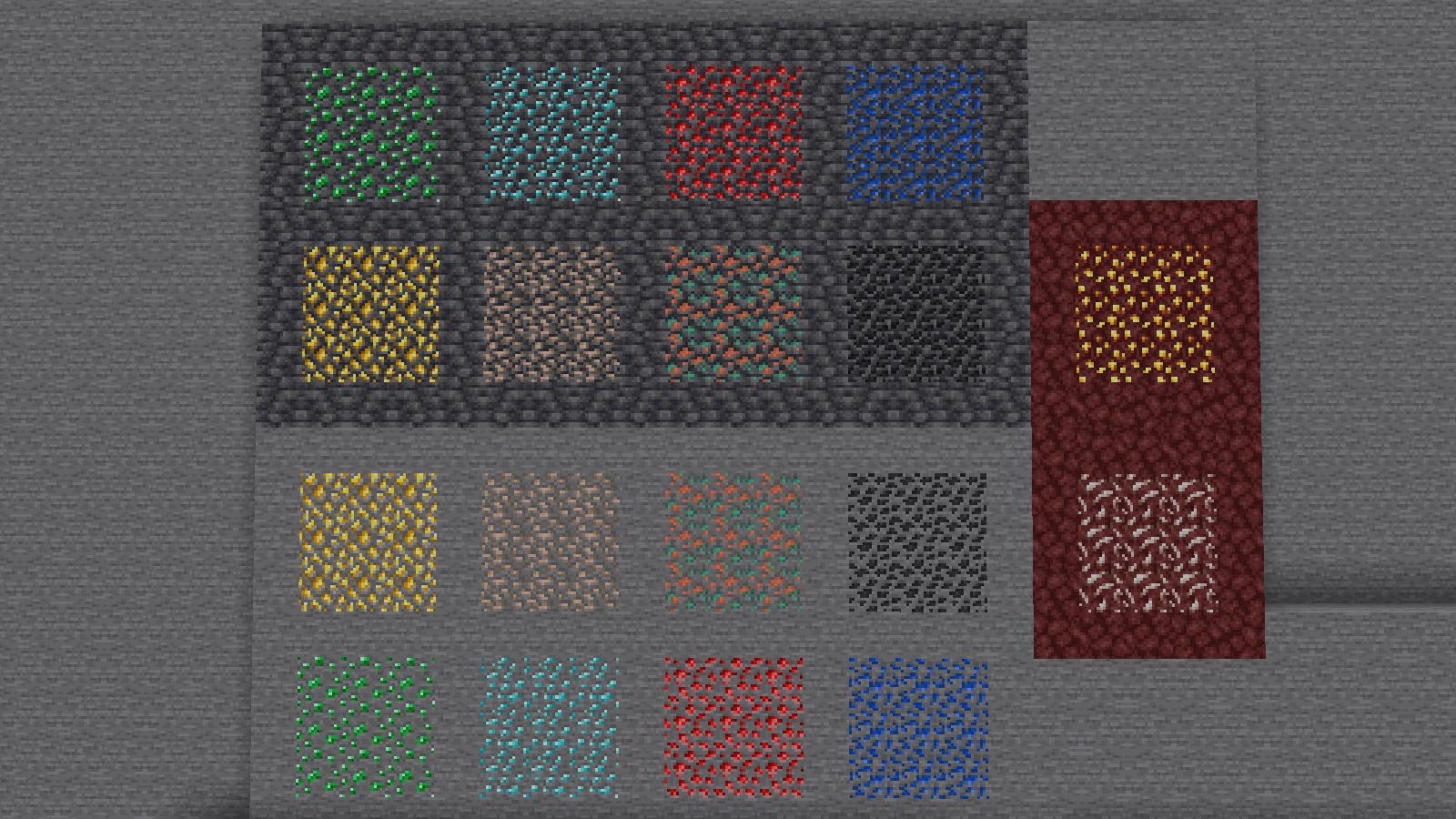
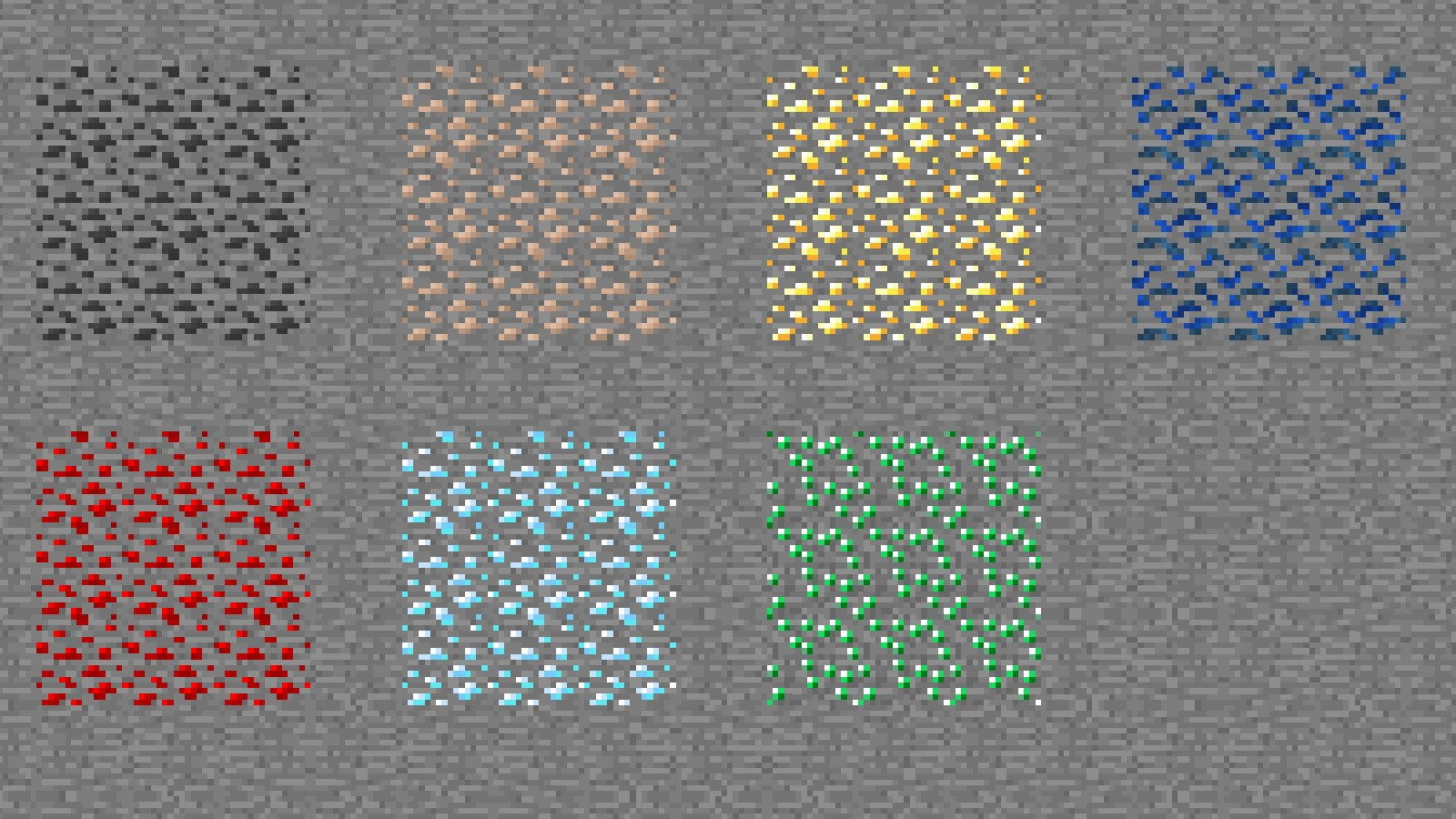
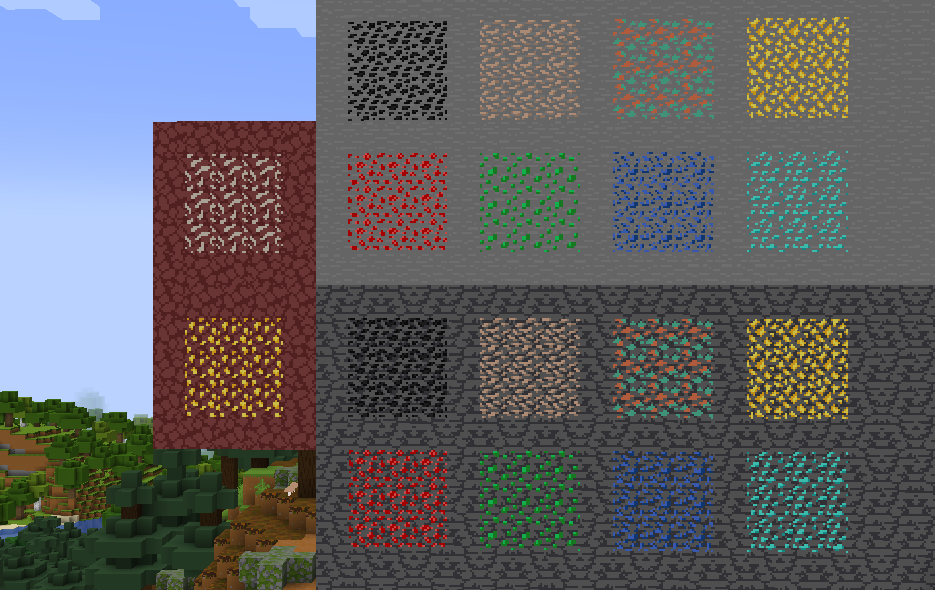
Vanilla ore textures have always seemed very “contained” in their blocks. You could draw a grid using the blocks themselves. This texture pack connects all those lonely ores together, albeit in a pretty rugged way.
This also functions as a more awesome version of all the “ore outline” resource packs.
I didn’t touch gilded blackstone or ancient debris because they’ve all been pretty cool textures already, and I wouldn’t be changing much. I included them in screenshots in the gallery, but I did not change them.
Images
All Ores Affected
1.19-Latest
1.6-1.8.9
Ingame Screenshots
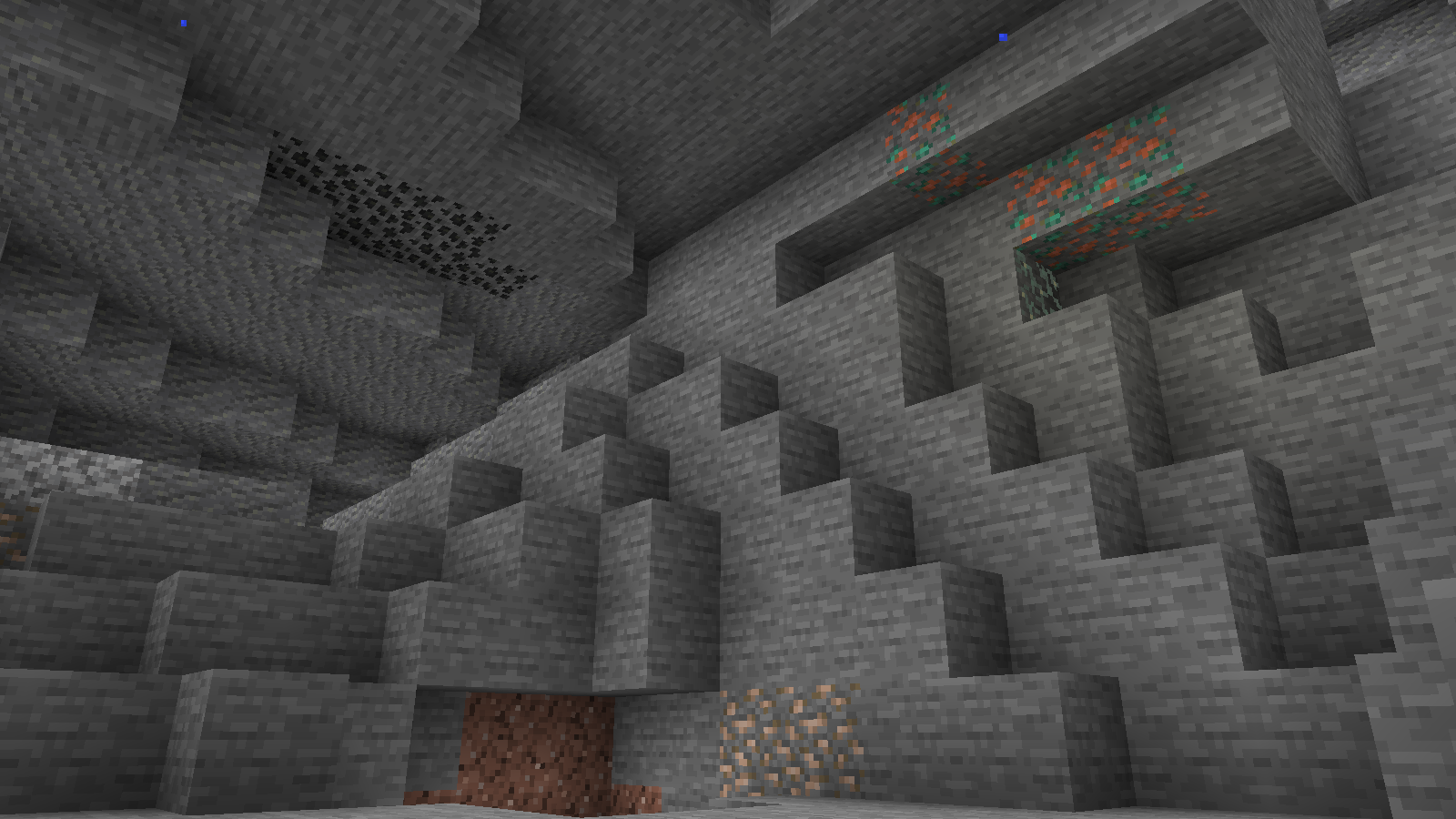
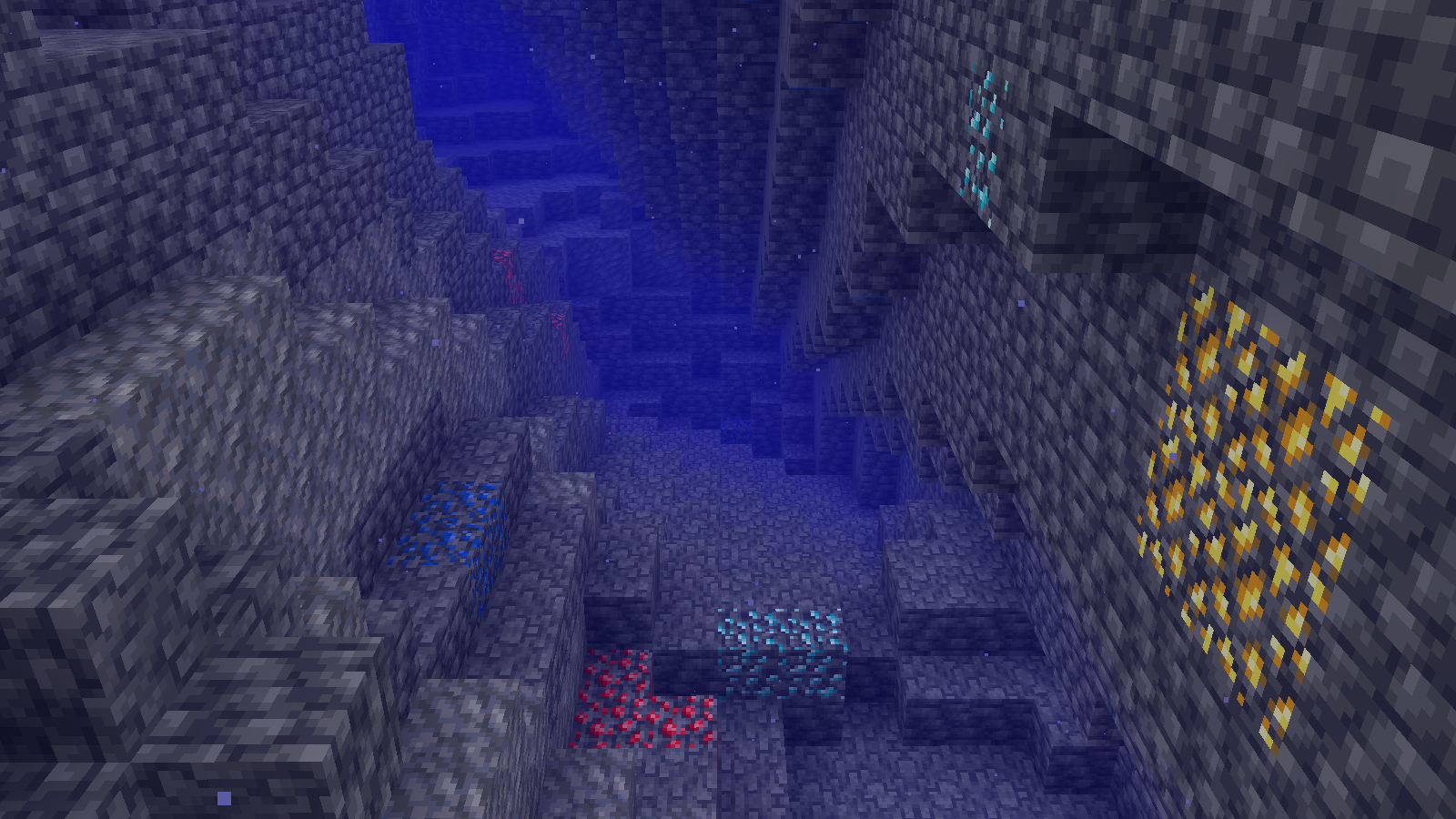

Shader Preview
Solas
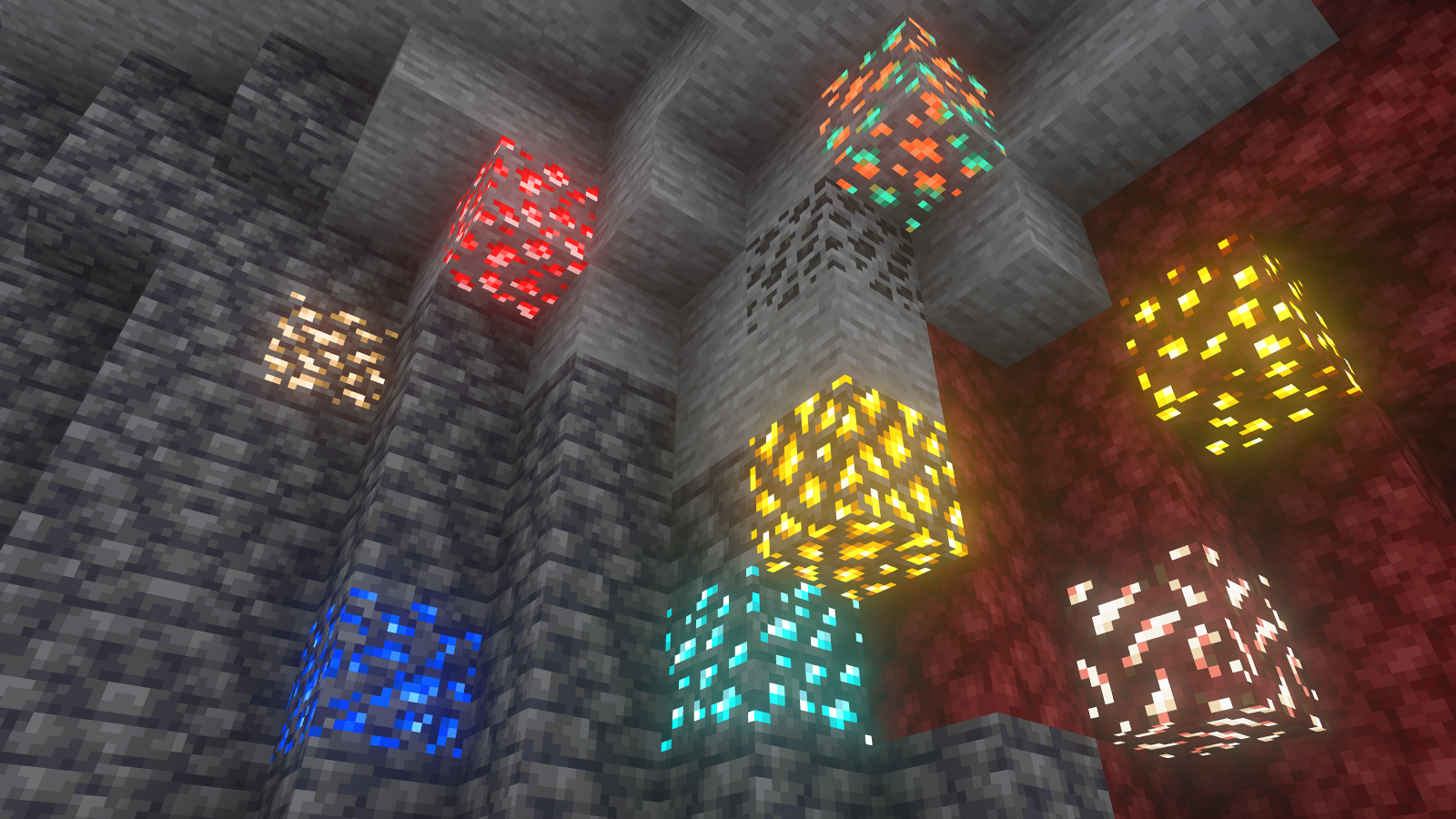
Complementary Reimagined

None
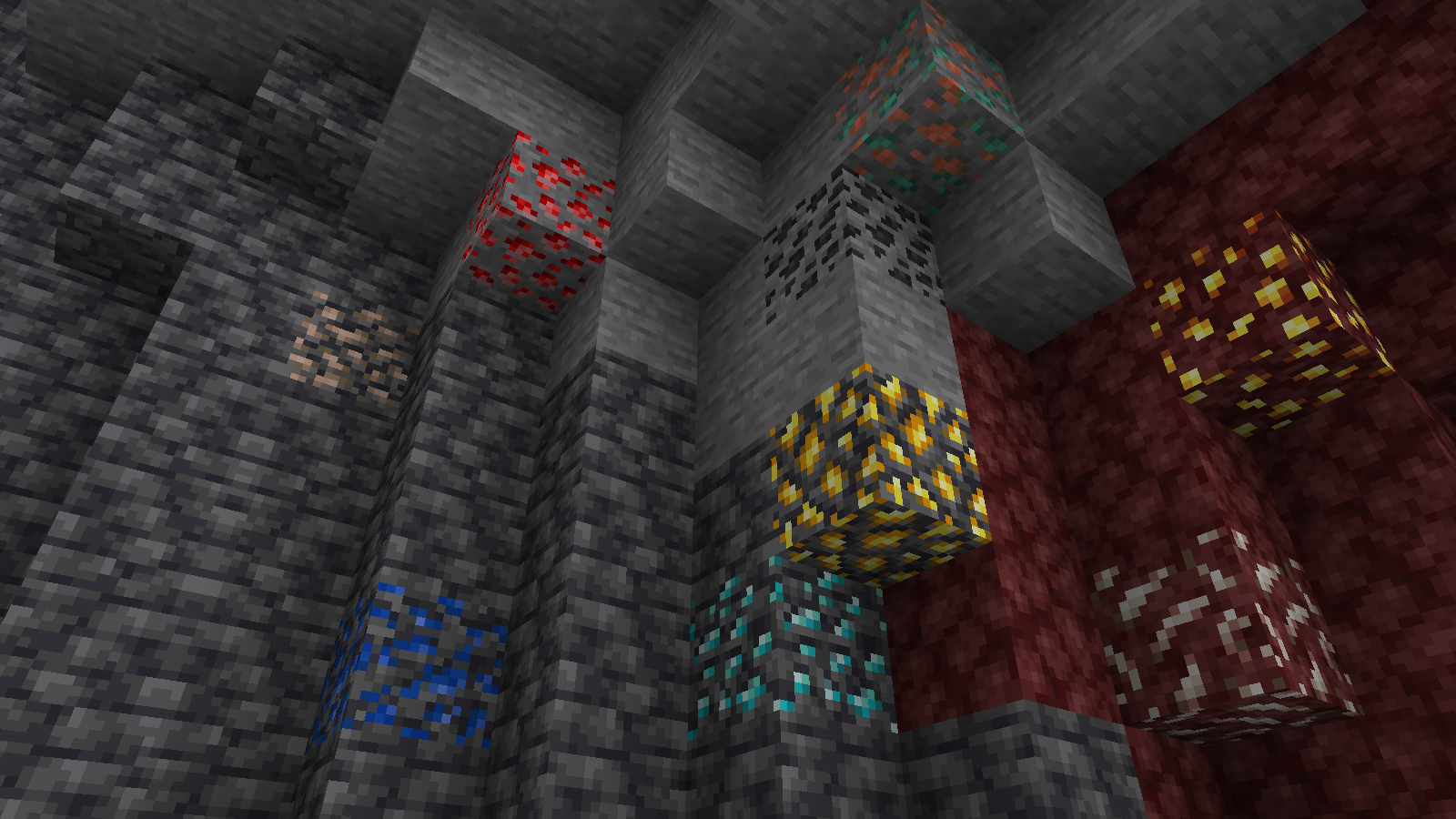
All shaders used are linked in the gallery with their corresponding images.
If you have any questions, comments, or ideas, please check out the wiki link and post them there.
SKN’s Loopy Ores: Bare Bones
Summary
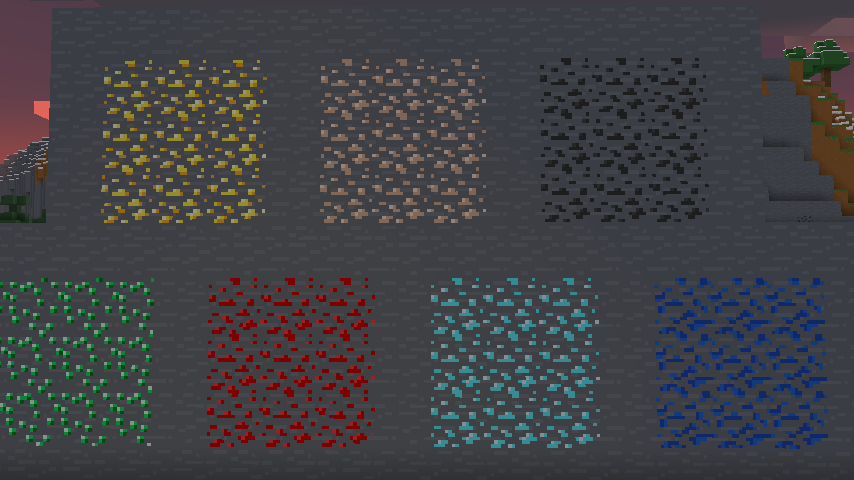
My Loopy Ores resource pack has been making its rounds, and as I’ve been enjoying playing with the Bare Bones resource pack, I figured I’d make a version of this that’s compatible. nearly every ore-type block is changed. (gilded blackstone and netherite are similar but unaffected, as there is nothing I can significantly do to make them like the ores.)
Images
All Ores Affected
1.8.9 Version
If you have any questions, comments, or ideas, please check out the wiki link and post them there.
Synkai IP Limiter
# Advanced Synkai IP Limiter
A powerful Velocity proxy plugin that prevents multiple accounts from joining your server using the same IP address. Includes account binding, alt-account detection, and Discord webhook notifications.
—
## Features
– 🔒 **IP-Based Player Limiting** – Restrict concurrent connections per IP address
– 🔐 **Account Binding** – Bind player accounts to their IP address
– 🚫 **Alt-Account Detection** – Automatically detect and prevent alt accounts
– 🔑 **Permission-Based Bypass** – Allow ops and VIPs to bypass restrictions
– 📢 **Customizable Messages** – Color code support (&c, &4, etc.)
– 🔔 **Discord Webhook Support** – Get real-time notifications of violations
– ⚪ **IP Whitelist** – Configure trusted IPs with custom limits
– ⏰ **Binding Expiration** – Set binding duration (never, 1 week, 1 month)
– 🐛 **Debug Mode** – Enhanced logging for troubleshooting
—
## Installation
1. Download the latest compiled JAR file from the build directory
2. Place it in your Velocity proxy’s `plugins/` directory
3. Restart your Velocity proxy server
4. Configuration file will be auto-generated at `plugins/IPLimit/config.yml`
—
## Configuration
Edit `plugins/IPLimit/config.yml` to customize the plugin:
“`yaml
# IP Limit Configuration
# Max players allowed per IP (This limits concurrent sessions for the valid account)
max-players-per-ip: 1
# Permission to bypass checks (Ops usually have this)
bypass-permission: “iplimit.bypass”
# Message shown when kicked due to IP limit/Binding (Supports Color Codes like &c, &4)
kick-message: “&cYou are not allowed to join with this IP! 1 Account per IP limit.”
# Message shown when kicked for using an Alt account
alt-kick-message: “&cAlt accounts are not allowed! This IP is bound to another account.”
# Binding expiration policy (never, 1w, 1m)
binding-expiration: “never”
# Discord webhook settings (optional)
discord-webhook-enabled: false
discord-webhook-url: “webhookurl here”
discord-webhook-username: “Advanced Synkai IP limiter”
discord-webhook-embed-color: 16711680
# Whitelisted IPs (These IPs bypass all checks)
whitelisted-ips:
– “192.168.1.1”
– “10.0.0.1”
# Optional limits for whitelisted IPs (overrides normal max)
whitelisted-ip-limits:
“127.0.0.1”: 3
# Debug mode (prints more info to console)
debug: false
“`
### Configuration Options
| Option | Type | Description | Default |
|——–|——|————-|———|
| `max-players-per-ip` | Integer | Maximum players allowed per IP | 1 |
| `bypass-permission` | String | Permission node to bypass checks | `iplimit.bypass` |
| `kick-message` | String | Message when player hit IP limit | Customizable |
| `alt-kick-message` | String | Message for alt accounts | Customizable |
| `binding-expiration` | String | Binding duration: `never`, `1w`, `1m` | `never` |
| `discord-webhook-enabled` | Boolean | Enable Discord notifications | `false` |
| `discord-webhook-url` | String | Discord webhook URL | `webhookurl here` |
| `discord-webhook-username` | String | Bot username for webhooks | Advanced Synkai IP limiter |
| `discord-webhook-embed-color` | Integer | Embed color (RGB decimal) | 16711680 |
| `whitelisted-ips` | List | IPs that bypass all checks | – |
| `whitelisted-ip-limits` | Map | Custom limits for specific IPs | – |
| `debug` | Boolean | Enable debug console output | `false` |
—
## Permissions
| Permission | Description | Default |
|———–|————-|———|
| `iplimit.bypass` | Bypass IP limit and binding checks | Ops |
| `iplimit.admin` | Access admin commands | Ops |
—
## Commands
“`bash
/iplimit [subcommand]
“`
### Subcommands
– `info` – Show player IP binding information
– `reload` – Reload configuration from disk
– `unbind ` – Remove IP binding for a player
– `whitelist ` – Add IP to whitelist
– `debug [on|off]` – Toggle debug mode
—
## Discord Webhook Setup
To get real-time notifications of IP violations:
1. Create a Discord webhook in your server settings
2. Copy the webhook URL
3. Edit `config.yml`:
“`yaml
discord-webhook-enabled: true
discord-webhook-url: “https://discord.com/api/webhooks/YOUR_WEBHOOK_ID/YOUR_WEBHOOK_TOKEN”
“`
4. Customize the webhook username and embed color as desired
5. Reload the plugin with `/iplimit reload`
—
## How It Works
1. **First Connection** – Player joins with their IP, account is bound to that IP
2. **Same IP, Same Account** – ✅ Allowed (logged in again)
3. **Same IP, Different Account** – ❌ Kicked (alt account detected)
4. **Different IP, Same Account** – ⚠️ Allowed (new IP, rebinding)
5. **Whitelisted IP** – ✅ Always allowed
6. **Bypass Permission** – ✅ Ops and VIPs bypass all checks
—
## Features in Detail
### Account Binding
Once a player joins, their account is bound to their IP address. This prevents other accounts from using the same IP.
### Binding Expiration
Configure how long bindings remain active:
– `never` – Bindings are permanent
– `1w` – Bindings expire after 1 week
– `1m` – Bindings expire after 1 month
### IP Whitelist
Add trusted IPs (proxy, testing, corporate networks) to bypass all checks:
“`yaml
whitelisted-ips:
– “192.168.1.1”
– “10.0.0.1”
“`
Set custom limits for whitelisted IPs:
“`yaml
whitelisted-ip-limits:
“127.0.0.1”: 5 # Allow 5 players from localhost
“`
### Debug Mode
Enable debug logging to troubleshoot issues:
“`yaml
debug: true
“`
Check console for detailed information about:
– Player connections
– IP bindings
– Permission checks
– Webhook requests
—
## Troubleshooting
### Players Getting Kicked Unexpectedly
1. Check the player’s IP: `/iplimit info `
2. Verify whitelisted IPs if needed
3. Check if player has `iplimit.bypass` permission
4. Enable debug mode for more info
### Discord Webhook Not Working
1. Verify the webhook URL is correct
2. Check `discord-webhook-enabled: true`
3. Ensure the webhook hasn’t been deleted from Discord
4. Check console for error messages with debug enabled
### Config Not Updating
1. Use `/iplimit reload` to reload configuration
2. Ensure YAML formatting is valid
3. Check file permissions on config.yml
Simple Auto Restart
# SimpleAutoRestart

[GitHub](https://github.com/teunjojo/SimpleAutoRestart) | [Modrinth](https://modrinth.com/plugin/simpleautorestart) | [Spigot](https://www.spigotmc.org/resources/simpleautorestart.107932/) | [CurseForge](https://www.curseforge.com/minecraft/bukkit-plugins/simpleautorestart) | [Wiki](https://github.com/teunjojo/SimpleAutoRestart/wiki)
[](https://github.com/teunjojo/SimpleAutoRestart/releases)
[](https://github.com/teunjojo/SimpleAutoRestart/actions/workflows/maven.yml)

[](https://bukkit.org/)
[](https://spigot.org/)
[](https://papermc.io/)
A Simple plugin to automatically restart your server at scheduled times with customizable warnings.
## Features
– Schedule automatic restarts at a specific times and days. (eg. `Wednesday;00:00`, `Sunday;3:00`)
– Customizable warning messages and titles (supports [MiniMessage](https://docs.advntr.dev/minimessage/) and legacy formatting).
– Configurable restart command(s) to fit your setup.
– Real-time based (not tick-based) scheduling for better accuracy.
– Supports all versions of from 1.8.7+
– Open Source!
## Installation
1. Configure your server restart script in `spigot.yml` (See [PaperMC Docs](https://docs.papermc.io/paper/reference/spigot-configuration/#settings_restart_script))
2. Download the latest `SimpleAutoRestart-.jar`.
3. Place the JAR file into your server’s `plugins/` folder.
4. Start or restart the server.
5. Configure `plugins/SimpleAutoRestart/config.yml` (See the [wiki](https://github.com/teunjojo/SimpleAutoRestart/wiki) for more information)
## User Interface
### Default Warning Messages

### Admin Commands

## Troubleshooting
### It counts down, but doesn’t restart
Make sure you have configured restart-script in your `spigot.yml`.
## Support
If you have any issues, bugs or questions. Feel free to [create an issue ticket](https://github.com/teunjojo/SimpleAutoRestart/issues/new) or message me on [discord](https://discord.com/users/306533562444939265).