Modern Font Pack
**Before downloading, please read the description carefully!**
**This is the Standard Edition of Modern Font Pack. If you are looking for derivative project of this project, go to [Modern Font Pack – Caxton Edition](https://modrinth.com/resourcepack/modern-font-pack-caxton-edition).**
Are you tired of Minecraft’s thick and large default font?

Even if you enable Force Unicode Font, it will look rough on a high-resolution screen.

This resource pack will solve these problems so that you can see a more beautiful, modern and smooth font when you play Minecraft.
– **HD Version**: There are 5 variants, JP, KR, CN, TW and HK. The font is taken from the [Noto Sans font family](https://fonts.google.com/noto/specimen/Noto+Sans) commissioned by Google.
– **JP**: CJK font is **Noto Sans Japanese**.

– **KR**: CJK font is **Noto Sans Korean**.

– **CN**: CJK font is **Noto Sans Simplified Chinese**.

– **TW**: CJK font is **Noto Sans Traditional Chinese**.

– **HK**: CJK font is **Noto Sans Hong Kong**.

– **Basic Version**: There are also 5 variants, JP, KR, CN, TW and HK. The font is also taken from the [Noto Sans font family](https://fonts.google.com/noto/specimen/Noto+Sans) commissioned by Google. Since its content is basically the same as the HD version, it will not be repeated here. The difference is that the font uses a basic smoothing effect, designed for low-resolution screens or smaller GUI scales.

– **Supreme Version**: There are also 5 variants, JP, KR, CN, TW and HK. The font is also taken from the [Noto Sans font family](https://fonts.google.com/noto/specimen/Noto+Sans) commissioned by Google. Since its content is basically the same as the HD version, it will not be repeated here. The difference is that the smoothness of the font is very high. This version is suitable for screen resolutions of QHD (2560 × 1440), 4K UHD (3840 × 2160) or above. **It only supports Minecraft 1.13 or above.**

This resource pack supports **emojis** (emoticons), so you can use it in the game. The font is taken from the [Noto Emoji font family](https://fonts.google.com/noto/specimen/Noto+Emoji) commissioned by Google.

It also supports some **fancy characters**, so you can use it in the game. The font is taken from the [Noto Sans font family](https://fonts.google.com/noto/specimen/Noto+Sans), the [Noto Sans Math font family](https://fonts.google.com/noto/specimen/Noto+Sans+Math), and the [Noto Sans Symbols font family](https://fonts.google.com/noto/specimen/Noto+Sans+Symbols) commissioned by Google.
To use them, you don’t need to use commands such as `/tellraw` and `/title`. You just need to use any online fancy text generators, and then copy and paste the generated fancy text into the game.

**Due to technical limitations, what you need to know is:**
– Emojis and fancy characters **only support version 1.16 and above**. **Version 1.15.2 and below are not supported**. If you try to use emojis and fancy characters in **version 1.15.2 or below**, it will **be displayed as garbled characters or nothing**.
– Since Minecraft **does not support combining characters**, some emojis still cannot be displayed correctly, such as “👨👩👧” may be displayed as “👨👩👧”. Similarly, some of the fancy text like “M҉i҉n҉e҉c҉r҉a҉f҉t҉”, “M҉͈͚̳͆̌ḯ̴̝̣̩̤̚n҈͖͍̬̤̆̈̌̈e̶͍͉̟͋͊̇̽c̵͖̥̬̮̐̉͊̄r̵͈̦͇̫͇̈a҈̫͖̓̄͗̆f҉͓̰̪̉̔t̶͓̣̗͓͒̊̄̇̾”, etc. cannot be displayed correctly.
– In order to make the emoji colored by the game still display normally, **only a single color version was made**. The **colored version will not be made** to avoid **distortion or become completely black problems** after being colored by the game.
As Chinese characters have **different standards in different countries or regions**, as well as **different screen resolutions**, 15 versions have been specially designed, namely **HD-Japanese version**, **HD-Korean version**, **HD-Chinese version**, **HD-Taiwan version**, **HD-Hong Kong version**, **Basic-Japanese version**, **Basic-Korean version**, **Basic-Chinese version**, **Basic-Taiwan version**, **Basic-Hong Kong version**, **Supreme-Japanese version**, **Supreme-Korean version**, **Supreme-Chinese version**, **Supreme-Taiwan version** and **Supreme-Hong Kong version**.
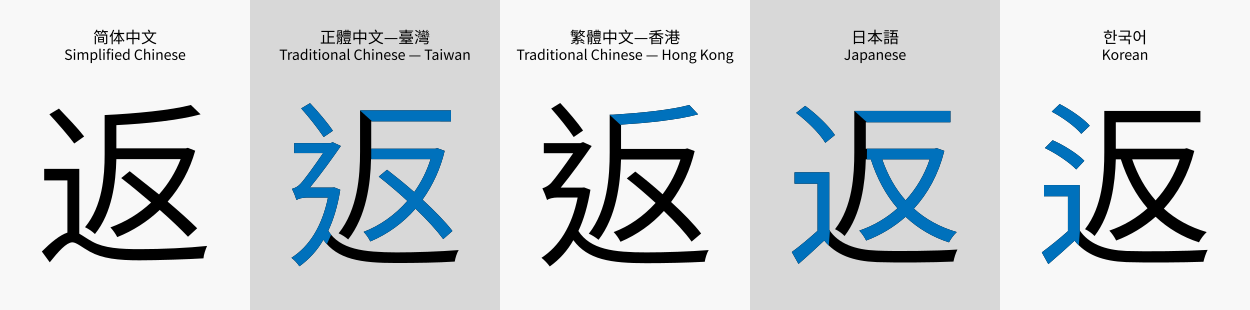
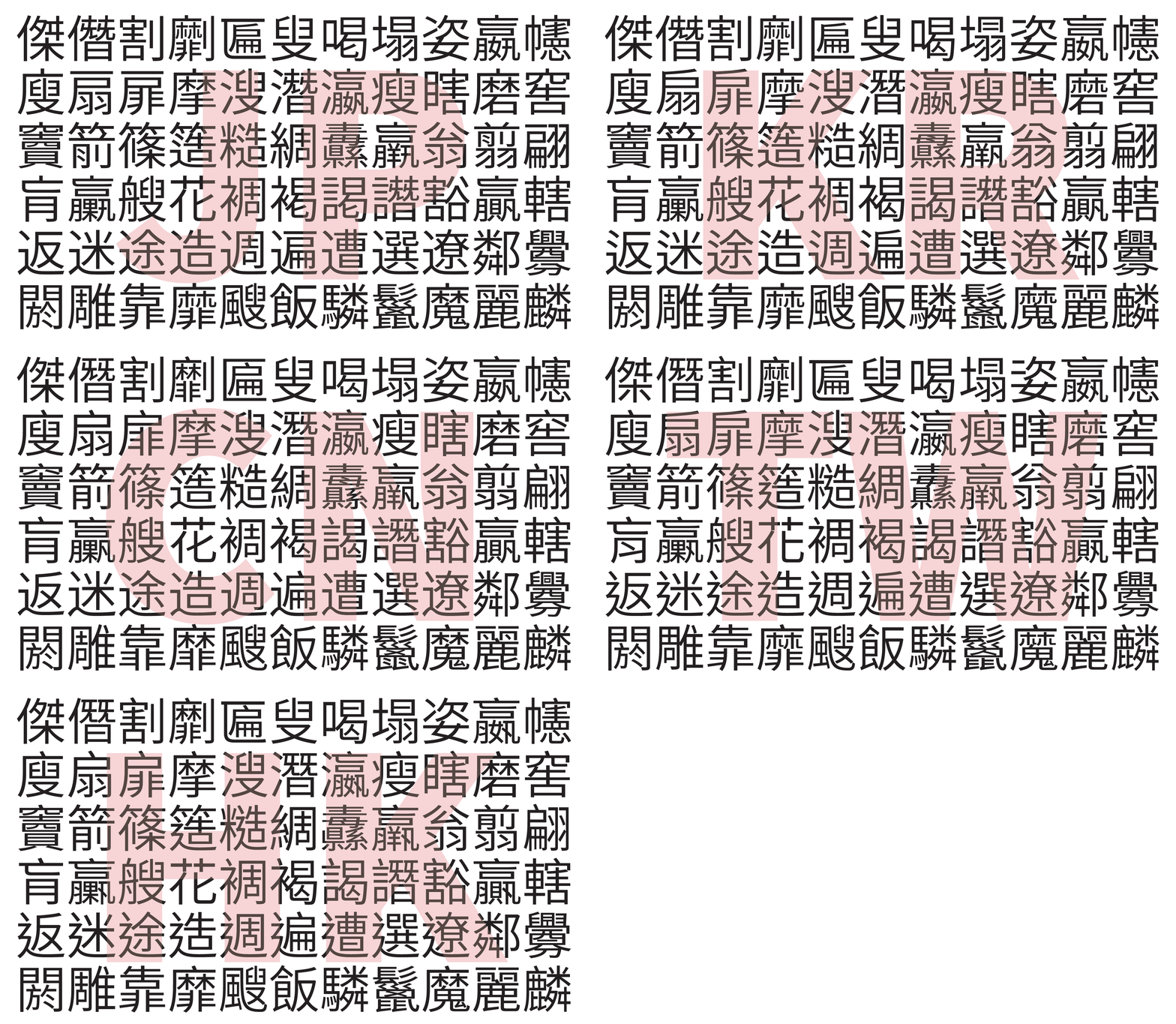
Please observe the following picture carefully, and you will find some differences in the writing of some characters:
(Image taken from Wikipedia)
(Image taken from Adobe’s blog)
Due to different screen resolutions, there will be different display effects in different situations. Please see the picture below:

(Click HERE to see the original image.)
Please choose to install the **Basic** version or the **HD** version according to the actual situation. If you choose the wrong version, the interface font may become blurry or rougher.
If your screen resolution is **QHD (2560 × 1440)**, **4K UHD (3840 × 2160) or higher**, and you are playing with **version 1.13 or above**, it is recommended that you select **Supreme** version and enable **full screen** for better results.
**If you still don’t know which version you should use, click the link below to see the display effect in various resolutions:**
– [1.13 and Above](https://www.curseforge.com/minecraft/texture-packs/modern-font-pack/pages/ideal-use-of-this-resource-pack-113-and-above)
– [1.12.2 and Below](https://www.curseforge.com/minecraft/texture-packs/modern-font-pack/pages/ideal-use-of-this-resource-pack-1122-and-below)
The format of the resource pack file name is **`MFP-J[Smoothness]-[Version Category][Version Number][CJK Type].zip`**, where:
– **`[Smoothness]`:**
– **`H`** represents that the resource pack is the **HD** version.
– **`B`** represents that the resource pack is the **Basic** version.
– **`S`** represents that the resource pack is the **Supreme** version.
– **`[Version Category]`:**
– **`00`** represents that the resource pack is suitable for **versions 1.5 (13w10a) to 1.5.2 (13w23b)**.
– **`01`** represents that the resource pack is suitable for **versions 1.6.1 (13w24a) to 1.8.9**.
– **`02`** represents that the resource pack is suitable for **versions 1.9 (15w31a) to 1.10.2**.
– **`03`** represents that the resource pack is suitable for **versions 1.11 (16w32a) to 1.12.2 (17w47b)**.
– **`04`** represents that the resource pack is suitable for **versions 1.13 (17w48a) to 1.14.4 (19w46b)**.
– **`05`** represents that the resource pack is suitable for **versions 1.15 (1.15-pre1) to 1.16.1 (1.16.2-pre3)**.
– **`06`** represents that the resource pack is suitable for **versions 1.16.2 (1.16.2-rc1) to 1.16.5**.
– **`07`** represents that the resource pack is suitable for **versions 1.17 (20w45a) to 1.17.1 (21w38a)**.
– **`08`** represents that the resource pack is suitable for **versions 1.18 (21w39a) to 1.18.2**.
– **`09`** represents that the resource pack is suitable for **versions 1.19 (22w11a) to 1.19.2**.
– **`10`** represents that the resource pack is suitable for **version 1.19.3 (22w42a to 23w07a)**.
– **`11`** represents that the resource pack is suitable for **version 1.19.4 (1.19.4-pre1 to 23w13a)**.
– **`12`** represents that the resource pack is suitable for **versions 1.20 (23w14a) to 1.20.1**.
– **`13`** represents that the resource pack is suitable for **versions 1.20.2 (23w31a) to 1.20.4 (23w51b)**.
– **`14`** represents that the resource pack is suitable for **versions 1.20.5 (24w03a and above) and above**.
– **`[Version Number]`:** Start from **`00`**. Every time it is updated, the number will increase by **`1`**.
– **`[CJK Type]`:**
– **`J`** represents that the Chinese characters are designed according to the Chinese character standard in **Japan**.
– **`K`** represents that the Chinese characters are designed according to the Chinese character standard in **Korean**.
– **`C`** represents that the Chinese characters are designed according to the Chinese character standard in **China**.
– **`T`** represents that the Chinese characters are designed according to the Chinese character standard in **Taiwan**.
– **`H`** represents that the Chinese characters are designed according to the Chinese character standard in **Hong Kong**.
For example:
– If you want to use the resource pack that is the **HD version**, can be used in **version *1.16.5***, and the **Chinese characters are designed according to the Chinese character standard in *Taiwan***, the file to be downloaded is “MFP-J**H**-**06**24**T**.zip”.
– If you want to use the resource pack that is the **HD version**, can be used in **version *1.12.2***, and the **Chinese characters are designed according to the Chinese character standard in *Hong Kong***, the file to be downloaded is “MFP-J**H**-**03**24**H**.zip”.
– If you want to use the resource pack that is the **Basic version**, can be used in **version *1.17.1***, and the **Chinese characters are designed according to the Chinese character standard in *China***, the file to be downloaded is “MFP-J**B**-**07**24**C**.zip”.
– If you want to use the resource pack that is the **Supreme version**, can be used in **version *1.15.2***, and the **Chinese characters are designed according to the Chinese character standard in *Korea***, the file to be downloaded is “MFP-J**S**-**05**24**K**.zip”.
If your country or region **does not use Chinese characters**, **you do not need to pay attention to the *Chinese character standard* in the `[CJK Type]` field**. You just need to **pay attention to the `[Smoothness]` field and the `[Version Category]` field**.
**Frequently Asked Question**
Click the spoiler to view.
Frequently Asked Question
1. Isn’t there already a Smooth Font Mod or Modern UI Mod that provides a similar effect? Why would you even make a smooth font pack?
This can be used by some players who don’t have the mod installed and in Bedrock Edition. In addition, there are not many versions supported by Smooth Font Mod and Modern UI Mod, while Modern Font Pack are supported from Java Edition 1.5 to the latest version 26.1.2, and Bedrock Edition 1.2.0 to the latest version 26.13! Here’s a comparison of the three:
-
- Smooth Font Mod:
-
- Supports Java Edition 1.7.10, 1.8.9, 1.10.2, 1.11.2, 1.12.1, 1.12.2.
-
- Requires Forge loader.
-
- Modern UI Mod:
-
- For Forge loader, it supports Java Edition 1.15.2, 1.16.1, 1.16.2, 1.16.3, 1.16.4, 1.16.5, 1.17.1, 1.18, 1.18.1, 1.18.2, 1.19.2, 1.19.4, 1.20, 1.20.1, 1.20.2, 1.20.4, 1.20.6, 1.21, 1.21.1, 1.21.3, 1.21.4, 1.21.6, 1.21.7, and 1.21.8. For Fabric Loader, it supports 1.20, 1.20.1, 1.20.3, 1.20.4, 1.20.6, 1.21, 1.21.1, 1.21.3, 1.21.4, 1.21.6, 1.21.7, and 1.21.8. For NeoForge Loader, it supports 1.20.1, 1.20.2, 1.20.4, 1.20.6, 1.21, 1.21.1, 1.21.2, 1.21.3, 1.21.4, 1.21.6, 1.21.7, and 1.21.8. For Quilt Loader, it supports 1.20, 1.20.1, 1.20.2, 1.20.4, 1.20.6, 1.21, 1.21.1, and 1.21.3.
-
- Some versions of this mod require Java 11. If any mod is incompatible with Java 11, it will not work.
-
- This mod requires OpenGL 4.3 (1.15.2 – 1.16.5) or 4.5 (1.17+). If the graphics card is not supported, it will not work.
-
- If a mod is incompatible with it, it will not work.
-
- Modern Font Pack:
-
- Supports all versions of Java Edition 1.5 to 26.1.2, and all versions of Bedrock Edition 1.2.0 to 26.13.
-
- Does not require any mod loader to use.
2. What is the difference between the Basic version, the HD version and the Supreme version?
Due to the different screen resolutions, and the font rendering of Minecraft will not be resampled as the GUI Scale changes, the same resource pack will have different display effects on different screens. The smoothing effect of the Basic version is relatively simple, and it will have an ideal effect in the case of a low-resolution screen or a GUI Scale of 2. The HD version uses a normal smoothing effect, which will have an ideal effect in the case of medium and high resolution screens or GUI Scale of 3 or above. The Supreme version has a super smoothing effect, which will have an ideal effect in the case of super high-resolution screens (such as 4K) or GUI Scale of 6 or above. See HERE for details.
3. Why does the Supreme version only support Java Edition 1.13 or above?
This is because the Supreme version fonts are displayed in TTF form. Minecraft Java Edition since 1.13 supports embedding font files into resource packs to display the desired font. If a super-smooth font from the image files used in the Basic and HD versions is created to support Java Edition 1.12.2 or below or Bedrock Edition, each character may need to be enlarged to 256×256 or larger. This can make resource packs too bulky and can drastically affect the performance of the game.
4. What are the differences between CJK font types “jp”, “kr”, “cn”, “hk”, and “tw”?
For details, please see the picture below. You can see five different ways of writing the word “返”:

And this picture illustrates some of the different ways of writing Chinese characters:
To learn more about the standard of Chinese characters, please read THIS (Simplified Chinese page).
5. Can I apply multiple versions of resource packs at the same time?
No. If you do this, only the content of the top-most resource pack will take effect.
6. After downloading the resource pack and loading it into the game, the game shows an incompatibility warning. What should I do?

This is normal if you are playing versions 22w42a to 22w44a and the resource pack to be applied was designed for version 1.19.3. This is because version 22w45a started to change pack_format to 12 in the pack.mcmeta file, and this resource pack has also made the same changes in response to this update. This is also normal if you are playing versions 23w14a to 23w16a and the resource pack to be applied was designed for version 1.20. This is because version 23w17a started to change pack_format to 15 in the pack.mcmeta file, and this resource pack has also made the same changes in response to this update. This will not affect the operation of the resource pack, so you can ignore the warning and apply it directly. If you are playing a version other than 22w42a to 22w44a or 23w14a to 23w16a, you may have downloaded the wrong version. You should go back to the download page, select the correct version and download again. Please do not forcefully apply a resource pack with an incompatibility warning. Otherwise, the resource pack may not work properly.
7. After applying the resource pack, the interface font displays abnormally. What should I do?

This problem will occur in version 1.6.1 to 1.10.2. Please restart the game to fix this problem. For this problem, see MC-41270.
8. After applying the resource pack, the interface font becomes rough. What should I do?

If you use the HD version or the Supreme version of the resource pack, the interface font will become rough when the GUI Scale is lower than the recommended GUI Scale. Please adjust the GUI Scale or apply the appropriate version to achieve the desired display effect. See HERE for details.
9. After applying the resource pack, the interface font becomes blurry. What should I do?

If you use the Basic version of the resource pack, the interface font will become blurry when the GUI Scale is higher than the recommended GUI Scale. Please adjust the GUI Scale or apply the appropriate version to achieve the desired display effect. See HERE for details.
10. The text that is aligned center or aligned right will shift to the left a bit. What should I do?

This problem will occur in version 1.8.9 and below. To solve this problem, please do not turn on “Force Unicode Font”. Installing OptiFine can fix this problem, but causes another problem where some text sometimes exceeds the box. See Question 14 for details. For this problem, see MC-23952.
11. The bold text is displayed abnormally, and it looks like two texts overlap each other. What should I do?

Please install OptiFine because it can fix the problem of abnormal display of bold text. Or enable “Force Unicode Font”, but this will not work if you are using the HD version in Java Edition 1.13 to 1.19.4, or using the HD version or Basic version in Java Edition 1.20 or above. If you are using the Supreme Edition, this problem cannot be fixed.
Alternatively, you can consider using the derivative project Modern Font Pack – Caxton Edition, which also fixes the problem of abnormal bold font display and has a font smoothing effect comparable to the Supreme version. However, it requires Caxton Mod to work (which requires Fabric Loader and Fabric API, or Forge or NeoForge), and only supports 1.18.2, 1.19.2, 1.19.4, 1.20, 1.20.1, 1.20.2, 1.20.3, 1.20.4, 1.20.5, 1.20.6, 1.21, 1.21.1, 1.21.2, 1.21.3, 1.21.4, 1.21.5, 1.21.6, 1.21.7, 1.21.8, 1.21.9, and 1.21.10.
12. I’m using a glow ink sac on a sign and I’m finding the effect is getting weird. What should I do?

This problem cannot be fixed. If you are using the Basic version of the resource pack with Force Unicode Font enabled, the problem is not apparent.
Alternatively, you can consider using the derivative project Modern Font Pack – Caxton Edition, which also fixes the problem of weird glowing text effect and has a font smoothing effect comparable to the Supreme version. However, it requires Caxton Mod to work (which requires Fabric Loader and Fabric API, or Forge or NeoForge), and only supports 1.18.2, 1.19.2, 1.19.4, 1.20, 1.20.1, 1.20.2, 1.20.3, 1.20.4, 1.20.5, 1.20.6, 1.21, 1.21.1, 1.21.2, 1.21.3, 1.21.4, 1.21.5, 1.21.6, 1.21.7, 1.21.8, 1.21.9, and 1.21.10.
13. Why are the fonts in some locations such as item tooltips in the game rough?

This problem will occur in Java Edition 1.14.4 and below. Since it is a problem of Minecraft itself, this problem cannot be fixed. You can see MC-154088 for details. However, this problem is not obvious in the HD version and the Supreme version of the resource pack.
14. I installed OptiFine and found that the interface font sometimes exceeds the box. What should I do?

This problem will occur in Java Edition 1.12.2 and below. To solve this problem, please do not turn on “Force Unicode font”. However, this problem cannot be fixed in languages that do not use Latin letters, such as Chinese, Japanese, Korean, Greek, and Russian. For this problem, see HERE and HERE.
15. I installed OptiFine and found that punctuation, Chinese Characters, Japanese Kana and Hangul alphabets in CJK languages are not full-width, but are incorrectly rendered as different widths. What should I do?

This problem occurs when using the HD version of the resource pack in version 1.13 or above. It seems to be caused by OptiFine. You can remove it to fix the problem. It is currently investigating whether this problem can be fixed.
16. Why does the game crash when I use the Supreme version of the resource pack?
This problem occurs in Java Edition 1.16.5 and below and Intel graphics cards are used. Because it is a problem of Minecraft itself, this problem cannot be fixed. You can see MC-180529 for details. Please temporarily use the HD version of the resource pack, it also provides a good smoothing effect.
17. When I enable “Force Unicode font”, the interface font of the game will become blurry. What should I do?

This problem occurs when using the HD version or the Supreme version of the resource pack in the Java Edition between 1.13 and 1.15.2. Since these versions do not open the function of editing Unicode fonts, they will use the fallback fonts in the resource pack and cause the fonts to become blurry. As for why each unicode_page_##.png file does not directly use the HD version of the font, this is because of an issue MC-133372 that is resolved as “Work As Intended”, and the subsequent versions cannot be displayed correctly. Therefore, the basic font is used as a fallback font. The way to solve the problem of blurry fonts is to turn off “Force Unicode fonts”. If the problem is still not resolved, please restart the game.
18. When I apply the modern font pack in Java Edition 1.15.x, I see the game log output a lot of messages like “Codepoint ‘d83e’ declared multiple times in minecraft:textures/font/symbol_smp5.png”. What should I do?
This is because versions between Java Edition 1.15 to 1.16.1 share the same format of font packs. Since UTF-16 encoding has been supported since 1.16, and to ensure that characters in the Unicode Supplemental Multilingual Plane (SMP, U+10000 – U+1FFFF) such as emojis, fancy text and CJK Unified Ideographs Extension can be used normally in versions 1.16 and 1.16.1, these characters are added. However, 1.15 to 1.15.2 only supported UTF-8, which caused the game to get this error when loading resource packs. But don’t worry, the resource packs you use will not be affected by these errors, and the functions that should be there will continue to exist.
19. I tried to type emojis, fancy texts, extended Chinese characters, etc., but the game almost never displays those characters properly. What should I do?

This problem will occur in version 1.15.2 and below. In those versions, the emoji characters available are as follows:
© ® ‼ ⁉ ⃣ ™ ℹ ↔ ↕ ↖ ↗ ↘ ↙ ↩ ↪ ⌚ ⌛ ⌨ ⏏ ⏩ ⏪ ⏫ ⏬ ⏭ ⏮ ⏯ ⏰ ⏱ ⏲ ⏳ ⏸ ⏹ ⏺ Ⓜ ▪ ▫ ▶ ◀ ◻ ◼ ◽ ◾ ☀ ☁ ☂ ☃ ☄ ☎ ☑ ☔ ☕ ☘ ☝ ☠ ☢ ☣ ☦ ☪ ☮ ☯ ☸ ☹ ☺ ♀ ♂ ♈ ♉ ♊ ♋ ♌ ♍ ♎ ♏ ♐ ♑ ♒ ♓ ♟ ♠ ♣ ♥ ♦ ♨ ♻ ♾ ♿ ⚒ ⚓ ⚔ ⚕ ⚖ ⚗ ⚙ ⚛ ⚜ ⚠ ⚡ ⚧ ⚪ ⚫ ⚰ ⚱ ⚽ ⚾ ⛄ ⛅ ⛈ ⛎ ⛏ ⛑ ⛓ ⛔ ⛩ ⛪ ⛰ ⛱ ⛲ ⛳ ⛴ ⛵ ⛷ ⛸ ⛹ ⛺ ⛽ ✂ ✅ ✈ ✉ ✊ ✋ ✌ ✍ ✏ ✒ ✔ ✖ ✝ ✡ ✨ ✳ ✴ ❄ ❇ ❌ ❎ ❓ ❔ ❕ ❗ ❣ ❤ ➕ ➖ ➗ ➡ ➰ ➿ ⤴ ⤵ ⬅ ⬆ ⬇ ⬛ ⬜ ⭐ ⭕ 〰 〽
As for other emoji characters, fancy text, and extended Chinese characters, etc, it is not possible to fix this due to technical limitations. You can only use them in version 1.16 and above.
20. Colored emoji characters are more aesthetically pleasing, but why do you only make emoji characters in a single color?
In order for the game to color these characters and still display them properly, only single-color emoji characters are used. If colored emoji characters are used, those characters will only display properly if they are colored white by the game. When these characters are colored by the game to other colors, it will cause distortion or even completely black.
21. When this resource pack is used with the DashLoader mod, it will cause the game to load slower and the DashLoader mod to display the error message “Internal crash. Please check logs or press ENTER”. What should I do?
This may be a bug in DashLoader itself, both HD and Supreme versions are affected. The Basic version is not affected by this bug. This does not prevent the resource pack from functioning properly, so you can choose to ignore this error. If you’re bored with this error screen every time you start the game, consider removing the DashLoader mod. This bug has been reported to the author of the DashLoader mod, details can be found HERE. This does not affect if you are playing version 1.16.5 and the resource pack you are using is HD version or Basic version. If you are playing version 1.17.1 and the resource pack you are using is HD version, you have to use DashLoader version 2.0.1 or below to avoid this error.
If the resource pack you are using is Supreme version, it’s not compatible with DashLoader anyway.
22. This resource pack is so cool. Can I add its content into the resource pack I made and share it?
Not recommend. Due to the different screen resolutions, and the font rendering of Minecraft will not be resampled as the GUI Scale changes, the same resource pack will have different display effects on different screens. Therefore, it is recommended that this resource pack be used as a separate resource pack instead of being added into the resource pack you made and shared.
23. This resource pack is so cool. Can I rehost these files for easy download by some people (eg players in mainland China)?
Not recommend. As resource packs will be updated due to feature requests, bug fixes or game updates, it is recommended to use the links on this site so players can enjoy the latest version of the content. If you have to rehost these resource pack files because some people don’t have access to the site or its download link, remember to check back from time to time to see if the resource pack has been updated.
24. This resource pack is so cool. Can I add it to any modpacks?
Yes.
**Future Development**
Provides tons of characters in the Unicode Supplementary Multilingual Plane (SMP, U+10000 – U+1FFFF). Due to technical limitations, this feature is only available in version 1.16 or above.
**Share This Resource Pack!**
Welcome to share this resource pack to some Minecraft communities! As resource packs will be updated due to feature requests, bug fixes or game updates, it is recommended to use the links on this site so players can enjoy the latest version of the content. If you have to rehost these resource pack files because some people don’t have access to the site or its download link, remember to check back from time to time to see if the resource pack has been updated. It is recommended to join my Discord server to ensure that you are notified when resource packs are updated.
**Feedback**
If you find a bug or want to make a feature request, please read the FAQ first. To report a bug or make a feature request, it is recommended to go to [Issues](https://github.com/YutaYamamoto212/ModernFontPack/issues/new/choose) to submit an issue. You are also welcome to join my Discord server.
**Discord**
Click [HERE](https://discord.gg/tqzdEaBAcn) to join my Discord server!
**Installation**
**Before downloading, please note:**
– This site only provides resource packs for **Minecraft: Java Edition**. For **Minecraft: Bedrock Edition**, click [HERE](https://www.curseforge.com/minecraft-bedrock/texture-packs/modern-font-pack).
– You should read the **FAQ** before downloading.
If you are playing **Minecraft: Java Edition**, please click the spoiler and follow the steps below to install the Resource Pack:
Installation
1. Download this Resource Pack in the Versions tab or Changelog tab.

2. Select your game version in the Game versions drop-down menu on the left. If you wish to quickly find your game version, you can enter the game version number in the Search box.

3. HD version is marked as Release (the letter R in the green circle), Basic version is marked as Beta (the letter B in the yellow circle), and Supreme version is marked as Alpha (the letter A in the red circle). This does not represent their development status, but is used to distinguish different versions so that you can quickly recognize them. After you find the resource pack you want to download, click the download button (A downward arrow if you are in the Versions tab. When the cursor hovers over it, it will turn into a downward arrow in a green circle and a Download tooltip will appear) on the right.

4. Place it in “/resourcepacks”. For example, “%appdata%.minecraftresourcepacks”. If you are playing version 1.5 to 1.5.2, please place it in “/texturepacks”.
5. Go to Options -> Resource Packs (Texture Packs if you’re playing version 1.5 to 1.5.2), and then apply it. If you receive an incompatibility warning, it means you may have downloaded the wrong version. If you are playing versions 22w42a to 22w44a and the resource pack to be applied is for version 1.19.3, or playing versions 23w14a to 23w16a and the resource pack to be applied is for version 1.20, ignore this warning and continue to apply. If you are not playing versions 22w42a to 22w44a or 23w14a to 23w16a, please return to this site, select the correct version and download it. If you are using this resource pack with resource packs that have modified fonts, resource packs that have added custom characters, or Patchouli Mod, please arrange on top of those resource packs, Mod Resources or Fabric Mods to ensure proper functioning. If you are not sure how to arrange it, please arrange it at the top.


6. If the font display is abnormal, restart Minecraft.
7. If you find that the interface font becomes blurry or rougher after applying the resource pack, please adjust the GUI Scale or change to another version (Basic -> HD or HD -> Basic, etc.).
8. If you are using the HD version or Supreme version in versions between 1.13 and 1.15.2, please turn off Force Unicode Font to ensure it works.
MiscPeripherals
_Frickin’ turtles with frickin’ mining lasers attached to their frickin’ side!_
Just a compendium of peripherals I have created with the help of the wonderful people on IRC and ForgeCraft.
### Miscellaneous Tweaks
– Peripheral Wrappers: You can use the following items as peripherals:
– Most Railcraft rails you can modify (set/get)
– Portal Gun Aerial Faith Plates (setHPower/setVPower/getPower/setPowered/getPowered) and Portal Spawners (setGun/setColor/getPortal/setPowered/getPowered)
– Thermal Expansion Tesseracts (getFreq/setFreq/getType/getOwner/getMode)
– Built-in programs installed when attaching anything MiscPeripherals (except turtle tools) to a computer or turtle: convertnbs diamondpipe energyarray gates gradient music playsng reactorcontrol readbee readcart readtree wrpulse
### Charge Station
Turtles parked on one of the dotted sides (use a wrench to change those) will be recharged at a maximum rate of 1 fuel point per tick per turtle (but it will be faster if you’re charging only 1 turtle in a higher tier station!) using energy from various mods.
– Standard (IC2, BuildCraft, Thermal Expansion): Stores 500 fuel points and charges 1 turtle at a time
– Advanced (IC2): Stores 5,000 fuel points and charges 2 turtles at a time
– Lapotronic (IC2): Stores 50,000 fuel points and charges 4 turtles at a time
– Ultimate (GregTech): Stores 500,000 fuel points and charges 6 (may be limited by cabling) turtles at a time
The IC2 part takes up to LV, MV, HV and EV respectively. The BuildCraft part takes up to 20*tier MJ/t.
### Iron Note Block
Peripheral that lets a computer play any note from any instrument available in note block form. You can also craft it alongside a turtle to make a Note Turtle.
Exposes a single function, playNote(instrument,note) where instrument is 0 for piano, 1 for bass drum, 2 for snare, 3 for clicks or 4 for bass guitar, and note is 0-24 in number of right-clicks.
The Minecraft Wiki has comprehensive documentation on Note Blocks if you need it.
### Feeding Upgrade
Craft it alongside a turtle to make a Feeding Turtle.
Exposes a single function, feed() which tries to feed an animal in a 3x3x3 area (centered around the turtle) using the contents of the selected slot. Returns true if an animal was fed, false if not.
### Chunk Loader Upgrade
Craft a Chunk Loader Module (shown above) alongside a turtle to make a Chunk Loader turtle. The module can be crafted with any of the following chunk loaders:
– Railcraft World Anchor (shown above)
– ChichenChunks Chunk Loader
– ChickenChunks Spot Loader (1×1 only)
– Additional Pipes Teleport Tether
– Steve’s Carts Chunk Loader Module
It will keep the chunk the turtle is on loaded, but be advised that a world reload will reboot the turtle, until they implement persistancy.
The radius of chunks that will stay loaded is configurable. Default is 0 for 1×1 (the chunk the turtle is on), can be set to 1 for 3×3 (chunks around the turtle), 2 for 5×5 and so on. The default Forge chunk loading settings allow for up to 5×5 – those can be changed in config/forgeChunkLoading.cfg under maximumChunksPerTicket.
### Laser Upgrade (IC2)
Craft a mining laser alongside a turtle to get a Laser Turtle.
If attacking, the turtle shoots a Mining laser, if digging, the turtle shoots a Low Focus laser. Requires the amount of EU for that mode (1250 or 100 respectively), converted into fuel (divide by 50 by default) and rounded up.
Right now the turtle does not automatically suck the drops, but I’m planning on making the upgrade do so.
### Resupply Upgrade and Resupply Station
Craft a Resupply Module alongside a turtle to get a Resupply Turtle. Also craft it like shown above to make a Resupply Station.
The Resupply Upgrade exposes the following functions:
– `link()`: Links the turtle to a Resupply Station next to it. Returns true if successful, false if failed.
– `resupply(slot)`: Resupplies the given slot, needs at least 1 item to identify what needs to be resupplied. Returns true if successful, false if failed.
– `getError()`: If resupply failed, returns a string containing the error.
The Resupply Station is where Resupply Turtles will resupply from. The turtle needs to be linked with the station. Has a double chest worth of inventory.
### Solar Turtle (IC2)
After its successful Solar Helmet add-on product, included in the standard IC2 product, Ender Dragoon Technologies now presents the Solar Turtle!*
Craft a Solar Panel alongside a turtle to get a Solar Turtle. The upgrade harnesses the power of EU-fuel conversion to recharge a single fuel value every 50 ticks.
It is also available in Compact Solar variants if you craft a LV, MV or HV Solar Array alongside a turtle. Those recharge 1 fuel every 7 ticks, 1 fuel every tick and 10 fuel every tick respectively.
Also available in Advanced Solar Panel variants if you craft a Advanced, Hybrid or Ultimate Hybrid Solar Panel alongside a turtle.
* – Royalties paid to Aperture Science.
### Shearing Upgrade
Tired of building maintenance-heavy RedPower sheep sweatshops? Need leaves for a build but shearing an entire forest is boring? This upgrade is for you!
Craft Shears alongside a turtle to get a Shearing Turtle. The turtle will shear sheep and mooshrooms when you order it to attack, and harvest leaves and tall grass when you order it to dig.
It is also compliant with Forge’s shearable API so mod entities should work too.
### Compass Upgrade
Craft a Compass alongside a turtle to get a Compass Turtle.
Exposes a single function, getFacing() which returns the turtle’s facing – 0-3, same as the f: value in the F3 screen.
### Bee/Tree/Butterfly Analyzer (Forestry)
The Bee, Tree and Butterfly Analyzers can read data from (analyzed!) Forestry bees, trees and butterflies. They expose the following functions:
– `analyze()`: Returns a table containing the data for the item in its inventory slot.
– `isMember()`: Returns whether the item on the inventory slot can be read, regardless of whether it’s been analyzed or not. The legacy isBee/isTree functions are still present.
### Interactive Sorter
The Interactive Sorter can send an incoming item (into its inventory slot) into a specific direction. When an item enters the sorter, it emits event “isort_item”, with the item identifier and amount as parameters. The item identifier is an universally unique ID identifying the item and its metadata. Exposes the following functions:
– `sort(direction,amount)`: Send amount (optional, defaults to as much as possible) of the item in its inventory down a direction. Direction values are: 0 for down, 1 for up, 2 for -Z, 3 for +Z, 4 for -X and 5 for +X.
– `list(direction)`: Lists the items available in the inventory at the given direction.
– `extract(direction,id,outputDirection,amount)`: Extracts amount (optional, defaults to as much as possible) of the given item (as id) from the inventory at the given direction, sending it down the given outputDirection.
When sorting, it tries to send the item to:
– An inventory (respects sidedness)
– A BuildCraft pipe (if it’s installed)
– If none are found, drop the item in that direction
### Gate Reader (BuildCraft)
Craft with any color of pipe wire and any kind of gate, including autarchic.
The Gate Reader can read BuildCraft gate triggers from blocks adjacent to it (or the turtle it is on), such as whether your quarry is done, or that tank is full. You can also craft it alongside a turtle to get a Gate Reader Turtle.
Exposes a single function, get(slot) which returns all gate conditionals as a string-boolean table. slot is optional (defaults to none) – it allows specifying a trigger parameter in the given turtle (or in the block version, built-in inventory) slot, for example, Liquid In Tank + a fuel bucket will check if there is fuel in the tank.
### Wrench Upgrade
Craft one of the wrenches below (in order of if not found try next) alongside a turtle to get a Wrench Turtle:
– Universal Electricity Wrench
– IC2 Wrench
– BuildCraft Wrench
– Railcraft Crowbar
The turtle will try to use all mod wrenches it knows of on a block when asked to dig.
### Treetap Upgrade (IC2 1.110 and up)
Craft a treetap alongside a turtle to get a Treetap Turtle.
When asked to dig, the turtle will use a treetap on a block and put the resulting resin on its inventory.
### Alchemist Upgrade (EE3)
Craft a Minium Stone alongside a turtle to get an Alchemist Turtle. Most of its operations need Minium Charge.
Exposes the following functions:
– `rechargeMinium(amount)`: Recharges amount (optional, defaults to all it can) Minium Charge from the Minium Stone in the current slot. Returns the total amount of Minium Charge recharged.
– `getMiniumCharge()`: Returns the current amount of Minium Charge in the turtle.
– `transmuteItem(amount)`: Transmutes amount (optional, defaults to the stack size) of the item in the current slot. Uses 1 Minium Charge per operation. Returns true if successful, false if failed.
– `transmute/transmuteUp/transmuteDown(sneak)`: Transmutes a block in-world, like right-clicking with a Minium Stone. If sneak (optional, defaults to false) is true, transmuting includes falling blocks such as sand or gravel. Uses 1 Minium Charge per operation. Returns true if successful, false if failed.
### Sign Reader Upgrade
Craft a sign alongside a turtle to get a Reading Turtle, just like the old peripheral which has been last updated in 1.2.5.
Exposes functions `read/readUp/readDown()` – which read a sign and return its 4 lines of text.
### REther Upgrade (Wireless Redstone ChickenBones Edition)
Craft a REther Module (shown above) alongside a turtle to get a REther Turtle.
It is able to interact with wireless redstone frequencies through the following functions:
– `setFreq(frequency)`: Sets the current frequency to frequency
– `get()`: Gets the current state of the wireless frequency (true for on, false for off)
– `set(state)`: Sets the current state of the wireless frequency (true for on, false for off)
Additionally, it emits event `wireless_redstone` (parameters are frequency and state) when the frequency state changes
### Rail Reader (original idea credit to bbqroast)
When a minecart passes on a rail above the reader, it emits event “minecart” with the following parameters:
– Minecart type, such as `basic`, `storage`
– Minecart entity ID, uniquely identifies the minecart. Will change when the chunk is reloaded!
– Table (string-arbitrary) containing extra data for the following carts:
– Any inventory minecart will have a number-number (ID-amount) table of inventory contents
– `basic`: Whether it’s occupied and the name of the entity or player riding it
– `furnace`: Current fuel (in ticks)
– `tank`: Liquid unique ID (like the Interactive Sorter) and amount
– `energy`: Type of energy cart, stored energy, capacity and transfer rate
– `tnt`: (Railcraft’s version) Fuse, as set in the GUI
– `tunnelBore`: Bore head unique ID, bore damage (0-1)
– `anchor`: Time remaining (0-1)
– `modular`: Hull type, number-string table of modules on this cart and detector manager conditionals
### Nuclear Information Reader (Nuclear Control)
Reads information from Nuclear Control sensor cards. The Tier 1 holds 1 card, but the Tier 2 holds 9 cards AND can accomodate range upgrades.
Exposes the following functions:
– `get(slot)`: Gets information from the sensor cards in the specified slot (first slot is 1, second is 2…). Returns:
– Card UUID (uniquely identifies the card’s type) or nil if invalid card
– Card state, OK means everything is right
– Card title, as given in the Information Panel GUI
– Table with the card information
– `getSlots()`: Returns the amount of slots in this nuclear reader.
### Tank Upgrade
Craft one of the following items (in order of if not found try next) alongside a turtle to get a Tank Turtle:
– Railcraft Iron Tank Gauge
– BuildCraft Tank
– Glass
It can store up to 10 buckets of liquid, and the peripheral has a visual indicator for the amount of liquid stored. The indicator only displays the liquid color for supported liquids from BuildCraft, Forestry, Railcraft, IC2, LiquidUU and Thermal Expansion – unsupported liquids are displayed as water.
Exposes the following functions:
– `drop/dropUp/dropDown(amount)`: Drops amount (optional, defaults to as much as possible) of the liquid in the turtle to a tank. If there is no tank, it tries to dump the liquid into the world. Returns the amount of liquid dropped, or nil if no tank was found or the liquid cannot be dropped.
– `suck/suckUp/suckDown(amount)`: Sucks amount (optional, defaults to as much as possible) of liquid from a tank or in the world to the turtle. Returns the amount of liquid dropped, or nil if no tank is found or no liquid could be sucked.
– `getLiquid()`: Returns the unique ID (or nil if no liquid) and amount of liquid in the turtle.
– `pack()`: Takes 1 bucket of the liquid in the turtle and puts it in the liquid container in the turtle’s selected slot. Returns the amount of liquid put in the container or nil if failed.
– `unpack()`: Takes the liquid capsule in the turtle’s selected slots and puts the liquid in the turtle. Returns the amount of liquid put in the turtle or nil if failed.
### Inventory Upgrade (EXPERIMENTAL)
Craft an Inventory Module (shown above) alongside a turtle to get a Inventory Turtle. It is able to interact with inventories through the following functions:
– `drop/dropUp/dropDown(slot,amount)`: Drops amount (optional, defaults to as much as possible) of the item in the current slot into the specified slot of an inventory.
– `suck/suckUp/suckDown(slot,amount)`: Sucks amount (optional, defaults to as much as possible) of an item from the specified slot of an inventory.
– `dropSneaky/dropSneakyUp/dropSneakyDown(side,amount)`: Same as drop, but uses the given side, as if you were piping items to that side. Side values are 0 for below, 1 for above, 2 for towards -Z, 3 for towards +Z, 4 for towards -X and 5 for towards +X.
– `suckSneaky/suckSneakyUp/suckSneakyDown(side,amount)`: Same as suck, but uses the given side, as if you were piping items from that side. Side values are the same as `dropSneaky`.
Please note that slots start with 0, and you can only access slots which the inventory allows you to, in order to prevent clever exploits.
### RTG Upgrade (IC2)
Craft a RTG Module (shown above) alongside a turtle to get a RTG Turtle. Harnessing the same technology which powers space probes in real life, this upgrade generates a small amount of energy (1 fuel every 50 ticks) for a very long time (almost 14 real-life hours per piece) when given uranium.
Exposes the following functions:
– `refuel(amount)`: Recharges the uranium storage in the turtle, using amount (optional, defaults to as much as possible) of the item in the current slot. One piece of uranium gives a million storage values. Returns the amount recharged.
– TODO: Function to get fuel level
### Thaum Scanner Upgrade (Thaumcraft 3)
Craft a pair of Goggles of Revealing alongside a turtle to get a Thaum Scanner Turtle. It is able to do a number of functions which the Goggles of Revealing can do while worn by a player, and a bit more.
Exposes the following functions:
– `getAspects/getAspectsUp/getAspectsDown()`: Returns a string-number table of the aspects in a block which stores aspects, such as a Crucible, Arcane Alembic or Warded Jar.
– `getItemAspects()`: Returns a string-number table of the aspects of the item in the current slot.
– `getAuraNode()`: Returns the following data regarding the nearest aura node to the turtle:
– Unique identifier
– Distance
– Aura level
– Flux level
– Node type
#### MFFS Upgrade (Modular Force Field System)
MFFSv2 only!
Craft a MFFS MultiTool alongside a turtle to get a MFFS Turtle. It has some of the abilities of a MFFS MultiTool.
Exposes the following functions:
– `createCard()`: Creates a ID card which will identify this turtle in future operations, out of a blank card in the current slot. Requires 1000 force energy, returns true if successful, false if not.
– `switch()`: Works as a Switch tool on a block. Requires 1000 force energy, returns true if successful, false if not. TBD: switchUp/switchDown
– `teleport/teleportUp/teleportDown()`: Works as a Field Teleporter tool. When the turtle is touching a forcefield, it will be teleported through the field, provided it has permission, the destination is not obstructed and the field is not too thick. Requires the Field Teleporter cost as configured (default 1000 force energy), returns true if successful, false if not.
Operations which require Force Energy drain it from either Force Energy Crystals in the turtle’s inventory, or an adjacent Capacitor.
### Turtle Teleporter
Peripheral with a single function, `teleport()` which will teleport the turtle parked on its facing side (no ability to change it right now, IC2 wrench may be an option) to the destination teleporter linked to this one.
The cost to teleport is the fuel it would take to normally reach the destination, multiplied by 2 (configurable). There’s some fuzzy math if you decide to go cross-dimension.
Teleporters are linked by right-clicking with a Redstone Repeater. Two-way teleporting requires a two-way link.
You can upgrade a Turtle Teleporter to an Advanced Turtle Teleporter, which can be linked to up to 8 targets (which can be non-advanced teleporters). Links are managed like a stack, and the turtle specifies the link to teleport to through an extra parameter to `teleport()` which may range from 1 to 8.[/spoiler]
### Player Detector
Simple peripheral. Emits event `player` (with the username as parameter) when a player right-clicks the block.
### Computer Controlled Crafter (EXPERIMENTAL)
Automatic crafting table which can be controlled by a computer. The upper part of its GUI shows the crafting pattern currently set by a computer, and the lower part is the buffer inventory.
Exposes the following functions:
– `setPattern(…)`: Sets the crafting pattern used by the table. Accepts buffer slot numbers as parameters, or nil/-1 for none. You can omit parameters, for example `setPattern(0,0,nil,0,0)` will make crafting tables with wood from slot 0.
– `craft(slot)`: Crafts the pattern using items from the buffer and puts the result in the specified buffer slot. Returns true if successful, false if not.
– `list()`: Like the interactive sorter, returns a list of items in the buffer along with the number of items.
– `get(slot)`: Returns the unique ID and amount of items in the specified buffer slot.
PS: The GUI does look a lot like the RedPower project table before plans were introduced. Turns out Eloraam used the same method as me.
### Electronic Signal Controller (Railcraft)
Reads and controls a Railcraft signal system. It supports up to 256 controller (controlling) links and 256 receiver (reading) links.
When a signal aspect changes, it emits event “signal” with the signal controller dimension/XYZ and the new aspect.
Exposes the following functions:
– `get()`: Returns the default (most blocking) signal aspect, calculated from all linked controllers.
– `get(x,y,z,dimension)`: Returns the signal aspect for the controller at the specified coordinates (dimension optional).
– `set(aspect)`: Sets the signal aspect for all linked receivers. Aspects are: green, blinkYellow, yellow, blinkRed, red and off
– `set(aspect,x,y,z,dimension)`: Sets the signal aspect for the receiver at the specified coordinates (dimension optional).
### Computer Engineer’s Backpacks (Forestry)
(upgrade to Woven like a regular backpack, craft with any color wool or disk)
Stores any ComputerCraft and MiscPeripherals block or item.
### Hardware Accelerator
Interface for Minecraft and Java, work in progress. You can also craft it alongside a Turtle to get a Hardware Accelerated Turtle.
Exposes the following functions:
– `tickAlarm(ticks)`: Sets an alarm to fire in ticks. Returns an unique number which is passed as argument when the timer fires, emitting event “tickAlarm” with the number as parameter.
### XP Upgrade
Craft a Turtle alongside an Enchantment Table to get a XP Turtle. It is able to store XP and enchant items using the stored levels.
Exposes the following functions:
– `add(amount)`: Adds XP from XP bottles or monster eggs, using amount (optional, defaults to as much as possible) of the item in the current slot. Returns the amount of XP added.
– `getXP()`: Returns the total amount of XP on the turtle.
– `getLevels()`: Returns the amount of XP levels on the turtle.
– `collect()`: Collects XP from XP orbs on the ground in a 2 block radius around the turtle. Returns the amount of XP collected.
– `setAutoCollect(autoCollect)`: If autoCollect is true, allow the turtle to automatically collect XP periodically.
– `enchant(levels)`: Enchants the item in the current slot using the specified levels. Returns true if successful, false if not.
– `get/getUp/getDown()`: Gets XP from the following XP sources, returns the amount of XP obtained:
– Other XP turtles
– Furnaces (sucking the item in the output slot(s))
– Thaumcraft Brain in a Jar
### Anvil Upgrade
Craft an anvil alongside a turtle to get an Anvil Turtle. It is able to repair an item like an anvil, using a XP Upgrade as XP source.
Exposes the following functions:
– `getRepairCost(slotA,slotB)`: Returns the XP level cost for repairing the item in slotA using the item in slotB. Returns 0 if the item is not repairable.
– `repair(slotA,slotB)`: Repairs the item in slotA using the item in slotB. Returns true if successful, false if not.
Rumor has it that an anvil upgrade can do a suicidal move, but the person who reported so is believed to be under effect of Programmer’s Delight, a homebrew combination of Short Mead, Booze, Tipsy Bees and other mod-added drinks.
### Firework Launcher
Less cheaty version of the firework launcher you’ve seen in another peripheral mod. You can also craft it alongside a turtle to get a Firework Turtle. The block version has 54 slots of firework component storage, while the turtle version uses the turtle’s inventory.
Exposes the following functions:
– `launch(slot,slot,slot…)`: Launches a firework with components from the given slots (1-54).
Launch rules are:
– Number of gunpowder slots indicates launch distance
– Other components are added to the firework star
– Dyes added BEFORE any gunpowder will make the star fade to the colors specified
### Barrel Upgrade (Factorization)
The ever-requested turtles which have the same property as a regular old barrel – storing up to 64 stacks of the same item.
Exposes the following functions:
– `get(amount)`: Gets amount (optional, defaults to as much as possible) of the item in the barrel and puts it in the current slot. Returns the amount of items obtained.
– `put(amount)`: Puts amount (optional, defaults to as much as possible) of the item in the barrel, taking it from the current slot. Returns the amount of items put.
– `getItem()`: Returns the item unique ID
### Chat Box
Interact with chat with this gadget. You can also craft it alongside a turtle to get a Chat Turtle.
Its behavior is heavily configurable for server ops, see the config file. The range is infinite by default on singleplayer.
Exposes the following functions:
– `say(text,range,infVertical)`: Says the specified text in chat. range and infVertical are optional (default to the config amount and false), and specify the message range and whether range checks will ignore your Y coordinate, respectively.
– `tell(player,text,range,infVertical)`: Same as say, but sends it to the specified player name. Returns true if successful, false if not.
Also emits the following events:
– `chat` (player, message) when something is said on chat
– `chat_death` (player, killer, cause) when a player dies (killer may be nil if there’s none)
### ME Bridge (Applied Energistics)
Allows for integration with an Applied Energistics network.
Exposes the following functions:
– `listAll/listItems/listCraft()`: Lists all items available in the system, those which are available and those which can be crafted, respectively. Returns a number-number table of the IDs and amounts.
– `retrieve(id,amount,outputDirection)`: Extracts amount of id from the system and send it down outputDirection. Returns the amount of items extracted.
– `craft(id,amount)`: Tries crafting amount of id and putting it in the system.
### Speaker
Because Black Mesa beats Aperture Science, your dream of talking turtles has come true, thanks to the Speaker. You can also craft it alongside a turtle to get a Talking Turtle – makes sense!
Exposes a single function, `speak(text,speed)` which speaks the given text. speed is optional (defaults to 0) and ranges from -1 to 1, although be careful since each platform handles speed differently, and some may not even support it.
On Windows and Mac, the system’s native text-to-speech engine is used. For Linux, look for packages “espeak”, “festival” or “libttspico-utils”. You can change the preferred engine on the config file.
### Grafter and Scoop Upgrades (Forestry)
Craft a Grafter or a Scoop alongside a turtle to add it to a turtle. When used as a tool to dig, it will use a durability point from a grafter/scoop from the turtle’s inventory (both vanilla Forestry and the thaumium variants from Thaumic Bees) and do their thing.
### Smallnet Sender
The main block for an unspoken networking system called Smallnet, which will have its uses shown below. Due to a technical limitation, it is only available as a block right now.
Right-click to link or unlink the sender from yourself – you need to link so Smallnet items can work.
Exposes a single function, send(type,payload) which sends the given payload with type identifier type to all active links.
### Smart Helmet
The first use for Smallnet brings the rising concept of wearable technology to Minecraft, starting at your helmet. Responds to messages of type smartHelmet and displays the payload on the HUD.
### Energy Meter (IC2, Thermal Expansion)
Craft using either an EU Reader or a Multimeter.
Way too overcomplicated and pending a redo on the next version. In short, don’t use it.
### Tool Builder Upgrade (TConstruct)
Craft a Tool Station alongside a turtle to get a Tool Builder Turtle.
Exposes the following functions:
– `build(slotA,slotB,slotC,name)`: Builds or repairs a tool with the components in slots slotA, slotB and slotC (all optional), optionally naming it with name.
– `buildLast(slotA,slotB,slotC,name)`: Same as build, but puts the resulting tool in the last specified slot rather than the first.
– `read(slot)`: Returns a table containing information about the tool in the given slot, or nil if not a valid tool
slotA must have the tool’s base, slotB the handle and slotC any auxiliary component.
### Chest Upgrade
Craft a Chest alongside a turtle to get a Chest Turtle.
Use an upgrade slot for extra inventory! Exposes the following functions:
– `setPage(page)`: Sets the active extra storage page. Normal chests only have 1, but it is rumored that a certain chest may be able to use its paging abilities on turtles…
– `getPage()`: Returns the active extra storage page
– `getPages()`: Returns the amount of available storage pages
– `swap(slot,slot…)`: Swaps the specified inventory slots with the ones on extra storage
– `swapRange(start,end)`: Similar to `swap()` but swaps a range of slots
You will most certainly not want to break a turtle with stuff stored in its extra inventory.
## Archival notice
**This mod is abandoned and has been uploaded for archival purposes. It was [originally created](https://web.archive.org/web/20151214203925/http://www.computercraft.info/forums2/index.php?/topic/4587-cc153mc152-miscperipherals-33/) by [RichardG](https://mastodon.social/@richardg867) on Sept 30, 2012. It has been uploaded to Modrinth under the ModrinthArchives account with permission from the original author.**