Synkai IP Limiter
# Advanced Synkai IP Limiter
A powerful Velocity proxy plugin that prevents multiple accounts from joining your server using the same IP address. Includes account binding, alt-account detection, and Discord webhook notifications.
—
## Features
– 🔒 **IP-Based Player Limiting** – Restrict concurrent connections per IP address
– 🔐 **Account Binding** – Bind player accounts to their IP address
– 🚫 **Alt-Account Detection** – Automatically detect and prevent alt accounts
– 🔑 **Permission-Based Bypass** – Allow ops and VIPs to bypass restrictions
– 📢 **Customizable Messages** – Color code support (&c, &4, etc.)
– 🔔 **Discord Webhook Support** – Get real-time notifications of violations
– ⚪ **IP Whitelist** – Configure trusted IPs with custom limits
– ⏰ **Binding Expiration** – Set binding duration (never, 1 week, 1 month)
– 🐛 **Debug Mode** – Enhanced logging for troubleshooting
—
## Installation
1. Download the latest compiled JAR file from the build directory
2. Place it in your Velocity proxy’s `plugins/` directory
3. Restart your Velocity proxy server
4. Configuration file will be auto-generated at `plugins/IPLimit/config.yml`
—
## Configuration
Edit `plugins/IPLimit/config.yml` to customize the plugin:
“`yaml
# IP Limit Configuration
# Max players allowed per IP (This limits concurrent sessions for the valid account)
max-players-per-ip: 1
# Permission to bypass checks (Ops usually have this)
bypass-permission: “iplimit.bypass”
# Message shown when kicked due to IP limit/Binding (Supports Color Codes like &c, &4)
kick-message: “&cYou are not allowed to join with this IP! 1 Account per IP limit.”
# Message shown when kicked for using an Alt account
alt-kick-message: “&cAlt accounts are not allowed! This IP is bound to another account.”
# Binding expiration policy (never, 1w, 1m)
binding-expiration: “never”
# Discord webhook settings (optional)
discord-webhook-enabled: false
discord-webhook-url: “webhookurl here”
discord-webhook-username: “Advanced Synkai IP limiter”
discord-webhook-embed-color: 16711680
# Whitelisted IPs (These IPs bypass all checks)
whitelisted-ips:
– “192.168.1.1”
– “10.0.0.1”
# Optional limits for whitelisted IPs (overrides normal max)
whitelisted-ip-limits:
“127.0.0.1”: 3
# Debug mode (prints more info to console)
debug: false
“`
### Configuration Options
| Option | Type | Description | Default |
|——–|——|————-|———|
| `max-players-per-ip` | Integer | Maximum players allowed per IP | 1 |
| `bypass-permission` | String | Permission node to bypass checks | `iplimit.bypass` |
| `kick-message` | String | Message when player hit IP limit | Customizable |
| `alt-kick-message` | String | Message for alt accounts | Customizable |
| `binding-expiration` | String | Binding duration: `never`, `1w`, `1m` | `never` |
| `discord-webhook-enabled` | Boolean | Enable Discord notifications | `false` |
| `discord-webhook-url` | String | Discord webhook URL | `webhookurl here` |
| `discord-webhook-username` | String | Bot username for webhooks | Advanced Synkai IP limiter |
| `discord-webhook-embed-color` | Integer | Embed color (RGB decimal) | 16711680 |
| `whitelisted-ips` | List | IPs that bypass all checks | – |
| `whitelisted-ip-limits` | Map | Custom limits for specific IPs | – |
| `debug` | Boolean | Enable debug console output | `false` |
—
## Permissions
| Permission | Description | Default |
|———–|————-|———|
| `iplimit.bypass` | Bypass IP limit and binding checks | Ops |
| `iplimit.admin` | Access admin commands | Ops |
—
## Commands
“`bash
/iplimit [subcommand]
“`
### Subcommands
– `info` – Show player IP binding information
– `reload` – Reload configuration from disk
– `unbind ` – Remove IP binding for a player
– `whitelist ` – Add IP to whitelist
– `debug [on|off]` – Toggle debug mode
—
## Discord Webhook Setup
To get real-time notifications of IP violations:
1. Create a Discord webhook in your server settings
2. Copy the webhook URL
3. Edit `config.yml`:
“`yaml
discord-webhook-enabled: true
discord-webhook-url: “https://discord.com/api/webhooks/YOUR_WEBHOOK_ID/YOUR_WEBHOOK_TOKEN”
“`
4. Customize the webhook username and embed color as desired
5. Reload the plugin with `/iplimit reload`
—
## How It Works
1. **First Connection** – Player joins with their IP, account is bound to that IP
2. **Same IP, Same Account** – ✅ Allowed (logged in again)
3. **Same IP, Different Account** – ❌ Kicked (alt account detected)
4. **Different IP, Same Account** – ⚠️ Allowed (new IP, rebinding)
5. **Whitelisted IP** – ✅ Always allowed
6. **Bypass Permission** – ✅ Ops and VIPs bypass all checks
—
## Features in Detail
### Account Binding
Once a player joins, their account is bound to their IP address. This prevents other accounts from using the same IP.
### Binding Expiration
Configure how long bindings remain active:
– `never` – Bindings are permanent
– `1w` – Bindings expire after 1 week
– `1m` – Bindings expire after 1 month
### IP Whitelist
Add trusted IPs (proxy, testing, corporate networks) to bypass all checks:
“`yaml
whitelisted-ips:
– “192.168.1.1”
– “10.0.0.1”
“`
Set custom limits for whitelisted IPs:
“`yaml
whitelisted-ip-limits:
“127.0.0.1”: 5 # Allow 5 players from localhost
“`
### Debug Mode
Enable debug logging to troubleshoot issues:
“`yaml
debug: true
“`
Check console for detailed information about:
– Player connections
– IP bindings
– Permission checks
– Webhook requests
—
## Troubleshooting
### Players Getting Kicked Unexpectedly
1. Check the player’s IP: `/iplimit info `
2. Verify whitelisted IPs if needed
3. Check if player has `iplimit.bypass` permission
4. Enable debug mode for more info
### Discord Webhook Not Working
1. Verify the webhook URL is correct
2. Check `discord-webhook-enabled: true`
3. Ensure the webhook hasn’t been deleted from Discord
4. Check console for error messages with debug enabled
### Config Not Updating
1. Use `/iplimit reload` to reload configuration
2. Ensure YAML formatting is valid
3. Check file permissions on config.yml
Simple Auto Restart
# SimpleAutoRestart

[GitHub](https://github.com/teunjojo/SimpleAutoRestart) | [Modrinth](https://modrinth.com/plugin/simpleautorestart) | [Spigot](https://www.spigotmc.org/resources/simpleautorestart.107932/) | [CurseForge](https://www.curseforge.com/minecraft/bukkit-plugins/simpleautorestart) | [Wiki](https://github.com/teunjojo/SimpleAutoRestart/wiki)
[](https://github.com/teunjojo/SimpleAutoRestart/releases)
[](https://github.com/teunjojo/SimpleAutoRestart/actions/workflows/maven.yml)

[](https://bukkit.org/)
[](https://spigot.org/)
[](https://papermc.io/)
A Simple plugin to automatically restart your server at scheduled times with customizable warnings.
## Features
– Schedule automatic restarts at a specific times and days. (eg. `Wednesday;00:00`, `Sunday;3:00`)
– Customizable warning messages and titles (supports [MiniMessage](https://docs.advntr.dev/minimessage/) and legacy formatting).
– Configurable restart command(s) to fit your setup.
– Real-time based (not tick-based) scheduling for better accuracy.
– Supports all versions of from 1.8.7+
– Open Source!
## Installation
1. Configure your server restart script in `spigot.yml` (See [PaperMC Docs](https://docs.papermc.io/paper/reference/spigot-configuration/#settings_restart_script))
2. Download the latest `SimpleAutoRestart-.jar`.
3. Place the JAR file into your server’s `plugins/` folder.
4. Start or restart the server.
5. Configure `plugins/SimpleAutoRestart/config.yml` (See the [wiki](https://github.com/teunjojo/SimpleAutoRestart/wiki) for more information)
## User Interface
### Default Warning Messages

### Admin Commands

## Troubleshooting
### It counts down, but doesn’t restart
Make sure you have configured restart-script in your `spigot.yml`.
## Support
If you have any issues, bugs or questions. Feel free to [create an issue ticket](https://github.com/teunjojo/SimpleAutoRestart/issues/new) or message me on [discord](https://discord.com/users/306533562444939265).
Wool Simple
## Simpler and better looking wool for bedwars and Minecraft.

### [My other projects](https://modrinth.com/user/Scroutop)
Simple TexturePack
This is a SimpleTexturePack
It brings vibrant textures to your Minecraft world,Has a wide range of version support,Some blocks and items have been optimized。
How To Use:
Start Minecraft,Press ESC, Options>Resource Packs>Open Pack Folder and copies the “.zip”flie to here,click the pack in “Available”Area and click Done,after a Loading interface,then you finished it
How To Update:
Delete old pack,copied newly pack in the “Pack Folder”than start Minecraft,Press ESC, Options>Resource Packs,click the pack in “Available”Area and click Done,after a Loading interface,then you finished it
Notice:
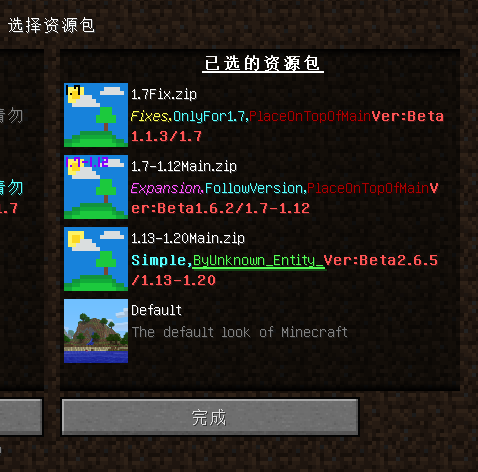
1.The version before 1.13 will **NOT** supported,so the newly texture only update on the“1.13-1.20MainVersion”
2.The Fix must on the top of Main
Example:
3.This texture pack also supports a number of other mods,need download other texture pack
Now support:
Create 1.14-1.20 [DOWNLOAD HERE!](https://modrinth.com/resourcepack/simple-texturepack-create)
Applied Energy2 1.15-1.20
Mekanism 1.9-1.20
Build Craft 1.7-1.12
Industry Craft2 1.18-1.19
SignEdit for Bukkit
# SignEdit for Bukkit
[![[Release@GitHub]](https://img.shields.io/github/v/release/Deltik/SignEdit?style=for-the-badge)](https://github.com/Deltik/SignEdit/releases) [![[Downloads@Total]](https://img.shields.io/github/downloads/Deltik/SignEdit/total?style=for-the-badge)](https://github.com/Deltik/SignEdit/releases) [![[Downloads@Latest]](https://img.shields.io/github/downloads/Deltik/SignEdit/latest/total?style=for-the-badge)](https://github.com/Deltik/SignEdit/releases) [![[Ratings@Spigot]](https://img.shields.io/spiget/rating/47604?style=for-the-badge)](https://www.spigotmc.org/resources/signedit-for-bukkit.47604/rate)
SignEdit for Bukkit is a [Bukkit plugin](https://www.spigotmc.org/resources/categories/bukkit.4/) that allows players to edit sign objects by looking at them or clicking on them and typing in a SignEdit command.
![[SignEdit for Bukkit v1.14.0 – /sign help]](https://i.imgur.com/VBCjDIr.png)
## Installation
1. Download the latest .jar file from [the Releases page](https://github.com/Deltik/SignEdit/releases) and upload it to your Bukkit server (Spigot, PaperMC, etc.) plugins/ folder.
2. Restart your Bukkit server.
**Usage, Permissions, Configuration, and Features**
Full documentation of this plugin can be found in [the GitHub project README.md](https://git.io/SignEdit-README).
## Compatibility
This plugin is a fork of [Omel’s SignEdit](https://web.archive.org/web/20190905124503/https://www.spigotmc.org/resources/signedit.25485/) v1.3. Omel’s SignEdit v1.3 and older are not compatible with Bukkit 1.12 and newer because a deprecated API method was removed ([see related issue in MyPet](https://github.com/xXKeyleXx/MyPet/issues/1033)).
More compatibility information can be found in [the GitHub project README.md](https://git.io/SignEdit-README#compatibility).
Shuttle
> This project is still in development!
## Description
Shuttle is a lightweight open-source addon library for adding extension support to your mods. It allows for dynamic registration of objects which can be pulled and used within your mod easily, as well as allowing provision of instances which might be required for the construction of certain objects.
## Should I use it?
You can and / or should use this library if:
– You are creating a public addon api for your mod
– You want to easily extend your own mod (with more mods :p)
– You want to, for some othe reason, provide the ability to register new stuff in or internally tweak with your mod(s)
## Why?
After rewriting the addon system for [Cactus Mod](https://modrinth.com/mod/cactus) I decided to publish it as an open-source library for other modders to use.
For now, there isn’t really documentation on it – I’m maintaining this in my free time and will create some docs when I have time for it.
## Docs
> Coming Soon™
Shorty Swords
Shortened Sword are Just Built Different! Aren’t they look hot?
Texture-pack makes swords a bit shorter. Supports almost **EVERY** ever existed Minecraft Version.
shea’s simple Totem x bare bones
# shea’s simple Totem x bare bones
## what does this pack does
### it takes Totems and cleans it up
This pack does not include any bare bones textures
**Bare Bones is required for the intended look**
disclaimer if you use this pack make sure to place this pack above bare Bones in your resource pack list for it to use its own instead of bare bones
i recomend using other shader and resource packs like [bliss](https://github.com/X0nk/Bliss-Shader) to improve looks but that is optional
**you can showcase this if you want just dont redistrabute it**
ServerJoinPerms
# ServerJoinPerms
A Velocity proxy plugin that enforces server-specific join permissions for Minecraft servers.
## Features
– Restricts players from joining servers they don’t have permission for
– Prevents server switching to unauthorized servers
– Simple permission-based access control
– Native Velocity integration
## Requirements
– Velocity 3.0.0 or higher
– Java 11 or higher
## Installation
1. Download the latest `ServerJoinPerms.jar` from the releases page
2. Place the JAR file in your Velocity server’s `plugins` directory
3. Restart your Velocity proxy
## Usage
### Permissions
The plugin uses a simple permission structure:
– `server.` – Grants permission to join the specified server
### Examples
– To allow access to a server named `survival`: `server.survival`
– To allow access to a server named `creative`: `server.creative`
### Behavior
– Players without the required permission will be disconnected with an error message
– Permission checks occur on both initial join and server transfers
– The error message clearly indicates the reason for disconnection
## Configuration
No configuration file is needed. The plugin works out of the box with Velocity’s permission system.
## Building from Source
1. Clone the repository
2. Run `mvn clean package`
3. Find the compiled JAR in the `target` directory
## Support
For support, please open an issue on the GitHub repository.
## License
This project is licensed under the MIT License.
## Author
– **LOLYAY** – Initial development
Sandy Pistons
Changes The Redstone Piston Texture to be Made out of Sandstone instead of cobblestone and will fit into sandstone builds