Classic Natural Textures
# Natural Texture Pack
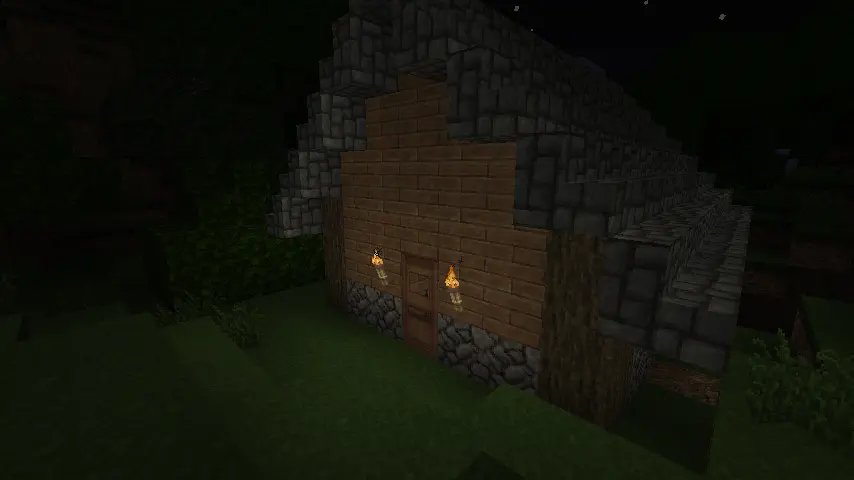
This texture pack was originally created by 4J Studios for the legacy console editions of the games. I extracted this from the texture files for the Xbox 360 edition and ported most of the textures (excluding console-exclusive GUI textures I’d have to make from scratch). This pack is soley for early release and beta versions of the game. If you want a modern port for the current version, the people behind Legacy4J maintain a port of the modern bedrock version with recreations of the missing GUI textures you can download [here](https://modrinth.com/resourcepack/natural-texture-pack)
### Due to being 32x, this pack needs mods to work (OptiFine, MCPatcher, StationAPI, etc.) on versions 1.5 and older. If they aren’t present, you will encounter issues like this:
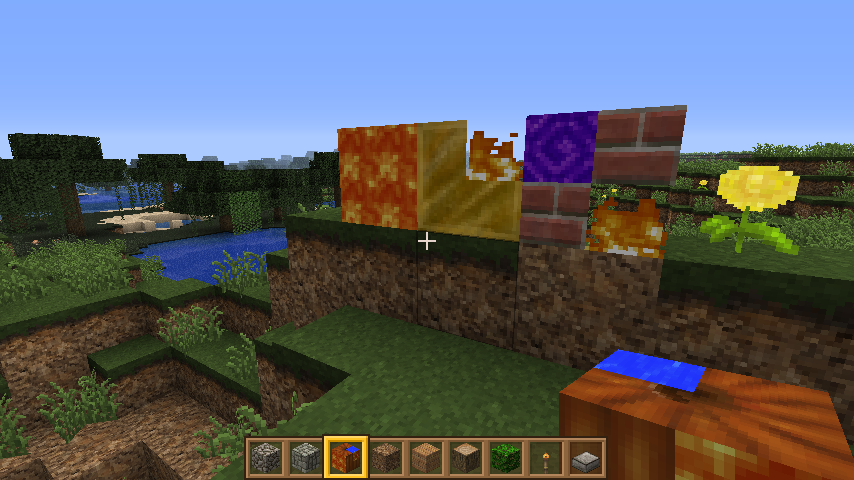
### This is not an issue of the pack. This is a game issue those mods fix.
Class Loader Fixer
## Summary
This mod fixes the Class Loader in legacy versions of Minecraft.
## Details
This is a simple **jar-mod** which adds the `CodeSource` to each loaded class in FML.
That is actually everything this mod does (well, besides fixing a few more bugs on even older versions of Forge).
This mod just ships a backported `RelaunchClassLoader` which overwrites the built-in version (from FML) and allows mods to read the file source of classes.
### Why is this needed in some cases?
For example, [Block Helper](https://modrinth.com/mod/block-helper) is able to show you in the item tooltips which mod a given item is from.
This procedure relies on the `CodeSource` object of the `ProtectionDomain`s of the loaded classes.
Old versions of FML do not set this `CodeSource`, which leads Block Helper into thinking that everything is a Vanilla item.
## Installation
### As a ModLoaderMP / Forge mod
This mod needs to be installed as a **jar-mod**. That means, you have to…
1. Be sure to back up your `minecraft.jar`!
2. Extract the content of the mod zip into the `minecraft.jar` file
3. Delete the `META-INF` folder in there
4. Overwrite any existing files when doing so!
5. ???
6. Profit!
### As a Fabric mod
I do not have any Fabric versions available. However, the fix is incorporated directly into [Fabricated Legacy Forge](https://github.com/FabricCompatibilityLayers/Fabricated-Legacy-Forge). Hence, you do not need to install it separately!
## Unsupported mods
– ObsidiPlates 1.4.2 was incompatible with v1. This is fixed in v2.
Please let me know about any incompatibilities! 🙂
Circular Logs
# Improve the look of your default Logs with… ↴

## Adds Vanilla-like circulated Logs Top | No Optifine or other Mods needed!
### It’s supports every Version of the game! (even including Legacy ones)
### And day-by-day will have more and more mods supported!
Supported Mods
• [Abundance](https://modrinth.com/mod/abundance) – by exoplanetary
• [Architect’s Palette](https://modrinth.com/mod/architects-palette) – by Jsburg
• [Biomes O’ Plenty](https://modrinth.com/mod/biomes-o-plenty) – by Forstride & Adubbz
• [The Aether](https://modrinth.com/mod/aether) – by Oz-Payn
• Vanilla Minecraft – by Mojang
• [Wilder Wild](https://modrinth.com/mod/wilder-wild) – by FrozenBlock
Cave Tweaks
CAVE TWEAKS!
❤️ Made by Wilozyx and DraconicAxolotl! ❤️
Cave tweaks is a vanilla-esque tweaks 16x pack for most minecraft versions. The goal of the pack is to include most versions from infdev (yep), alpha, beta and release!
This pack is 100% public domain, we totally allow and encourage people who enjoy the pack to use, edit and improve upon our textures for their own works if you wish to do so!
Wish to support us?
Subscribe to our channels on youtube!
[Wilozyx’s Channel](https://www.youtube.com/@wilozyx) |
[DraconicAxolotl’s Channel](https://www.youtube.com/@Draconic_Axolotl)
—
What versions is the pack available for, currently?
| Sign | State |
|———————|:———————:|
| ✔️ | Fully done & uploaded |
| ❌ | Not done but planned |
| 🔨 | Currently being worked on |
| ⏳ | Done and awaiting to be posted |
| Version | Status |
|———————|:———————:|
| Beta 1.0 | 🔨 |
| Beta 1.1 | 🔨 |
| Beta 1.2 | 🔨 |
| Beta 1.3 | ⏳ |
| Beta 1.4 | ⏳ |
| Beta 1.5 | ✔️ |
| Beta 1.6 | ✔️ |
| Beta 1.7 | ✔️ |
| Beta 1.8 | ✔️ |
| Release 1.0 | ✔️ |
| Release 1.1 | ✔️ |
| Release 1.2| ✔️ |
| Release 1.3| ✔️ |
| Release 1.4| ✔️ |
| Release 1.5| ✔️ |
| Release 1.6| ✔️ |
| Release 1.7| ✔️ |
| Release 1.8| ✔️ |
| Release 1.9| ✔️ |
| Release 1.10| ✔️ |
| Release 1.11| 🔨 |
| Release 1.12+| ❌ |
Block Helper
# Block Helper
A direct WAILA port for old versions of Minecraft, with almost the same API and many, many additional fixes!
## Download
[**Download on CurseForge**](https://www.curseforge.com/minecraft/mc-mods/block-helper)
[**Download on Modrinth**](https://modrinth.com/mod/block-helper) (More versions are available here)
### Fixers
Some Minecraft versions have bugs. That’s normal. In order to fix some of them, you can install the following fixers:
– [Class Loader Fixer](https://modrinth.com/mod/class-loader-fixer)
– [Font Fixer](https://modrinth.com/mod/font-fixer)
## Old source code
This repository hosts the source code for BlockHelper versions 2.x and onwards.
The source code for older versions (0.x and 1.x), has moved [here](https://github.com/ThexXTURBOXx/BlockHelper-old).
## Installation
### Forge (all versions) / ModLoaderMP (≤ 1.2.3)
#### Client
Just drop the mod into the `mods` folder. Done! 🙂
#### Server
If you are running a server on MC 1.3.x or newer, just copy the Block Helper jar file into the `mods` folder.
On older versions, you need to download the dedicated server build of the mod.
It can be found under “Additional files” both on Modrinth and CurseForge.
In MC b1.5_02 and older, you need to copy all the files from this jar into the server jar.
In all newer versions, it is sufficient to just copy the jar file into the `mods` folder.
#### MCPC+/Cauldron/Bukkit
If you are running a server on MC 1.3.x or newer, just copy the Block Helper jar file into the `mods` folder.
On older versions, you need to download the dedicated Bukkit/MCPC+ build of the mod.
It can be found under “Additional files” both on Modrinth and CurseForge.
In MC b1.7.3 and older, you need to copy all the files from this jar into the Bukkit jar.
In all newer versions, it is sufficient to just copy the jar file into the `mods` folder.
### Fabric
Drop the mod into the `mods` folder and install [Apron](https://github.com/BetterThanUpdates/Apron) or [BetaLoader](https://github.com/paulevsGitch/BetaLoader) (for b1.7.3)
or [Fabricated Forge](https://github.com/arthurbambou/Fabricated-Legacy-Forge) (for 1.3.2+).
## Features
### Mod Compatibility
Next to Vanilla blocks, integration modules for the following mods are in place (list updated only irregularly!):
– Advanced Machines
– Advanced Solar Panels
– Applied Energistics 1
– Barrels
– BuildCraft 2 and 3
– ChickenChunks
– Ender Storage
– Equivalent Exchange 1, 2 and 3
– Factorization
– Falling Meteors
– Flora & Soma / Natura
– Forestry
– Forge Multipart
– GregTech
– IC²
– Immibis’s Microblocks
– IndustrialCraft
– InfiCraft
– NEI
– Pam’s Mods
– Project Zulu
– Railcraft
– Red Power
– Thaumcraft
– Thermal Expansion
– Total Panels
– Twilight Forest
Some of these mods still host downloads to this day.
If you cannot find downloads for some of these,
chances are that they are still downloadable via [MCModArchive](https://mcmodarchive.femtopedia.de/).
### API
Block Helper features WAILA’s API (with minimal changes) from version 2.x onwards.
Since there are many resources online on how to use the API, I will keep this as simple as possible here and just list a few “good” examples:
– [Block Helper’s own plugins](https://github.com/ThexXTURBOXx/BlockHelper/tree/1.5.2/src/main/java/mcp/mobius/waila/addons)
– [BlockHelperAddons](https://github.com/VintageModsReforged/BlockHelperAddons)
Just try to follow these examples and you will succeed. To safely register your plugin, use the code snippet from the
JavaDoc of the `mod_BlockHelper#registerPlugin` function.
### Other features
Yes, Block Helper has a few additional features and integrations you probably have not seen before 🙂
On the Modrinth and CurseForge page, there are a few images of most of these features in action!
_Please note that not every feature is available for every Minecraft version due to modding limitations._
#### NEI/AMI/HMI integration
– Two new keybinds (default: NUM3 and NUM4), which show all the recipes for or using the
block currently looked at
– Show the mod an item is from in the item’s tooltip [this also works without NEI/AMI/HMI in Apron]
– Another keybind specific for NEI (default: I), which shows all the applicable enchantments for the
currently highlighted item in the inventory
#### World Overlays
Just like NEI in MC 1.4.7 and onwards, Block Helper features a light level overlay and chunk border overlay. The default
keybinds for these are F7 and F9, respectively.
## Source Code
Block Helper is being developed for:
– [a1.2.6](https://github.com/ThexXTURBOXx/BlockHelper/tree/a1.2.6)
– [b1.1_01/b1.1_02](https://github.com/ThexXTURBOXx/BlockHelper/tree/b1.1_02)
– [b1.2_02](https://github.com/ThexXTURBOXx/BlockHelper/tree/b1.2_02)
– [b1.3_01](https://github.com/ThexXTURBOXx/BlockHelper/tree/b1.3_01)
– [b1.4_01](https://github.com/ThexXTURBOXx/BlockHelper/tree/b1.4_01)
– [b1.5/b1.5_01](https://github.com/ThexXTURBOXx/BlockHelper/tree/b1.5_01)
– [b1.6.5/b1.6.6](https://github.com/ThexXTURBOXx/BlockHelper/tree/b1.6.6)
– [b1.7-b1.7.3](https://github.com/ThexXTURBOXx/BlockHelper/tree/b1.7.3)
– [b1.8/b1.8.1](https://github.com/ThexXTURBOXx/BlockHelper/tree/b1.8.1)
– [b1.9p5](https://github.com/ThexXTURBOXx/BlockHelper/tree/b1.9p5)
– [1.0/1.0.1](https://github.com/ThexXTURBOXx/BlockHelper/tree/1.0)
– [1.1](https://github.com/ThexXTURBOXx/BlockHelper/tree/1.1)
– [1.2.3](https://github.com/ThexXTURBOXx/BlockHelper/tree/1.2.3)
– [1.2.4/1.2.5](https://github.com/ThexXTURBOXx/BlockHelper/tree/1.2.5)
– [1.3.2](https://github.com/ThexXTURBOXx/BlockHelper/tree/1.3.2)
– [1.4](https://github.com/ThexXTURBOXx/BlockHelper/tree/1.4)
– [1.4.1/1.4.2](https://github.com/ThexXTURBOXx/BlockHelper/tree/1.4.2)
– [1.4.3](https://github.com/ThexXTURBOXx/BlockHelper/tree/1.4.3)
– [1.4.4/1.4.5](https://github.com/ThexXTURBOXx/BlockHelper/tree/1.4.5)
– [1.4.6/1.4.7](https://github.com/ThexXTURBOXx/BlockHelper/tree/1.4.7)
– [1.5.x](https://github.com/ThexXTURBOXx/BlockHelper/tree/1.5.2)
Blinding Pumpkin Overlay
You ever wanted to completely blind your foes with a curse of binding pumpkin? Then this is the resource pack for you!
Should work for every version.
It just makes the pumpkin overlay completely black, thats it.
[Alternative Download [PlanetMinecraft]](https://www.planetminecraft.com/texture-pack/blinding-pumpkin-overlay)
Black Hole Moon
# 
Thanks for checking out Black Hole Moon! This Resource Pack will change the boring moon to a Black Hole. Great to prank your friends, or just to change the moon to something else.
## FAQ
### Does this require any external mods?
Nope. This Resource Pack does not need any external mods for it to function properly.
### Can you put this pack on CurseForge?
I do not plan to put this pack on CurseForge, and probably never will.
### On some versions of Minecraft it either says “The pack is too new” or “The pack is too old”
On these versions “supported_formats” in pack.mcmeta was not introduced yet, because of that it looks at “pack_format” and says on the lines of “Pack format 5? (pack format for 1.15.2) That is old. This pack must not work on me anymore” even though the pack supports that version. Best you can do is just ignore it and enable the pack anyway, do the same if it says “pack is too new”.
### Did you make the Pixel Art yourself?
Yes! and you are free to use it on whatever project your working on. Credit would be appreciated, but its not mandatory, just dont copy the Resource Pack outright and publish it claiming its your own.
Better Zombie X Herobrine
Transform your Minecraft experience with Better Zombie X Herobrine A terrifying and unique texture pack that completely reimagines the classic zombies.
Every zombie you encounter is replaced with a haunting Herobrine version
featuring glowing white eyes that pierce through the darkness creating an unsettling atmosphere for your worlds.
Perfect for adventure maps, horror-themed servers
or just adding a creepy twist to vanilla gameplay. This pack focuses on entity and model textures
Altering the visual appearance of zombies while keeping Minecraft’s vanilla feel intact. With a resolution of 16x–32x, it balances clarity and performance
Ensuring smooth gameplay on most systems. Whether you’re exploring dungeons, fighting mobs, or building eerie landscapes Better Zombie X Herobrine adds a chilling and memorable visual
If the menu looks strange or is missing textures, that’s normal, but it won’t affect your gameplay.
Element that will keep players on edge. Experience the horror… if you dare.
Bedwars Ultimate
This Resource Pack focuses on Bedwars and PvP Textures, like tiny Swords or some simple Block Textures.
Tools and Weapons:
25
Blocks:
128
Items:
11
Armor and Equipment:
21
Coming soon: Item Textures 🙂
anit CHAT
# Chat anit 一个自动屏蔽《Minecraft》中文脏话,和增加IP属地的开源项目。
本插件需要装在Velocity上。前置为SignedVelocity-Proxy需要在velocity和所以1.19.1+的子服上增加
IP属地api为*xiaotuo*提供,脏话屏蔽由*Uapi提供*
使用方法
1.下载本插件,放入velocity的pluging文件夹,启动客户端
>tip
>如果你有子服的Minecraft版本在1.19.1以上需要增加[signed velocity](https://modrinth.com/plugin/signedvelocity/version/1.3.0) 插件到velocity和每个1.19.1+的子服务器。
2.将velocity配置文件“`velocity.toml“` 中“`force-key-authentication“`改为false
3.将所有子服务的配置文件“`server.properties“`中的“`enforce-secure-profile“`改为false
4.启动服务端
**更新日志**: https://github.com/cdpyx/Chatanit/commits/release
English:
# Chat Anit is an open-source project that automatically blocks Chinese profanity in Minecraft and increases IP ownership.
This plugin needs to be installed on Velocity. SignedVelocity Proxy needs to be added on velocity and all 1.19.1+sub servers
The IP locality API is provided by * xiaotuo *, and the profanity blocking is provided by * UAPI*
Usage
1. Download this plugin, place it in the velocity plugin folder, and start the client
> tip
> If you have a sub server version of Minecraft above 1.19.1, you need to add [signed velocity]( https://modrinth.com/plugin/signedvelocity/version/1.3.0 )Plug in to velocity and every 1.19.1+sub server.
2. Change the ‘force key authentication’ in the velocity configuration file ‘velocity. toml’ to false
3. Change the ‘enforce secure profile’ in the ‘server. properties’ configuration file for all sub services to false
4. Start the server
**Update log**: https://github.com/cdpyx/Chatanit/commits/release