Backport Everything

**Backport Everything** attempts to convert modern Minecraft into older versions!
If you want to see what older versions look like with new textures, _this is the pack for you_. Test them out on older versions for a laugh, play with updated textures for servers that aren’t at the latest version, or start a world in beta or alpha with a weird updated look.
Currently updated for **1.21.11 textures**, this pack aims to bring modern versions to older ones. Currently, the pack **supports versions 1.20.1 and older**, dating back to the first version in 2009 with the pre-classic build rd-132211, which features only grass and cobblestone.
There are other packs available, such as MC New Textures, Modernity and Modern Textures, but I find that they either miss out some textures (e.g. leather armour, fast leaves) or don’t support the beta and alpha versions.
A couple of the things that this pack supports:
– Backported 1.21.11 textures to all versions (OptiFine, MCPatcher or equivalent required for some textures)
– New redstone repeater, comparator & torch (1.20.1 to 1.8)
– HD ghast texture from 1.21.6 (1.20.1 to 1.6.1)
– HD Minecraft logo (1.20.1 to b1.8)
– Unique spawn egg textures (1.20.1 to 1.8, OptiFine required before 1.13)
– Wolf colour variants (1.20.1 to 1.8, OptiFine/Entity Texture Features required)
– Bush texture (1.20.1 to 1.8)
– Cold & warm cow, pig & chickens (1.20.1 to 1.8, OptiFine/ETF required)
– Tall & short dry grass textures (1.20.1 to 1.8)
– The Aether (b1.7.3 & 1.2.5) and Aether on Station API (b1.7.3)
A few things this pack doesn’t support at the moment:
– New music released after 1.21.1, check out Tunes : Backport by wasabliss. I’d add it, but the zip file size would be huge.
– Horse, vex, bat & zombie piglin model backports, see Scutoel’s packs linked. These models require OptiFine and break textures on vanilla versions. I’m not adding them because that would make OptiFine a dependency.
– Bogged models, see Bogged Backport by realllyrandommann. Not added for the same reason as above.
– Leaf litter and wildflowers, see ludo_silver_’s packs linked. Not added, as they are a little janky since they don’t work as a standalone block, but they are an alternative grass texture.
**For 1.5.2 and older, texture packs are not one-click install on Modrinth unlike resource packs, you’ll need to install them to your instance (which you may need to create), click the three dots to the right of the start button on the specific instance screen, click ‘Open folder’, and move the Backport Everything zip file from the ‘resourcepacks’ folder to the ‘texturepacks’ folder.**
**Texture packs are not supported natively before Alpha v1.2.2**, but earlier versions can have their textures swapped out using a jar mod. I don’t _really_ know why you’d want to play those versions, but it’s funny to see them working with the latest textures. **If you need help installing versions that don’t support texture packs natively, please check the bottom of this page for a guide.**
Just a note, rd-20090515 kept crashing for me on launch, and so I can’t test it. But since it’s just 13 textures, you won’t be missing much if you can’t run it yourself.
This was a fun little project, but there are **probably a few texture issues here and there** from the conversion. If you notice any problems and are willing to let me know, please email [[email protected]](mailto:[email protected]), and I’ll address the issue.
OptiFine 1.7.2 and newer can be found here. For archived versions of OptiFine, MCPatcher, and additional files, click here to access my GitHub archive. If you have any other suggestions for mods, feel free to email me.
### License
All original content is licensed under CC BY-SA 4.0.
Vanilla Minecraft assets are © Mojang Studios and are not included under CC BY-SA 4.0.
Select assets from Qwuiblington’s actually correct new default texture backport are included under Public Domain.
OptiFine Custom Entity Model (.jem) files sourced from the pack: Farm Animals Backport, included with permission from SirJumpy8772.
### How to add textures to versions older than Alpha v1.2.2
To add textures to old versions that don’t support texture packs, you’ll need to add them as a jar mod using Prism Launcher or MultiMC. They’re pretty much the same, but Prism Launcher has fancy extra features.
Unfortunately, Modrinth does not currently support jar mods for older versions.
1. Download the ZIP file for the version of Minecraft you want to change. You’ll need it for later.
2. Download and install either Prism Launcher or MultiMC; take your pick.
3. Open either Prism or MultiMC, log in to your Microsoft account and then click the ‘Add Instance’ button in the top-right corner.
4. In the ‘Custom’ (Prism) or ‘Vanilla’ (MultiMC) section, on the right-hand side, tick the checkboxes for ‘Betas’ and ‘Alphas’ in the filter list.
5. Scroll down to the version you want to play, select it and click the OK button in the bottom-right.
6. Once you’ve clicked OK, an icon will appear for the version you selected. Right-click the icon, then click ‘Edit…’ (Prism) or ‘Edit Instance’ (MultiMC).
7. Go to the ‘Version’ tab if you’re on Prism Launcher.
8. Once you’re on the version tab, you should see a list of actions on the right-hand side. Click the ‘Add to Minecraft.jar’ button.
9. A new window should appear, locate the Backport Everything file, select it and open it.
10. The jar mod should now be installed. You can then launch Minecraft, and the new textures should work!
AUTOCMD
# 🧩 AutoCommandPlugin
AutoCommandPlugin is a simple and powerful Minecraft plugin that lets you automatically run multiple server commands after specific delays. You can also manually run them using `/autocmd`, or add new ones using `/autocmd add`.
—
## ✅ Plugin Features
– ⏱️ Run multiple commands after server starts with custom delays
– 🔁 Commands auto-execute at specific times
– ➕ Add new commands with `/autocmd add `
– 🎮 Optional in-game usage (enabled/disabled via config)
– 🎨 Supports Minecraft color codes (like `&a`, `&c`)
– 🛡️ Blocks abuse by restricting in-game access with a toggle
– 🧾 Simple config file with easy setup
—
## 📥 How to Install
1. Download the `.jar` file
2. Place it in your `plugins/` folder
3. Start or restart your Minecraft server
4. The plugin creates a `config.yml` and auto-runs your first command in 30 seconds!
—
## ⚙️ Config File: `config.yml`
“`yaml
allow_in_game_command: false
# You can add more below or use /autocmd add
commands:
setup:
delay: 30
command: “&a[AutoCommandPlugin] &fThis plugin is now set up and running every 30 seconds!”
“`
### Explanation:
| Setting | Description |
|——–|————-|
| `allow_in_game_command` | `true` or `false` — if `false`, players can’t run `/autocmd` or add new commands |
| `commands` | A list of commands to run automatically |
| `delay` | Delay in **seconds** after server starts |
| `command` | The actual command to run (use `&` for colors) |
—
## 🧵 Commands
### 🔹 `/autocmd`
Runs all the commands listed in `config.yml` immediately.
– ✅ Works in-game **only if** `allow_in_game_command: true`
– ❌ Otherwise shows this message:
`In-game command usage is disabled. Enable it from config.yml.`
—
### 🔹 `/autocmd add `
Adds a new command to `config.yml` and runs it after **30 seconds**.
**Example:**
“`
/autocmd add broadcast &eCheck out our Discord at discord.gg/server
“`
This will save:
“`yaml
commands:
cmd_1:
delay: 30
command: “broadcast &eCheck out our Discord at discord.gg/server”
“`
—
## 📝 Example Config
“`yaml
allow_in_game_command: false
commands:
welcome:
delay: 5
command: “say &6Welcome to the server!”
auto_chunky:
delay: 20
command: “chunky start”
tip:
delay: 60
command: “broadcast &bTIP: &fDon’t forget to claim your daily reward!”
“`
—
## 🧪 Compatible Servers
| Server Type | Version |
|————-|————-|
| ✅ Paper | 1.13 – 1.21.5+ |
| ✅ Spigot | 1.13 – 1.21.5+ |
| ✅ Bukkit | 1.13 – 1.21.5+ |
Works on all latest Minecraft versions. No outdated code or version locks.
—
## 🔐 Security Option
To prevent OP abuse or unwanted use, the plugin lets you block in-game command usage.
If a player tries to use `/autocmd` or `/autocmd add` in-game and it’s disabled in config, they will see:
“`
In-game command usage is disabled. Enable it from config.yml.
“`
Commands can **always be used from console**.
—
## 👤 Plugin Info
– Made by: **JODVISHAL**
– Discord: `isthisvishal`
– Email: `[email protected]`
—
Enjoy using AutoCommandPlugin and automate your Minecraft tasks easily! 🎉
Auto Third Person
|version|loader availability|note|
|–:|:-:|:–|
|1.21.5|Fabric and Neoforge||
|1.21.1|Fabric and Neoforge||
|1.20.1|Fabric and Forge||
|1.20.0|Fabric and Forge|unmaintained|
|1.19.4|Fabric and Forge|unmaintained|
|1.19.2|Fabric and Forge||
|1.18.2|Fabric and Forge||
|1.17.1|Fabric and Forge|unmaintained|
|1.16.5|Fabric and Forge||
|1.12.2|Forge|New codebase compared to the very old 1.12 version|
|1.7.10|Forge|Voldeloom|
|1.4.7|Forge|Voldeloom|
—
Auto Third Person automatically puts you in third-person camera when you fly an elytra, ride an animal, boat, or minecart, or swim underwater. When you stop flying or leave your vehicle, your camera view will be restored to whatever it was before you started. Much of the mod is configurable through an extensive config file.
There’s a few other camera-related goodies – an option to disable the “first-person flipped” camera, an option for fixing the “weirdly rotated first-person hand” in 1.7.10-and-earlier versions that happens when you look at yourself in f5, and a backport for pressing Shift to exit vehicles for 1.4.7.
—
New things in version 2️⃣ of the mod:
* All ~~13~~ ~~15~~ ~~17~~ ~~19~~ 21 versions use the same codebase.
* New toggle key for temporarily disabling the mod. It is in the options screen under “Miscellaneous” and is unbound by default.
* Forge versions use a regular Forge config file, instead of the custom thingie the mod used to use.
—
Questions? Comments? Just lonely? Join me on Discord: https://quat1024.github.io/discord/
Authentication
# Authentication
This plugin allows the authentication of Minecraft players in web applications via Nginx auth_request. It is a single puzzle piece in this ecosystem to secure and lock down your Minecraft server related websites such as maps or analytics pages. You can use this plugin as a standalone and let the web application do the access control but only a few of such applications exists so you will probably want the next piece
for Authorization
Due to the need of external software and multiple ports. You will most likely not be able to use this on any Minecraft hosting services and need to have a proper server such as a cloud vps or a dedicated server.
Keep in mind that authentication is an advanced topic and you are expected to have basic understanding of Nginx and networks to be able to succesfully use this plugin.
See the GitHub repository readme for more details and installation instructions.
ArkItem
ArkItem is an Arklandia Bukkit plugin (1.12.2) that breaks Minecraft item limits!
It allows for:
Level 1000+ Enchantments/Potions (display only for extreme levels).
Unbreakable items.
Custom renaming and lore with colors.
Modifiable book author and item rarity.
Virtual stacks (127+) for consumables.
Multi-language support (EN, FR, DE).
Ideal for legendary items and a unique gameplay experience!
Aragorn’s Light Shader
# ARAGORN’S LIGHT SHADER
This is a simple, lightweight shader based on Iris that adds realistic anti aliasing shadows and realistic water and clouds. It is not resource-heavy and is ideal for most users.
IMPORTANT: Kindly disable clouds through ‘Options > Video Settings’ as the shader includes a custom cloud engine.
Apples to Bananas
# Changes Apples to Bananas!
This resource pack changes ALL apple types to their respective bananas, apples to bananas, golden apples to golden bananas and enchanted golden apples to enchanted golden bananas (and renames them)!
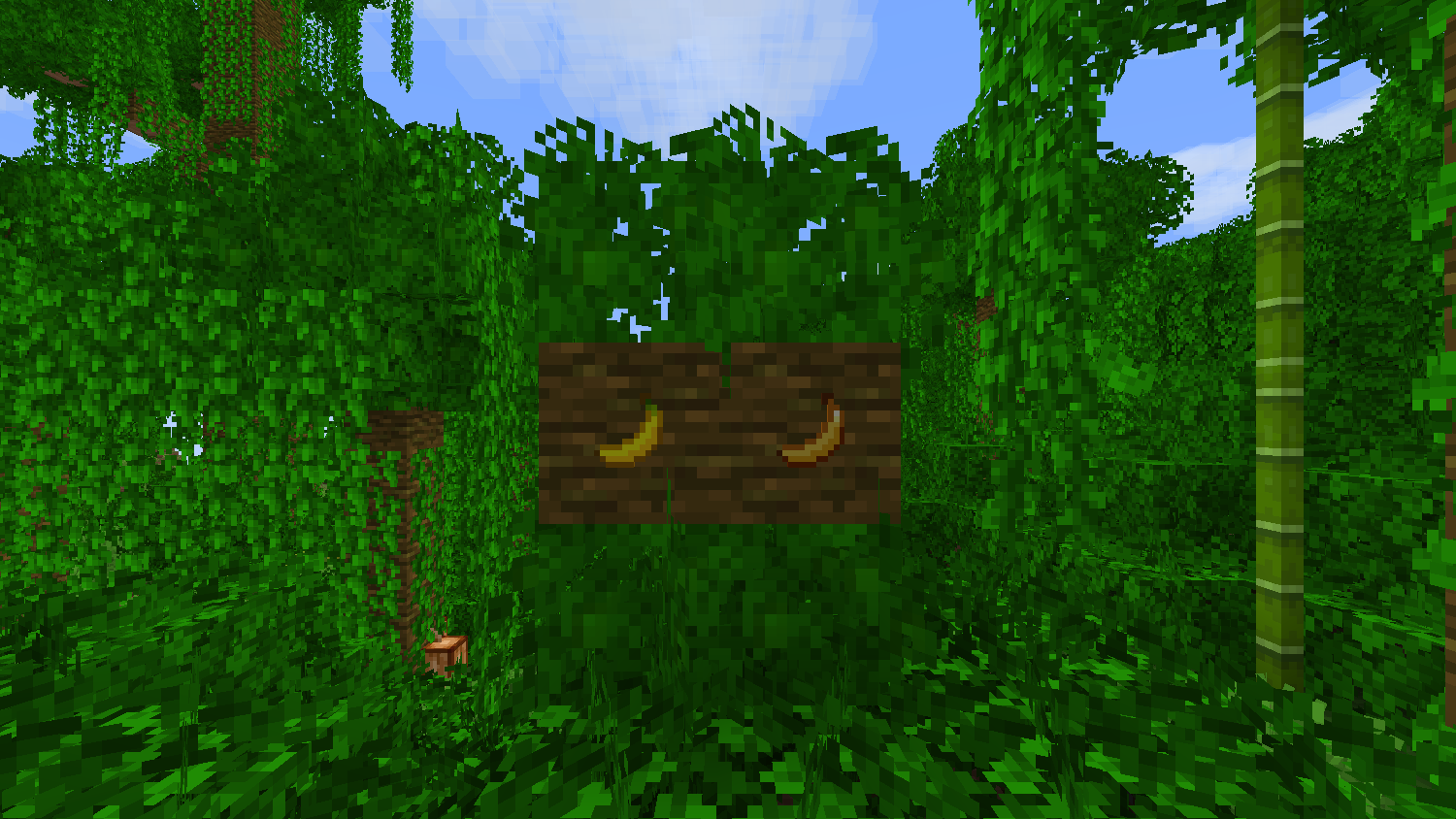
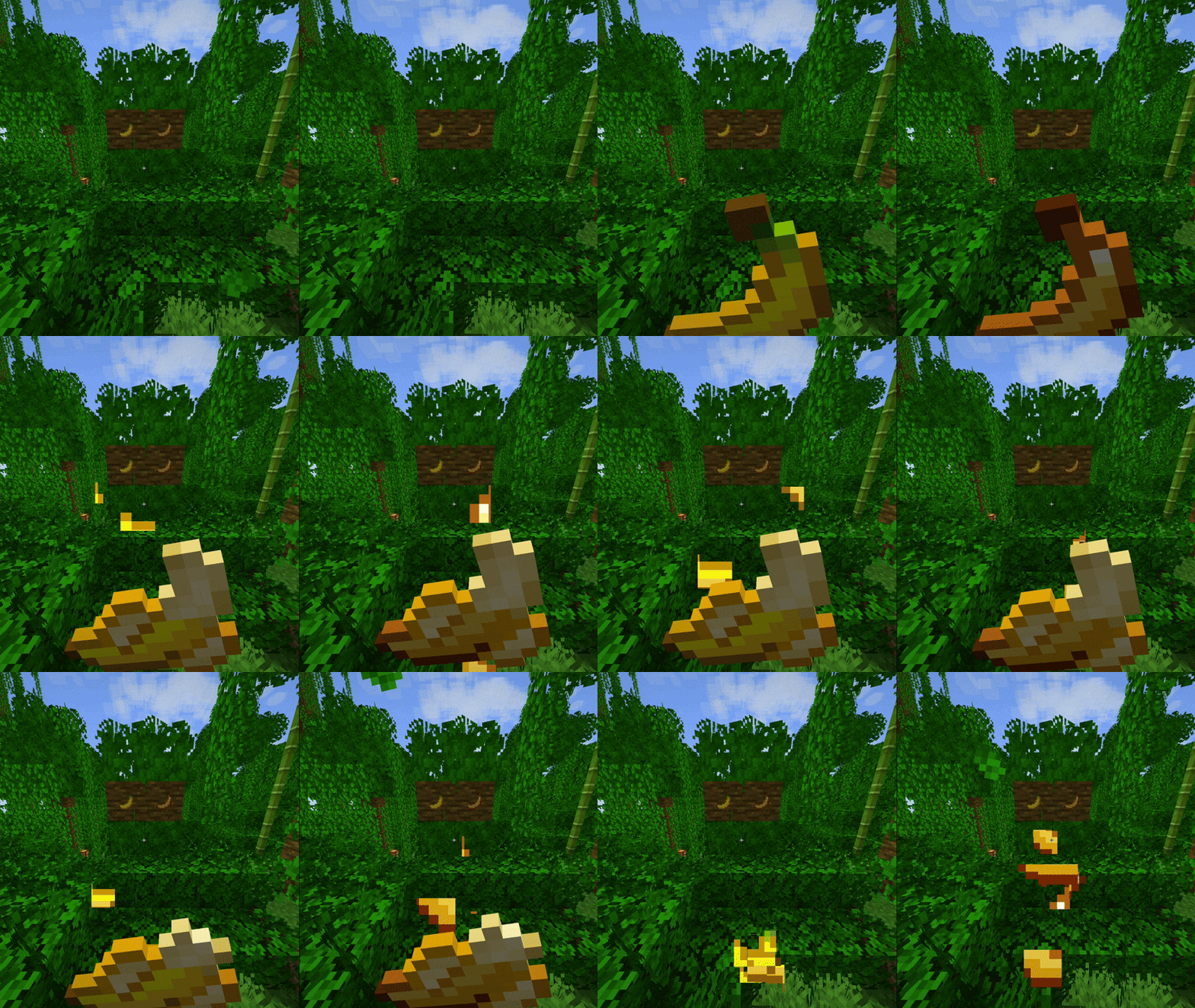
## Supports Eating Animation!
For versions under 1.21.3, the mod is required for eating animations to work. For versions over 1.21.4, you can use this without the mod, just make sure to install the correct version.
anit CHAT
# Chat anit 一个自动屏蔽《Minecraft》中文脏话,和增加IP属地的开源项目。
本插件需要装在Velocity上。前置为SignedVelocity-Proxy需要在velocity和所以1.19.1+的子服上增加
IP属地api为*xiaotuo*提供,脏话屏蔽由*Uapi提供*
使用方法
1.下载本插件,放入velocity的pluging文件夹,启动客户端
>tip
>如果你有子服的Minecraft版本在1.19.1以上需要增加signed velocity 插件到velocity和每个1.19.1+的子服务器。
2.将velocity配置文件“`velocity.toml“` 中“`force-key-authentication“`改为false
3.将所有子服务的配置文件“`server.properties“`中的“`enforce-secure-profile“`改为false
4.启动服务端
**更新日志**: https://github.com/cdpyx/Chatanit/commits/release
English:
# Chat Anit is an open-source project that automatically blocks Chinese profanity in Minecraft and increases IP ownership.
This plugin needs to be installed on Velocity. SignedVelocity Proxy needs to be added on velocity and all 1.19.1+sub servers
The IP locality API is provided by * xiaotuo *, and the profanity blocking is provided by * UAPI*
Usage
1. Download this plugin, place it in the velocity plugin folder, and start the client
> tip
> If you have a sub server version of Minecraft above 1.19.1, you need to add [signed velocity]( https://modrinth.com/plugin/signedvelocity/version/1.3.0 )Plug in to velocity and every 1.19.1+sub server.
2. Change the ‘force key authentication’ in the velocity configuration file ‘velocity. toml’ to false
3. Change the ‘enforce secure profile’ in the ‘server. properties’ configuration file for all sub services to false
4. Start the server
**Update log**: https://github.com/cdpyx/Chatanit/commits/release
Among Us

But how to make **Among Uses**? 
All you need is an anvil and a carved pumpkin:
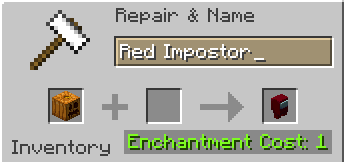
> Rename a carved pumpkin in the anvil to “Color” Impostor
* Example: Red Impostor
* Before snapshot 25w03a, using third-party mods, you could write things like “red impostor” instead of “Red Impostor”, or even “123 red impostor 123”
> After renaming, the item will automatically turn into its custom version
Make your impostors and have fun! 🎭
Alternate Current
Alternate Current is an efficient and non-locational redstone dust implementation. Its main focus lies in reducing the lag caused by redstone dust, by optimizing the power calculations and reducing the number of shape and block updates emitted. As a side effect of these changes the block update order of redstone dust networks is predictable and intuitive rather than locational and chaotic.
### Performance
MSPT contributions of redstone dust are up to 30 times lower with Alternate Current, all the while maintaining a high level of Vanilla parity. Its low number of code modifications make it minimally invasive, so it’s an easy drop-in replacement for Vanilla redstone dust.
Check out the GitHub page for a detailed explanation of Alternate Current’s improvements.
## Why is redstone dust so laggy?
There are two main reasons why redstone dust is laggy: unnecessary updates and unnecessary calculations, both of which are caused by the fact that redstone dust updates recursively. A redstone wire can update its power level over half a dozen times before settling on the final value, doing expensive calculations and emitting copious amounts of shape and block updates each time. On top of that, many shape and block updates are completely redundant.
## How does Alternate Current fix that?
Alternate Current fixes these issues by doing power calculations of the entire network before updating the power levels. Each wire will check power from non-wire components just once and power from other wires just twice. Power sources within the network are identified, and the power is spread from there. This makes the calculations more efficient and the update order more intuitive. Shape and block updates are only emitted when the final power level is reached, and each wire emits no redundant updates.