Colourful containers GUI




Sick of approaching your enchanting table only to be presented by the same grey menu as the crafting table? Looking to add some colour into your game? Introducing Colourful Containers!
A container GUI replacement mod that hopes to match the menu to every one of Minecraft’s colourful interactable blocks.
Theatricks aside, this texture pack will replace the GUI of every block like the crafting table and furnace. Each new menu will take inspiration from the block its associated with. Some are even animated!

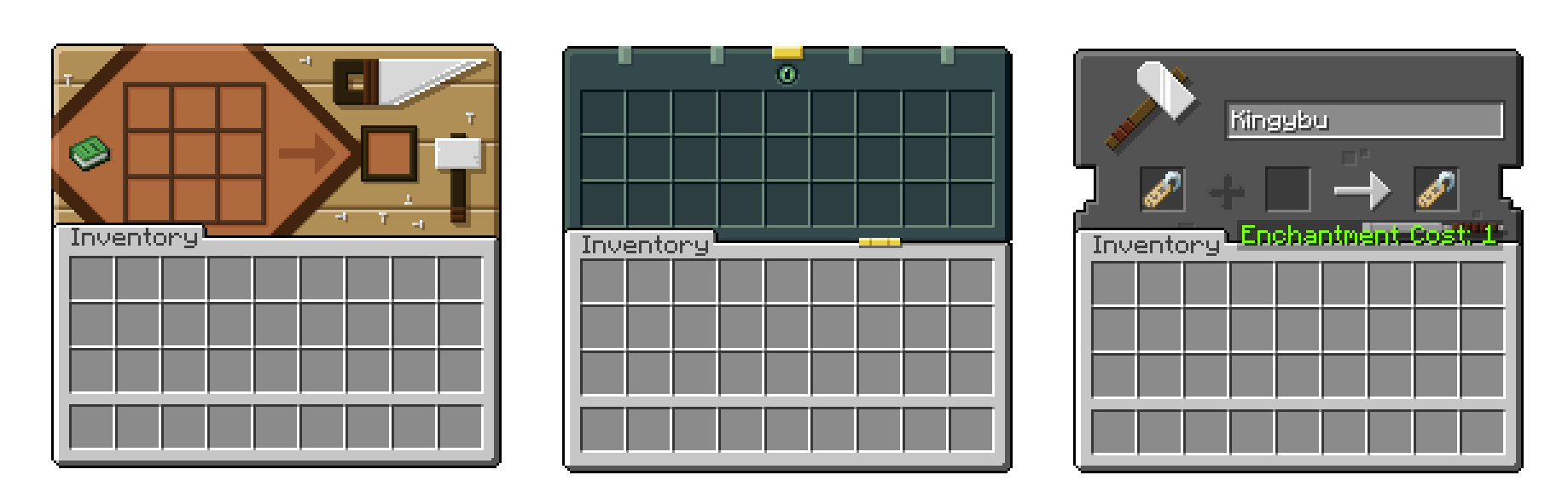

– Anvil
– Recipe Book
– Blast Furnace
– Brewing Stand
– Cartography Table
– Chests (Large, Small, Ender) **OptiGUI required**
– Crafting Table
– Dispenser
– Dropper optifine.png
– Enchanting Table
– Furnace
– Grindstone
– Hopper
– Loom
– Shulkers (All Colours) **OptiGUI required**
– Smoker
– Stone Cutter
– Smithing Table
– Barrel
– Custom Villager GUI **OptiGUI required**
– Beacon
– crafter
– survival inventory

– creative inventory
– mod support

**Chris_XENO**
**BurntToast_**
**Kingybu**
Colourful containers Dark Mode GUI

Sick of approaching your enchanting table only to be presented by the same grey menu as the crafting table? Looking to add some colour into your game? Introducing Colourful Containers, now in dark mode!
A container GUI replacement mod that hopes to match the menu to every one of Minecraft’s colourful interactable blocks.
Theatricks aside, this texture pack will replace the GUI of every block like the crafting table and furnace. Each new menu will take inspiration from the block its associated with. Some are even animated!
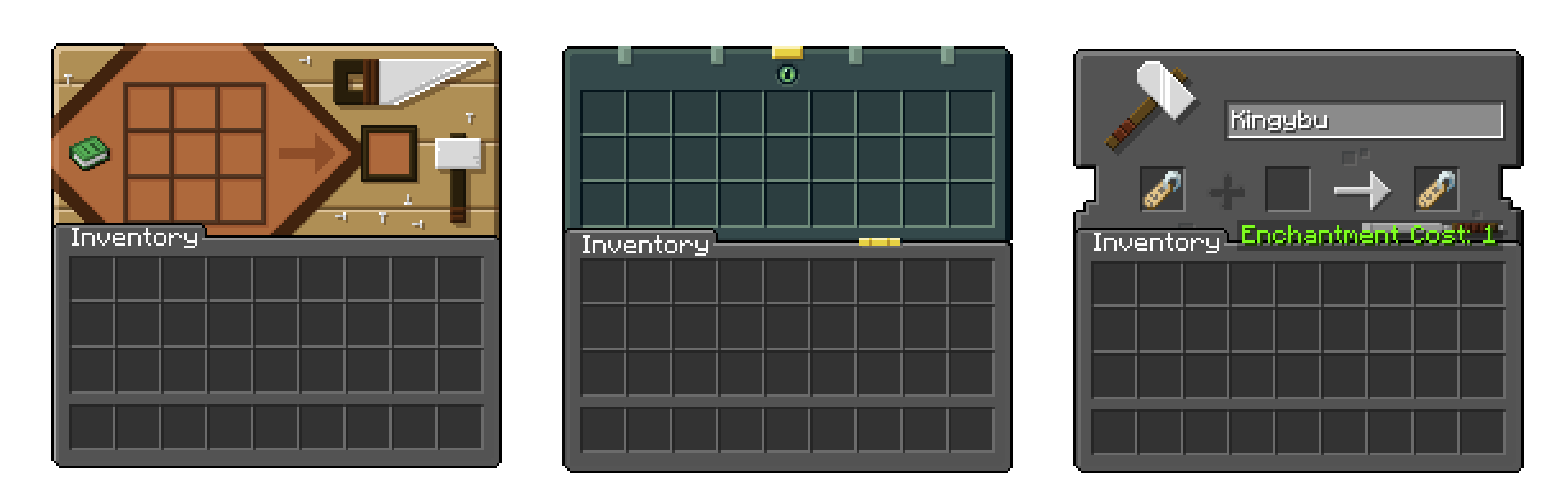
– Anvil
– Recipe Book
– Blast Furnace
– Brewing Stand
– Cartography Table
– Chests (Large, Small, Ender) **OptiGUI required**
– Crafting Table
– Dispenser
– Dropper optifine.png
– Enchanting Table
– Furnace
– Grindstone
– Hopper
– Loom
– Shulkers (All Colours) **OptiGUI required**
– Smoker
– Stone Cutter
– Smithing Table
– Barrel
– Custom Villager GUI **OptiGUI required**
– Beacon
– crafter
– survival inventory
Including
– Dark Loading Screen
– Dark Advancements Menu
– creative inventory
– mod support
**Chris_XENO**
**BurntToast_**
**Kingybu**
CodeChicken Core
Base common code for all chickenbones mods.
CodeChickenCore has been retired in Minecraft 1.11+ and merged with CodeChickenLib.
We are partnered with CreeperHost! Use promo code `covers1624vpp` at checkout for 15% off your first month

CME is Bad
# Abstract
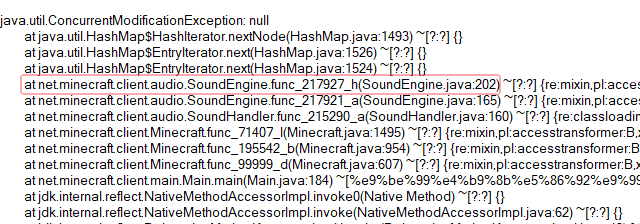
Players and modpack developers sometimes find the game crashed with `ConcurrentModificationExceptions` (CME) and `IndexOutOfBoundsExceptions` (IOOBE), which only give stacktrace of current thread and are hard to trace which mod causes them. Here’s one of the crashes which is caused by SimpleReloadInstance in 1.20.1 Forge:
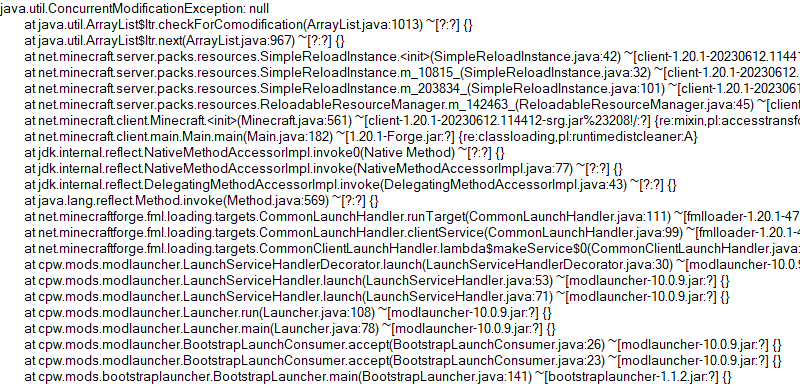
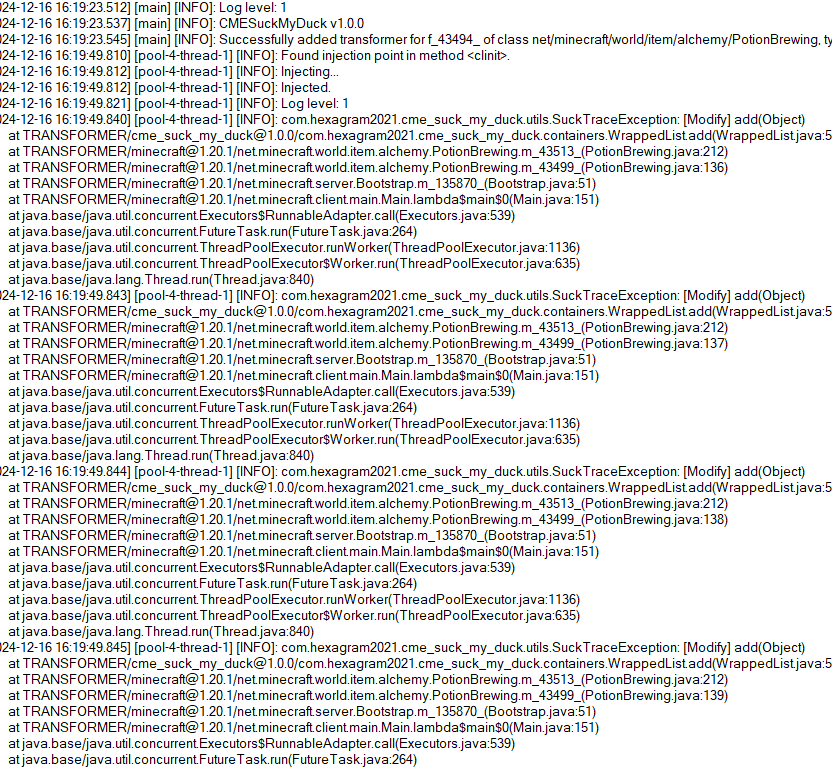
So this is what the mod is developed for. Players who install this mod and add javaagent to JVM Argument correctly will receive a full log for modification history of a certain collection:
# Usage
First, add this jar to mods folder.
Second, edit your Java Virtual Machine Argument in your launcher. Add `-javaagent:mods/CMESuckMyDuck-.jar=;;;`.
Finally, run the game, play and wait until the crash happens.
# Usage for Other Java Projects
This mod can not only be used for Minecraft debugging, but also be utilized to debug other java projects. Similar to Minecraft. The only different step is that you should add gson and asm jar to classpath (`-cp`) before javaagent, and add our `CMESuckMyDuck-.jar` to classpath after javaagent.
# Arguments
##
A full name of the class, which has a container that you would like to monitor. Use “ instead of `.` (a.k.a. the internal name of class).
##
A field name of the container in target class, which you would like to monitor. For Forge, use SRG name. For Fabric, use intermediary name. For NeoForge, use official name.
##
Currently, we only support three containers: `List`, `Set`, `Map`. This argument indicates the type of monitored container.
##
`static` or `nonstatic`. This argument indicates the container is a static field or non-static field.
# How to get and
Let’s start with an example.
First, take a look at the stacktrace of CME/IOOBE:
Second, read the source code of SoundEngine and confirm which container is facing this issue:
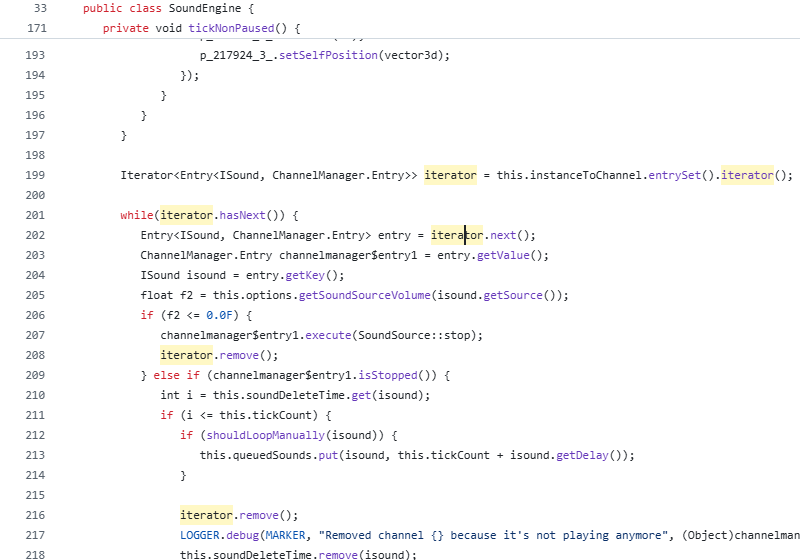
Now we know we should monitor map `field_217942_m` (`instanceToChannel` in `SoundEngine`). Keep going.
Third, install this mod, and add “`-javaagent:mods/CMESuckMyDuck-1.0.0.jar=net/minecraft/client/audio/SoundEngine;field_217942_m;Map;nonstatic`” to Java Virtual Machine Argument. Relaunch the game and wait for the next crash.
Finally, open `CMESuckMyDuck.log` file and you will see which thread and which mod has concurrently modified the container.
# Examples (JVM Arguments)
## ConcurrentModificationException from SoundEngine in Forge 1.16.5 Environment
`-javaagent:mods/CMESuckMyDuck-1.0.0.jar=net/minecraft/client/audio/SoundEngine;field_217942_m;Map;nonstatic`
## ConcurrentModificationException from PotionBrewing in Forge 1.20.1 Environment
`-javaagent:mods/CMESuckMyDuck-1.0.0.jar=net/minecraft/world/item/alchemy/PotionBrewing;f_43494_;List;static`
## ArrayIndexOutOfBoundsException from Zeta mod
`-javaagent:CMESuckMyDuck-1.0.0.jar=org/violetmoon/zetaimplforge/event/ForgeZetaEventBus;convertedHandlers;Map;nonstatic`
# Other options
## Log Level
Use system property `-Dcme_suck_my_duck.log_level=` to set custom log level.
Default 1, which means no debug message will be logged.
Users can set it to 0 to output debug message, which is not recommended – query functions like Map#get, Set#containsAll will also be logged when set to 0, and make the file very very long.
## ASM API Version (v1.0.2+)
In order to maintain compatibility with the latest version of Minecraft, this mod is compiled with asm version 9.7. For older versions of Minecraft (such as 1.12.2), API level operations such as ASM_9 cannot be applied, so players need to use `-Dcme_suck_my_duck.asm_api_version=` to modify the ASM API version compatibility. For example, game version 1.12.2: `-Dcme_suck_my_duck.asm_api_version=5`.
## File Max Entries (v1.0.3+)
Since we notice that when crash happens, the last few operations in the log are much more important than the previous ones. So our mod adopts a paging strategy after v1.0.3, and only the last two pages are retained at the end. The number of logs output on each page (that is, the number of operation call stacks) is fixed, and the default value is 500. Players can use `-Dcme_suck_my_duck.file_max_entries=` to modify the maximum number of elements on the page.
## Whitelist of Constructor (v1.0.3+)
Sometimes a container in a certain class is used in many places (eg. CompoundTag#tags). Directly using this mod will cause the log to be too long or the valid content to be replaced by subsequent operations. Therefore, players can specify an additional constructor whitelist to monitor the corresponding container in the corresponding class of a specific module. The default is empty, that is, there is no whitelist. Players can use `-Dcme_suck_my_duck.whitelist_constructor_stacktrace=` to specify it. If any line in the stack trace where the container is constructed includes the content of the whitelist string, the container will be monitored – otherwise, the container will not be monitored, which greatly simplifies the log output information.
## Transform to Thread Safe (v1.0.4+)
Use system property `-Dcme_suck_my_duck.transform_to_thread_safe=true` to transform the field into a thread-safe container.
This is NOT recommended unless you like slowness and don’t want to fix the problem.
## Inject method (v1.0.4+)
Use system property `-Dcme_suck_my_duck.inject_method=true` to switch to inject mode.
If set, you should use `-javaagent:CMESuckMyDuck-.jar=;` and whenever this method is called, you will receive a stack trace in log files.
## Ignore threads (v1.0.5+)
Use system property `-Dcme_suck_my_duck.ignore_threads=;;;…` to ignore some thread that is expected to modify the given container (or call the given method). For example, `-Dcme_suck_my_duck.ignore_threads=”Server thread”`.
## Stop logging early (v1.0.7+)
Use system property `-Dcme_suck_my_duck.stop_logging_if_exception_created=false` to stop logging if critical error occurs.
## Trace ID Updater (v1.0.8+)
Use system property `-Dcme_suck_my_duck.trace_id_updater=;` to update trace ID when calling the given method. This might be useful in inject mode.
## Monitoring Local Variables (v1.1.0+)
Use system property `-Dcme_suck_my_duck.local_var_index=` to monitor local variable at given index in the given method.
If set, you should use `-javaagent:CMESuckMyDuck-.jar=;;`. By the way, the index can be reused by different local variables. So you might have to use `-Dcme_suck_my_duck.match_local_index=` to specify the ordinal of ASTORE operation to indicate which local variable to monitor.
# Conclusion
I like eating peking duck. It’s so delicious!

Classic Natural Textures
# Natural Texture Pack

This texture pack was originally created by 4J Studios for the legacy console editions of the games. I extracted this from the texture files for the Xbox 360 edition and ported most of the textures (excluding console-exclusive GUI textures I’d have to make from scratch). This pack is soley for early release and beta versions of the game. If you want a modern port for the current version, the people behind Legacy4J maintain a port of the modern bedrock version with recreations of the missing GUI textures you can download here
### Due to being 32x, this pack needs mods to work (OptiFine, MCPatcher, StationAPI, etc.) on versions 1.5 and older. If they aren’t present, you will encounter issues like this:
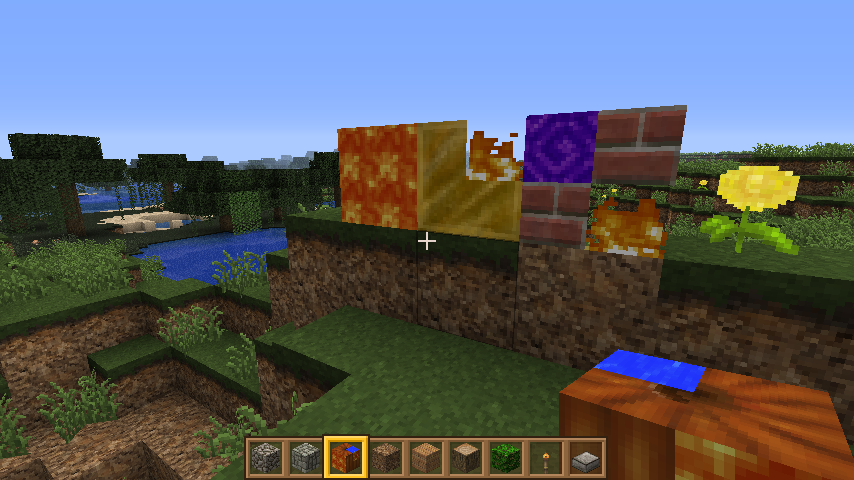
### This is not an issue of the pack. This is a game issue those mods fix.
Circular Logs
# Improve the look of your default Logs with… ↴

## Adds Vanilla-like circulated Logs Top | No Optifine or other Mods needed!
### It’s supports every Version of the game! (even including Legacy ones)
### And day-by-day will have more and more mods supported!
Supported Mods
• Abundance – by exoplanetary
• Architect’s Palette – by Jsburg
• Biomes O’ Plenty – by Forstride & Adubbz
• The Aether – by Oz-Payn
• Vanilla Minecraft – by Mojang
• Wilder Wild – by FrozenBlock
Chill_Totems

# RU:
Русский
## Описание
Описание
Тотемы и многое другое для игроков сервера MineChill.
Для тотемов работает переименование с помощью наковальни.
Для работы требуется или Optifine, или Sodium со вспомогательным модификацией CIT Resewn.
## Тотемы – Totems
Totems
| Переименование | превью | Переименование | превью | Переименование | превью |
| —————— | ———————————————| —————— | ——————————————– | —————— | ——————————————– |
| **0xc88** |  | **1holdok** |  | **annhex** |  |
| **Bai4ik2007** |  | **Banataks** |  | **Bart** |  |
| **brickbor** |  | **cat_man3000** |  | **catbos11** |  |
| **CatSavuha** |  | **СokeFenya** |  | **СorVuz_** |  |
| **crazycrashing** |  | **Cvadroner** |  | **Darex** |  |
| **Death_lighty** |  | **DEN4IRUS** |  | **Diluk_0978** |  |
| **Dirvin_** |  | **Do6po_U_3JIO** |  | **DontScar** |  |
| **AFK_Doshic** |  | **egor2286f87** |  | **EleVetS** |  |
| **Enikotor** |  | **Fess_** |  | **FoxKops** |  |
| **FXTYUR** |  | **get90** |  | **CJGoopper** |  |
| **grob003** |  | **GulYash** |  | **guozong** |  |
| **HaykoHak** |  | **JICIN** |  | **_Ka1sEr_** |  |
| **kaizer0315** |  | **Kastoridas13** |  | **Kcrestar** |  |
| **khazeshnik** |  | **kiwi104sm** |  | **Kolborn_hub** |  |
| **Kreo_gen** |  | **kreo_AFK** |  | **Kreo_new** |  |
| **kvil0uze** |  | **Laguho4ok** |  | **Lancealot** |  |
| **lolik56789** |  | **luees_lul** |  | **mamix07079** |  |
| **Masskk1ll** |  | **Mihasya_LoL** |  | **Mira_hod** |  |
| **MIRI____** |  | **MISTER_ZLUK** |  | **mooh_ie** |  |
| **morffyy** |  | **mortyfnaf** |  | **Mr_merahodets** |  |
| **MinimalMrago** |  | **MrChillout_** |  | **MrKr1stall1k** |  |
| **Nikotiin_** |  | **noflyer** |  | **noskovv** |  |
| **noskovv2** |  | **Oipur** |  | **Okiro** |  |
| **OLD** |  | **Olen_typoi** |  | **Pandaemon** |  |
| **Prey_of_Lust** |  | **ProtoRon** |  | **QWE_FT** |  |
| **ReaoProya** |  | **_reffors_** |  | **Rom4k7719** |  |
| **rupa4a** |  | **Sernor** |  | **shtorkapizda** |  |
| **st1ven91** |  | **Torgfo** |  | **TWSTw0rld** |  |
| **Uskie22** |  | **vova_torik** |  | **xaloxog** |  |
| **xl_yta** |  | **Yuhyy** |  | **z3rk112** |  |
| **_Za14ek_** |  | **ZlodeyBritanec** |  | **zloitamer** |  |
| **zokyoud** |  | **** |  |
## Установка и использование
Для установки вы можете скачать сам ресурс-пак или прописать команду /rps на сервере.
Советую скачивать отсюда и следить за обновлениями. Потом переносите в папку .minecraft/resoursepacks
## Катаны
На данный момент, на сервере предоставлено 38 катан(многие взяты из различных ресурс-паков из интернета, несколько нарисовано мной и моими друзьями(Ссылки предоставлены ниже))
## Для игроков сервера MineChill
### Как получить катаны
Получить катаны можно двумя способами:
1. Существуют катаны которые можно получить на наковальне путём переименования по представленным ниже названиям:
2. За заслуги перед сервером
Переименование
– **Yamato**
– **reinforced thunder nichirin**
– **thunder nichirin**
– **zenitsu nichirin**
– **Dainsleif**
– **molten sword**
– **Molten Blade**
– **steel sword**
– **katana_l**
– **epic sword**
– **Kardis Gardarat**
– **Et aro de Empera!**
3. Другие катаны можно получить только за баллы у стримеров из организации “Жаждущие Чая”(все ссылки прилагаются ниже), катаны имеют редкости и некоторые катаны нельзя будет получить даже за баллы. Все инструкции смотрите ниже.
### Как получить кастомную еду
Чтобы получить кастомную еду надо переименовать золотую морковку или зелье исцеления в ниже предоставленные названия:
Переименование
– **Вино**
– **Водка**
– **Виски**
– **Кофе**
– **Чай**
– **hot coffee**
– **Рыбка**
– **Кфс**
– **Клубнички**
– **хлебушек**
– **Говядина**
– **Арбузик**
– **Арбузик с золотом**
– **Шашлык**
– **Бараний шашлык**
– **Багет**
– **Суши**
– **Стейк**
– **Дошя**
### Как получить кастомное оружие
Большинство оружия можно получить через переименование лука или арбалета на наковальне по ниже указанным названиям:
Переименование
– **ак-47**
– **bfg 9000**
– **m-98**
– **mac10**
– **mauser**
– **наган**
– **revolver**
– **Томпсон**
– **bar**
– **svd**
– **awm**
– **rpg-7**
– **Дробовик**
– **Винчестер**
### Как добавить свой кастомный тотем
Чтобы я смог добавить ваш тотем в ресурс-пак вам требуется:
1. Написать мне в личные сообщения с фразой “Хочу тотем”
2. Отправить ваш никнейм(учитывайте заглавные буквы и т.п.)
3. Отправить свой скин файлом(Пример: )
## Ссылки
### Твич
EleVetS
Kreo_gen
Fess_
### Дискорд сервер MineChill
MineChill
### Мой дискорд
Олешка#2809/kreo_gen
## Хочу сказать спасибо:
– За помощь в переводе: Sernor
– За помощь с файлами: Prey_of_Lust
# En:
English
## Description
Totems, Katanas, Guns, and much more…
To get the totems you need to rename them using an anvil.
For the resourcepack to work you need either Optifine or CIT Resewn.
For the katanas you either have to rename them or you need to have OP in your world/server because in most katanas you need to add nbt tags to them, to do that you need to put your sword into an item frame then look at it and write this command /data merge entity (item frame uuid) {Item: {id:”minecraft:netherite_sword” , tag:{(nbt tag of the katana you want):1b}}}.
## Installation guide
You first download the resourcepack, go to %appdata% – .minecraft – resourcepacks and put the zip archive there. Or if you play on minechill you can do /rp instead.
## Katanas – NBT tags
– **kikoku**
– **Genya**
– **Fess**
– **nichirin_wind**
– **nishirin_moon**
– **orakano_kao**
– **Rengoku**
– **Sakura_sword**
– **shinazu**
– **Csandr**
– **Kokushibo**
– **katana1**
– **Lust_scythe**
– **Mitsuri**
– **Muichiro**
– **nichirin**
– **nichirin_flame**
– **nichirin_flower**
– **nichirin_insect**
– **nichirin_love**
– **nichirin_mist**
– **nichirin_sound**
– **nichirin_watergawa**
– **shinobu**
– **tanjiro**
– **tanjirosun**
– **tengen**
– **the_scythe_is_ordinary**
– **tokito**
– **tomioka**
– **youneon**
– **yroiichi**
– **zenitsu**
## Katanas – Rename
– **Yamato**
– **reinforced thunder nichirin**
– **thunder nichirin**
– **zenitsu nichirin**
# Social links / Ссылки на социальные сети


ChatControl
Testimonials/Vouches:


ChatControl is chat management and formatting plugin for Bukkit, Spigot and Paper that significantly reduces the amount of spam, ads, swearing and bots on your server!
It received over 600,000+ downloads since 2013 and was since modernized to work on the latest Minecraft version.
## Issue Tracker | Wiki
Create custom rules and handlers for complete control over your chat. ChatControl also comes with many other, often unique features, see the list below!
### Unofficial review video by Koz4Christ
Note: In commands, there is no such argument as “username”.

## Features
### Rules and Handlers
– Rules can be used for:
– **Effective curse/swear word filtering**. By default, over 48 curse words are blocked!
– **Powerful IP / URL advertisements blocking**
– **Filter spam** and **repetitive characters**
– **Block unicode / non-english messages**
– **Typo / slang correction**
– **Command aliases**
– Utility commands / messages
– Fun message replacements
– …they are entirely up to you, and the possibilities are endless!
– Define your own rules that matches certain **regular expressions** and applies for: chat, commands, signs or packets
– Packet rules **allows you to edit messages from the server itself or even other plugins** (or hide them). The support replacing message per different worlds with rewritein operator
– For example, change the unknown command message to no permission message in survival, but to something else in the hardcore world
– Handlers allow you to easily manage a big set of rules without spaghetti code
– Custom syntax and parser, fixing many YAML limitations
– Inspired by popular but now outdated PwnFilter
### Chat Formatting
– Format chat messages, with variables: {player_prefix} and {player_suffix}
– {world} (TIP: if you want to customize the world name, use Multiverse-Core and edit world alias in worlds.yml)
– {health
– {player} (player name)
– {town} and {nation} (if Towny plugin is enabled)
– {clan} (if SimpleClans plugin is enabled)
– {country_name} and {country_code}
– {region_name} and {isp} (player’s internet provider)
– PlaceholderAPI is supported.
– Supports **global chat** (begin with “!”) and **local chat** (ranged mode)
– Use _chatcontrol.chat.overrideranged_ permission to get all messages in the world
– Use _chatcontrol.chat.spy_ permission to get all messages in all worlds – spy mode
### Anti Spam
– Block the same or similar messages and commands
– Strip special and duplicate characters to prevent bypasses (toggleable)
– Ignore first argument in commands to prevent too strict check
– Customizable percentage
– Set the delay between messages and commands
– Lower long unreadable message spam
– Whitelist commands from delay and similarity check
### Anti Caps
– Efficient and intelligent CAPS prevention
– Customize minimum message length, caps percentage, amount of caps in the row and a whitelist of ignored words
– Ignore player names
### Anti Bot
– Set the delay between logging in again
– Prevent signs with the same text (alert staff + drop the sign) (Useful against “AutoSign” cheat)
– Block chat until player moves on join (Prevent bots joining and spamming)
### Chat Clear
– Clear the in game chat. Support reason and arguments:
– -anonymous (-a) (to hide the cleaner’s name)
– -silent (-s) (to hide entire broadcast message after clean)
– -console (to clear console)
– Do not clear chat for players with permission
### Chat Mute
– Globally prevent chatting and executing certain commands under the mute.
– Also hide join/quit/kick and death messages
– Supports reason and arguments
– -anonymous (-a) (to hide the cleaner’s name)
– -silent (-s) (to hide entire message after clean)
– -console (to clear console)
### Messages’ Customization & Broadcaster
– Customize or hide join/quit and kick messages. Support variables:{player}, {player_suffix} and {player_prefix} (see more variables above in Chat formatter)
– Send fake join or leave messages (/chc fake)
– Broadcast messages in the specified interval
– 3 modes – by order, random and random with cache that prevents messages to repeat until all were broadcasted
– Set a prefix and a suffix
– Supports variables %player and %world
– Different messages per world
– World messages inherit global messages by default, this can be disabled by inserting – excludeGlobal on the first line.
### Packet Features
– Disable tab complete if no argument is given, leaking server info.
– Notice: If using spigot, it is recommended to disable this feature and to configure it in spigot.yml!
– Change other plugins’ or even server messages (see rules/packet.txt file)
### Console Features
– Remove unwanted messages from the console
### Sound Notify
– Get notified when somebody mentions you in the chat or if you receive ‘/tell’, ‘/r’ (or any specified message)
– Customizable sound, volume and pitch.
– Respects the difference in sound names between MC 1.9 and older
– Can specify a prefix that is necessary to get notified (e.g @kangarko)
– Only notify afk players (toggleable, requires Essentials)
### Grammar
– Capitalise sentences automatically
– Insert a dot at the end
– Respects domains and IP addresses
– Define minimum message length for capitalization and punctuation
### Chat Conversation Saver
– Save entire chat conversation to file. Unlike console output, this will save only player messages and specified commands
– Ignore certain players
### Localization
– Current available locations:
– English (en)
– Slovak (sk)
– Czech (cz)
– Spanish (es)
– German (de)
– French (fr)
– Dutch (nl)
– Swedish (se)
– Hungarian (hu)
– Bulgarian (bg)
– To customize the localization, create a file in plugins/ChatControl/localization/messages_LOCALE.yml (replace LOCALE with the short name of the localization – the one above in brackets)
– On reload, it will be filled with all the values and kept up to date with newer versions.
– If you make a localization, it would be appreciated if you send it to me via PM. Thanks!
### Groups (Permission-specific Settings)
– Apply different settings for each group (or players) with certain permission
– Example: Allow trusted players to type quickly but set the message delay for quests to, for example, 5 seconds.
– Example 2: Set different join/leave/kick message for certain players/groups.
### Lightweight & Safe
– Extremely efficient and low CPU / RAM usage
– Asynchronous updater and non-blocking features
– Safety checker to prevent malformed regular expressions running into an infinite loop and freezing the server
– Custom syntax parser
#### You can turn every feature off and change every message!
### Compatibility
– Minimum Minecraft version: Craftbukkit 1.2.5 (that is correct!) to the latest Spigot / Paper
– Minimum Java version: Java 8
– The plugin doesn’t use NMS access so it will most likely not break upon next releases (1.10.x etc)
– Cauldron & PaperSpigot compatible
**Important for Minecraft 1.7.10 and lower:** Please install BungeeChatAPI alongside ChatControl.
### Commands
See “/chc list” to display all available commands of the plugin.

### Supported Plugins
– **ProtocolLib** for custom rules in packet.txt file and preventing tab complete.
– **Essentials** or **EssentialsX** for detecting AFK players.
– **Vault** for chat formatter and taking money players in “then fine” operator in custom rules.
– **Multiverse-Core** for colored world alias in chat formatter.
– **Towny** for {nation} and {town} variables in chat formatter.
– **SimpleClans** for {clan} variable in chat formatter.
– **AuthMe** for better join/kick/quit messages.
– **PlaceholderAPI** for extra variables.
### Need help? Ask questions?
### Click here to send us a message.
### We aim to reply to all customers within 1-5 business days.
ChatAnnouncementPlugin
# 📢 ChatAnnouncementPlugin
**ChatAnnouncementPlugin** is a lightweight, customizable Minecraft plugin that automatically sends periodic chat announcements to all players. Perfect for welcoming players, sharing tips, or promoting server events.
—
## 📦 Features
– ✅ **Configurable Messages** — Add as many announcement lines as you want in `config.yml`.
– ⏱️ **Custom Delay** — Choose how often announcements are sent.
– 🔀 **Random or Sequential** — Send messages in order or pick them randomly.
– 🎨 **Color Code Support** — Use `&a`, `&b`, etc. for colored and formatted messages.
– 🔄 **Hot Reload** — Reload messages and settings without restarting the server using `/chapreload`.
– 🧩 **Highly Compatible** — Works with Bukkit 1.1-R5 and later, including Spigot, Paper, and forks.
—
## 🔧 Commands
| Command | Description |
|—————-|——————————————|
| `/chapreload` | Reloads the plugin’s configuration file. |
—
## 🛡️ Permissions
| Permission | Description | Default |
|———————-|——————————————|———|
| `chap.reload` | Allows the player to reload the config. | `op` |
—
## ⚙️ Configuration
“`yaml
# ChatAnnouncementPlugin configuration
messages:
– “&aWelcome to the server!”
– “&bRemember to join our Discord!”
– “&eVote daily for rewards!”
# Delay in seconds between announcements
delay: 60
# If true, messages are picked randomly; if false, they are in order
random: false
Chack’s RP (crosshair)
This my resource pack for the Minecraft crosshair and crit particle when damaging a player or a mob, making for a better experience in Minecraft PvP. It works on all versions!
Pop it to the right side and make sure that it’s above the default texture.