Legacy Minigames Lobby Panorama
Makes ur panorama the og Minecraft Minigames lobby (new)
Makes ur panorama the og Minecraft Minigames lobby (new)
# What does the pack do?
This pack adds the original Legacy Console Edition background panorama to java edition!
## It says incompatible?
This pack should be compatible with almost every Minecraft version because it only changes the panorama.
## Why does this exist?
This exists purely because **I got bored** and wanted to re-create the old Minecraft Legacy Console Edition background panorama with a world I downloaded lmao.
Kreklinok Pack
Kreklinok Pack is a PvP resource pack designed to make gameplay more comfortable while keeping the classic Minecraft style.
The pack improves item visibility and makes PvP clearer and more enjoyable without changing the vanilla feel of the game.
Features
• Clean food and totem textures

• Smaller fire for better visibility in combat

• Short swords for easier PvP, • 32×32 tools

• Improved item visibility
• Vanilla-style textures
• Many small improvements and tweaks
❗If you find any bugs or issues, feel free to contact me.
Discord “Kreklinok”
Telegram “Kreklinok”
Are you bored about the “player moved too quickly” notice on server?
Then you could use this mod to get rid of it!
Currently supports:
Forge: 1.19.x
Fabric: All Versions
# JMTP (JourneyMap TelePort)
Plugin for Minecraft Spigot which allows teleporting through the dimensions (especially for using with JourneyMap)
## Commands
### /wtp
`/wtp {dim} {x} {y} {z}` – teleports you to provided dimension and coordinates
*dim*, *x*, *y*, *z* – must be **signed int**
### /wtp_version
`/wtp_version` – prints version of plugin
### /wtp_dims_list
`/wtp_dims_list` – prints all avaliable dimensions
## Tested server cores
– ❌ Craftbukkit version git-Bukkit-1.8.1-R4-17-g04a14f7-b1493jnks (MC: 1.0.0) (1.0.0-R1-SNAPSHOT)
– ✅ CraftBukkit version git-Bukkit-1.1-R4-23-gb2d2dba (MC: 1.1) (1.1-R5-SNAPSHOT)
– ✅ CraftBukkit version git-Bukkit-jenkins-CraftBukkit-183 (MC: 1.2.5) (1.2.5-R5.0-MCPC-SNAPSHOT)
– ✅ CraftBukkit version git-Bukkit-1.2.5-R5.0-1-g4d45a19-b2266jnks (MC: 1.2.5) (1.2.5-R5.1-SNAPSHOT)
– ✅ CraftBukkit version git-Spigot-959 (MC: 1.5.2) (1.5.2-R1.1-SNAPSHOT)
– ❌ CraftBukkit version git-MCPC-Plus-jenkins-MCPC-Plus-507 (MC: 1.5.2) (1.5.2-R0.2-SNAPSHOT)
– ✅ CraftBukkit version git-Bukkit-1.6.4-R2.0-b2918jnks (MC: 1.6.4) (1.6.4-R2.0)
– ❌ Cauldron-MCPC-Plus version git-Cauldron-MCPC-Plus-1.6.4-1.965.01.205 (MC: 1.6.4) (1.6.4-R2.1-SNAPSHOT)
– ❌ MCPC+ version git-MCPC-Plus-jenkins-MCPC-Plus-164-251 (MC: 1.6.4) (1.6.4-R2.1-SNAPSHOT)
– ✅ Spukkit b21 (1.7.2) (1.7.2-R0.1)
– ✅ CraftBukkit version git-Spigot-1.7.9-R0.2-208-ge0f2e95 (MC: 1.7.10) (1.7.10-R0.1-SNAPSHOT)
– ✅ CraftBukkit version git-Bukkit-1.7.9-R0.2-20-g0b2ed13-b3108jnks (MC: 1.7.10) (1.7.10-R0.1-SNAPSHOT)
– ✅ Cauldron version 1.7.10-1614.58 (MC: 1.7.10) (1.7.10-R0.1-SNAPSHOT)
– ✅ KCauldron version 1.7.10-1492.152 (MC: 1.7.10) (1.7.10-R0.1-SNAPSHOT)
– ✅ CatServer version CatServer-dae70adc (MC: 1.12.2) (1.12.2-R0.1-SpigotAPI)
– ✅ CraftBukkit version git-Spigot-79a30d7-f4830a1 (MC: 1.12.2) (1.12.2-R0.1-SNAPSHOT)
– ✅ Paper version git-Paper-1620 (MC: 1.12.2) (1.12.2-R0.1-SNAPSHOT)
– ✅ Cardboard version git-7ae8ebd (MC: 1.18.2) (1.18.2-R0.1-SNAPSHOT) on **Fabric**
– ✅ Cardboard version git-6841632 (MC: 1.18.2) (1.18.2-R0.1-SNAPSHOT) on **Fabric**
– ❌ Cardboard version git-7ae8ebd (MC: 1.18.2) (1.18.2-R0.1-SNAPSHOT) on **Quilt**
– ❌ Cardboard version git-6841632 (MC: 1.18.2) (1.18.2-R0.1-SNAPSHOT) on **Quilt**
– ✅ CraftBukkit version 3608-Spigot-6198b5a-b5aa0be (MC: 1.19.2) (1.19.2-R0.1-SNAPSHOT)
– ✅ Paper version git-Paper-333 (Git: eec64a4) (MC: 1.19.3) (1.19.3-R0.1-SNAPSHOT)
### Why not working
– 1.0.0 has issues with logger
– MCPC+ (and Cauldron before 1.7.x) have issues with plugin remapping
– Cardboard on Quilt has problems with Fabric version detection (could be fixed by Cardboard devs in future)
Jappaified backports new Jappa-styled textures to every single version of Minecraft before 1.14 except for snapshots and April Fools updates, and I mean it. EVERY. SINGLE. VERSION. (There’s also a Classicube version)
This pack aims to port the modern textures as accurately as possible. This includes having correct ore textures, new cloud textures, and new changes when new updates drop if possible.

## Installation (pre a1.2.2)
### Prism Launcher / MultiMC
In the instance menu (click “Edit Instance” to get there), go to the Version section and click “Add to Minecraft.jar”. Once your file explorer of choice opens up, find the version you downloaded and select it. After that, it should be installed and you can launch the game with it.

I’d also recommend using [LegacyFix](https://github.com/betacraftuk/legacyfix) to get those old versions running idealy.
### Optifine and MCPatcher for old versions
Optifine and MCPatcher can be used to get the water and lava working properly in versions between a1.1.2_01 and r1.4.7. You can get the version you want [here](https://github.com/backporteverything/Backport-Everything/tree/main/Supplementary%20Files) and then you can add them by doing the same thing you do when using pre a1.2.2 versions of this pack to add MCPatcher.
## Version Numbering Scheme
game1(-game2).bigpatch.smallpatch.bugfix
game1 is the earliest Minecraft version a version of this pack supports
game2 is the latest Minecraft version a version of this pack supports
bigpatch is if I add or change something to every single version of the pack. Whenever this happens, I will make a downloadable .zip file with every version of the pack (it saves me a LOT of time)
smallpatch is if I want to add or change something in certain versions of the pack
bugfix is if I need to fix something in certain versions of the pack
The current version of a pack right now would be game1(-game2)(-OP).2.X.X
## Also Check Out
[Tunes: Backport](https://modrinth.com/resourcepack/tunes-backport): A pack that adds new songs to r1.6 and later. It works great alongside this pack.
[MC New Textures: Sound Pack](https://modrinth.com/resourcepack/mcnt-sound): A pack that backports the new sounds to r1.7 and later. It’s meant to go with MC New Textures, but it should work with this pack too.
[Modernity: Climate Mapped Water](https://modrinth.com/resourcepack/modernity): There are water climate resource packs that truly add the new water colors to r1.6 to r1.12.2. Though, you’ll have to copy the stuff from this to my pack if you are using r1.6 specifically.
[Modernity Adjunct](https://modrinth.com/resourcepack/modernity-adjunct): A pack that added Jappa-like textures to old mods on old versions. It’s meant to go with Modernity, a pack similar to this one, but I think mine should work as well if you want to give it a shot.
[Backport Everything](https://modrinth.com/resourcepack/backport-everything): A pack with a very similar goal as this one, that was made around the same time by pure coincidence! If there are changes in this pack you like more, use it instead of my pack. Also, this pack works with the StationAPI port of The Aether mod on b1.7.3 if you like that and Jappa textures.
# About
Stupid-simple elevators! The fastest, easiest way to navigate up your tallest towers! Just jump to go up and crouch to go down. No buttons, levers, pressure plates, or any other cumbersome mechanics. Stairs are too bulky and ladders are too slow! Simply place an iron block on each floor of your house in a vertical line, and you’ll be flying through your mansion in no time!
# Features
– 1.4.6 – 1.19.X Ready and Tested
– Create an elevator just by placing iron blocks above one another
– Allows instant vertical travel between aligned iron blocks
– No commands to make elevator, No signs, No redstone or other required mechanics.
New
– Create multiple elevators
– Can change sound for going up or down
– Cooldowns for elevators
– Select worlds you want elevators to work in
# Commands
**/irreload** – reloads the config
# Permissions
– **ironelevators.use** – Allow a player to teleport using this plugin.
– **ironelevators.reload** – Allows players to reload config
– **ironelevators.notify** – Notify the player when there is a new update
# Information
– Place iron blocks in a vertical line (NO MORE THAN 14 BLOCKS BETWEEN THEM BY DEFAULT)
– Stand on one
– Jump to go up to a higher level
– Crouch to go down to a lower level
# Config
“`
UpdateMessage: true #Get updates for future releases
Spectator Disable: true #Disables spectators from using elevators
Worlds: #What worlds you want the plugin to work in
– world
– world_nether
– world_the_end
CoolDownInSeconds: 0 #Cooldown to use the elevator
Elevators: #You can now add multiple elevators
IRON_BLOCK: #Default evelvator
minElevation: 3 #Minimum blocks for a elevator
maxElevation: 14 #Maximum blocks for a elevator
elevatorWhooshUP: ENTITY_IRON_GOLEM_ATTACK #Sound when going up a elevator
elevatorWhooshDOWN: ENTITY_IRON_GOLEM_ATTACK #Sound when going down a elevator
GOLD_BLOCK: #Example second elevator
minElevation: 3 #Minimum blocks for a elevator
maxElevation: 50 #Maximum blocks for a elevator
elevatorWhooshUP: ENTITY_IRON_GOLEM_ATTACK #Sound when going up a elevator
elevatorWhooshDOWN: ENTITY_IRON_GOLEM_ATTACK #Sound when going down a elevator
“`
# IPBanPlugin
A lightweight, high-performance IP ban system for Velocity Proxy servers.
## 🚀 Features
– **Ultra Lightweight**: Weighs only ~350KB (no external database drivers required).
– **JSON Storage**: Simple, human-readable storage in `banned_ips.json`. No database setup needed.
– **High Performance**:
– Instant ban checks (0ms latency) using in-memory caching.
– Asynchronous file I/O to prevent server lag.
– **Full UTF-8 Support**: Correctly handles Cyrillic and special characters in ban reasons and messages.
– **Instant Kick**: Automatically kicks players who are online when their IP is banned.
## 📥 Installation
1. Download the latest `ipbanplugin-x.x.x.jar` from the releases page.
2. Place the jar file into your Velocity `plugins/` folder.
3. Restart the proxy.
## 🛠 Commands & Permissions
| Command | Usage | Description | Permission |
|———|——-|————-|————|
| `/ipban` | `/ipban` | Lists all banned IPs. | `ipbanplugin.ban` |
| `/ipban` | `/ipban
| `/unbanip` | `/unbanip
## ⚙️ Configuration
The plugin generates a configuration folder at `plugins/ipbanplugin/`.
### `config.yml`
Basic configuration settings.
### `messages.properties`
Fully customizable messages with support for color codes (`&`) and placeholders.
*Note: The file is read as UTF-8, so you can use any language.*
### `banned_ips.json`
Stores the ban data.
“`json
[
{
“ip”: “127.0.0.1”,
“bannedBy”: “Admin”,
“bannedAt”: “2026-01-01 12:00:00”
}
]
“`
## 📋 Requirements
– Velocity 3.3.0 or higher
– Java 17 or higher
## Github
https://github.com/yunexal/ip-ban-plugin

**A simple resource pack that makes item frames invisible**.
—
## Need a Minecraft Server? (Sponsor)
[](https://billing.sparkedhost.com/aff.php?aff=3138)
Get **25% off your first month** with Sparked Host.
—
## Quick info
– **Versions:** 1.4+ (full invisibility from 1.8+)
– **Works with almost all mods (Sodium/Iris and OptiFine too)**
– **No mods or commands required**
– **Additional files for invisible glow item frames and invisible map frames**
– **Versions below 1.8 will only have the center of the frame invisible (view images below for more info)**
—
## Showcase
**1.8+**
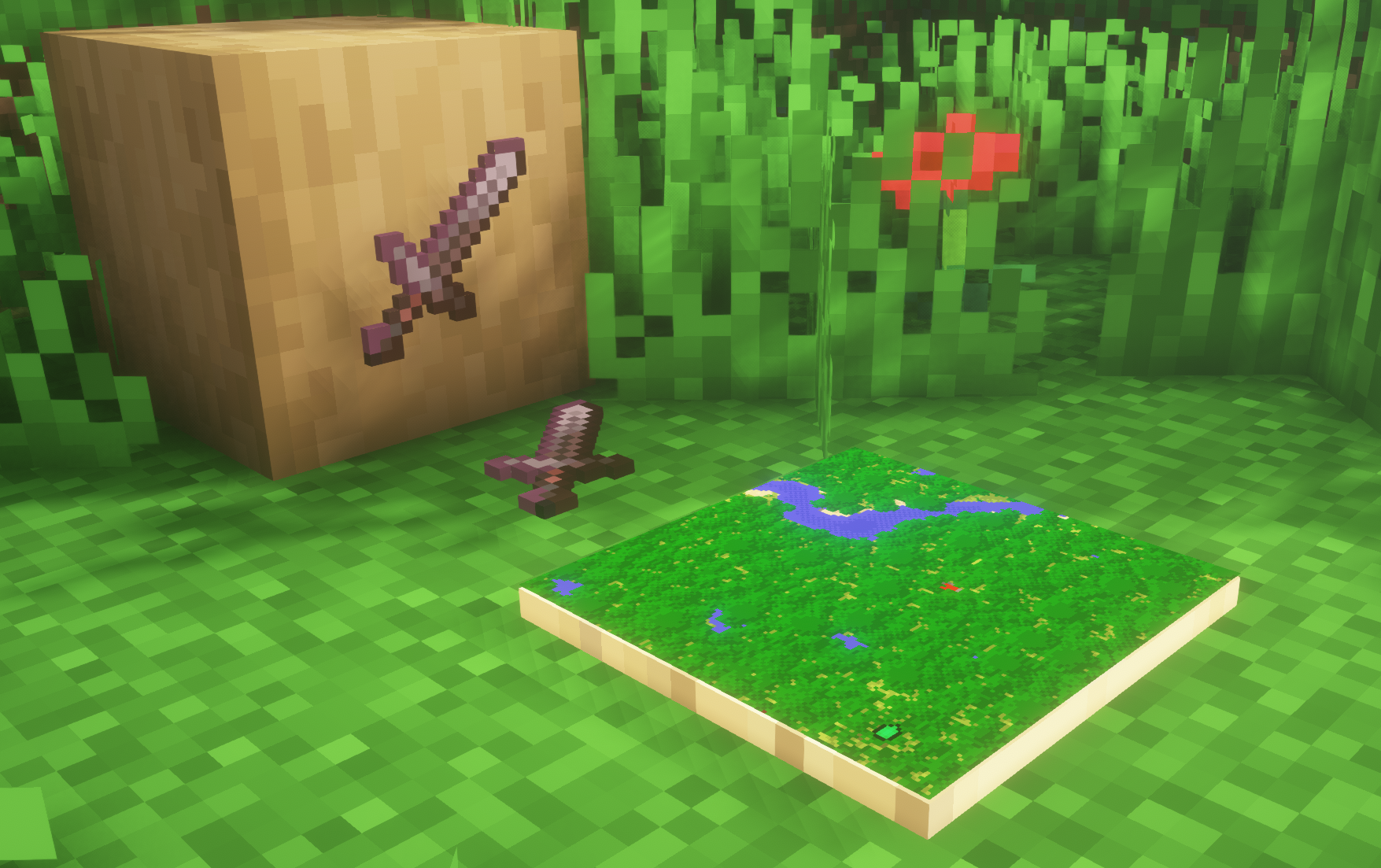
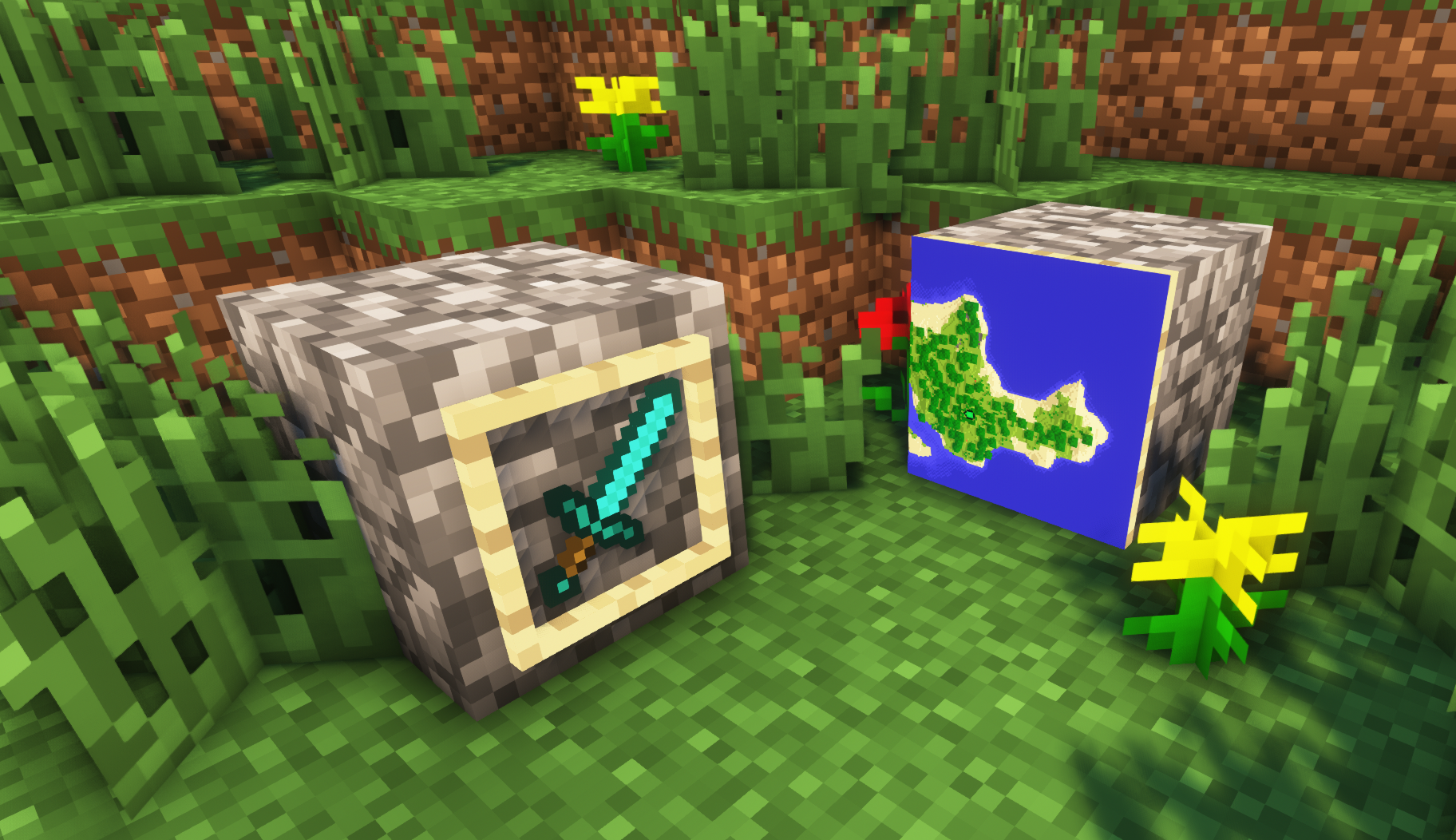
—
**Can I use this with other packs?**
> Yes, but place this pack in a **higher priority (above other packs)**.
**How do I remove item frames?**
> Enable debug hitboxes using **F3 + B** and break the frame.
**Can I use this pack in my modpack or server?**
> Yes you are free to use it, as long as you don’t claim this pack as your own.
**Why is my map/glow item frame not invisible?**
> You have to install those separately. They are available under **additional files** or the buttons near the top of this page.
**Does this make the game slower?**
> This pack actually slightly **improves the client-side framerate** in scenes with lots of item frames.
—
## Additional Files
– [Download Invisible Glow Item Frames](https://cdn.modrinth.com/data/gfr4403r/versions/SVxFWAm4/Invisible-Glow-Item-Frames-V4.zip)
– [Download Invisible Map Item Frames](https://cdn.modrinth.com/data/gfr4403r/versions/SVxFWAm4/Invisible-Map-Item-Frames-V1.zip)
—
## Need a Minecraft Server? (Sponsor)
[](https://billing.sparkedhost.com/aff.php?aff=3138)
Use code **MattyWalker** for 25% off your first month.

This pack makes the item frame invisible so you can put an item in it and make it look like it’s just the item that’s there.