TZP Extra Compat (Tissou’s Zombie Style)
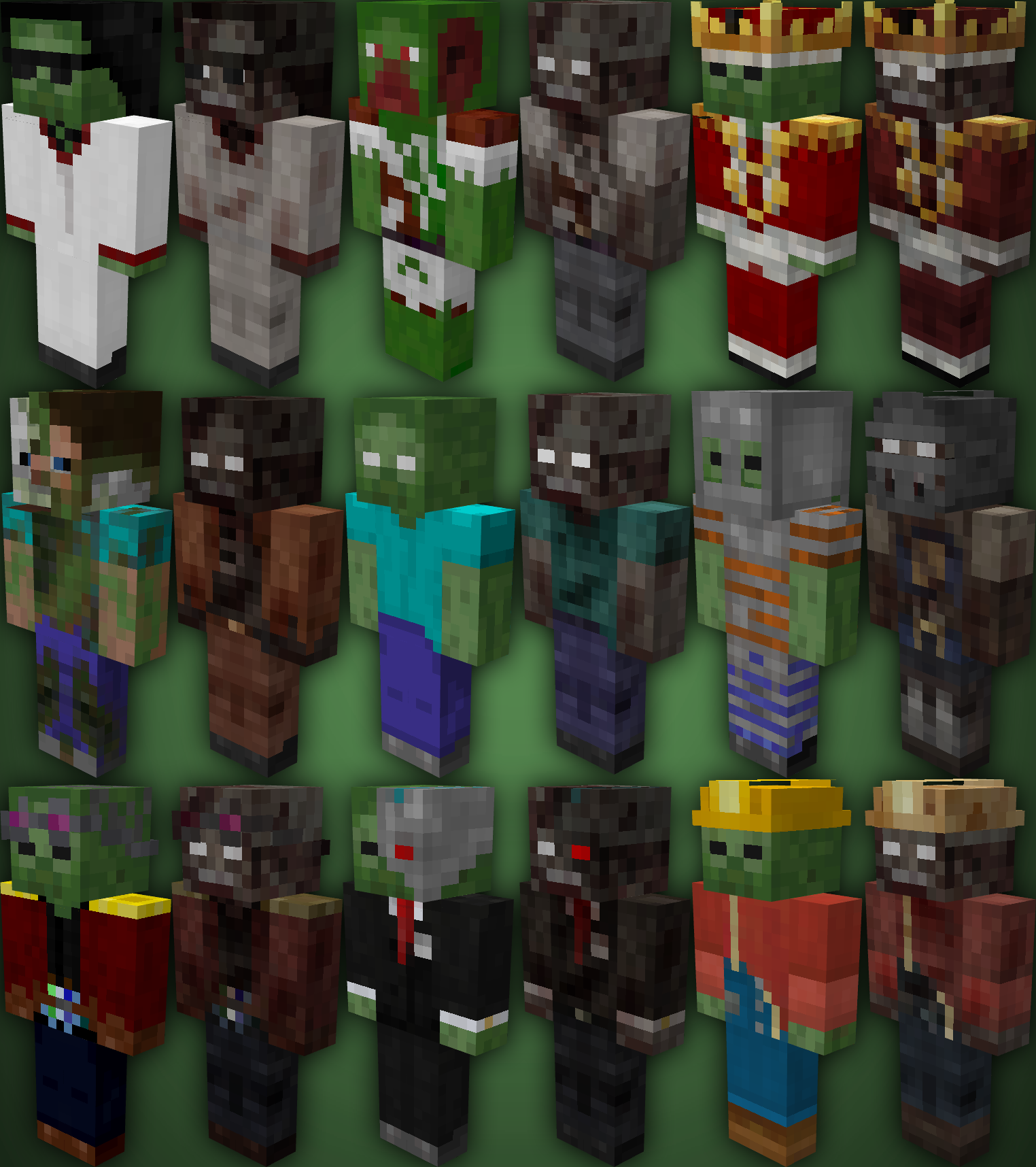
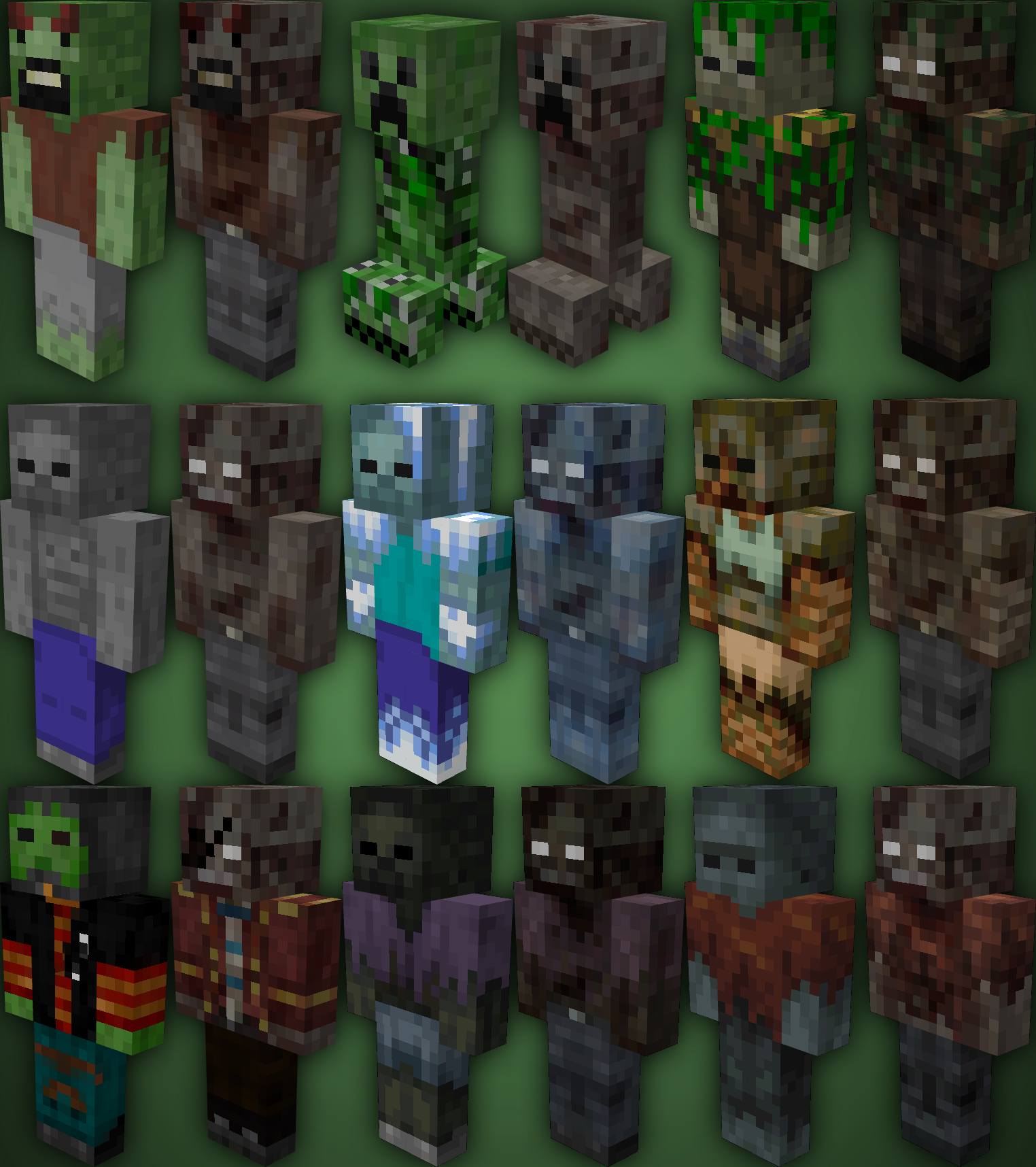
TZP Extra Mod Compat, Add new textures to mobs (zombies) so you feel more according to [Tissou’s Zombie Pack](https://www.curseforge.com/minecraft/texture-packs/tissous-zombie-pack-optifine-1-7x-1-20) Style.
### Mod Compatibility:
– [Sully’s Mod](https://modrinth.com/mod/sullysmod)
– [Mo’ Zombies Wave](https://modrinth.com/mod/mo-zombies-wave)
– [Mob Variants](https://modrinth.com/mod/fryc-mob-variants)
– [Majrusz’s Progressive Difficulty](https://modrinth.com/mod/majruszs-progressive-difficulty)
### Before (left), after (right)
Tulip
## What is Tulip?
Tulip is a lightweight and easy-to-use config library for Minecraft that simplifies the process of saving and loading data to and from config files. With its simple API, Tulip allows you to easily manage your mod’s config settings. Whether you’re a beginner or an experienced modder, Tulip’s intuitive design means that it is easy to handle things like saving and loading data all while the mod handles errors for you.
You can use this mod to add configurations to your mods. To clarify, this mod isn’t for making config screens (where other config libraries do so), this library is for handling saving and loading. You will have to create your own config screen class to handle actually dealing with your mod’s data.
## Well, where do I find a source to learn how to use this library?
I’ve made a GitHub wiki page that explains every step in the process of using Tulip, as well as setting up a simple config screen along with it. You can find it [here](https://github.com/TimeCubed/tulip-config-manager/wiki).
## IMPORTANT
Please note that most likely older versions of Tulip are broken and should be considered broken even if they aren’t. If you’re a mod creator and would like to use Tulip, please be sure to download the latest version of Tulip.
## Potential Future Additions
– Quick config screen creation
– JSON config files
– Automatic class serialization and deserialization
True Dark UI Sophisticated Backpacks
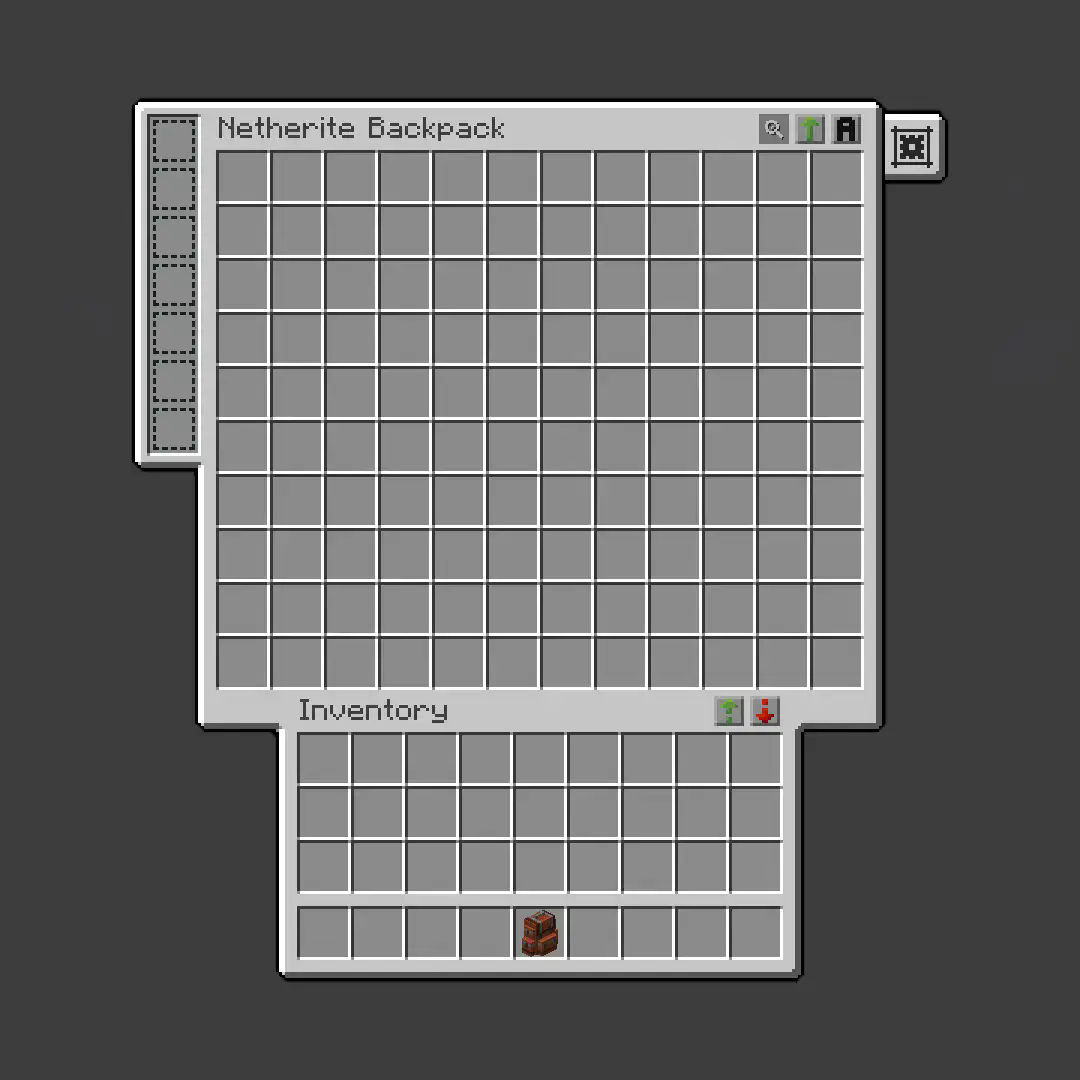
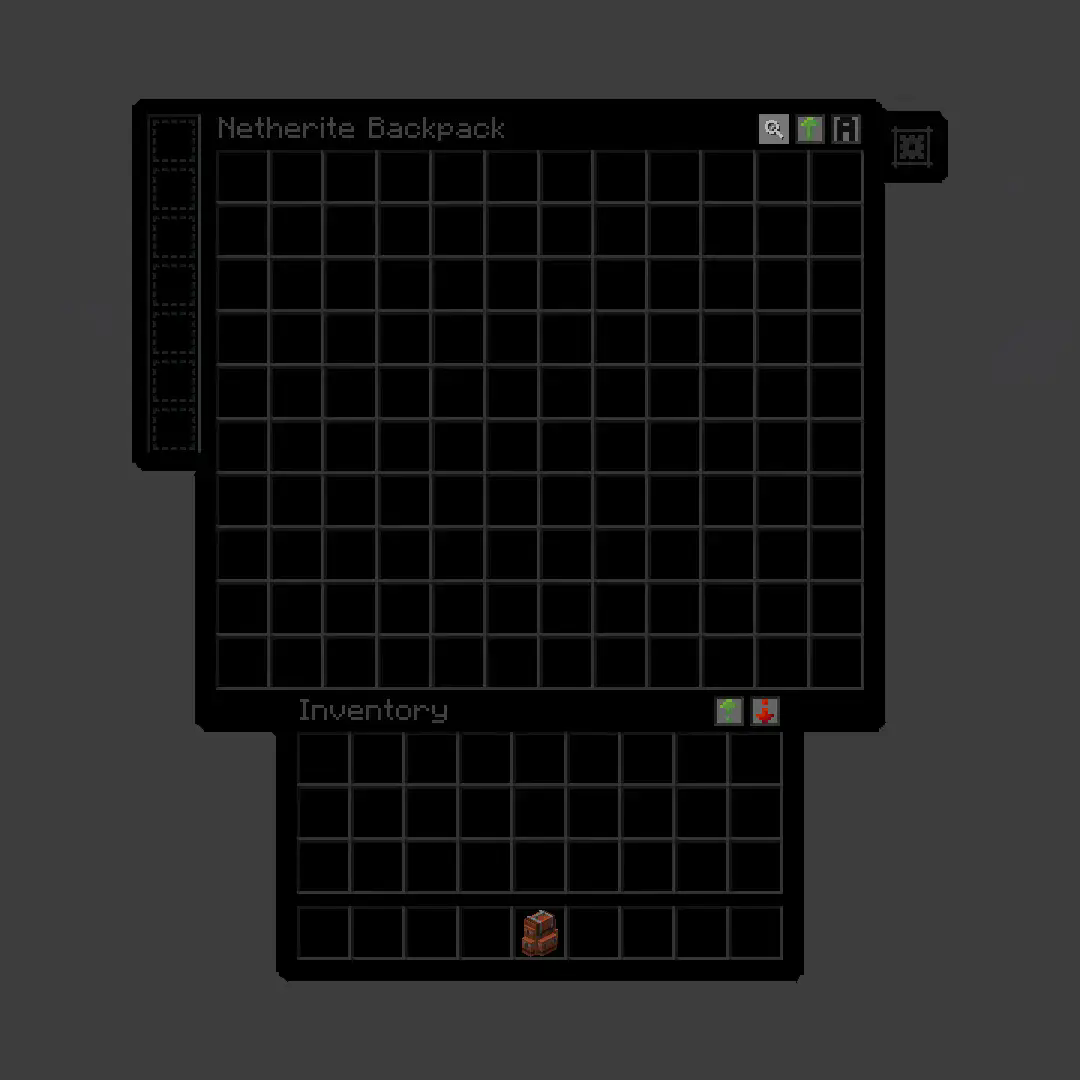
**True Dark UI [Sophisticated Backpacks](https://modrinth.com/mod/sophisticated-backpacks)**
## Before
## After
Trigger-触发器插件
Trigger Plugin Introduction
Trigger is a highly compatible trigger plugin, primarily designed to empower server owners to implement functionalities that are otherwise difficult to achieve.
It uses a concise configuration syntax, allowing for complex conditional judgments and action responses based on almost any in-game event.
It boasts powerful version compatibility (since v1.5.0) and also maintains compatibility with many plugin cores and mod APIs.
Currently compatible with: 1.21.X, 1.20.X, 1.19.X, 1.18.X, 1.17.X, 1.16.X, 1.15.X, 1.14.X, 1.13.X, 1.12.X, 1.11.X, 1.10.X, 1.9.X, 1.8.X, 1.7.X, 1.6.X, 1.5.X, 1.4.X, 1.3.X, 1.2.X, 1.1.X, 1.0.X
✨ Core Features
1. Trigger System
Supports over 100 native events: Player movement, block breaking, entity damage, command input, world time changes… Almost any game event can serve as a trigger starting point.
Events can be attached with ANY / ALL modes for fine-grained control over trigger logic.
Triggers can be enabled/disabled and assigned priority to determine execution order.
2. Condition System
Built-in numerous condition placeholders: Player attributes, item information, entity types, world states, timer variables, etc., meeting any judgment requirement.
Supports logical combinations: Build complex conditional expressions using and, or, and parentheses.
Supports regex matching, numerical comparison, string comparison, and negation operations (! or un prefix).
3. Action System
Can execute console commands, player commands (with OP elevation support), send messages (regular, title, action bar), play sounds, display particle effects, and more.
Actions support delayed execution ({wait:seconds} syntax) for timed control.
Fallback actions (un_command) can be specified when conditions are not met.
4. Region System
Supports WorldGuard regions, and also features its own built-in region system. Regions can be dynamic or static, with real-time tracking.
Allows configuration of region-related aspects for customized regional behavior.
5. Group System
Item Groups: Define complex items with NBT, enchantments, and Lore for condition matching or command operations.
Entity Groups: Manage entity types, health, equipment, supporting UUID tracking of members.
Player Groups: Dynamically manage player collections for group permissions or event binding.
Region Groups: Dynamically manage regions, enabling real-time analysis for timely actions and condition processing.
Trigger Groups: Manage multiple triggers simultaneously for easier administration.
Group operations can dynamically add or remove members via commands or trigger actions.
6. Timers & Variables
Timers: Create count-up or countdown timers. Value changes can trigger events. Supports global/private scopes and can be persistent.
Variables: Store any data type (numbers, strings, booleans). Can be read in conditions and support persistence.
Both Timers and Variables support cross-server synchronization (requires BungeeCord configuration).
7. Custom Menus & Containers
Menus: Create custom menu content, similar to ChestCommands, but integrated with triggers for better management.
Containers: Menus can act as containers, either private or public. This solves issues with persistent player data synchronization and allows configuration of item insertion/removal permissions.
8. Custom Commands
Custom Commands: Players can learn how to configure and implement custom command features based on loaded help content. Includes custom command permission node functionality.
9. More Target Selectors
Starting from v2.0.0, 4 new target selectors have been added: @t, @d, @y, @x.
@t – The player or entity the user is looking at.
@d – The nearest entity.
@y – A random entity or mob.
@x – The position the player is looking at.
10. JavaScript Scripting Functionality
Starting from v2.1.0, other plugins can easily register custom conditions and actions for seamless integration with Trigger.
Write complex logic directly in triggers using JavaScript scripts – dynamic judgments, loops, calling server APIs – all within your grasp.
11. Pet System
Starting from v2.1.0, create and nurture exclusive pets that will follow you into battle, learn skills, wear equipment, and even evolve into new forms. Forge unique combat companions!
12. World Editing System
Starting from v2.1.0, create custom worlds like superflat or void without relying on WorldEdit. Use the golden axe to select regions for copy, paste, fill operations, and other standard world editing actions.
13. Data Statistics & Analysis System
Starting from v2.1.0, record detailed player data, from kills to chat messages. The statistics module tracks player behavior comprehensively. Use the /tg stats command to view personal or others’ detailed stats. Supports PlaceholderAPI for real-time data display in scoreboards or menus.
14. Web Management System
Starting from v2.1.0, bring your server into the browser! The web management panel allows real-time viewing of trigger, variable, and timer statuses, toggling triggers on/off, and even calling REST APIs for integration with other systems. Simple configuration, secure and reliable, allowing you to control server dynamics anytime, anywhere.
15. Dependencies
All dependencies for this plugin are optional; it basically requires no other plugins to function.
16. Other Information
From now on, we do not charge any fees. This plugin is designed to solve problems related to unimplementable features. If you encounter someone reposting it and charging a fee, please report them promptly.
Author: 红伞伞白杆杆
Transparent UI + Mod Support
This pack makes UI elements of the game semi-transparent, changing the look of the game to be modern and minimalistic.
## With this pack I recommend to install [JEI](https://modrinth.com/mod/jei) and [Blur Fabric](https://modrinth.com/mod/blur-fabric) / [Blur Forge](https://modrinth.com/mod/blur-forge) mods for the ultimate look.
– “JEI” allows UIs to support semi-transparent textures
– “Blur”, well, blurs the background
The pack has extended support for mods. Support for mods is based on 1.20.1 versions of mods.
### Full list of supported mods:
– Aether
– Amendments
– Apotheosis
– Apotheotic Attributes
– Applied Energistics 2
– Aquaculture 2
– Architectury
– Ars Nouveau
– Artifacts
– Athena
– Blue Skies
– Blur
– Bookshelf
– Building Gadgets 2
– Caelus
– ComputerCraft Tweaked
– MrCrayfish’s Furniture Mod
– Charm of Undying
– Corpse
– Cosmetic Armor Reworked
– Crafting Tweaks
– Curios
– Dark Utilities
– Ears
– Elytra Slot
– Farmer’s Delight
– Framework
– Goblin Traders
– Gurard Villagers
– Handcrafted
– Industrial Foregoing
– Iron Chests
– Iron Furnaces
– JEI
– Just Enough Professions
– Just Enough Resources
– Lootr
– Macaw’s Furniture
– Mekanism
– Mekanism Generators
– Mob Grinding Utils
– Moonlight
– Mystical Agriculture
– Nether’s Delight
– Ocean’s Delight
– Oculus
– Optifine
– Patchouli
– Placebo
– Polymorph
– Quark
– Refined Storage
– Refined Storage Addons
– Runelic
– Sophisticated Backpacks
– Sophisticated Core
– Sophisticated Storage
– Structure Gel
– Supplementaries
– Thermal Dynamics
– Thermal Expansion
– Thermal Foundation
– Thermal Innovation
– Titanium
– Trashcans
– Trash Slot
– The Twilight Forest
– Voicechat
– Waystones
—
Anybody is free to use this pack anywhere. Just do not rename the pack, please.
Contact me (DedMaxim99):
My [YouTube channel](https://www.youtube.com/channel/UCrMHx89X71br0aDlzwsLDHQ)
My [Twitch channel](https://www.twitch.tv/dedmaxim99)
My [VK page](https://vk.com/id728112150)
My [Telegram](https://t.me/DedMaxim99)
TNT to Grass

# What does this resource pack do?
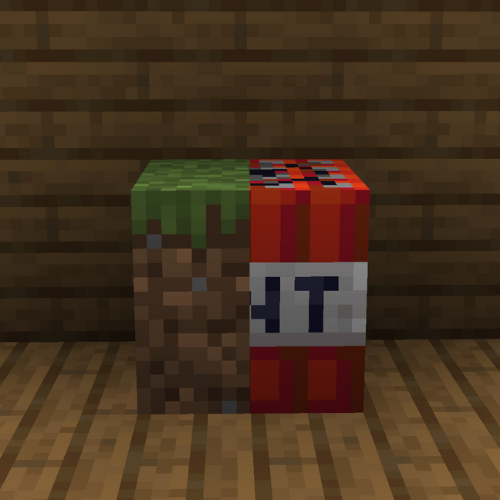
This resource pack **replaces the TNT textures to the grass textures**.
# How do I trick someone into using this pack?
1) **Download the pack**
2) **Change the name** of the .zip file
3) **Change the pack.mcmeta file** and **pack.png** to less _suspicious_ ones.
# Credits
We (**_ELTE Studios_**), **developed** and **made** this pack using the **Butterium** modpack for the **best optimisation, smoothness and QOL**, you can **download it on modrinth [here](https://modrinth.com/modpack/butterium)**.
# pack.png
Thorough Keybindings
For as many Minecraft versions as possible, this mod makes the keybindings of usually fixed mappings rebindable. This is a client side mod.
For example, this lets you remap Escape and F3 in-game, even in versions before F3 was made rebindable. Also adds rebinding options for Shift, Control, Alt as well as the digits to navigate the profiling pie chart. Furthermore, backports mappings to earlier game versions, like rebinding F5 or hotbar slot keys.
For versions 1.14 to 1.21, this mod uses [Fabric](https://fabricmc.net/) and requires the [Fabric API](https://modrinth.com/mod/fabric-api) to run.
For versions beta 1.0 to release 1.13, this mod uses [Ornithe](https://ornithemc.net/) with Fabric and requires the [Ornithe Standard Libraries](https://modrinth.com/mod/osl) to run.
TF2 hit sound
A meme resourcepack that replaces the hitting sound with the tf2 hit sound
Even if it says that the pack is outdated, it should work on all versions
You can submit bugs or suggestions [here](https://docs.google.com/forms/d/e/1FAIpQLSeELpo_gqlwn4ftgP_tkB6I-rq6c6nyvs4BM07e89AKy3DI2g/viewform?usp=sf_link)
ColorCraft

# 🎨 ColorCraft — Bring Color to Your Interface
**ColorCraft** redefines how you see Minecraft’s UI — literally.
It enhances text visibility and adds rich formatting to menus, messages, and UI elements across multiple languages and mods.
Better contrast, better clarity, better *vibes*. 🌈
—
## ✨ What It Does
Tired of dull, unreadable menus or chat text blending into the background?
ColorCraft injects vibrant colors and styles into Minecraft’s interface — making it more intuitive and eye-catching without altering the game’s vanilla spirit.
✅ Improved contrast on menus and buttons
✅ Styled text for game modes, tooltips, effects, and more
✅ Support for mods & multiple languages
✅ Seamless integration with existing UI packs
—
## 🖼️ Sneak Peek
| Feature | Preview |
|———-|———-|
| Main Menu |  |
| Create World Menu |  |
| Settings & UI |  |
| Sodium Compatibility |  |
| Keybinds |  |
| Enchantments |  |
| Dye Colors |  |
| Effects |  |
| Pause Menu |  |
| Death Screen |  |
| Chat Messages |  |
—
## 🌍 Supported Languages
Almost all major Minecraft Vanilla languages are supported ! (some mods may not be fully supported yet for all languages)
`ru_ru` Thanks to [YarTom](https://modrinth.com/user/YarTom) for some of the translations.
—
## 🧩 Mod Compatibility
ColorCraft supports a wide variety of mods to ensure every text in your world stays clean and colorful.
✅ Supported mods:
– [Alex’s Caves](https://modrinth.com/mod/alexs-caves)
– [Alex’s Mobs](https://modrinth.com/mod/alexs-mobs)
– [Alexs Caves: Stuff & Torpedoes](https://modrinth.com/mod/alexscaves-torpedoes)
– [Better Statistics Screen](https://www.curseforge.com/minecraft/mc-mods/betterstats)
– [Bobby](https://modrinth.com/mod/bobby)
– [Cave Dust](https://modrinth.com/mod/cave-dust)
– [Cloth Config](https://modrinth.com/mod/cloth-config)
– [Create](https://modrinth.com/mod/create)
– [Detail Armor Bar Reconstructed](https://modrinth.com/mod/detail-armor-bar-reconstructed)
– [Durability Tooltip](https://modrinth.com/mod/durability-tooltip)
– [Dynamic FPS](https://modrinth.com/mod/dynamic-fps)
– [Dynamic Crosshair](https://modrinth.com/mod/dynamiccrosshair)
– [Embeddium](https://modrinth.com/mod/embeddium)
– [Enderite Mod](https://modrinth.com/mod/enderite-mod)
– [Enhanced Block Entities](https://modrinth.com/mod/ebe)
– [Extended Enchanting](https://modrinth.com/mod/extended-enchanting)
– [Fancy Block Particles – Renewed](https://modrinth.com/mod/fbp-renewed)
– [Farmer’s Delight](https://modrinth.com/mod/farmers-delight)
– [Immersive Hotbar](https://modrinth.com/mod/immersive-hotbar)
– [Inventory Particles](https://modrinth.com/mod/inventory-particles)
– [Inventory Management](https://modrinth.com/mod/inventory-management)
– [InvMove](https://modrinth.com/mod/invmove)
– [Malilib](https://modrinth.com/mod/malilib)
– [Mod Menu](https://modrinth.com/mod/modmenu)
– [Naturally Trimmed](https://modrinth.com/mod/naturally-trimmed)
– [Nvidium](https://modrinth.com/mod/nvidium)
– [oωo](https://modrinth.com/mod/owo-lib)
– [Physics Mod](https://modrinth.com/mod/physicsmod)
– [Presence Footsteps](https://modrinth.com/mod/presence-footsteps)
– [Shulker Box Tooltip](https://modrinth.com/mod/shulkerboxtooltip)
– [Sodium](https://modrinth.com/mod/sodium)
– [Sodium Extra](https://modrinth.com/mod/sodium-extra)
– [Sounds](https://modrinth.com/mod/sound)
– [Stellar View](https://modrinth.com/mod/stellarview)
– [Supplementaries](https://modrinth.com/mod/supplementaries)
– [TCDCommons API](https://www.curseforge.com/minecraft/mc-mods/tcdcommons)
– [Terralith](https://modrinth.com/datapack/terralith)
– [VanillaTweaks](https://modrinth.com/mod/vanillatweaks)
– [Vein Mining](https://modrinth.com/mod/vein-mining)
– [Veinminer Enchantments](https://modrinth.com/mod/veinminer-enchantments)
– [Wakes](https://modrinth.com/mod/wakes)
– [Waystones](https://modrinth.com/mod/waystones)
– [Xaero’s Minimap](https://modrinth.com/mod/xaeros-minimap)
– [Xaero’s World Map](https://modrinth.com/mod/xaeros-world-map)
– [Yet Another Config Lib (YACL)](https://modrinth.com/mod/yacl)
> 🧱 *Want your mod supported?*
Drop your mod link in the issues tab — compatibility updates are frequent.
—
## 🧠 Compatibility Notes
– Works with (maybe) any Minecraft version
– Compatible with all major mod loaders (Fabric, Forge, etc.)
– Can be used alongside other **UI enhancement** or **dark mode** packs
– Designed for **vanilla readability** — no texture changes outside of text
– Some of the UI Texture Pack features may conflict with other UI packs, so make sure to place ColorCraft above them in the resource pack list for best results.
—
## ⚙️ Installation
1. Download the latest release from [Modrinth](https://modrinth.com/resourcepack/colorcraft) or your launcher.
2. Drop it into your `resourcepacks` folder.
3. Enable it in-game and place it **above** any UI pack (for priority).
4. Enjoy your clean, colorful Minecraft interface. ✨
—
## ❤️ Contribute
Want to translate, tweak, or suggest a new color scheme?
Open a [Pull Request](https://github.com/JustArthur/ColorCraft/pulls) or start a [Discussion](https://github.com/JustArthur/ColorCraft/discussions).
> Every contribution keeps ColorCraft vibrant — thank you for helping make Minecraft more readable for everyone!
—
**🧡 Stay colorful. Stay creative.**
TCommandBlockerLite


# TCommandBlocker (v1.1)
Check the updated page [here](https://www.spigotmc.org/resources/tcommandblocker.111927/)
Simple command blocker plugin
# Features
– Unlimited commands
– Block any command
– 100% translatable
# Commands
– /tcommandblocker reload
– /tcommandblocker version
# Permissions
– tcommandblocker.reload
– tcommandblocker.version
# Dependencies
– None