Zxygo’s Crystal Util
**Business email: [email protected]** |
**Business discord: zxygomc.mod**
### Open to partnerships/sponsors ^
———————————————————————————————-
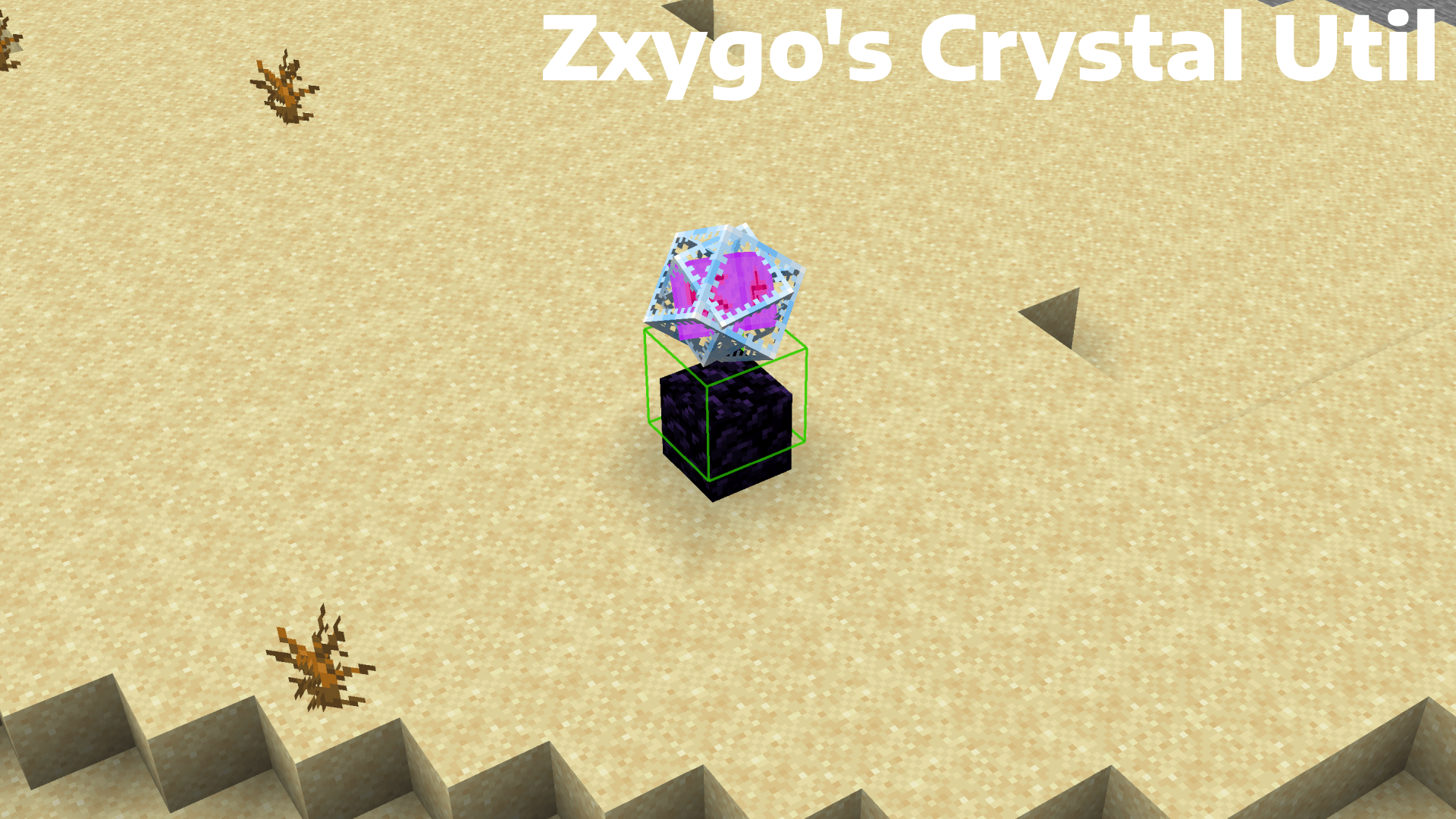
**Zxygo’s Crystal Util is a utility mod that shows people a relative damage indicator of a crystal comapred to the position and distance of a player compared to a crystal. It shows a simple box outline that changes color depending on your relative position and distance, and it allows for many uses.**
———————————————————————————————-
**NOTE: This mod may be seen as cheating on some servers and provides a unfair advantage. This mod is simply to be used as a learning tool for people getting into Crystal PVP. It exists as a tool that players can use, not a cheat. I don’t support hacking or cheating of any kind**
———————————————————————————————-
———————————————————————————————-
### Features
**Color-Coded Danger Levels**
– Red: can be dealt heavy damage and can be popped / killed
– Yellow: will deal some damage, a bit dangerous, take caution
– Green: safe
**Fully Customizable**
– Toggle the indicator on/off anytime
**Clean & Optimized**
– Minimal performance impact
– Works in multiplayer smoothly
**Mod Menu Integration**
– Simple Mod Menu Integration
———————————————————————————————-
### How It Works
Zxygo’s Crystal Util analyzes the vertical position of end crystals relative to your player, along with the distance from the player to the crystal. This allows for a calculation for the indicator and then a color depending on the calculation.
For example, if the crystal is above your head or you are far away from it, it renders green (least damage).
Intermediate positions blend between colors.
———————————————————————————————-
**This is my first ever mod, so apologies if there are some bugs. I hope this helps in someone’s journey in Crystal PVP, as at the very start of your journey, this mod can help you learn the mechanics and how you take damage from a crystal.**
Zxygo’s Anchor Util
**Business email: [email protected]** |
**Business discord: zxygomc.mod**
### Open to partnerships/sponsors ^
———————————————————————————————-
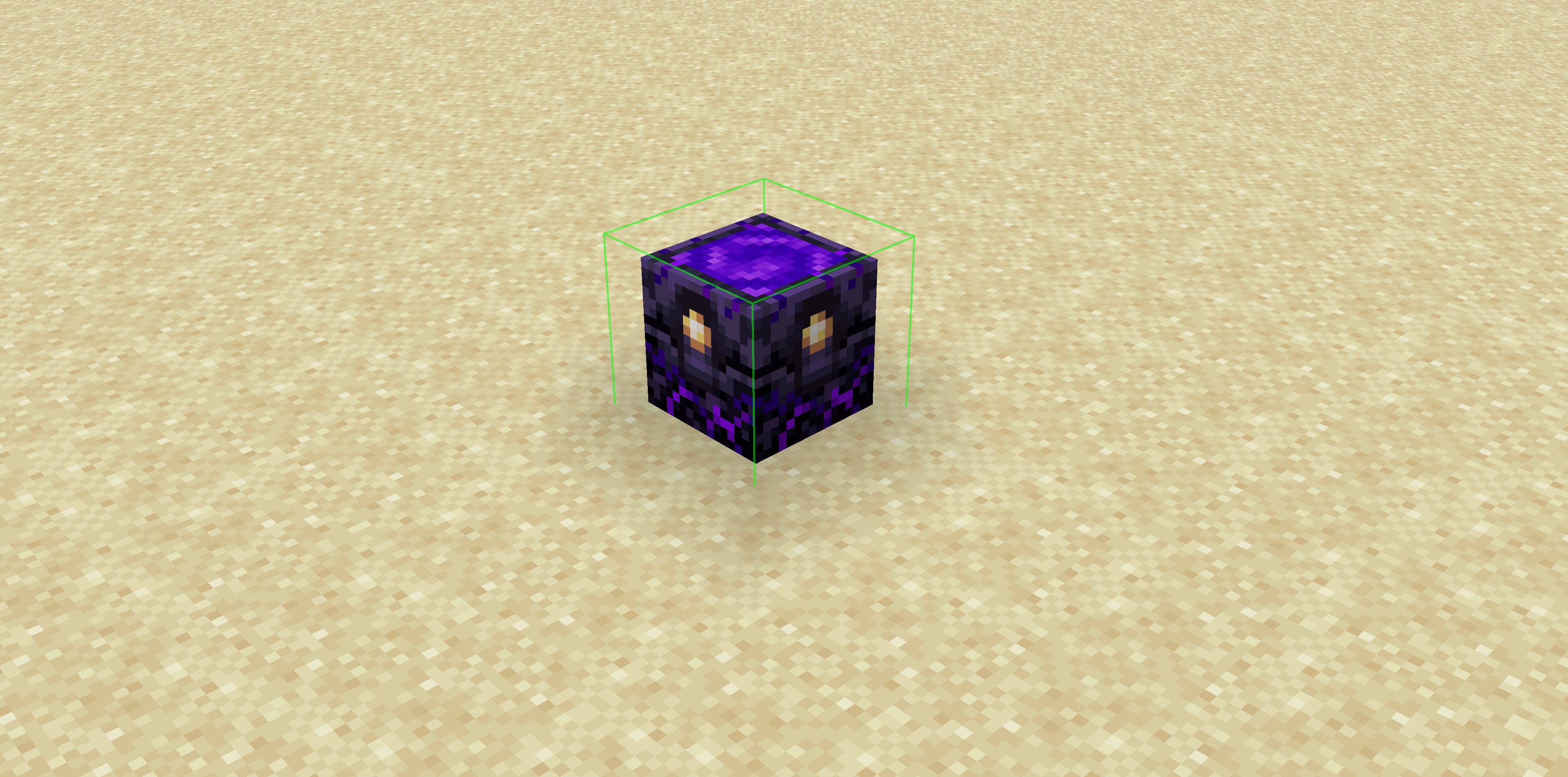
**Zxygo’s Anchor Util is a utility mod that shows people a relative damage indicator of a anchor comapred to the position and distance of a player compared to a anchor, along with taking in factors like the armor and enchantments a player is using. It shows a simple box outline that changes color depending on your relative position and distance, along with armor and enchantments, and it allows for many uses.**
**Check out my other mod: Zxygo’s Crystal Util**
————————————————————————————————
**NOTE: This mod may be seen as cheating on some servers and provides a unfair advantage. This mod is simply to be used as a learning tool for people getting into Crystal PVP. It exists as a tool that players can use, not a cheat. I don’t support hacking or cheating of any kind**
————————————————————————————————
————————————————————————————————
### Features
**Color-Coded Danger Levels**
– Red: (deadly)
– Yellow: (dangerous)
– Green: (safe)
**Fully Customizable**
– Toggle the indicator on/off anytime
**Clean & Optimized**
– Minimal performance impact
– Works seamlessly in multiplayer
**Mod Menu Integration**
– Simple Mod Menu Integration
————————————————————————————————
### How It Works
Zxygo’s Anchor Util analyzes the position and distance of anchors relative to your player, along with the other factors like blocks placed between you and the anchor, armor, and enchantments like protection on the armor. This allows for a calculation for the indicator and then a color depending on the calculation.
For example, if you have a obsidian block in front of the anchor between you, then it will be a green (least damage).
ZXRP
[](https://discord.gg/VQP9zM7EwU) [](https://t.me/trzteam) [](https://www.donationalerts.com/r/zcript_)
# 💬 Description
A resource pack that adds a lot of RP items to the game. Created specifically for the RP servers.
There is currently no English localization
# 📄 Other
List of items: https://3sqd.ru
Thanks to TweaksWr, dscss2 and Krisytov for their help!
ZxMenus
🧩 ZxMenus – Simple & Powerful GUI Menu Plugin
ZxMenus is a lightweight, all-in-one inventory GUI menu plugin inspired by DeluxeMenus, built to be powerful, fast, and easy to configure.
Create fully customizable GUI menus that open with commands and perform player-specific actions such as running commands, opening other menus, or executing console commands. ZxMenus focuses on simplicity without sacrificing flexibility.
—
✨ Features
Create unlimited GUI menus using simple YAML configuration
Open menus using custom commands
Execute player or console commands from menu items
Open menus for other players
Permission-based access for menus and items
Full PlaceholderAPI support
Lightweight and optimized for performance
Compatible with modern Spigot / Paper servers
Designed as an easier alternative to DeluxeMenus
—
📌 Commands
/zxmenu open
ZxArena
# ZXArena
**ZXArena** is a powerful and flexible **Spigot arena management plugin** that enables server owners to create, store, and instantly reset arenas across multiple Minecraft versions.
Perfect for **PvP**, **minigames**, and **event-based servers**.
—
## Key Highlights
### Arena Creation & Restoration
* Select any region and save it as a reusable arena
* Reset arenas back to their original state at any time
### Reset Performance Modes
* **Normal Mode** – Balanced reset speed (~3–5 seconds)
* **Extreme Mode** – High-speed reset in about 1 second
### Selection Tool
* Use a **golden axe** to define arena boundaries
* Left-click and right-click to set region corners
### Arena Statistics
* Track last reset time
* View how long each reset took
### Version Compatibility
* Works seamlessly on **Minecraft 1.20.1 – 1.21.4**
### Advanced Formatting
* Supports standard Minecraft colors and **hex color codes**
### Smart Command Completion
* Full tab-completion for all commands and arguments
### PlaceholderAPI Integration
* Access arena data anywhere using placeholders
—
## Commands & Permissions
| Command | Purpose | Permission |
| —————————— | ——————————– | —————— |
| `/zxarena pos1` | Set first selection point | `zxarenaset.admin` |
| `/zxarena pos2` | Set second selection point | `zxarenaset.admin` |
| `/zxarena save ` | Save selected region as an arena | `zxarenaset.admin` |
| `/zxarena reset [mode]` | Reset arena (normal / extreme) | `zxarenaset.use` |
| `/zxarena delete ` | Remove an arena | `zxarenaset.admin` |
| `/zxarena list` | Show all arenas and stats | `zxarenaset.use` |
| `/zxarena setspawn ` | Set arena spawn point | `zxarenaset.admin` |
| `/zxarena givewand` | Receive the selection wand | `zxarenaset.admin` |
| `/zxarena reload` | Reload configuration files | `zxarenaset.admin` |
| `/zxarena help` | View command help | All players |
| `/zxarena version` | Show plugin version | All players |
—
## Permission Nodes
* **`zxarenaset.admin`** – Complete administrative access
* **`zxarenaset.use`** – Basic usage (reset, list, view info)
—
## Installation Guide
1. Download **`xArenaReset.jar`**
2. Move the file to your server’s `/plugins` directory
3. Restart or reload the server
4. Configuration files will generate automatically
—
## Configuration Settings
All options can be customized via the configuration file, including:
* Reset delays
* Custom messages & color formats
* Automatic reset intervals
* Global broadcast messages
—
## PlaceholderAPI Placeholders
### General
| Placeholder | Output |
| —————– | ———————– |
| `%zxarena_count%` | Total number of arenas |
| `%zxarena_list%` | List of all arena names |
### Arena-Specific
| Placeholder | Description |
| ——————————————- | ——————— |
| `%zxarena_info__name%` | Arena name |
| `%zxarena_info__world%` | World name |
| `%zxarena_info__blocks%` | Block count |
| `%zxarena_info__mode%` | Last reset mode |
| `%zxarena_info__last_reset%` | Time since last reset |
| `%zxarena_info__reset_duration%` | Reset duration |
| `%zxarena_info__spawn%` | Spawn coordinates |
| `%zxarena_info__region%` | Region boundaries |
| `%zxarena_info__autoreset%` | Auto-reset status |
| `%zxarena_info__autoreset_interval%` | Interval (seconds) |
### Raw Data
| Placeholder | Description |
| ——————————————- | ——————– |
| `%zxarena_info__raw_reset_duration%` | Reset time (ms) |
| `%zxarena_info__raw_last_reset%` | Last reset timestamp |
—
## Color Formatting
* Supports standard Minecraft color codes (`&a`, `&c`, etc.)
* Full **HEX color** support for modern servers
—
ZX HomeSystem
ZX HomeSystem – Advanced Minecraft Home Management Plugin
Transform your Minecraft server with the most feature-rich home system available!
ZX HomeSystem is a premium home management plugin developed by ZX Studio that provides players with an exceptional teleportation and home management experience. With its intuitive command system and stunning visual interface, players can easily set, manage, and teleport to multiple homes across your server.
Key Features:
🏠 Advanced Home Management
Set multiple named homes with /zxhome set
Delete, rename, and list your homes effortlessly
Public/private home sharing system for player interaction
Permission-based home limits for different rank tiers
⚡ Premium Teleportation System
Configurable teleport delays with movement cancellation
Customizable cooldowns to prevent abuse
Safe teleport location checking for player security
Cross-world teleportation support with sound effects
Particle effects for immersive teleport experience
🎮 Stunning User Interface
Beautiful GUI interface for home management
Full tab completion for all commands
Colorful, formatted chat messages with custom prefixes
Action bar notifications during teleport countdown
Professional ASCII art branding
🛡️ Server Administration Tools
Flexible configuration system with rank-based limits
Economy integration for teleport and home setting costs
World restrictions for home placement control
Automatic data saving with configurable intervals
Detailed logging for server monitoring
Admin reload command for configuration changes
Commands:
/zxhome help – Comprehensive help menu
/zxhome set – Set a new home location
/zxhome go – Teleport to your home
/zxhome del – Remove a home
/zxhome list – View all your homes
/zxhome gui – Open the home management GUI
/zxhome rename – Rename existing homes
/zxhome share – Share homes with friends
/zxhome public – Make homes publicly accessible
/zxhome near – Find your nearest home
/zxhome reload – Reload configuration (Admin only)
Perfect For:
Survival servers wanting enhanced player convenience
Creative servers with multiple world setups
Minigame servers needing quick teleport solutions
Any Minecraft server looking to improve player retention
Built with performance and scalability in mind, ZX HomeSystem seamlessly integrates with your existing server setup while providing the premium features your players demand.
Developed with ❤️ by ZX Studio – Creating exceptional Minecraft experiences
Zusz’s CoffeeCraft2: ReBrewed
# ☕ Zusz’s CoffeeCraft2: ReBrewed
**Brew. Experiment. Energize.**
**Zusz’s CoffeeCraft2: ReBrewed** is a comprehensive and creative coffee mod that brings **variety, customization, and a jolt of caffeine** to your Minecraft world!
## 1.3.2 Update: Out Now!
## 🔥 Features
* ✅ **264 completely unique coffee combinations** — combine ingredients to your liking!
* ⚡ **Original caffeine system** — experience the perks and side-effects of your coffee intake!
* 🧪 **Dynamic brewing mechanics** — your ingredients matter!
* 📚 **JEI Integration** — easily view coffee recipes, ingredients, and results in-game!
* 🚀 **More content coming soon** — new ingredients, and effects are on the way!
## ☕ Why Zusz’s CoffeeCraft2?
* This mod provides an immersive coffee brewing experience, and a unique caffeine system, seen nowhere else!
* This is the **official successor** to the original **Zusz’s CoffeeCraft**, fully reimagined for modern Minecraft versions, with new mechanics, so **if you liked Zusz’s CoffeeCraft, this is the mod for you!**
* Whether you’re a casual sipper or a coffee-crazed alchemist, this mod offers **a flavorful experience full of experimentation** and discovery!
### 🛠️ Supported Modloader and Versions:
* 🧩 **NeoForge**
* 🧪 Supports Minecraft 1.21.0 and **1.21.1**
## ☕ 1.3.2: The Sack Update
From cherry to cup — expand your brewing with new storage, new drinks, and smoother systems.
### ☕ Additions
– Added a new coffee type: **Americano**
– Added **Coffee Cherry & Ground Coffee Sacks**
– Hot Chocolate now requires milk to brew
### 🐛 Fix
– **Fixed Excelsa coffee bushes missing texture**
## Out Now!
## 🔗 Links
**Zusz’s CoffeeCraft2: ReBrewed**
* [Modrinth](https://modrinth.com/mod/zuszs-coffeecraft2-rebrewed)
* [CurseForge](https://www.curseforge.com/minecraft/mc-mods/zuszs-coffeecraft2-rebrewed)
**Original Zusz’s CoffeeCraft**
* [Modrinth](https://modrinth.com/mod/zuszscoffeecraft)
* [CurseForge](https://www.curseforge.com/minecraft/mc-mods/zuszs-coffee-craft)
**Zusz’s Lil Donuts**
* [Modrinth](https://modrinth.com/mod/zuszs-lil-donuts)
* [CurseForge](https://www.curseforge.com/minecraft/mc-mods/zuszs-lil-donuts)
Zume
# IMPORTANT LICENSE NOTICE
By using this project in any form, you hereby give your “express assent” for the terms of the license of this project (see [LICENSE](https://github.com/Nolij/Zume/raw/master/LICENSE)), and acknowledge that I (the author of this project) have fulfilled my obligation under the license to “make a reasonable effort under the circumstances to obtain the express assent of recipients to the terms of this License”.
# Zume
An ~~over-engineered~~ simple zoom mod.
This mod adds a keybind which zooms in your FOV while it’s held down, allowing you to see further away, and keybinds
for increasing and decreasing the zoom level.
# FAQ
#### Q: Where is the config?
A: You’ll find the config at `.minecraft/global/zume.json5` (note that this is the default `.minecraft` folder, not
the instance `.minecraft`). You can modify the file while the game is running, and the config will be automatically
reloaded. On platforms which have mod menus (such as Forge, and Fabric with [Mod Menu](https://modrinth.com/mod/modmenu)
installed), the config button for Zume will open this file in your system text editor.
#### Q: discord where
A: https://discord.gg/6ZjX4mvCMR
#### Q: What version is this for?
A: Zume supports the following platforms:
– Fabric: Any version supported by Fabric Keybinding API v1 (currently 14.4+)
– NeoForge: 20.4+ (requires NeoForge 20.4.195+)
– LexForge: 14.4 – 20.5 (requires MixinBootstrap before 16.1) (there are currently no plans to support 20.6+)
– Legacy Fabric: Any version supported by Legacy Fabric Keybinding API v1 (currently 7.10 – 12.2)
– Babric (Fabric for Minecraft Beta): Any version supported by Station API (currently b7.3)
– Vintage Forge: 8.9 – 12.2 (requires MixinBooter or UniMixins)
– Archaic Forge: 7.10 (requires UniMixins)
#### Q: Can you add support for ?
A: Every platform I intend to add support for myself is already supported. PRs are welcome for other platforms **if
the following conditions are met**:
– Must not break single-jar compatibility with any already supported platform (obviously).
– Must not be for a platform that has a 1st-party compatibility layer for an already supported platform – explicit
Quilt support will not be accepted so long as Quilt maintains a Fabric compatibility layer; it’d be a waste of CI
time. [Sinytra Connector](https://github.com/Sinytra/Connector) is a 3rd-party compatibility layer, so explicit
Forge support will be provided.
– Must not manually maintain overridden game options; implementations that look like
[Mooz’s](https://github.com/embeddedt/Mooz/blob/92570f7449a7e71c1c0b988788027b10c00f1346/src/main/java/org/embeddedt/mooz/ClientProxy.java#L35-L56)
will not be accepted – no offense [embeddedt](https://github.com/embeddedt). Direct ASM is fine as long as functionality is similar enough.
– Must make a reasonable effort to be maximize compatibility with existing mods on target platforms – see use of
Neo/LexForge API over mixins in Neo/LexForge implementations, and use of `@WrapWithCondition` and
`@ModifyExpressionValue` and such from MixinExtras over `@Redirect` in most implementations.
– Must follow existing format – add a Unimined subproject for each newly supported platform.
– Must not have exclusive features without significant justification – if you’re adding a feature, add it to every
version.
#### Q: What kind of weird license is this?
A: OSL-3.0 is the closest equivalent to a LAGPL I could find. AGPL and GPL are incompatible with Minecraft, and LGPL
doesn’t protect network use. OSL-3.0 protects network use and is compatible with Minecraft.
#### Q: Why though? It’s so strict!!!!
A: This is, and will remain, free, copyleft software. Any requests to change the license other than to make it even
stronger will be denied immediately (unfortunately GPL and AGPL aren’t compatible with Minecraft due to linking
restrictions, as much as I’d like to use them). Even in situations where I use parts of other projects with more
“permissive” licenses, I will treat them as copyleft, free software.
## License
This project is licensed under OSL-3.0. For more information, see [LICENSE](https://github.com/Nolij/Zume/raw/master/LICENSE).
## Need a Minecraft server? Consider CreeperHost!

Zulu’s Simple Recipes
**Zulu’s Simple Recipes** allows you to create the following recipes!
### 8 Logs = 4 Chest
### 2 Logs = 16 Stick
### 3 Gravel = 1 Flint
More recipes will be added in the future.
You Can Join [Discord](https://discord.gg/5uC3MHpMwb) For Your Questions And Suggestions!
You Can Join My [Patreon](https://www.patreon.com/staciaexpert) To Support The Project!
Need A Server To Play With Friends?
Click [Here](https://bisecthosting.com/stacia) And Use Code “stacia” for %25 Off!

AzTrain
# 🎮 Aᴢᴛʀᴀɪɴ – ᴘᴠᴘ ᴍᴏʙ ᴛʀᴀɪɴᴇʀ
> 📌 ᴀ ɢᴜɪ-ʙᴀꜱᴇᴅ ᴘᴠᴘ ᴍᴏʙ ᴛʀᴀɪɴᴇʀ ꜱʏꜱᴛᴇᴍ ꜰᴏʀ ᴍɪɴᴇᴄʀᴀꜰᴛ ꜱᴇʀᴠᴇʀꜱ
## 🎯 ꜰᴇᴀᴛᴜʀᴇꜱ
– 📋 ᴄᴜꜱᴛᴏᴍɪᴢᴀʙʟᴇ ᴍᴏʙ ᴘʀᴇꜱᴇᴛꜱ
– 🎨 ɪɴᴛᴜɪᴛɪᴠᴇ ɢᴜɪ ꜱʏꜱᴛᴇᴍ
– ⚔️ ᴘᴠᴘ ᴛʀᴀɪɴɪɴɢ
– 🛡️ ᴄᴜꜱᴛᴏᴍ ᴇQᴜɪᴘᴍᴇɴᴛ
– 🎭 ᴘʟᴀᴄᴇʜᴏʟᴅᴇʀᴀᴘɪ ꜱᴜᴘᴘᴏʀᴛ
## 📜 ᴄᴏᴍᴍᴀɴᴅꜱ
### 🎮 ᴘʟᴀʏᴇʀ ᴄᴏᴍᴍᴀɴᴅꜱ
“`minecraft
/train – ᴏᴘᴇɴꜱ ᴛʜᴇ ᴛʀᴀɪɴɪɴɢ ɢᴜɪ
“`
### ⚡ ᴀᴅᴍɪɴ ᴄᴏᴍᴍᴀɴᴅꜱ
“`minecraft
/aztrain gui – ᴏᴘᴇɴ ᴀᴅᴍɪɴ ᴍᴇɴᴜ
/aztrain edit – ᴍᴏᴅɪꜰʏ ᴍᴏʙ ꜱᴛᴀᴛꜱ
/aztrain spawn – ᴍᴀɴᴜᴀʟʟʏ ꜱᴘᴀᴡɴ ᴍᴏʙ
/aztrain reload – ʀᴇʟᴏᴀᴅ ᴄᴏɴꜰɪɢꜱ
“`
## 🔒 ᴘᴇʀᴍɪꜱꜱɪᴏɴꜱ
“`yaml
aztrain.use: ᴀᴄᴄᴇꜱꜱ ᴛᴏ /ᴛʀᴀɪɴ (ᴅᴇꜰᴀᴜʟᴛ: ᴛʀᴜᴇ)
aztrain.admin: ᴀʟʟ ᴀᴅᴍɪɴ ꜰᴇᴀᴛᴜʀᴇꜱ (ᴅᴇꜰᴀᴜʟᴛ: ᴏᴘ)
aztrain.spawn: ᴍᴀɴᴜᴀʟ ᴍᴏʙ ꜱᴘᴀᴡɴɪɴɢ (ᴅᴇꜰᴀᴜʟᴛ: ᴏᴘ)
aztrain.edit: ᴇᴅɪᴛ ᴍᴏʙ ᴘʀᴇꜱᴇᴛꜱ (ᴅᴇꜰᴀᴜʟᴛ: ᴏᴘ)
aztrain.reload: ʀᴇʟᴏᴀᴅ ᴄᴏɴꜰɪɢꜱ (ᴅᴇꜰᴀᴜʟᴛ: ᴏᴘ)
“`
## 🎨 ᴄᴏʟᴏʀ ᴄᴏᴅᴇꜱ
“`minecraft
&0 ʙʟᴀᴄᴋ &8 ᴅᴀʀᴋ ɢʀᴀʏ
&1 ᴅᴀʀᴋ ʙʟᴜᴇ &9 ʙʟᴜᴇ
&2 ᴅᴀʀᴋ ɢʀᴇᴇɴ &a ɢʀᴇᴇɴ
&3 ᴅᴀʀᴋ ᴀQᴜᴀ &b ᴀQᴜᴀ
&4 ᴅᴀʀᴋ ʀᴇᴅ &c ʀᴇᴅ
&5 ᴅᴀʀᴋ ᴘᴜʀᴘʟᴇ &d ʟɪɢʜᴛ ᴘᴜʀᴘʟᴇ
&6 ɢᴏʟᴅ &e ʏᴇʟʟᴏᴡ
&7 ɢʀᴀʏ &f ᴡʜɪᴛᴇ
&l ʙᴏʟᴅ
&n ᴜɴᴅᴇʀʟɪɴᴇ
&o ɪᴛᴀʟɪᴄ
&k ᴏʙꜰᴜꜱᴄᴀᴛᴇᴅ
&m ꜱᴛʀɪᴋᴇᴛʜʀᴏᴜɢʜ
&r ʀᴇꜱᴇᴛ
“`
## 📦 ᴠᴇʀꜱɪᴏɴ
ᴠ1.0 ꜰᴏʀ ᴍɪɴᴇᴄʀᴀꜰᴛ 1.19+