The White Pumpkin
this is **inspired by Minecraft story mode (a telltale games creation) episode 6**, this is what happened on that episode:
In **Minecraft Story mode** (mcsm) season 1 episode 6, jesse goes on a journey and stubles apon a mansion in one of the dimentions he was exploring to find his way home, on his way to enter the mansion, he spots a figure with a white pumpkin. apon entering the mansion to get sheltered from hords of zombies, he and his friends meet another group of people who are popular minecraft youtubers, but they one by one get trapped, killed and more. jesse and his gang finds out “the white pumpkin” was up to all these traps. they go after him/her to kill the white pumpkin, they discover one of the other group of friends who were in the mansion (cassie rose) was the white pumpkin, they go on to defeat her leaving her trapped in her dimention while they continue their journey.
please try to give me feedback on what to do to make this texture pack better
The Pigstep Remix (AvM Remix for Pigstep)
### Hello fellow user!
Today i introduce you The Pigstep Remix!
This datapack/resourcepack changes the default pigstep sound to the AvM remix made by Alan Becker, Scott Buckley and Aaron Grooves. This makes your experience with Pigstep longer and better.
### Where it came from?
This music came from a series called Animation Vs Minecraft (AvM), which was made by Alan Becker on youtube. The music came from the _Episode 25_ of the series. One of the producer of the music also posted it on their own channel so you can clearly hear it as you can see _here_.
### How to play it?
First download the datapack from here and put it on your datapacks folder, then clone it and add the copy to your resourcepacks folder. The datapack makes the jukebox music stays for long enough so the music dont cut out of nowhere, and the resourcepacks changes the pigstep sound overriding the default pigstep and adding the remix into it.
### Another way to use it on public servers
You see, if you join a normal server that does not use this datapack, the music will cut off. But if you can install a mod called Jukebox Custom Disc Fix, it will fix the cut off in any server, which you can download it here.
**Have fun!**
Toggle Chat
# Toggle Chat
A Minecraft mod for Fabric and Quilt mod loaders that toggles chat visibility with a key binding (period [`.`] by default).
Text Formatting Everywhere
## Text Formatting Everywhere
Utility mod that returns an ability to use Minecraft’s old formatting system.
In order to format text, you simply put section sign (**§**), followed by formatting code, followed by your desired text. For instance: __§1Hello__, will color __Hello__ into blue
## Places status:
### Chat
—
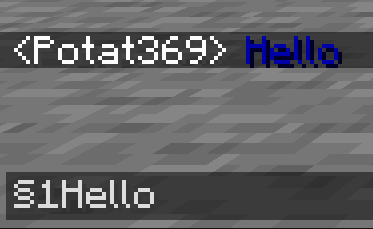
– **Required on**
– **Client**: Yes
– **Server**: Yes
### Anvil
—
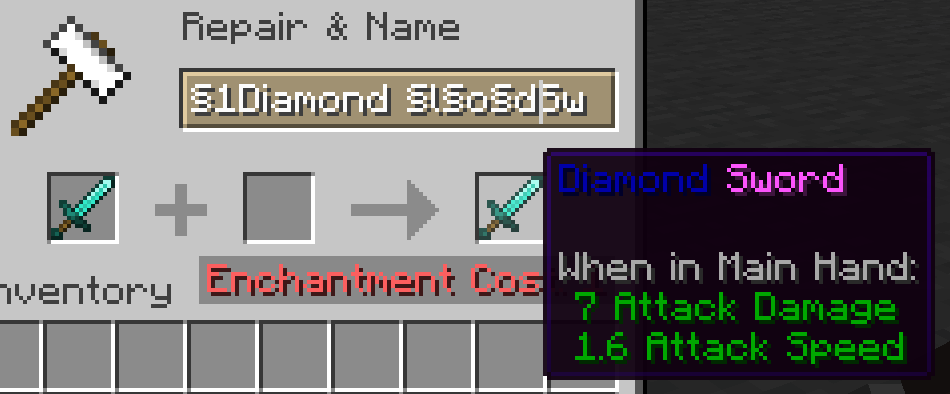
– **Required on**
– **Client**: Yes
– **Server**: Yes
### Sign
—
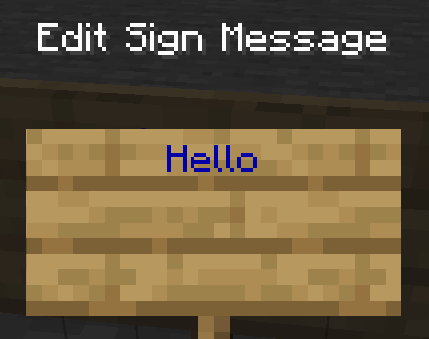
– **Required on**
– **Client**: No
– **Server**: Yes. However, there is a way to circumvent the requirement by doubling the code, like this: `§§11Hello`.
> Note: formatting will disappear after opening and closing.
### Book and Quill Body
—

– **Required on**
– **Client**: Yes
– **Server**: No
### Book and Quill Title
—
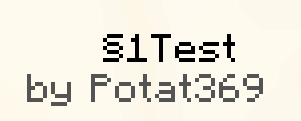
– **Required on**
– **Client**: Yes
– **Server**: No
Terrestria

Terrestria is a detailed and vibrant biomes mod for Minecraft running on the Fabric mod loader. Terrestria enhances gameplay through the addition of 17 major biomes supported by 24 component biomes, 9 new wood types, as well as a healthy selection of foliage – providing a refreshing new selection of terrain.

Terrestria requires Fabric Loader and Fabric API
Check out the Terraformers Discord Server to chat about Terrestria and other Fabric mods!
Visit the Terrestria Wiki to learn more about each biome
The goal of Terrestria is to be the most polished and visually appealing biomes mod available for Minecraft, and to this end there has been intense focus on selecting, detailing, and refining the biomes until they look absolutely amazing. Rather than add tons of different biomes, focus has been put into adding a rather small amount of biomes and then populating them with large amounts of detail and component biomes. This overall results in a more cohesive experience compared to existing biome mods.
Biomes:
v1.0.0 – Initial Release
- Caldera
- Cypress Forest
- Cypress Swamp
- Dense Woodlands
- Hemlock Rainforest
- Japanese Maple Forest
- Lush Redwood Forest
- Rainbow Rainforest
- Redwood Forest
- Sakura Forest
- Snowy Hemlock Forest
- Volcanic Island
v2.0.0 – The Dry Update
- Canyon
- Dunes
- Lush Desert
- Oasis
- Outback
Some biomes contain variants to increase variety
Images of the biomes can be found on the Images page.
Other Mods by Terraformers:
Check out Terrestria’s sister mod, Traverse:

Traverse works well alongside Terrestria if you are looking for a set of biomes that are closer to the Vanilla+ ideal. Traverse has a lot of unique, colorful biomes that embrace the simple vanilla aesthetic instead of trying to overshadow it.
Check out the Terraformers Nether biome expansion, Cinderscapes:
Cinderscapes complements Terrestria by providing an expansion to the nether, much like Terrestria does to the overworld. Cinderscapes brings more life and beauty to the nether, while also keeping it frightening.
Campanion, your camping companion:

Campanion adds various tools and utilities to help improve your adventures away from your home. Campanion also works well alongside Terrestria in order to make the exploration of the biomes even more fun.
Terrestria is a mod for Fabric, and there are no plans to port this mod to Forge.
Tab Player Health
# Tab Player Health
Free and open-source datapack for Minecraft 1.21 and higher that display players health.
## Features
By default the players health is displayed in the tab.
Timo Translations
This is a Translation Pack for my project Timo.
When using mods like Coordinates Display it displays **”biome.timo.rich”** without this Pack but with this pack **”Rich”**
Supported Languages:
“`
English (United States)
ɥsᴉluƎ(uʍop ǝpᴉsd∩)
“`
Svrve’s Dragon Egg
 |  |  | 

You can buy monthy subscription to get faster updates on KO-FI
****
#
**About**
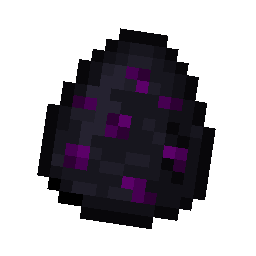
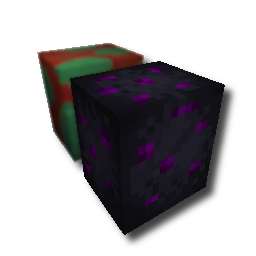
With this pack i modeled the dragon egg becouse why it its so old looking and different than sniffer’s.
.
#
**FAQ**
> **How to install resourcepacks?**
– There are a lot of tutorial out there on youtube, that will explain this better than me, but just download something from trusted sites like modrinth or curseforge, then drag this file to folder that will pop out if you click “Open Pack Folder” in Minecraft.
> **Can i use some textures from Svrve’s Dragon Egg in my pack**
– As long as its not distributed, yes you can. If you want to publish it, just ask me before doing it.
Immersive Torches
 |  |  | 

You can buy monthy subscription to get faster updates on KO-FI
****
#
**About**
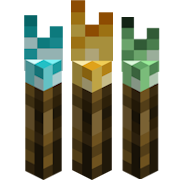
This pack is all about torches, make them an item texture, animate it, change model, also animate it. Thats all.
.
#
**FAQ**
> **How to install resourcepacks?**
There are a lot of tutorial out there on youtube, that will explain this better than me, but just download something from trusted sites like modrinth or curseforge, then drag this file to folder that will pop out if you click “Open Pack Folder” in Minecraft.
> **Can i use some resources from it in my pack?**
After installing it, open the file you downloaded (.zip). Here you will find licence. Read it.
Survival Rebalanced


Survival Rebalanced attempts to fix or improve vanilla survival’s miscellaneous shortcomings with several small and large tweaks that don’t deviate too much from how vanilla survival already functions.

****
### A note about how I view survival mode
While I personally believe survival mode should be about surviving, I understand that many still primarily play for the sandbox the game provides. To appeal to both perspectives, I plan to only change the progression _towards_ end-game gear. This means, for example, that I don’t plan to nerf Elytra, but I will _slow down_ enchanting by nerfing librarian villagers.
****
## Features
Many features in Survival Rebalanced can be toggled in the config. Currently there is no user-friendly way to toggle features. However, toggles do exist via commands if you so wish:
Toggling features via commands (requires OP)
To get the current settings:
`/data get storage svr:settings`
To set a setting to a value (values are: `0b`=off | `1b`=on): `/data merge storage svr:settings {settings:{SETTING HERE:VALUE HERE}}`
For example, to disable progression-based mob buffs, run:`/data merge storage svr:settings {settings:{mob_buffs_setting:0b}}`
### Players
* Reduced item spread on death (items will drop but won’t go flying)
* Increased hunger to compensate for food abundance
* Removed Saturation Healing
### Recipes
* The campfire replaces the furnace in early-game cooking
* Trident is now craftable
* Spectral arrows can now use any glowy resource (Glowstone, Glow Ink Sac, Glow Berries)
### Loot
* You can find three new explorer maps across two dimensions
* Adjustments to loot in multiple structures
* All equipment spawns with a bit of durability used
* Heart of the Sea can be dropped by elder guardians instead of buried treasure
* Updated fishing loot
### Mobs
* Added dolphin jockeys
* Creepers ignite if lit on fire
* Progression-based, per-player mob buffs
### Miscellaneous
* Villages are slightly rarer
* The utility and plentiful loot provided by villages shouldn’t be significantly more common *than desert temples*
* Rebalanced the **process of obtaining** iron
* *As of now, this is made primarily with more experienced/technical players in mind. If you frequently use redstone or are a more casual player, please let me know what you think of these changes in the Discord server!*
*
Show changes
* The regular furnace smelts iron into 4 Iron Nuggets
* Blast Furnace is an important upgrade if you need large sums of iron
* Crafting an Iron Ingot from Iron Nuggets requires 4 nuggets instead of 9
* Iron Golems must be killed by a player to drop Iron Ingots
* This effectively kills automatic iron farms but I think there are other solutions
* Enchanting via the enchanting table is boosted by the time now taken to get an anvil for librarian trades
Detailed changelog (THESE ARE SPOILERS)
## Major gameplay changes
– Players now have permanent Hunger 1
– This can be toggled in the config
– Mobs are buffed based on a nearby player’s stage in progression
– Levels increase with obtaining iron, and diamond gear
– Players are further incentivized to use armor
– Once you reach a stage, it is irreversible
– Effects only apply within a 48 block radius. The highest tier in a given area is always used
– This system can be toggled in the config
– Health regeneration has been nerfed
– Players regenerate half a heart every 4 seconds from food
– Players gain Regeneration 1 when within 8 blocks of a lit campfire
– This effectively removes Saturation Healing
– Furnaces no longer can cook food
– Recommended to use a campfire until you can use a smoker
– Item spread on death has been reduced to about 2 blocks
– The regular furnace smelts iron into 4 Iron Nuggets
– Blast Furnace is an important upgrade if you need large sums of iron
– Crafting an Iron Ingot from Iron Nuggets requires 4 nuggets instead of 9
– Iron Golems must be killed by a player to drop Iron Ingots
– This effectively kills iron farms but I think there are other solutions. If you have constructive criticism about this change, especially from the perspective of redstone, please join the Discord server and share your thoughts!
– An alternative to iron farms is iron ore veins. If you need a huge amount of iron, you could quarry them out with Fortune or use TNT. A goal of removing of iron farms is to boost the importance of iron ore veins, which I’ve hardly seen used.
A good side effect of making Iron more expensive is that it now takes a lot of iron to create an Anvil. This should actually HELP enchanting via an Enchanting Table! It also delays when librarian villagers come into play.
### Recipe changes
– Added Trident recipe
– Trident costs 3 Quartz, 1 Heart of the Sea, and 1 Prismarine Shard
– Changed Spectral Arrow recipe to use Glowstone, Glow Inc Sac, or Glow Berries, instead of exclusively Glowstone
### Loot changes
– Rebalanced the shipwreck loot tables
– Reduced high-value mineral rates
– Coast armor trim is no longer contained in shipwrecks; see next change
– Rebalanced the buried treasure loot table
– Coast armor trim can now be contained in buried treasure
– Heart of the Sea is no longer contained in buried treasure; see next change
– Elder Guardians now have a 25% chance of dropping a Heart of the Sea
– Explorer maps for Nether Fortress, Bastion Remnant, and Ancient City have been added
– Nether Fortress Explorer Map: piglin bartering
– Bastion Remnant Explorer Map: piglin bartering
– Ancient City Explorer Map: Villager Cartographer chests & Stronghold library chests
– All equipment found in loot now generates missing some durability
### Other changes
– Villages spawn less often
– For the quality and quantity of loot there is, and the utility of the villagers themselves, you probably shouldn’t be able to see 3-4 villages in a 512×512 area
## Less-important changes
– Creepers now ignite apon being lit on fire
– This can be toggled in the config
– Drowned now can spawn riding Dolphins (aka Dolphin Jockey)
– This can be toggled in the config
– Hoes can now quickly mine more blocks
– Completely remade the “story” section of vanilla Advancements
– A bit more detailed on the progression of the game
– *Almost everything except for the root advancement is in English only though (feel free to translate it and let me know so I can link it here!)*
– Moved “Is it a ____?” advancements to their respective dimensions’ tabs
### Loot changes
– Changed leatherworker’s village house loot table
– Saddles are more common
– Rabbit Hide can now be generated
– Edited both Jungle Temple loot tables
– Dispensers in the structure now can contain Poison and Weakness tipped arrows
– Chest loot slightly adjusted
– Fishing loot table type odds have been adjusted
– “junk” fishing loot table has had several new additions
– All types of saplings (including Azaleas and mushrooms!) can now be fished up in their respective biomes
– Added Seagrass, Kelp, and Gold Nugget
****
The following list contains all features in Survival Rebalanced that cannot be toggled on/off. This is an unfortunate limitation of datapacks. If you know how to dig through files, you could delete the features’ files and mentions of them.
– Additional explorer maps
– Adjusted structure loot
– Advancement changes and additions
– Recipe changes and additions
– Inability to cook food in the furnace
– Reduced village spawn rate
If you want to remove Survival Rebalanced from a world, first uninstall it from the “Survival Rebalanced” menu, and **then** disable the data pack. This cleans up all saved data, scoreboard objectives, and active changes from Survival Rebalanced.
KNOWN ISSUES
– Functions are not optimized optimally