**V-Paxels** uses the new component capabilities, such as the [tool component](https://minecraft.wiki/w/Data_component_format#tool), to add Paxels to the game. These paxels function as a multi-tool. You can use them to break all blocks as if you were using the recommended tool for each block. You can also switch between Tilling, Pathing and Stripping/Srcaping modes by pressing your sprint key and right click at the same time.
## Content:
– **6 Paxel Types:**
> Wood | Stone | Copper | Iron | Diamond | Netherite
– **Tilling, Pathing and Stripping/Srcaping Modes:**
> The ability to switch between **Tilling, Pathing** and **Axing Modes** (hoe, shovel and axe right-click).
– **1 Charm:**
– Charm of Mining Reach I–III
> A Charm that can be found in Trial Chamber Vaults, the Charm increases your Mining Reach when held in your Offhand – 1-2 can be found in normal vaults and 3 only in Ominous Vaults
## Showcase
#### V-Paxels | Crafting and R-Click Modes Showcase
## ✅ Features
– **Efficiently** converts UUIDs to hex format
– Optimized for speed by relying on a precomputated hexadecimal range (`0000-FFFF`), increasing static data usage
## 📖 Usage
Call the `uuid:_` function as an entity and use its output in `storage uuid:out plain`
Alternatively, assign a 4-integer array to `storage uuid:in UUID`, then call the `uuid:convert` function to format it.
unsup
***Un**a’s **S**imple **Up**dater*
unsup is a somewhat minimal implementation of a generic working directory
syncer in Java. It supports running as a Java agent, to piggy-back off of the
launch of another program.
***It is particularly good at syncing small private modpacks or one-offs in small groups, where a full public distribution (e.g. on Modrinth!) is overkill or undesirable.*** It is capable of downloading mods from their original sources, wherever that may be… as long as it speaks HTTP(S).
An [unsup.ini](https://git.sleeping.town/unascribed/unsup/wiki/Config-format)
must be placed in the working directory for unsup to know what to do, or a `-Dunsup.bootstrapUrl=` JVM argument specifying where to find such a file.
The updater works hard to ensure the working directory is never left in an
inconsistent state. Short of a sudden power loss in the middle of applying
changes (an incredibly short time window), an unsup update cannot result in
an inconsistent or corrupted working directory.
It does hash-based consistency validation (with your choice of function, SHA-256 recommended) on all downloads and on files before overwriting
them, warning the user if they’ve changed something that has been updated. It
additionally supports signing manifests using OpenBSD Signify for additional
security.
unsup’s unique simplified design means it is compatible with **all launchers**,
from the vanilla launcher to MultiMC. Just add `-javaagent:unsup.jar` to the
JVM arguments, and place `unsup.jar` and `unsup.ini` in the .minecraft
directory.
In Prism Launcher, you can utilize unsup as a “component” by importing the
`com.unascribed.unsup.json` from the latest release on Forgejo. (I can’t upload JSON files to Modrinth). This will allow Prism
Launcher to download and manage unsup. (MultiMC does not support Java agent
components, despite requests.)
It also has a built-in concept of *environments* and *flavors*, allowing it to
be used to manage server installs rather than just clients, and allowing users
to pick between multiple mutually incompatible mod sets with a feature-packed interface unlike any other updater tool.
unsup is also capable of updating MultiMC’s “components”, including
unsup itself if it is added as one. This means you can update mod loaders or
Minecraft itself.
## Creating Packs
You can either point unsup at a [Packwiz](https://packwiz.infra.link/) pack.toml (recommended),
or write a native unsup manifest by hand. See [the wiki](https://git.sleeping.town/unascribed/unsup/wiki/Manifest-format) for info on the
native manifest format. The Creator GUI is on hold, as Packwiz has become a
de-facto standard for Minecraft modpacks.
## Stability
unsup has been used for modpacks on versions from b1.7.3 to 1.21.5, both client and server,
and is known to work with Forge (both legacy and modern), Fabric, Quilt, and NeoForge. It
has successfully powered many modpacks, from [small](https://git.sleeping.town/Rewind/Upsilon)
to [large](https://github.com/ModFest/bc23-pack). Native manifest and Packwiz manifest
support are both quite stable, and have been used extensively.
Signing support is still somewhat experimental, and has not been deployed by anyone at
large scale. That someone could be you — please let me know if it works well!
## GUI
unsup has a minimal and elegant GUI that works everywhere (yes, including
macOS) and can have all of its colors customized to make it fit in with your
branding. It ships with a dark theme with minty accents. Check out the gallery tab!
## License
unsup is released under the LGPLv3.
Universal Outlined Ores
This is a Minecraft resource pack that adds outlines to ores in mods, making them more visible.
It is trying to be compatible with all mods that add ores (work also with vanilla ores) and for all versions of Minecraft.
It will probably be compatible with OptiFine’s connected textures.
This mod works using symbolic links, which can be used like a folder but don’t require reusing (copying) resources. Some launchers also use symbolic links, but the mod works independently of them. It’s a configuration file. The first field specifies the path to the directory to use, and the second field specifies the path to the folder where the symbolic link should be placed. The final path can be absolute (e.g., “`C:….minecraftsaves“`) or abbreviated (“`saves“`).
If you change the directory used for worlds and then revert the change, the game may freeze while searching for and failing to find the required folder. For this purpose, the configuration file has an option to recreate the folders used by the game.
## 🛠️ How it works
By default, the mod does nothing. However, you can add data to the configuration to create a link: the path from which resources will be used and the path where the symbolic link will be created.
### What follows from this:
* After changing the configuration, new links will be added. Therefore, old, unused links will be deleted.
* Since Minecraft creates some folders, the mod will have to delete the existing folder before creating the link. However, since the mod deletes folders without asking, it has a limitation on deleting directories with files inside. This means that if a folder contains any files, it won’t be deleted and the link won’t be created.
Creating symbolic links requires certain permissions. Therefore, some launchers that don’t have them won’t be able to create links. Solution: Run the launcher as administrator.
## 🤝 Support
Underwater Swim Fix (MC-220390)
Fixes [MC-220390](https://bugs.mojang.com/browse/MC/issues/MC-220390) a bug where if you hit an entity while swimming and holding the sprint hotkey, the hitboxes server and clientside will be different. Resulting in weird behaviour where the client thinks that theyre swimming while the server doesnt think that. So when you for example try to go into a 1×1 block space while experiencing this bug, you will glitch out until you stop swimming and swim again.
The bug really annoyed me in monuments so I fixed it.
Join the [Discord!](https://discord.gg/p6ShJPq98d) You can ask for help, a mod, just suggest something, hangout or request the source code of any mod I have made (if I still have the source code)
Or donate to my [Kofi](https://ko-fi.com/bikerboys) incase you are feeling generous!
Un-Hidden Snow
# Un-Hidden Snow
Change the powder snow to have yellow and black edges so you don’t fall into powder snow traps
### UNFORTUNATELY NOT COMPATIBLE WITH OPTIFINE AND SODIUM
Ultimate Classic Fishing Loot Datapack
Back when fishing felt simple, rewarding, and a little bit lucky.
No bloated tables. No weird junk. Just the classic drops you remember.
Do you wanna have that nostalgic feel again?
This datapack restores the original 1.16 fishing loot table, bringing back the drops you remember before later versions changed the balance.
Fish up:
Enchanted books with classic enchantments
Bows and fishing rods with natural enchant rolls
Name tags, saddles, and other rare treasures
Familiar “junk” and “treasure” items balanced the old way
UHC Gapples
# UHC Gapples
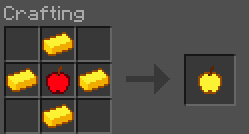
Replaces the vanilla golden apple crafting recipe with a shaped cross pattern using only 4 gold ingots.
## Recipe
## Features
– **Half the cost**: only 4 gold ingots required instead of 8
– **Multi-version**: supports 1.20.4 through 26.1.2
– **No dependencies**: drop it in and go
## Installation
1. Download the `.jar` file
2. Place it in your `.minecraft/mods/` folder
3. Make sure **Fabric Loader** is installed
4. Launch the game and enjoy cheaper golden apples!
## About
Adds an RPG like daycounter, displaying at the start of each day with a type writer effect and sound. See the
(https://modrinth.com/datapack/typewriter-daycounter/gallery) for a preview!
– The day counter displays at the start of each minecraft day
– It also displays when first joining a server
– On milestone days like day 100, a special day counter animation will play. This is included for all multiples of 100
– Vanilla minecraft starts on day 0, so to solve this, +1 day is added to the world. The daycounter starts at Day 1!
## Timestop
You can configure the day counter to only increment when there are players in your server, this way, a milestone will never go unseen. Use the command below:
– `/function vanilla_refresh:day_counter/_toggle_offline_timestopper`
***

This pack is a standalone, mini-pack of a feature from [Vanilla Refresh](https://modrinth.com/datapack/vanilla-refresh)

