ZickZack V5 Golden Ruby
> #### 💼🌹 You can combine this texture pack with the [Projekt Ori Pack](https://modrinth.com/resourcepack/ori)!
—
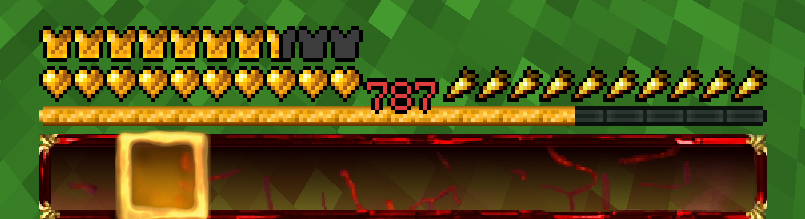
### Ein Texture Pack im Stil von BastiGHG und der 2 Millionen Golden Ruby Edition von ZickZack V5.
Es enthält Hotbar, Custom Sky, Overlay, Totem of Undying, Paintings, angepasste Models und mehr
Hotbar und Sky haben ein dunkleres und besseres Design als im originalen Pack.
Dieses Texture Pack wird ständig angepasst und verbessert. Solltet ihr Fehler finden oder Fragen/anliegen haben, öffnet gerne ein Ticket auf dem verlinkten Discord Server.
Dieses Texture Pack ist nicht von BastiGHG, Badlion oder ZickZack Cosmetics genehmigt oder mit ihnen verbunden. Es handelt sich um eine eigene, abgeänderte Version/Parodie des originalen Packs.
##
English Description
### A texture pack in the style of BastiGHG and the 2 million Golden Ruby Edition of ZickZackV5
It contains Hotbar, Custom Sky, Overlay, Totem of Undying, Paintings, customised models and more.
Hotbar and Sky have a darker and better design than in the original pack.
This texture pack is constantly being adapted and improved. If you find any bugs or have questions/concerns, feel free to open a ticket on the linked Discord server.
The Custom Sky is compatible with OptiFine and Badlion without any problems. Sodium does not support custom skies and requires the installation of [FabricSkyBoxes](https://modrinth.com/mod/fabricskyboxes). Core shader also change the colour of the XP number in the hotbar to red.
This texture pack is not approved by or associated with BastiGHG, Badlion or ZickZack Cosmetics. It is a customised version/parody of the original pack.
Showcase Video
ZickZack V5
> #### 💼🌹 BastiGHG’s current texture pack is the [Projekt Ori Pack](https://modrinth.com/resourcepack/ori)!
—
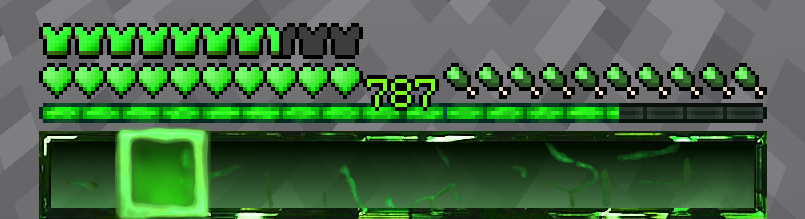
### Ein Texture Pack im Stil von BastiGHG und ZickZack V5
Es enthält Hotbar, Custom Sky, Overlay, Totem of Undying, Paintings, angepasste Models und mehr.
Dieses Texture Pack wird ständig angepasst und verbessert. Solltet ihr Fehler finden oder Fragen/anliegen haben, öffnet gerne ein Ticket auf dem verlinkten Discord Server.
Der Custom Sky ist ohne Probleme mit OptiFine und Badlion kompatibel. Sodium unterstützt keine Custom Skies und erfordert die Installation von [Optiboxes](https://modrinth.com/mod/optiboxes).
Dieses Texture Pack ist nicht von BastiGHG, Badlion oder ZickZack Cosmetics genehmigt oder mit ihnen verbunden. Es handelt sich um eine eigene, abgeänderte Version/Parodie des originalen Packs.
English Description
### A texture pack in the style of BastiGHG and ZickZackV5
It contains Hotbar, Custom Sky, Overlay, Totem of Undying, Paintings, customised models and more.
Hotbar and Sky have a darker and better design than in the original pack.
This texture pack is constantly being adapted and improved. If you find any bugs or have questions/concerns, feel free to open a ticket on the linked Discord server.
The Custom Sky is compatible with OptiFine and Badlion without any problems. Sodium does not support custom skies and requires the installation of [Optiboxes](https://modrinth.com/mod/optiboxes). OptiFine also changes the colour of the XP number in the hotbar to a matching green.
This texture pack is not approved by or associated with BastiGHG, Badlion or ZickZack Cosmetics. It is a customised version/parody of the original pack.
ZickZack V4 Black Edition
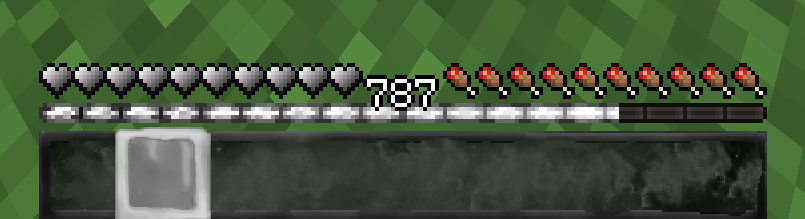
### Ein Texture Pack im Stil von BastiGHG und der 1,5 Millionen Black Edition von ZickZack V4
Es enthält Hotbar, Custom Sky, Overlay, Totem of Undying, Paintings, angepasste Models und mehr.
Dieses Texture Pack wird ständig angepasst und verbessert. Solltet ihr Fehler finden oder Fragen/anliegen haben, öffnet gerne ein Ticket auf dem verlinkten Discord Server.
Der Custom Sky ist ohne Probleme mit OptiFine und Badlion kompatibel. Sodium unterstützt keine Custom Skies und erfordert die Installation von [Optiboxes](https://modrinth.com/mod/optiboxes). Durch Core Shader wird auch die Farbe der XP Zahl in der Hotbar passend weiß gefärbt.
Dieses Texture Pack ist nicht von BastiGHG, Badlion oder ZickZack Cosmetics genehmigt oder mit ihnen verbunden. Es handelt sich um eine eigene, abgeänderte Version/Parodie des originalen Packs.
English Description
### A texture pack in the style of BastiGHG and the 1,5 million Black Edition of ZickZackV5
It contains Hotbar, Custom Sky, Overlay, Totem of Undying, Paintings, customised models and more.
This texture pack is constantly being adapted and improved. If you find any bugs or have questions/concerns, feel free to open a ticket on the linked Discord server.
The Custom Sky is compatible with OptiFine and Badlion without any problems. Sodium does not support custom skies and requires the installation of [Optiboxes](https://modrinth.com/mod/optiboxes). Core Shader also changes the color of the XP number in the hotbar to a fresh white.
This texture pack is not approved by or associated with BastiGHG, Badlion or ZickZack Cosmetics. It is a customised version/parody of the original pack.
ZickZack V4
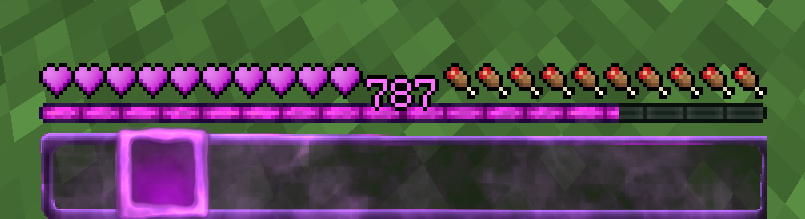
### Ein Texture Pack im Stil von BastiGHG und ZickZack V4
Es enthält Hotbar, Custom Sky, Overlay, Totem of Undying, Paintings, angepasste Models und mehr.
Dieses Texture Pack wird ständig angepasst und verbessert. Solltet ihr Fehler finden oder Fragen/anliegen haben, öffnet gerne ein Ticket auf dem verlinkten Discord Server.
Der Custom Sky ist ohne Probleme mit OptiFine und Badlion kompatibel. Sodium unterstützt keine Custom Skies und erfordert die Installation von [Optiboxes](https://modrinth.com/mod/optiboxes). Durch Core Shader wird auch die Farbe der XP Zahl in der Hotbar passend lila gefärbt.
Dieses Texture Pack ist nicht von BastiGHG, Badlion oder ZickZack Cosmetics genehmigt oder mit ihnen verbunden. Es handelt sich um eine eigene, abgeänderte Version/Parodie des originalen Packs.
English Description
### A texture pack in the style of BastiGHG and ZickZackV4
It contains Hotbar, Custom Sky, Overlay, Totem of Undying, Paintings, customised models and more.
This texture pack is constantly being adapted and improved. If you find any bugs or have questions/concerns, feel free to open a ticket on the linked Discord server.
The Custom Sky is compatible with OptiFine and Badlion without any problems. Sodium does not support custom skies and requires the installation of [Optiboxes](https://modrinth.com/mod/optiboxes). Core shaders also change the colour of the XP number in the hotbar to purple.
This texture pack is not approved by or associated with BastiGHG, Badlion or ZickZack Cosmetics. It is a customised version/parody of the original pack.
ZickZack ORI Red 🌹
# BastiGHG ORI Red

This is a resourcepack that mimics the texturepack used by BastiGHG on the CraftAttack 13 server. The pack comes with custom skyboxes, updated hud & hotbar, Kugelschreiber Bow Model, red arrows and more!
### Contributors
– **@inowtp** was a huge help with the pack, he contributed the correct skyboxes for the pack and helped with further tweaks and enhancements, thanks a lot for helping me out!
### ORI Suitcase
If you want to get the mysterious suitcase in-game, please checkout the great project by **davidpel**: [https://modrinth.com/project/kH6OD1Z9](https://modrinth.com/project/kH6OD1Z9)
### ORI Kugelschreiber / Pen & Tracker
This texturepack includes the pen & tracker models, which show up when you rename a bow to either ‘Kugelschreiber’ or ‘Pen’ and a compass to ‘Tracker’. There are further details in the gallery!


## Texture changes
– GUI hearts and armour are red
– Apples as food bar
– Optifine/Optiboxes Custom Sky (Red night sky, blue day sky (double sun & artifacts fixed)
– Arrows are Red
– Added alternative model (Kugelschreiber/pen) for the bow
– Added alternative model (Tracker) for the compass
> **NOTE about the Tracker:** The Tracker may appear glitchy when moving, because animation frame time is reset when the compass changes direction, this is a limitation by minecraft which can (sadly) not be fixed.
> **NOTE about custom SkyBoxes:** You need to install a mod in order to make the custom skyboxes work, I recommend Optiboxes for this. If you are using Optifine or if you’re playing on BadLion, the pack should just work fine!
___
### Resourcepack Support
For any questions or problems with the resource pack, please contact me on Discord!
**PLEASE** do not ask for support in the BastiGHG Discord or in his Twitch Chat!
[](https://discord.gg/CE3rzSnzzw)
___
## **DISCLAIMER:**
> I am not BastiGHG, this is a community made resourcepack! This resourcepack is not approved by or associated with BastiGHG in any way! Some textures are not available to me, so I can’t include them!
ZickZack ORI Edition
> **THIS IS NOT AN OFFICIAL PACK FROM BASTIGHG IN ANY WAY.** Its Fanmade!
# BastiGHG CraftAttack 13 – ORI Pack
### Custom HUD, Sky and much more!
The weird green stars are not intended, its a client side bug. Credits to [L3_N0X](https://modrinth.com/resourcepack/zickzack-ori-red) (I used his creation as a base for many HUD elements. you are the goat Lenox)

—————————————————————————–
### How to get the New BastiGHG ORI Suitcase?
Put a normal totem of undying in an anvil and rename it to “????”

### The old “Fake” ORI Suitcase?
Rename a Totem of Undying to “???”

—————————————————————————–
### The special Weapen
a regular pen? No, put youre Bow in an anvil and rename it to “Kugelschreiber” or “Pen” to get BastiGHG´s special pen.

—————————————————————————–
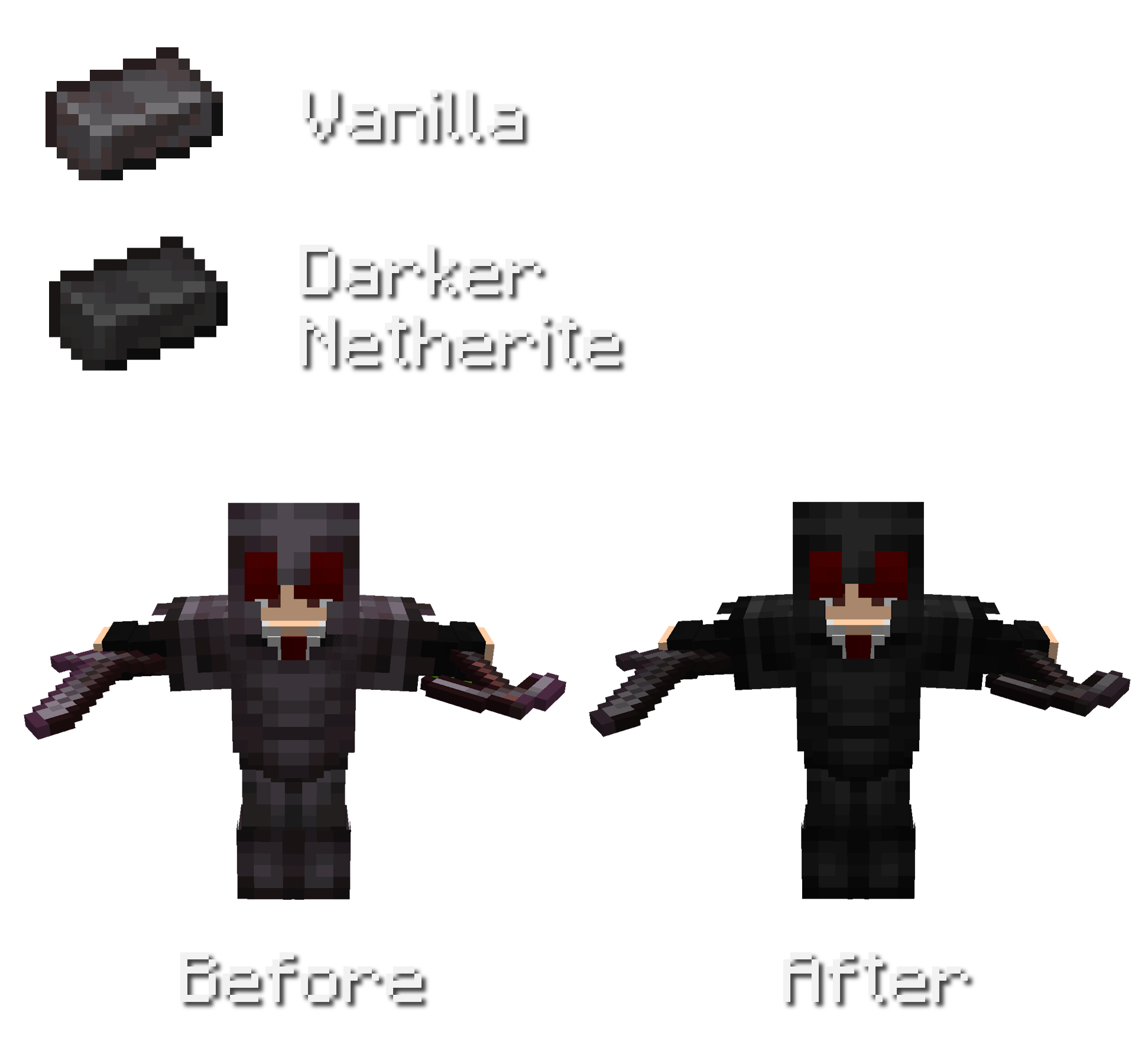
### Darker Netherite
Overall less saturated and darker netherite.
Also changed colors for netherite trim´s on netherite armor.
Other Features
No Pumpkin Blur
Less Rain/Snow Texture
ZickZack Light Blue
# ZickZack Light Blue


This is a resourcepack that mimics the texturepack used by BastiGHG in early 2026. The pack comes with custom skyboxes, updated hud & hotbar, custom XP Level color [Requires [Polytone](https://modrinth.com/mod/polytone)] and everything is made configurable using [ResPackOpts](https://modrinth.com/mod/respackopts)
## Texture changes
– GUI hearts and armour are light blue
– Golden carrots as food bar
– Optifine/Skyboxify Custom Sky (light blue night sky, blue day sky (double sun & artifacts fixed)
> **NOTE about custom SkyBoxes:** You need to install a mod in order to make the custom skyboxes work, I recommend [Skyboxify](https://modrinth.com/mod/skyboxify) for this. If you are using Optifine, the pack should just also work fine!
> **NOTE about the configuration Screen:** You need to install a mod in order to make configuration screen work, the mod is called [ResPackOpts](https://modrinth.com/mod/respackopts)!
___
### Resourcepack Support
For any questions or problems with the resource pack, please contact me on Discord!
**PLEASE** do not ask for support in the BastiGHG Discord or in his Twitch Chat!
[](https://discord.gg/CE3rzSnzzw)
___
## **DISCLAIMER:**
> I am not BastiGHG, this is a community made resourcepack! This resourcepack is not approved by or associated with BastiGHG in any way! Some textures are not available to me, so I can’t include them!
Zhu Yuan Totem
This resource pack replaces the traditional Totem of Undying texture with a custom design inspired by **Zhu Yuan from Zenless Zone Zero**. Instead of the default Minecraft totem, players will see Zhu Yuan represented in a clean, stylized texture that fits seamlessly within the game’s art style. This pack is purely cosmetic and does not alter gameplay mechanics, making it perfect for fans of Zenless Zone Zero who want to add a touch of personality and character flair to their Minecraft experience.
zHomes







zHomes is a modern, fast and fully-configurable homes plugin for Spigot/Paper/Purpur/PufferFish servers. It focuses on simplicity, speed and customization so server owners can give players a familiar — but powerful — teleportation experience.
Some features:
– Create, delete and list homes
– Admin tools for managing and converting homes
– PlaceholderAPI support for message placeholders
– MiniPlaceholders support for minimessage placeholders
– Vault support for economy/command-costs
– GriefPrevention and WorldGuard integration for region checks
– Teleport warmup and safe-teleport checks
– Configurable commands, messages and permissions
– 100% configurable menus
– Uses SQL (H2/SQLite/MariaDB/MySQL) for storage (no local data/ directory)
Maintained by [yL3oft](https://github.com/yL3oft). This project is free and open-source.
—

Requirements
– Java 17+ (check release notes for exact JDK requirement)
– Paper, Spigot or a compatible fork
Installation
1. Download the latest JAR from Releases / Modrinth / Hangar / Spigot.
2. Place the JAR in your server’s `plugins/` folder.
3. Start the server once to generate config files (src/main/resources/config.yml defaults).
4. You’re done!
Quick test
– As a player: `/sethome home1` then `/home home1`
– As an admin: `/zhomes reload`
—

Admin
– `/zhomes info` — Shows plugin info and stats.
– `/zhomes reload` — Reloads plugin configuration and messages.
– `/zhomes version ` — Checks the plugin version and updates if `` is specified.
– `/zhomes nearhomes [radius] <-u -h >` — Check for homes near a location (your location by default). Admins can specify a user and home to check near that home.
– `/zhomes parse ` – Parse a string with Plugin Placeholders & PlaceholderAPI placeholders for a specific player.
– `/zhomes export` — Export all homes to a .json.gz file in the plugin folder.
– `/zhomes import ` — Import homes from a .json.gz file exported by `/zhomes export`.
– `/zhomes converter ` — Inline converter tool to import homes from other plugins (example: `/zhomes converter ultimatehomes`). See detailed converter docs: https://docs.yleoft.me/zhomes/commands-and-permissions/zhomes-converter-less-than-type-greater-than
Player / Home commands
– `/sethome [name]` — Create a home (default name if omitted).
– `/delhome [name]` — Delete a home. Admins can use `/delhome `.
– `/home [name]` — Teleport to a home. Admins can use `/home `.
– `/homes [player]` — List homes. Admins can use `/homes `.
– `/home rename [oldName] [newName]` — Rename a home
Notes
– Command costs and vault integration require Vault to be installed.
– Some commands have admin-only variants (see Permissions below).
Full command list and usage: https://docs.yleoft.me/zhomes/commands-and-permissions
—

Below are the permission nodes and their default intent as defined in the plugin configuration (zHomes/config.yml). Use your permissions plugin to grant or deny these.
Command permissions
– zhomes.command.main — Main command (True by default)
– zhomes.command.main.help — Help SubCommand (Only OP by default)
– zhomes.command.main.version — Version SubCommand (True by default)
– zhomes.command.main.info — Info SubCommand (Only OP by default)
– zhomes.command.main.reload — Reload SubCommand (Only OP by default)
– zhomes.command.main.nearhomes – Nearhomes SubCommand (Only OP by default)
– zhomes.command.main.parse — Parse SubCommand (Only OP by default)
– zhomes.command.main.converter — Converter SubCommand (Only OP by default)
– zhomes.command.main.importexport — Import & Export SubCommand (Only OP by default)
– zhomes.command.sethome — `/sethome` (True by default)
– zhomes.command.delhome — `/delhome` (True by default)
– zhomes.command.delhome.others — `/delhome ` (Only OP by default)
– zhomes.command.homes — `/homes` (True by default)
– zhomes.command.homes.others — `/homes ` (Only OP by default)
– zhomes.command.home — `/home` (True by default)
– zhomes.command.home.others — `/home ` (Only OP by default)
– zhomes.command.home.rename — `/home rename` (True by default)
Bypass / misc permissions (as defined in config.yml)
– zhomes.bypass.limit — Bypass home limits (Only OP by default)
– zhomes.bypass.dimensionalteleportation — Bypass dimension restriction (Only OP by default)
– zhomes.bypass.safeteleport — Bypass safe-teleport checking (False by default)
– zhomes.bypass.warmup — Bypass teleport warmup (Only OP by default)
– %command_permission%.bypass.command-cost — Bypass command-cost (Only OP by default). Command-specific bypass permission is generated from the command permission string (see config.yml)
– %command_permission%.bypass.command-cooldown — Bypass commands cooldown (Only OP by default). Command-specific bypass permission is generated from the command permission string (see config.yml)
If you want to see the authoritative defaults and change them, open src/main/resources/config.yml in the repo or check the live docs: https://docs.yleoft.me/zhomes/commands-and-permissions
—

zHomes contains an inline converter to import homes from well-known plugins. The converter runs in-chat (not a GUI). See full converter details here: https://docs.yleoft.me/zhomes/commands-and-permissions/zhomes-converter-less-than-type-greater-than
—

Supported integrations:
– PlaceholderAPI — Message placeholders supported & custom [placeholders provided by zHomes](https://docs.yleoft.me/zhomes/hooks/placeholderapi).
– MiniPlaceholders – MiniMessage placeholders supported for advanced message formatting & custom [placeholders provided by zHomes](https://docs.yleoft.me/zhomes/hooks/miniplaceholders).
– Vault — for economy-based command-costs.
– GriefPrevention — region checks integration.
– WorldGuard — region and flag checks.
– MiniMessage — advanced message formatting.
– bStats — anonymous metrics (configurable).
Enable or disable integrations from config and ensure the third-party plugins are installed on the server when you expect integration behavior.
—

If you find zHomes helpful or need assistance:
– Discord: https://discord.gg/yCdhVDgn4K
– Issues: https://github.com/yL3oft/zHomes/issues
– Docs: https://docs.yleoft.me/zhomes
Support the project by starring the repo and joining the Discord!
—
ZhaoZizhengs Subway
This MOD added some track. There are Car plant track,platform track,Speed-changing track…
Then,we have the lift:ladder and vertical lift
How to use them?,please visit https://b23.tv/ctk9RGd to watch the tutorial video.
Next one.
It’s a route map.
right click to open it(It like a paper),there are some route,but if u don’t creat a new route,please,creat a route.
How to creat a new?
find a Route editor (His icon is like an excel spreadsheet)(:
right click
Now u opened a UI
1. find “edit”or”creat”
2. click it
3. Enter the name,Station,and the coulor(Hex)
Then you can watch the video to get more info