The Copper Joke
# 
This is a datapack that adds joke features to go along with The Copper Age (1.21.9, works with pre release 2 and on).
### Features Include:
– Struck enchantment for copper items
* Put copper items in shelf, when struck by lightning items given struck
* Gives armor +2 armor
* Gives tools efficiency and more damage
* Has unbreaking effect for all items
* Exclusive with mending
* Lightning gives effects based on how many items you have on
* Shields and tridents can get effect as well
– Cross-copper
* Recipe given once crossbow picked up
* Hit entities are locked in copper blocks for a time based on how much health they have left
* Breaking block deals damage and reduces trapped time
* Works on players
– Wearable lightning rods
* Give with the struck enchantment
– Attack golems
* Giving copper golem copper ingot makes it attack golem for time based on copper amount
Goes around placing torches on enemies heads that deal damage until they die (maybe overpowered lol)
– Copper armor and tools
* Random copper strikes when right click use on copper tools
* When raining or thundering, copper items can get you struck with lightning
* Can be hit onto other entities
– Dragon egg storm summoning
* Place dragon egg on copper chest and stand on dragon egg
* If copper chest has copper items in it, storm will be summoned that burns the copper items for fuel
– More specifics I haven’t listed here lol
Text Formatting Everywhere
## Text Formatting Everywhere
Utility mod that returns an ability to use [Minecraft’s old formatting system](https://minecraft.wiki/w/Formatting_codes).
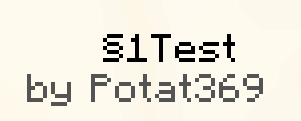
In order to format text, you simply put section sign (**§**), followed by [formatting code](https://minecraft.wiki/w/Formatting_codes), followed by your desired text. For instance: __§1Hello__, will color __Hello__ into blue
## Places status:
### Chat
—
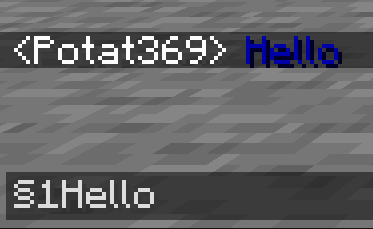
– **Required on**
– **Client**: Yes
– **Server**: Yes
### Anvil
—
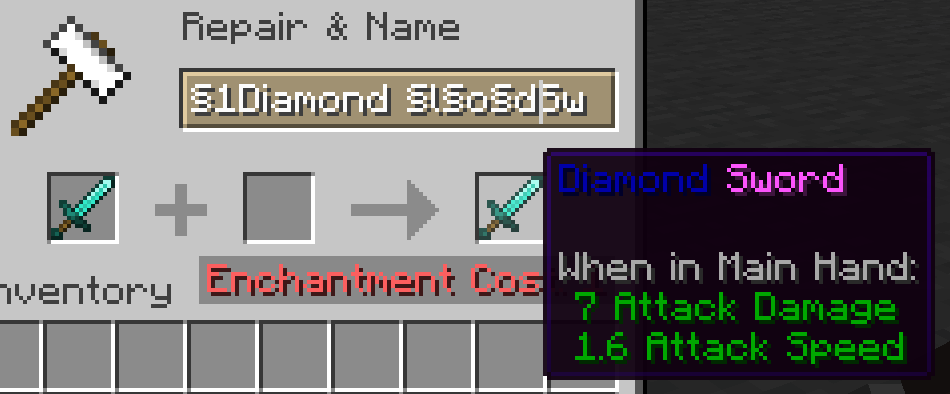
– **Required on**
– **Client**: Yes
– **Server**: Yes
### Sign
—
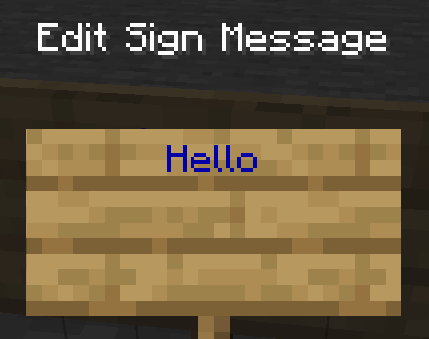
– **Required on**
– **Client**: No
– **Server**: Yes. However, there is a way to circumvent the requirement by doubling the code, like this: `§§11Hello`.
> Note: formatting will disappear after opening and closing.
### Book and Quill Body
—
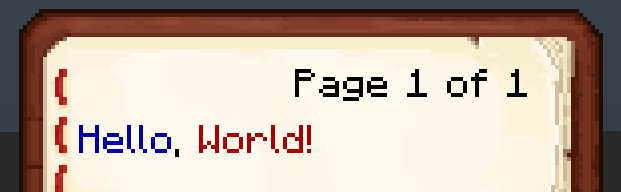
– **Required on**
– **Client**: Yes
– **Server**: No
### Book and Quill Title
—
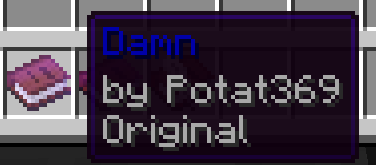
– **Required on**
– **Client**: Yes
– **Server**: No
Terrestria

Terrestria is a detailed and vibrant biomes mod for Minecraft running on the Fabric mod loader. Terrestria enhances gameplay through the addition of 17 major biomes supported by 24 component biomes, 9 new wood types, as well as a healthy selection of foliage – providing a refreshing new selection of terrain.

Terrestria requires Fabric Loader and Fabric API
Check out the Terraformers Discord Server to chat about Terrestria and other Fabric mods!
Visit the Terrestria Wiki to learn more about each biome
The goal of Terrestria is to be the most polished and visually appealing biomes mod available for Minecraft, and to this end there has been intense focus on selecting, detailing, and refining the biomes until they look absolutely amazing. Rather than add tons of different biomes, focus has been put into adding a rather small amount of biomes and then populating them with large amounts of detail and component biomes. This overall results in a more cohesive experience compared to existing biome mods.
Biomes:
v1.0.0 – Initial Release
v2.0.0 – The Dry Update
Some biomes contain variants to increase variety
Images of the biomes can be found on the Images page.
Other Mods by Terraformers:
Check out Terrestria’s sister mod, Traverse:

Traverse works well alongside Terrestria if you are looking for a set of biomes that are closer to the Vanilla+ ideal. Traverse has a lot of unique, colorful biomes that embrace the simple vanilla aesthetic instead of trying to overshadow it.
Check out the Terraformers Nether biome expansion, Cinderscapes:
Cinderscapes complements Terrestria by providing an expansion to the nether, much like Terrestria does to the overworld. Cinderscapes brings more life and beauty to the nether, while also keeping it frightening.
Campanion, your camping companion:

Campanion adds various tools and utilities to help improve your adventures away from your home. Campanion also works well alongside Terrestria in order to make the exploration of the biomes even more fun.
Terrestria is a mod for Fabric, and there are no plans to port this mod to Forge.
Techno Totem Flat

#### Contents:
This Pack makes the Totem of Undying look like the popular Youtuber Technoblade.
#
#### Having Issues?
If the Resource Pack says its not compatable with your Minecraft version, it doesn’t mean it doesn’t work. Try to see if the pack works, but if i still doesn’t work refresh your pack or download it again and see if the new one works. But if it still doesn’t work join my discord server and you can ask me there. (https://discord.gg/7tbtN7xt29)
#
#### Dependencies
Use the [Lower Utilities Resource Pack](https://modrinth.com/resourcepack/lower-utilites) to make the totem of undying and other utilites like the shield, food, and fireworks look smaller.
#
#### My Links:
– [Discord Server / Report Issues](https://discord.gg/7tbtN7xt29)
– [My Optimization Modpack](https://modrinth.com/modpack/mostly-optimized-fabric)
– [More Projects Made by me](https://modrinth.com/user/olivef22z)
#### Credits:
– [Technoblade’s Youtube Channel](https://www.youtube.com/@Technoblade)
– [Technoblade’s Website](https://technoblade.com/)
– [Technoblade’s Twitter](https://x.com/Technothepig)
– [Techno’s Dad’s Youtube Channel](https://www.youtube.com/@MrTechnodad)
– [Totem Generator](https://skinmc.net/totem)
– [Lower Utilites](https://modrinth.com/resourcepack/lower-utilites)
# Images


Tea
## WARNING:
1.5.0 is the last update I will do. It should work fine for all future version. Until mojong break something ofc.
Replaces potions with tea cups. 🙂
Thanks to WafflesAreBetter#6519 for the idea and the original textures!
You can put this resource pack in your modpacks. Just please link back to this page in some way.
Tab Player Health
# Tab Player Health
Free and open-source datapack for Minecraft 1.21 and higher that display players health.
## Features
By default the players health is displayed in the tab.
Svrve’s Dragon Egg
[
](https://www.planetminecraft.com/member/nickshoof/) | [](https://www.curseforge.com/members/nickshoof/projects) | [](https://modrinth.com/user/NickShoof) | [](https://discord.com/)
[
](https://ko-fi.com/nickshoof)
You can buy monthy subscription to get faster updates on KO-FI
****
#
**About**
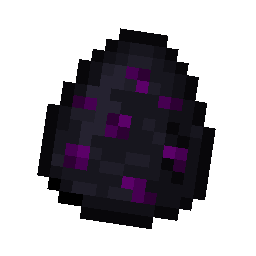
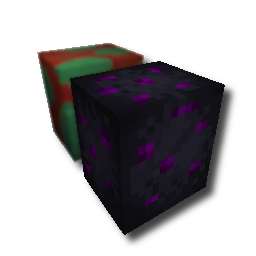
With this pack i modeled the dragon egg becouse why it its so old looking and different than sniffer’s.
.
#
**FAQ**
> **How to install resourcepacks?**
– There are a lot of tutorial out there on youtube, that will explain this better than me, but just download something from trusted sites like modrinth or curseforge, then drag this file to folder that will pop out if you click “Open Pack Folder” in Minecraft.
> **Can i use some textures from Svrve’s Dragon Egg in my pack**
– As long as its not distributed, yes you can. If you want to publish it, just ask me before doing it.
Immersive Torches
[
](https://www.planetminecraft.com/member/svrve/) | [](https://www.curseforge.com/members/svrve/projects) | [](https://modrinth.com/user/Svrve) | [](https://discord.com/)
[
](https://ko-fi.com/svrve)
You can buy monthy subscription to get faster updates on KO-FI
****
#
**About**
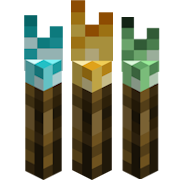
This pack is all about torches, make them an item texture, animate it, change model, also animate it. Thats all.
.
#
**FAQ**
> **How to install resourcepacks?**
There are a lot of tutorial out there on youtube, that will explain this better than me, but just download something from trusted sites like modrinth or curseforge, then drag this file to folder that will pop out if you click “Open Pack Folder” in Minecraft.
> **Can i use some resources from it in my pack?**
After installing it, open the file you downloaded (.zip). Here you will find licence. Read it.
survival2hardcore
A resource pack that makes your survival heart look like hardcore.
For alternative download options, go here
Supernova (Original Music Pack)
an original album made as a tribute to C418 in his signature style, made into a custom music pack:
this pack features 6 tracks:
– 1 title track: jang
– 2 creative tracks: albeit, burning konkrete
– 3 survival tracks: rose field, cliff hanger, supernova
this resourcepack should be compatible with versions 1.7.2 and above. newer versions may complain about it being broken or incompatible, ignore that.
there are two versions of the pack: one that replaces the vanilla music and one that does not. the one that replaces the original soundtrack doesn’t seem to do so on 1.7.2, but the music should still be added to the pool.
you may use this music in your own resource/data/mod-packs only if it’s ENTIRELY FREE. this music may NOT be resold or used for COMMERICAL PURPOSES.
[https://aurigrave.org/audio/release/supernova](https://aurigrave.org/audio/release/supernova)