
# Linear Tools Progression Datapack
Do you ever feel like tools in Minecraft are easily skipped? In vanilla, you can jump straight from wood to iron, or even rush diamonds without ever touching gold. Whole tiers of tools are often ignored.
This datapack fixes that by making tool upgrades linear and dependent on each other. To get to the next tier, you’ll need the full previous set. That way, players have to work their way up step by step, making each tier feel meaningful instead of disposable.
## How It Works
Wood First: All Tool progression begins with Wood. You’ll need Wooden Tools before moving forward.
Then Stone: Hey that’s how it normal goes well for picaxe anyway now it’s all the tools
Copper Next: You’ll need it to move on to iron.
Iron: Classic iron tools still play a central role, but you can’t just jump into it. You’ll need Copper first.
Gold: You can craft gold tools after obtaining copper tools. It can be upgraded into diamond.
Diamond: The strongest tier still exists, but it’s earned gradually. You won’t be able to craft diamond Tools unless you’ve already built your way up through Wood → Stone → Copper → iron → gold. It can still be upgraded to netherite in the smithing table.
Each crafting recipe is carefully adjusted so that you must use the previous Tool tier as an ingredient in the next. Every piece you make has value, and you can’t skip ahead.
## Why This Matters
Better Balance: Every tool type matters. Even gold finally has a reason to exist outside of being burned.
Progression is Earned: No more rushing iron or diamond in the first hour. Players will feel the climb through each tier.
Perfect for Servers: This adds fairness and pacing to multiplayer worlds, preventing one player from skipping straight to the end while others are still naked.
RPG-Like Feel: It transforms Minecraft tool progression into a system more like an RPG, where upgrading is part of the adventure.
## Compatibility
Works in 1.21.9
Compatible with most other datapacks.
If you want an armor equivalent consider:https://modrinth.com/datapack/linear-armor
## Intended Experience
This datapack is made for players who want to slow the game down a bit, appreciate every step of progression, and feel that their gear actually represents the journey they’ve taken. Instead of treating early-game tool as trash, this system turns every piece into a necessary milestone.
If you’re looking for a datapack that encourages exploration, grinding, and resource management while keeping things balanced, this one’s for you.
Ready to make tool progression actually feel like a journey instead of a checklist? Install this datapack and rediscover the value of leather, diamond, and every step in between.
MAKE YOUR BUILDING LIMIT UP
# MAKE YOUR BUILDING LIMIT UP
_**Think Minecraft doesn’t have enough building space? Want to build taller buildings? Try our data pack and you can increase the building limit up to 4064 blocks!!**_
_This is a DATAPACK! Please put it in the “datapacks” folder in your saves folder_
**NOT THE “recoursepacks” FOLDER**
Lightmap Fixer
all this pack does is put 25w33a’s “`core/lightmap“` shader into a resource pack so that it works in later versions, fixing the strangely warm lighting.
I have no idea if this’ll break anything visually. maybe the end flashes? they’re why the shader was changed in the first place. I dunno.
Light Blue Color Fix
## What is this texture pack?
This texture pack fixes wrong light blue glass and light blue dye textures since 1.12. In 1.12 “World of Color Update” dye colors changed. For example, wools. But the light blue wool didn’t match the color of the light blue glass and dye. Years later, in version 25w31a, which is a snapshot of 1.21.9, the texture of the dyes was updated, but the incorrect color of the light blue dye was not fixed. This texture pack fixes this incorrect color.
## How is the light blue wool color previously?
Before version 1.12, light blue wool looked like this:
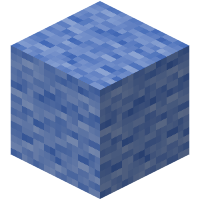
The light blue glass and dye basically took on the color of this shade. This has not been changed from its state in 1.12.
Legacy Potion Colors
# Legacy Potion Colors
Simple mod that restores how potions used to look visually from versions prior to 1.19.4 including the color and enchantment glint.
Version 1.1.0 works in 25w03a+, but future versions are not guaranteed!
Version 1.0.2 works in 1.20.5-1.21.4 & 25w02a
## Requires MidnightLib 1.6.6+
Discord: https://discord.gg/C8KKgbA8jy
# Leaf Litter Recolor
A vibrant new look for Minecraft’s forest floors
Breathe new life into your world with this lightweight resource pack that reimagines Minecraft’s fallen leaves.
🌿 Dull browns are replaced by lush greens and golden tones, turning the forest floor into a vivid, organic carpet — perfect for builders, explorers, and nature lovers alike.
### **🎯 Key Features:**
– Fully compatible with modern Minecraft versions (including 1.21+)
– Only affects fallen leaves – vanilla-friendly
– Ideal for autumn-themed builds or natural landscapes
### **🔗 Want to support my work?**
If you enjoy this pack and want to help me make more like it, consider **supporting** me on **Patreon**! Every contribution helps me grow and continue updating Leaf Litter Recolor.
📸 Don’t forget to share your builds using this pack!
Got suggestions or want to chat? I’m always open to feedback.
Lava Chicken
Did you ever want to **listen** to the **Lava Chicken Music** from the “**A Minecraft Movie**” **in-game?**
Well **now you can!**
This Resourcepack **replaces the “Lava Chicken” music disc with the “Lava Chicken” Song from the “A Minecraft Movie!”**
## ℹ️ This pack has 2 variants:
### 1. Extended Version:
### 2. Normal (Movie) Version:
This is NOT a demonstration of this resourcepack and is only linked for fun:
### **All rights go to: Mojang Studios, Warner Brothers, WaterTower Music**
Sang by: **Jack Black**
Last Time – Miniround Version
This adds the Last Life lives rolling into Limited Life! (made for minirounds
#
**YOU MUST HAVE THE LIFE SERIES MOD FOR THIS TO WORK!!**
—
**THIS IS FOR LIMITED LIFE**
—
By default, the amount of hours you can get are anywhere from 1-12 hours!
This Datapack assumes you are using the config I use (can be found below) the title colours will NOT change if you change the life Series Mod config. To change the colours or min/max times you will have to unzip the file and then change the .mcfunction files
The config that this datapack is used for:
(all of this found under “Season Specific Settings” of limited life)
Tick Offline Players: Yes (does not matter but good for minirounds)
Broadcast Color Chnages: Yes (does not matter but good for minirounds)
Show Time Below Name: Yes (does not matter but good for minirounds)
Time Default: 32400 (IMPORTANT)
Time Yellow: 21600 (IMPORTANT)
Time Red: 10800 (IMPORTANT)
Time Death: -3600 (Default, does not matter but good for balancing)
Time Death Boogeyman: -7200 (Default, does not matter but good for balancing)
Time Kill: 1800 (Default, does not matter but good for balancing)
Time Kill Boogeyman: 3600 (Default, does not matter but good for balancing)

Last Time – Life Series Mod Addon
This adds the Last Life lives rolling into Limited Life!
#
**YOU MUST HAVE THE LIFE SERIES MOD FOR THIS TO WORK!!**
—
**THIS IS FOR LIMITED LIFE**
—
By default, the amount of hours you can get are anywhere from 8-30 hours!
This Datapack assumes you are using the default config, the title colours will NOT change if you change the life Series Mod config. To change the colours or min/max times you will have to unzip the file and then change the .mcfunction files

Keep Inventory Always
## Keep Inventory Always
The mod turns on a game rule that allows you to save your inventory when you die in each world
## How to use
To use the mod, you only need to install it. Now when creating a world, the game rule keepInventory will always be enabled
## Dependencies
– Fabric loader requires Fabric API