Message Display Time
## Message Display Time
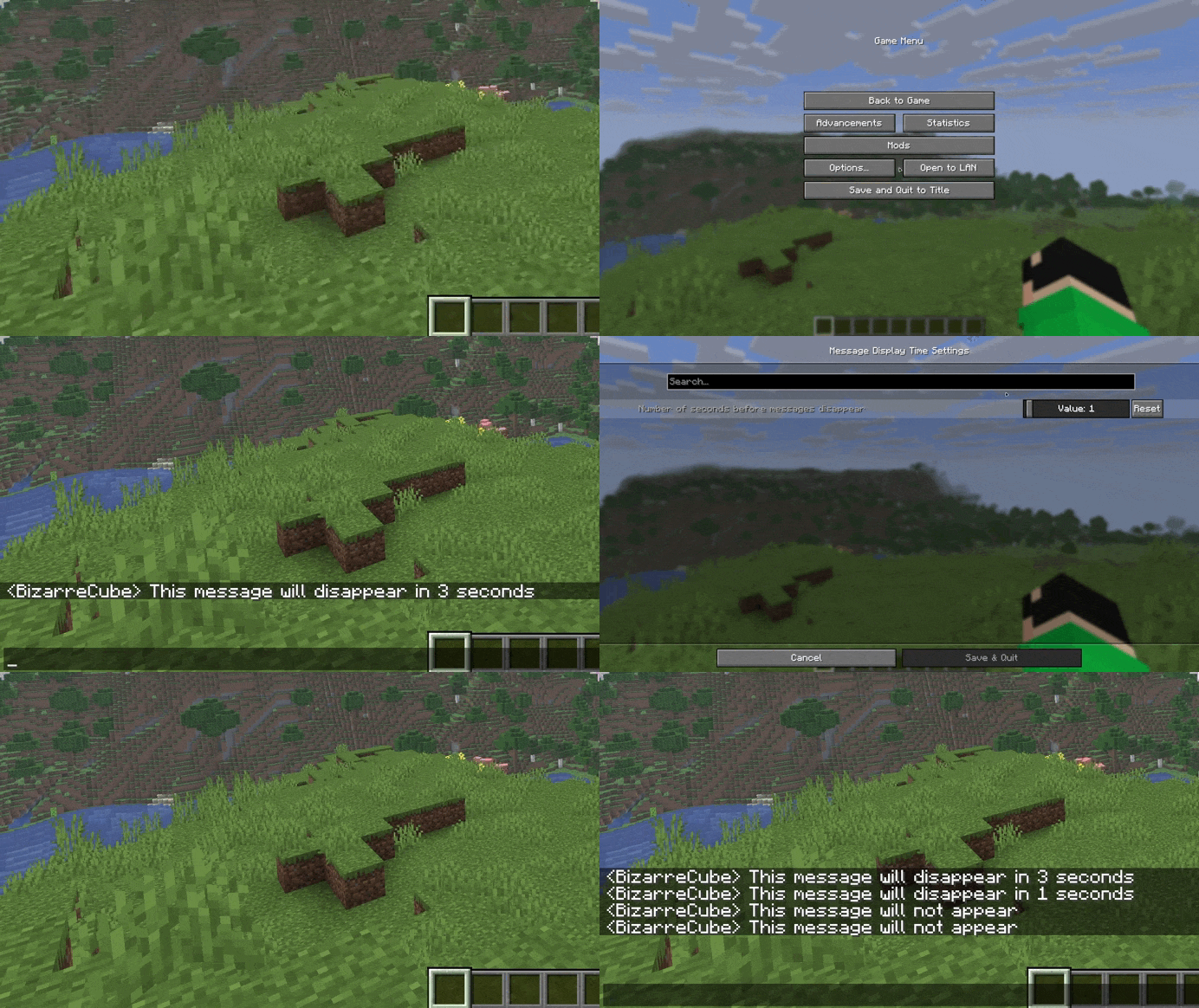
A mod that adds a setting for seconds before messages in chat disappear.
## Usage
By default, the mod changes the number of seconds before disappearance from 10 to 5, but the mod can be customized using the Cloth Config API mod.
## Support
If you like my mods, feel free to support their creator!

Meowl Totem of Undying
– EN: Meowl or “kotosova”, is an Internet meme that is a hybrid created using a photo editor that combines the head of a cat with the body of an owl.
– RU: Meowl (с англ. — «Меовл»), также известный как «мяовл», «мяул», «мяуль» или «котосова», это интернет-мем, представляющий собой созданный с помощью фоторедактора гибрид, который сочетает голову кошки с телом совы
Check collection with all memes + streamers Totems
Mellstroy (Я уже красный) Totem of Undying
**EN**: This resource pack replaces the original **Totem of Undying** with the Meme from Mellstroy **I’m already red, it won’t work out culturally** with sound. This meme has become very popular on TikTok over the past couple of years.
**RU**: Этот ресурспак заменяет оригинальный **Тотем бессмертия** на Мем от Меллстроя **Я уже красный, культурно не получится** со звуком, данный мем за последние пару лет стал очень популярным в Тик Ток
– Омайгадность Тотем
– Тотем Меллстрой
– ПОЛНАЯ КОЛЛЕКЦИЯ РЕСУРСПАКОВ – МЕМЫ + СТРИМЕРЫ

Meadow Grass Everywhere!
#
Meadow Grass Everywhere!
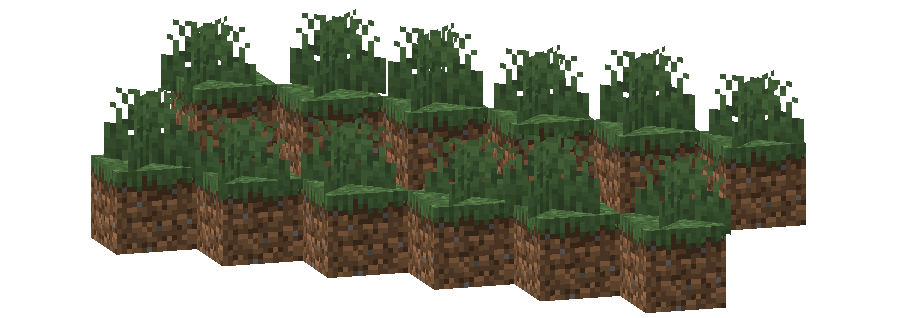
This pack changes the **Grass colormap** so that it always matches the color of the **Meadow biome(s)**.
The Meadow uses the color `#83BB6D` in vanilla Minecraft.
List of biomes that use this color in vanilla Minecraft
* Meadow
Additional Information
* build_time: `2025-10-06T02:13:39+02:00`
* build_user: `rotgruengelb`
## Limitations
Some biomes use hardcoded colors that cannot be overridden by resource packs.
This is a limitation of Minecraft itself, not of this pack.
## Installation
Download the pack and place it in your `resourcepacks` folder.
## About “Oh My Colormap!”
A collection of resource packs that change Minecraft’s colormaps.
### Rotgruengelb (Developer & Artist):


MCSM enchantment glint
**Enchantment glint in Minecraft story mode looks different than the one in minecraft**, so i decided to **make a texture pack** that **looks similar** to the one seen in Minecraft story mode, it **isnt the same** but its good enough. this texture pack **will be updated in the future** because it **isnt perfect**
Worlds
# Worlds
A Minecraft mod that allows you to create and manage worlds in-game using simple commands.
## Features
– Create new worlds with custom IDs and optional seeds
– Create worlds from presets (flat world, amplified, large biomes, etc.)
– Default world creation uses normal overworld dimensions
– Delete worlds safely (removes all players first)
– Teleport between worlds easily
– Lazy worlds loading (support for infinite worlds)
– Create fully functional Overworld, End and Nether worlds (mod includes fixes to enable End Dragon and other vanilla mechanics in the custom worlds)
– **API for other mods to register custom level providers**
## Commands
All commands use the base `/worlds` command:
### Create Command
The `/worlds create` command allows you to create new worlds with various options:
**Basic usage:**
– `/worlds create ` – Creates a new normal overworld with the specified ID and a random seed
– `/worlds create ` – Creates a new normal overworld with the specified ID and seed
**Create from preset:**
– `/worlds create from-preset ` – Creates a world using a specific world preset (e.g., `minecraft:flat`, `minecraft:amplified`, `minecraft:large_biomes`)
– `/worlds create from-preset ` – Creates a world from a preset with a specific seed
– `/worlds create from-preset ` – Creates a world from a preset using a specific dimension from that preset
– `/worlds create from-preset ` – Combines preset, dimension, and seed options
**Create from dimension:**
– `/worlds create from-dimension ` – Creates a world using an existing dimension type (e.g., `minecraft:overworld`, `minecraft:the_nether`, `minecraft:the_end`)
– `/worlds create from-dimension ` – Creates a world from a dimension with a specific seed
**Examples:**
“`
/worlds create myworld
/worlds create myworld 12345
/worlds create flatworld from-preset minecraft:flat
/worlds create amplified from-preset minecraft:amplified 67890
/worlds create nether from-dimension minecraft:the_nether
/worlds create custom_end from-dimension minecraft:the_end 11111
“`
### Delete Command
– `/worlds delete ` – Deletes the specified world and kicks all players currently in it
### Teleport Command
– `/worlds tp [targets]` – Teleports you (or specified players) to the world
### Settings Command
The `/worlds settings` command allows you to view and modify settings for the current world you’re in. Similar to Minecraft’s `/gamerule` command, you can query the current value by omitting the new value parameter.
**Load on Startup:**
– `/worlds settings loadOnStartup` – Displays whether the world loads automatically on server start
– `/worlds settings loadOnStartup ` – Enable or disable automatic loading on server start
– When enabled (`true`), the world will load automatically when the server starts
– When disabled (`false`), the world will only load when a player enters it (lazy loading)
**Spawn Point:**
– `/worlds settings spawn` – Displays the current spawn point and rotation
– `/worlds settings spawn here` – Sets the spawn point to your current position and rotation
– `/worlds settings spawn ` – Sets the spawn point to specific coordinates (rotation defaults to 0, 0)
**Examples:**
“`
/worlds settings loadOnStartup
/worlds settings loadOnStartup true
/worlds settings loadOnStartup false
/worlds settings spawn
/worlds settings spawn here
/worlds settings spawn 100 64 200
“`
**Note:** These commands affect the world you’re currently in. Navigate to the world you want to configure before running the command.
## Importing worlds from World Manager
1. Replace World Manager mod with Worlds
2. use `/worlds create {world_id_to_import} {world_type} {world_seed}`
You need to specify same world id, type and seed that world had when was created with “World Manager”, only classic Overworld, End and Nether worlds supported
## For Mod Developers
MC Worlds provides an API that allows other mods to register custom server level providers. This enables you to create worlds with custom behavior, special rules, or unique mechanics.
### Quick Start
1. Add MC Worlds as a dependency in your `fabric.mod.json`
2. Implement the `ServerLevelProvider` interface
3. Register your provider using `WorldsRegistries.LEVEL_PROVIDER_REGISTRY`
For detailed documentation and examples, see API.md.
## Requirements
– Fabric Loader
– Minecraft 1.21.8+
Max Totem of Undying
– ENG: Max is a Russian cross-platform instant messaging service based on the digital system of the same name. It was founded in 2025 by the VK technology company. Resourcepack replaces the immortality totem with the logo
– RU: Max — российский кроссплатформенный сервис мгновенного обмена сообщениями на базе одноимённой цифровой системы. Основан в 2025 году технологической компанией VK. Ресурспак заменяет тотем бессмертия на логотип
Check collection with all memes + streamers Totems
– Тотем Я уже Красный-totem-of-undying)
– Тотем Меллстрой
– Colored Bricks
– MACAN Totem of Undying
Masa’s Mods lzh Translation Pack
> 喜报:
本翻译包已被Litematica维护者Sakura Ryoko合并!
这意味着,对于新版本日后不必下载本资源包,也可以使用Litematica文言翻译了(
查看详情)。
不过,对于老版本的Masa系列模组,仍然需要翻译包的支持。
## 简介
> 注意:这**不是简体中文**翻译!!!如果你想要简体中文或繁体中文翻译,建议点击此处。
这是一份**文言**翻译资源包,用于填补MASA系列模组缺少文言的空白,目前翻译进度较低。
~~如果你是一个生电大佬,非常熟悉MASA系列模组,觉得原版的MASA系列模组还是太好用了的话,可以尝试下载这个资源包来抹平您的大脑皮层(笑)你也可以把这个翻译包假扮成其他资源包后发给你的朋友,硬控他们几分钟。~~
|支持的模组| 原名 | 链接 |
| ——- | ——- | ——- |
|**清影**|Litematica|Modrinth|
|**摩輕庫**|MaLiLib|Modrinth|
|**眇訊**|MiniHUD|Modrinth|
|**伺服司**|Servux|Modrinth|
|**調祛術**|Tweakeroo|Modrinth|
## 如何使用
1. 确保您的Minecraft装载了MASA系列模组。
2. 下载该项目最新的翻译包。
3. 将翻译包拖入”resoucepacks”文件夹并装载。
4. 将您的Minecraft游戏语言调整为“`文言(華夏)“`。若无法生效大多是这一步忘了。
5. 锵锵!不出意外的话,您的MASA模组此时已翻译成文言了吧。可以按下“`M“`键打开Litematica的菜单检验。
## 版本命名规则
这一部分有点长,请展开观看
1. 资源包分为`Release` `Alpha` `Beta` 三类。分别对应正式版、测试版、早期测试版。R1.0之前的版本都是Alpha版本,R1.0之后的所有测试版都是Beta版本。
2. 正式版命名规则如下
`摩挲改囊文言全譯 R{version}.zip`
例如:摩挲改囊文言全譯 R1.0.zip
其中`version`由两位有效数字组成。第一位为大版本号,第二位为大版本号的修订号。大版本号分配计划如下表所示:
|序号|达成标志|大版本号|情况|
|—|—|—|—|
|1|资源包被Sakura合并|1.0|√已达成|
|2|完成Litematica翻译|2.0|×未达成|
|3|完成MaLiLib翻译|3.0|×未达成|
|4|完成Tweakeroo翻译|4.0|×未达成|
|5|完成MiniHUD翻译|5.0|×未达成|
|6|完成Servux翻译|6.0|×未达成|
|敬请期待|……|……|……|
3. 测试版命名规则如下
`摩挲改囊文言全譯 B{version}.{timestamp}.zip`
例如:摩挲改囊文言全譯 B1.1.260219.zip
其中`version`为对应预发布的正式版本号。`timestamp`为构建时间。
> 注意,早期Alpha测试版以`摩挲改囊文言全譯 A{version}.zip`命名。因为之后不再会有Alpha版本(只有Beta版本),所以这种方式将不再使用。
希望这能帮助你更好理解并下载本翻译包。
## 贡献
发现大量词条未翻译/错误?想要参与翻译?点击这里进入Crowdin参与翻译!(审核通过方可翻译)
若发现有以下情况,请报告到项目Issue:
– 文不对意
– 用字讹误
– 翻译错用
– 语法不通
– 缺少变量
– 用词不统一
– 翻译包失效
– 与原版已有的术语不一致
– 使用了§等格式化代码而显示不正确
## 进度







Martini´s Treasure and Farming
# **Martini´s Treasure and Farming**
**This is Part three of Martini’s way to Play**
## **Description**
It adds a additional way of getting some ore and Mob Drops after defeating mobs like Husks, Warden and more, in Minecraft with this Datapack installed.
For the Minecraft Snapshot enjoyer, this is for you guys!
The datapack as well as the mod version are now divided into two versions: the “Release” version and the “Snapshot” version.
– **Beta** stands for Snapshot
– **Release** remains the same
Spoiler
– Chance to find some Ore when mining almost every sort of Stones
– Chance to find some Items like Potatos, Carrots and more when minning Grass blocks
– Chance to find some Items like red and brown mushrooms or poisonous potatos and fermented spider eyes when minning Mycelium
– a small Chance to mine successfully a Spawner and higher chance when enchanted with fortune
– Great rewards after defeating the Warden
– New Drops for certain Mobs, like Bat, Drowned, Husk and some more..
But in the end you decide if you want to try it out!
—————————————————————————————-
### Little Q&A
###
Q: Can I add this to my modpack?
A: Yes.
Q: Can I upload this to another plattform like curseforge etc.?
A: No.
Martini´s Cutting and Crafting
# **Martini´s Cutting and Crafting**
**This is Part two of Martini’s Way to Play**
## **Description**
this Datapack adds a few additional Recipe´s for the Crafting Table and the Stonecutter.
I added alot of new recipes, changed some old ones and added one old specific recipe back, even a new function for the stonecutter the addition cut wool, use Glass and Wooden materials. It makes it more or less cheaper in the end. I also added a few Advancements you can get.
For the Minecraft Snapshot enjoyer, this is for you guys!
The datapack as well as the mod version are now divided into two versions: the “Release” version and the “Snapshot” version.
– **Beta** stands for Snapshot
– **Release** remains the same
Some of the new Recipes include:
Spoiler
– Crafting Slabs back to Blocks
– Cheaper Armor Trims and i mean all of them…
– Getting back some materials for old tools and armor in the stonecutter
– Craft some items with copper in addition to iron
– Wool to Wool Carpets Cutting
– Wool Carpets to Wool Blocks Crafting
– Moss Carpets to Moss Blocks Crafting
– Craftable Trident
– Craftable Nautilus Armor
– Craftable Totem of Undying
– Craftable Enchanted Golden Apples
– Craftable Elytra
– Craft some Spawn eggs
– Craftable Spawner
and more!
But in the end you decide if you want to try it out!
—————————————————————————————-
### Little Q&A
###
Q: Can I add this to my modpack?
A: Yes.
Q: Can I upload this to another plattform like curseforge etc.?
A: No.