Weird and powerful weapons – Texture pack
**This ressource pack add custom textures on the items of the datapack [Weird and powerful weapons](https://modrinth.com/project/Jr3nq9JV)**
## Totem of protection

Pouches!
# **Pouches!**
This data pack is a simple concept. You add extra string to a bundle, it becomes a pouch. It looks exactly identical, except that you can wear it!
It takes over the leggings slot, turning it into an extra storage slot.
# **The download**
I’ve included both the resourcepack and datapack in the datapack download. So uhh you can copy the thing onto ur resourcepack folder incase you ever lose the rp.
_Do also note: Recoloring *may* be a little broken when your gamemode is set to creative from what I’ve tested. No clue why._
Waypoints
Waypoints Teleport – Minecraft Waypoint & Fast Travel Datapack (1.21.6+)

Waypoints Teleport is a lightweight Minecraft waypoint datapack that adds a survival-friendly fast travel and teleport system to your world. Save, manage, and instantly travel between custom locations across all dimensions using a clean dialog-based interface — no client-side mods required.
Perfect for survival worlds, SMP servers, multiplayer communities, and long-term exploration maps.
Craft and obtain a Waypoint Rod to unlock your personal teleport network.
Features

- ✔ Create and manage up to 20 custom waypoints per player
- ✔ Cross-dimension teleportation (Overworld, Nether, End)
- ✔ Survival-balanced XP cost system (configurable)
- ✔ Built-in teleport cooldown to prevent spam
- ✔ Fully multiplayer compatible (server-side storage)
- ✔ No resource pack required
- ✔ Vanilla datapack – no Fabric or Forge needed
- ✔ Designed for Minecraft Java Edition 1.21.6+
Requirements
- Minecraft Version: 1.21.6 or later (Java Edition)
- Type: Vanilla Datapack
- Single Player/Server: Works on both
Getting Started
Obtaining the Waypoint Rod
Crafting Recipe:

The Waypoint Rod acts as your portable fast travel controller. Right-click to open your waypoint management menu.
- Right-click the Waypoint Rod to open the main menu
- Choose from 5 options:
- Create Waypoint – Save your current location
- My Waypoints – View all saved locations
- Teleport – Fast travel to a selected waypoint
- Remove – Delete an existing waypoint
- Help & Info – View system details
Teleporting (Fast Travel System)
- Open the Teleport menu
- Select a waypoint from the dialog interface
- Instantly fast travel to that location
- Cost: 2 XP Levels per teleport (configurable)
- Cooldown: 10 seconds between teleports
Creating Waypoints
Click “Create Waypoint” and enter a custom name (up to 24 characters). If left blank, the system auto-generates names such as “Waypoint 1”, “Waypoint 2”, etc.
- Max Waypoints: 20 per player (configurable)
- Storage: Permanently saved server-side
- Distance: Unlimited cross-dimension support
Commands
| Command |
Effect |
/trigger wp_menu set 1 |
Open the Waypoints menu |
/trigger wp_list set 1 |
Show your waypoints in chat (legacy) |
/trigger wp_list set -1 |
Show your waypoints in dialog |
/trigger wp_create set 1 |
Create a new waypoint |
/trigger wp_tp set -1 |
Open Teleport dialog |
/trigger wp_remove set -1 |
Open Remove dialog |
/function waypoints:admin/config |
Open admin configuration panel |
/function waypoints:admin/reset_player @s |
Reset a specific player’s saved waypoints |
/function waypoints:admin/uninstall |
Safely uninstall the waypoint datapack |
System Configuration
Customize the Minecraft waypoint and fast travel system:
- XP cost per teleport
- Teleport cooldown duration
- Maximum waypoints per player
/function waypoints:admin/config
Dynamic Dialog System
Each waypoint displays:
- Custom name (or auto-generated fallback)
- X, Y, Z coordinates
- Dimension (Overworld, Nether, End)
Teleportation Mechanics
Teleport instantly to any saved waypoint. The system:
- Checks for sufficient XP before teleporting
- Applies cooldown to prevent teleport spam
- Provides visual and audio feedback
- Displays waypoint confirmation in chat
Server-Side Storage System
All waypoints are stored per-player and persist through world reloads, server restarts, and re-joins. Multiplayer safe and fully isolated per player.
Limits & Balance
- Max Waypoints: 20 per player (default)
- Teleport Cost: 2 XP Levels (default)
- Cooldown: 10 seconds
- Name Length: 24 characters maximum
- Waypoint Distance: Unlimited
Need to adjust XP cost?
- Modify values via settings menu
/function waypoints:admin/config
Technical Details
- Type: Vanilla Minecraft Datapack
- Pack Format: 80+ (Minecraft 1.21.6+)
- Performance Impact: Minimal (only active during interaction)
- Command Usage: ~15 execute commands per tick
Search Keywords: Minecraft waypoint datapack, Minecraft fast travel system, teleport datapack 1.21, survival teleport mod, SMP waypoint system, vanilla teleport datapack, multiplayer waypoint teleport.
Vanilla Shader
## Hello everyone!
I’m excited to share my **Vanilla Shader Project** with you all. I’m still a beginner in the world of programming, but it’s been an incredible journey learning how this works and seeing the results of many hours spent in front of the screen.

I’ve just released **Version 2 (V2)**. While it was technically “ready,” I felt it needed some extra polishing (and it still does!). Please keep in mind that there are still plenty of bugs, but I’m committed to fixing them as I learn.
> **Note:** Currently, it does not support Sodium, but I’m working hard to make that happen soon!
### 🟢 What’s New in V2
* **Toon/Retro Lighting:** Light sources now feature silhouettes for a stylized, classic game aesthetic.
* **Bouncing & Indirect Light:** New mechanics for light accumulation and bounce.
* **True Darkness:** Nights are now significantly darker and more atmospheric.
—
### 1) What this shader does
* **Enhanced Lighting:** Change global illumination and light.
* **Diferrent Visuals:** Tweaks colors and contrast.
* **Performance is not bad:** Designed to run on mid-range hardware.
### 2) Why you should try it
* **New Feel:** provide a “moody” atmosphere.
* **Plug & Play:** No complex installations—it’s a standard resource pack.
### 3) Critical Info & Compatibility
* **Visual Only:** This is a purely aesthetic pack; it does not change gameplay mechanics or add any “cheats.”
*
* **Feedback Welcome:** Since I’m learning, your feedback is incredibly valuable! Feel free to report bugs or share your thoughts.
Vanilla+ TPS
**Vanilla+ TPS** — это простой и удобный мод, разработанный для просмотра данных сервера в реальном времени. С его помощью игроки могут легко отслеживать производительность сервера, используя удобные команды и интерфейс.
### Основные функции:
– **Команды для просмотра данных:**
– **/vtps bossbar** — отображает информацию о TPS (количество тиков в секунду) в виде босс-бара, что делает мониторинг производительности ещё более наглядным.
– **/tps** — предоставляет краткую информацию о TPS и задержке (ping) в чате.
– **/vtps actionbar** — выводит данные о TPS и задержке в строке действий (action bar) для удобного мониторинга в реальном времени.
### Особенности:
– **Простота использования:** Мод не требует сложной настройки — достаточно установить и начать использовать команды.
– **Информативность:** Получайте важные данные о производительности сервера в удобном формате, включая наглядный босс-бар для TPS.
– **Гибкость:** Выбирайте, как именно отображать информацию — в чате, босс-баре или строке действий.
– **Лёгкий в установке:** Мод не требует дополнительных зависимостей и легко интегрируется в ваш игровой процесс.
– **Быстрое обновление:** Мы активно поддерживаем мод и быстро выпускаем обновления для новых версий Minecraft, чтобы вы всегда могли использовать последние функции.
### Статус мода:
– **Текущий статус:** Мод находится в **бета-версии**, что означает, что он стабилен и готов к использованию, но пока что не поддерживает настройку прав доступа для команд.
– **Будущие обновления:** В ближайших обновлениях планируется добавить систему прав доступа, что позволит ограничить использование команд **/vtps bossbar**, **/tps** и **/vtps actionbar** только для администраторов или других указанных групп игроков. После этого мод будет считаться **полноценным релизом**.
**Vanilla+ TPS** идеально подходит как для администраторов серверов, так и для обычных игроков, которые хотят лучше понять, как работает их сервер. Установите мод и наслаждайтесь прозрачностью и контролем над игровой средой!
**Vanilla+ TPS** is a simple and convenient mod designed to view server data in real time. With its help, players can easily monitor server performance using convenient commands and an interface.
### Key features:
– **Commands for viewing data:**
– **/vtps bossbar** – displays TPS (ticks per second) information in the form of a boss bar, which makes performance monitoring even more visual.
– **/tps** – provides brief information about TPS and latency (ping) in the chat.
– **/vtps actionbar** – displays TPS and latency data in the action bar for convenient monitoring in real time.
### Features:
– **Ease of use:** The mod does not require complex configuration – just install and start using commands.
– **Informative:** Get important server performance data in a convenient format, including a visual boss bar for TPS.
– **Flexibility:** Choose how you want to display information – in the chat, boss bar, or action bar.
– **Easy to install:** the mod does not require additional dependencies and easily integrates into your gameplay.
– **Fast update:** we actively support the mod and quickly release updates for new versions of Minecraft, so you always have the latest features.
### Mod status:
– **Current status:** the mod is in **beta**, which means that it is stable and ready for use, but does not yet support setting access rights for commands.
– **Future updates:** in future updates, we plan to add a permissions system that will limit the use of the **/vtps bossbar**, **/tps** and **/vtps actionbar** commands to admins or other specified groups of players. After that, the mod will be considered a **full release**.
**Vanilla+ TPS** is great for both server admins and casual players who want to better understand how their server works. Install the mod and enjoy transparency and control over your gaming environment!
Voidblock: Mod/Portable Version
### Voidblock – Portable Version
[](https://crowdin.com/project/skyblock-classic-edition)

_Skyblock is one of the most famous maps in Minecraft. the original has been updated and now supports all future versions of Minecraft._
# Lore:
_Steve, Alex, Noor, Sunny, Ari, Zuri, Makena, Kai and Efe, they woke up on an unknown island, inside a chest it says…_
# Feature:
– The classic islands have been updated and are now more modern,
– Added new islands (Large, Normal, Small, Very Small),
– Added recipes to renewable resources (check the recipes book in the inventory),
– Added the datapack/mod jar, so that the map can be updated,
– The world is endless (including The Nether and ~~The End~~),
– ~~Now you can visit the end and finish the game~~,
– The map includes a part of the unofficial Slamacow trailer (a mini loreline),
– Also contains the hardcore mode version,
– It also contains an version where you can add the datapack to your worlds. Try it out the portable version,
– Compatible with multiplayer,
– Supports localizations: help me translate into your native language. The languages must be faithful to the English language, respect the punctuation and the capitalization. Click here to translate into your language in Crowdin: https://crowdin.com/project/skyblock-classic-edition/,
# [FAQ](https://loweredgames.github.io./faq.html)
# [Troubleshooting and Help Requests](https://loweredgames.github.io./help.html)
_Thanks to the original Skyblock team for creating the most popular Minecraft map._
READ THE LICENZE BEFORE DOWNLOADING THE DATAPACK:
https://loweredgames.github.io/license.html
NOT APPROVED BY OR ASSOCIATED WITH MOJANG STUDIO, READING THE COPYRIGHT (C):
https://www.minecraft.net/en-us/terms
Vixmoyy’s No Particles
A simple resource pack that removes all particles from the game using core shaders, _even modded ones!_
—
### • How?
> Instead of overwriting particle textures, this pack simply tells the game not to render them at all. This results in better performance and a true no particle experience.
### • Sodium?
> You can use this resource pack with Sodium if you have the [Sodium Core Shader Support](https://modrinth.com/project/G8yJPRdl) mod installed; it may display a warning stating that it may be incompatible, although it should work just fine.
### • >1.17?
> No, it is not possible to port this to pre 1.17 versions because core shaders could not be modified through resource packs before that.
—
particle.fsh & particle.vsh
### particle.fsh
“`
#version 330
void main()
{
discard;
}
“`
### particle.vsh
“`
#version 330
void main()
{
gl_Position = vec4(0.0, 0.0, 0.0, 0.0);
}
“`
##### You may not redistribute this resource pack anywhere without proper permission, the only official download page for this resource pack is on modrinth.
Visually Waterlogged
# Visually Waterlogged!
### About
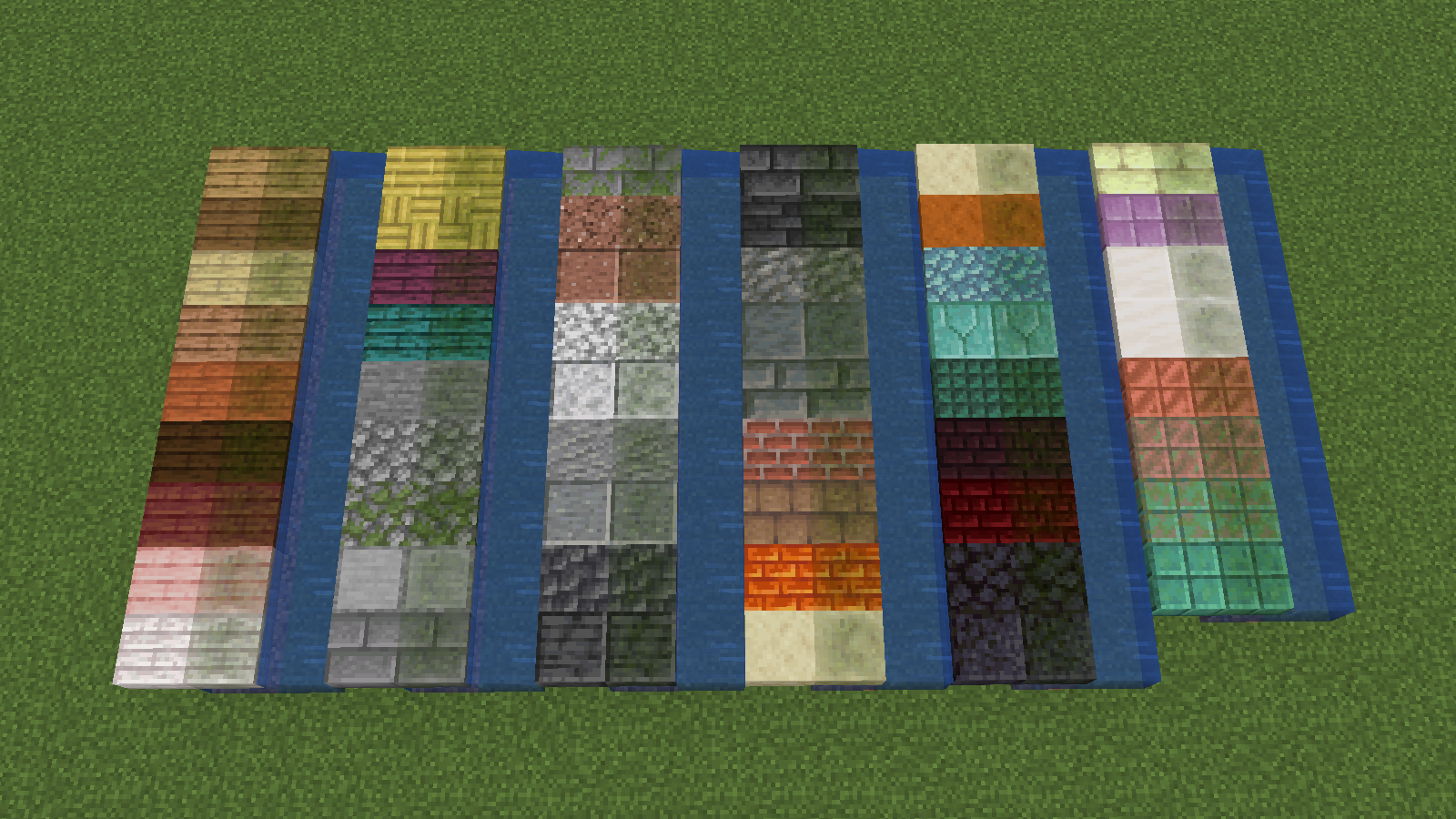
This pack adds a green algae layer on waterlogged blocks!
Can be useful when using top slabs as a floor or something
🚨 1.21.2+ REQUIRED 🚨
### Currently supported blocks:
– Slabs
– Stairs
– Fences
– Walls
### Notice
Unfortunately the overlay doesn’t work with custom textures
I tried but I couldn’t figure it out so every block has to have its own wet texture :/
### Showcase
Visual Snowy Leaves
Snowy leaves that works for you, everywhere (especially servers).
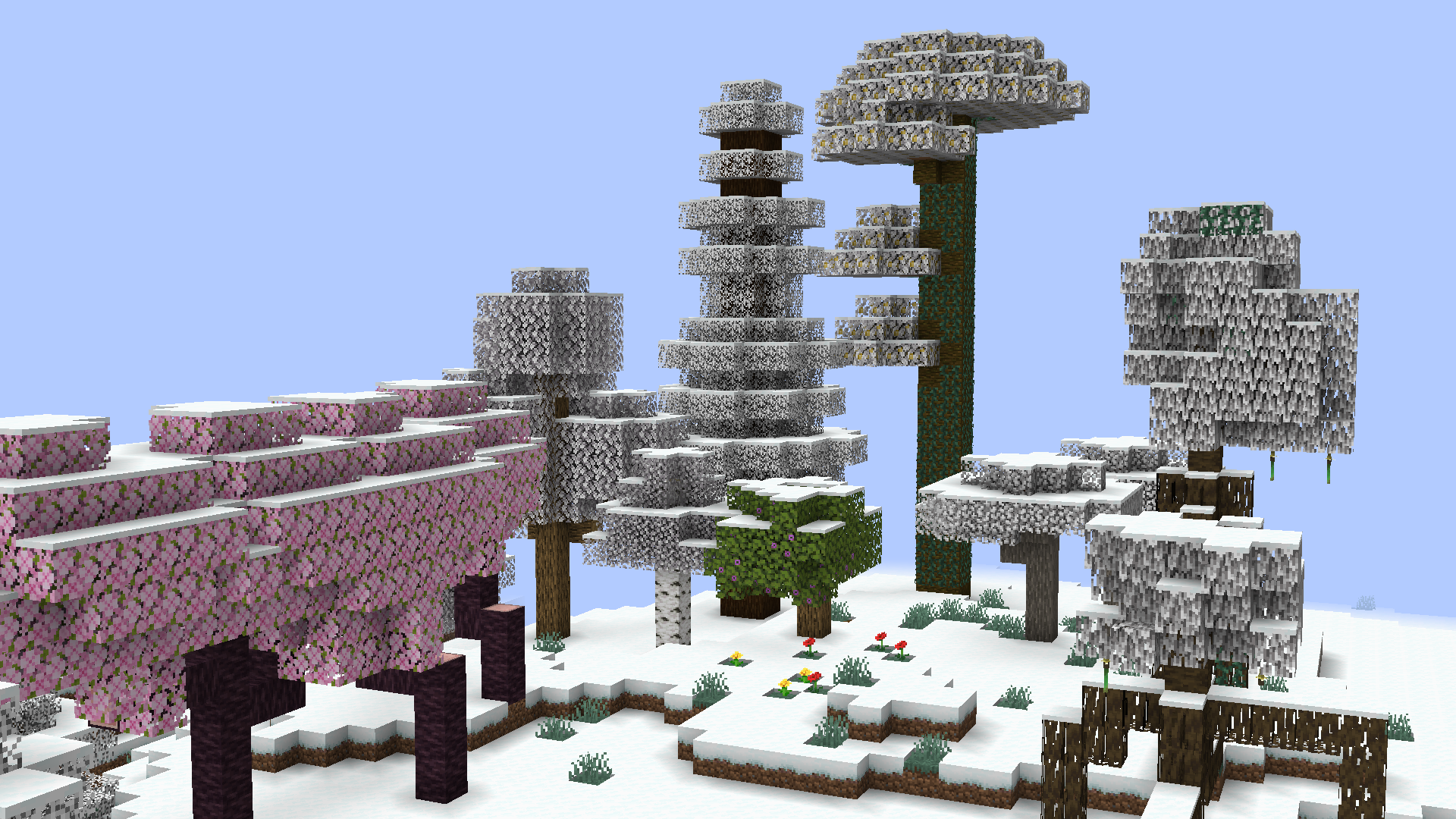
Leaves will slowly fade into their snowy colors during snowfall comprable to the same feature found at [Minecraft: Bedrock Edition](https://minecraft.wiki/w/Bedrock_Edition). Timings ang transition conditions are fully configurable!
Soon for version `0.6.0` *(currently in Beta)*:
* **This mods modifies Minecraft core shaders.**
This is to achieve smooth transition instead of the former reliance on the more demanding and clunky chunk rebuilds.
* **This mod will not work when Iris shaders is enabled.**
A fallback render is being considered at the moment.
See also: https://github.com/IrisShaders/Iris/blob/1.21.11/docs/development/compatibility/core-shaders.md
Compared to other snowy leaves mods, this one is fully client-side! You can join servers with no worries with things like registry mismatch and weird blocks that shouldn’t be rendered there! Improvements through texture modifications allows leaves to reach true white at their fully frosted state instead of just gray leaves.
## Configuration
The Visual Snowy Leaves configuration can be accessed through three ways:
* with Fabric API installed, you can bind a key to open the config screen
* with ModMenu, the same config screen can be accessed through the mod menu instead
* in any case, the configuration can still be accessed at `<.minecraft>/config/visual-snowy-leaves.json`
Visual Enhancements
This Minecraft resource pack is designed for improved visibility and immersion. It outlines all ores for easier mining, marks crops that are ready to harvest, and makes infested blocks distinct with bumblebee stripes to prevent accidental mining. It also minimizes the obstructive pumpkin blur for a better viewing experience and renames music discs with unique, identifiable item names rather than just the default “Music Disc”. It also fixes the helmet item textures by adding a nosepiece and shows a visual indicator for bow pulling.