Raised
*Take control of the position of your GUI and fix the broken hotbar selection texture!*
### Move around the GUI!
Raised lets you move around both vanilla and modded GUI layers (that are supported)!
Want the hotbar closer to the middle of the screen? Raised has got your back! Take control of a layer and move it where you please! Control them individually or sync them to make the entire in-game GUI move together!
### Working with mods!
Raised allows mods to register layer entries for their own GUI overlays for you to configure their movement. However, Raised can also natively work with mods in several ways that do not require their support!
Any mod that registers their (Neo)Forge overlay via the respective registry is automatically captured and added to Raised’s layer registry. This allows you to individually control the layers of many mods without any special support!
Any mod that renders its overlay solely via a (Neo)Forge render event for one of the vanilla layers that Raised supports will be moved along with that vanilla layer. Much the same on Fabric, any mod that injects its overlay render within the scope of Raised’s targets in the code will also be moved!
### Set it up however you like!
You can edit the layer configurations directly from the config, from a suite of commands, or from the options screen (openable via `~` by default or from the (Neo)Forge mods screen). Please note that the options screen limits the amount that a layer may be displaced to accommodate the use of slider controls. For unlimited displacement, use commands or directly edit the config!
### Get the goods!
You can find releases of Raised on both *[Modrinth]* and *[CurseForge]* and also access development builds on *[GitHub]*!
Raised supports Fabric 1.16+, Forge 1.16+, and NeoForge 1.20.2+.
### Figure it all out!
You can delve into the *[wiki]* for details or submit a *[bug report]* if something isn’t quite right!
Still need something? Head on over to the *[discussions]* forum for support, to read announcements, or discuss anything about the mod!
[Modrinth]: https://modrinth.com/mod/raised
[CurseForge]: https://www.curseforge.com/minecraft/mc-mods/raised
[GitHub]: https://github.com/yurisuika/raised
[wiki]: https://github.com/yurisuika/raised/wiki
[bug report]: https://github.com/yurisuika/raised/issues
[discussions]: https://github.com/yurisuika/raised/discussions
[Discord]: https://discord.gg/0zdNEkQle7Qg9C1H
Cheetahs Rainbow Hearts
Cheetahs Rainbow Hearts!
—
Simply makes your health bar RAINBOW!!
—


Rail Recipe Rebalance
## Are you for re-ail?
You know what really steams my engine? **Rails**. Specifically, how _expensive_ they are.
Rails are not a bad method of transportation, especially early-game. They’re pretty fast, and can even be automated using redstone, making them an immersive choice!
There’s just one problem: accessibility. During the period of a world that they would be useful (pre-elytra), most people don’t have a surplus of ingots to spend on tracks. I mean, just for regular, unpowered rails, it costs roughly 1 ingot for 3 blocks of track.

That’s what this recipe change aims to fix. By making rails more affordable, it’s now a more realistic goal to make a train between your friend’s base!
## Available wherever the tracks take you!
**Rail Recipe Rebalance** is available all the way from version **1.15** to **26.1**, and will continue to be updated for newer versions! You can install it as a datapack, or as a mod for your favorite modloader!
Additionally, RRR aims to add compatibility with mods, and currently adds new recipes for the following mods:
> – **Copper Rails**
> – **Create**
*If you would like to request a mod to be supported, DM me at* **palm1**!
## Try these couplings!
Rails get even better with these amazing projects, and they are highly recommended for use with this pack!
### Server
> – **Linkart** – Link your minecarts together!
> – **Fast Minecart** – Double the speed of minecarts!
### Client and Server
> – **Copper Rails** – Adds two new rail types in the vanilla style!
> – **Create** – Allows you to couple minecarts, control rail speed, and create custom multi-block trains!
## You May Also Like
Rabbit Shield
# Rabbit Shield
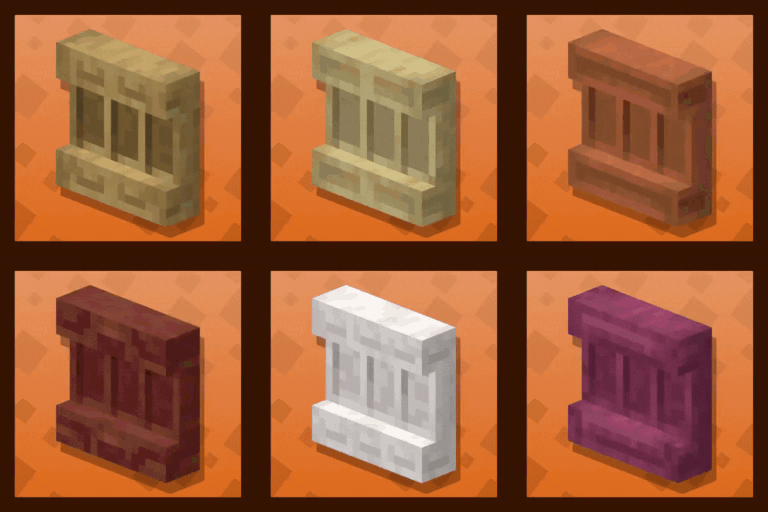
This resource pack replaces the default shield with a custom 3D model.
The design uses a rabbit theme.
No OptiFine required. Vanilla compatible.
## More Shield Themes
– Black
– Blue
– Creeper
– Dark Red
– Mirror
– Navy Blue
– Red
Qube Pack
This resource pack gives some blocks more volume, while maintaining the original texture of the block.
Full White Quartz
Retextures the Block of Quartz to a Full-White Texture. Perfect for photos.

PvP Essentials [Overlay]
#### IGNORE “PACK IS NOT COMPATIBLE” ITS A BUG
##### everything will work perfectly fine its just mcmeta bug!
**Hey!** If you’re into Survival, SMP / PvP, this pack is made for you. It keeps everything clean, simple, and smooth and honestly, once you try PvP Essentials [Overlay], you’ll probably never want to play without it again.
It’s mainly an overlay, but you can use it alone too. Just drop it on top of any pack you like nothing gets changed except bow, crossbow, and a few more textures. This is the official PvP Essentials [Overlay], and you won’t find it anywhere else.
# Preview
#### Heads up! : The pack updates frequently depending on the newest update some visuals might be different.
## Features
– Bordered Ores
– Cleaner GUI
– Clearer Water
– Colored Bow Charge
– Colored Crossbow Charge
– Crop Growth Indicator
– Glass Bottom Boat
– Lower Shield
– Low Fire
– Less Obvious Bedrock
– No Bobber
– No Eating Particles
– No Explosion Particles
– No Fire Smoke
– No Nausea Overlay
– No Pumpkin Blur
– No Vignette
– Quieter Explosions
– Quieter Fire Tick
– Quieter Weather
– Redstone Tweaks
– Smaller Totems + Particles
– Smaller Utilities
– Seamless Glass
And More…
#
### Legal:
Textures by sz_co (1szco1). CC BY-SA. Use for personal projects only. Give credit and link to the original. Do not share without credit!
#
license
PvP Essentials [Overlay] © 2025 by sz_co is licensed under CC BY-SA 4.0


Issues?
Hit me up on Discord if something’s broken: **sz_co**
PvP particles
Most particles will have a yellow background. The only exceptions are :
– Strength (orange)
– Slowness (greenish)
– Regeneration (red)
– Weakness (dark greenish)
– Luck (green)
– Fire resistance (orange)
– Water breathing (green)
– Swiftness (flashy green)
– Poison (greenish)
Every other potion effect are yellow tints.
PvP Crosshair
](https://modrinth.com/resourcepack/pvp-crosshair-bba)



**This resource pack improves the current crosshair and the block breaking animation for PvP!**
# 📥Installation:
This ressource pack improves the current crosshair and the block breaking animation for PvP! The pack is *made for* **all versions and snapshots between 1.6 and 26.1.1**.

# ✨Features:
Improves the current crosshair and the block breaking animation for PvP -> replaces them with a super assistive and useful crosshair and a loading bar block breaking animation!

# 🛠️Versioning:
This ressource pack uses the following versioning system:
– **Base pack:** standard versioning + Minecraft version
– -> *e.g.* **v1.0-1.21.8, v2.4-v1.21.11,…**

Credits:
Thanks to all the resource packs and their authors, who either licensed their projects under the MIT license or allowed me to use their resource packs!
– PvP Crosshair
– Loading Bar Breaking Animation Pack
Without these projects and their authors, PvP Crosshair & BBA Pack would not have been possible to make. **Special thanks!**
# 💘 Support me!
To help me and make me develop more fascinating projects, share and recommend this resourcepack. Thank you so much!!!
You can also try my other projects here or the projects me and Polr made here! 😀

PVGUI
Restyles various GUI elements including the in-game HUD. Features occasional plants.
Provides support/compatibility for the following mods:
– Appleskin
– Better Command Block UI
– Client Sort
– Controlify
– Dynamic Crosshair
– EMI
– Entity Model Features
– Entity Sound Features
– Entity Texture Features
– Figura
– Gamma Utils
– Iris
– ItemSwapper
– Jade
– Mod Menu
– No Chat Reports
– Origins
– Overflowing Bars
– Raised
– Sidekick
– WTHIT
Check out the gallery.
Unfinished. Leave feedback/suggestions at GitHub.
Only supports 1.20.2 and onwards. Versions earlier than 1.20.2 will not be supported.
Recommended for use alongside this resource pack (this pack is not endorsed by these creators, I just like their work):
– Caxton
– Atkinson Hyperlegible
– Geometric Font 2
– Lithos:Font
