Create: Zinc Ore Borders
Create adds zinc ore and I dont see many Ore Borders for it so I made one myself
Inspired by [Vanilla Tweaks](https://vanillatweaks.net/picker/resource-packs/)
Moved to https://www.modrinth.com/resourcepack/modded-ores-borders
Zima’s Vanilla+ (Steam Deck Optimized)


**STEAM DECK USERS:** Refer to the
[Steam Deck Setup](#steam-deck-setup) section
for setup instructions and performance adjustments.
Zima’s Vanilla+ is a compact modpack designed to enhance performance and bring
minor QoL improvements to the vanilla Minecraft experience. Unlike other vanilla
modpacks, Zima’s Vanilla+ uses as few mods as possible to minimize impact on
performance.
> ⚠️ **A note about the NeoForge variant**
>
> This modpack is now based on Fabulously Optimized, which means the NeoForge variant is no longer being maintained.
—
## QoL Overview
This modpack introduces a change to tree farming with the FallingTree mod. When
players chop down a tree with an axe, the entire trunk will break instantly into
logs. The number of logs broken will still affect the axe’s durability. If the
player’s axe breaks while chopping a tree, the entire tree will still fall.
FallingTree **will not interfere with vanilla servers, and you can leave it
enabled when joining them.**
Along with FallingTree, this modpack brings additional QoL improvements,
including:
– Native controller support, including Steam Deck.
– A minimap and world map.
– Sound mods, including post-processing and UI sounds.
– A better first-person experience.
– Improvements to the inventory UI and UX.
A complete list of mods I have curated for this pack, excluding those already found in Fabulously Optimized:
| Mod | Customized options, if any |
| – | – |
| Controlify | Disabled enhanced Steam Deck driver due to a bug. |
| Distant Horizons | Configured to use the “Low” preset, and distance is set to 32 chunks.|
| Dynamic Crosshair | |
| FallingTree | |
| First Person Model | |
| Inventory Profiles Next | No first run notification, continuous crafting is disabled, and some non-enchanted items are allowed to break.|
| Jade | |
| JourneyMap | Configured to be in the lower-right hand side of the screen, which keeps it out of the way of controller button tooltips.|
| Presence Footsteps | |
| Shoulder Surfing Reloaded | |
| Simple Voice Chat | |
| Sounds | |
| Sound Physics Remastered | |
## Preconfigured Settings
By default, the game comes with the Super Duper Vanilla shaderpack enabled, and a
capped framerate of 30 FPS. This is to prevent overheating on laptop devices or
low-end machines. Desktop players may want to adjust their framerate cap on
first launch. Players with low-performance machines may want to consider
switching to the MakeUp Ultra Fast shaderpack or disabling shaders altogether.
## Steam Deck Setup
Unfortunately, there’s no way for this modpack to set everything up for you
automatically. But you only have to do this once, and it will get you the best
experience when playing on your Steam Deck.
First, [install Prism Launcher](https://prismlauncher.org/download/steam-deck/)
from the Discover app in Desktop Mode. Then, read the sections below to learn
how to configure your hardware, download the pack, setup your controller config,
and adjust video settings.
**DO NOT FORGET TO ADD PRISM LAUNCHER TO YOUR STEAM LIBRARY.** This is required
for controller support to work.
### Configuring the Controller
Before launching Prism, you’ll want to configure controller input.
1. In Game Mode, navigate to Prism Launcher. Open the page for it, but don’t
launch it yet.
2. Find and select the controller icon. This should open the controller
configuration page.
3. If the current button layout is not already set to “Gamepad With Joystick
Trackpad”, change the button layout to this template.
4. Once the template is selected, navigate to **Edit Layout** -> **Trackpads**.
5. From here, change the right trackpad’s behavior to “As Mouse” and set its
click behavior to “Left Mouse Click”. Leave the touch behavior unconfigured.
6. If you’d like, you may want to create a virtual menu attached to the left
trackpad to bind keyboard buttons, like `M` for opening Xaero’s World Map.
### Installing the Modpack
> If you’re a pro: install the modpack from Modrinth in Prism and skip this
> section.
If possible, you may want to use a keyboard and mouse through this section. If
that is not an option, you can open the keyboard by holding the `[STEAM]` button
and pressing `X`.
1. Switch to Game Mode and open Prism Launcher.
2. When prompted, select Java version 21 and configure your maximum memory
allocation to 8192 MiB. Do **not** exceed this maximum, especially if your
VRAM is set to 4 GiB.
3. The rest of the wizard should be self explanatory.
4. Once you’ve finished the wizard, you’ll want to sign in to your Minecraft
account. Click the icon at the top-right corner of the screen, then select
**Manage Accounts…** and sign in to your account.
5. Once you’re signed in, return to the main screen. You may have to close the
settings window.
6. Click the **Add Instance** button at the top-left corner of the screen. Then,
select “Modrinth” from the list and search for “Zima”. The list of modpacks
will filter down; select “Zima’s Vanilla+” from the list.
7. Before clicking **OK**, make sure you’ve selected the version you wish to
install. You can choose between the NeoForge and Fabric versions. You may
also with to install an older version if you wish. Once you’ve selected a
version, click **OK**.
### Controller Configuration
Start with the template called “Gamepad with Joystick Trackpad” and make the
following changes at minimum:
1. Change the right trackpad’s behavior to function as a mouse
2. Set the right trackpad’s click to perform a mouse left click
Optionally, you can create a virtual menu for the left trackpad. My virtual menu
is configured with the following entries:
– Open the map with the `M` key
– Create a waypoint with the `B` key
– Reload shaders with the `R` key (useful for debugging)
#### In-game Configuration
Once you’ve configured your controls, launch the game. Controlify will prompt
you to download a support library. **You absolutely want to do this.**
After downloading the library, head over to **Options** -> **Controls** ->
**Controller Settings** and select the **Settings** button for the Steam Deck.
From there, go to the **Advanced** tab and enable “Mixed Input”. This will allow
you to use the mouse while playing and prevent the Steam Deck’s input from being
disabled when using the mouse.
### Recommended Performance Configurations
Zima’s Vanilla+ has a balanced preset configured out of the box, and you do not
have to adjust any Steam Deck Performance settings to benefit from them.
However, you may find the following changes beneficial depending on how you
game:
| Setting | Value | Description |
|-|-|-|
| Use per-game profile | On | This goes without saying, but you’ll want to turn this on as to not change your performance settings globally. |
| Disable Frame Limit | On | Turn this off to decrease latency, as we’re using the game’s built-in frame limiter. |
| Allow Tearing | On | For the same reasons as above. |
| TDP Limit | 8-9 Watts | Not required, but I build and test this pack at 8 watts. Setting this to 8-9 watts will reduce heat and conserve some additional battery power. Highly recommended if you choose to play without a framerate cap + VSync disabled. |
Zilibobka (Зилибобка) Totem of Undying
– EN: **Zilibobka** is a popular Russian meme, which was also stimulated during post-ironic memes in 2017 on the social network VKontakte and Tiktok. Texture pack replaces Totem of Immortality with this meme
– RU: **Zilibobka (Зилибобка)** – популярный российский мем который также был зафоршен во времена постироничных мемов в 2017 году в соц сети ВКонтакте и Тиктоке. Текстурпак заменяет тотем бессмертия на этот мем
[ALL RESOURCEPACKS COLLECTION: MEMES + STREAMERS](https://modrinth.com/collection/sfDcDGAi)
ZickZack V5 Golden Ruby
> #### 💼🌹 You can combine this texture pack with the [Projekt Ori Pack](https://modrinth.com/resourcepack/ori)!
—
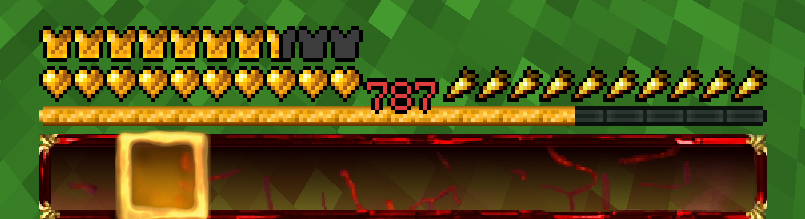
### Ein Texture Pack im Stil von BastiGHG und der 2 Millionen Golden Ruby Edition von ZickZack V5.
Es enthält Hotbar, Custom Sky, Overlay, Totem of Undying, Paintings, angepasste Models und mehr
Hotbar und Sky haben ein dunkleres und besseres Design als im originalen Pack.
Dieses Texture Pack wird ständig angepasst und verbessert. Solltet ihr Fehler finden oder Fragen/anliegen haben, öffnet gerne ein Ticket auf dem verlinkten Discord Server.
Dieses Texture Pack ist nicht von BastiGHG, Badlion oder ZickZack Cosmetics genehmigt oder mit ihnen verbunden. Es handelt sich um eine eigene, abgeänderte Version/Parodie des originalen Packs.
##
English Description
### A texture pack in the style of BastiGHG and the 2 million Golden Ruby Edition of ZickZackV5
It contains Hotbar, Custom Sky, Overlay, Totem of Undying, Paintings, customised models and more.
Hotbar and Sky have a darker and better design than in the original pack.
This texture pack is constantly being adapted and improved. If you find any bugs or have questions/concerns, feel free to open a ticket on the linked Discord server.
The Custom Sky is compatible with OptiFine and Badlion without any problems. Sodium does not support custom skies and requires the installation of [FabricSkyBoxes](https://modrinth.com/mod/fabricskyboxes). Core shader also change the colour of the XP number in the hotbar to red.
This texture pack is not approved by or associated with BastiGHG, Badlion or ZickZack Cosmetics. It is a customised version/parody of the original pack.
Showcase Video
ZickZack V5
> #### 💼🌹 BastiGHG’s current texture pack is the [Projekt Ori Pack](https://modrinth.com/resourcepack/ori)!
—
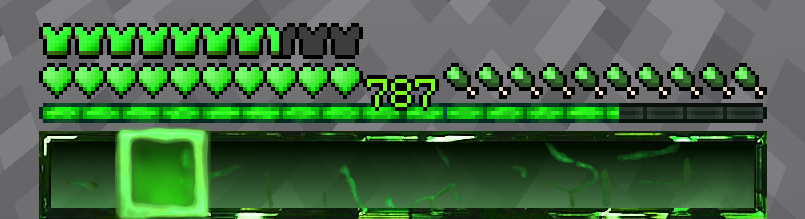
### Ein Texture Pack im Stil von BastiGHG und ZickZack V5
Es enthält Hotbar, Custom Sky, Overlay, Totem of Undying, Paintings, angepasste Models und mehr.
Dieses Texture Pack wird ständig angepasst und verbessert. Solltet ihr Fehler finden oder Fragen/anliegen haben, öffnet gerne ein Ticket auf dem verlinkten Discord Server.
Der Custom Sky ist ohne Probleme mit OptiFine und Badlion kompatibel. Sodium unterstützt keine Custom Skies und erfordert die Installation von [Optiboxes](https://modrinth.com/mod/optiboxes).
Dieses Texture Pack ist nicht von BastiGHG, Badlion oder ZickZack Cosmetics genehmigt oder mit ihnen verbunden. Es handelt sich um eine eigene, abgeänderte Version/Parodie des originalen Packs.
English Description
### A texture pack in the style of BastiGHG and ZickZackV5
It contains Hotbar, Custom Sky, Overlay, Totem of Undying, Paintings, customised models and more.
Hotbar and Sky have a darker and better design than in the original pack.
This texture pack is constantly being adapted and improved. If you find any bugs or have questions/concerns, feel free to open a ticket on the linked Discord server.
The Custom Sky is compatible with OptiFine and Badlion without any problems. Sodium does not support custom skies and requires the installation of [Optiboxes](https://modrinth.com/mod/optiboxes). OptiFine also changes the colour of the XP number in the hotbar to a matching green.
This texture pack is not approved by or associated with BastiGHG, Badlion or ZickZack Cosmetics. It is a customised version/parody of the original pack.
ZickZack V4 Black Edition
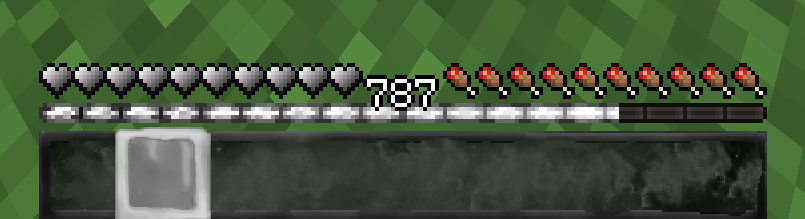
### Ein Texture Pack im Stil von BastiGHG und der 1,5 Millionen Black Edition von ZickZack V4
Es enthält Hotbar, Custom Sky, Overlay, Totem of Undying, Paintings, angepasste Models und mehr.
Dieses Texture Pack wird ständig angepasst und verbessert. Solltet ihr Fehler finden oder Fragen/anliegen haben, öffnet gerne ein Ticket auf dem verlinkten Discord Server.
Der Custom Sky ist ohne Probleme mit OptiFine und Badlion kompatibel. Sodium unterstützt keine Custom Skies und erfordert die Installation von [Optiboxes](https://modrinth.com/mod/optiboxes). Durch Core Shader wird auch die Farbe der XP Zahl in der Hotbar passend weiß gefärbt.
Dieses Texture Pack ist nicht von BastiGHG, Badlion oder ZickZack Cosmetics genehmigt oder mit ihnen verbunden. Es handelt sich um eine eigene, abgeänderte Version/Parodie des originalen Packs.
English Description
### A texture pack in the style of BastiGHG and the 1,5 million Black Edition of ZickZackV5
It contains Hotbar, Custom Sky, Overlay, Totem of Undying, Paintings, customised models and more.
This texture pack is constantly being adapted and improved. If you find any bugs or have questions/concerns, feel free to open a ticket on the linked Discord server.
The Custom Sky is compatible with OptiFine and Badlion without any problems. Sodium does not support custom skies and requires the installation of [Optiboxes](https://modrinth.com/mod/optiboxes). Core Shader also changes the color of the XP number in the hotbar to a fresh white.
This texture pack is not approved by or associated with BastiGHG, Badlion or ZickZack Cosmetics. It is a customised version/parody of the original pack.
ZickZack V4
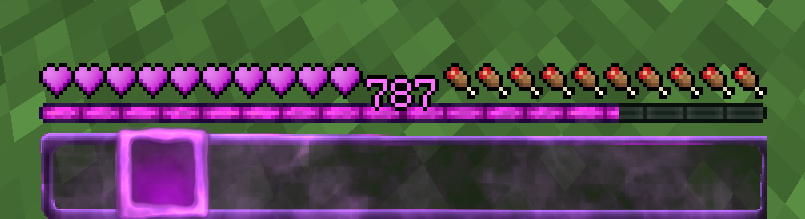
### Ein Texture Pack im Stil von BastiGHG und ZickZack V4
Es enthält Hotbar, Custom Sky, Overlay, Totem of Undying, Paintings, angepasste Models und mehr.
Dieses Texture Pack wird ständig angepasst und verbessert. Solltet ihr Fehler finden oder Fragen/anliegen haben, öffnet gerne ein Ticket auf dem verlinkten Discord Server.
Der Custom Sky ist ohne Probleme mit OptiFine und Badlion kompatibel. Sodium unterstützt keine Custom Skies und erfordert die Installation von [Optiboxes](https://modrinth.com/mod/optiboxes). Durch Core Shader wird auch die Farbe der XP Zahl in der Hotbar passend lila gefärbt.
Dieses Texture Pack ist nicht von BastiGHG, Badlion oder ZickZack Cosmetics genehmigt oder mit ihnen verbunden. Es handelt sich um eine eigene, abgeänderte Version/Parodie des originalen Packs.
English Description
### A texture pack in the style of BastiGHG and ZickZackV4
It contains Hotbar, Custom Sky, Overlay, Totem of Undying, Paintings, customised models and more.
This texture pack is constantly being adapted and improved. If you find any bugs or have questions/concerns, feel free to open a ticket on the linked Discord server.
The Custom Sky is compatible with OptiFine and Badlion without any problems. Sodium does not support custom skies and requires the installation of [Optiboxes](https://modrinth.com/mod/optiboxes). Core shaders also change the colour of the XP number in the hotbar to purple.
This texture pack is not approved by or associated with BastiGHG, Badlion or ZickZack Cosmetics. It is a customised version/parody of the original pack.
ZickZack ORI Red 🌹
# BastiGHG ORI Red

This is a resourcepack that mimics the texturepack used by BastiGHG on the CraftAttack 13 server. The pack comes with custom skyboxes, updated hud & hotbar, Kugelschreiber Bow Model, red arrows and more!
### Contributors
– **@inowtp** was a huge help with the pack, he contributed the correct skyboxes for the pack and helped with further tweaks and enhancements, thanks a lot for helping me out!
### ORI Suitcase
If you want to get the mysterious suitcase in-game, please checkout the great project by **davidpel**: [https://modrinth.com/project/kH6OD1Z9](https://modrinth.com/project/kH6OD1Z9)
### ORI Kugelschreiber / Pen & Tracker
This texturepack includes the pen & tracker models, which show up when you rename a bow to either ‘Kugelschreiber’ or ‘Pen’ and a compass to ‘Tracker’. There are further details in the gallery!


## Texture changes
– GUI hearts and armour are red
– Apples as food bar
– Optifine/Optiboxes Custom Sky (Red night sky, blue day sky (double sun & artifacts fixed)
– Arrows are Red
– Added alternative model (Kugelschreiber/pen) for the bow
– Added alternative model (Tracker) for the compass
> **NOTE about the Tracker:** The Tracker may appear glitchy when moving, because animation frame time is reset when the compass changes direction, this is a limitation by minecraft which can (sadly) not be fixed.
> **NOTE about custom SkyBoxes:** You need to install a mod in order to make the custom skyboxes work, I recommend Optiboxes for this. If you are using Optifine or if you’re playing on BadLion, the pack should just work fine!
___
### Resourcepack Support
For any questions or problems with the resource pack, please contact me on Discord!
**PLEASE** do not ask for support in the BastiGHG Discord or in his Twitch Chat!
[](https://discord.gg/CE3rzSnzzw)
___
## **DISCLAIMER:**
> I am not BastiGHG, this is a community made resourcepack! This resourcepack is not approved by or associated with BastiGHG in any way! Some textures are not available to me, so I can’t include them!
ZickZack ORI Edition
> **THIS IS NOT AN OFFICIAL PACK FROM BASTIGHG IN ANY WAY.** Its Fanmade!
# BastiGHG CraftAttack 13 – ORI Pack
### Custom HUD, Sky and much more!
The weird green stars are not intended, its a client side bug. Credits to [L3_N0X](https://modrinth.com/resourcepack/zickzack-ori-red) (I used his creation as a base for many HUD elements. you are the goat Lenox)

—————————————————————————–
### How to get the New BastiGHG ORI Suitcase?
Put a normal totem of undying in an anvil and rename it to “????”

### The old “Fake” ORI Suitcase?
Rename a Totem of Undying to “???”

—————————————————————————–
### The special Weapen
a regular pen? No, put youre Bow in an anvil and rename it to “Kugelschreiber” or “Pen” to get BastiGHG´s special pen.

—————————————————————————–
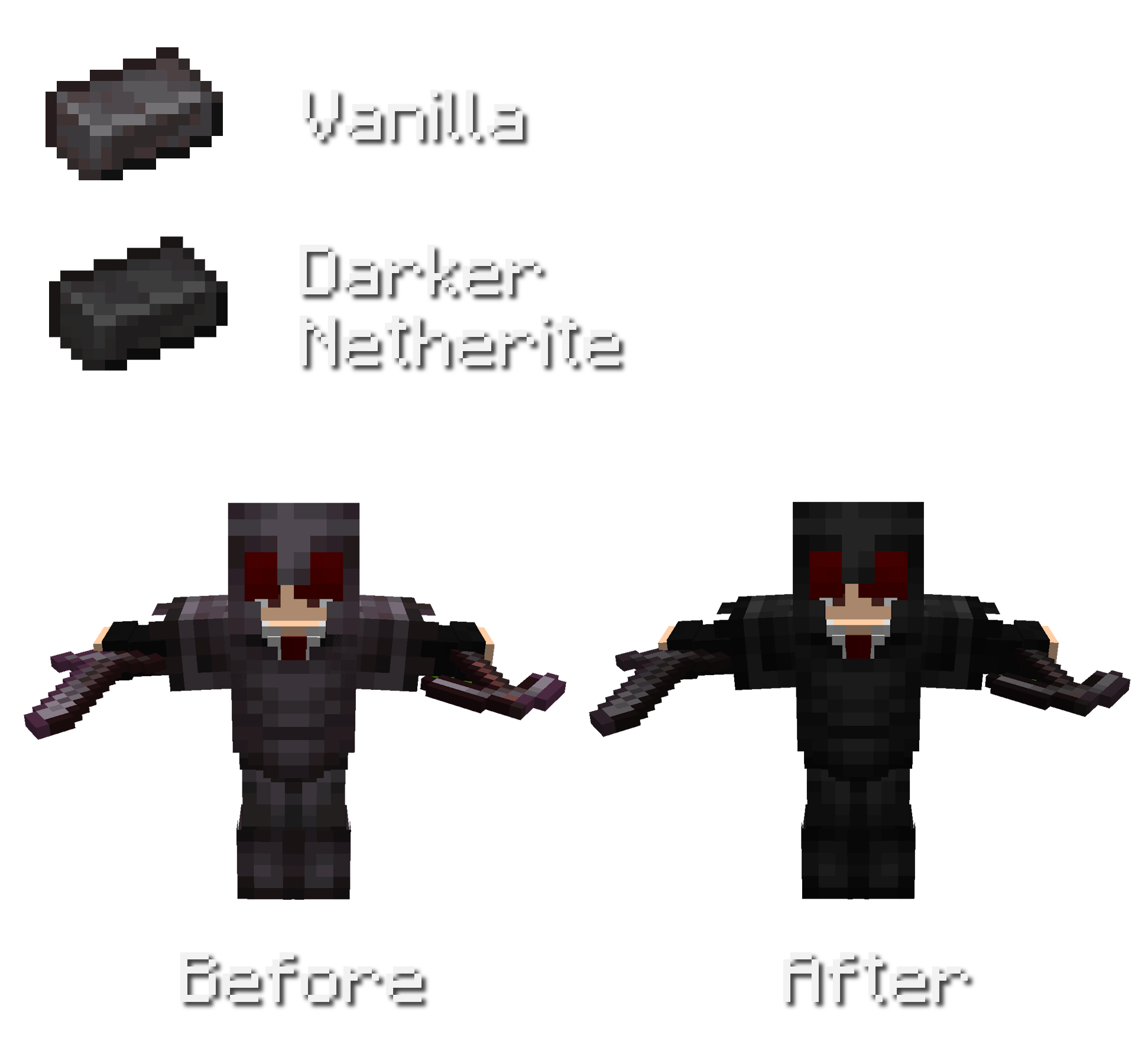
### Darker Netherite
Overall less saturated and darker netherite.
Also changed colors for netherite trim´s on netherite armor.
Other Features
No Pumpkin Blur
Less Rain/Snow Texture
ZickZack Light Blue
# ZickZack Light Blue


This is a resourcepack that mimics the texturepack used by BastiGHG in early 2026. The pack comes with custom skyboxes, updated hud & hotbar, custom XP Level color [Requires [Polytone](https://modrinth.com/mod/polytone)] and everything is made configurable using [ResPackOpts](https://modrinth.com/mod/respackopts)
## Texture changes
– GUI hearts and armour are light blue
– Golden carrots as food bar
– Optifine/Skyboxify Custom Sky (light blue night sky, blue day sky (double sun & artifacts fixed)
> **NOTE about custom SkyBoxes:** You need to install a mod in order to make the custom skyboxes work, I recommend [Skyboxify](https://modrinth.com/mod/skyboxify) for this. If you are using Optifine, the pack should just also work fine!
> **NOTE about the configuration Screen:** You need to install a mod in order to make configuration screen work, the mod is called [ResPackOpts](https://modrinth.com/mod/respackopts)!
___
### Resourcepack Support
For any questions or problems with the resource pack, please contact me on Discord!
**PLEASE** do not ask for support in the BastiGHG Discord or in his Twitch Chat!
[](https://discord.gg/CE3rzSnzzw)
___
## **DISCLAIMER:**
> I am not BastiGHG, this is a community made resourcepack! This resourcepack is not approved by or associated with BastiGHG in any way! Some textures are not available to me, so I can’t include them!