You Received a Crit from the Arrow│你受到了箭矢的暴擊
# Function│功能
Arrows fired by AI mobs with bows or crossbows will now be crit arrows.│現在AI生物透過弓或弩所射出的箭矢都會是暴擊箭矢。
# Function│功能
Arrows fired by AI mobs with bows or crossbows will now be crit arrows.│現在AI生物透過弓或弩所射出的箭矢都會是暴擊箭矢。

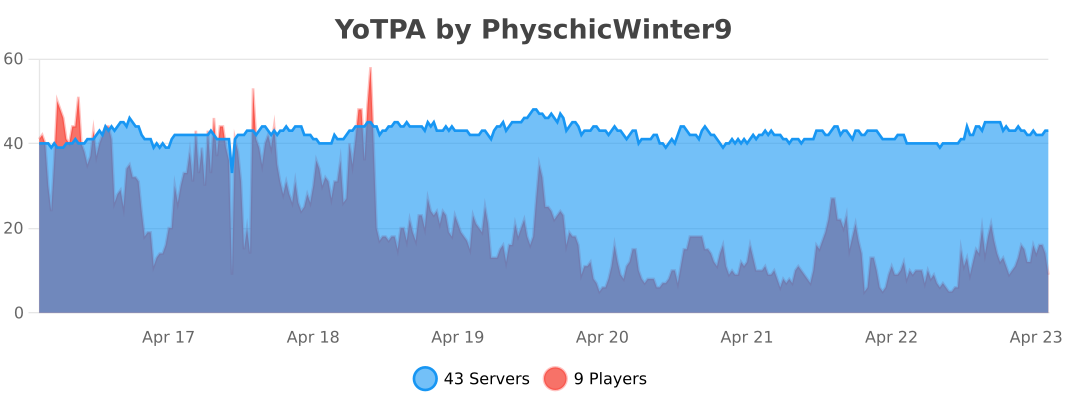
# YoTPA
YoTPA is a lightweight and powerful teleport request plugin with adaptive performance optimization. Simple to use, easy to configure, and built for modern Minecraft servers.
## Features
### Adaptive Performance System
The plugin automatically detects your server’s available RAM and optimizes itself accordingly – zero configuration needed!
**4 Performance Modes:**
– **ULTRA_LIGHT** – For 512 MB – 1 GB RAM (Free/Cheap VPS)
– Best for: 5-10 players, minimal plugins
– **LIGHT** – For 1-2 GB RAM (Low-end servers)
– Best for: 10-15 players, light plugins
– **BALANCED** – For 2-4 GB RAM (Mid-range servers)
– Best for: 15-25 players, moderate plugins
– **HIGH_PERFORMANCE** – For 4+ GB RAM (High-end servers)
– Best for: 25+ players, any plugins
**Performance Benefits:**
– 30-70% less memory usage
– 25-60% less CPU usage
– Up to 83% faster maintenance tasks
– Dynamic optimization based on your server specs
### Core Features
– **Simple TPA System** – Request to teleport to other players or invite them to you
– **Countdown Timer** – Configurable delay before teleporting with visual feedback
– **Title Display** – Clear visual indication of teleport countdown
– **Movement Detection** – Teleport cancels if player moves during countdown
– **Custom Sound Effects** – Fully customizable audio feedback using Minecraft’s sound registry
– **Config Validation** – Prevents server crashes from broken configs with detailed error messages
– **Permission System** – Fine-grained access control
– **Request Management** – Toggle receiving requests, cancel outgoing requests
– **Multi-Threading Support** – Thread-safe for more concurrent players
– **Customizable Messages** – Fully localizable and configurable messages
### Internationalization (NEW in 1.4.0)
Customize all plugin messages in any language with full MiniMessage support:
“`yaml
prefix: “[YoTPA] ”
commands:
tpa:
sent: “Teleport request sent to {target}”
received: “{requester} wants to teleport to you.”
“`
**MiniMessage Features:**
– Rich text formatting (bold, italic, underlined)
– Color gradients: `
– Rainbow effect: `
– Hex colors: `<#FF5733>text`
### Custom Sound Effects
Customize all plugin sounds using Minecraft’s sound IDs:
“`yaml
sounds:
countdown: “block.note_block.pling”
success: “entity.enderman.teleport”
cancel: “entity.villager.no”
request: “entity.experience_orb.pickup”
“`
Test sounds in-game: `/playsound minecraft:block.note_block.pling master @s`
## Configuration
YoTPA’s `config.yml` file allows you to customize various aspects of the plugin:
– Request timeout duration
– Cooldown between requests
– Teleport delay countdown
– Performance mode settings
– Sound effects for different actions
– Feature toggles (statistics, bStats, titles, sounds)
### Configuration File
“`yaml
# YoTPA Configuration v1.3.0-Adaptive
# Smart Auto-Optimization for All Server Sizes
# Request timeout in seconds (how long before a request expires)
# Recommended: 30-120 seconds
request-timeout: 60
# Request cooldown in seconds (how long before sending another request)
# Recommended: 15-60 seconds
request-cooldown: 30
# Teleport delay in seconds (countdown before actual teleport)
# Recommended: 3-10 seconds
teleport-delay: 5
# Performance mode settings
performance:
# Options: AUTO, ULTRA_LIGHT, LIGHT, BALANCED, HIGH_PERFORMANCE
mode: AUTO
# Sound effects (use Minecraft sound names)
sounds:
countdown: “block.note_block.pling”
success: “entity.enderman.teleport”
cancel: “entity.villager.no”
request: “entity.experience_orb.pickup”
# Feature toggles
features:
statistics: true
bstats: true
titles: true
sounds: true
“`
### Messages Configuration (messages.yml)
“`yaml
# Customize your prefix
prefix: “[YoTPA] ”
# All messages are customizable
commands:
tpa:
usage: “Usage: /tpa ”
sent: “Teleport request sent to {target}”
received: “{requester} wants to teleport to you.”
teleport:
countdown:
title: “Teleporting…”
subtitle: “Don’t move!”
message: “Teleporting in {seconds} seconds”
“`
## Customization Examples
### Change Language to Spanish
Edit `messages.yml`:
“`yaml
prefix: “[YoTPA] ”
commands:
tpa:
usage: “Uso: /tpa ”
sent: “Solicitud enviada a {target}”
received: “{requester} quiere teletransportarse a ti.”
“`
Then use `/tpareload` to apply changes!
### Add Beautiful Gradients
“`yaml
prefix: “✦ YoTPA ✦ ”
teleport:
countdown:
title: “Teleporting…”
message: “Teleporting in {seconds} seconds”
“`
### Customize Colors
“`yaml
prefix: “[TPA] ”
commands:
tpa:
sent: “Request sent to {target}”
“`
### Use Hex Colors
“`yaml
prefix: “[YoTPA] ”
teleport:
success: “Teleported to {target} successfully!”
“`
**Placeholders:**
– `{player}` – Player name
– `{target}` – Target player name
– `{requester}` – Requester player name
– `{seconds}` – Number of seconds
– `{cooldown}` – Cooldown duration
### Configuration Sections Explained
**General Settings:**
– `request-timeout` – How long (in seconds) teleport requests remain valid (recommended: 30-120)
– `request-cooldown` – Time (in seconds) before a player can send another request (recommended: 15-60)
– `teleport-delay` – Countdown time (in seconds) before teleportation happens (minimum: 1)
**Performance Settings:**
– `performance.mode` – AUTO (recommended), ULTRA_LIGHT, LIGHT, BALANCED, or HIGH_PERFORMANCE
– AUTO automatically detects your server’s RAM and selects the best mode
**Sound Settings:**
– All sounds use Minecraft’s sound registry format (lowercase with dots)
– The plugin validates sounds on config reload
– Full sound list: https://minecraft.wiki/w/Sounds.json
**Feature Toggles:**
– `statistics` – Enable or disable statistics tracking
– `bstats` – Enable or disable bStats metrics
– `titles` – Enable or disable title animations during countdown
– `sounds` – Enable or disable all sound effects
### Config Validation
When reloading with `/tpareload`, the plugin validates:
– YAML syntax
– All values are in valid ranges
– Sounds exist in Minecraft’s registry
– Shows detailed error messages if invalid
Example validation output:
“`
Configuration validation failed!
✗ teleport-delay must be at least 1 second
✗ Sound ‘countdown’ (invalid.sound) not found in registry
Warnings:
• request-timeout (5) is very low, recommended: 30-120
Config not applied. Fix errors and try again.
Using previous configuration.
“`
## How to Edit and Reload
1. Edit the `plugins/YoTPA/config.yml` file
2. Save your changes
3. Use `/tpareload` in-game to apply changes with validation
## Commands Overview
| Command | Description | Permission |
| :—— | :———- | :——— |
| `/tpa
| `/tpaccept` | Accept a pending teleport request | `yotpa.tpaccept` |
| `/tpadeny` | Deny a pending teleport request | `yotpa.tpadeny` |
| `/tpahere
| `/tpacancel` | Cancel your outgoing teleport request | `yotpa.tpacancel` |
| `/tpatoggle` | Toggle receiving teleport requests | `yotpa.tpatoggle` |
| `/tpareload` | Reload the plugin configuration | `yotpa.reload` |
| `/tpainfo` | View plugin information and statistics | `yotpa.info` |
| `/tpastats` | View teleport statistics | `yotpa.stats` |
**Default:** All permissions are granted to all players by default.
## Detailed Commands
### TPA Command
Send a request to teleport to another player.
“`
/tpa
| Parameter | Type | Description |
| :——– | :— | :———- |
| `player` | `string` | **Required**. The player name you want to teleport to |
**Examples:**
“`
/tpa Steve # Request to teleport to player named Steve
/tpa Alex123 # Request to teleport to player named Alex123
“`

**Notes:**
– You cannot send a request to yourself
– There is a configurable cooldown between sending requests (default: 30 seconds)
– Request will expire after a configurable time (default: 60 seconds)
– Target player will receive a notification with clickable accept/deny buttons
—
### TPAccept Command
Accept a pending teleport request from another player.
“`
/tpaccept
“`
No parameters required – accepts the most recent teleport request.
**Examples:**
“`
/tpaccept # Accept the pending teleport request
“`

**Notes:**
– Only works if you have a pending teleport request
– After accepting, the teleportation will begin with a countdown
– The player must stay still during the countdown or it will be cancelled
– If accepting a `/tpa` request, the requester will teleport to you
– If accepting a `/tpahere` request, you will teleport to the requester
—
### TPADeny Command
Deny a pending teleport request from another player.
“`
/tpadeny
“`
No parameters required – denies the most recent teleport request.
**Examples:**
“`
/tpadeny # Deny the pending teleport request
“`

**Notes:**
– Only works if you have a pending teleport request
– The requester will be notified that their request was denied
– Request is immediately removed from the system
—
### TPAHere Command
Request another player to teleport to your location.
“`
/tpahere
| Parameter | Type | Description |
| :——– | :— | :———- |
| `player` | `string` | **Required**. The player name you want to request to teleport to you |
**Examples:**
“`
/tpahere Steve # Request Steve to teleport to you
/tpahere Alex123 # Request Alex123 to teleport to you
“`

**Notes:**
– You cannot send a request to yourself
– There is a configurable cooldown between sending requests (default: 30 seconds)
– Request will expire after a configurable time (default: 60 seconds)
– The target player must accept with `/tpaccept`
—
### TPACancel Command
Cancel your outgoing teleport request.
“`
/tpacancel
“`
No parameters required – cancels your most recent outgoing request.
**Examples:**
“`
/tpacancel # Cancel your pending request
“`
**Notes:**
– Only works if you have an active outgoing request
– The target player will be notified that the request was cancelled
– Useful if you sent a request by mistake
—
### TPAToggle Command
Toggle whether you want to receive teleport requests.
“`
/tpatoggle
“`
No parameters required – toggles your request reception status.
**Examples:**
“`
/tpatoggle # Toggle receiving teleport requests on/off
“`
**Notes:**
– When toggled off, other players cannot send you teleport requests
– You will receive a message showing your current status
– Your setting persists across server restarts
—
### TPAReload Command
Reload the plugin configuration with validation.
“`
/tpareload
“`
No parameters required – reloads and validates the configuration file.
**Examples:**
“`
/tpareload # Reload the plugin configuration
“`

**Notes:**
– Requires the `yotpa.reload` permission (default: op only)
– Validates YAML syntax and all configuration values
– Checks that all sounds exist in Minecraft’s registry
– Shows detailed errors if config is invalid
– Only applies config if all validation passes
– Useful after making changes to the config.yml file
—
### TPAInfo Command
View plugin information and real-time statistics.
“`
/tpainfo
“`
No parameters required – displays plugin information.
**Examples:**
“`
/tpainfo # View plugin info and stats
“`
**Shows:**
– Current performance mode (auto-detected based on RAM)
– Optimization level and settings
– Active teleport requests
– Ongoing teleports
– Memory usage statistics
– Plugin version
**Notes:**
– Useful for monitoring plugin performance
– Helps diagnose issues
– Shows how the plugin has optimized itself for your server
—
### TPAStats Command
View teleport statistics and usage data.
“`
/tpastats
“`
No parameters required – displays teleport statistics.
**Examples:**
“`
/tpastats # View teleport statistics
“`
**Shows:**
– Total teleport requests sent
– Total teleport requests received
– Success rate
– Most active players
– Other usage metrics
**Notes:**
– Requires `features.statistics: true` in config
– Statistics are tracked per player
– Data persists across server restarts
## Optimization Tips
### For FREE/LOW-SPEC servers (512 MB – 1 GB):
– Keep mode as AUTO or ULTRA_LIGHT
– Limit total plugins to 5-8
– Set view-distance to 4 in server.properties
– Use Paper instead of Spigot
– Limit players to 5-10 concurrent
### For MID-RANGE servers (2-4 GB):
– Use AUTO or BALANCED mode
– Can run 10-15 plugins
– view-distance 6-8
– 15-25 players should be fine
### For HIGH-END servers (4+ GB):
– Use AUTO or HIGH_PERFORMANCE mode
– No significant plugin limitations
– view-distance 10-12
– 25+ players supported
## Performance
YoTPA is built with performance in mind:
– **Lightweight** – Minimal impact on server TPS
– **Thread-Safe** – No lag from concurrent operations
– **Memory Efficient** – Adapts to your server’s resources automatically
– **Async Operations** – Non-blocking task execution
– **Lock-Free** – No race conditions or deadlocks
## Installation
1. Download the latest JAR from the releases
2. Place the JAR in your server’s `plugins` folder
3. Restart your server
4. That’s it! The plugin will auto-configure based on your server’s specs
—
**Note:** This is my first plugin project!.
About this pack:
– This resource pack is specifically compiled and optimized for the streamer YOSIHIDE, often referred to as the “Japanese DrDonut.”
Key Features:
– Crystal PvP Optimization: Tailored for high-stakes combat with improved visibility.
– Visual Tweaks: Includes Low Fire, Lower Shield,and Small Crosshair for better stream quality.
Credits:
– Special thanks to Vanilla Tweaks (vanillatweaks.net) for the utility elements. These have been
carefully selected to match YOSIHIDE’s playstyle.
Vanilla Tweaks:
– Included Features: Arabic Numerals (Enchantment Levels), Smaller Crosshair, Utility tweaks.
License: CC BY-NC-SA 4.0
– Note: These assets are used under the Creative Commons Attribution-NonCommercial-ShareAlike 4.0 International License.
# Your Options Shall Be Saved (YOSBS)
Your Options Shall Be Saved (YOSBS) is a lightweight utility mod that lets modpack creators define default configuration files without overwriting player preferences
Updating a modpack often resets custom settings like keybinds or mod configs, because most launchers replace the entire `config/` folder
YOSBS solves this by copying any file placed in `config/yosbs/` to its proper location only once on first launch — and never again
This gives full control to the pack author:
– Files inside `config/yosbs/` are treated as user-owned: copied once, then left untouched
– Files inside `config/` behave as usual: they will be replaced on each update
That way, you decide which configs should persist, and which should reset
## Features
– **Zero-config**: just drop the defaults under `/config/yosbs/…` (or legacy `/config/yosbr`)
– Works for **any** file – `options.txt`, mod configs, `optionsshaders.txt`, etc
– Runs in the **pre-launch phase**, before Fabric/Forge starts loading the rest of the mods
## Compatibility & Installation
1. Fabric Loader ≥ 0.4.0 *(No Fabric API required)*
2. Minecraft 1.14 – 1.21.x
3. Requires Java 8 or newer
4. Put the YOSBS jar in `mods/` and launch once – the folder `/config/yosbs` is created automatically (or create it manually)
## Usage examples
| Want to ship… | Do this before first launch |
|—————|—————————-|
| A default `options.txt` | Place your file at `/config/yosbs/options.txt` |
| A REI config | `/config/yosbs/config/roughlyenoughitems/config.json5` |
## Credits
Inspired by the original Your Options Shall Be Respected – YOSBR by *shedaniel*
1. Changes the scale of hunger and hearts (does not work on hardcore)
2. Changes the golden apple and carrot
3. Changes the trident
4. Items with the name:
– flint and steel – lighter
– shears – pruner
– totem of undying – yortev
– netherite and diamond sword – divider
– netherite and diamond axe – chopper
– netherite and diamond pickaxe – crusher
– netherite and diamond shovel – breaker
– netherite and diamond hoe – braid
# 📖 Description
**Yori3o’s Grappling Hooks** is a mod inspired by Toffy’s Hooks that adds a new parkour and movement item to the game: grappling hooks.
## **Features:**
– Hooks made of various materials, varying in length and durability. They can be repaired and enchanted with various enchantments, including three new ones.
– Almost realistic physics: the hook simulates the physics of a rigid rope.
– You can climb up and down the rope, and also jump from it by pressing the keybinds.
– The hook breaks fragile blocks, which can be prevented by the “Gentle Touch” enchantment.
– Hooks are sometimes found in certain structures where they can be very useful.
– Maximum vanilla style and deep integration into the game.
– **Common:** You can configure the climbing speed and the soft rope mode. You can also enable “funnyMode” which will change some settings for fun.
– **Server:** You can adjust hunger consumption and disable breaking fragile blocks with a hook. You can also blacklist some blocks so that the hook cannot latch onto them.
**Important**: some values such as block blacklist are only available in config files.
You can change hook parameters, such as range, in **_mod.jar/yo_hooks/hooks.json_**.


The mod supports add-on creation! You can create any compatibility with any mod for new tool materials: Wiki
**If you found a bug or have any suggestions, please submit an issue on GitHub.**
**Description:**
Yoo RAM shows real-time memory usage, including used, free, and total RAM. It helps administrators and users monitor system performance easily, making memory management simple and transparent. The tool is lightweight, reliable, and designed for quick insights into how resources are being used.
**Commands:**
“`
/ram – Displays current RAM usage.
/yoo-ram – An alternative command for the same functionality.
/rambar – toggles the RAM BossBar.
/yoo-ram bar – alternative access to the BossBar
“`
**Permissions:**
“`
yoonai.ram.command.ram – Allows access to the `/ram(/rambar)` and `/yoo-ram(/yoo-ram bar)` commands.
“`
# YooAnnounce
**YooAnnounce** – Minecraft plugin for automatic chat announcements.
## Commands
| Command | Alias | Description |
| — | — | — |
| `/yoo-announce help` | `/ya help` | Displays the help menu and plugin information. |
| `/yoo-announce reload` | `/ya reload` | Reloads the configuration and restarts the announcement task. |
## Permissions
| Permission | Description
| — | —
| `yoonai.announce.command.help` | Allows use of the `/ya help` command.
| `yoonai.announce.command.reload` | Allows use of the `/ya reload` command.
## Configuration
* All configuration files are located in the plugin folder.
* `config.yml` – main plugin settings (messages, intervals, etc.)
## Reporting Bugs
* If you encounter issues or have suggestions, please create an Issue.
* Provide as much detail as possible (Minecraft version, plugin version, error messages).
# YOGI+ | Crystal PvP Resource Pack
A meticulously crafted resource pack designed for the competitive crystal PvP scene in **Minecraft 1.21 and above**. YOGI+ enhances your gameplay with stunning animations and clean, low-visual-clutter textures that provide both a visual edge and buttery-smooth performance.
## ✨ Features
### 🔥 **Optimized Visuals**
* **Low Fire:** Significantly reduces the height and opacity of fire, providing clear visibility of your enemies and feet in combat.
* **Clean GUI:** A streamlined and minimalist interface that keeps your screen focused on the fight.
### ⚡ **Dynamic Animations**
* **Animated Mace:** Features a smooth, custom animation for the Mace, making it feel as powerful as it is.
* **Animated Ender Pearls:** Easily track your throws with a distinct, swirling animation.
* **Animated Wind Charges:** Visual cues for wind charges make timing and aiming your shots more intuitive.
### 🎯 **Competitive Edge**
* **Reduced Distraction:** Every texture is designed to remove unnecessary details that can clutter your screen during intense fights.
* **Crystal Clarity:** Clear and recognizable textures for end crystals and other essential PvP items.
## 🛠️ Compatibility
* **Game Versions:** **1.21, 1.21.1, 1.21.2, 1.21.3, 1.21.4**+ (The entire 1.21.x series)
* **Loader:** Vanilla / Compatible with all clients that support resource packs.
## 📦 Installation
1. Download the `YOGI+.zip` file.
2. Place it in your Minecraft `resourcepacks` folder.
3. Activate it in your game’s Resource Packs menu.
—
**Designed for CPvP, built for performance.**
Reactive Music pack designed for casual survival, containing 80+ pieces of music.
– 01: 創作彼女の恋愛公式
– 02: 夜の向日葵
– 03: graduation
– 04: Lover Contract -Emi-
– 05: 夏の大三角
– 06: 桜色の恋
– 07: Treasure in your pocket
– 08: 波涛声的香沁
– 09: Adventure for Black
– 10: 夏風の始まり
– 11: 东日のハイサッシュ
– 12: はじまりの風
– 13: 勇気の向こうに
– 14: 朝霞
– 15: 紅い瞳に映るセカイ
– 16: 透明な白い日常
– 17: 夏休みの過ごし方
– 18: 陽射し入る窓
– 19: きみのこえ
– 20: ちいさな奇跡
– 21: 暖かな日々の中で
– 22: Time capsule
– 23: ぬくもりの時間
– 24: 風車の丘で
– 25: Moonlight Garden
– 26: 夜想曲
– 27: 輝く星を奏でて
– 28: 開花
– 29: cool
– 30: 空恋 -sorakoi- instrumental ver
– 31: Dear good friends
– 32: コントレイル
– 33: 胸の奥底
– 34: 迫られる決断
– 35: StarGaze
– 36: Everlasting Shine
– 37: 途切れた赤い糸
– 38: AI -ArrangE-
– 39: 秋姉妹のなく顷に
– 40: Blush
– 41: 纯纯的夏天
– 42: 暮春
– 43: 夏影
– 44: 青藤色仲夏
– 45: 託された想い
– 46: Crossroads
– 47: Hirusagari No Yuutsu
– 48: 雲流れ
– 49: Shade, Hat, and Wind Chimes
– 50: Shelter (乐器版)
– 51: Akinari Symphony
– 52: 大精灵之泉主题曲
– 53: Mountain Journey
– 54: かわくだり
– 55: Yukikaze
– 56: 秋姉妹のなく顷に in the autumn sky
– 57: Peer Gynt Suite No. 1, Op.46: I. Morning Mood
– 58: Summer (Nature’s Crescendo)
– 59: The Awakening
– 60: 儿时的夏日
– 61: Concerning Hobbits
– 62: 暮春
– 63: To The Ends of Our World
– 64: 纯纯的夏天
– 65: 稻香 (原版伴奏)
– 66: 過ぎ去りし夏
– 67: Spring (It’s a Big World Outside)
– 68: Pelican Town
– 69: Stardew Valley Overture
– 70: 静寂の森
– 71: Iced iced coffee
– 72: Starry Sky
– 73: 田野 (原调)
– 74: Expect
– 75: 風待ち
– 76: Sacred Play Secret Place
– 77: Blush (feat. Mylk)
– 78: Call Me a Fool
– 79: Wolfs
– 80: Travelers’ Encore
– 81: 青藤色仲夏 (氛围纯享版)
– 82: Minoriya
– 83: Boss2
– 84: Badinerie
– 85: The Winner Is
– 86: In the Hall of the Mountain King
– 87: The Devil is in the Details
– 88: Bad Apple
– 89: Underground