YeeeesMOTD
Customized server motd and random icon, it can use player’s head as server icon,like this:
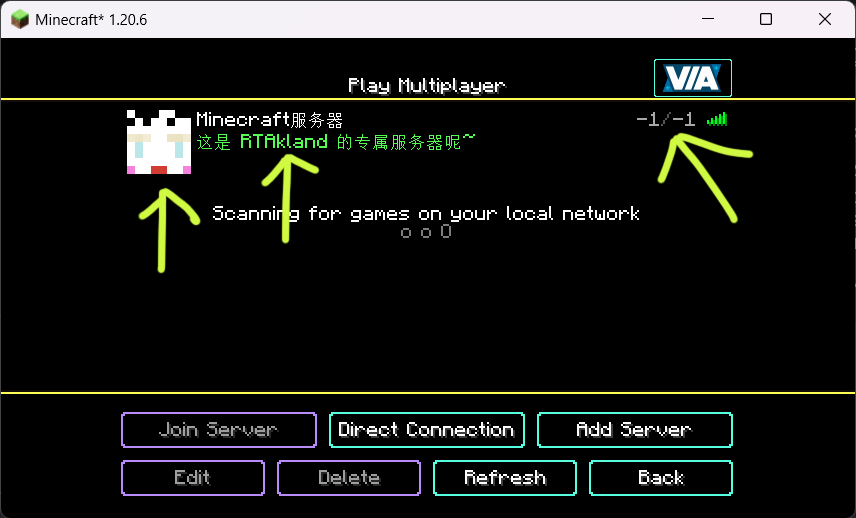)
also use player’s name as motd description, and random icon
everything is up to you
for more information please go to github: https://github.com/RTAkland/YeeeesMOTD
YearCalendar
### ⚠️ This plugin is no longer being updated.
# YearCalendar
**Original Calendar plugin.**
*Let your players check the date!*
—
## Features
– GUI: Keep it simple with only `/calendar` command
– Edit: Edit months, days, colors in config.yml
—
## Commands & Permissions
| Command | Alias | Description | Permission |
|—————|——-|———————|——————–|
| `/calendar` | – | Opens main gui | `calendar365.use` |
—
## Images / Screenshots
Section “**Gallery**”
—
## Files
config.yml
“`yaml
messages:
no-permission: “§cYou don’t have permission to use this command!”
player-only: “§cThis command can only be used by players!”
gui:
month-selector-title: “§7§lCalendar 365”
back-button-name: “§c« Back to Months”
months:
– name: January
days: 31
title: “§7Days: §f31”
– name: February
days: 28
title: “§7Days: §f28”
– name: March
days: 31
title: “§7Days: §f31”
– name: April
days: 30
title: “§7Days: §f30”
– name: May
days: 31
title: “§7Days: §f31”
– name: June
days: 30
title: “§7Days: §f30”
– name: July
days: 31
title: “§7Days: §f31”
– name: August
days: 31
title: “§7Days: §f31”
– name: September
days: 30
title: “§7Days: §f30”
– name: October
days: 31
title: “§7Days: §f31”
– name: November
days: 30
title: “§7Days: §f30”
– name: December
days: 31
title: “§7Days: §f31”
date-display:
today-status: “§f§lTODAY”
past-status: “§a§lPast”
future-status: “§c§lFuture”
day-format: “§e{month} {day}, {year}”
status-prefix: “§7Status: ”
click-to-view: “§7Click to view!”
“`
Documents
Year Round Christmas Chests
This resource pack makes chests use the Christmas texture. Unlike other resource packs, this is fully compatible with resource packs that change the Christmas Chest texture, as it uses atlases to achieve the effect.
Yeallux_’s cat Totem
A resource pack that edits the Totem Of Undying to a cat photo !
Yeahlows PVP Pack
THIS IS A TEXTURE PACK
Okay you probably already knew that…
This texture pack prioritizes making the most important changes for a pvp pack without making the game look completley different. Older versions of this texture pack include short swords for 1.8, low shields and smaller items.
This pack supports both 1.6.1-1.8.9 for short swords, and 1.21-1.21.10 (Might support older versions)

Ye Shunguang Totem
This resource pack replaces the default Totem of Undying with a custom texture inspired by **_Ye Shunguang from Zenless Zone Zero_**. The original Minecraft totem is swapped out for a stylized depiction of Yeshenguāng, designed to blend smoothly with the game’s visual style while standing out as a unique cosmetic change. The pack does not affect gameplay in any way, serving purely as a visual enhancement for players who enjoy personalizing their world and showcasing their appreciation for **Zenless Zone Zero.**
YDM’s Scorpions
YDM’s Scorpions for FORGE/FABRIC/NEOFORGE
This mod adds scorpions to the game!
Brown and Emperor Scorpion spawns in the desert, while the Nether Scorpion Spawns in the Soul Sand Valley.
They will burrow themself in to the ground on daylight.
They drop Scorpion stingers that can be brewed into Venom Coat Potion.
After consuming this potion you will get a venom “armor” that will poison attackers!
If you have a spider eye in your hand then they won’t attack you and are tempted by it.
So like that you can make them follow you.
Other mod biome compatibility!
Spawn config options:
– Biome name(s) where it should spawn
– Spawn rate (The higher, the more chance for spawning a group)
– Minimum and maximum number of a Group
– Poison Duration (20 means -> 20 seconds)
– Health Point
– Damage Value
If you want the scorpions to spawn in another mods biome.
You have to change the biome_name line:
For example to:
biome_name = “modid:name_of_the_biome”
To let it spawn in more biomes you have to put a comma (,) between the biome names like this:
biome_name = “modid:name_of_the_biome,minecraft:desert”
The 1.19 version doesn’t have a spawn config.
The biome world generation changed a bit and now the spawn settings will be editable in json files.
To select the desired biomes for the mob you have to edit the biome tags.
(/data/scorpions/tags/worldgen/biome/…)
To edit the spawn settings you have to edit the biome_modifier
(/data/scorpions/forge/biome_modifier/…)
Suggested by: gohkenytp
Thanks for downloading this mod!
YDM’s Red Panda
This mod adds red pandas to the game!
They will spawn in bamboo jungles and are neutral.
You can tame them with sweet berries and bred them with bamboo.
If you feed them bamboo, then their hp will be restored.
Upon death it has a chance to drop a single bamboo.
You can edit the biome settings in the common config for the 1.16.5/1.18.x versions.
In 1.19 spawn settings can be changed with the biome tag (has_red_panda.json)
and biome modifier (spawn_red_panda.json).
In the fabric versions the name of the spawn config is “ydms_redpandaconfig.properties” in the config folder
This mod was suggested by: gohkenytp
Thanks for downloading this mod
Those who used older versions, please delete your red panda config file if you want to use the new default spawn settings
If not then you can keep the file
YDM’s MobHealthBar
### Mob Health Bar Mod
#### Forge, Fabric and Neoforge
This mod adds a health bar above the mob.
There are 13 type of bars available that are positionable.
You can open the selector by pushing the “H” button.
Other changeable options for the bars are:
– Render distance
– scale size
– name display
– health points display (if the selected bar type supports hp display).
– make a bar only appear when the mob is aggressive, damaged or when you hover over it
– texture visibility
– show only damaged mobs
– blacklist mobs in config
– If you use forge then:
(type after blacklist = minecraft:cow,minecraft:pig and like this these mobs will be blacklisted)
– If you use fabric then:
(type after blacklist = cow,pig and like this these mobs will be blacklisted)
Hope you like it.
Please let me know if you find any bugs.
Thanks for downloading this mod!
YDM’s Iceologer
#### YDM’s Iceologer
**For forge, neoforge and fabric**
This mod adds the Iceologer from the 2020 mob vote and an Ice Chunk Block
that is summoned by the Iceologer and you need to mine it with a tool that is enchanted with Silk Touch.
Currently it spawns in:
– Snowy taiga
– Snowy slopes
– Frozen peaks
-Jagged peaks
– Snowy beach
– Snowy plains
– Ice spikes
– Frozen Ocean
– Frozen river
Other mod biome compatibility!
You can set the spawning biomes for the Iceologer.
You can find the config for it in your run folder.
If you want the iceologer to spawn in another mods biome.
You have to change the biome_name line:
For example to:
biome_name = “modid:name_of_the_biome”
To let it spawn in more biomes you have to put a comma (,) between the biome names like this:
biome_name = “modid:name_of_the_biome,minecraft:snowy_plains”
Other options in the config is:
– spawn rate
– minimum number
– maximum number
– Time between Ice Chunk Summon (40 means -> 40 tick, 40 tick = 2 second)
In 1.19 the config for spawn settings was replaced with biome tag and biome modifier json files.
These can be found under the data folder in the jar.
Thanks for downloading this mod!