Qube Pack
This resource pack gives some blocks more volume, while maintaining the original texture of the block.
This resource pack gives some blocks more volume, while maintaining the original texture of the block.
Retextures the Block of Quartz to a Full-White Texture. Perfect for photos.

This data pack serves as a library for many Qrazy data packs and provides some helpful utils for data pack developers such as myself.
## Enchantment-driven multi-slot items
Ever want to create a full-body armor set or a two-handed weapon in just one item? This pack makes it easy. Using enchantment tags, you can make a single item take up more than one slot with several different customizable functions.
Armor sets and two-handers are tied to enchantments, not to items. This means that an armor set or two-hander enchantment will function the same way when applied to any given item (although items do have to be equippable on the legs for armor sets to work).
To get started, create a new enchantment. For the armor set to function properly, you need to follow a couple guidelines:
qrazy:armor_set/master/tick once per tick.legs. Armor sets are only designed to use the legs slot, and using any other slot may have unpredictable consequences.Beyond that, you can customize the enchantment all you want. It can have any description, any supported items, any other effects, etc., as long as you comply with the guidelines above.
After you’ve created your enchantment, you need to decide which slots it should replace. Armor set items always go in the legs slot, and they can replace the head, chest, and/or feet slots. To make an armor set replace a slot, add it to the corresponding enchantment tag.
For the head slot: #qrazy:armor_set/replaces_slot/head (data/qrazy/tags/enchantment/armor_set/replaces_slot/head.json)
For the chest slot: #qrazy:armor_set/replaces_slot/chest (data/qrazy/tags/enchantment/armor_set/replaces_slot/chest.json)
For the feet slot: #qrazy:armor_set/replaces_slot/feet (data/qrazy/tags/enchantment/armor_set/replaces_slot/feet.json)
🚧 UNDER CONSTRUCTION 🚧
For files you can copy and paste into your own data pack and modify to your liking, download the file “`qrazy_templates.zip“` included in the downloads for versions 1.1.0 and above.
## Other utils
This pack also adds a few simple utils to make developers’ lives easier.
### Find an entity from its UUID
Run “`function qrazy:get_uuid {input: [array UUID], command: “(command to execute)”}“` to find the owner of a UUID represented as an integer array, as they are often stored in NBT (such as a mob’s Owner tag). The “`command“` argument specifies the command to be executed by the entity found by the function.
/function qrazy:get_uuid {input: [0, 1, 2, 3], command: "say hi"}### Get the name of an entity
Run “`/function qrazy:get_entity_name {output_path: “(block
/function qrazy:get_entity_name {output_path: "storage qrazy:foo bar.baz"}Output in storage
qrazy:foo:{ bar: { baz: (the executor's name in text component form) } }
### Get the type of an entity
Run “`/function qrazy:get_entity_id {output_path: “(block
/execute as @n[type=pig] run function qrazy:get_entity_id {output_path: "storage qrazy:foo bar.baz"}Output in storage
qrazy:foo:{ bar: { baz: "minecraft:pig" } }
### Get the string UUID of an entity
Run “`/function qrazy:get_string_uuid {output_path: “(block
/function qrazy:get_string_uuid {output_path: "storage qrazy:foo bar.baz"}Output in storage
qrazy:foo:{ bar: { baz: (the executor's hex UUID or username) } }
### Get the position of a command’s execution
Run “`function qrazy:store_position/(nbt|scoreboard) {output_path: “(block
/execute positioned 1.1 2.2 3.3 run function qrazy:store_position/nbt {output_path: "storage qrazy:foo bar.baz"}Output in storage
qrazy:foo:{ bar: { baz_x: 1.1d, baz_y: 2.2d, baz_z: 3.3d } }
/execute positioned 1.1 2.2 3.3 run function qrazy:store_position/scoreboard {output_score: "@s qrazy.foo"}Output scores:
qrazy.foo.x= 1
qrazy.foo.y= 2
qrazy.foo.z= 3
### Convert integer color to hex code
Run “`function qrazy:integer_color_to_hex {integer_color: (integer color), output_path: “(block
/function qrazy:integer_color_to_hex {integer_color: 11259375, output_path: "storage qrazy:foo bar.baz"}Output in storage
qrazy:foo:{ bar: { baz_r16: "A", baz_r1: "B", baz_g16: "C", baz_g1: "D", baz_b16: "E", baz_b1: "F", } }
### Apply specific numbers of durability damage to any item
Run “`function qrazy:damage_item_not_normalized {item_damage: (number of durability points), slot_path: “(block
/function qrazy:damage_item_not_normalized {item_damage: 5, slot_path: "entity @s weapon.mainhand"}Decreases the durability of your mainhand item by 5, regardless of its maximum durability.
### Store NBT as a text component
Run “`function qrazy:nbt_to_text {source: “(block|entity|storage)”, block: “(
/function qrazy:nbt_to_text {source: "storage", block: "", entity: "", storage: "qrazy:foo", nbt: "map", output_path: "storage qrazy:bar map_text"}Input from storage
qrazy:foo:{ map: { some: "data", here: true } }
Output in storage
qrazy:bar:{ map_text: '{"some":"data","here":1b}' }
### Copy a specific item component between slots (1.21.5+)
Run “`function qrazy:copy_component {source_item_path: “(block
/function qrazy:copy_component {source_item_path: "entity @s weapon.mainhand", target_item_path: "entity @s weapon.offhand", component: "minecraft:enchantments"}Copies all enchantments from the executor’s mainhand item to their offhand item.


## About
Pyrite helps to fill out your block palette when building with various vanilla blocks! Looking to build with coloured blocks? Try out new Stained Planks, Dyed Lamps or Dyed Bricks in all the dye colours and more! Looking to flex your wealth? Try out Cut, Chiseled and Pillar variants of all the various resource blocks! Best of all, these variants (depending on the block) can include stairs, slabs, fences, fence gates, walls, wall gates, trapdoors, pressure plates, buttons – everything you need to decorate as _you_ want.
For more info, check out the wiki!
## Features

_1,364 blocks and counting…_
– Stained Planks, in every colour of dye (and more!)
– This includes stained wood slabs, stairs, fences, fence gates, pressure plates, doors, crafting tables, ladders, signs, and buttons as well!
– Dyed Bricks, in every colour of dye (and more!)
– This includes dyed brick slabs, stairs, and walls!
– Resource Block Variants, letting you more easily decorate with riches!
– Iron, Gold, Emerald, Diamond, Netherite, Quartz, Amethyst, Lapis, and Copper Blocks now have consistent block variations, including: Cut Blocks/Stairs/Slabs, Bricks, Chiseled, Pillar, Smooth, Bars, Doors, Trapdoors, Pressure Plates, and Buttons.
– Wall Gates, because your walls deserve matching gates just like your fences have!
– This includes wall gates for every vanilla wall type.
– Terracotta Bricks, which come in all dye colours.
– This includes dyed brick slabs, stairs, and walls!
– Dyed Torches, perfect for just a little bit of colour.
– Torch Levers, to hide redstone in plain sight.
– New Glass blocks! Framed Glass acts as an ornate glass variant, and Switchable Glass will become opaque when provided with redstone power.
– Framed Glass also has a pane variant, and Stained Framed Glass and Glass Pane variants.
– New Nether Bricks, including Charred Nether Bricks and Blue Nether Bricks.
– New Stone Brick Variants, including Smooth Stone and Cobblestone sets.
– Grass Turf, for detailing your lawns.
– This includes grass, podzol, mycelium, and dirt path slabs, stairs, and carpets as well!
– Slab and Stairs for Concrete blocks.
– Crafting Tables for all vanilla wood types.
– Nostalgic Features
– Roses, of a variety of new colours.
– Classic cobblestone, grass, gravel, and more.
– Glowing Obsidian from Pocket Edition.
– Locked Chests from Beta 1.4.
## Installation
Pyrite is a client and server mod for Fabric and NeoForge 1.21.1 and 1.21.10. Its dependencies are listed below.
### Dependencies
– Fabric API is required on Fabric Loader.
– EMI or EIV is recommended to view crafting recipes.
## Mod Compatibility
Pyrite adds additional content when the following mods are installed.
– The Aether: Skyroot Crafting Tables, and Wall Gates for all Aether wall blocks.
– Columns: Columns for all Pyrite wall blocks.
– More Chest Variants: Chest variants for all Pyrite wood types.
## FAQ
– Will this mod be ported to other versions/loaders?
– The mod actively supports the latest version of Minecraft (currently 1.21.11), and the current modding version, 1.21.1. I do not currently have time to manage backports to older versions or any other loaders.
## License

Pyrite’s code is available under the open source MIT License. Note that this means you are required to attribute the mod if you use any content from it in your own projects.
## Credits
Pyrite is inspired by mods like Quark, Stoneworks, and Charm that expand on Minecraft’s block palette.
Many textures are adapted from and inspired by vanilla Minecraft and removed features of such. These textures belong to Mojang.
Most particles will have a yellow background. The only exceptions are :
– Strength (orange)
– Slowness (greenish)
– Regeneration (red)
– Weakness (dark greenish)
– Luck (green)
– Fire resistance (orange)
– Water breathing (green)
– Swiftness (flashy green)
– Poison (greenish)
Every other potion effect are yellow tints.

**This resource pack improves the current crosshair and the block breaking animation for PvP!**
# 📥Installation:
This ressource pack improves the current crosshair and the block breaking animation for PvP! The pack is *made for* **all versions and snapshots between 1.6 and 26.1.1**.

# ✨Features:
Improves the current crosshair and the block breaking animation for PvP -> replaces them with a super assistive and useful crosshair and a loading bar block breaking animation!

# 🛠️Versioning:
This ressource pack uses the following versioning system:
– **Base pack:** standard versioning + Minecraft version
– -> *e.g.* **v1.0-1.21.8, v2.4-v1.21.11,…**

Thanks to all the resource packs and their authors, who either licensed their projects under the MIT license or allowed me to use their resource packs!
– PvP Crosshair
– Loading Bar Breaking Animation Pack
Without these projects and their authors, PvP Crosshair & BBA Pack would not have been possible to make. **Special thanks!**
# 💘 Support me!
To help me and make me develop more fascinating projects, share and recommend this resourcepack. Thank you so much!!!
You can also try my other projects here or the projects me and Polr made here! 😀

Restyles various GUI elements including the in-game HUD. Features occasional plants.
Provides support/compatibility for the following mods:
– Appleskin
– Better Command Block UI
– Client Sort
– Controlify
– Dynamic Crosshair
– EMI
– Entity Model Features
– Entity Sound Features
– Entity Texture Features
– Figura
– Gamma Utils
– Iris
– ItemSwapper
– Jade
– Mod Menu
– No Chat Reports
– Origins
– Overflowing Bars
– Raised
– Sidekick
– WTHIT
Check out the gallery.
Unfinished. Leave feedback/suggestions at GitHub.
Only supports 1.20.2 and onwards. Versions earlier than 1.20.2 will not be supported.
Recommended for use alongside this resource pack (this pack is not endorsed by these creators, I just like their work):
– Caxton
– Atkinson Hyperlegible
– Geometric Font 2
– Lithos:Font
since i made a python script to make gifs into minecraft textures i wanted to make a cute crosshair so i made one out of a pusheen gif using my python script that makes GIF’s into spritesheets so u can have an animated texture in minecraft
—
—



—

This pack was made for players who miss how Minecraft used to look, sound, and feel back in 2013. It brings back the old-school vibes—from classic mob models and block textures to original sounds, lighting, programmer art fixes, and more! Think of it like Programmer Art, but a way more complete and polished version! Whether it’s the nostalgic music, the classic mob models, or the cozy lighting, this pack is all about preserving that original Minecraft Nostalgia.
—

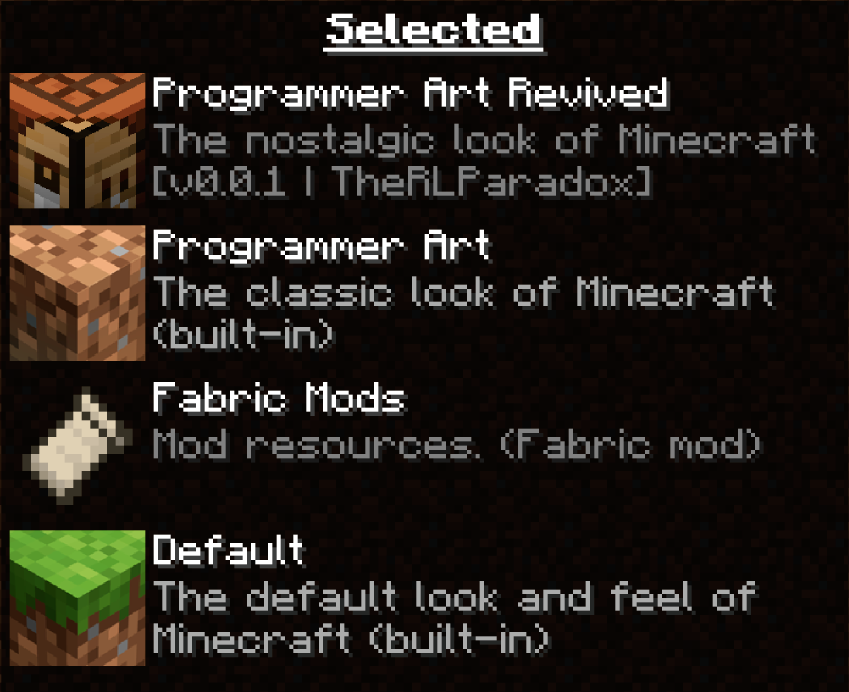
Please ensure the built-in Programmer Art is below my resource pack!
**Note:** For the best experience, I recommend installing [ETF] Entity Texture Features, [EMF] Entity Model Features, Polytone, or OptiFine. Without these mods, things like custom entity models (horses, bats, vex), water colors, potion colors, and banner colors will not be available; instead, there will be a replacement that resembles the original design.




—

**Frequently Asked Questions**
– If you comment a question that’s already in the FAQ, im most likely not going to respond
**Do I need OptiFine or EMF, ETF, and Polytone to use this resource pack?**
Nope, this Resource Pack doesn’t depend on mod support; however, certain things within the pack will not be available.
**Without Mods, will there still be models that resemble the old design?
**
Yes, without the recommended mods, things like Zombie Villagers, Bats, and Water will have replacement designs to look like the intended design.
**Will this ever be made available for Bedrock?**
As of right now, I want to focus on making it for JAVA. It would probably be a big headache to start from scratch and on a format I’m not familiar with.
**Why do some mobs have purple and black textures when I load the resources?**
This is a bug that can happen on Optifine. I would recommend just relaunching Minecraft.
**The Resource Pack is warning me that it’s made for another version of Minecraft. Which version should I get?**
This Resource Pack is for 1.21 and above. I’m still working on compatibility issues. The Mods Recommended for this Resource Pack may not always be available in every version.
—

**Terms of Use**
**Terms and Conditions**
All custom textures, models, sounds, and other original assets included in this resource pack are the intellectual property of “TheRLParadox” and are protected under applicable copyright laws.
– Changes may happen at any time
——————————————————————————————
With this resource pack, YOU MAY:
– Use this pack for PERSONAL GAMEPLAY and NON-COMMERCIAL CONTENT (e.g., YouTube videos, livestreams). If u want to give credit, it’s up to you, but I’d love it if you would.
– Use assets from this pack for PERSONAL USE, NON-DISTRIBUTED USES ONLY.
——————————————————————————————
With this resource pack, YOU MAY NOT:
– REUPLOAD or REDISTRIBUTE this pack or its assets WITHOUT PERMISSION.
– Port this resource pack or its assets to work on Minecraft Bedrock Edition
– Use any part of this pack in your own projects WITHOUT EXPLICIT WRITTEN CONSENT.
– MODIFY AND SHARE this pack publicly WITHOUT PERMISSION and CREDIT.
——————————————————————————————
This pack may include MODIFIED VERSIONS of Minecraft’s default assets. All original Minecraft content is © Mojang AB and used in accordance with Mojang’s Asset Usage Guidelines.
“NOT AN OFFICIAL MINECRAFT [PRODUCT/SERVICE/EVENT/etc.]. NOT APPROVED BY OR ASSOCIATED WITH MOJANG OR MICROSOFT”
—
This pack tries to remaster vanilla panoramas with Programmer Art and Programmer Art Fix, and to use the same map as vanilla if possible.
Please note that panoramas with no actual seed discovered can have a different scene from vanilla.


