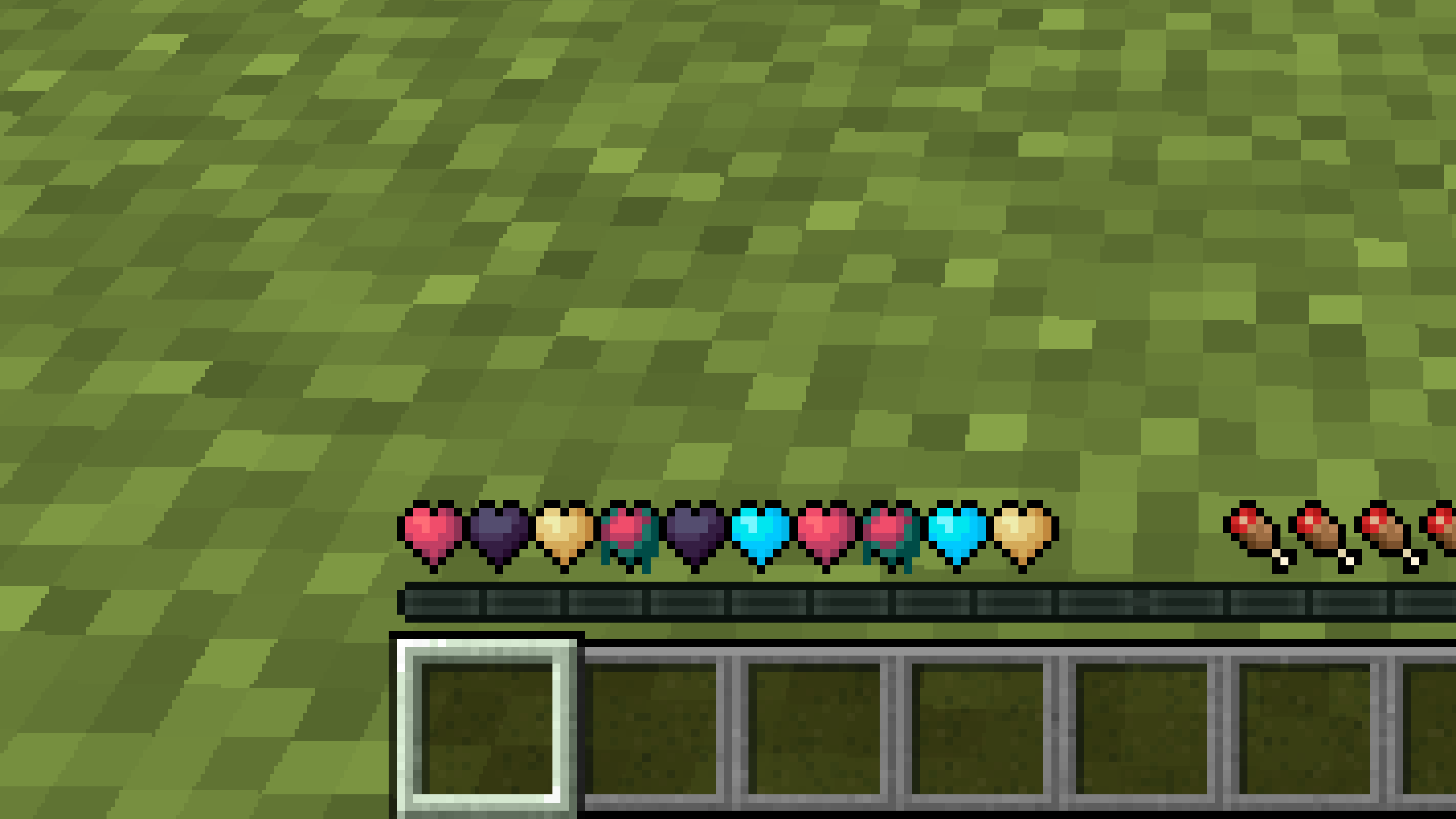
New Hearts
# **New Hearts**
**Don’t like the bright colors of the hearts?**
**This texture pack is for you.**
—
—
## **Description**
**Pastel-colored hearts with softer color transitions.**
—
**Texture pack in classic colors: New Hearts, classic colors**
New end stone
# **New end stone**
**Like pink and pastel colors?**
**This texture pack is for you.**
—

—
## **Description**
**This pack slightly modifies end stone, giving it a softer, pastel pink tone.**
Nether Structure Highlighter
Spot Nether structures instantly! This pack highlights bastions and nether fortresses by subtly enhancing key blocks, making survival exploration faster and easier without cheating. It makes nether fortresses green and bastions and bastion remnants yellow. I personally tried it myself and it saves 10x more time than manually finding one.
credits:**PlanetGuy_122**
Netherite Styled Default Armors
Gives all default armors the look of netherite. UPDATED FOR 1.0-1.22+
Variants:
Ashen 16x https://modrinth.com/resourcepack/netherite-styled-ashen-16x-armors
Bare Bones https://modrinth.com/resourcepack/netherite-styled-bare-bones-armors
Bronze https://modrinth.com/resourcepack/bronze-netherite-styled-armor
SimpleOres https://modrinth.com/resourcepack/simpleores-netherite-styled-armor
View the whole collection here! https://modrinth.com/collection/J5xlug9g
Subscribe to Subsetgaming on YouTube
https://www.youtube.com/@subset.gaming
Type “Subsetg4ming” in your search bar to find everything by me!
nerdPVP
# NerdPVP – A Clean & Competitive PVP Resource Pack
### WARNING : This pack is still in alpha and NOT complete
## Overview
Nerd PVP is a streamlined resource pack designed for competitive Minecraft PVP. It enhances visibility, reduces distractions, and optimizes key elements to give you a tactical edge in combat. Whether you’re playing Bedwars, SkyWars, or Faction PVP, this pack keeps your focus sharp and your performance crisp.
## Key Features
– ✔ Clear & Minimalist Textures – Removes visual clutter for better enemy tracking.
– ✔ Optimized Sword & Tool Designs – Clean, high-visibility models for fast-paced combat.
– ✔ Low Fire – Less obstruction during fights.
– ✔ 16x Resolution – Balanced performance for smooth gameplay.
## Compatibility
Works on Minecraft [version (1.16.x, 1.17.x, 1.18.x,1.19.x, etc) ]
Supports OptiFine (connected textures, custom skies).
FPS-friendly (compatible with Sodium, Iris, etc.).
## Installation
Download the .zip file.
Place it in your resourcepacks folder.
Activate in-game via Options > Resource Packs.
## Feedback & Updates
Suggestions or bug reports? Say it in the discord server or DM me directly. Updates focus on community-driven improvements!
## Developer note
You can use textures from this pack, just credit the pack maker “membercatcousin”
Nemo’s More Ladder Variants (MStV+)


—
# More Ladder Variants
Certainly any wood is suitable for ladder building – try it out!
Thanks to Nemo’s Carpentry, ladders are now available in all the colors of the forest.
What if I already have Nemo’s Carpentry installed?
Then this mod is fairly but not completely useless because it ensures compatibility with More Stick Variants (MStV) and provides ladder variant recipes for the crafting table. It also makes it compatible with Quad 1.3.0’s block replacement feature as can be seen below.

## Adding 11 new ladders (incl. Pale Oak) to Minecraft.
## Compatible with Quad 1.3.0+’s block replacement:

Looking through the window of a desert village fletcher: We can see that instead of _Oak Ladder_, _Oak Torch_ and _Birch Fletching Table_, the game now generates the village with a _**Jungle Ladder**_, a _**Jungle Torch**_ (from More Torch Variants) and a _**Jungle Fletching Table**_ (from More Fletching Tables).
—
**
Navy Blue Shield
# Navy Blue Shield
This resource pack replaces the default shield with a custom 3D model.
The design uses a navy blue theme.
No OptiFine required. Vanilla compatible.
## More Shield Themes
– Black
– Blue
– Creeper
– Dark Red
– Mirror
– Rabbit
– Red
NarrusYeetus No Error
# Narrus Yeetus No Error
### Remove the pesky narrator and ALL the errors related to it.
Fork of NarrusYeetus by TheEnderCore, this mod removes the Narrator, without throwing an error for no reason.
(NarrusYeetus would throw an error after Mixining into the Narrator)
**NarrusYeetus:**
[15:35:39] [Render thread/ERROR] (Narrator) Narrus Yeetus!
**NarrusYeetus No Error:**
[15:36:49] [Render thread/INFO] (Narrator) NarrusYeetus has disabled the narrator!
### Other Changes from NarrusYeetus:
– Removes narrator infomation from the accessibility screen
– Prevents the onboarding accessibility screen from opening
Name Tag Backport
## Description
This datapack/mod backports the name tag recipe added to the game in 26.1 Snapshot 2.

## Dependencies
– Fabric loader requires Fabric API
Music Selector
## Music Selector By hmida_16
A very simple Data Pack that was made in like 30 minutes.
It uses minecraft’s new custom screens features for 1.21.6 to add a music selection GUI, where you can pick music from the minecraft soundtrack to play. The menu can be accessed from the Pause Screen, or by pressing “G” (or whatever key you have for the new Quick Actions keybind).
Note that you can only pick sound events instead of specific tracks. For example If you want the song “Taswell” by C418, you can’t just pick it directly, instead you’ll need to choose “Creative Mode”, if you want “So Below” by Lena Raine, you have to choose “Nether” and then “Soul Sand Valley”
This can be slightly annoying because you don’t always get the song that you want, but you can click the button several times until you get a song that satisfies you.
You can find out where each song plays on the Minecraft Wiki Music Page.
I might make a version where you can select a specific track from any album you want including the unused ones in Volume Alpha & Beta, however that would require a resource pack.
Hope you enjoy!