Yeet Spooky Cave Sounds!
Yeet Spooky Cave Sounds is a very simple resource pack that removes all the spooky cave sounds, so you can mine in peace.
Feel free to use this anywhere, but give me credit.
Be sure to report bugs, give feedback or anything on the official Planet Minecraft page!
YeeeesMOTD
Customized server motd and random icon, it can use player’s head as server icon,like this:
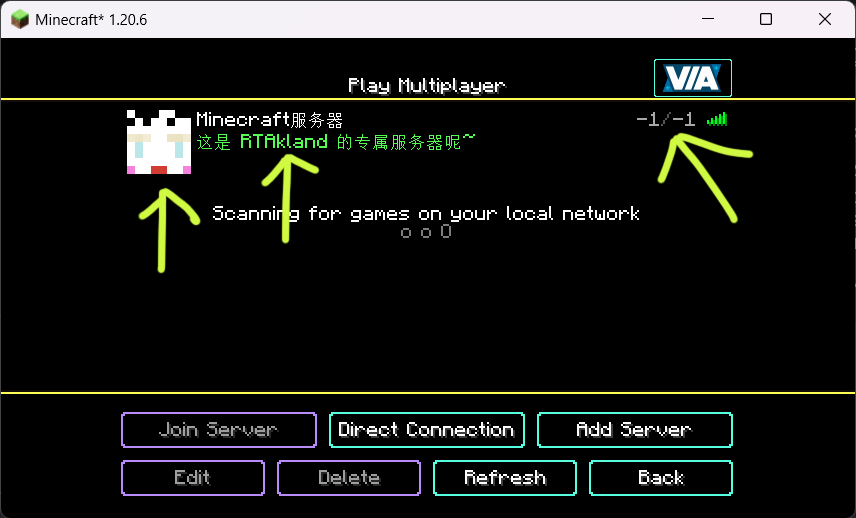)
also use player’s name as motd description, and random icon
everything is up to you
for more information please go to github: https://github.com/RTAkland/YeeeesMOTD
Yeastdonkey’s Modpack
# Welcome to Yeastdonkey’s Modpack!
## About This Modpack
This pack includes many basic QOL features and tweaks that maintain the vanilla *feel* along with tools and utilities that improve the gameplay experience and allow one to fully interact with other players on any *Yeastdonkey* Minecraft servers.
This modpack follows the ethos observed by many prominent Minecraft personalities such as Ilmango or Xisumavoid – namely, *”vanilla+”*. What this modpack does NOT contain are any mods that drastically change gameplay or add anything in-game.
This modpack can also be used anywhere else by people who want to stay *mostly* vanilla but want the wide array of QOL improvements and utilities provided in this pack, and it is compatible with standard vanilla servers.
*NOTE: some features will not work in 100% vanilla servers, such as syncmatica or other mods that require a server component to be installed. However, most base features will remain operational.*
## Why This Modpack
This modpack subscribes to the *vanilla* spirit that many other packs do as well, but it goes further than most by adding tools, tweaks, and utilities that toe the line of what’s considered *”vanilla”*.
## What’s Included
Listed below are all of the mods included in this pack separated into different categories with explanations of what each one does.
*NOTE: some libraries not listed*
Optimizations
*Mods that improve game performance*
– **Cull Less Leaves** – Adds leaf culling
– **Dynamic FPS** – Adds the ability to reduce Minecraft’s FPS when tabbed out
– **Enhanced Block Entities** – Improves block entity rendering
– **Entity Culling** – Adds entity culling
– **Lazy DFU** – Disables DFU, which can greatly impact performance, unless necessary
– **Lithium** – Improves backend computations and processes to vastly improve game performance
– **ModernFix** – Generally improves game performance, reduces launch time, reduces memory usage, and fixes many bugs
– **Sodium** – Vastly improves rendering performance and other graphical issues
– **Starlight** – Improves the lighting engine to improve performance and reduce lighting errors
– **Yeetus Experimentus** – Disables the experimental settings popup when creating or loading worlds
QOL
*Mods that make the game just a little easier to play*
– **AppleSkin** – Shows food saturation & hunger
– **bad packets** – Allows syncing of information between mods
– **Better F3** – Makes the F3 menu easier to read
– **Controlling** – Adds a search field to game settings
– **Inventory Profiles Next** – Adds the ability to sort and manage inventories more easily
– **Jade** – Adds a HUD that provides information about what the player is looking at
– **Just Enough Items (JEI)** – Adds a searchable block database to the inventory screen that shows and populates recipes
– **Just Enough Breeding (JEBr)** – Adds a JEI category that shows breeding information for mobs
– **Just Enough Professions (JEP)** – Adds a JEI category that shows villager profession workstations
– **Just Enough Resources (JER)** – Adds a JEI category that shows in-game sources for items such as dungeon chests, mob sources, villager trades, or world gen information
– **MiniHUD** – Adds toggleable HUD info lines that give the player easy access to information they would otherwise have to dig for such as player coordinates, block coordinates, or block states
– **Mod Menu** – Adds a button in the escape screen to open a searchable menu listing all of the installed mods and the ability to access their configurations easily from the menu
– **Player Health Indicators** – Adds hearts above other players that show their current health
– **Reese’s Sodium Options** – Replaces *Sodium’s* options screen with an improved UX
– **Searchables** – Allows other mods to implement search bars and categories
– **Shulker Box Tooltips** – Adds a tooltip to Shulker boxes and other tile entities to show their contents in inventories
– **Xaero’s Minimap** – Adds a minimap and waypoints
– **Xaero’s World Map** – Saves minimap information into a larger, scrollable map of all areas the player has explored
– **XaeroPlus** – Adds extra features and increases the performance of Xaero’s minimap and world map
Utilities
*These mods add pretty significant changes to the base game while still maintaining the vanilla *feel*. They are used by many players on any Yeastdonkey server and will allow you to fully interact with other players by utilizing shared schematics, maps, and more*
– **Item Scroller** – Adds many utilities for moving items, mass crafting, and mass trading
– **Litematica** – Adds the ability to make and use schematics
– **Syncmatica** – Allows players to sync schematics with each other
– **ReplayMod** – Adds the ability to record gameplay by recording the game states, which allows players to move through the replay world and produces lightweight files
– **Servux** – Allows clients to receive extra information needed by certain mods
– **Simple Voice Chat** – Adds an in-game voice chat *(doesn’t have to be used)*
– **Tweakaroo** – Adds a wide variety of tweaks to the game
– **WorldEdit** – Allows players to edit their single-player worlds with tools such as copy & pasting, shape generation, and brushes
– **Zoomify** – Adds a zoom button
Graphics
*Mods that improve the graphics of the game*
– **Iris Shaders** – Adds support for shaders
– **Complementary Shaders – Reimagined** – Basic shader pack
– **LambDynamicLights** – Adds dynamic lighting
– **Sodium Extra** – Adds most of OptiFine’s eye-candy options to sodium
– **Yeastdonkey 5.0** – A resource pack from VanillaTweaks that makes the game look and sound better while retaining the vanilla *feel*. Also adds some information to blocks such as Redstone signal strength, Redstone component direction, and more
## Questions or Concerns?
If you have any questions, concerns, or suggestions for this modpack, or want to request changes or additions of any specific mods, feel free to contact me via my profile!
YearCalendar
### ⚠️ This plugin is no longer being updated.
# YearCalendar
**Original Calendar plugin.**
*Let your players check the date!*
—
## Features
– GUI: Keep it simple with only `/calendar` command
– Edit: Edit months, days, colors in config.yml
—
## Commands & Permissions
| Command | Alias | Description | Permission |
|—————|——-|———————|——————–|
| `/calendar` | – | Opens main gui | `calendar365.use` |
—
## Images / Screenshots
Section “**Gallery**”
—
## Files
config.yml
“`yaml
messages:
no-permission: “§cYou don’t have permission to use this command!”
player-only: “§cThis command can only be used by players!”
gui:
month-selector-title: “§7§lCalendar 365”
back-button-name: “§c« Back to Months”
months:
– name: January
days: 31
title: “§7Days: §f31”
– name: February
days: 28
title: “§7Days: §f28”
– name: March
days: 31
title: “§7Days: §f31”
– name: April
days: 30
title: “§7Days: §f30”
– name: May
days: 31
title: “§7Days: §f31”
– name: June
days: 30
title: “§7Days: §f30”
– name: July
days: 31
title: “§7Days: §f31”
– name: August
days: 31
title: “§7Days: §f31”
– name: September
days: 30
title: “§7Days: §f30”
– name: October
days: 31
title: “§7Days: §f31”
– name: November
days: 30
title: “§7Days: §f30”
– name: December
days: 31
title: “§7Days: §f31”
date-display:
today-status: “§f§lTODAY”
past-status: “§a§lPast”
future-status: “§c§lFuture”
day-format: “§e{month} {day}, {year}”
status-prefix: “§7Status: ”
click-to-view: “§7Click to view!”
“`
Documents
Year Round Christmas Chests
This resource pack makes chests use the Christmas texture. Unlike other resource packs, this is fully compatible with resource packs that change the Christmas Chest texture, as it uses atlases to achieve the effect.
Yeallux_’s cat Totem
A resource pack that edits the Totem Of Undying to a cat photo !
Yeahlows PVP Pack
THIS IS A TEXTURE PACK
Okay you probably already knew that…
This texture pack prioritizes making the most important changes for a pvp pack without making the game look completley different. Older versions of this texture pack include short swords for 1.8, low shields and smaller items.
This pack supports both 1.6.1-1.8.9 for short swords, and 1.21-1.21.10 (Might support older versions)

Ye Shunguang Totem
This resource pack replaces the default Totem of Undying with a custom texture inspired by **_Ye Shunguang from Zenless Zone Zero_**. The original Minecraft totem is swapped out for a stylized depiction of Yeshenguāng, designed to blend smoothly with the game’s visual style while standing out as a unique cosmetic change. The pack does not affect gameplay in any way, serving purely as a visual enhancement for players who enjoy personalizing their world and showcasing their appreciation for **Zenless Zone Zero.**
YDM’s Scorpions
YDM’s Scorpions for FORGE/FABRIC/NEOFORGE
This mod adds scorpions to the game!
Brown and Emperor Scorpion spawns in the desert, while the Nether Scorpion Spawns in the Soul Sand Valley.
They will burrow themself in to the ground on daylight.
They drop Scorpion stingers that can be brewed into Venom Coat Potion.
After consuming this potion you will get a venom “armor” that will poison attackers!
If you have a spider eye in your hand then they won’t attack you and are tempted by it.
So like that you can make them follow you.
Other mod biome compatibility!
Spawn config options:
– Biome name(s) where it should spawn
– Spawn rate (The higher, the more chance for spawning a group)
– Minimum and maximum number of a Group
– Poison Duration (20 means -> 20 seconds)
– Health Point
– Damage Value
If you want the scorpions to spawn in another mods biome.
You have to change the biome_name line:
For example to:
biome_name = “modid:name_of_the_biome”
To let it spawn in more biomes you have to put a comma (,) between the biome names like this:
biome_name = “modid:name_of_the_biome,minecraft:desert”
The 1.19 version doesn’t have a spawn config.
The biome world generation changed a bit and now the spawn settings will be editable in json files.
To select the desired biomes for the mob you have to edit the biome tags.
(/data/scorpions/tags/worldgen/biome/…)
To edit the spawn settings you have to edit the biome_modifier
(/data/scorpions/forge/biome_modifier/…)
Suggested by: gohkenytp
Thanks for downloading this mod!
YDM’s Red Panda
This mod adds red pandas to the game!
They will spawn in bamboo jungles and are neutral.
You can tame them with sweet berries and bred them with bamboo.
If you feed them bamboo, then their hp will be restored.
Upon death it has a chance to drop a single bamboo.
You can edit the biome settings in the common config for the 1.16.5/1.18.x versions.
In 1.19 spawn settings can be changed with the biome tag (has_red_panda.json)
and biome modifier (spawn_red_panda.json).
In the fabric versions the name of the spawn config is “ydms_redpandaconfig.properties” in the config folder
This mod was suggested by: gohkenytp
Thanks for downloading this mod
Those who used older versions, please delete your red panda config file if you want to use the new default spawn settings
If not then you can keep the file