ZZZ_LayoutFixer
# ZZZ Layout Fixer – Description & Configuration
## 📖 Description (Описание)
## Git Hub
https://github.com/aimdf/ZZZ_LayoutFixer[Git Hub](https://github.com/aimdf/ZZZ_LayoutFixer)
**ZZZ Layout Fixer** is a smart Minecraft server plugin that automatically fixes incorrect keyboard layouts in player messages. The plugin detects when players type Russian words in English layout (or vice versa) and automatically converts the text to the correct form.
**ZZZ Layout Fixer** — это умный плагин для серверов Minecraft, который автоматически исправляет неправильную раскладку клавиатуры в сообщениях игроков. Плагин определяет, когда игрок печатает русские слова на английской раскладке (или наоборот) и автоматически преобразует текст в правильную форму.
### 🔧 Key Features (Основные возможности):
– ✅ Automatic layout correction (RU↔EN) / Автоматическое исправление раскладки (RU↔EN)
– ✅ Dictionary-based language detection / Проверка по словарям для точного определения языка
– ✅ Porter stemming for Russian words / Использование стемминга Портера для русских слов
– ✅ Anti-spam protection system / Система защиты от спама сообщений
– ✅ Visual correction notifications / Визуальное уведомление об исправлениях
– ✅ Optimized memory usage / Оптимизированная работа с памятью
## 📥 Installation (Установка)
1. Download the `ZZZ.jar` file / Скачайте файл `ZZZ.jar`
2. Place the file in your server’s `plugins` folder / Поместите файл в папку `plugins` вашего сервера
3. Restart the server / Перезапустите сервер
## ⚙️ Configuration for Modrinth (Конфигурация для Modrinth)
The plugin works out-of-the-box without additional configuration. All anti-spam parameters are optimally configured:
Плагин работает из коробки без необходимости дополнительной настройки. Все параметры защиты от спама уже настроены оптимально:
“`yaml
# Показывать символ предупреждения при исправлении раскладки/Show warning symbol when fixing keyboard layout
show-warning-symbol: true
# Настройки защиты от спама/Spam protection settings
anti-spam:
# Максимальное количество сообщений в окне времени/Maximum number of messages in the time window
max-messages: 4
# Временное окно для подсчета сообщений (в миллисекундах)/Time window for counting messages (in milliseconds)
time-window-ms: 2000
# Длительность блокировки за спам (в миллисекундах)/Block duration for spam (in milliseconds)
block-duration-ms: 20000
ZZZ Weapons
## NOTE: This project is fan-made
And is not affiliated with or endorsed by HoYoverse.
# How to Use
To turn a weapon into a ZZZ weapon, use an anvil.
Currently available weapons:
Swords:
– Qingming Sword
– Ye Shiyuan Sword
– Ye Shunguang Sword
– Tailless
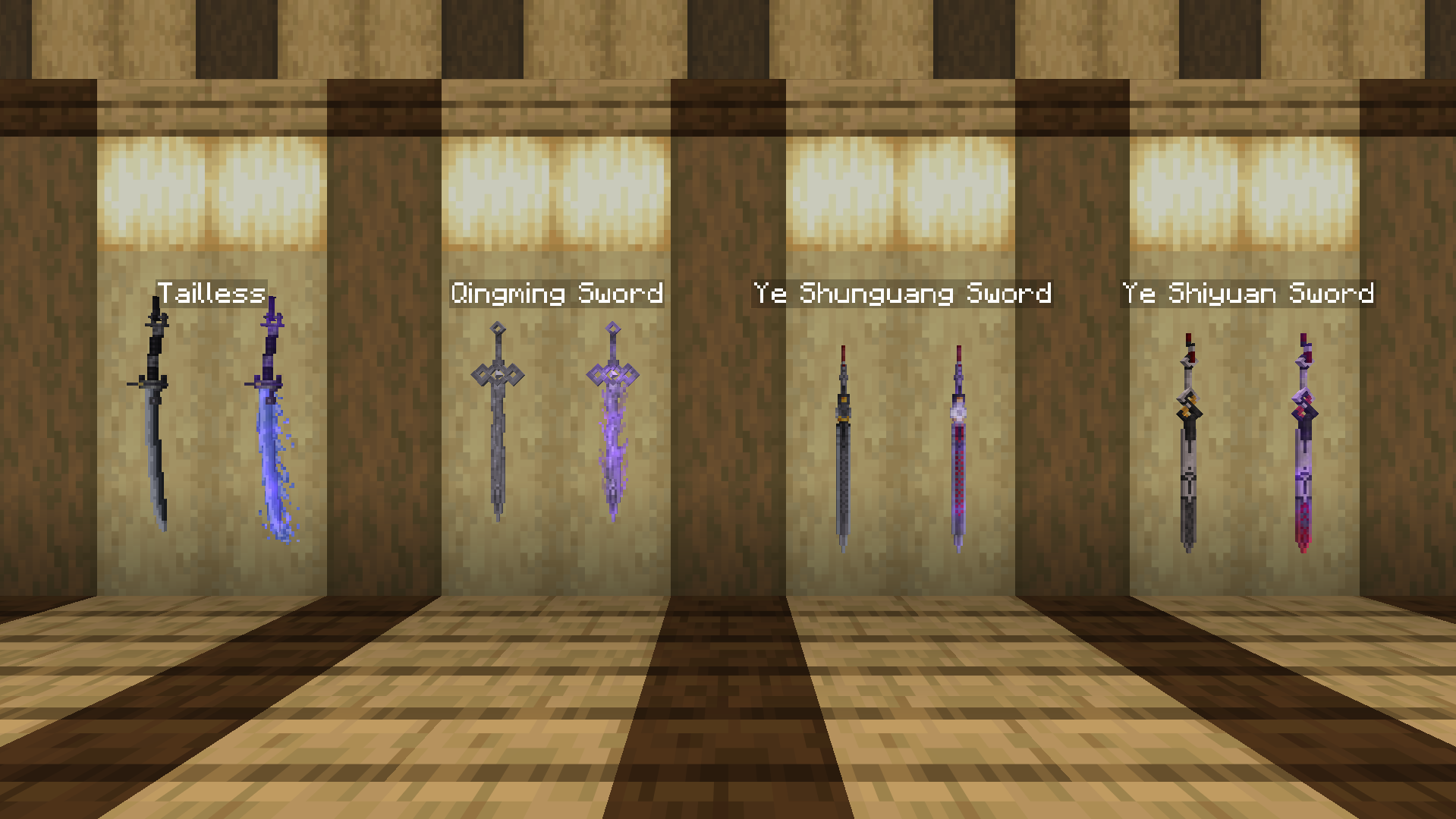
All weapons have enchanted variants!
# Dependencies
For Minecraft 1.21.5 and below, please install [Optifine](https://optifine.net/downloads) or [CIT Reforged (Forge)](https://modrinth.com/mod/citreforged) or [CIT Resewn (Fabric)](https://modrinth.com/mod/cit-resewn) for the pack to work.
ZZZ Mobs
## NOTE: This project is fan-made
And is not affiliated with or endorsed by HoYoverse.
## How to use
To turn a mob into a ZZZ character, use a nametag renamed on an anvil.
Currently available mobs and characters:
**Fox:**
– Into Hoshimi Miyabi:
– “Miyabi” for normal version, has a chance to have long ears;
– “Miyaaaaabi” for long ears version
– Into Ye Shunguang:
– “Shunguang/Xiao’Guang” for normal version, has a chance to wear pink outfit, turns into alter form if snowy fox is used.
– Into Ye Shiyuan:
– “Shiyuan” for normal version, turns into alter form if snowy fox is used.
**Bat:**
– Into Vivian Banshee:
– “Vivian” for normal version, has a chance to wear swimsuit.
– Into Hugo Vlad:
– “Hugo” for normal version, has a chance to wear hat.
## This resource pack only works with
– OptiFine Custom Entity Models (CEM) feature:
https://optifine.net/downloads
or
– Entity Model Features + Entity Texture Features:
https://modrinth.com/mod/entity-model-features
https://modrinth.com/mod/entitytexturefeatures
ZZZ Fissure Sounds
This resourcepack replaces the Nether Portal sounds with the ones from the Fissures in Zenless Zone Zero! Sounds changed are:
– Idle portal sound.
– Entering the portal.
– Exitng the portal.
This video showcases the sounds in action:
–
zzufix
# zzufix
A very simple 1.21+ Minecraft plugin that restores certain behaviors from 1.8 SportPaper and vanilla servers.
## Remove TNT offset
Prevents TNT blocks from moving to the sides a bit when primed (while keeping custom projectiles such as those from PGM functional).
Pair this with
“`yml
fixes:
prevent-tnt-from-moving-in-water: true
“`
in your `root/config/paper-world-defaults.yml` file for maximum PGM TNT action.
## Restore damage and knockback from thrown projectiles
Restores 1.8 behavior for thrown snowballs and eggs (including the new types), which means it makes them deal a bit of damage and give knockback to other players.
## Restore arrow self hits
Restores 1.8 behavior which allowed you to hit yourself with arrows and get knockback. Useful for 2 Player Parkour maps.
# config.yml
“`yml
features:
tnt: true
projectiles: true
arrow-self-hits: true
“`
Zyvera WelcomeMessage
# ZyveraWelcomeMessage
**Greet your players with stunning gradient messages, fireworks, and sounds—all fully controllable via a single config.**

*↑ Gradient welcome message in chat*
—
## ✨ Features
– 🎨 **Color gradients** — Supports all MiniMessage gradients (``)
– 🌍 **Global message** for all players upon joining
– 👤 **Individual messages** per player (name or UUID)
– 🥇 **First-Join Message** — automatically detects new players
– 🎆 **Fireworks Effects** — type, colors, number, and delay configurable
– 🔊 **Sound Effects** — for the player themselves or everyone online
– ⚡ **Folia-compatible**
– 🔄 `/zwm reload` — no server restart required
—
## 🚀 Installation
1. Copy the JAR file to the `/plugins/` folder
2. Start the server
3. Customize `plugins/ZyveraWelcomeMessage/config.yml`
4. Run `/zwm reload` in-game
—
## ⚙️ Configuration (Example)
“`yaml
global:
join-message:
text: “✦ Welcome, {player}! ✦”
fireworks:
enabled: true
type: BALL_LARGE
colors: [“#a855f7”, “#6366f1”]
sound:
enabled: true
sound: “ENTITY_PLAYER_LEVELUP”
“`
Placeholders: `{player}` · `{displayname}` · `{world}` · `{uuid}`
All colors in hex format (`#rrggbb`). MiniMessage reference: [docs.advntr.dev](https://docs.advntr.dev/minimessage/format.html)
—
## 🔧 Commands & Permissions
| Command | Description |
|——–|————-|
| `/zwm reload` | Reload config |
| `/zwm preview [global|first-join|playername]` | Preview message |
| `/zwm version` | Plugin info |
| Permission | Default |
|———- -|———|
| `zyvera.welcomemessage.admin` | OP |
| `zyvera.welcomemessage.bypass` | false |
—
## 🖥️ Compatibility
| Platform | Status |
|———|——–|
| Paper 1.16+ | ✅ |
| Folia | ✅ |
| Purpur | ✅ |
| Spigot 1.16+ | ⚠️ Limited |
—
*Made by Thomas & Zyvera-Systems · [zyvera-systems.dev](https://zyvera-systems.dev)*
Translated with DeepL.com (free version)
Zyvera TicTacToe
# ⚔ Zyvera-TicTacToe
### Classic TicTacToe as a fully GUI-based Lobby Minigame.





**by Thomas U. & Zyvera-Systems**
—
## Overview
Zyvera-TicTacToe adds a complete TicTacToe minigame to your Minecraft server — fully inventory-based, with automatic matchmaking, direct challenges, persistent ranked stats, and crafting table binding. No dependencies, no setup hassle. Just drop and play.
—
## Features
### 🎮 Game Modes
– **Queue (Ranked)** — Join the matchmaking queue and get paired automatically. Wins, losses, draws, streaks — everything is tracked.
– **Challenge (Unranked)** — Challenge any online player directly. No stats, just fun.
– **Workbench Binding** — Bind TicTacToe to crafting tables in your world. Right-click toggles the queue (1s cooldown).
### 🖥️ GUI System
– **Compact 3×3 Board** — Clean layout in a 36-slot inventory
– **Real Player Heads** — Actual Minecraft skins displayed via SkullMeta
– **Win Highlight** — Winning line turns green at the end
– **Main Menu** — Queue, stats, and leaderboard in one place
– **Stats GUI** — Wins, losses, draws, winrate, total moves, streaks
– **Top 10 Leaderboard** — Gold, silver, bronze for the best players
### ⏱️ Timeout System
– **No moves placed + 120s idle** → Game gets cancelled (no stats affected)
– **Ranked + moves placed + 120s idle** → Inactive player loses automatically
– **Challenge (Unranked)** → Timeout has no effect
### 🔮 Holograms
Bound crafting tables display a floating hologram above them:
> **TicTacToe**
> [Click Me]
—
## Commands
| Command | Description | Permission |
|———|————-|————|
| `/ttt` | Open main menu | `zyvera.ttt.use` |
| `/ttt play` | Join the queue | `zyvera.ttt.use` |
| `/ttt leave` | Leave the queue | `zyvera.ttt.use` |
| `/ttt challenge ` | Challenge a player | `zyvera.ttt.use` |
| `/ttt accept` | Accept a challenge | `zyvera.ttt.use` |
| `/ttt deny` | Deny a challenge | `zyvera.ttt.use` |
| `/ttt stats [name]` | View stats (GUI) | `zyvera.ttt.use` |
| `/ttt top` | Top players (GUI) | `zyvera.ttt.use` |
| `/ttt quit` | Leave active game | `zyvera.ttt.use` |
| `/ttt bind` | Bind a crafting table | `zyvera.ttt.bind` |
| `/ttt unbind` | Unbind a crafting table | `zyvera.ttt.bind` |
| `/ttt reload` | Reload config | `zyvera.ttt.admin` |
**Alias:** `/tictactoe`
—
## Permissions
| Permission | Description | Default |
|———–|————-|———|
| `zyvera.ttt.use` | Basic TicTacToe access | everyone |
| `zyvera.ttt.bind` | Bind/unbind workbenches | OP |
| `zyvera.ttt.stats.others` | View other players’ stats | everyone |
| `zyvera.ttt.admin` | Admin commands (reload) | OP |
—
## Compatibility
| Platform | Supported |
|———-|———–|
| Bukkit | ✅ 1.13+ |
| Spigot | ✅ 1.13+ |
| Paper | ✅ 1.13+ |
| Purpur | ✅ 1.13+ |
| Folia | ✅ Regionized Scheduler |
– **Java:** 8+
– **Dependencies:** None
– Material fallbacks ensure compatibility across all versions (e.g. `RED_CONCRETE` → `STAINED_CLAY` on legacy)
– Folia support is fully reflection-based — no compile-time dependency
—
## Configuration
Everything is customizable — messages, colors, materials, timeouts, and hologram text.
“`yaml
prefix: “&8[&6&lTTT&8] ”
game:
turn-timeout: 120
challenge-timeout: 60
workbench-cooldown: 1000
gui:
symbol-x-material: RED_CONCRETE
symbol-o-material: BLUE_CONCRETE
hologram:
line1: “&6&lTicTacToe”
line2: “&8[&aKlick Mich&8]”
offset-y: 1.5
“`
—
## Installation
1. Drop the JAR into your `plugins/` folder
2. Start or restart the server
3. Config generates automatically
4. Done — `/ttt` and play!
—
**Made with ❤️ by Thomas U. & Zyvera-Systems**
⭐ *Enjoying TicTacToe? Leave a review!*
Zy’s Chinese translation
包含一些小型的模组翻译,主要来源于AI,包含部分人工修改,目前只有简体中文的qwq
目前包含的模组ID:
“`
accessible-step
cameraoverhaul
chatplus
chunksfadein
clean_tooltips
crumbling_hearts
distanthorizons
distraction_free_recipes
do_a_barrel_roll
durability_visibility_options
dynmus
elytratime
explosiveenhancement
genshinthirdperson
ias
icantdomath
immersive-hotbar
make_bubbles_pop
moderate-loading-screen
now_playing
quickmenu
reactivemusic
scoreboard-overhaul
scribble
segmented
slimefun_essentials
totem-party
wakes
whatisit
wildfire_gender
worldplaytime
“`
ZyrenAuth
# ZyrenAuth – Secure Minecraft Authentication Plugin
**ZyrenAuth** is a modern, robust, and privacy-focused authentication plugin for Minecraft 1.21.1+ servers, developed by [_Pheonix](https://pheonix.is-a.dev). It delivers strong account protection and a seamless, intuitive login experience for Paper (Spigot-compatible) environments.
🔗 **[Official Modrinth Page (updates & downloads)](https://modrinth.com/plugin/zyrenauth/versions)**
🔗 **[Official Website & Online Config Generator](https://zyrenauth.wuaze.com/)**
—
## ✨ Key Features
– **Mandatory Reverse Word Captcha on Join**
Every player must solve a reverse word captcha before login/registration. Fully configurable expiry/attempts and safe void teleport during the challenge.
– **Dedicated 2FA Setup GUI**
`/za 2fa setup` opens an in-game GUI to display your 2FA secret key and QR code URI, making authenticator setup seamless.
– **Focused Authentication Teleportation**
After solving captcha, players are teleported to a safe void (`0.5, 0.0, 0.5`) for `/login` or `/register`—no world interaction until auth is done.
– **Comprehensive Player State Management**
Original location, inventory, gamemode, health, food, experience, and potion effects are saved at auth start and reliably restored after success.
– **Asynchronous Modrinth Update Checker**
Plugin checks for the latest release version on startup and notifies server owners in the console if an update is available.
– **Dynamic On-Screen Prompts**
Clear, persistent titles and subtitles for `/register` and `/login` guide users through the process.
– **Optional 2FA (Google Authenticator)**
Players can enable/disable 2FA; required for their own logins once enabled.
– **Smart Player Authentication**
– **Online-Mode Servers:** Automatically registers/logs in legitimate Minecraft accounts, with auto-username update.
– **Offline-Mode/Alternative Auth:** Registered players are auto-logged in; new players must register for account protection.
– **Secure Logins**
BCrypt password hashing and robust username validation.
– **Flexible Storage**
MySQL/MariaDB for scalable persistence. Robust encrypted file-based fallback.
– **Optional Email Features**
Supports email confirmation and password reset (requires MySQL+SMTP).
– **Improved Command Interface**
`/za` (alias: `/zyrenauthadmin`) for all admin, status, reload, migrate, delete, and 2FA subcommands.
– **Streamlined File Management**
All plugin files are organized under `plugins/config/zyrenauth/` for a clean server directory.
—
## 🚀 Supported Platforms
– **Paper** (and all compatible forks) 1.21.1+
_Place ZyrenAuth `.jar` in your `plugins/` folder._
—
## ⚡ Quick Start
1. **Download** the latest version from [Modrinth](https://modrinth.com/plugin/zyrenauth/versions).
2. Put the `.jar` in your server’s `plugins/` folder.
3. Start and stop the server to generate `config.json`.
4. **Easily configure** `config.json` using our [Online Config Generator](https://zyrenauth.wuaze.com/).
5. Restart the server and you’re done!
—
## ⚙️ Key Configuration Options
– Captcha: `captchaEnabled`, `captchaExpiryMinutes`, `maxCaptchaAttempts`
– Password: `minPasswordLength`, `requireDigit`, `requireLowercase`, `requireUppercase`, `requireSpecialChar`
– MySQL: `mysqlEnabled`, `mysqlHost`, `mysqlDatabase`, etc.
– Email/SMTP: `emailFeaturesEnabled`, `smtpHost`, etc.
– See all options at [zyrenauth.wuaze.com](https://zyrenauth.wuaze.com/).
—
## 📜 Commands
– `/register ` – Register a new account.
– `/login ` – Log into your account.
– `/captcha ` – Solve the reverse word captcha.
– `/addemail ` – Link an email.
– `/emailconfirm ` – Confirm your email.
– `/resetpassword` – Request a password reset.
– `/resetconfirm ` – Confirm password reset.
– `/za help` – Plugin help.
– `/za status` – Plugin status (OP only).
– `/za reload` – Reload config (OP only).
– `/za migrate ` – Migration (OP only).
– `/za delete [confirm]` – Delete account (OP only).
– `/za 2fa setup|confirm |disable |status` – Manage 2FA.
---
## 🤝 Support & License
- **Issues/Source:** [https://github.com/Hardik-Verma/ZyrenAuth](https://github.com/Hardik-Verma/ZyrenAuth)
- **License:** MIT
- **By [_Pheonix](https://pheonix.is-a.dev) – Website & app developer**
---
Thank you for choosing ZyrenAuth!
zyraquests
# 📜 ZyraQuests
> **A fully custom quest plugin with beautiful GUI menus, 6 objective types, flexible rewards, and native ZyraJobs integration — built for Spigot 1.21.**
—
## ✨ Overview
**ZyraQuests** lets you create any quest you can imagine directly from a single YAML file — no commands, no in-game editor required. Players browse quests through polished inventory menus, track their progress in real time via action bar indicators, and earn XP, items, or custom commands as rewards.
Works perfectly standalone, and unlocks extra features when paired with **ZyraJobs**.
—
## 🖥️ GUI Menus
ZyraQuests is built around three fully interactive inventory menus:
**📋 Quest Browser** — Browse all quests sorted by category (Mining, Farming, Hunting, Brewing, General). Each quest shows its difficulty color, objectives count, your current status (not started / in progress / completed), and a live XP progress bar if active. Paginated for large quest collections.
**🔍 Quest Detail** — Opens on click. Shows the full quest description, each objective with its own progress bar, all rewards previewed as items, and the Accept / Abandon button. Border color changes based on difficulty (green = Easy, yellow = Medium, red = Hard, orange = Legendary).
**⚡ Active Quests** — See all your quests in progress at a glance, with per-objective progress bars. Quick-navigate back to any quest’s detail view.
—
## 📋 Creating Quests
Everything lives in `quests.yml`. One quest looks like this:
“`yaml
quests:
diamond_hunter:
display-name: “Diamond Hunter”
description:
– “The real treasure lies deep below.”
– “Find and mine diamonds.”
icon: DIAMOND
category: MINING
difficulty: HARD
repeatable: false
objectives:
– type: MINE_BLOCK
block: DIAMOND_ORE
amount: 10
display: “Mine Diamond Ore”
– type: REACH_JOB_LEVEL
job: miner
level: 20
display: “Be Miner Level 20”
rewards:
– type: XP
amount: 20
– type: JOB_XP
job: miner
amount: 1000
– type: ITEM
material: DIAMOND_PICKAXE
amount: 1
name: “&b&lDeep Earth Pickaxe”
lore:
– “&7Forged from the deepest veins.”
“`
That’s it — reload with `/qadmin reload` and the quest is live.
—
## 🎯 Objective Types
| Type | What it tracks |
|——|—————|
| `MINE_BLOCK` | Breaking specific blocks underground |
| `HARVEST_CROP` | Harvesting fully grown crops |
| `KILL_MOB` | Killing any entity by type |
| `BREW_POTION` | Brewing potions at a brewing stand |
| `COLLECT_ITEM` | Picking up or crafting specific items |
| `REACH_JOB_LEVEL` | Reaching a level in ZyraJobs *(ZyraJobs required)* |
—
## 🎁 Reward Types
| Type | Effect |
|——|——–|
| `XP` | Give vanilla experience levels |
| `JOB_XP` | Add ZyraJobs XP to a specific job *(ZyraJobs required)* |
| `ITEM` | Give an ItemStack with optional custom name & lore |
| `COMMAND` | Run any console command with `%player%` placeholder |
—
## 🔗 ZyraJobs Integration
ZyraQuests integrates with **ZyraJobs** as a soft-dependency — install both plugins and the integration activates automatically. No configuration needed.
When ZyraJobs is present:
– `JOB_XP` rewards give XP directly into the player’s job level
– `REACH_JOB_LEVEL` objectives track job progression in real time
– If ZyraJobs is absent, `JOB_XP` rewards fall back to vanilla XP automatically
—
## 📈 Player Experience
– 🔔 **Level-up style chat message** when a quest is completed, listing all rewards
– 📺 **Screen title** on completion
– 📊 **Action bar progress** updates every time an objective advances
– 🔊 **Sounds** on quest accept and completion
– 🔁 **Repeatable quests** — configure any quest to be completable multiple times
– 🌐 **Server broadcast** on completion (optional, disabled by default)
– 💬 **Join message** reminding players of their active quests
—
## 🏷️ Quest Difficulties
| Difficulty | Color | Border |
|———–|——-|——–|
| Easy | 🟢 Green | Lime glass |
| Medium | 🟡 Yellow | Yellow glass |
| Hard | 🔴 Red | Red glass |
| Legendary | 🟠 Orange | Orange glass |
—
## ⚙️ Configuration
**`config.yml`** — Global settings:
– `max-active-quests` — how many quests a player can track at once (default: 3)
– `actionbar-progress` — show action bar updates on objective progress
– `sounds` — toggle all sounds
– `broadcast-completion` — announce completions server-wide
– All chat messages fully customizable with color codes
**`quests.yml`** — All quests. Add, remove, or edit quests freely. No restart needed — just `/qadmin reload`.
—
## 🛠️ Commands
| Command | Description |
|———|————-|
| `/quests [category]` | Open the quest browser |
| `/qadmin reload` | Reload config and all quests |
| `/qadmin list` | List all quest IDs |
| `/qadmin give ` | Force-start a quest for a player |
| `/qadmin complete ` | Force-complete a quest |
| `/qadmin reset [id]` | Reset one quest or all quests |
| `/qadmin info ` | View a player’s quest progress |
Tab-completion is supported on all commands.
—
## 🔑 Permissions
| Permission | Default | Description |
|———–|———|————-|
| `zyraquests.use` | Everyone | Access to `/quests` |
| `zyraquests.admin` | OP | Access to `/qadmin` |
—
## 📦 Requirements
– **Minecraft**: 1.21.x
– **Server software**: Spigot or Paper 1.21+
– **Java**: 21+
– **No required dependencies**
– **Optional**: ZyraJobs (for `JOB_XP` rewards and `REACH_JOB_LEVEL` objectives)
—
## 🤝 Part of the Zyra Suite
ZyraQuests is designed to work alongside **ZyraJobs** as a unified gameplay ecosystem. Install both for the full experience — quests that reward job XP, objectives that track job levels, and a consistent GUI style across both plugins.
—
## 👤 Credits
Made with by **sti_moi** — *zyrajobs’s group*