no.
# no.
This resource pack removes all miecraft textures: buttons, fonts, menus, icons, and most of the UI. The game becomes nearly impossible to navigate because nothing is displayed anymore. This pack is not designed for gameplay — it is simply a minimal, empty, and fully stripped‑down experience.
—
## ⚠️ Warning
This pack also removes **all** UI elements, including:
– Buttons
– Fonts
– Click sounds
Because of this, you may not be able to access settings, menus, or even disable the pack normally (unless you’re lucky to disable it).
To deactivate it, you must **rename the pack’s folder** so Minecraft cannot load it, or **delete the pack** from your resourcepacks directory.
Use with caution.
No Worldborder
**The first version of the No Worldborder resource pack, which of course removes the worldborder texture so that it is invisible. Useful for taking screenshots of, for example, builds that have a border.**
## Support
If you have any problems, ideas, or other feedback about this project, please contact me via discord or email. You can contact me on Discord by sending a friend request, so you can send me a message.
Discord: tibodp
Mail: [email protected]
## 🌟 My other projects:
– Torchcraft Lobby Panorama
– The Ultimate Creator
– Chromakey Blocks
– No Worldborder
– Vuurwerkshow Modpack
– Vuurwerkshow Panorama
– Vuurwerkshow Paintings
No Vignette Effect – Remove Dark Shadow Borders/Corners/Edges
Removes the Vignette Effect (The dark corners effect of the screen):

No Totem Pop Particles
Removes particles from poppping totems to increase visibility during a crystal fight.
No TNT Minecarts
Whenever a player has a TNT minecart in their inventory, the player gets refunded 1 TNT and 1 minecart. Only works with vanilla TNT minecarts.
Friend and DM me on discord (@Cootshk#0001) for help.
No Rocket Usage
# No Rocket Usage
Rocket flying is annoying! (and unfair, too.)
## Highlights
It prevents firework usage by breaking the equipped elytra upon usage, simple as that.
## Installation
### Datapack
– Make a new world, click on **Datapacks** and put the `.zip` file inside of the `datapacks` folder.
– For existing worlds, put the datapack inside of the `datapacks` folder of that world.
### Mod
– Move the `.jar` file into the `mods` folder.
– Alternatively, you can go to the Mods page and click on **Add File** when using MultiMC or Prism Launcher.
## Extras
This project was made as an experiment to make a functional GitHub repository. Nonetheless, this project will be maintained and updated from time to time on breaking changes.
## License
No Rocket Usage is unlicensed.
No RGSS
_This pack is not needed on versions **1.21.11** and above because mojang now lets you manually disable it in settings. (video settings > texture filtering: none)_
—
A resource pack that prevents RGSS _(Rotated Grid Super-Sampling)_ using core shaders for improved performance.
—
### • RGSS?
> RGSS is a texture anti-aliasing method that takes multiple slightly offset samples in a rotated pattern and averages them to reduce shimmering and jagged edges in textures, although in this case we dont lose much quality from disabling it.
### • Sodium?
> No, it will not work with sodium because sodium has different core shaders to vanilla.
### • >1.21.2?
> No, before 1.21.2 core shaders where structured in a different way than newer versions.
—
### Performance comparison:
| Pack Disabled | Pack Enabled | Improvement |
|——————|——————–|——————–|
| 304 FPS | 362 FPS | 1.19× |
_(i ~~will~~ might improve this garbage table soon)_
##### You may not redistribute this resource pack anywhere without proper permission, the only official download page for this resource pack is on modrinth.
No Pumpkin Overlay (Recipe)
### No-Pumpkin-Overlay
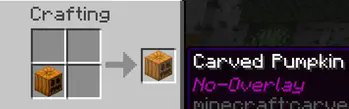
To get a **Carved Pumpkin without the overlay**, simply place a regular **Carved Pumpkin** in the crafting grid:
No Pumpkin Blur
🎃 Simple resource pack that removes the blur when you put on a pumpkin. 🎃
🎃 Why Choose No Pumpkin Blur 16x?
| ✅ No Pumpkin Blur 16x |
❌ Competitors |
| 📦 Only 776 bytes |
📁 Usually 8–80 KB |
| ⚡ Fast updates |
🐢 Slower updates |
| 🧩 Supports all versions in one file |
📂 Often requires separate files for different versions |

No More Pumpkin Blur
If you like wearing pumpkins but hate the blur they create when you wear them, this is the resource pack for you!
Note: Although the different versions of the pack may say they are for specific versions of Minecraft, since this pack only replaces a single texture, every version of the pack should work on every version of Minecraft as long as they don’t move where the texture file is stored or what they call the texture file.
## Additional Links
– Curse Forge