Zs Red Wings

The Red Wings Elytra texture pack redesigns the Elytra with bold red wings, giving flight a powerful and striking visual style. The wings feature clean detailing and smooth shading, making them stand out while remaining clear and balanced during gameplay.
Designed to fit seamlessly with Minecraft’s vanilla aesthetic, this Elytra texture enhances exploration, PvP movement, and creative builds without affecting performance. Perfect for players who want a stylish, eye-catching look while flying.
Features
Custom red-wing Elytra design
Clean textures with smooth shading
Highly visible and stylish during flight
Vanilla-friendly and immersive look
Performance-friendly and lightweight
Suitable for survival, PvP, and multiplayer servers
Z’s PVP PACK
# **_ZEUZ’S PVP PACK_**
**! THIS PACK IS STILL GETTING CHANGED. IT ISNT DONE AND IT ISNT PERFECT !**

## **_PVP FOCUSED_**
No distractions, no fluff, just the essentials to help you sharpen your skills and have fun while doing it. Install it, queue up, and let your enemies wonder how you just pulled off that insane win.

## **_PERFORMANCE_**
Who needs lag when you’re trying to land a perfect combo? Not you. That’s why this pack is designed to run smooth as butter even on low-end machines. With performance-focused tweaks and optimizations baked right in, you’ll enjoy higher FPS, reduced stuttering, and faster load times.

**_Have Fun While Using The Pack!_**
zQuests
[](https://minestrator.com/a/GROUPEZ)
**Attention, this is a free version of zQuests, you can use it but you must buy the paid version to get help!**
—
# **Features**
## ✅ 30 quest types
* **[BLOCK_BREAK](https://zquests.groupez.dev/configurations/quests#block_break)**
* **[BLOCK_PLACE](https://zquests.groupez.dev/configurations/quests#block_place)**
* **[ENTITY_KILL](https://zquests.groupez.dev/configurations/quests#entity_kill)**
* **[FARMING](https://zquests.groupez.dev/configurations/quests#farming)**
* **[FISHING](https://zquests.groupez.dev/configurations/quests#fishing)**
* **[TAME](https://zquests.groupez.dev/configurations/quests#tame)**
* **[ENCHANT](https://zquests.groupez.dev/configurations/quests#enchant)**
* **[BREW](https://zquests.groupez.dev/configurations/quests#brew)**
* **[SMELT](https://zquests.groupez.dev/configurations/quests#smelt)**
* **[CRAFT](https://zquests.groupez.dev/configurations/quests#craft)**
* **[VOTE](https://zquests.groupez.dev/configurations/quests#vote)**
* **[SELL](https://zquests.groupez.dev/configurations/quests#sell)** *(requires [zShop](https://www.spigotmc.org/resources/zshop-advanced-shop-plugin.74073/))*
* **[PURCHASE](https://zquests.groupez.dev/configurations/quests#purchase)** *(requires [zShop](https://www.spigotmc.org/resources/zshop-advanced-shop-plugin.74073/))*
* **[ENTITY_DAMAGE](https://zquests.groupez.dev/configurations/quests#entity_damage)**
* **[EXPERIENCE_GAIN](https://zquests.groupez.dev/configurations/quests#experience_gain)**
* **[HATCHING](https://zquests.groupez.dev/configurations/quests#hatching)**
* **[ITEM_CONSUME](https://zquests.groupez.dev/configurations/quests#item_consume)**
* **[ITEM_BREAK](https://zquests.groupez.dev/configurations/quests#item_break)**
* **[ITEM_MENDING](https://zquests.groupez.dev/configurations/quests#item_mending)**
* **[RESURRECT](https://zquests.groupez.dev/configurations/quests#resurrect)**
* **[JOB_LEVEL](https://zquests.groupez.dev/configurations/quests#job_level)** *(requires [zJobs](https://zjobs.groupez.dev/))*
* **[JOB_PRESTIGE](https://zquests.groupez.dev/configurations/quests#job_prestige)** *(requires [zJobs](https://zjobs.groupez.dev/))*
* **[SMITHING](https://zquests.groupez.dev/configurations/quests#smithing)**
* **[ISLAND](https://zquests.groupez.dev/configurations/quests#island)** *(requires [SuperiorSkyBlock](https://www.spigotmc.org/resources/87411/))*
* **[COMMAND](https://zquests.groupez.dev/configurations/quests#command)**
* **[CUBOID](https://zquests.groupez.dev/configurations/quests#cuboid)**
* **[CUSTOM](https://zquests.groupez.dev/configurations/quests#custom)**
* **[INVENTORY_OPEN](https://zquests.groupez.dev/configurations/quests#inventory_open)**
* **[INVENTORY_CONTENT](https://zquests.groupez.dev/configurations/quests#inventory_content)**
* **[SHEAR](https://zquests.groupez.dev/configurations/quests#shear)**
* **[LOOK_AT_BLOCK](https://zquests.groupez.dev/configurations/quests#look_at_block)**
* **[LOOK_AT_ENTITY](https://zquests.groupez.dev/configurations/quests#look_at_entity)**
—
## ✅ Integrations & extras
* **Holograms support** *(via [zEssentials](https://www.spigotmc.org/resources/zessentials-best-essentials-cmi-sunlight-alternative.118014/))*
* **Scoreboard support** *(via zEssentials)*
* **WayPoints support (1.21.8+)** *(via zEssentials)*
* **Toast messages**
* **Endless customization** – every detail is configurable
* **Optimized inventories** powered by [zMenu](https://www.spigotmc.org/resources/zmenu-ultra-complete-menu-plugin.110402/)
* **Texture-pack–friendly inventories**
* **16+ powerful [placeholders](https://zquests.groupez.dev/configurations/placeholders)**
* **Favorites & display options for players**
* **Fully configurable rewards**
* **100% open source**
* **Try before you buy** via our [Discord](http://discord.groupez.dev/)
* **Complete [documentation](https://zquests.groupez.dev/)**
* **Powerful API** to create custom quests
* **Dozens of admin & player [commands](https://zquests.groupez.dev/configurations/commands-and-permissions)**
—
# **How to install zQuests**
## Requirements
* **Java**: 21+
* **Minecraft**: 1.20.4 → 1.21.8+
* **Server software**: Spigot, Paper, Folia (and Paper forks)
* **Required plugin**: [zMenu](https://www.spigotmc.org/resources/zmenu-ultra-complete-menu-plugin.110402/)
* **Optional**: [PlaceholderAPI](https://www.spigotmc.org/resources/placeholderapi.6245/) (Folia-compatible version available)
> ⚠️ Modded server software is **not supported**.
## Installation steps
1. Download **zQuests** and required plugins
2. Place the `.jar` files in the `plugins/` folder
3. Start or restart the server
4. Configure the plugin
5. Restart again – **zQuests is ready!**
—
# **Example**
This showcase demonstrates a full **zQuests** configuration with a custom texture pack.
* First video: the beginning of the **[FairySky](https://www.fairysky.fr/)** tutorial
* Second video: custom inventories powered by **zQuests + zMenu**
FairySky is a **Skyblock 1.21.8** server, fully developed and configured by myself, featuring most of my plugins.
ZPvPToggle
# ZPvPToggle
A lightweight Minecraft plugin that allows players to toggle their PvP status on and off. Players can only engage in PvP when both parties have PvP enabled.



## Features
– **Toggle PvP**: Players can enable or disable their PvP status
– **Visual Indicators**: Customizable particle rings show which players have PvP enabled
– **Cooldowns:** Configurable cooldown for toggling PvP after a player enters PvP combat.
– **Custom Indicators:** Players can choose their own indicators. Access to indicators is permission-based.
– **Admin Controls**: Staff can toggle PvP for other players
– **Fully Customizable**: All messages and particle effects can be configured
– **Folia Support**: Works with Folia server software
– **Permissions-Based**: Granular permission system for different commands
## Commands
| Command | Description | Permission |
|———|————-|————|
| `/pvp` | Toggle your PvP status | zpvptoggle.user |
| `/pvp toggle` | Toggle your PvP status | zpvptoggle.user |
| `/pvp on` | Enable your PvP status | zpvptoggle.user |
| `/pvp off` | Disable your PvP status | zpvptoggle.user |
| `/pvp hide` | Hide PvP particle indicators | zpvptoggle.user |
| `/pvp show` | Show PvP particle indicators | zpvptoggle.user |
| `/pvp indicator ` | Change your PvP indicator | zpvptoggle.indicator. |
| `/pvp help` | Display the help message | zpvptoggle.user |
| `/pvp reload` | Reload plugin configuration | zpvptoggle.admin |
| `/pvp ` | Toggle PvP for another player | zpvptoggle.admin |
| `/pvp bypass ` | Toggle PvP Bypass status for you or another player | zpvptoggle.admin |
## Permissions
| Permission | Description | Default |
|————|————-|———|
| `zpvptoggle.user` | Allows players to toggle their own PvP status | true |
| `zpvptoggle.indicator.` | Give access to specific indicators. | multiple |
| `zpvptoggle.admin` | Allows staff to toggle PvP status for other players | op |
## Configuration
### config.yml
“`yaml
# Whether to disable PvP when a player dies
disable-pvp-on-death: true
# Whether to show a warning message when a player first toggles PvP
warning-message-enabled: true
# Whether to apply pvp-toggle protections to pets of players too
protect-pets: true
# Duration of the cooldown for players toggling pvp or since their last pvp interaction
pvp-cooldown: 10.0
particle-indicator:
# Interval in ticks to show the ring of particles. 20 ticks = 1 second.
interval-ticks: 60
# Maximum distance (in blocks) at which players can see PvP indicators.
max-view-distance: 32
# The default indicator to use (must match one of the keys in the indicators section)
default-indicator: default
# Define multiple particle ring indicators
indicators:
# Default ring – red circle around feet
default:
type: REDSTONE
points: 32
random-particle-positions: false
radius: 0.8
y-offset: 0.1
interval: 5
random-offset-vertical: 0.0
random-offset-horizontal: 0.0
speed: 0.01
color: RED
dust-size: 1.0
“`
## Compatibility
– Paper 1.21+
– Folia-compatible
– Java 21+
## Dependencies
– [MCKotlin](https://modrinth.com/plugin/mckotlin)
## Installation
1. Download the latest version of ZPvPToggle from [Modrinth](https://modrinth.com/plugin/zpvptoggle/versions).
2. Download MCKotlin from [Modrinth](https://modrinth.com/plugin/mckotlin)
3. Place the downloaded `.jar` files into your server’s `plugins/` folder.
4. Restart your server.
5. Configure the plugin to your liking by editing the `.yml` files in the `plugins/ZPvPtoggle/` folder.
zOverlay
# A clean Overlay designed to increase overall visibility.
## Features
**Item Models**
– Small Food
– Small Totem
– Small Shield
**Block Textures**
– Low Fire
– Clear Water
**Environment Textures**
– Clean Sun/Moon
– Clear Snow/Rain
**Misc Textures**
– White Enchanting Glint
– No Nauseablur
– No Pumpkinblur
– No Vignette
**Particles Textures**
– No Enchanted Hit Particle
– No Sweep Hit Particle
– No Explosion Particle
– No Damage Particle
****
Join my [**Discord**](https://discord.gg/4GKytn9RRb) for Updates and Feedback!
Small Caps Font
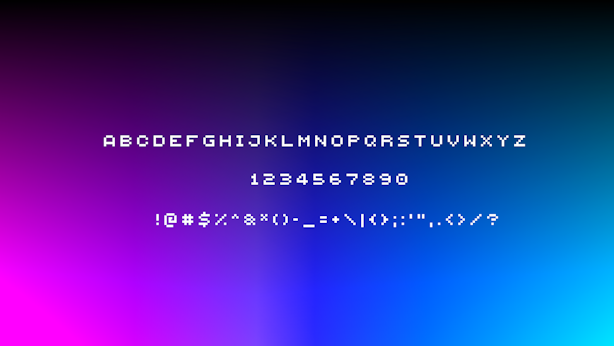
This simple texture pack replaces Minecraft’s default font with the Minecraft Five font, giving your game a clean, modern look. The Minecraft Five font is widely used across many modded servers and community projects, making your in-game text feel familiar and polished while keeping the overall vanilla style intact.
This pack is also inspired by [qrafty’s capitalized font](https://modrinth.com/resourcepack/qraftys-capitalized-font)
Fancy Hearts
**Fancy Hearts** is a texture pack that replaces the default hearts with cleaner, more detailed versions that look a lot fancier without ruining the original style. Along with the hearts, the pack also updates parts of the HUD and even tweaks the jumping bar you see when you’re riding a horse or any other mount. It’s a small visual change overall, but it makes everything feel cleaner and more polished while still fitting right into the game.

> _Zoro_
zOres
# Emissive Ores in the style of Programmer Art.
Requires [**Continuity**](https://modrinth.com/mod/continuity) or [**OptiFine**](https://optifine.net/home) to function properly.
## Ores
**Non-Emissive**
– Coal
**Emissive**
– Copper
– Diamond
– Emerald
– Gold
– Iron
– Lapis
– Redstone
– Nether Gold
– Nether Quartz
****
Join my [**Discord**](https://discord.gg/4GKytn9RRb) for Updates and Feedback!
zOptimized



## 💬 Description – *english*
Well optimized with a lot of its own chips fully client modpack. There are mods for beautiful clouds, splashes on the water, and even… for bedrock edition?
You don’t have to worry about anything, resource packs, configs and shaders are already in the file.
We update to the latest stable versions and always stay cool. Stable updates and modpack support – yes
Modpack simplifies common processes in Minecraft, such as crafting or moving items
– Item Scroller – allows you to quickly move items from inventory to another inventory
The main purpose of the modpack – is beauty, added a lot of mods that either improve the external component of Minecraft
– Better Clouds – beautiful clouds
– Subtle Effects – beautiful partials in different interactions
– And a lot of other mods for splashes on the water or shine on the armor
### 📩 How to install?
🟢 Modrinth App
One of the easiest ways to install modpack
– Open the Launcher
– Search for this modpack (Action & Stuff ON JAVA)
– Click download
– Run and play
– ✅
🌍 MultiMC / Prism Launcher and etc.
In these launchers there are 2 ways to install modpack
1:
– Click in the launcher “Add build”
– Select “Modrinth” and search this modpack (Action & Stuff ON JAVA)
– Click download (or OK)
– Run and play
– ✅
2:
– Download the modpack file [here](https://modrinth.com/modpack/actionandstuffonjava/versions)
– Click “Add build” in the launcher
– Select “Import from file”
– Import modpack file to launcher
– Run and play
– ✅
2.1:
– Download the modpack file [here](https://modrinth.com/modpack/actionandstuffonjava/versions)
– Grab the file with your mouse and move it to the launcher (modpack starts installing)
– Run and play
– ✅
🦠 TLauncher
– Download the modpack file [here](https://modrinth.com/modpack/actionandstuffonjava/versions)
– Convert the modpack from .mrpack to .zip on any website (search *mrpack to zip converter*)
– Create build in “TL Mods” (Create modpack/instance/build > Select your MC version (version of file *1.21.4/8/10*) > Select Fabric *last version* > Remove check mark from “Use skin system TL” and “Use Optifine”)
– Open the files (.minecraft) > Open “versions” folder > Open “*your name of modpack*” folder
– All files from .zip file should be moved here
– Run and play
– ✅
🟤 Official launcher or any other launcher
The hardest way
– Download the modpack file [here](https://modrinth.com/modpack/actionandstuffonjava/versions)
– Fabric Loader must be installed (you can find the tutorials on how to download it yourself)
– Convert the modpack from .mrpack to .zip on any website (search *mrpack to zip converter*)
– All files from .zip file should be moved to the folder with minecraft (*.minecraft* mostly)
– If you have done everything correctly modpack should start and work correctly
– Run and play
– ✅
—
## 💬 Описание – *русский*
Хорошо оптимизированный с кучей своих фишек полностью клиентский модпак. Есть мод на красивые облака, всплески на воде, и даже… на bedrock edition?
Вам ненадо ни о чем беспокоиться, ресурс паки, конфиги и шейдеры уже находятся в файле
Мы обновляемся на самые последние стабильные версии и всегда остаемся крутыми. Стабильные обновления и поддержка модпака присутствуют
Модпак упрощает обычные процессы в майнкрафте, такие как крафт или перемещения предметов
– Item Scroller – позволяет быстро перемещать предметы из инвентаря в другой инвентарь
Основная цель модпака – это красота, добавлено очень много модов которые как либо улучшают внешнюю состовляющую майнкрафта
– Better Clouds – красивые облака
– Subtle Effects – красивые партиклы при разных взаимодействиях
– И еще очень много других модов на вспески на воде или блеск на броне
### 📩 Как установить?
🟢 Modrinth App
Один из самых простых способов установки модпака
– Откройте лаунчер
– Найдите этот модпак (Action & Stuff ON JAVA)
– Нажмите
– Запустить и играть
– ✅
🌍 MultiMC / Prism Launcher
В этих лаунчерах есть 2 способа установить модпак
1:
– Нажмите в лаунчере “Добавить экземпляр (Add build)”
– Выберите “Modrinth” и найдите эту сборку (Action & Stuff ON JAVA)
– Нажмите скачать (или ОК)
– Запустить и играть
– ✅
2:
– Скачайте файл модпака [здесь](https://modrinth.com/modpack/actionandstuffonjava/versions)
– Нажмите в лаунчере “Добавить экземпляр (Add build)”
– Выберите “Импортировать из файла”
– Импортируйте файл модпака в лаунчер
– Запустить и играть
– ✅
2.1:
– Скачайте файл модпака [здесь](https://modrinth.com/modpack/actionandstuffonjava/versions)
– Захватите файл мышью и перенесите его в лаунчер (модпак начнет установливаться)
– Запускай и играй
– ✅
🦠 TLauncher
– Скачайте файл модпака [здесь](https://modrinth.com/modpack/actionandstuffonjava/versions)
– Конвертируйте модпак из .mrpack в .zip на любом сайте (ищите *mrpack to zip converter*)
– Создайте сборку в “TL Mods” (Создать модпак/экземпляр/сборку > Выберите вашу MC версию (версия файла сборки *1.21.4/8/10*) > Выберите Fabric *последняя версия* > Уберите галочку из “Ипользовать систему скинов TL” и “Использовать Optifine”)
– Откройте файлы (.minecraft) > Откройте папку “versions” > Откройте папку “*your name of modpack*”
– Все файлы из .zip файла необходимо переместить в эту папку
– Запускай и играй
– ✅
🟤 Официальный лаунчер или любой другой
Самый сложный способ
– Скачайте файл модпака [здесь](https://modrinth.com/modpack/actionandstuffonjava/versions)
– Fabric Loader должен быть установлен предварительно (вы можете найти руководство, как скачать его самостоятельно)
– Конвертируйте модпак из .mrpack в .zip на любом сайте (ищите *mrpack to zip converter*)
– Все файлы из .zip файла необходимо переместить в папку с майнкрафтом (*.minecraft* обычно)
– Если вы все сделали правильно, модпак должен запуститься и работать корректно
– Запускай и играй
– ✅
zOOpy’s Creepers
Changes the Creeper texture to a texture I made to replace the old Alpha era texture, I think it’s good but I wouldn’t say it’s supposed to be a “better” texture, however, it’s a texture meant to be something I’d like more than the Vanilla texture. [Creeper Banner](https://cdn.modrinth.com/data/cached_images/d97d18344d6e6a456943945c08be63b82697c959_0.webp)
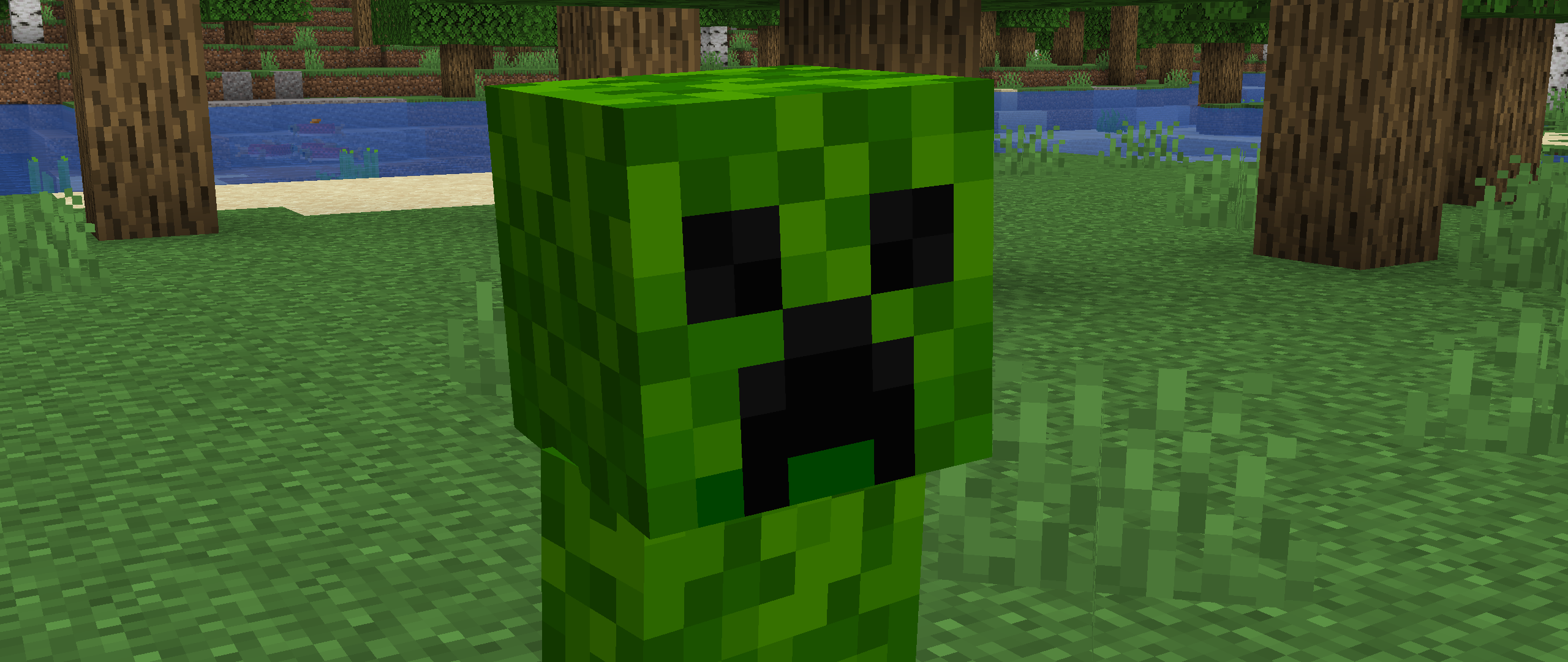
(This Pack has support for [Fresh Animations](https://modrinth.com/resourcepack/fresh-animations) (It blinks!)