zyramenu
—
## 🗂️ ZyraMenu — Custom GUI Menus for 1.8 → 1.21
**ZyraMenu** is a lightweight, fully YAML-driven GUI menu plugin with **native multi-version support** from Minecraft 1.8.8 all the way to 1.21.x — no NMS, no reflection hacks, just clean compatibility layers.
—
### ✨ Features
– **YAML-based menus** — each menu is its own `.yml` file in `plugins/ZyraMenu/menus/`, easy to edit and reload without restarting the server
– **In-game menu creator** — open a chest, place your items, close it: the menu is saved automatically (`/zm create `)
– **Image backgrounds** — drop a `.png` named after your menu into `IMAGES-MENU/`, and ZyraMenu will slice it into a 9-slot grid and apply it as the inventory background
– **Rich slot actions** — assign one action per slot:
– `CLOSE` — close the inventory
– `COMMAND:` — run a command as the player
– `CONSOLE:` — run a command from the console
– `MESSAGE:` — send a chat message
– `OPENMENU:` — open another ZyraMenu
– `SERVER:` — transfer to a BungeeCord server
– **Item utilities** — rename any held item or set individual lore lines directly in-game
– **Player head support** — set a skull owner per slot for custom player heads
– **Hot reload** — `/zm reload` picks up all config and menu changes instantly
– **Tab completion** — full tab-complete support on all subcommands
—
### 🔧 Commands
| Command | Description |
|—|—|
| `/zm view
zyrajobs
# ⚒ ZyraJobs
> **A fully custom Jobs plugin with beautiful GUI menus, progressive unlocks, and a deep leveling system — built for Spigot 1.21.**
—
## ✨ Overview
**ZyraJobs** lets your players choose a profession and level it up by doing what they love — mining, farming, hunting, or brewing. Every action earns XP, every level unlocks something new, and every milestone rewards the grind.
No bloat. No dependencies. Just a clean, immersive jobs experience with handcrafted GUI menus that look great out of the box.
—
## 🧭 The 4 Jobs
| Job | How to level up | Unlocks |
|—–|—————-|———|
| ⛏ **Miner** | Break ores underground | Coal → Iron → Gold → Diamond → Ancient Debris |
| 🌾 **Farmer** | Harvest fully grown crops | Wheat (Lv.1) → Carrots (Lv.5) → Chorus Plant (Lv.30) |
| 🏹 **Hunter** | Kill mobs & animals | Chickens → Creepers → Endermen → Warden (Lv.40) |
| ⚗ **Alchemist** | Brew potions at a stand | Basic potions (Lv.1) → Strength (Lv.8) → Turtle Master (Lv.25) |
Each job goes from **level 1 to 50**, with an XP formula that scales naturally: `100 × level^1.5`.
—
## 🖥️ Custom GUI Menus
ZyraJobs is built around **beautiful, interactive inventory menus**:
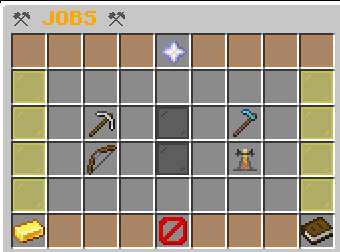
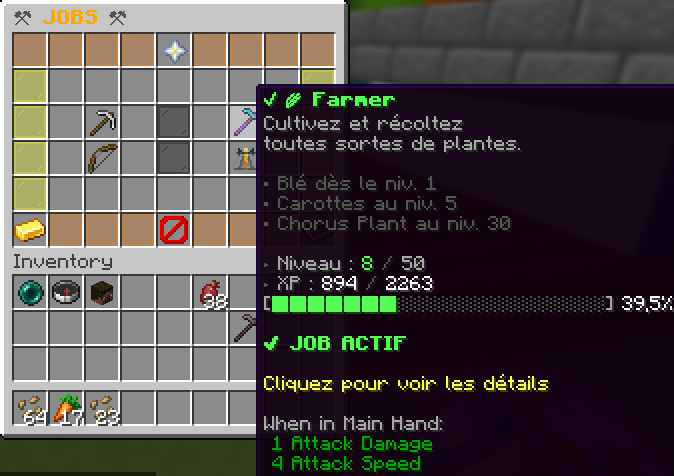
– **Main Menu** — displays all 4 jobs with your current level, XP bar, and active job highlighted with an enchantment glow
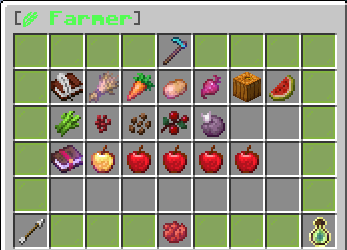
– **Job Detail Menu** — color-coded per job (gray / green / red / purple), shows every unlockable action, required level, XP reward, and all level bonuses
– Everything is **click-to-navigate**: open job details, join, leave, all without typing a command
—
## 📈 Progressive Unlocks
Crops, ores, mobs and potions are **gated by level** — you earn the right to work with better materials as you progress.

**Example for Farmer:**
– Lv. 1 → Wheat `+8 XP`
– Lv. 5 → Carrots & Potatoes `+15 XP` *(unlocked!)*
– Lv. 8 → Beetroots `+12 XP`
– Lv. 10 → Pumpkins & Melons `+20 XP`
– Lv. 30 → Chorus Plant `+45 XP`
Every unlock sends the player a chat notification the moment they reach the required level.
—
## 🎖️ Level-Up System
When a player levels up, they get:
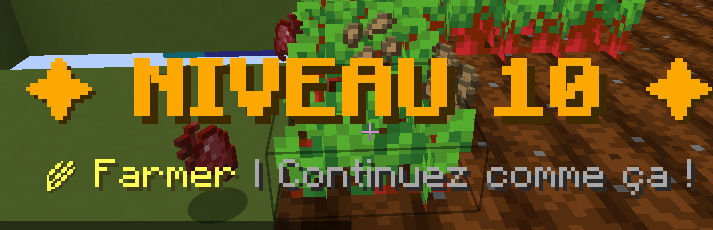

– 🔔 A **rich chat message** with a formatted XP progress bar
– 📺 A full **screen title** announcing the new level
– 🔊 A **level-up sound** effect
– 📣 A notification if a **new action is unlocked** at that level
—
## ⚡ Job Bonuses (every 10 levels)
Each job grants passive bonuses at milestone levels:
**⛏ Miner**
– Lv. 10 — 15% chance to double coal drops
– Lv. 20 — 10% chance to double iron/gold drops
– Lv. 40 — 2% chance to find a diamond while mining deepslate
– Lv. 50 — **PRESTIGE**: Triple XP on all ores
**🌾 Farmer**
– Lv. 5 — 50% chance to auto-replant harvested crops
– Lv. 15 — 10% chance to double wheat/carrot yield
– Lv. 25 — Auto-replant guaranteed at 100%
– Lv. 50 — **PRESTIGE**: Instant harvest without breaking
**🏹 Hunter**
– Lv. 15 — 2% chance to drop monster heads on kill
– Lv. 25 — Double XP against bosses (Ravager, Elder Guardian, Evoker…)
– Lv. 35 — Regeneration effect after each kill
– Lv. 50 — **PRESTIGE**: Random potion drop on every kill
**⚗ Alchemist**
– Lv. 15 — 8% chance to brew a duplicate potion
– Lv. 25 — Brewed potions last 25% longer
– Lv. 35 — 5% chance to auto-upgrade potion to level II
– Lv. 50 — **PRESTIGE**: All your potions are automatically level II
—
## 🛠️ Commands
| Command | Description |
|———|————-|
| `/jobs` | Open the Jobs GUI |
| `/jadmin reload` | Reload the config |
| `/jadmin setlevel ` | Set a player’s job level |
| `/jadmin addxp ` | Add XP to a player |
| `/jadmin reset ` | Reset all job data for a player |
| `/jadmin info ` | View a player’s job stats |
—
## 🔑 Permissions
| Permission | Default | Description |
|———–|———|————-|
| `zyrajobs.use` | Everyone | Access to `/jobs` |
| `zyrajobs.admin` | OP | Access to `/jadmin` |
—
## ⚙️ Configuration
Everything is configurable in `config.yml`:
– Max level (default: 50)
– XP formula base and exponent
– Multi-job mode (allow multiple jobs at once)
– Per-action XP rewards and minimum level requirements
– Level-up titles & sounds on/off
– All chat messages with color code support
—
## 📦 Requirements
– **Minecraft**: 1.21.x
– **Server software**: Spigot or Paper 1.21+
– **Java**: 21+
– **No dependencies** required
—
## 👤 Credits
Made by **sti_moi** — *zyraplug’s group*
zyrahomes
# 🏠 ZyraHome
**GUI-based home management with teams & VIP support — by sti_moi**



—
## ◈ Overview
ZyraHome is a lightweight yet feature-rich home plugin for Paper 1.21.x servers. Unlike traditional command-based home plugins, everything is handled through a clean 27-slot GUI — no memorizing commands, no typing coordinates. Just open the menu, click, and teleport.
The plugin supports personal homes, VIP premium homes with instant teleportation, and a full team system with a shared team home managed by the team leader.
—
## ◈ Features
– 🖱️ **GUI-only home management** — Set, teleport to, and delete homes entirely through an intuitive chest-style menu.
– ⏱️ **Teleport delay system** — Normal homes have a 3-second countdown. Moving during the delay cancels the teleport.
– ⭐ **VIP / premium homes** — 2 extra home slots with instant teleportation for players with the `zyrahome.vip` permission.
– 👥 **Team system** — Create teams, invite members, and share a common team home. The leader manages the team home via the GUI.
– 💾 **Persistent data** — All homes and team data are saved to `homes.yml` and `teams.yml` — no database required.
– ⚙️ **Configurable** — Teleport delays, home counts, cancel-on-move and all messages are fully editable in `config.yml`.
—
## ◈ GUI Explained
The menu is a 27-slot chest split into two rows: **beds on top** (visual status), **dye buttons on the bottom** (actions).
| Item | Meaning |
|——|———|
| Gray wool | Team home slot, not yet defined |
| White bed | Normal home, undefined |
| Red bed | VIP home — requires `zyrahome.vip` |
| Green bed | Home is defined and ready |
| Gray dye | Click to set / define this home |
| Green dye | Left-click to teleport · Right-click to delete |
> **Note:** VIP homes display as red beds until `zyrahome.vip` is granted. Once unlocked, they behave identically to normal homes but teleport instantly.
—
## ◈ Commands
| Command | Description |
|———|————-|
| `/home` | Open the home GUI menu |
| `/teamhome` | Teleport to your team’s home |
| `/team create ` | Create a new team |
| `/team invite ` | Invite a player to your team *(leader only)* |
| `/team accept` | Accept a pending team invitation |
| `/team leave` | Leave your current team |
| `/team kick ` | Kick a member from your team *(leader only)* |
| `/team disband` | Dissolve the team *(leader only)* |
| `/team info` | Display team info and member list |
—
## ◈ Permissions
| Node | Description | Default |
|——|————-|———|
| `zyrahome.home` | Access the home GUI and use homes | everyone |
| `zyrahome.vip` | Unlock VIP home slots + instant teleportation | op |
| `zyrahome.team` | Use team commands and team home | everyone |
| `zyrahome.admin` | Administrative commands | op |
—
## ◈ Installation
1. Drop the `.jar` into your server’s `plugins/` folder.
2. Restart the server — no dependencies required.
3. Configuration files (`config.yml`, `homes.yml`, `teams.yml`) are generated automatically inside `plugins/ZyraHome/`.
Works out of the box on any **Paper 1.21.x** server running **Java 21+**.
—
*Created by **sti_moi** · ZyraHome v1.0.0 · Paper 1.21.x*
Zyphorix Red
Get ready to PvP with Zyphorix Red! A Recolor of Zyphorix, a PvP texturepack that overhauls all PvP related items while keeping the loved vanilla-like feeling.
Zyphorix Red retextures:
– Swords and Tools of any material
– Iron, Gold, Diamond and Netherite Armor
– Water and Lava Bucket (also empty one of course)
– Mace, Bow and Arrows
– Golden Apples and Totem of Undying
– HUD (Crosshair, Hotbar, etc)
Zyphorix Pink
Get ready to PvP with Zyphorix Pink! A Recolor of Zyphorix, a PvP texturepack that overhauls all PvP related items while keeping the loved vanilla-like feeling.
Zyphorix Pink retextures:
– Swords and Tools of any material
– Iron, Gold, Diamond and Netherite Armor
– Water and Lava Bucket (also empty one of course)
– Mace, Bow and Arrows
– Golden Apples and Totem of Undying
– HUD (Crosshair, Hotbar, etc)
Zyphorix Blue
Get ready to PvP with Zyphorix Blue! A Recolor of Zyphorix, a PvP texturepack that overhauls all PvP related items while keeping the loved vanilla-like feeling.
Zyphorix Blue retextures:
– Swords and Tools of any material
– Iron, Gold, Diamond and Netherite Armor
– Water and Lava Bucket (also empty one of course)
– Mace, Bow and Arrows
– Golden Apples and Totem of Undying
– HUD (Crosshair, Hotbar, etc)
Zyphorix 16x
Get ready to PvP with Zyphorix! A PvP texturepack that overhauls all PvP related items while keeping the loved vanilla-like feeling.
Zyphorix retextures:
– Swords and Tools of any material
– Iron, Gold, Diamond and Netherite Armor
– Water and Lava Bucket (also empty one of course)
– Mace, Bow and Arrows
– Golden Apples and Totem of Undying
– HUD (Crosshair, Hotbar, etc)
Zxygo’s Crystal Util
**Business email: [email protected]** |
**Business discord: zxygomc.mod**
### Open to partnerships/sponsors ^
———————————————————————————————-
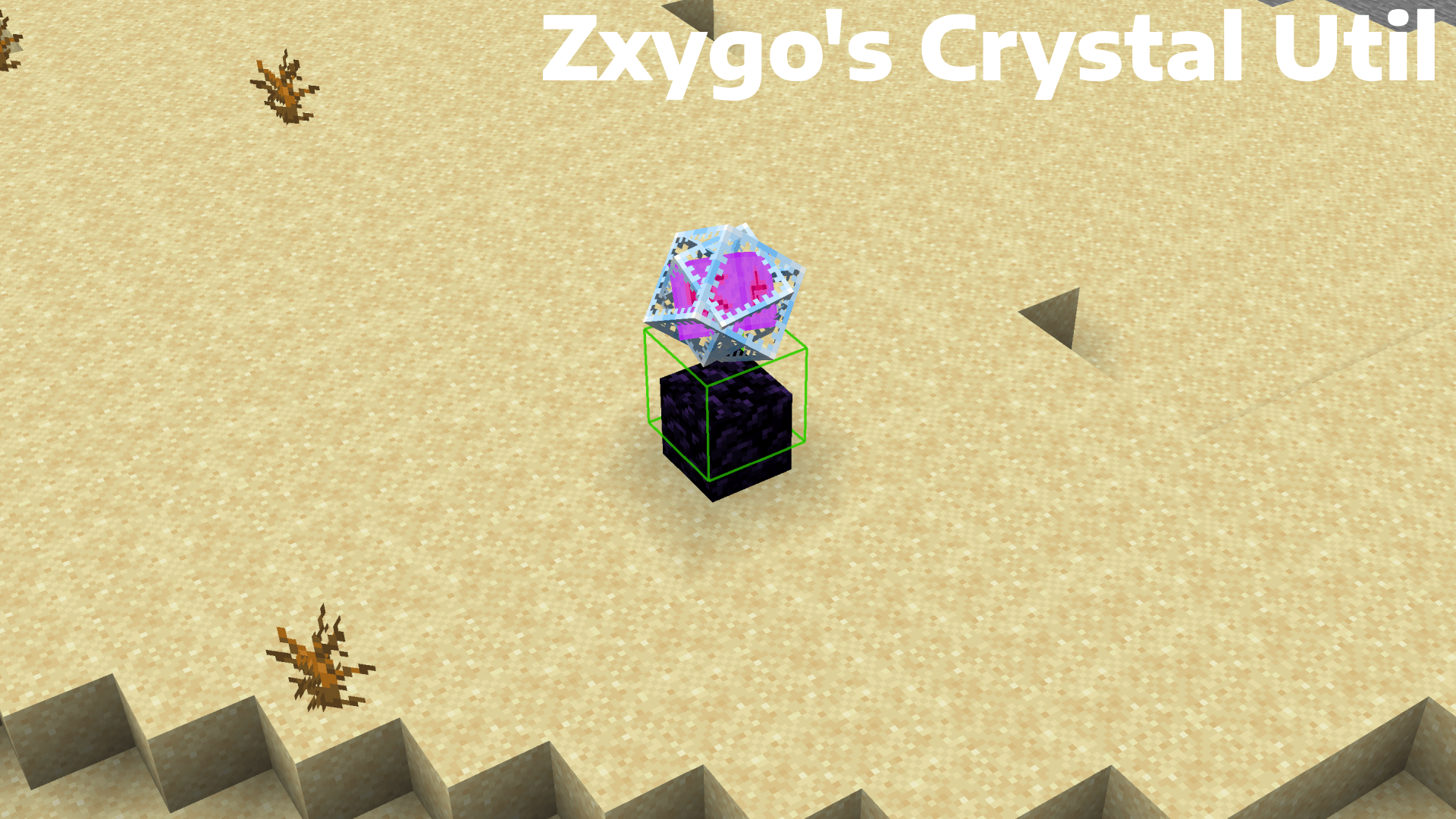
**Zxygo’s Crystal Util is a utility mod that shows people a relative damage indicator of a crystal comapred to the position and distance of a player compared to a crystal. It shows a simple box outline that changes color depending on your relative position and distance, and it allows for many uses.**
———————————————————————————————-
**NOTE: This mod may be seen as cheating on some servers and provides a unfair advantage. This mod is simply to be used as a learning tool for people getting into Crystal PVP. It exists as a tool that players can use, not a cheat. I don’t support hacking or cheating of any kind**
———————————————————————————————-
———————————————————————————————-
### Features
**Color-Coded Danger Levels**
– Red: can be dealt heavy damage and can be popped / killed
– Yellow: will deal some damage, a bit dangerous, take caution
– Green: safe
**Fully Customizable**
– Toggle the indicator on/off anytime
**Clean & Optimized**
– Minimal performance impact
– Works in multiplayer smoothly
**Mod Menu Integration**
– Simple Mod Menu Integration
———————————————————————————————-
### How It Works
Zxygo’s Crystal Util analyzes the vertical position of end crystals relative to your player, along with the distance from the player to the crystal. This allows for a calculation for the indicator and then a color depending on the calculation.
For example, if the crystal is above your head or you are far away from it, it renders green (least damage).
Intermediate positions blend between colors.
———————————————————————————————-
**This is my first ever mod, so apologies if there are some bugs. I hope this helps in someone’s journey in Crystal PVP, as at the very start of your journey, this mod can help you learn the mechanics and how you take damage from a crystal.**
Zxygo’s Anchor Util
**Business email: [email protected]** |
**Business discord: zxygomc.mod**
### Open to partnerships/sponsors ^
———————————————————————————————-
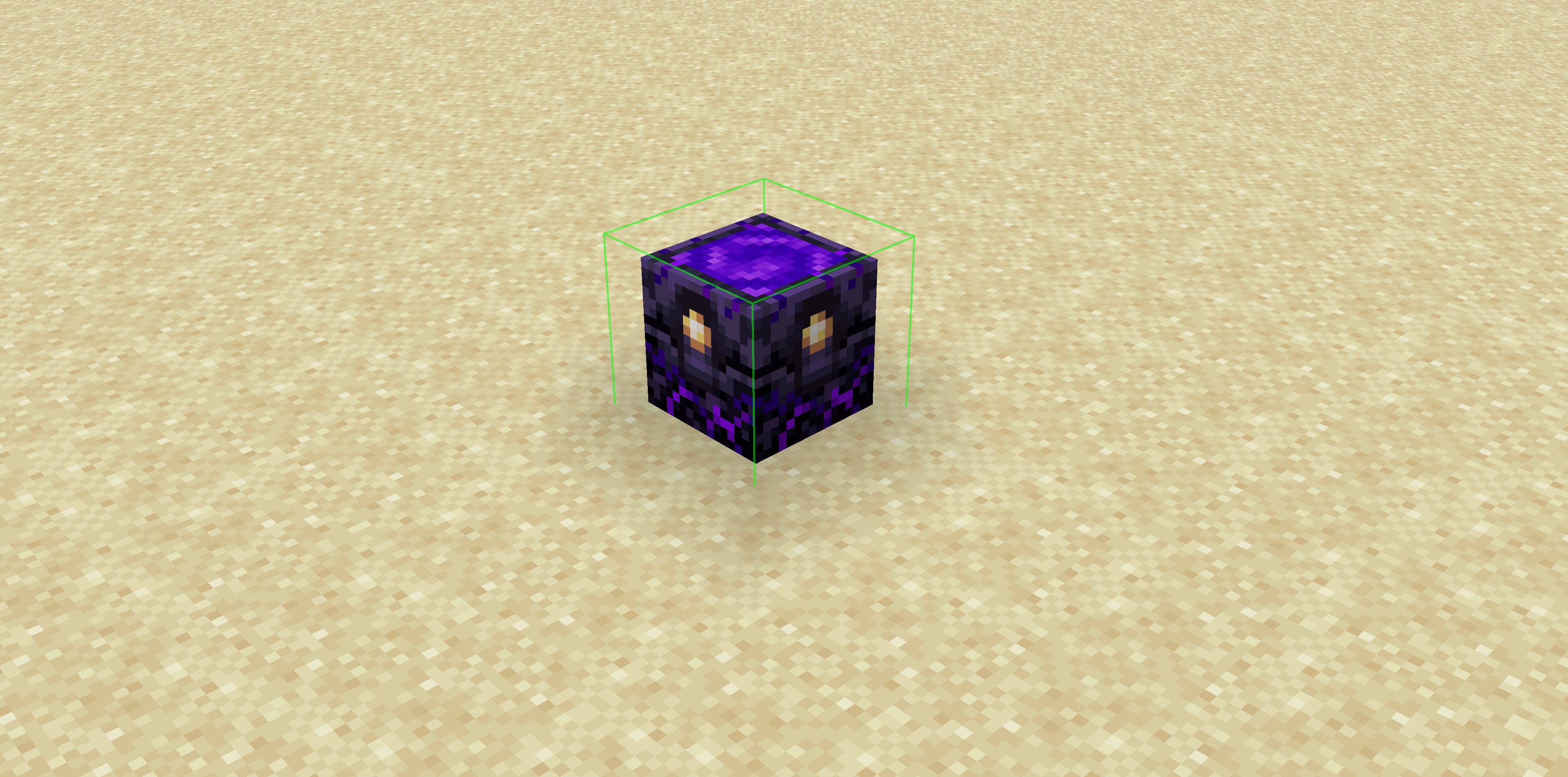
**Zxygo’s Anchor Util is a utility mod that shows people a relative damage indicator of a anchor comapred to the position and distance of a player compared to a anchor, along with taking in factors like the armor and enchantments a player is using. It shows a simple box outline that changes color depending on your relative position and distance, along with armor and enchantments, and it allows for many uses.**
**Check out my other mod: Zxygo’s Crystal Util**
————————————————————————————————
**NOTE: This mod may be seen as cheating on some servers and provides a unfair advantage. This mod is simply to be used as a learning tool for people getting into Crystal PVP. It exists as a tool that players can use, not a cheat. I don’t support hacking or cheating of any kind**
————————————————————————————————
————————————————————————————————
### Features
**Color-Coded Danger Levels**
– Red: (deadly)
– Yellow: (dangerous)
– Green: (safe)
**Fully Customizable**
– Toggle the indicator on/off anytime
**Clean & Optimized**
– Minimal performance impact
– Works seamlessly in multiplayer
**Mod Menu Integration**
– Simple Mod Menu Integration
————————————————————————————————
### How It Works
Zxygo’s Anchor Util analyzes the position and distance of anchors relative to your player, along with the other factors like blocks placed between you and the anchor, armor, and enchantments like protection on the armor. This allows for a calculation for the indicator and then a color depending on the calculation.
For example, if you have a obsidian block in front of the anchor between you, then it will be a green (least damage).
ZxMenus
🧩 ZxMenus – Simple & Powerful GUI Menu Plugin
ZxMenus is a lightweight, all-in-one inventory GUI menu plugin inspired by DeluxeMenus, built to be powerful, fast, and easy to configure.
Create fully customizable GUI menus that open with commands and perform player-specific actions such as running commands, opening other menus, or executing console commands. ZxMenus focuses on simplicity without sacrificing flexibility.
—
✨ Features
Create unlimited GUI menus using simple YAML configuration
Open menus using custom commands
Execute player or console commands from menu items
Open menus for other players
Permission-based access for menus and items
Full PlaceholderAPI support
Lightweight and optimized for performance
Compatible with modern Spigot / Paper servers
Designed as an easier alternative to DeluxeMenus
—
📌 Commands
/zxmenu open