**🌟 zMAnnounce** is an optimized plugin for **Velocity** servers that allows sending **global and server-specific announcements**, displaying **bossbars** with countdowns, and fully customizing messages with **Legacy**, **HEX**, or **MiniMessage** colors. It includes spam protection, message limits, and performance optimizations with color caching. 🚀
## ✨ Key Features
– 📢 **Global & server-specific announcements**
– ⏱️ **Bossbars with customizable timers**
– 🎨 **Full color & MiniMessage support**
– 🔒 **Security**: message limits, input validation, and anti-spam
– ⚡ **Performance optimizations** with thread-safe operations
– 🔔 **Update notifications** via Modrinth
## 📦 Installation
1. Download the latest release from the [Modrinth page](https://modrinth.com/plugin/zmannounce) or [GitHub releases](https://github.com/zMarkitos/zMAnnounce/releases)
2. Place `zMAnnounce-1.0.0.jar` in your **Velocity** `plugins/` directory
3. Restart your Velocity server
4. Configure the plugin in `plugins/zMAnnounce/config.yml`
* ✅ Checks Modrinth API for new versions on startup
* 🛎️ Optional player notifications when they join
* ⚙️ Can be disabled in `config.yml`
## 📞 Support
* **Discord**: [Support the discord](https://discord.com/invite/R7PNG2fChs)
Zlodyy’s PvP RP
**Ultimate Clear PvP: Crystal, UHC & Mace**
_This resource pack is built from the ground up for serious players across multiple combat styles. Whether you are dominating in Crystal PvP, surviving classic UHCs, or mastering the newest Mace mechanics, this pack provides the visual clarity you need to gain a competitive edge.
The core philosophy of this pack is maximum visibility and zero distractions._
**✨ Key Features:**
_Multi-Mode Optimization: Tailored specifically for Crystal PvP, UHC, Mace combat, and general server duels. Key weapons and items are distinct and easy to read.
Unobstructed View: Features a Small Shield and Small Totem so your off-hand items never block your screen during intense fights.
Perfect Clarity: Completely removes the annoying pumpkin overlay (No Pumpkin Blur) and includes Small Fire to keep your field of vision perfectly clear, even when taking damage._
_Crisp Typography: Comes with a custom, ultra-clean Font that makes chat, player names, and menus look sleek and easy to read at a glance.
Performance Focused: Minimalist textures and reduced visual clutter mean nothing gets between you and your opponent.|
extra feautures glowing totem,dark snow…
“`
If you are looking for a versatile, comfortable pack that just works perfectly across all modern PvP modes, this is the one. Drop it into your folder, queue up a match, and enjoy the clean visuals!_
“`
ZLives

# Please read the concept of this plugin
## Concept :
– **1. Player A and Player B gets default 3 lives and 10 Hearts**
– **2. Player A killed Player B, then Player B will lose 1 live (remaining = 2) and in exchange of the live, player B will get +5 Hearts (total = 15).**
– **3. If Player A again killed Player B, then Player B will lose 1 live (remaining = 1) and in exchange of the live player B will get +5 Hearts (total = 20)**
– **4. After this if Player B killed Player A, then Player B will gain 1 live and -5 Hearts.**
– ### *NOTE : The maximum hearts obtainable are 25 and maximum lives are 3, so no one can go beyond it (untill changed from config.yml)*
## 1. Plugin Description
**ZLives** is a unique Minecraft plugin that introduces a **lives and heart system** to your server. Players start with a limited number of lives and hearts, and their actions (such as killing other players or being killed) affect their lives and hearts. Key features include:
– **Lives System**:
Players start with a default number of **3 lives**. When a player loses all their lives, they are eliminated and put into spectator mode.
– **Heart System**:
Players have a limited number of hearts, **default is 10** (20 Heart points). Hearts determine the player’s max health.
– **Revival System**: Eliminated players can be revived using a special **Revive Book** or by an admin using the `/revive` command.
– **Elimination Animation**: When a player is eliminated, a dramatic animation and sound effect play to signify their elimination.
– **Customizable Config**: The plugin allows server admins to configure default lives, hearts, and other settings via the `config.yml` file.
– **Commands**:
– `/lives`: Check your remaining lives and hearts.
– `/revive `: Revive an eliminated player (admin-only).
– `/elimination-animation`: Play the elimination animation on a player or at specific coordinates (admin-only).
## 2. Installation Guide
Follow these steps to install and set up the **ZLives** plugin on your Minecraft server:
#### **Step 1: Download the Plugin**
1. Download the `ZLives.jar` file from the provided source (e.g., SpigotMC, GitHub, or your custom build).
2. Place the `ZLives.jar` file in your server’s `plugins` folder.
#### **Step 2: Start the Server**
1. Start or restart your Minecraft server.
2. The plugin will generate a default `config.yml` file in the `plugins/ZLives` folder.
#### **Step 3: Configure the Plugin**
1. Open the `config.yml` file located in the `plugins/ZLives` folder.
2. Customize the settings as needed.
#### **Step 4: Test the Plugin**
1. Join your server and test the plugin’s features.
2. Use the `/lives` command to check your lives and hearts.
3. Test the elimination and revival mechanics.
—
## **3. Screenshots**
### **Elimination Animation**
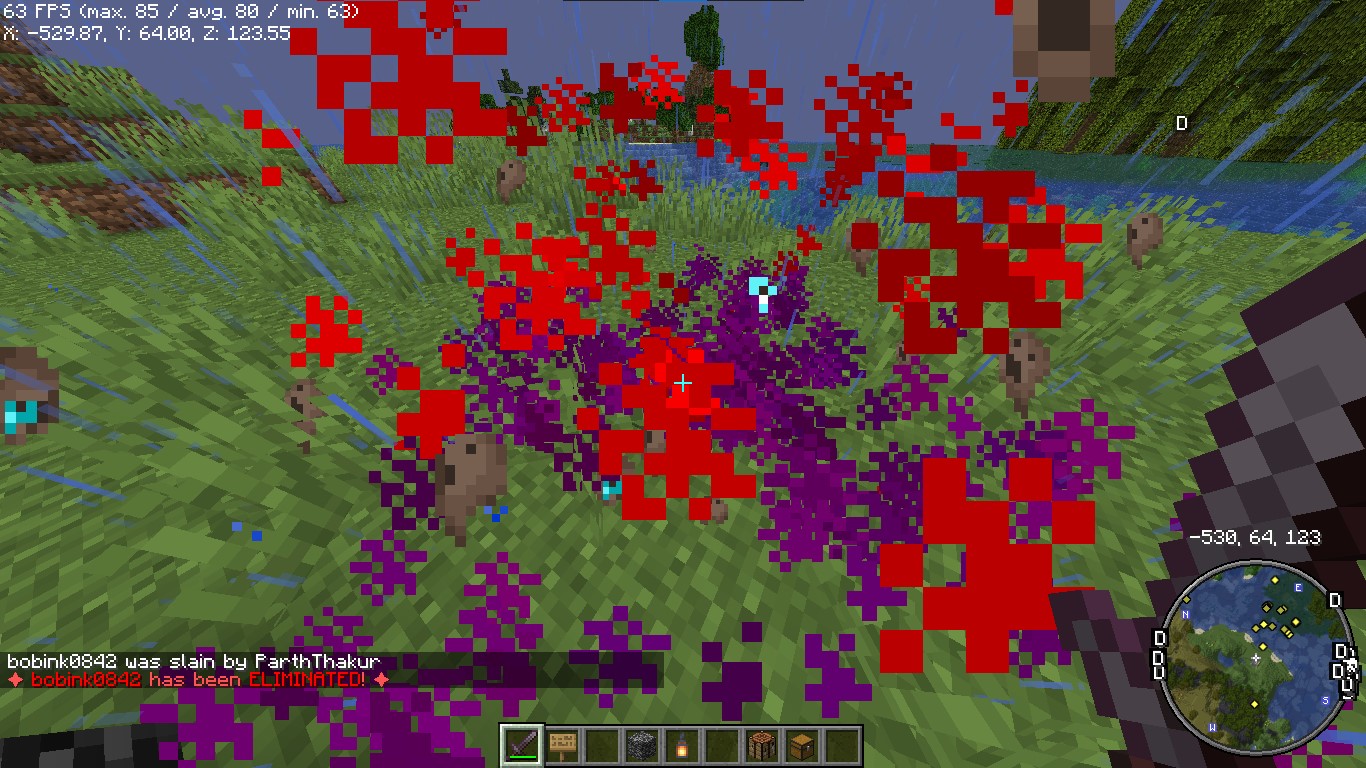
*Players see a dramatic animation when they are eliminated.*
### **Revival Animation**
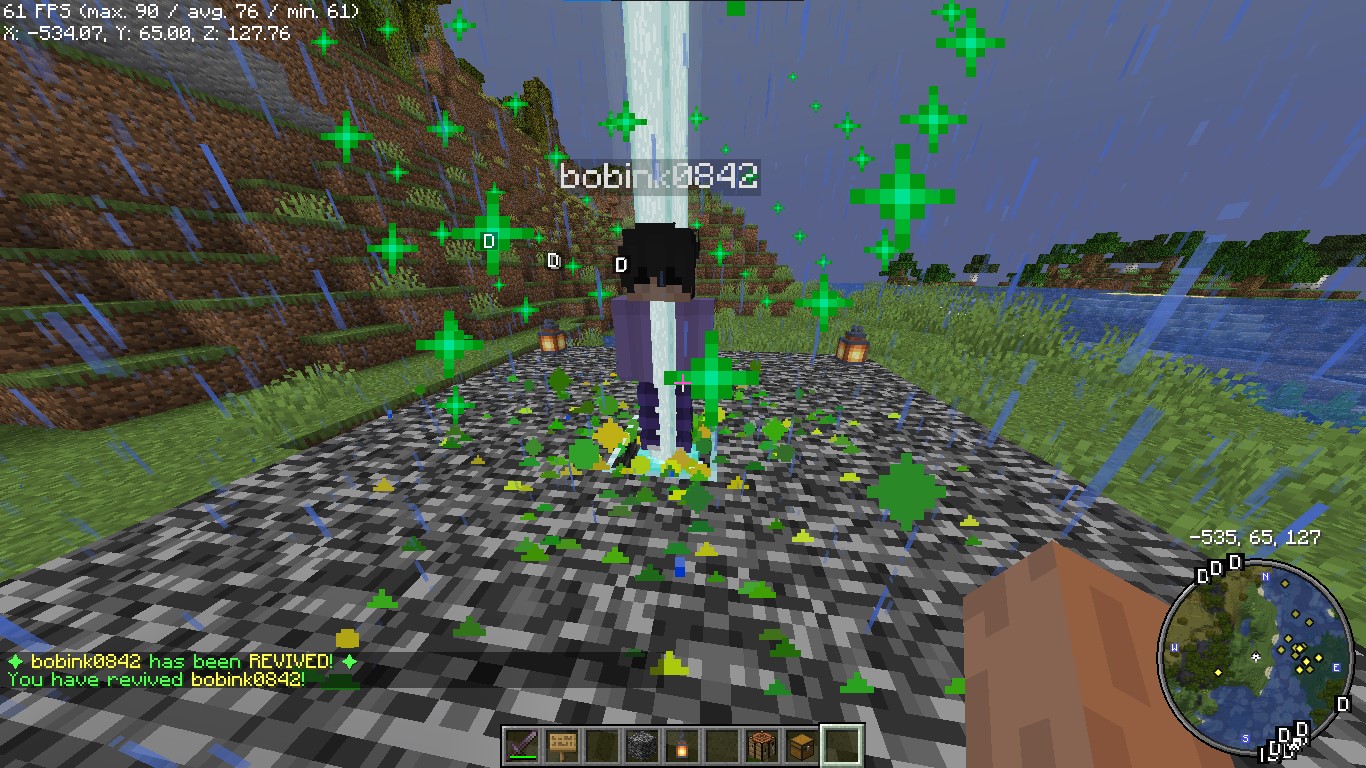
*Players see a dramatic animation when they are eliminated.*
### **Revive Book**

*The Revive Book can be crafted and used to revive eliminated players.*
### *Note: This recipe can be changed from config.yml.*
### **Remaining Lives message after killed by a player**

### **+5 Hearts on every death by a player**
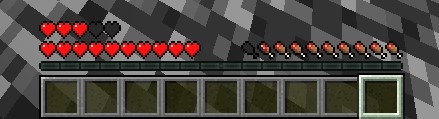
*+5 Hearts when a player is killed by other player*
## **4. Donations**
### Liked my Content? Want to support me?
– **Support me by sending money on this UPI QR Code**.

## **5. Reporting Issues**
**Need Help? Contact Us!**
Encountered a problem or have suggestions? We’re here to assist you!
### 📧 **Discord Support**: Contact me on Discord at **@iitian_69**.
#### **Step 1: Check the Logs**
1. Look for error messages in the server console or `logs/latest.log`.
2. Copy the relevant error message.
#### **Step 2: Provide Details**
When reporting an issue, include the following information:
– **Minecraft Version**: The version of Minecraft your server is running.
– **Server Software**: The server software you’re using (e.g., Spigot, Paper).
– **Plugin Version**: The version of the **ZLives** plugin you’re using.
– **Steps to Reproduce**: A detailed description of how to reproduce the issue.
– **Error Logs**: The error message or log snippet.
#### **Step 3: Submit the Issue**
**Contact me at discord username is : @iitian_69**
#### **Example Issue Report**
“`
**Minecraft Version**: 1.21.4
**Server Software**: Paper
**Plugin Version**: 1.0.0
**Issue**: Players are not losing hearts when they kill another player.
**Steps to Reproduce**:
1. Set default lives to 3 and hearts to 10 in the config.
2. Have a player with 2 lives kill another player.
3. Check the killer’s hearts after the kill.
**Error Logs**: [No errors in the logs]
“`
### **Final Notes**
The **ZLives** plugin adds a unique and engaging gameplay mechanic to your Minecraft server. If you have any questions, need further assistance, or want to suggest new features, feel free to reach out! 😊
Happy gaming! 🚀
zLink
zLink is your custom link plugin. It works by connecting to a database and giving the user a code, that code the user can input into your project to link their account. Right now you can fetch the users uuid, luckperms rank, display name, world, game mode and when they first joined.
**Please Note: This plugin is still in beta, there will be bugs and it will not be perfect.**
If you would like to get releases before it comes here please visit: [Our Official Website](https://link.zavrobot.tech/)
zLife Season 1
Start with 1 heart and 7–13 lives. On death: lose 1 life, gain 1 heart. On kill: gain 1 life. Name color shows lives: Red (1–3), Yellow (4–6), Lime (7–9), Dark Green (10+). Run out of lives = elimination.
ZlAutoGive
## ✨ Overview
ZlAutoGive is a **powerful, lightweight, and fully configurable plugin** that automatically gives players the **vanilla drops** of blocks directly to their inventory! Perfect for servers that want to streamline resource collection while keeping the **vanilla Minecraft experience intact**.
With ZlAutoGive, you can:
* 💎 Automatically get blocks and items from mining or harvesting **without losing vanilla mechanics**.
* 🍏 Receive **apple drops from oak leaves** with the same probability as vanilla.
* 🛠 Respect **Silk Touch & Fortune enchantments** on your tools.
* 🎛 Apply **multipliers per permission group** (e.g., VIP, MVP) to increase drops.
* 📦 Handle **full inventories gracefully**, dropping items to the ground with a clear warning message.
* ⚡ Enable or disable the system dynamically, reload config/messages, and customize **prefixes & colors**.
—
## 🧩 Features
* ✅ Automatic vanilla drops
* ✅ Silk Touch & Fortune support
* ✅ Multipliers per permission (`zlautogive.multiplier.X`)
* ✅ Configurable messages with **colors** (`&x`, `&#hex`, `&`)
* ✅ Inventory full handling with item drop + warning message
* ✅ Works for **Minecraft 1.18 and above**
* ✅ Lightweight & server-friendly
—
## ⚙ Configuration
ZlAutoGive comes with:
* `config.yml` – Enable/disable system, set multipliers per permission.
* `messages.yml` – Customize all messages, including prefix, help, and inventory full warnings.
“`yaml
inventory-full: “%prefix%&cYour inventory is full! Dropped &b%amount%x &f%item%”
“`
—
## 📝 Commands
| Command | Permission | Description |
| ——————– | ———————– | —————————————— |
| `/zlautogive on` | `zlautogive.admin` / OP | Enable the system (applies after restart) |
| `/zlautogive off` | `zlautogive.admin` / OP | Disable the system (applies after restart) |
| `/zlautogive reload` | `zlautogive.admin` / OP | Reload config and messages |
| `/zlautogive` | Any with permission | Show help message |
—
## 🎨 Customization
* Full **color support**: `&`, `&x`, `&#hex`
* **Prefix customization** in `messages.yml`
* Control multipliers per **LuckPerms groups**
—
## 💡 Why use ZlAutoGive?
* Saves players time without breaking vanilla Minecraft.
* Perfect for **semi-vanilla, survival, and minigame servers**.
* Fully **configurable and permission-based**, giving you complete control.
* Lightweight and **optimized for 1.18+ servers**.
—
## 🚀 Installation
1. Place `ZlAutoGive.jar` in your `/plugins` folder.
2. Start your server once to generate config/messages.
3. Configure multipliers and messages to your liking.
4. Reload with `/zlautogive reload` or restart the server.
—
## 📣 Support & Credits
* Developed by **Zeralyth Studios**
* For support or suggestions, contact your server dev team or reach out to Zeralyth Studios.
1.8 style texture pack that i made for my friend. It offers a full port of GUIs and items from a 1.8 pack aswell as some blocks like Deepslate i made to match the style of the 1.8 blocks (including wood, boats, deepslate blocks, chests/enderchests)
_qyrox(zkxv) has an updated version on his account.
Redstone Tweaks Overlaid
**Add redstone display overlaid to your favorite resource packs**
| A transparent GUI texture pack that supports 1.7.10 to 1.22!|
| :————-:|
|**It works better with [Clean Screen](https://modrinth.com/resourcepack/low-shield-fire-no-pumpkinblur)!**|
| **Mod support:** |
|jade|✅|
|fabric|✅|
|appleskin|✅|
|inventoryprofilesnext|✅|
|**Wait for more**|
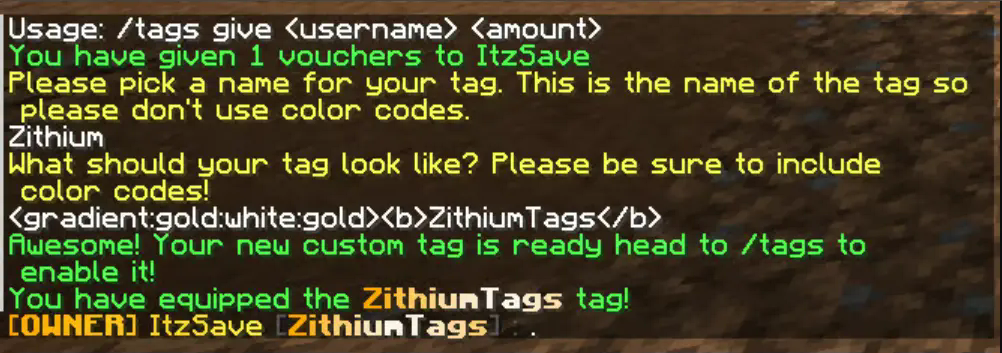
ZithiumTags is the ultimate tag plugin for your server. Easily create tags for users and allow them to create their own custom tags with our Tag Voucher system.
This plugin is still in BETA extensive testing has gone into the plugin before release, but issues are expected please report any in our discord.
## **Features:**
– Gradient Support
– Tag Vouchers
– Players can be given tag vouchers to make custom tags that only they can use.
– Unlimited Tags
– Custom tag permissions
– Tag Colors
– Players can custom color their tags with the built-in color menu.
– Admins/Owners can also create custom colors to add as presets.
## **Images**
The text prompt when a user redeems a custom tag voucher.