Toggle Chat
# Toggle Chat
A Minecraft mod for Fabric and Quilt mod loaders that toggles chat visibility with a key binding (period [`.`] by default).
# Toggle Chat
A Minecraft mod for Fabric and Quilt mod loaders that toggles chat visibility with a key binding (period [`.`] by default).
## Text Formatting Everywhere
Utility mod that returns an ability to use [Minecraft’s old formatting system](https://minecraft.wiki/w/Formatting_codes).
In order to format text, you simply put section sign (**§**), followed by [formatting code](https://minecraft.wiki/w/Formatting_codes), followed by your desired text. For instance: __§1Hello__, will color __Hello__ into blue
## Places status:
### Chat
—
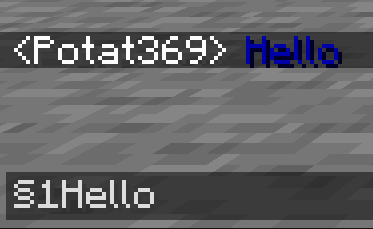
– **Required on**
– **Client**: Yes
– **Server**: Yes
### Anvil
—
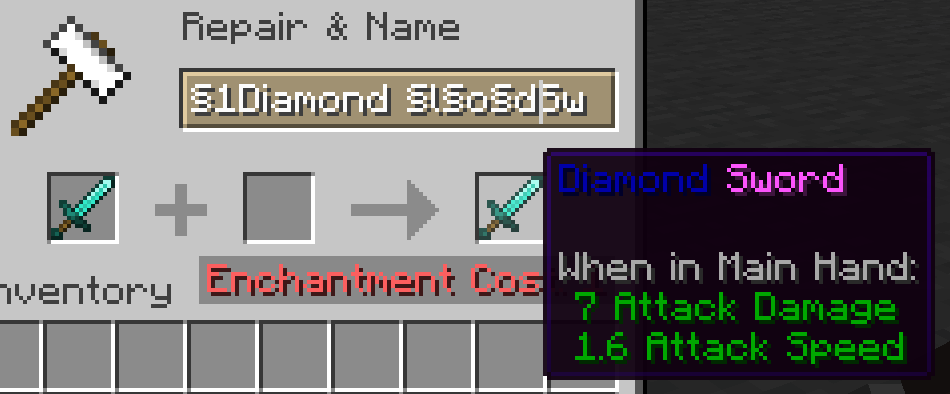
– **Required on**
– **Client**: Yes
– **Server**: Yes
### Sign
—
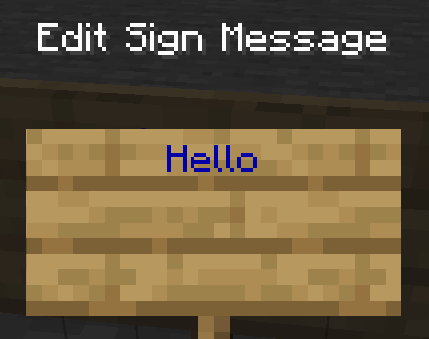
– **Required on**
– **Client**: No
– **Server**: Yes. However, there is a way to circumvent the requirement by doubling the code, like this: `§§11Hello`.
> Note: formatting will disappear after opening and closing.
### Book and Quill Body
—
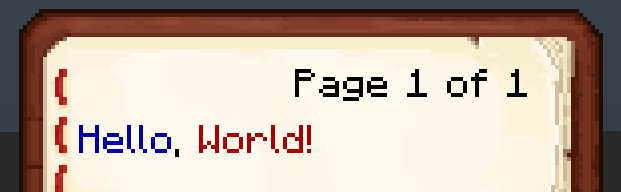
– **Required on**
– **Client**: Yes
– **Server**: No
### Book and Quill Title
—
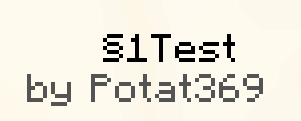
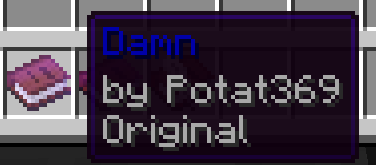
– **Required on**
– **Client**: Yes
– **Server**: No
# Tasty Items
Tasty Items is a resourcepack that adds eating animations to food and other consumable items with no mods! It uses new item definitions introduced in 24w45a, meaning you will need to be in any version above that for this to work.
This pack uses all original textures and includes some extra things, such as carrots and potions being rotated to your mouth when consuming them.
**_Hey, wasn’t this done before?_**
There have been mods that add a similar feature in the past, however this resourcepack works in vanilla so you don’t need mods for it to work!
## Current Items
This pack adds eating animations for all food and drink items as of 1.21.4!
## Game Versions
You need to be in 1.21.4 or above for this to work. You don’t need any mods installed.
**I will not backport this to older versions for two reasons:**
– It’s literally impossible without making a specialised mod
– There are mods for older versions that do a similar thing
## Credits
– **Amaro Lunático**: Made the raw beef animation (shortened to 6 frames from 11)
– **KilianFelix**: Made the pumpkin pie animation (first two frames slightly modified)
– **theoness1**: Made the Food Animations mod that was an inspiration for this pack
## License
Tasty Items by ioblackshaw (a.k.a. Enchanted_Games) is licensed under CC BY-NC 4.0


Video content creators may monetise videos including this work provided the license is followed.
# Tab Player Health
Free and open-source datapack for Minecraft 1.21 and higher that display players health.
## Features
By default the players health is displayed in the tab.
This is a Translation Pack for my project [Timo](https://modrinth.com/datapack/timo_11).
When using mods like [Coordinates Display](https://modrinth.com/mod/coordinates-display) it displays **”biome.timo.rich”** without this Pack but with this pack **”Rich”**
Supported Languages:
“`
English (United States)
ɥsᴉluƎ(uʍop ǝpᴉsd∩)
“`
[
[
****
#
With this pack i modeled the dragon egg becouse why it its so old looking and different than sniffer’s.
.
#
> **Can i use some textures from Svrve’s Dragon Egg in my pack**
– As long as its not distributed, yes you can. If you want to publish it, just ask me before doing it.
[
[
****
#
This pack is all about torches, make them an item texture, animate it, change model, also animate it. Thats all.
.
#
> **Can i use some resources from it in my pack?**
After installing it, open the file you downloaded (.zip). Here you will find licence. Read it.
an original album made as a tribute to C418 in his signature style, made into a custom music pack:
this pack features 6 tracks:
– 1 title track: jang
– 2 creative tracks: albeit, burning konkrete
– 3 survival tracks: rose field, cliff hanger, supernova
this resourcepack should be compatible with versions 1.7.2 and above. newer versions may complain about it being broken or incompatible, ignore that.
there are two versions of the pack: one that replaces the vanilla music and one that does not. the one that replaces the original soundtrack doesn’t seem to do so on 1.7.2, but the music should still be added to the pool.
you may use this music in your own resource/data/mod-packs only if it’s ENTIRELY FREE. this music may NOT be resold or used for COMMERICAL PURPOSES.
[https://aurigrave.org/audio/release/supernova](https://aurigrave.org/audio/release/supernova)


> ### **THIS RESOURCE PACK REQUIRES THESE MODS TO FUNCTION:**
> 1. **[ETF](https://modrinth.com/mod/entitytexturefeatures)**
> 2. **[EMF](https://modrinth.com/mod/entity-model-features)**
> 3. **[Continuity](https://modrinth.com/mod/continuity)**
> 4. **[Polytone](https://modrinth.com/mod/polytone)**
# Summit: Minecraft At Its Peak
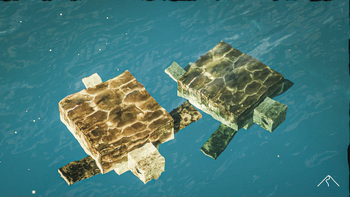
**Summit** is a realistic texture pack for Minecraft, designed to enhance your game with a touch of natural beauty. It’s subtle, refined, and compatible with a range of systems.
## Summit 64x is now free!




## Features:
– **Varied Resolutions:** Choose from 16x to 64x to match your system.
– **Balanced Realism:** Enhanced textures that feel right at home in Minecraft.
– **Optimized Performance:** Smooth and efficient gameplay experience.
**Rediscover Minecraft with Summit!**
[Patron]: https://patreon.com/Summitmc?utm_medium=clipboard_copy&utm_source=copyLink&utm_campaign=creatorshare_fan&utm_content=join_link
[1]: https://i.imgur.com/vZ1vIat.png
[2]: https://www.optifine.net/home “Redirect to Optifine”
[3]: https://i.imgur.com/a7UsCgN.png
[4]: https://irisshaders.dev/ “Redirect to Iris”
[5]: https://i.imgur.com/XCZiKxy.png
[6]: https://patreon.com/Summitmc?utm_medium=clipboard_copy&utm_source=copyLink&utm_campaign=creatorshare_fan&utm_content=join_link “Redirect to Patreon”

# StupidMC Translate——沙雕翻译包
## MoeRain Codeopen Project/已列入萌雨社开源计划
## 介绍
这是辉夜星瞳与萌雨社的作品——沙雕翻译包。本翻译包具有跟APT一样的强大力量。
## 与其他模组的兼容性
>您知道吗?在一般情况下,资源包翻译文件优先级大于模组翻译的优先级
为了更好的体验,沙雕翻译包目前正在尝试兼容部分模组的翻译,目前支持情况如下:
|模组名称|兼容情况|
|——-|——|
|Bedrockify|兼容加载提示|
|Modmenu(模组菜单)|考虑兼容中|
|Sodium(钠)|已兼容部分翻译|
|IRIS(鸢尾花光影加载器)|已兼容部分翻译|
|~~quickbackupmulti(多槽位备份)~~|~~与作者讨论后无果,遂取消兼容~~|
* 您也可以开一个issue,请求翻译包加上你喜欢的模组的翻译。
* 由于作者不是很喜欢使用Forge,所以Forge上的独占模组可能将不会被兼容。
* 您提交的新的模组翻译将随下一个版本(绝大部分是正式版)进行发布,如果您的模组不兼容发布的版本,请手动修改pack.mcmeta以手动兼容
## 文件结构
当前版本的沙雕翻译包文件结构如下所示。(*表示下载后可自行删除,不影响使用)
“`Python
[assets]
[bedrockify]#兼容Bedrockify的模块
[lang]
[minecraft]#原版兼容Minecraft的模块
[lang]#语言文件
*
*
[texts]#通用文本文件(例如终末之诗和演职员表)
“`
## 用法
### Modrinth版本下载(推荐)
如果您的启动器自带从Modrinth检索资源包的功能,您可以直接搜索”Stupid MC”,之后按照启动器的说明安装即可。
如果您的启动器不带有从Modrinth检索资源包的功能,您可以通过[此链接](https://modrinth.com/resourcepack/stupid-mc-translate-chn)进行下载,Modrinth的zip无需解压,直接放在资源包文件夹即可使用。
### git版本下载
在[这里下载发行版](https://github.com/EastCation/StupidMC-Translate/releases),拿到压缩包后将里面的
### 使用模组进行更新(实验性)
>此功能正在开发,请稍后回来查看
您可以下载“StupidMC Updater”模组来保持翻译的最新版本
## 与其他资源包的反应
本资源包可与梗体中文资源包合并使用;但在使用前请确保您的梗体中文资源包启用了*兼容模式*且此资源包在最顶端,否则您将只能看到梗体中文的翻译。
本资源包建议配合[沙雕附加包](https://starmoe-my.sharepoint.com/:f:/g/personal/starmoe_starmoe_com_mp/EvBq1wLCheJPiRnwIoZheEoB0HmMHYtBppgRUlmbveV69A?e=tElcnX)使用,否则可能会少了很多乐趣。
## 如何贡献
您需要Fork或者Git这个仓库,之后在本地创作您的杰作,如果您认为已经创作完毕,提交PR即可
如果PR出现了冲突,我们首先会遵循“先来后到”原则,如果后者有比前者更为优质的翻译,我们将会考虑后者而不是前者。
如果您对此资源包有任何疑问,欢迎开issue与我们一起讨论。
如果是涉及到个人隐私,您也可以发送邮件到[[email protected]](mailto:[email protected]),我们会尽全力解决。
## 开源许可
本翻译包使用[GNU GPLv3](https://www.gnu.org/licenses/gpl-3.0.en.html#license-text)许可条款进行许可.