The YouTuber Swords datapack adds a bunch of new unique, crazy, and OP swords themed around your favorite YouTubers. Unlike my other datapacks, this one is meant to be overpowered and fun to mess around with, while not needing to fit perfectly into an SMP. This pack requires my Moar Swords datapack to be installed in order to use this datapack.
You can craft them in the Vanilla Crafting Table. All recipes can all be found HERE, or in-game in the Recipe Guide
The datapack REQUIRES this Library, as well as this Resource Pack.
Moar Swords must be installed for this pack to work!
Moar Diamonds must be installed to Craft any of the Swords!
Learn more from this video:
Free YouTuber Swords
Admin4cc Sword:
On Hit: Spawns a burning cow that explodes after a few seconds.
Right Click: Shoots a random Moar Wand ability (if Moar Wands is installed).
Passive: Has a red particle trail.
Dream Sword:
On Hit: Makes blaze drop more blaze rods.
Right Click: Makes all nearby mobs/players glow for 1 second..
Passive: 15% speed boost, auto water clutch, and auto lava boat clutch.
Techno-Blade:
On Hit: Makes mobs drop potatoes and porkchops.
Right Click: Shoots arrows..
Passive: No attack cooldown.
Logdotzip Sword:
On Hit: Makes mobs drop Steak.
Right Click: Summons his development team to shoot explosive lasers..
Passive: Spawns a chicken named Drumstick. Doesn’t have a loot table.
Craftee Sword:
On Hit: Makes mobs drop rarely drop diamonds.
Right Click: Throw a random TNT..
Passive: Leave a trail of fake gold that turns mobs that walk over it into gold.
MrBeast Sword:
On Hit: Puts the target in a circle. If they leave it, they die.
Right Click: Throw damaging money..
Passive: Get a load of useful buffs.
Grian Sword:
On Hit: Summons TNT on the target.
Right Click: Throw eggs… (Grian isn’t the chicken man though).
Passive: While flying with an Elytra, slowly get firework rockets.
Mumbo Jumbo Sword:
On Hit: Sometimes drops redstone components.
Right Click: Shoots a redstone laser that explodes on contact with mobs..
Passive: Leave a trail of charged redstone that zaps mobs that walk over it with lightning.
Element Animation Sword:
On Hit: Drop an anvil of cubic villagers on the target.
Right Click: Throw damaging villagers at mobs..
Passive: Gives all mobs that can wear hats villager noses.
Sigils Sword:
On Hit: Sends the target flying high into the sky.
Right Click: Cause mobs you are looking at to get stunned in place due to their weak knees..
Passive: Green Particle Trail.
Patron Exclusive Totems ($1+)
xNestorio Sword:
On Hit: Turns the mob into a walking AI that mines rapidly in front of them. This mob has armor that looks like a suit.
Right Click: Launches a giant arrow where you aim that destroys blocks or deals a ton of damage to mobs..
Passive: Gives a random positive potion effect every 30 seconds.
Henwy Sword:
On Hit: Rarely turns mobs into gold.
Right Click: Throws damaging feet where you aim..
Passive: Provides some armor.
Jelly Sword:
On Hit: Bounces the mob into the air.
Right Click: Throw a damaging game controller where you aim..
Passive: Slide down the sides of blocks.
Captainsparklez Sword:
On Hit: Summons a creeper on the target that explodes after a second. AWW MAN.
Right Click: Set your spawnpoint..
Passive: Speed + Jump Boost.
JeromeASF Sword:
On Hit: Rips zombies arms off, like Chewbacca.
Right Click: Throws damaging diamond axes where you aim..
Passive: Grants strength 2.
Ssundee Sword:
On Hit: Slows the hit mob a bit.
Right Click: Throws a fireball where you aim..
Passive: Jumping does a TNT jump with no fall damage.
Purpled Sword:
On Hit: Sends the target flying high into the sky.
Right Click: Cause mobs you are looking at to get stunned in place due to their weak knees..
Passive: Green Particle Trail.
YouTube Chat
## 📺 YouTube Live Chat Integration
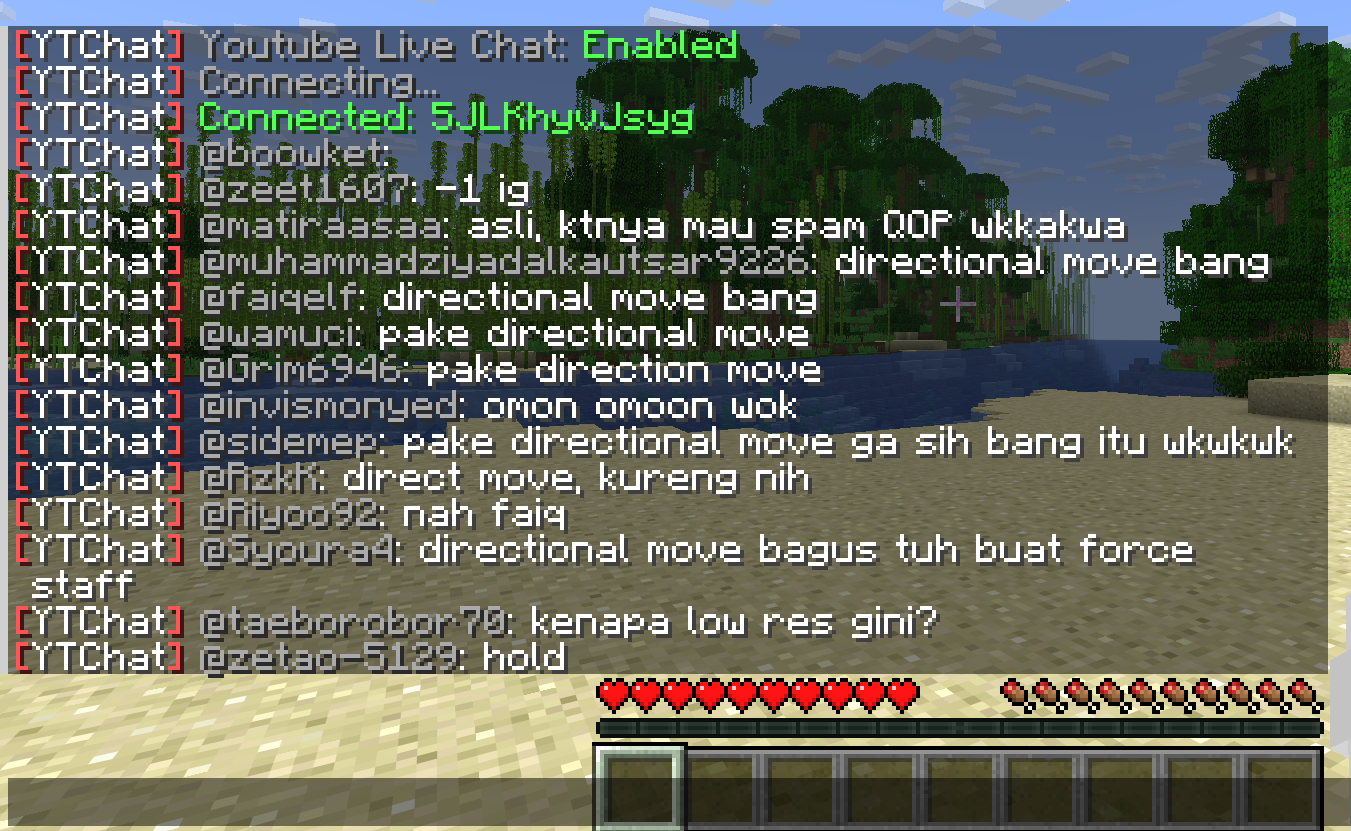
A Minecraft plugin for Spigot/Paper servers that seamlessly integrates YouTube Live Chat into your server. Messages sent during a live stream are displayed in real-time directly in the in-game chat, allowing players to interact with live audiences effortlessly.
### ✨ Features
– Real-time YouTube Live Chat integration
– Displays live stream messages in Minecraft chat
– Easy configuration and setup
### 🎮 Use Cases
Perfect for streamers who want to connect their in-game players with their YouTube audience, creating a more interactive and engaging experience.
### ⚙️ Compatibility
– Bukkit / Purpur / Paper / Spigot servers
– Modern Minecraft versions
You’re Dead
This mod is replacing original death screen with black screen for 5 seconds.
Your totem is your skin
# What the goal of this pack?
I think have your skin as a totem is pretty, then I created this pack.
You can found a tutorial in the pack (its name is tutoral.txt)
# How I can set the pack in my Resource packs?
Go in your .minecraft, resourcepacks, and drag and drop the pack.
# I can’t modify the pack
Just unzip the pack with right click, and select “Extract All…”
# How to setup the pack?
TUTORIAL
1. Grab your own skin
go on https://namemc.com
search your pseudo
click on your profile
under your skin preview, there is all your skins and click on your latest
click on the download button
2. Put the skin in the Resource Pack
Go in your downloads, click on your skin and press Ctrl + X
Go in the resource pack : assets, minecraft, textures, item and press Ctrl + V
Rename your skin “totem” (verify the extension : it’s normally png)
There it is!
If you have questions, ask me on my discord : https://dsc.gg/somroti (it’s a french server but you can use Google Translate)
Here’s my discord for suggest ideas or report an issue : https://discord.gg/7yXRx6yVVy
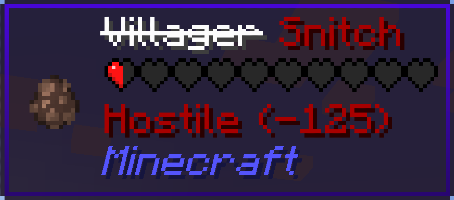
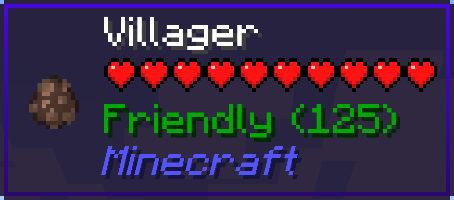
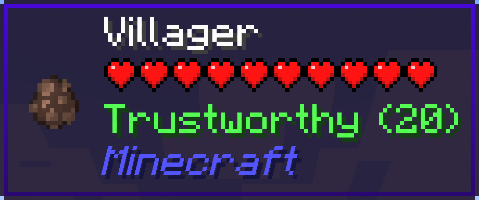
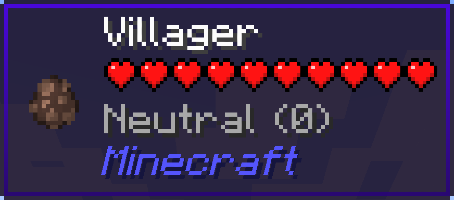
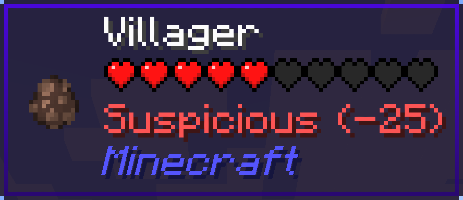
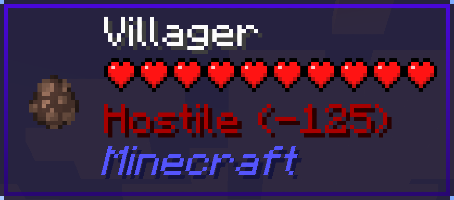
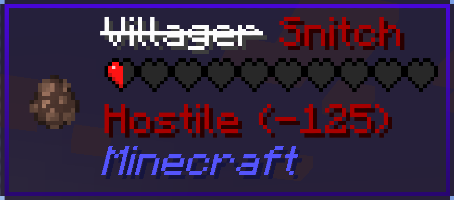
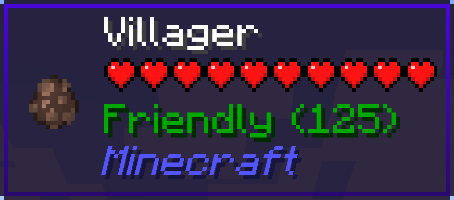
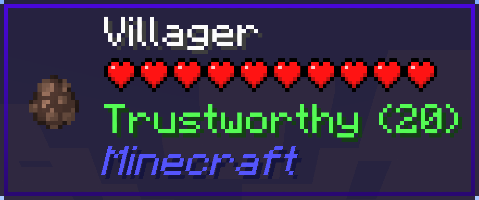
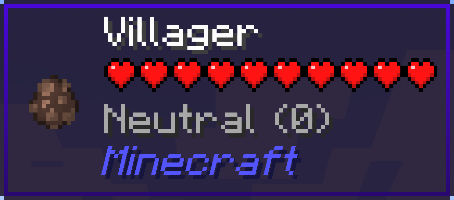
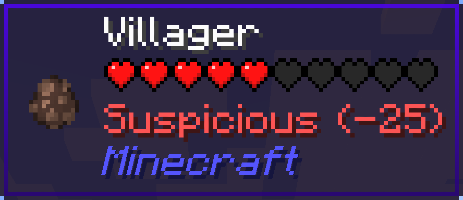
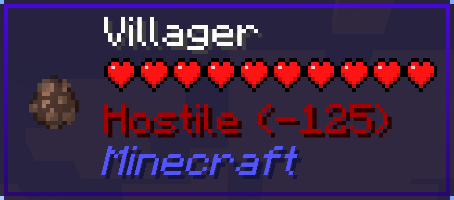
Your Reputation is a WTHIT plugin that displays your reputation on the villagers’ tooltips.
The project for Minecraft versions prior to 1.20: https://modrinth.com/mod/your-reputation
Requires WTHIT.
| Reputation | Value | Tooltip |
| ———– | —————————— | ———————————————————————————————————————————– |
| Friendly | 100 or more | |
| Trustworthy | more than 0 and less than 100 | |
| Neutral | equal to 0 | |
| Suspicious | more than -100 and less than 0 | |
| Hostile | -100 or less | |
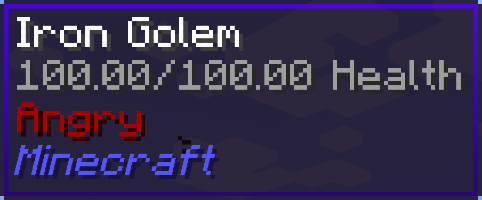
If your reputation is “Hostile”, villagers will become snitches.
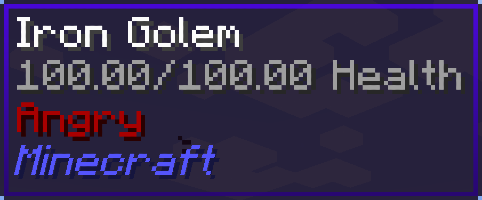
And then, iron golems will get angry and start attacking you…
Your Reputation is a Jade plugin that displays your reputation on the villagers’ tooltips.
The project for Minecraft versions prior to 1.20: https://modrinth.com/mod/your-reputation
Requires Jade.
| Reputation | Value | Tooltip |
| ———– | —————————— | ———————————————————————————————————————————– |
| Friendly | 100 or more | |
| Trustworthy | more than 0 and less than 100 | |
| Neutral | equal to 0 | |
| Suspicious | more than -100 and less than 0 | |
| Hostile | -100 or less | |
If your reputation is “Hostile”, villagers will become snitches.
And then, iron golems will get angry and start attacking you…
Your Items Are Safe
Requires the library mod Collective.
This mod is part of The Vanilla Experience modpack and Serilum’s Quality of Life Bundle mod. Your Items Are Safe is a mod which can function as an alternative to the existing gravestone mods, by using only vanilla blocks. When a player dies, it will keep their items from despawning. It does this by creating an armor stand with equiped gear and a chest with the items from the inventory. A sign will be placed on the chest with the player’s name. If the inventory does not fit into one chest, another one above it is generated. The armor stand stands above the chest. All features can be turned on/off via the config. If a player dies in the void, the chest will be placed above the death coordinates.
To keep it balanced the chests and armor stand can only be created if the player has enough wood in its inventory. A chest requires either 2 logs, 8 planks or an actual chest. The armor stand requires 1 log or 3 planks. The mod searches for logs first, then planks, then chests. If it can’t find the raw material needed, the chest and armor stand is not generated. If you’d like to always generate them, even without raw materials, this can be set in the config file as well.
The mod also contains the functionality to generate a player head and put it on the armor stand. This makes it easier to identify which player has died where. If the player had a helmet equiped, it is placed inside the chest. Enabled by default. But again, this can be disabled in the config.
Configurable:( how do I configure? ) mustHaveItemsInInventoryForCreation (default = true): When enabled and a player dies without any items in their inventory, no chest or armor stand is generated. addPlayerHeadToArmorStand (default = true): If a player head should be added to the armor stand. If a helmet is worn, this will be placed into the chest. createArmorStand (default = true): Whether an armor stand should be created on death. If disabled, the player’s gear will be placed inside the chest. createSignWithPlayerName (default = true): Whether a sign should be placed on the chest with the name of the player who died there.
needChestMaterials (default = true): Whether materials are needed for the chest which spawns on death. This can be the actual chest or the costs in raw materials. needArmorStandMaterials (default = true): Whether materials are needed for the armor stand to spawn on death. This can be the actual armor stand or the costs in raw materials. needSignMaterials (default = false): Whether materials are needed for the creation of the sign when ‘createSignWithPlayerName’ is enabled. ignoreStoneMaterialNeed (default = true): Only relevant if ‘needChestAndArmorStandMaterials’ is enabled. An armor stand needs 1 stone slab to be created, but I think it’s alright to ignore that requirement. If enabled, no stone is needed in the inventory on death.
createChestAboveVoid (default = true): If a chest should be placed right above the minimum build height when a player dies in the void. createVoidPlatform (default = true): If a 3×3 platform should be created below the chest above the void. ‘createChestAboveVoid’ must be enabled.
sendMessageOnCreationFailure (default = true): If a message should be sent if the chest or armor stand can’t be created due to missing materials. sendMessageOnCreationSuccess (default = true): If a message should be sent on successful creation of the chest(s) and armor stand. sendDeathCoordinatesInChat (default = true): If the player’s death coordinates should be sent in the chat below the ‘sendMessageOnCreationFailure’/’sendMessageOnCreationSuccess’ message.
creationFailureMessage (default = “Your items are not safe due to having insufficient materials. Missing: %plankamount% planks.”): The message sent on creation failure with ‘sendMessageOnCreationFailure’ enabled. Possible replacement values: %plankamount%, %stoneamount%. creationSuccessMessage (default = “Your items are safe at your death location.”): The message sent on creation success with ‘sendMessageOnCreationSuccess’ enabled.
Some examples: An armor stand and chest generated after death:
Two chests generated after death, because the inventory didn’t fit in a single one:
One chest and an armor stand created after death:
Show Spoiler
The previous death results in the following:
Show Spoiler
Here the player has no wood in its inventory. The chest/armor stand is not generated:
Show Spoiler
The player does have some planks in its inventory, but not enough. This is shown in the chat via a message:
Show Spoiler
The inventory is completely full, so 2 chests are needed to store everything. Luckily the player has more than 19 planks:
Show Spoiler
When a player dies in the void, the chest is placed on the initial position above it with a cobblestone platform.
Death coordinates are sent in the chat. Can be disabled in the config.
——————
You may freely use this mod in any modpack, as long as the download remains hosted within the Modrinth ecosystem.
Serilum.com contains an overview and more information on all mods available.
Comments are disabled as I’m unable to keep track of all the separate pages on each mod. For issues, ideas, suggestions or anything else there is the Github repo. Thanks!
YouCantHaveThat
Prevents obtaining/breaking any item of your choice.
Great for protecting your server or spicing up survival.
## Features
– Prevents obtaining / breaking / placing.
– Scans inventory/containers when opened.(Can be toggled off for survival fun now.)
– Detects offhand.
– Lightweight. Operates completely through player actions.
You Think I’m Bread?!?!
this mod makes the bread look like grian
Version 1.6.1-1.10.2:
tested on 1.6.1, 1.7.10, 1.8.9, 1.9, and 1.10.2
Version 1.11-1.12.2:
tested on 1.11 and 1.12.2
says it’s meant for a newer version but its not
Version 1.13-1.14.4:
tested on 1.13-1.14.4
Version 1.15-1.21.5:
tested on 1.15, 1.16.3, 1.18.2, 1.20.1, 1.21.1, and 1.21.5
this will likely work for future versions as well
update: tested on 1.21.11 as well
notes: older versions have the new-looking texture
oftentimes, it will say it is meant for an older or newer version of minecraft, but this can generally be ignored
You Take the Moon and You Take the Sun
I will maybe update this description someday, but honestly, it’s literally just a sun and moon retexture. 🙂

 |
| |
| |
| |
| |
|
 |
| |
| |
| |
| |
|