Rebalanced Bartering
# Rebalanced Bartering
Free and open-source datapack for Minecraft 1.21 and higher that adds new trades with piglins.
## Features
This reinstates the magma cream and glowstone dust trades that had been removed in the 1.16.2 snapshots, with the same drop rate as before.
– Magma Cream – Weight: 20 – Quantity: 2-6
– Glowstone Dust – Weight: 20 – Quantity: 5-12
Raw Blocks | Smeltery and Blasting
# Description
“Raw Blocks | Smeltery and Blasting” or for short “Smeltery” is a light weight datapack with a simple goal, to make smelting raw iron in to iron a whole lot faster, with the edition of Raw Blocks Smelting!
Rarity Tooltips
# Rarity Tooltips
This datapack customises item tooltips to reflect their rarity. Affected items
⚠️ **Will only work for 24w36a (1.21.2) and newer, resource pack is required.**
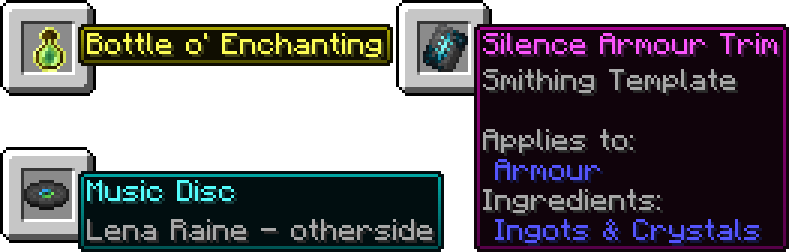
### Help
If you are using this on a server, paste the resource pack download link after “resource-pack=“ in the “server.properties“ file.
Most items will just work but for some you will need to drop them on the ground to change them, for example if you enchant/disenchant an item or items from before the pack was installed.
### Issues/Feature Requests
Please report issues and/or request features on the GitHub Issues Page, any help is greatly appreciated.
Raised
*Take control of the position of your GUI and fix the broken hotbar selection texture!*
### Move around the GUI!
Raised lets you move around both vanilla and modded GUI layers (that are supported)!
Want the hotbar closer to the middle of the screen? Raised has got your back! Take control of a layer and move it where you please! Control them individually or sync them to make the entire in-game GUI move together!
### Working with mods!
Raised allows mods to register layer entries for their own GUI overlays for you to configure their movement. However, Raised can also natively work with mods in several ways that do not require their support!
Any mod that registers their (Neo)Forge overlay via the respective registry is automatically captured and added to Raised’s layer registry. This allows you to individually control the layers of many mods without any special support!
Any mod that renders its overlay solely via a (Neo)Forge render event for one of the vanilla layers that Raised supports will be moved along with that vanilla layer. Much the same on Fabric, any mod that injects its overlay render within the scope of Raised’s targets in the code will also be moved!
### Set it up however you like!
You can edit the layer configurations directly from the config, from a suite of commands, or from the options screen (openable via `~` by default or from the (Neo)Forge mods screen). Please note that the options screen limits the amount that a layer may be displaced to accommodate the use of slider controls. For unlimited displacement, use commands or directly edit the config!
### Get the goods!
You can find releases of Raised on both *[Modrinth]* and *[CurseForge]* and also access development builds on *[GitHub]*!
Raised supports Fabric 1.16+, Forge 1.16+, and NeoForge 1.20.2+.
### Figure it all out!
You can delve into the *[wiki]* for details or submit a *[bug report]* if something isn’t quite right!
Still need something? Head on over to the *[discussions]* forum for support, to read announcements, or discuss anything about the mod!
[Modrinth]: https://modrinth.com/mod/raised
[CurseForge]: https://www.curseforge.com/minecraft/mc-mods/raised
[GitHub]: https://github.com/yurisuika/raised
[wiki]: https://github.com/yurisuika/raised/wiki
[bug report]: https://github.com/yurisuika/raised/issues
[discussions]: https://github.com/yurisuika/raised/discussions
[Discord]: https://discord.gg/0zdNEkQle7Qg9C1H
Cheetahs Rainbow Hearts
Cheetahs Rainbow Hearts!
—
Simply makes your health bar RAINBOW!!
—


Rail Recipe Rebalance

## Are you for re-ail?
You know what really steams my engine? **Rails**. Specifically, how _expensive_ they are.
Rails are not a bad method of transportation, especially early-game. They’re pretty fast, and can even be automated using redstone, making them an immersive choice!
There’s just one problem: accessibility. During the period of a world that they would be useful (pre-elytra), most people don’t have a surplus of ingots to spend on tracks. I mean, just for regular, unpowered rails, it costs roughly 1 ingot for 3 blocks of track.

That’s what this recipe change aims to fix. By making rails more affordable, it’s now a more realistic goal to make a train between your friend’s base!
## Available wherever the tracks take you!
**Rail Recipe Rebalance** is available all the way from version **1.15** to **26.1**, and will continue to be updated for newer versions! You can install it as a datapack, or as a mod for your favorite modloader!
Additionally, RRR aims to add compatibility with mods, and currently adds new recipes for the following mods:
> – **Copper Rails**
> – **Create**
*If you would like to request a mod to be supported, DM me at* **palm1**!
## Try these couplings!
Rails get even better with these amazing projects, and they are highly recommended for use with this pack!
### Server
> – **Linkart** – Link your minecarts together!
> – **Fast Minecart** – Double the speed of minecarts!
### Client and Server
> – **Copper Rails** – Adds two new rail types in the vanilla style!
> – **Create** – Allows you to couple minecarts, control rail speed, and create custom multi-block trains!
## You May Also Like
Raid Restorer
Restores the raid mechanic like it was in 1.20 – makes (stacked) raid farms work again
Showcase
Showcase
## Configuration
### Gamerule “raider_bad_omen_effect_sec“
Controls the duration of the Bad Omen effect that is applied when killing a raid/patrol captain.
The default is “6000“ (100 minutes) as it was in 1.20.
## Motivation/Why does this mod exist?
Raids in 1.21 got significantly changed and it’s no longer possible to create a stacking raid farm.
See also: More details, comparisons and arguments
Rabbit Shield
# Rabbit Shield
This resource pack replaces the default shield with a custom 3D model.
The design uses a rabbit theme.
No OptiFine required. Vanilla compatible.
## More Shield Themes
– Black
– Blue
– Creeper
– Dark Red
– Mirror
– Navy Blue
– Red
Rabbit Pathfinding Fixed
Fixes rabbit pathfinding efficiently.
As of 1.21.1 there are multiple problems with rabbit pathfinding:
### Basic pathfinding
1. The calculation of the jump height/velocity is incorrect and poorly implemented.
This results in too small jumps for climbing over a block.
2. Rabbits “stall” (no horizontal movement) during jumps – due to this they just jump upwards in the same place when trying to climb a block.
This behavior is caused by “RabbitMoveControl“ which only sets the (horizontal) speed correctly during movement but not while jumping.
3. Rabbits are stuck / try to wander around forever.
* The root cause is that “EntityNavigation“ sets its timeouts based on movement speed.
If the movement speed is 0 (this is the case when a rabbit/mob is “stuck”), the timeout is also 0… and if the timeout is 0 it’s ignored and therefore it’s executed forever (or until interrupted by something external like another goal).
* Rabbits only have a single goal when idle: “WanderAround(Far)“. Most other entities also use “LookAroundGoal“.
Thus the above mentioned infinite navigation is never stopped in favor of executing another goal like in most other mobs.
* “RabbitMoveControl#tick“ constantly updates the rabbits speed (“RabbitEntity#setSpeed“).
While doing this it also indirectly executes “moveControl#moveTo“ thus the rabbit always tries to reach it’s last target even when it shouldn’t do that.
> As of “1.21.4/24w46a“ MC-150224 was fixed, correcting the jump height (1) and fixing the stall (2).
> However all other parts – including optimizations and sanity checks in above mentioned fixes – are still missing.
### Eating carrot crops
1. Rabbits can’t reach the crops and always stop one block short of them.
This is due to selecting the incorrect distance from the crop block (it’s “1“ but should be “0“).
2. Rabbits eat the crop instantly even while still jumping and being in the air.
3. The goal/behavior is immediately aborted (after a few ticks – when a target crop block was selected) due to incorrect implementation of “shouldContinue“ and “isTargetPos“ methods.
### Other fixes
* The client-side rotation of Adults rabbit’s head is most of the time slightly upwards – MC-306682 affects 26.1 or later
Detailed video comparisons are also available.
QuickBackupMulti
—
### 警告 / Warning
> 严禁自行删除备份文件夹内的所有备份文件, 如需删除请进入游戏内进行手动删除!
> It is strictly prohibited to delete all backup files in the backup folder by oneself.
> If you need to delete them, please enter the game and use the command to delete them!
—
A mod for backup / restore save, with multiple backup slots.
This mod will not have any impact on world generation.
For more details of the mod and builds for snapshots, check the github page
