VR Craft
# 🕶️ VR Craft
> Playing with an Adventure on VR? Then that pack is for you! Whatever you imagine on VR, there. Say goodbye to the Ugly Minecraft!
[](https://modrinth.com/resourcepack/vrc)
[](https://www.curseforge.com/minecraft/mc-resourcepacks/vrc)
[](https://github.com/AhmedACOnline-0/VR-Craft/tree/main)
[](https://sites.google.com/view/aclibraryx/notebooks/vr-craft)
—
## 🚀 About the Pack
**VR Craft** is a highly optimized, immersive visual pack designed specifically for players using VR headsets (like Vivecraft). This pack removes annoying screen clutter and focuses on pure, real-life immersion while standing inside the blocky world!
—
## 🎬 YouTube Video (pack review)
uhhh… it doesn’t exist! 🙁
—
## ✨ Features
### 🎯 Ultimate Immersion
### 🛠️ Future-Proof Design
– Built with a highly advanced, clean folder structure to prevent visual glitches and ensure smooth frame rates while rendering in a heavy virtual reality environment.
—
## 📦 How to Install
1. Download the `.zip` file from this page.
2. Open your Minecraft game directory and drop the zip into the `resourcepacks` folder.
3. Boot up your game (Works brilliantly with VR mods like Vivecraft), go to **Options** -> **Resource Packs**, and move **VR Craft** to the top of the active list!
Don’t forget to install Vivecraft too!
[](https://vivecraft.org)
And Fabric API!
—
## 🔨 How the resource pack was made
1. Invisible Crosshair
– By making the Crosshair invisible in the files (erasing the data inside).
2. Custom Splashes
– By changing the splashes.txt file to add new splashes.
3. Menu New Text
– By changing the lang folder to support almost every language to change the Menu’s Text.
4. Beautiful New Minecraft Title (VR Craft)
– By making the Title in Blockbench and then saving it as an image then putting it into `textures/gui/title`.
5. Different Enchantment Glint Color
– By downloading the pack from John Paul Inso for changing Enchantment Glint Colors and then choosing the pink (instead of purple).
– Credits to creator also!
Also, watch out for the Changelog since that’s where new features will come!
—
## 😡 BRUH ERRORS WHILE CONNECTING TO VR HEADSET
If you **installed Vivecraft** already and clicked the **VR: Off** button to turn it **on**, it may commonly give an error, why?
– Vivecraft requires you to have SteamVR so it can translate your real-life moves into the game.
### So how to fix this?
Simple!
1. Go to **Steam**
– **Tip:** If it requires you to sign in, just sign in!
2. Install **SteamVR**
3. Once it’s installed, **click the little VR icon** on whatever position on the Steam app
### Still?
If it still gives you errors, it may be maybe this reason:
**YOU DIDN’T CONNECT TO THE WIFI**.
1. Connect to the WiFi on both the **VR** (Headset) and your **Computer**
2. Once you’re done, if needed, do the settings the VR asks you (though optional maybe)
### I did all steps and still
It sounds like you may gave a Quest 3 VR. Try **connecting the port to the computer** (nothing required for this)
—
## 😵💫 But I’m spinning
If that happens, CHANGE YOUR SETTINGS IMMEDIATELY!!! There’s an option on some VRs which are an **IPD** (Interpupillary Distance) thing. Change it to something like **1** or **2**.
**HOWEVER**. If it’s a value that makes it very blurry, you will get Motion Sickness (feel dizzy)
—
## But isn’t playing VR easy?
It’s actually a bit hard if you’re trying to open GUIs or interact. So to help you out, check this official YouTube video:
> BEFORE YOU INSTALL THE VIVECRAFT MOD, INSTALL **FABRIC API** OR NOTHING WILL WORK ON THIS VIDEO!!! THE VR MOD NEEDS THE API TO WORK. AND INSTALL **STEAMVR** TOO AS INCLUDED IN THE VIDEO.
> And not our channel.
—
## Your tabs
FAQs
Your Frequently Asked Questions:
Q1. Does it work with Vivecraft?
A1. Yes. Also, you are required to install that mod while installing the resource pack.
Q2. Why does it have an invisble crosshair?
A2. Because we want to make VR look like reality.
Q3. Where can I manage the settings of the VR?
A3. You need to install Vivecraft.
Q4. What are Gogglers?
A4. Gogglers are little swimming glasses that makes you survive underwater. This is actually common for VR because it blocks the rest of the world. Emoji: 🥽.
Q5. Why is this resource pack made?
A5. Because we wanted to make VR look like reality in the past. (because VR stands for Virtual Reality lol)
**Submit/Open a new FAQ [here](https://github.com/AhmedACOnline-0/VR-Craft/issues/new?q=state%3Aopen+label%3A%22help+wanted%22)**
Rare bugs
1. Failing to render the 3D gogglers for the skin (Steve/Alex) in the game.
2. SteamVR crashing in a random time.
2.1. Computers can also have this random crash.
3. Mods making a BSOD (Blue Screen of Death) in the computer.
3.1. Another rare bug for this: an OoM (Out of Memory) error.
etc.
Credits & tools
**1. John Paul Inso:** creator of the resource pack that changes enchantment colors.
**2. Blockbench:** the tool used for the 3D Gogglers in-game.
—
## Recommended font (gonna be replaced later)
[Go here](https://github.com/AhmedACOnline-0/VR-Craft/blob/786c42e617168e1b938e63ff0c34dfe51c55f56f/AhmedHandmade.ttf)
If you can’t go to the link… wait for the later pack to change the font lol
—
VR Cratf lol
unofficial translation of voxy
unofficial translation of voxy .You can share and save it to other websites.更多语言[准确性不知道]More languages [Accuracy unknown]_(:з)∠)_
译者:F光荣进退有度![More languages [Accuracy unknown]](https://cdn.modrinth.com/data/cached_images/b0b09b24ca82a7d3b6f7519328dec90b3ede2426.png)
– af_za.json-Afrikaans
– ar_sa.json-اللغة العربية
– ast_es.json-Asturianu
– az_az.json-Azərbaycanca
– ba_ru.json-Башҡортса
– bar.json-Boarisch
– be_by.json-Беларуская
– bg_bg.json-Български
– br_fr.json-Brezhoneg
– brb.json-Braobans
– bs_ba.json-Bosanski
– ca_es.json-Català
– cs_cz.json-Čeština
– cy_gb.json-Cymraeg
– da_dk.json-Dansk
– de_at.json-Österreichisches Deitsch
– de_ch.json-Schwiizerdutsch
– de_de.json-Deutsch
– el_gr.json-Ελληνικά
– en_au.json-English (Australia)
– en_ca.json-English (Canada)
– en_gb.json-English (United Kingdom)
– en_nz.json-English (New Zealand)
– en_pt.json-Pirate Speak
– en_ud.json-ɥsᴉꞁᵷuƎ (uʍoᗡ ǝpᴉsd∩)
– en_us.json-English (US)
– enp.json-Anglish
– enws.json-Shakespearean English
– eo_uy.json-Esperanto
– es_ar.json-Español (Argentina)
– es_cl.json-Español (Chile)
– es_ec.json-Español (Ecuador)
– es_es.json-Español (España)
– es_mx.json-Español (México)
– es_uy.json-Español (Uruguay)
– es_ve.json-Español (Venezuela)
– esan.json-Andalûh
– et_ee.json-Eesti
– eu_es.json-Euskara
– fa_ir.json-فارسی
– fi_fi.json-Suomi
– fil_ph.json-Filipino
– fo_fo.json-Føroyskt
– fr_ca.json-Français québécois
– fr_fr.json-Français
– fra_de.json-Frängisch
– fur_it.json-Furlan
– fy_nl.json-Frysk
– ga_ie.json-Gaeilge
– gd_gb.json-Gàidhlig
– gl_es.json-Galego
– haw_us.json-ʻŌlelo Hawaiʻi
– he_il.json-עברית
– hi_in.json-हिन्दी
– hr_hr.json-Hrvatski
– hu_hu.json-Magyar
– hy_am.json-Հայերեն
– id_id.json-Bahasa Indonesia
– ig_ng.json-Igbo
– io_en.json-Ido
– is_is.json-Íslenska
– isv.json-Medžuslovjansky
– it_it.json-Italiano
– ja_jp.json-日本語
– jbo_en.json-la .lojban.
– ka_ge.json-ქართული
– kk_kz.json-Қазақша
– kn_in.json-ಕನ್ನಡ
– ko_kr.json-한국어
– ksh.json-Kölsch/Ripoarisch
– kw_gb.json-Kernewek
– la_la.json-Latina
– lb_lu.json-Lëtzebuergesch
– li_li.json-Limburgs
– lmo.json-Lombard
– lo_la.json-ລາວ(ປະເທດລາວ)
– lol_us.json-LOLCAT
– lt_lt.json-Lietuvių
– lv_lv.json-Latviešu
– lzh.json-文言(華夏)
– mk_mk.json-Македонски
– mn_mn.json-Монгол
– ms_my.json-Bahasa Melayu
– mt_mt.json-Malti
– nah.json-Mēxikatlahtōlli
– nds_de.json-Platdüütsk
– nl_be.json-Vlaams
– nl_nl.json-Nederlands
– nn_no.json-Norsk nynorsk
– no_no.json-Norsk Bokmål
– oc_fr.json-Occitan
– ovd.json-Övdalsk
– pl_pl.json-Polski
– pt_br.json-Português (Brasil)
– pt_pt.json-Português (Portugal)
– qya_aa.json-Quenya
– ro_ro.json-Română
– rpr.json-Дореформенный русскій
– ru_ru.json-Русский
– ry_ua.json-руснацькый
– sah_sah.json-Сахалыы(Cаха Сирэ)
– se_no.json-Davvisámegiella
– sk_sk.json-Slovenčina
– sl_si.json-Slovenščina
– so_so.json-Af-Soomaali
– sq_al.json-Shqip
– sr_cs.json-Srpski
– sr_sp.json-Српски
– sv_se.json-Svenska
– sxu.json-Säggs’sch
– szl.json-Ślōnskŏ
– ta_in.json-தமிழ்
– th_th.json-ภาษาไทย
– tl_ph.json-Tagalog
– tlh_aa.json-tlhIngan Hol
– tok.json-toki pona
– tr_tr.json-Türkçe
– tt_ru.json-Татарча
– uk_ua.json-Українська
– val_es.json-Català (Valencià)
– vec_it.json-Vèneto
– vi_vn.json-Tiếng Việt
– yi_de.json-ייִדיש
– yo_ng.json-Yorùbá
– zh_cn.json-简体中文(中国大陆)
– zh_hk.json-繁體中文(香港特別行政區)
– zh_tw.json-繁體中文(台灣)
– zlm_arab.json-بهاس ملايو
–
Voluminous Grass
### Before

### After <3

# Desc
### Questions
- **What does the RP change?**
- The resourcepack changes the Tall grass, Short grass and grass block models making them more bushy and green:)
- **What about FPS?**
- The resourcepack uses a minimum PC resources, but in a location with a lot of grass, performance can significantly decrease
### Recommendations
Only the cool shaders ;)
### support (any amount :D if you want):
- USDC SOL: **3WqgzkcMShFuB4yDRs3vbsFTqgSecNdu32phNaMjtnPJ**
- USDT TRC20: **TCNVcyQDeGA4C71wfWj5fJsWvVHppFKwPg**
VCT – Voiid Countdown Timer

# Voiid Countdown Timer
As simple as the name implies. A customizable timer datapack & plugin.
[](https://ko-fi.com/maxxvoiid/donate)
[](https://modrinth.com/datapack/voiid-countdown-timer)
[](https://curseforge.com/minecraft/bukkit-plugins/voiid-countdown-timer-for-bukkit)
[](https://vctdocs.mintlify.app/)
[](https://github.com/Voiid-Studios/voiidstudios/blob/main/LICENSE.md)
[](https://github.com/Voiid-Studios/voiidcountdown)
[](https://crowdin.com/project/voiidcountdowntimer)


## ❓ What is VCT?
Voiid Countdown Timer (VCT) is a fully customizable timer for Minecraft.
It works in two different versions:
– 📦 **Datapack** → The Lite version of VCT, ideal for single-player worlds or realms.
– 🔌 **Plugin** → The full version of VCT, perfect for multiplayer servers with Spigot/Paper.
With both versions, you can:
– 🎨 Create visual timers with a progress bar.
– 🖌️ Customize color styles.
– 🛠️ Run custom events when the timer starts or ends.
## ✨ Features
Voiid Countdown Timer includes:
– 🎨 Custom Colors Styles
– ⚙️ Quick and easy setup
– ⏳ Progressive Time Bar
– 🎈 Custom Events
– 👥 SinglePlayer and Multiplayer Compatible
– 💻 Open Source and constantly updated
## 📋 Requirements
### 📦 Datapack
– Version: `1.15+`
### 🔌 Plugin
– Version: `1.13+`
– Server: Spigot, Paper, or Purpur (not CraftBukkit)
## 🚀 Installation
### 📦 Datapack
1. Download the [latest version here](https://modrinth.com/datapack/voiid-countdown-timer/versions?c=release&l=datapack)
2. Place the downloaded `.zip` file in the `datapacks` folder of your world.
3. Enter the world and you will receive a message confirming the installation! 🎉
### 🔌 Plugin
1. Download the [latest version here](https://modrinth.com/datapack/voiid-countdown-timer/versions?c=release&l=spigot)
2. Place the downloaded `.jar` file in the `plugins` folder of your server.
3. Restart the server and the plugin will be ready. ⚡
## 📖 How to use it
### 📦 Datapack
– Execute the command `/function vct:book` to receive the configuration book.
– From the book you will be able to:
– ⏰ Set time
– 🎛️ Timer controls
– 🌈 Customize style of colors
– 🗣️ Change language
– ❌ Uninstall
### 🔌 Plugin
– Configuration using commands and configuration files (`config.yml`)
– To see all available commands, use `/vct help`.
– In `config.yml`, you can customize various timer options; all of them are detailed in the [official documentation.](https://vctdocs.mintlify.app/)
## [📚 Plugin Documentation](https://vctdocs.mintlify.app/)
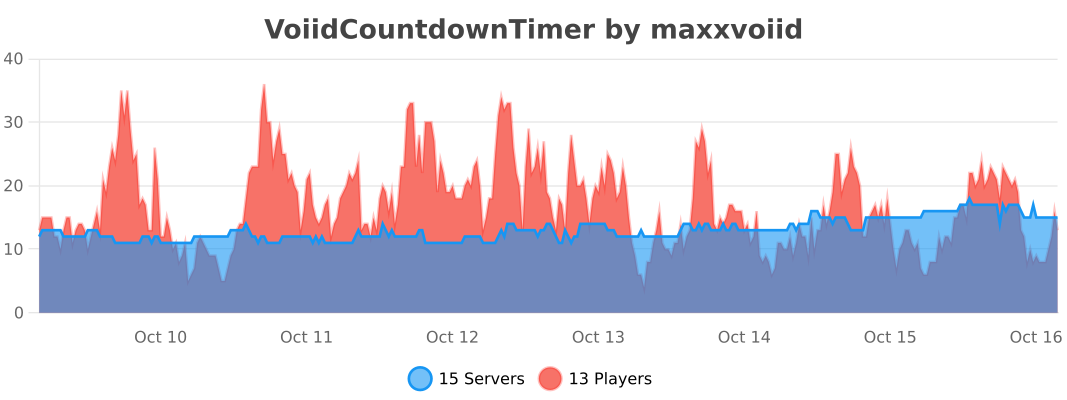
## 🔥 bStats


Void TP
# | DESCRIPTION |
Protects you from the void by TPing you to 0, 0 in the Overworld. Also TPs any items or mobs that fall in the void. Can be used to escape a trap or mistake involving being stuck with a spawnpoint in the End (for example, a bed below the End portal, which makes it impossible to escape the End through the exit portal or death)
# | VERSIONS |
Currently supports Minecraft Java “`1.21-1.21.11“`.
# | COMPATIBILITY |
Incompatible with packs using the same filenames, incompatible with dimensions going below y-64 (will tp you at y-64), incompatible with going below bedrock in Creative or Spectator modes.
## | Patreon |
Join my new Patreon to support my projects!
Void Particles
# Minecraft’s unOfficial Void Particles
This datapack brings back the void fog from Minecraft 1.8
When a player crosses Y=-47, the fog of the void will begin to cover their vision; and when crossing Y=-59, the player will suffer Blindness, as they get very close to the edge of the world.
This datapack executes the commands (particles & blindness) for each player within the area of effect (Y=-47 downwards). This could cause performance issues when multiple players are in the area of effect.
To learn the basic commands of this datapack, the operator should use the following command:
`/function void_fog:help`
This data pack belongs to the [Minecraft unOfficial Project](https://modrinth.com/collection/hB55ZXtF).
—
### License
This project is licensed under the GNU General Public License (GPL).
You are free to use, copy, modify, and distribute this project.
However, if you distribute modified versions, you must also release
the source code and keep the same GPL license.
This ensures that the project and all its derivatives remain free
and open for everyone.
VoiceChatX-Red
# VoiceChatX-Red
### 📖 About
– VoiceChatX-Red brings life to your Simple Voice Chat icons by adding smooth colors.
– It enhances visuals without changing the core look, making the icons feel more alife and engaging.
### ✨ Features
– Adds smooth color to the Simple Voice Chat mod
– Fully matches the theme aesthetic
– Keeps original item designs clean and simple
– Enhances visual feedback and immersion
– Lightweight and performance-friendly
### 🎯 Why Use This?
– Makes the icons have more color
– Improves overall visual experience
– Keeps a clean and consistent style
– Great for both survival and showcase worlds
– Adds detail without adding clutter
### ⚙️ Compatibility
– Designed for the Simple Voice Chat mod
– Works well alongside most other packs
– May conflict with packs that modify the same icons
– Safe to add or remove anytime
### 🤖 Info
🔗 Check out [All my resourcepacks](https://modrinth.com/user/Apenkont3000)
🐞 Report bugs in my [discord server](https://discord.gg/nf29GuwzRd)
VoiceChatX-Green
# VoiceChatX-Green
### 📖 About
– VoiceChatX-Green brings life to your Simple Voice Chat icons by adding smooth colors.
– It enhances visuals without changing the core look, making the icons feel more alife and engaging.
### ✨ Features
– Adds smooth color to the Simple Voice Chat mod
– Fully matches the theme aesthetic
– Keeps original item designs clean and simple
– Enhances visual feedback and immersion
– Lightweight and performance-friendly
### 🎯 Why Use This?
– Makes the icons have more color
– Improves overall visual experience
– Keeps a clean and consistent style
– Great for both survival and showcase worlds
– Adds detail without adding clutter
### ⚙️ Compatibility
– Designed for the Simple Voice Chat mod
– Works well alongside most other packs
– May conflict with packs that modify the same icons
– Safe to add or remove anytime
### 🤖 Info
🔗 Check out [All my resourcepacks](https://modrinth.com/user/Apenkont3000)
🐞 Report bugs in my [discord server](https://discord.gg/nf29GuwzRd)
VoiceChatX-Blue
# VoiceChatX-Blue
### 📖 About
– VoiceChatX-Blue brings life to your Simple Voice Chat icons by adding smooth colors.
– It enhances visuals without changing the core look, making the icons feel more alife and engaging.
### ✨ Features
– Adds smooth color to the Simple Voice Chat mod
– Fully matches the theme aesthetic
– Keeps original item designs clean and simple
– Enhances visual feedback and immersion
– Lightweight and performance-friendly
### 🎯 Why Use This?
– Makes the icons have more color
– Improves overall visual experience
– Keeps a clean and consistent style
– Great for both survival and showcase worlds
– Adds detail without adding clutter
### ⚙️ Compatibility
– Designed for the Simple Voice Chat mod
– Works well alongside most other packs
– May conflict with packs that modify the same icons
– Safe to add or remove anytime
### 🤖 Info
🔗 Check out [All my resourcepacks](https://modrinth.com/user/Apenkont3000)
🐞 Report bugs in my [discord server](https://discord.gg/nf29GuwzRd)
Vixmoyy’s No Particles
A simple resource pack that removes all particles from the game using core shaders, _even modded ones!_
—
### • How?
> Instead of overwriting particle textures, this pack simply tells the game not to render them at all. This results in better performance and a true no particle experience.
### • Sodium?
> You can use this resource pack with Sodium if you have the [Sodium Core Shader Support](https://modrinth.com/project/G8yJPRdl) mod installed; it may display a warning stating that it may be incompatible, although it should work just fine.
### • >1.17?
> No, it is not possible to port this to pre 1.17 versions because core shaders could not be modified through resource packs before that.
—
particle.fsh & particle.vsh
### particle.fsh
“`
#version 330
void main()
{
discard;
}
“`
### particle.vsh
“`
#version 330
void main()
{
gl_Position = vec4(0.0, 0.0, 0.0, 0.0);
}
“`
##### You may not redistribute this resource pack anywhere without proper permission, the only official download page for this resource pack is on modrinth.